---
title: "The 2026 Buyer’s Guide to Google Shopping Campaign Segmentation Platforms (US)"
description: "The 2026 Buyer’s Guide to Google Shopping Campaign Segmentation Platforms: segmentation and SKU-level tracking for US Shopping teams."
canonical: "https://www.productmetrics.io/blog/google-shopping-segmentation-platforms-us"
pageType: article
language: en
publisher: "Product Metrics"
author: "Berend Vrakking"
datePublished: 2026-11-09
dateModified: 2026-11-09
image: "https://www.productmetrics.io/og/blog/google-shopping-segmentation-platforms-us.png"
---
> Content index: https://www.productmetrics.io/llms.txt
# The 2026 Buyer’s Guide to Google Shopping Campaign Segmentation Platforms (US)
## Key takeaways
- The shift to Performance Max and richer product reporting means segmentation and measurement now have to be designed together, not separately.
- “Advanced” platforms earn that label only if they provide actionable segmentation plus granular, trustworthy tracking—down to the SKU and segment level.
- Run test-forward pilots with clear hypotheses and segment-level success metrics so procurement decisions are backed by data, not demo theatrics.
If you manage serious Google Shopping or [Performance Max](https://www.productmetrics.io/glossary/performance-max "Performance Max is a goal-based Google Ads campaign type that uses automation to reach customers across Google advertising channels.") spend in 2026, you no longer have a “campaign structure” problem.
You have a **segmentation plus measurement** problem:
- How do you group products so budgets and bids follow real business value?
- How do you **[track performance granularly enough](https://www.productmetrics.io/blog/sku-level-tracking-google-ads)** to know that segmentation is actually working?
Google has raised the floor on product reporting: the Products tab in Google Ads now gives retailers a centralized view of performance across all campaign types that use Google Merchant Center, including Performance Max, Standard Shopping, Video, App, and Demand Gen. (Source: [Google Ads Help](https://support.google.com/google-ads/answer/17035334)) Recent 2026 updates to the Google Ads API extend product-level cost and conversion metrics across more campaign types via resources like `shopping_product` and `shopping_performance_view`. (Source: [Google Ads Developer Blog](https://ads-developers.googleblog.com/2026/04/product-reporting-changes-for-google.html))
That’s a big step forward—but it’s not enough if you’re:
- Optimizing to [profit or POAS rather than pure ROAS](https://www.productmetrics.io/blog/poas-vs-roas)
- Running complex US catalogs with thousands of SKUs
- Reporting to stakeholders who expect clear, granular attribution of performance
This guide is written to help US ecommerce and performance teams evaluate **[Google Shopping optimization platforms with advanced segmentation and granular tracking](https://www.productmetrics.io/blog/google-shopping-segmentation-tracking-software)**—and to do it in a way that leads to better outcomes, not just prettier dashboards.
We’ll focus on:
- The 2026 **market map** for [Google Shopping campaign segmentation platforms](https://www.productmetrics.io/blog/google-shopping-segmentation-platforms)
- How to think about **performance tracking granularity** (what “granular enough” actually means)
- A practical **evaluation and procurement framework** you can use in [RFPs and vendor demos](https://www.productmetrics.io/blog/google-shopping-segmentation-software-rfp)
- Where a product-level platform like **Product Metrics** fits in that landscape
If your recent searches look anything like “**top-rated Google Shopping optimization tools for granular campaign segmentation and tracking**” or “**solutions for advanced segmentation and performance tracking in Google Shopping**,” this guide is for you.
## 1. Why Segmentation Now Lives or Dies on Performance Tracking Granularity
Google Shopping and Performance Max are feed-driven. Your product data flows from **Google Merchant Center**, which is the system that makes your shop and product data available to Google Shopping and other Google services. (Source: [Google Merchant Center Help](https://support.google.com/merchants/answer/7052112))
Campaign segmentation platforms help you answer two connected questions:
1. **Where should I send more or less traffic?** (segmentation, structure, and labels)
2. **What happened by segment, label, and product after I changed something?** (granular tracking and diagnostics)
You can only improve the first if the second is trustworthy and detailed enough.
In 2026, three forces make **performance tracking granularity** non‑negotiable:
1. **Blended campaign types.** Performance Max, Video, Demand Gen, and App campaigns now all contribute to the same products, and Google’s product reporting increasingly aggregates across them. (Source: [Google Ads Help – About product reporting](https://support.google.com/google-ads/answer/17035334)) Without a layer that re-attributes results back to the product and segment level, it’s hard to know which structures are actually working.
2. **Profit pressure.** US retailers care less about “more revenue” and more about **profitable** revenue: [contribution margin after ad spend](https://www.productmetrics.io/contribution-margin-calculator), returns, shipping, and discounts. That requires joining Google Ads data with margins, refunds and inventory status.
3. **Data loss and tracking complexity.** Browser changes and [adblockers mean default tags can undercount conversions](https://www.productmetrics.io/ad-blocker-conversion-tracking); many teams add server-side or enhanced tracking just to get back to a consistent baseline. (Source: [Product Metrics – Product-Level Google Shopping Optimisation](https://www.productmetrics.io/))
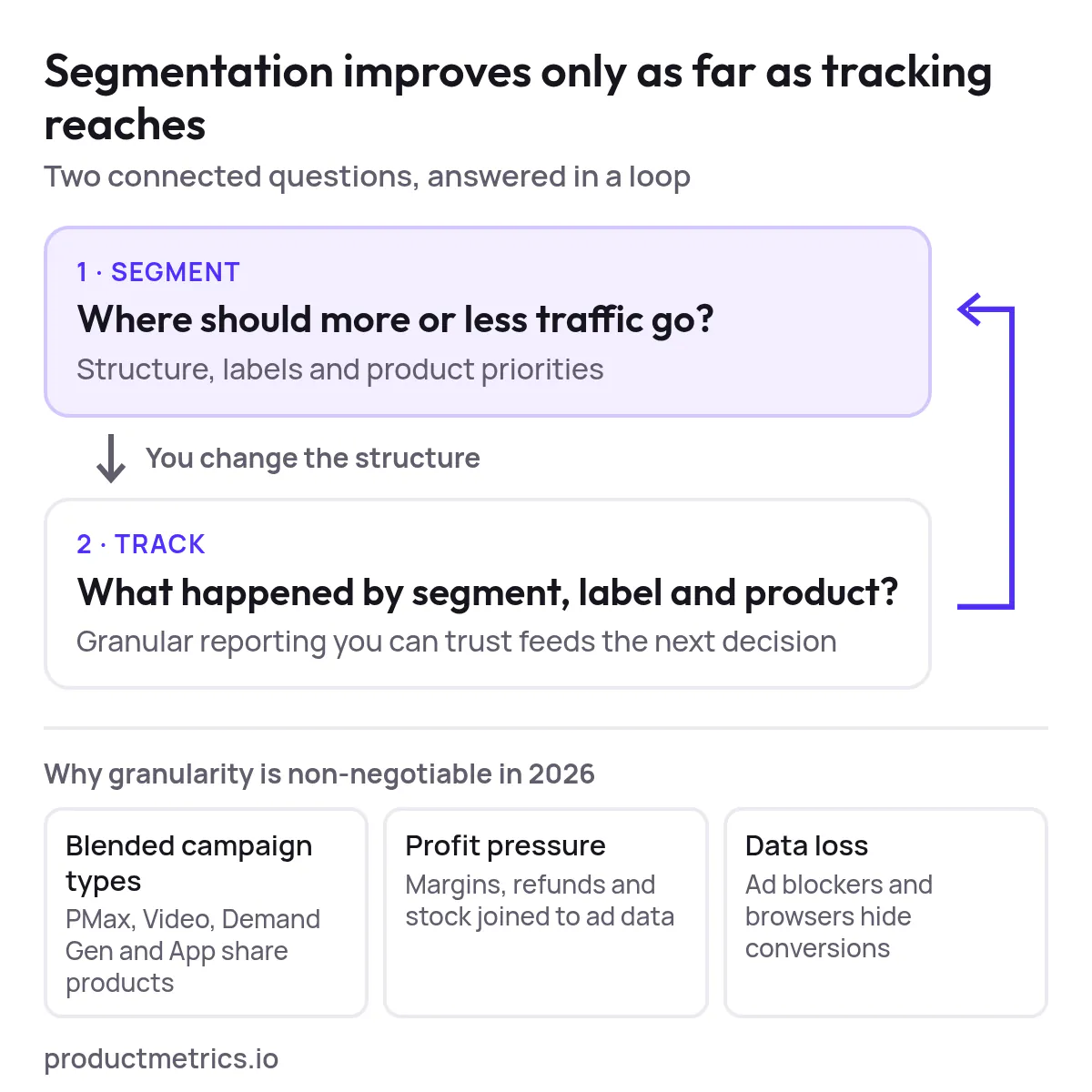
_Segmentation decides where traffic goes; granular tracking shows whether it worked and feeds the next decision._
If your platform cannot show performance at the same level you make decisions—SKU, custom label, or performance bucket—you are effectively flying blind.
## 2. What Counts as an Advanced Platform for Granular Segmentation and Tracking?
Before you pick tools, it helps to define the category.
An **advanced Google Shopping optimization platform for granular segmentation and tracking** typically does five things:
1. **Ingests rich product and performance data**
- [Product feed](https://www.productmetrics.io/glossary/product-feed "A product feed is a file or data source that lists your products, one per row, with attributes such as ID, title, price and availability.") from Merchant Center (title, price, brand, category, availability, [custom labels](https://www.productmetrics.io/glossary/custom-labels "Custom labels are five attributes in a product feed, custom_label_0 to custom_label_4, that you fill with your own text to group products in campaigns."))
- Campaign and product-level metrics from Google Ads (impressions, clicks, cost, conversions, revenue)
- Optional business data: margins, stock, customer type, returns, competitor prices
- Sometimes other channels (e.g., Meta) so you can compare contribution by product across platforms (Source: [Product Metrics – Product-Level Google Shopping Optimisation](https://www.productmetrics.io/))
2. **Builds or applies campaign segmentation logic**
- Creates or maintains Shopping and Performance Max structures based on rules you define
- Writes segments and rules back as [custom labels to Merchant Center](https://www.productmetrics.io/blog/custom-labels-google-shopping), so Google Ads campaigns can act on them (Source: [Product Metrics – Product-Level Google Shopping Optimisation](https://www.productmetrics.io/))
3. **Tracks performance at the right grain**
- Aggregates by product, label, segment, brand, category, or other dimensions
- Supports [ROAS](https://www.productmetrics.io/glossary/roas "Return on ad spend (ROAS) is the revenue your ads generate for every euro you spend on them.") and, ideally, [POAS/profit-based metrics](https://www.productmetrics.io/poas-calculator)
- Lets you pivot and filter by the same entities your budget and bid decisions act on
4. **Surfaces clear diagnostics and actions**
- Identifies products or segments to push, fix, or pause based on volume and return
- Explains *why* (for example, low volume but high margin vs. high spend with poor return)
5. **Helps you test and iterate safely**
- Supports side-by-side structures (legacy vs. new) with comparable reporting windows
- Provides change logs so you can connect structural changes to performance changes over time
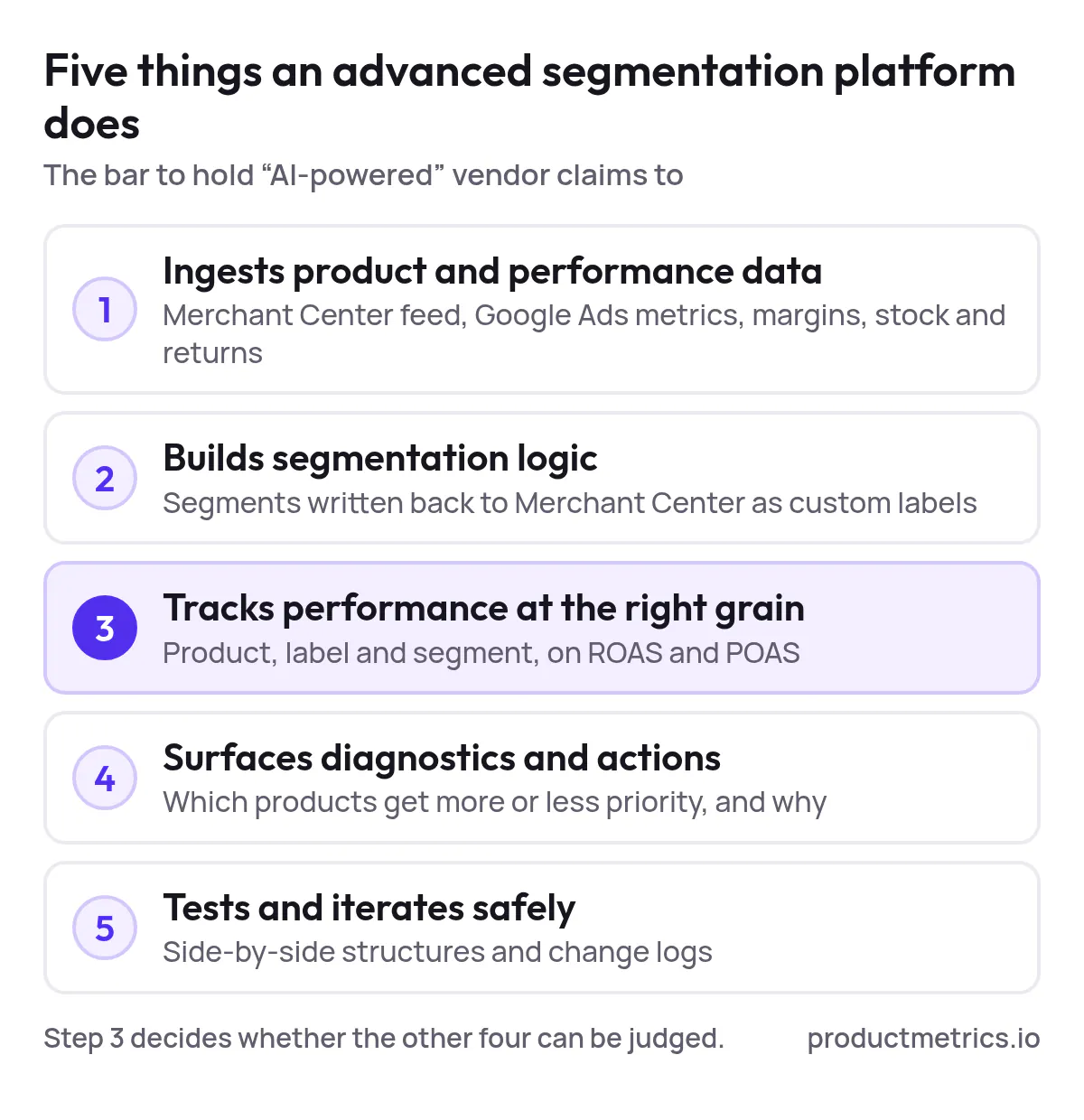
_Of the five capabilities, tracking at the right grain decides whether the other four can be judged at all._
When you see vendor pages promising “AI-powered Shopping optimization,” this is the bar you should hold them to.
## 3. The 2026 Market Map Four Types of Segmentation Platforms (And How Deep Their Analytics Go)
Most US advertisers don’t need a single monolithic tool. They need a **stack** that covers feed, segmentation, bidding, and measurement with the right level of performance tracking granularity.
Below is a practical market map you can use instead of generic “top 10 tools” lists.
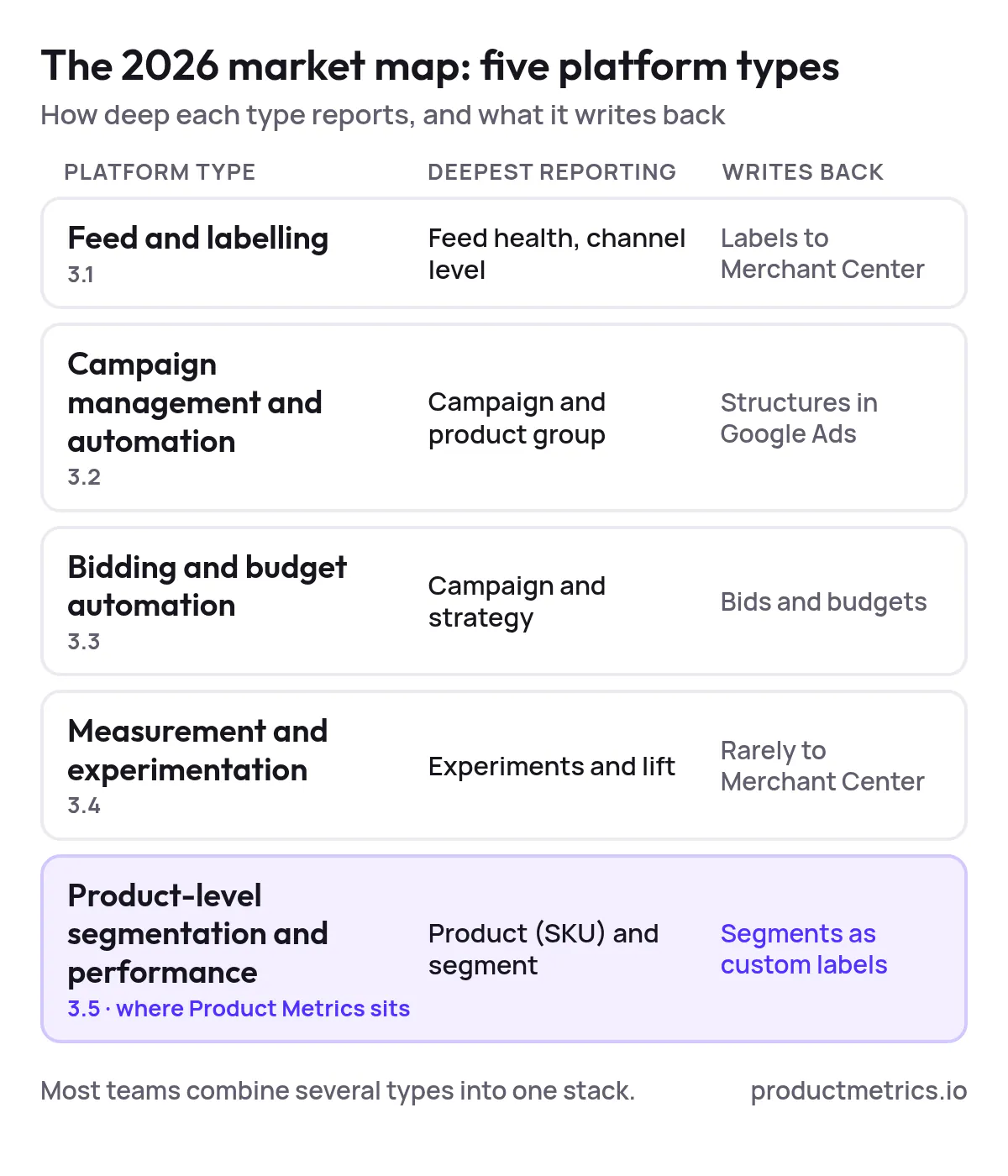
_Only the product-level type both reports per product and writes segments back to Merchant Center as custom labels._
### 3.1 Feed and Labeling Platforms
**What they do**
Primarily manage and enrich your product feed, then write structured data and labels back to Merchant Center.
Typical capabilities:
- Clean and normalize attributes (brand, product type, category, price, stock)
- Generate performance-oriented labels (price tiers, margin tiers, lifecycle stages)
- Maintain feeds for multiple channels (Google, Microsoft, Meta, marketplaces) from one place (Source: [Productsup – Google Shopping Feed Best Practice Guide](https://go.productsup.com/hubfs/resources/guides_white-papers/google-shopping-feed-best-practice-guide.pdf))
**Analytics depth:**
- Usually limited to basic feed health and maybe high-level channel performance
- Product-level performance is often read from Google Ads but not deeply modeled
- Good for *enabling* segmentation, weaker for **granular performance tracking**
Use these when your biggest problem is messy feeds and missing labels, not lack of reporting.
### 3.2 Shopping Campaign Management & Automation Platforms
**What they do**
Operate directly on Google Ads structures: campaigns, ad groups/asset groups, and listing groups/product groups.
Typical capabilities:
- Auto-create campaigns and product groups from feed rules
- Enforce naming conventions and structures across brands and markets
- Apply budgets, bid strategies, and negatives consistently (Source: [Google Shopping Optimization Handbook – Channel Automation Overview](https://static.godatafeed.com/content/whitepapers/Google_Shopping_Optimization_Handbook.pdf))
**Analytics depth:**
- Usually provide strong **campaign and product-group-level** reporting (ROAS, revenue, cost)
- Some expose product-level metrics; fewer join in margins, stock, or customer type
- Good for day-to-day account management; varying depth on **SKU or label-level** analytics
Look here if your structures keep drifting or you manage many US accounts and need consistency at scale.
### 3.3 Bidding and Budget Automation Platforms
**What they do**
Layer business data over Google’s [Smart Bidding](https://www.productmetrics.io/glossary/smart-bidding "Smart Bidding is a set of Google Ads bidding strategies that use Google AI to optimise for conversions or conversion value in every auction.") and manage bids and budgets across campaigns.
Typical capabilities:
- Optimize toward margin, LTV, or custom targets rather than pure [conversion value](https://www.productmetrics.io/glossary/conversion-value "Conversion value is the amount you tell Google Ads a conversion is worth, such as sales revenue or profit margin.")
- Allocate budgets across campaigns and sometimes labels or product groups
- Run controlled experiments on bid strategies (Source: [Google Ads Help – About Smart Bidding](https://support.google.com/google-ads/answer/2979071))
**Analytics depth:**
- Strong on **campaign and strategy-level** performance views
- Often provide some drill-down by product group or label; truly deep SKU-level analytics vary
- Best for teams whose primary bottleneck is *how aggressively* they bid, not *what* they bid on
### 3.4 Measurement and Experimentation Platforms
**What they do**
Specialize in clean measurement, incrementality, and experimentation—often across channels.
Typical capabilities:
- Holdout tests and geo experiments
- Cross-channel attribution models beyond last click
- Custom dashboards that tie revenue and profit back to product categories or groups (Source: [Google – Shopping Campaigns US Mattress Case Study](https://services.google.com/fh/files/misc/shopping-campaigns-case-study-usmattress.pdf))
**Analytics depth:**
- Excellent for **experiment and lift** measurement
- Product-level capabilities depend heavily on your data warehouse and setup
- Rarely push labels or structures back into Merchant Center directly
### 3.5 Product-Level Segmentation and Performance Platforms (Where Product Metrics Sits)
There is a growing category of tools focused specifically on **product-level Google Shopping optimisation**:
- They segment products into [performance-based buckets using machine learning](https://www.productmetrics.io/product-segmentation), based on volume (ad clicks) and return (ROAS or POAS against your target).
- They show journeys, competitor prices, margins, and stock around each product.
- They send segments back to Merchant Center as custom labels so Shopping and Performance Max campaigns can act on them. (Source: [Product Metrics – Product-Level Google Shopping Optimisation](https://www.productmetrics.io/))
These platforms exist because teams want **both**:
- Automation of segmentation and campaign labels
- Granular, product- and segment-level performance tracking that stays interpretable
They are especially relevant to US advertisers running 500–50,000 SKUs and asking whether each product should be pushed, fixed, or paused. (Source: [Product Metrics – Product-Level Google Shopping Optimisation](https://www.productmetrics.io/))
## 4. Performance Tracking Granularity From Account to SKU
When you evaluate **[Google Shopping optimization platforms with advanced segmentation and granular tracking](https://www.productmetrics.io/blog/google-shopping-campaign-segmentation)**, be explicit about *which level of granularity you actually need*.
Here’s a simple way to think about it.
### 4.1 Levels of Granularity
1. **Account / portfolio level**
Answers: Are we hitting our overall ROAS/POAS target?
Limitation: Hides big winners and losers.
2. **Campaign / campaign-type level**
Answers: Is Performance Max beating Standard Shopping? Are brand campaigns subsidizing non-brand?
Limitation: Still too coarse for merchandising or assortment decisions.
3. **Asset group / ad group / listing-group level**
Answers: Which thematic or category groupings are working?
Limitation: Hard to spot individual SKUs quietly chewing budget or never showing.
4. **Product-group or label level**
Answers: How are “high-margin shoes” or “new-in electronics” doing as segments?
This is where many campaign segmentation platforms stop.
5. **Product (SKU or item ID) level**
Answers: Should *this* product be pushed, fixed, or paused? What happens right after the click?
Requires joining Google Ads product reporting with margins, stock, cross-sell, and returns. (Source: [Google Ads API – Product Reporting for Shopping Ads](https://developers.google.com/google-ads/api/docs/shopping-ads/reporting))
6. **Product journey and cohort level**
Answers: What does a click on product A tend to sell (cross-sell)? Are new customers attracted by different products than repeat customers?
Platforms like Product Metrics expose these journeys and [cross-sell paths](https://www.productmetrics.io/product-journeys) so you can understand true product contribution, not just last-click revenue. (Source: [Product Metrics – Product-Level Google Shopping Optimisation](https://www.productmetrics.io/))
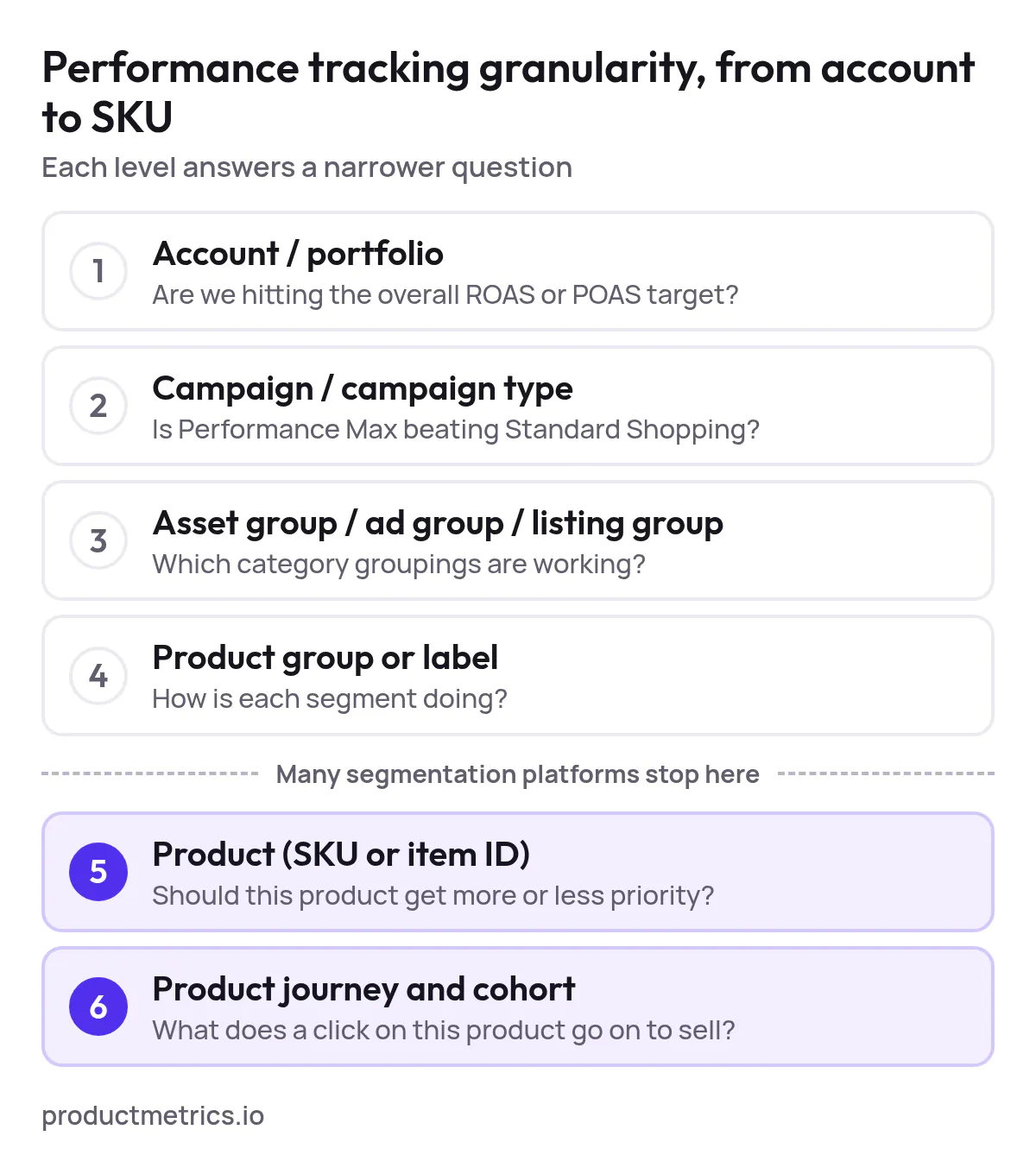
_Many platforms stop at product group or label level; the product and journey levels are where each product’s priority is decided._
### 4.2 Questions a Granular Platform Should Answer
Any platform you shortlist for **granular tracking of segmented Google Shopping campaigns** should make questions like these trivial:
- Which **labels or segments** generated the most incremental profit over the last 30 days?
- Which SKUs moved from “hero” to “problem” status after a price or stock change?
- How much of my Performance Max spend last month went to products that are:
- [Below break-even POAS](https://www.productmetrics.io/break-even-roas-calculator)
- Out of stock or chronically low on inventory
- New-to-catalog with promising early signals
- For each segment, what are the **top queries, assets, and audiences** driving performance (where surfaces are visible)?
If the answers require you to [export raw data to spreadsheets or BI](https://www.productmetrics.io/blog/google-ads-performance-dashboards) every time, the platform is not truly solving for performance tracking granularity.
> **Get more revenue out of Google Shopping.** Every product segmented and labelled in Merchant Center, so your top performers get more priority. [Analyse your products for free](https://app.productmetrics.io/) Log in with Google, no credit card.
## 5. Evaluation Framework How to Shortlist and Score Platforms
Instead of hunting for “top-rated” tools in abstract, use a **scoring framework** grounded in your own goals.
### 5.1 Start From Your Stack and Constraints
Before you look up “**[where to get campaign segmentation solutions with detailed performance tracking for Google Shopping](https://www.productmetrics.io/blog/segmentation-platform-google-shopping)**,” document:
- Commerce platform (Shopify, WooCommerce, Magento, custom, etc.)
- Feed management or PIM, if any
- Analytics stack (GA4, CDP, data warehouse, BI tools)
- Existing bidding or automation platforms
You want segmentation software that complements this stack, not duplicates it.
### 5.2 Define Must-Have Integrations and Entities
At minimum, expect **direct integration** with:
- Google Merchant Center (read/write on custom labels and key attributes)
- Google Ads (product-level metrics and campaign structures)
Most advanced US advertisers will also want:
- Margin or cost-of-goods data at SKU level (even if approximate)
- Stock and availability feeds
- Optional: cross-channel performance (Meta, email, marketplaces)
### 5.3 Score Vendors on Segmentation + Measurement
Use a simple 1–5 scoring scale (1 = poor, 5 = excellent) with weights that reflect your priorities.
Example scoring sheet focused on **segmentation and granular tracking**:
| Criterion | Description | Weight (1–3) |
|---|---|---|
| Segmentation flexibility | Can we express the product structures and business rules we care about without hacks? | 3 |
| Performance tracking granularity | Does reporting go down to the SKU and label level with the metrics we need (ROAS, POAS, new vs. returning, etc.)? | 3 |
| Joined business context | Can we layer in margins, stock, returns, competitor prices, or LTV without a data engineering project? | 2 |
| PMax & Shopping coverage | Does the tool fully support current and planned Google Shopping and Performance Max setups? | 2 |
| Testing and safety | Are there previews, rollbacks, and experiment support so we can test new structures safely? | 2 |
| Integration fit | How cleanly does it plug into our existing ecommerce and analytics stack? | 2 |
| Ease of use | Can the performance team own it without constant developer help? | 2 |
| Support & roadmap | Does the roadmap track where Shopping and AI-driven product reporting are heading? | 1 |
Multiply each vendor’s 1–5 score by the weight, sum them, and you have an objective way to compare **[solutions for advanced segmentation and performance tracking in Google Shopping](https://www.productmetrics.io/blog/google-shopping-segmentation-software)**.
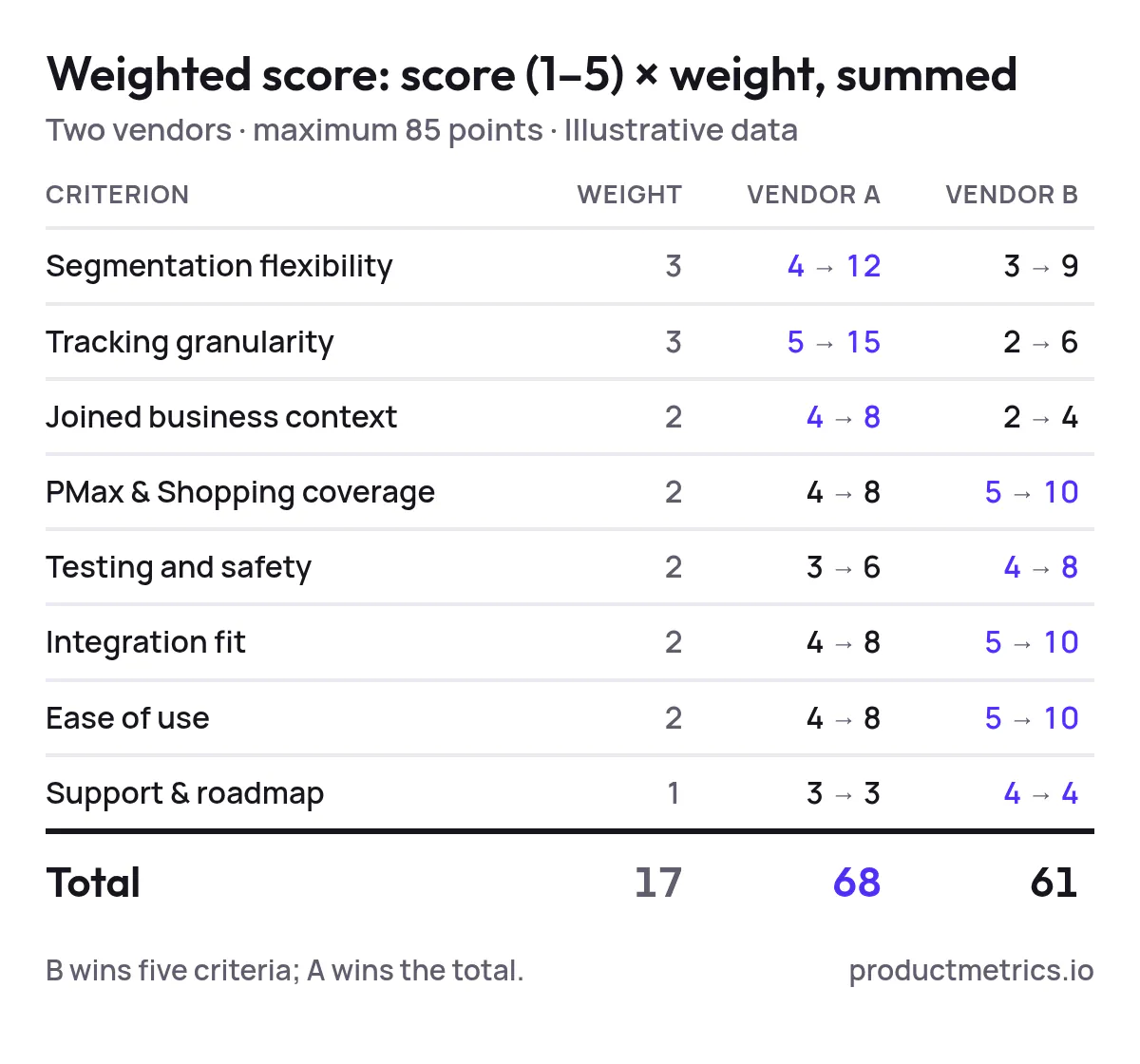
_Illustrative data: the weight-3 criteria decide the result, so a vendor that wins on ease of use and integration can still lose on tracking granularity._
### 5.4 Run Test-Forward Pilots Not Endless Demos
Once you’ve shortlisted 3–5 candidates, structure a **60–90 day pilot** around a clear hypothesis, such as:
- “Moving from broad, category-only segmentation to ML-based product buckets will increase Shopping ROAS by 15% at flat spend.”
- “Introducing margin- and stock-aware segmentation will increase contribution profit without harming total revenue.”
Key practices:
1. Pick 1–2 brands or categories with enough volume for a clean test.
2. Split into test vs. control structures, keeping budgets and bids comparable.
3. Decide in advance which **segment- and SKU-level metrics** will determine success.
4. Use the platform’s own dashboards plus a neutral source (GA4 or your warehouse) to confirm results.
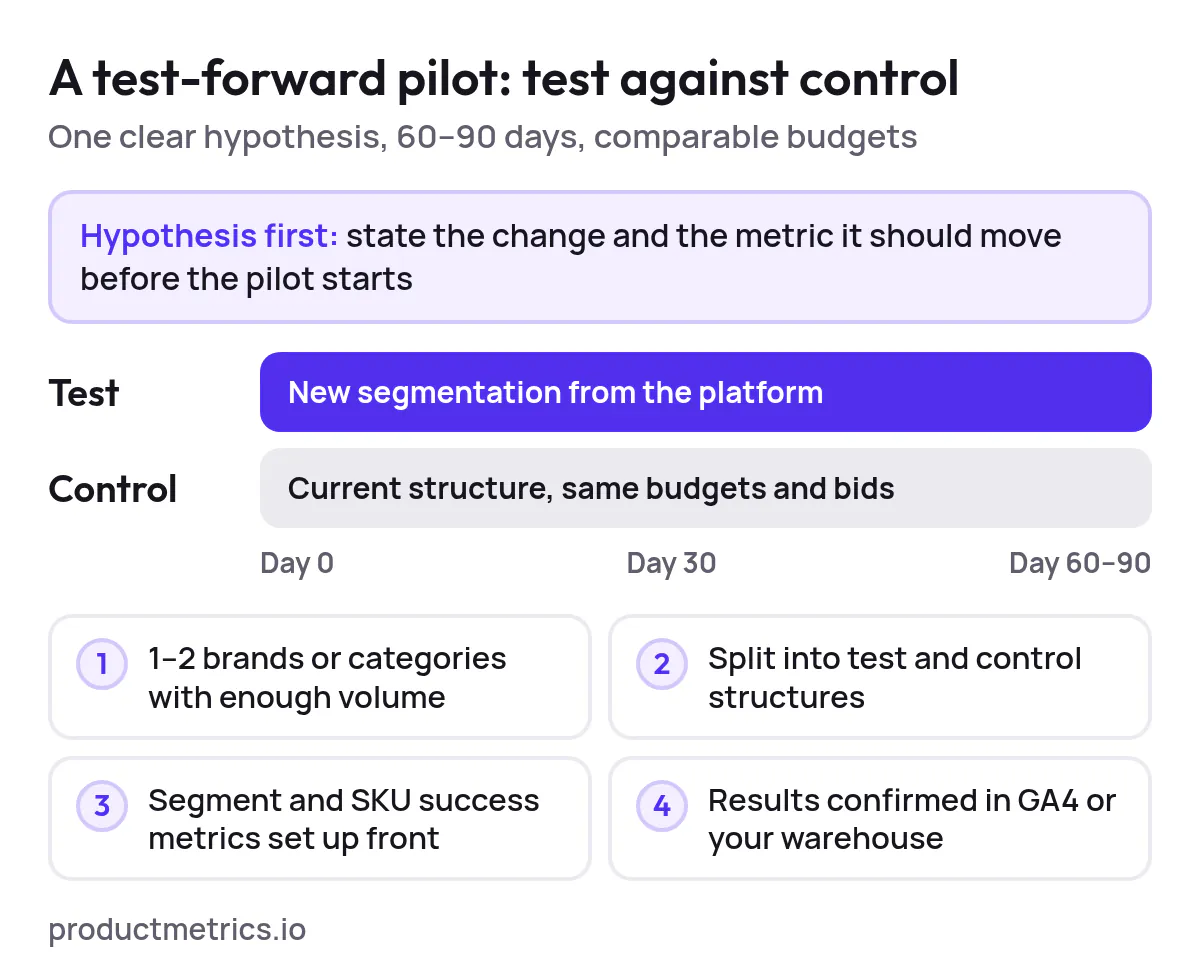
_Run test and control side by side on the same budgets, and fix the success metrics before day 0._
If a vendor can’t support that level of instrumentation, they’re not a fit for high-stakes optimization.
## 6. Procurement Checklist for US Advertisers
When you move from evaluation to procurement, focus on a few practical points:
### 6.1 Data Access and Ownership
- Who owns product and performance data stored in the platform?
- Can you export the **granular datasets** (by product, label, and segment) needed for BI and finance?
- How long is data retained, and what happens if you churn?
### 6.2 Compliance, Privacy, and Tracking
- How does the platform interact with Google’s own tracking and privacy policies (for example, [server-side tracking](https://www.productmetrics.io/server-side-tracking) or enhanced conversions)? (Source: [Google Ads Help – About Enhanced Conversions](https://support.google.com/google-ads/answer/9888656))
- For US retail, does the vendor provide guidance on consent and data handling aligned with CCPA/CPRA where applicable?
### 6.3 Support, SLAs, and Time to Value
- Who implements the first version of your segmentation and dashboards—your team, the vendor, or a partner?
- How quickly should you expect to see **decision-ready segment and SKU views** after onboarding (days vs. weeks)?
- What support channels and response times are guaranteed?
### 6.4 Pricing Model
Most Google Shopping platforms price on a mix of ad spend, SKU volume, or seats. Product Metrics, for example, charges a [graduated share of your rolling 30-day Google Shopping spend](https://www.productmetrics.io/pricing) with the first tranche free up to a defined threshold, and no minimum. (Source: [Product Metrics – Product-Level Google Shopping Optimisation](https://www.productmetrics.io/))
For US advertisers, map pricing scenarios at:
- Current monthly Google Shopping + Performance Max spend
- 2× and 3× that level, to see if the platform will still be economical as you scale
**Figure: Monthly Product Metrics fee at current, double and triple Shopping spend.** At an example €25K a month the fee is €97.50; doubling spend to €50K takes it to €247.50, and tripling it to €75K to €397.50.
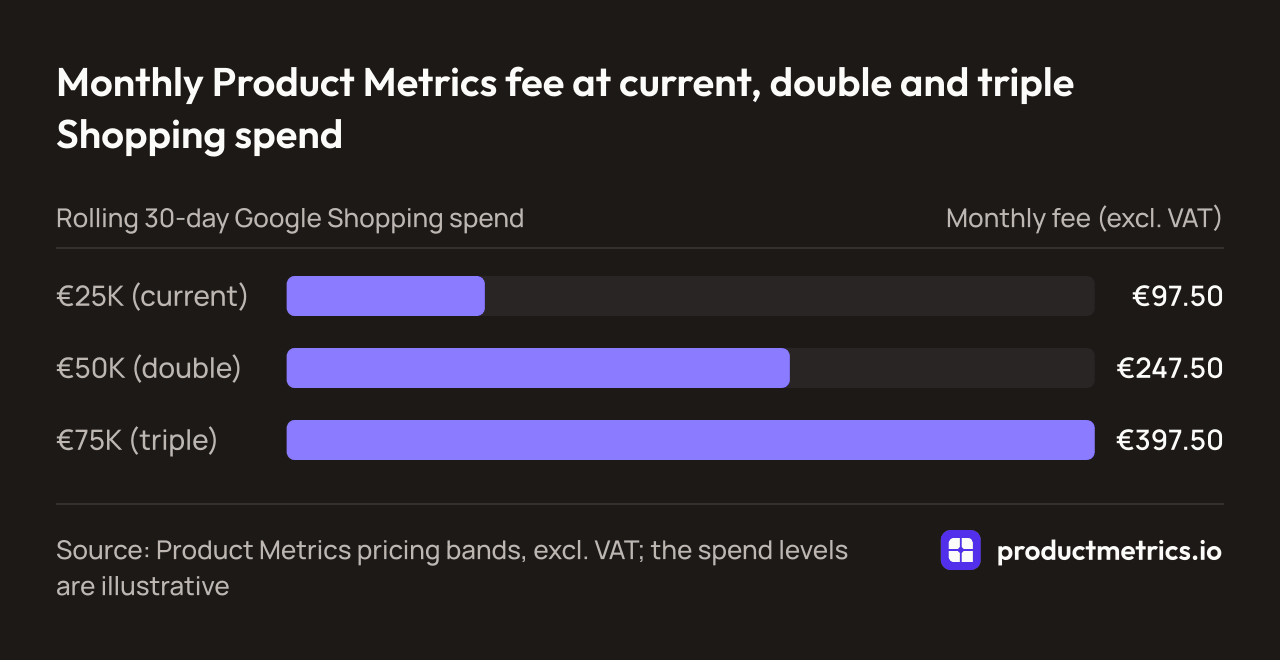
| Rolling 30-day Google Shopping spend | Monthly fee (excl. VAT) |
| --- | --- |
| €25K (current) | €97.50 |
| €50K (double) | €247.50 |
| €75K (triple) | €397.50 |
_Source: Product Metrics pricing bands, excl. VAT; the spend levels are illustrative_
## 7. Expected Outcomes What a Good Platform Should Deliver
When you **find platforms for granular tracking of segmented Google Shopping campaigns**, it’s tempting to focus on features. Instead, anchor on business outcomes.
A strong platform should help you:
1. **Shift spend into higher-value products and segments**
- Higher ROAS or POAS from the same or lower spend
- Clear evidence that budgets move toward segments with better unit economics
2. **Reduce wasted spend on low-return inventory**
- Faster identification of products that consistently underperform targets
- Ability to pause, fix, or reprice based on joined margin, stock, and competitor data
3. **Shorten the loop between tests and decisions**
- Clear, segment- and SKU-level reporting windows for each structural test
- Less time spent stitching exports together in spreadsheets
4. **Improve stakeholder trust in Shopping and PMax**
- Merchandising, finance, and leadership can see how spend and profit break down by product or segment
- Easier justification for budget increases when you can show granular evidence
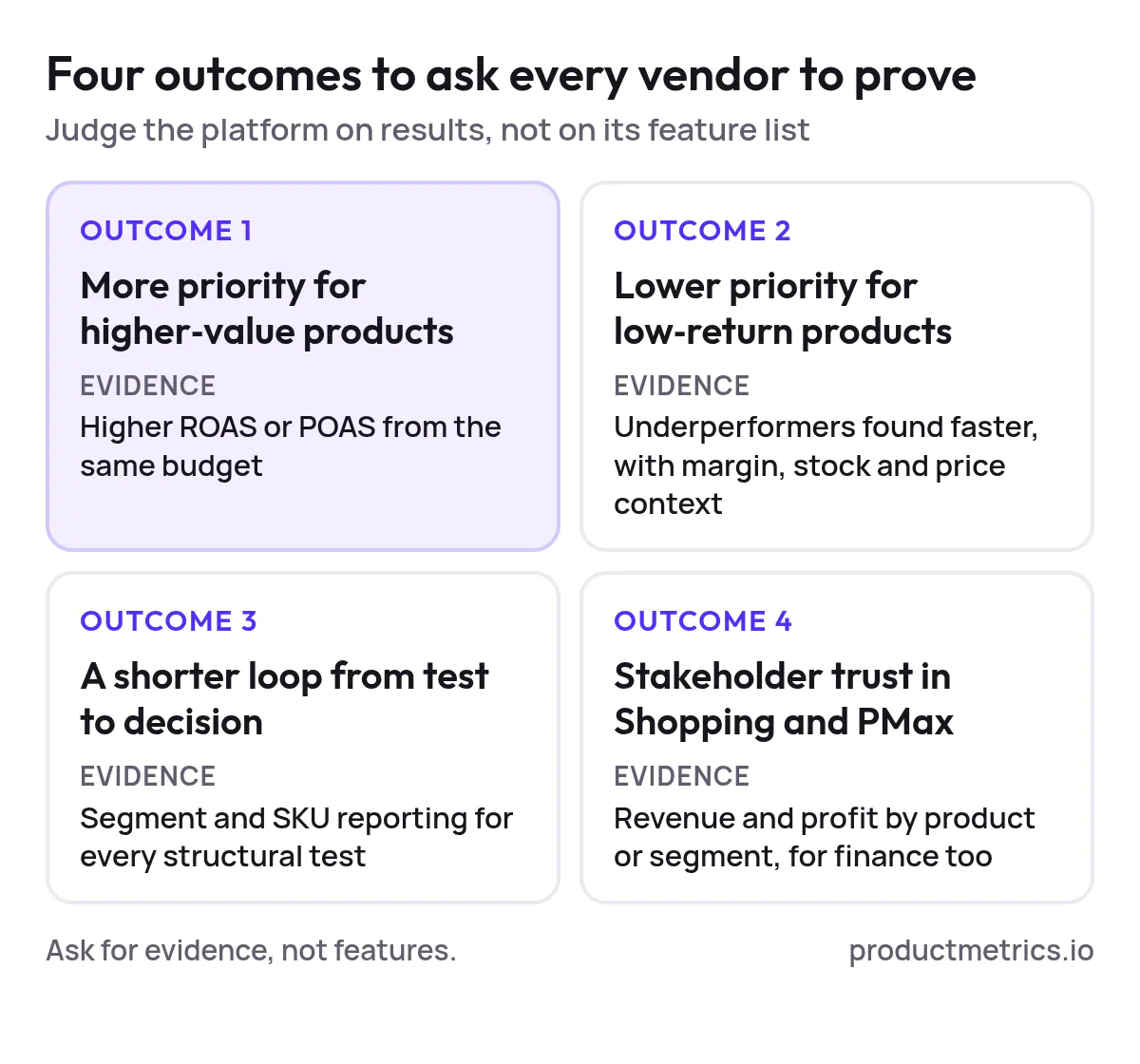
_Ask each vendor for evidence of these four outcomes in its case studies and demos, not for a longer feature list._
If a vendor’s case studies and demos cannot connect directly to these outcomes, keep them as a “nice to have,” not a core pillar of your stack.
## 8. Where Product Metrics Fits in Your Shortlist
If you’re evaluating tools and thinking:
- “I need a **Google Shopping optimization platform with advanced segmentation and granular tracking**, not just another bid script.”
- “I care as much about measurement and testing as I do about convenience.”
…then Product Metrics is worth a close look.
Based on its public product information, Product Metrics is a **product-level optimization platform** built specifically for Google Shopping and Performance Max. It:
- **Segments products into six performance-based buckets** using machine learning on ad clicks and return, so each SKU gets a clear status (push, fix, or pause). (Source: [Product Metrics – Product-Level Google Shopping Optimisation](https://www.productmetrics.io/))
- Combines ad data with **product journeys, competitor prices, margin, and stock**, giving you context for why a product falls into a given segment. (Source: [Product Metrics – Product-Level Google Shopping Optimisation](https://www.productmetrics.io/))
- [Writes those segments back to Google Merchant Center as custom labels](https://www.productmetrics.io/blog/product-segmentation-google-shopping-pmax), so your Shopping and Performance Max structures can target each bucket differently.
- Includes **[Full Signal Tracking](https://www.productmetrics.io/server-side-tracking)** to recover conversions lost to adblockers and privacy rules via server-side tracking, improving the reliability of your performance metrics. (Source: [Product Metrics – Product-Level Google Shopping Optimisation](https://www.productmetrics.io/))
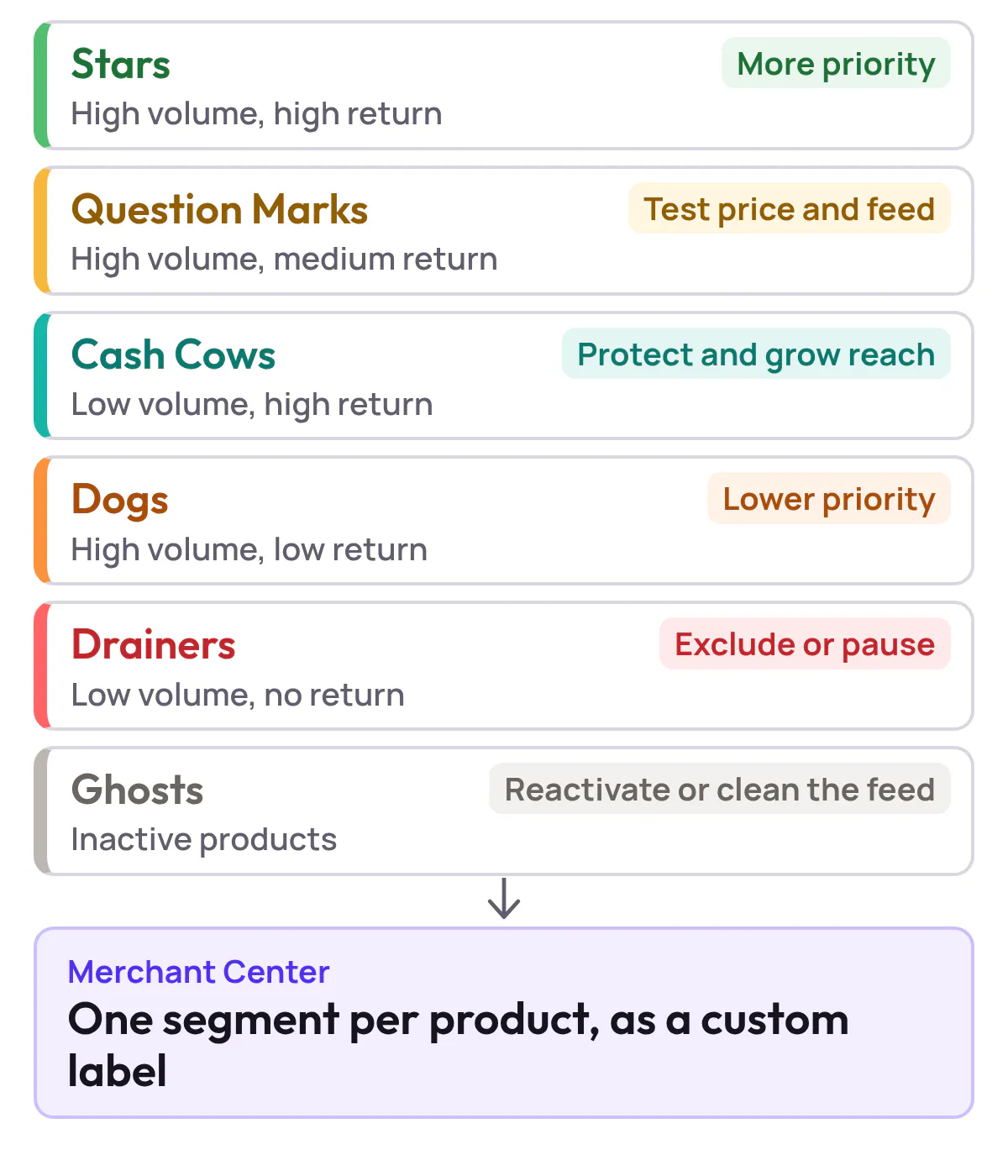
_Product Metrics ML gives every product one of six segments by ad clicks and return, and sends it to Merchant Center as a custom label._
For US advertisers, this combination effectively gives you a **campaign segmentation engine plus a granular performance analytics layer** in one workflow.
Next steps with Product Metrics:
- **Analyse your products for free** – run a free analysis of your current products and see how they would be segmented, no credit card required. (Source: [Product Metrics – Product-Level Google Shopping Optimisation](https://www.productmetrics.io/))
→ [Analyse your products for free](https://app.productmetrics.io/)
- **Book a demo** – walk through your current structure, budget, and goals and see a live example of how your catalog would be segmented and tracked.
→ [Book a demo](https://www.productmetrics.io/demo)
Using the scoring framework in section 5, you can evaluate Product Metrics alongside other candidates on segmentation flexibility, performance tracking granularity, and integration fit—grounded in your own US market context and targets.
## 9. Putting It All Together
To recap:
- The shift to Performance Max and richer product reporting means **segmentation and measurement now have to be designed together**, not separately.
- “Advanced” platforms earn that label only if they provide **actionable segmentation plus granular, trustworthy tracking**—down to the SKU and segment level.
- Instead of chasing generic rankings of “top-rated Google Shopping optimization tools for granular campaign segmentation and tracking,” build a shortlist from your own stack, constraints, and scoring sheet.
- Run **test-forward pilots** with clear hypotheses and segment-level success metrics so procurement decisions are backed by data, not demo theatrics.
If you’re ready to turn those principles into a concrete plan, start by running a product-level analysis and seeing how your catalog looks through a segmentation-and-granularity lens.
You can do that today with Product Metrics—and walk into your next budgeting or tooling conversation with a far clearer view of what to push, fix, or pause in Google Shopping.
## Keep reading.
- [Where to Buy Google Shopping Segmentation Software With Granular Analytics Pricing Trials And RFP Checklist](https://www.productmetrics.io/blog/google-shopping-segmentation-software-rfp)
- [Custom Label Intelligence: Segment, Bid, and Measure Granularity In Google Shopping](https://www.productmetrics.io/blog/custom-labels-google-shopping)
- [Designing Multi‑Level Performance Dashboards For Segmented Google Ads From Campaigns To SKUs](https://www.productmetrics.io/blog/google-ads-performance-dashboards)
---
Written by Berend Vrakking, founder of Product Metrics. Last updated 2026-11-09.
1M+ products analysed · Nominated at the Dutch Search Awards for Best Measurement Campaign (2023) and Best Use of Data (2024)
HTML version: https://www.productmetrics.io/blog/google-shopping-segmentation-platforms-us