---
title: "Operationalizing POAS: Best Practices, Governance, and Analysis"
description: "Operationalizing POAS for Google Ads: one profit definition, profit sent to Google Ads and Meta server-side, products segmented on it and a weekly review."
canonical: "https://www.productmetrics.io/blog/operationalizing-poas"
pageType: article
language: en
publisher: "Product Metrics"
author: "Berend Vrakking"
datePublished: 2026-11-09
dateModified: 2026-11-09
image: "https://www.productmetrics.io/og/blog/operationalizing-poas.png"
---
> Content index: https://www.productmetrics.io/llms.txt
# Operationalizing POAS: Best Practices, Governance, and Analysis
## Key takeaways
- Before you touch tags or feeds, you need a **governed definition** of POAS.
- Only after a few stable weeks of data should you consider **bidding directly on profit**.
- Whatever stack you choose, the rule is the same: there is one canonical POAS metric, and everyone sees the same number.
[Profit on ad spend (POAS)](https://www.productmetrics.io/glossary/poas "POAS (profit on ad spend) means contribution profit before advertising divided by ad spend: the profit each euro of ads leaves.") has moved from niche metric to board-level question for ecommerce teams. It promises what [ROAS](https://www.productmetrics.io/glossary/roas "Return on ad spend (ROAS) is the revenue your ads generate for every euro you spend on them.") cannot: a view of Google Ads and Performance Max performance that is grounded in profit, not just revenue.
The gap is no longer conceptual. It is operational.
Most teams that “do POAS” today struggle less with the formula and more with instrumentation, governance, and day‑to‑day decision-making:
- How exactly do we define profit?
- Where does that number live?
- How do we get it into Google Ads in a way [Smart Bidding](https://www.productmetrics.io/glossary/smart-bidding "Smart Bidding is a set of Google Ads bidding strategies that use Google AI to optimise for conversions or conversion value in every auction.") can actually use?
- How do we keep the definition stable across brands, campaigns, and teams?
This guide is written from that angle: turning POAS from a slide into an operating system for Google Ads.
## 1. From ROAS to POAS Why Profit Tracking Matters For Google Ads
### 1.1 What POAS Measures And What It Doesn’t
In this article, we’ll use the same definition Product Metrics uses in its POAS glossary:
> **POAS = contribution profit before advertising ÷ ad spend**
where contribution profit before ads is net revenue minus product and variable order costs, excluding ad spend itself.
A POAS of 1.0 means your profit before ad spend exactly covers your ad spend; a POAS above 1.0 leaves money after ads, and below 1.0 means that product is losing money on its attributed advertising. (Source: [Product Metrics – Profit on ad spend (POAS) glossary](https://www.productmetrics.io/glossary/poas))
This is broadly consistent with how other analytics providers describe POAS: they measure the profit you keep per advertising dollar—after subtracting COGS, shipping, payment fees and similar variable costs—from the ad-attributed orders. (Source: [Polar Analytics – POAS explained](https://www.polaranalytics.com/post/poas-profit-on-ad-spend))
By contrast, [classic ROAS](https://www.productmetrics.io/blog/poas-vs-roas) is simply **revenue ÷ ad spend**. Two products with the same ROAS can have very different POAS if one carries double the margin of the other. (Source: [YieldBI – POAS overview](https://yieldbi.com/docs/profit-on-ad-spend-poas/))
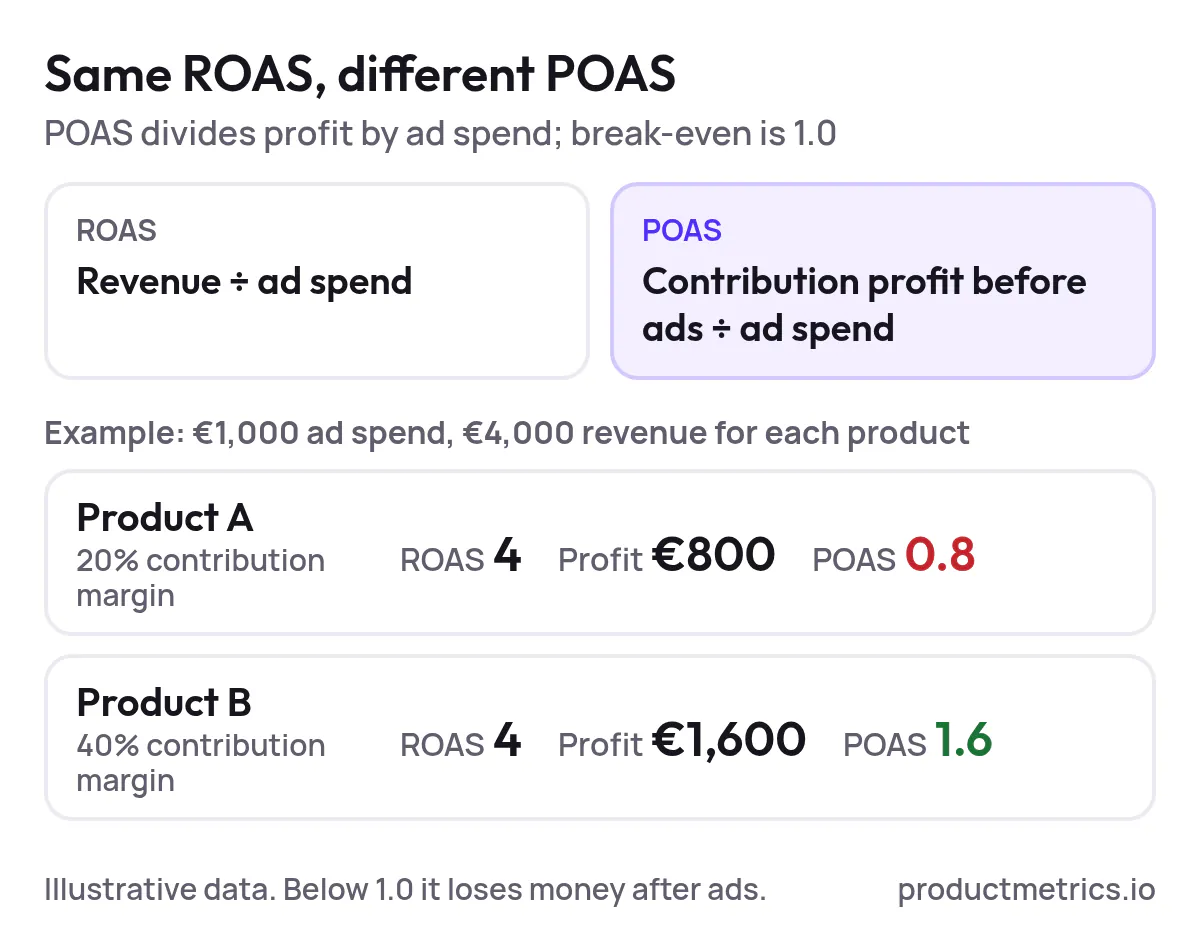
_Two products on the same ROAS of 4: at a 20% margin POAS is 0.8 and the product loses money after ads; at 40% it is 1.6. Illustrative data._
### 1.2 Why ROAS Alone Breaks For Large Catalogs
Google Ads and Performance Max allocate budget at auction time based on conversion value and bidding targets, not on your internal margin structure. If you only send revenue as conversion value, Smart Bidding optimizes for revenue per click, not profit per click. (Source: [Google Ads Help – About conversion value rules](https://support.google.com/google-ads/answer/10518330))
For catalogs with:
- Highly variable margins by product or category
- Meaningful shipping, payment, and handling costs
- [Return rates](https://www.productmetrics.io/blog/ecommerce-return-rate) that differ by product line
ROAS will systematically over-fund products that are [high revenue but low margin](https://www.productmetrics.io/blog/break-even-roas-per-product), and under-fund quieter products that quietly generate most of your profit.
This is exactly the pattern Product Metrics illustrates in its segmentation work: at the account level, ROAS can sit comfortably above target while the bestselling products, once margins are applied, actually lose money and low-volume products carry the profit load. (Source: [Product Metrics – Product segmentation marketing](https://www.productmetrics.io/blog/product-segmentation-marketing))
POAS is the metric that closes this gap, but only if you operationalize it correctly.
## 2. Designing A Governed POAS Definition
Before you touch tags or feeds, you need a **governed definition** of POAS. Without this, you will ship conflicting metrics into your stack and lose trust in the numbers long before Smart Bidding can learn from them.
### 2.1 Decide Which Costs Belong In Profit Before Ads
Start by specifying, in writing, which costs you include in the POAS numerator. A practical, [contribution‑margin](https://www.productmetrics.io/glossary/contribution-margin) style definition usually includes:
- **Net revenue**: item price minus discounts, excluding tax where that’s recoverable.
- **Cost of goods sold (COGS)**: per‑item cost from your ERP or ecommerce platform. (Source: [Wikipedia – Cost of goods sold](https://en.wikipedia.org/wiki/Cost_of_goods_sold))
- **Shipping and handling costs**: what you actually pay carriers and 3PLs, net of any shipping fees collected from the customer.
- **Payment and transaction fees**: card fees, BNPL fees, marketplace fees tied to the order.
- **Packaging or pick‑and‑pack costs** where these vary with order volume.
Product Metrics, for example, reads Shopify’s “cost per item” per variant, applies Shopify Payments fees and any configured shipping/handling costs per order line, and then treats the result as profit before advertising. (Source: [Product Metrics – Shopify server‑side tracking](https://www.productmetrics.io/platforms/shopify))
What you **don’t** include in the numerator if you want POAS (not ROI on ad spend):
- Ad spend itself
- Fixed overheads like salaries, rent, or software subscriptions
Those costs matter for overall profitability, but they sit downstream of POAS—use POAS to cover variable costs and ad spend; then use [MER](https://www.productmetrics.io/blog/marketing-efficiency-ratio) or operating margin at the business level.
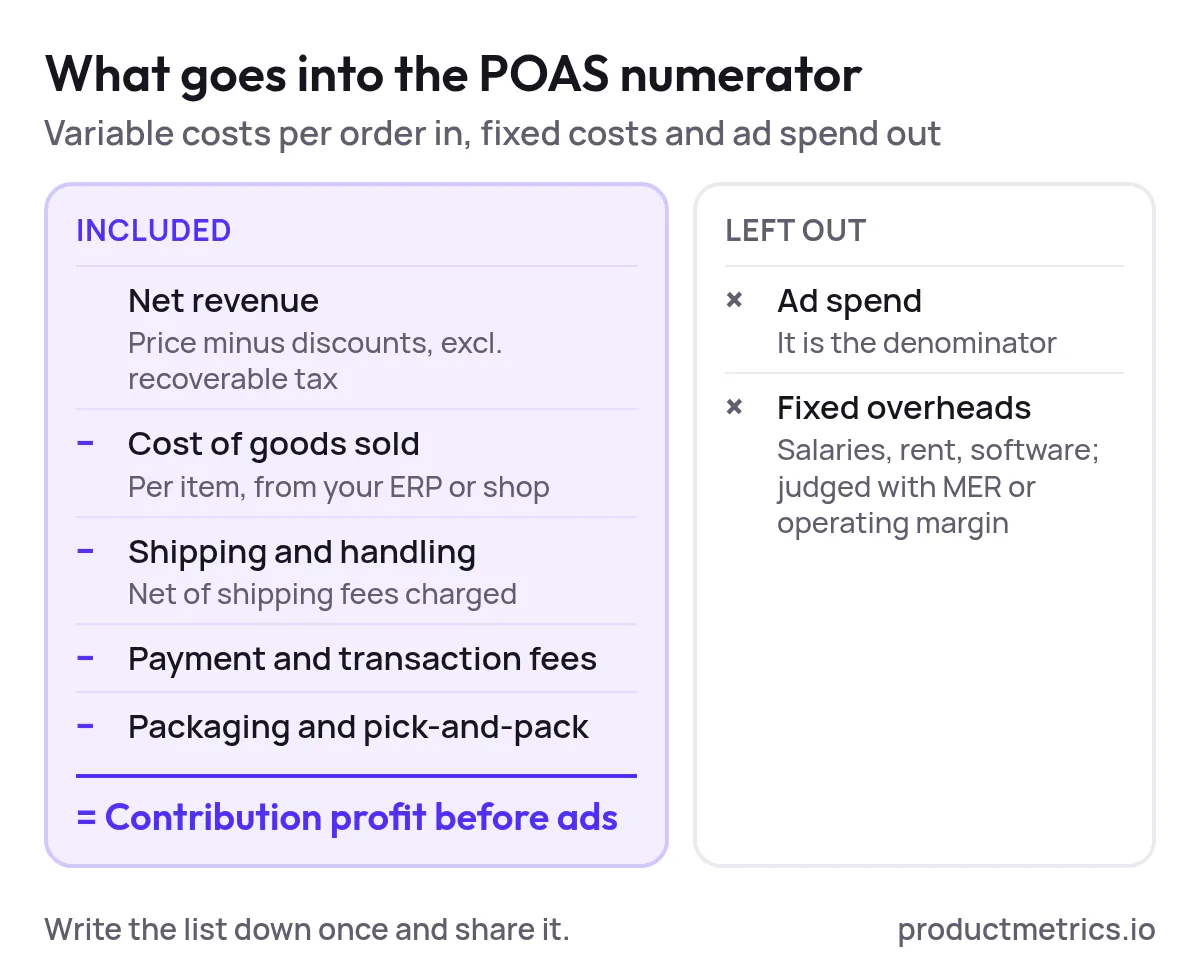
_Contribution profit before ads keeps every cost that moves with the order and leaves ad spend and fixed overheads out._
### 2.2 Standardize Attribution Windows And Currencies
Next, align **attribution windows** and currencies for profit and revenue. A few simple policies go a long way:
- Match the **lookback window** you use in Google Ads (for example, 30 days for Shopping) with the revenue and profit window you use for analysis, so POAS and ROAS reflect the same set of orders. (Source: [Google Ads Help – Conversions and attribution overview](https://support.google.com/google-ads/answer/6167122))
- Decide how you treat **returns and cancellations**. Product Metrics, for instance, re‑reads Shopify orders when they are refunded or cancelled, so conversion values in Google Ads and Meta reflect updated revenue and profit. (Source: [Product Metrics – Shopify server‑side tracking](https://www.productmetrics.io/platforms/shopify))
- Normalize all POAS calculations into your **reporting currency**, even if ad spend and sales settle in multiple currencies.
Write this into a one‑page “POAS spec” that finance, analytics, and paid media agree on.
### 2.3 Document Accepted Variants And Discourage New Ones
There are legitimate variants of “profit”:
- **Gross margin** (revenue minus COGS)
- **Contribution margin** (revenue minus all variable costs)
- **Net profit after ads**
Different vendors and articles use these differently; even within Google’s own documentation you’ll see POAS described using “gross profit before ad spend” as the numerator. (Source: [Omniconvert – What is POAS?](https://www.omniconvert.com/what-is/poas/))
The governance move is:
1. **Pick one official definition** of POAS for your organization (ideally contribution profit before ads ÷ ad spend).
2. Document any tolerated exceptions (for example, a marketplace where you only have reliable COGS, not shipping).
3. Make it hard to invent new variants—ensure Looker Studio, BI models, and naming conventions all point back to the same governed metric.
If you later introduce a second metric—for example, POAS on **first‑order customers only**—treat that as a separately named KPI, not a silent redefinition.
## 3. Best Practices For Integrating POAS Tracking In Your Stack
Once you know what POAS means for your business, you can turn to **[conversion tracking integration](https://www.productmetrics.io/blog/google-ads-conversion-tracking)**—how to get profit into Google Ads and back out into your reporting layer.
### 3.1 Capture Per‑Order Profit In Your Commerce Platform
For most online stores, the lowest‑friction pattern is:
1. **Store per‑SKU cost** in your ecommerce platform (e.g., Shopify’s “cost per item” field).
2. Supplement with rules or additional fields for shipping, packaging, and handling.
3. Compute profit per order line server‑side when an order is created, paid, or updated.
Product Metrics uses exactly this pattern on Shopify: it reads the cost per item, applies actual payment fees and your configured shipping/packing costs, and turns each paid order into a profit figure per line item. (Source: [Product Metrics – Shopify server‑side tracking](https://www.productmetrics.io/platforms/shopify))
If you cannot centralize these inputs in the commerce platform, a lightweight alternative is an external profit table (database or spreadsheet) keyed by product ID. Tools like Stape explicitly recommend external storage for POAS data because dataLayers and lookup variables become insecure or unmanageable as product counts grow. (Source: [Stape – Profit on Ad Spend: why it matters and how to set it up](https://stape.io/blog/profit-on-ad-spend-why-it-matters-and-how-to-set-it-up-via-stape))
### 3.2 Send Profit To Google Ads As A Conversion Value Without Leaking It
At a high level, you have three implementation patterns for Google Ads:
1. **Duplicate purchase conversion with profit value**
- Keep your existing “Revenue” purchase conversion.
- Add a second “Profit” conversion where the value passed is contribution profit instead of order value.
- Use the revenue conversion as your initial bidding signal and treat the profit conversion as analysis‑only until you trust the feed.
2. **Switch the primary conversion to profit**
- Once you’re confident in profit calculations, change your primary bidding conversion so that Smart Bidding optimizes directly on profit rather than revenue.
- This can be done either by passing profit into the main purchase event or by changing which conversion action is marked as “primary” for campaigns. (Source: [Google Ads Help – About conversion actions and primary vs secondary](https://support.google.com/google-ads/answer/7064782))
3. **Use conversion value rules as an overlay**
- In some B2B or lead gen flows you can’t send exact profit per conversion, but you do know that some segments have higher margins. Google’s conversion value rules let you multiply or add value based on audience, device, or location (for example, +20% value for high‑margin product lines). (Source: [Google Ads Help – About conversion value rules](https://support.google.com/google-ads/answer/10518330))
For ecommerce, the most precise route is usually **sending actual profit as the conversion value**—either via an offline conversions upload, Enhanced Conversions with server‑side GTM, or a dedicated connector like Product Metrics’ [Full Signal Tracking](https://www.productmetrics.io/server-side-tracking). (Source: [Google Ads Help – Set up offline conversion imports](https://support.google.com/google-ads/answer/2998031))
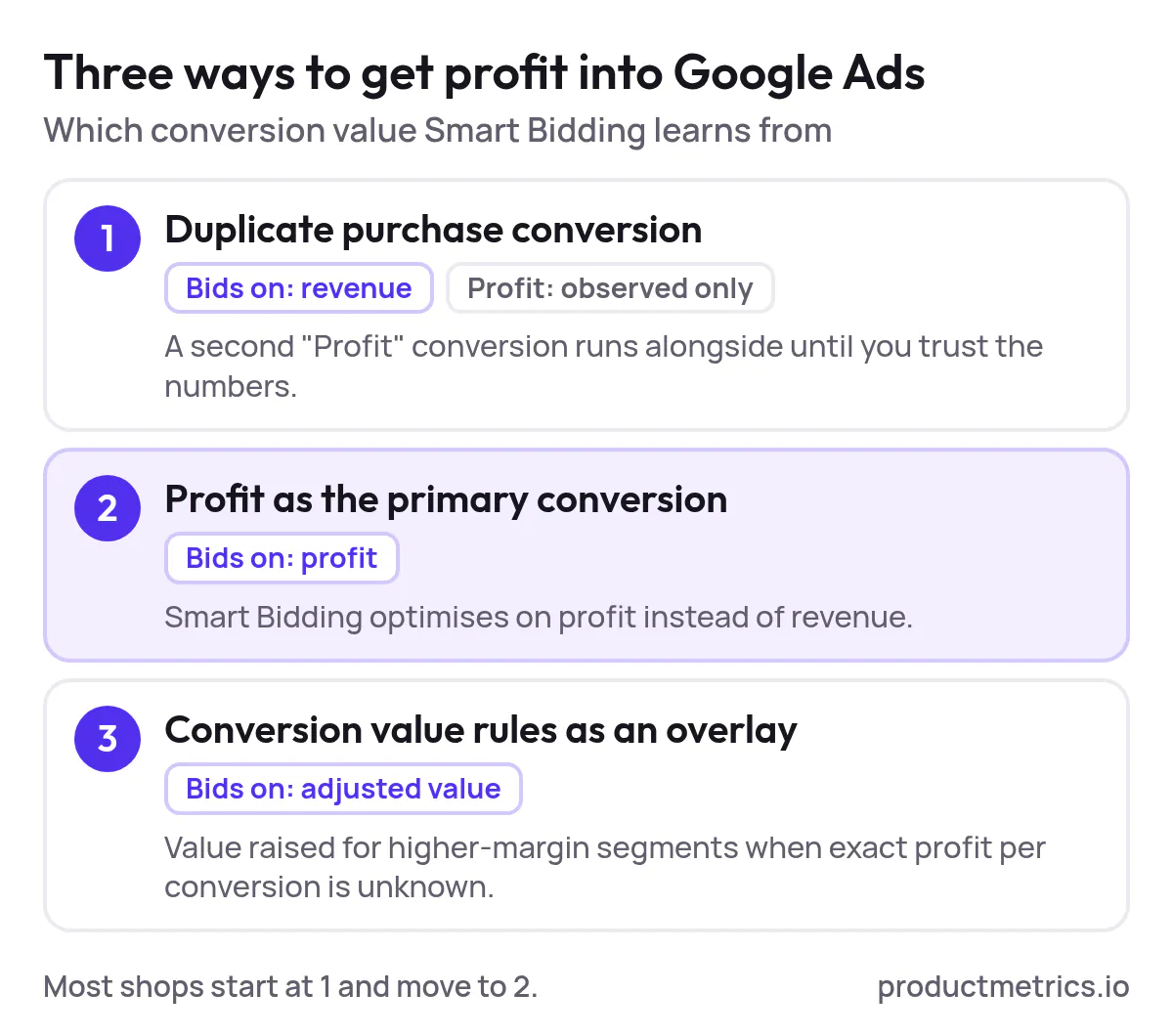
_The three patterns differ in what Smart Bidding learns from: revenue, profit, or a rule-adjusted value._
### 3.3 Why Server-Side Tracking Is Now Table Stakes For POAS
POAS tracking makes two things more sensitive:
- **Data completeness**: if [ad blockers](https://www.productmetrics.io/ad-blocker-conversion-tracking) and Safari’s ITP strip 20–30% of your purchases out of Google Ads, both ROAS and POAS will be biased—and you won’t know which SKUs truly hit target.
- **Data privacy**: pushing per‑SKU profit figures into browser‑visible JavaScript or dataLayers exposes sensitive cost data to anyone with DevTools access.
[Server-side tracking](https://www.productmetrics.io/blog/what-is-server-side-tracking) addresses both.
Product Metrics’ Full Signal Tracking, for example, sends purchases from a first‑party endpoint on your own domain, keeps click IDs server‑side, and auto‑rotates the endpoint if an ad blocker ever catches it—so conversions continue to reach Google Ads and Meta even where default tags are blocked. (Source: [Product Metrics – Product-Level Google Ads Optimisation](https://www.productmetrics.io/))
In a lab comparison Product Metrics published, a default browser tag reported 41 purchases from Google Ads clicks while the same traffic produced 55 purchases when measured with a server‑side endpoint. The extra conversions lifted reported ROAS and POAS materially and even changed the product’s performance segment from “loss‑making” to “worth further investment.” (Source: [Product Metrics – Enhanced conversions vs server‑side tracking](https://www.productmetrics.io/blog/enhanced-conversions-vs-server-side-tracking))
**Figure: Purchases from Google Ads clicks: browser tag vs server-side endpoint.** On the same traffic, the default browser tag reported 41 purchases and the server-side endpoint 55, so 14 purchases never reached ROAS or POAS.
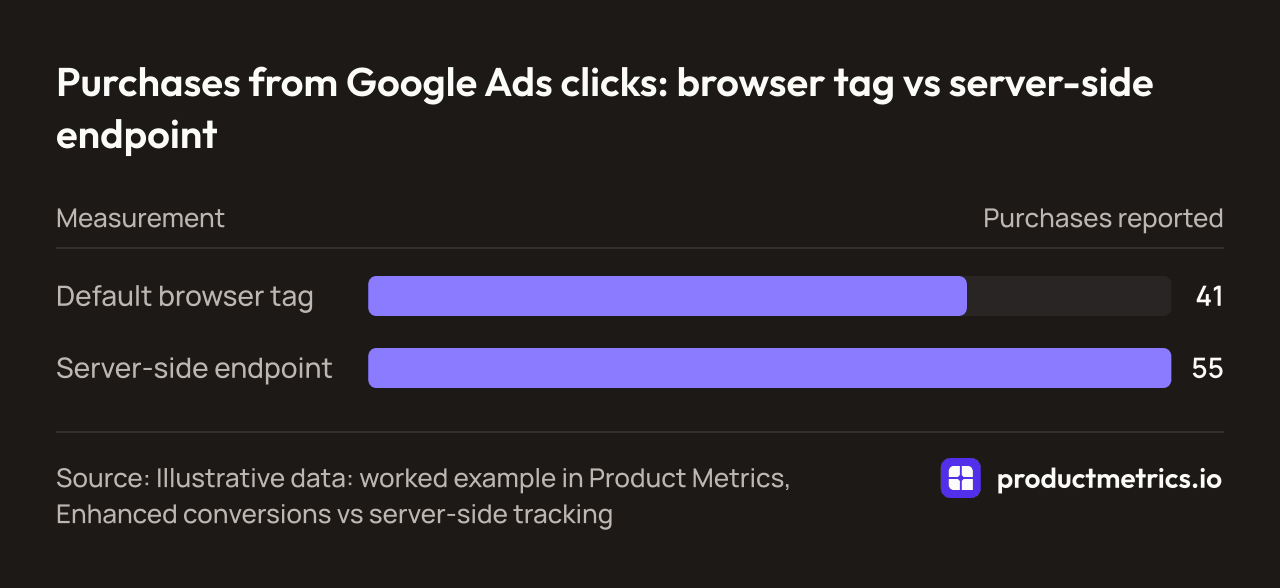
| Measurement | Purchases reported |
| --- | --- |
| Default browser tag | 41 |
| Server-side endpoint | 55 |
_Source: Illustrative data: worked example in Product Metrics, Enhanced conversions vs server-side tracking_
Stape makes a similar point from a different angle: because a dataLayer is readable in the browser, sensitive profit figures stored there are visible to competitors, resellers, or anyone with access to the code. Their recommended pattern is to fetch profit from a protected database in server‑side GTM and send only the aggregated value to Google Ads. (Source: [Stape – Profit on Ad Spend via server‑side GTM](https://stape.io/blog/profit-on-ad-spend-why-it-matters-and-how-to-set-it-up-via-stape))
For serious POAS tracking in 2026, treating server‑side tracking as optional is no longer realistic.
### 3.4 Minimum Viable POAS Setup For Google Ads
If you had to roll out POAS tracking for Shopping in the simplest credible way, a pragmatic “v1” would look like this:
1. **Capture COGS per SKU** in your ecommerce platform.
2. **Estimate shipping and payment fees** per order using simple rules (by country, carrier, payment method) rather than attempting perfect allocation on day one.
3. **Compute profit per order server‑side** and store it against the transaction ID.
4. **[Send a second purchase conversion to Google Ads](https://www.productmetrics.io/blog/poas-tracking-google-ads)** for “Profit” with the transaction ID and profit value.
5. **Keep Smart Bidding on revenue** initially; use POAS as an analytical lens to re‑label products and adjust campaign priorities.
6. Only after a few stable weeks of data should you consider **bidding directly on profit**.
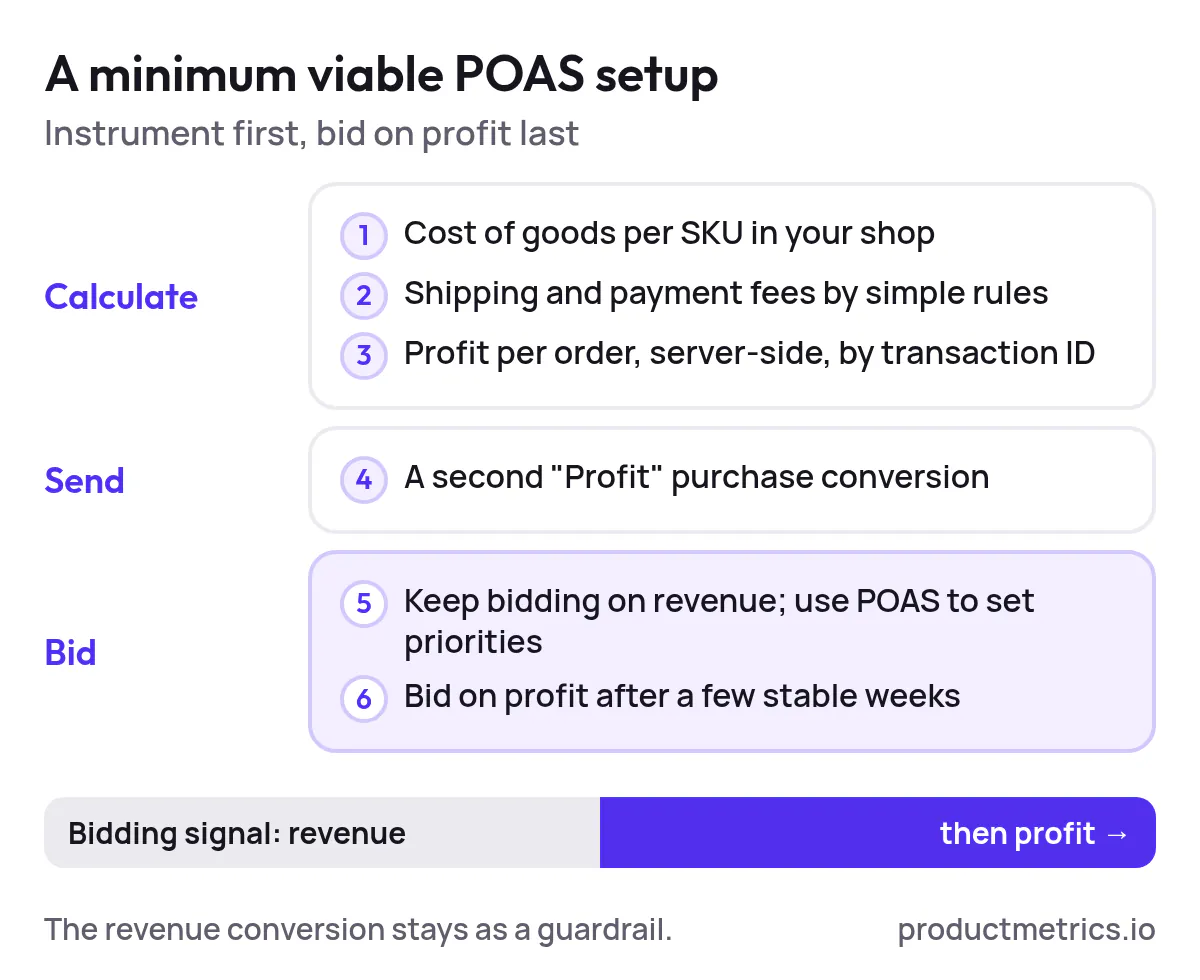
_Instrument first and bid on profit last: the revenue conversion stays the bidding signal until the profit numbers hold for a few weeks._
This mirrors how experienced practitioners describe their own adoption path: keeping ROAS as a guardrail while they validate POAS tracking, then gradually letting profit values drive bids once the feed proves reliable. (Source: [Reddit – Thoughts on POAS: more of a headache or actually useful?](https://www.reddit.com/r/googleads/comments/1xgwnfh/thoughts_on_poas_more_of_a_headache_or_actually/))
## 4. POAS Tracking Strategies For Maximizing ROI In Google Ads
Having POAS in Google Ads doesn’t automatically improve results. The leverage comes from how you **structure campaigns and feeds around that metric**, particularly through segmentation and labeling.
### 4.1 Segment Products By Clicks And POAS Not Just Campaigns
An effective mental model is a simple 2×2 (or 3×2) grid:
- X‑axis: advertising **volume** (ad clicks)
- Y‑axis: **return vs target** (ROAS or POAS)
Product Metrics’ [Product Segmentation](https://www.productmetrics.io/product-segmentation) operationalizes this by placing every product into one of six segments — Stars, Question Marks, Cash Cows, Dogs, Drainers, Ghosts — based on ad clicks and return against your ROAS or POAS target. (Source: [Product Metrics – Product segmentation glossary](https://www.productmetrics.io/glossary/product-segmentation))
The strategic insight is independent of the exact labels:
- **High clicks, high POAS** → push harder (your winners).
- **High clicks, low POAS** → either fix pricing, feed, or page; if not fixable, reduce priority.
- **Low clicks, high POAS** → protect margins and work on reach (improve feeds, bids, and budgets).
- **Spend with no return** → pause or exclude until there’s a clear hypothesis.
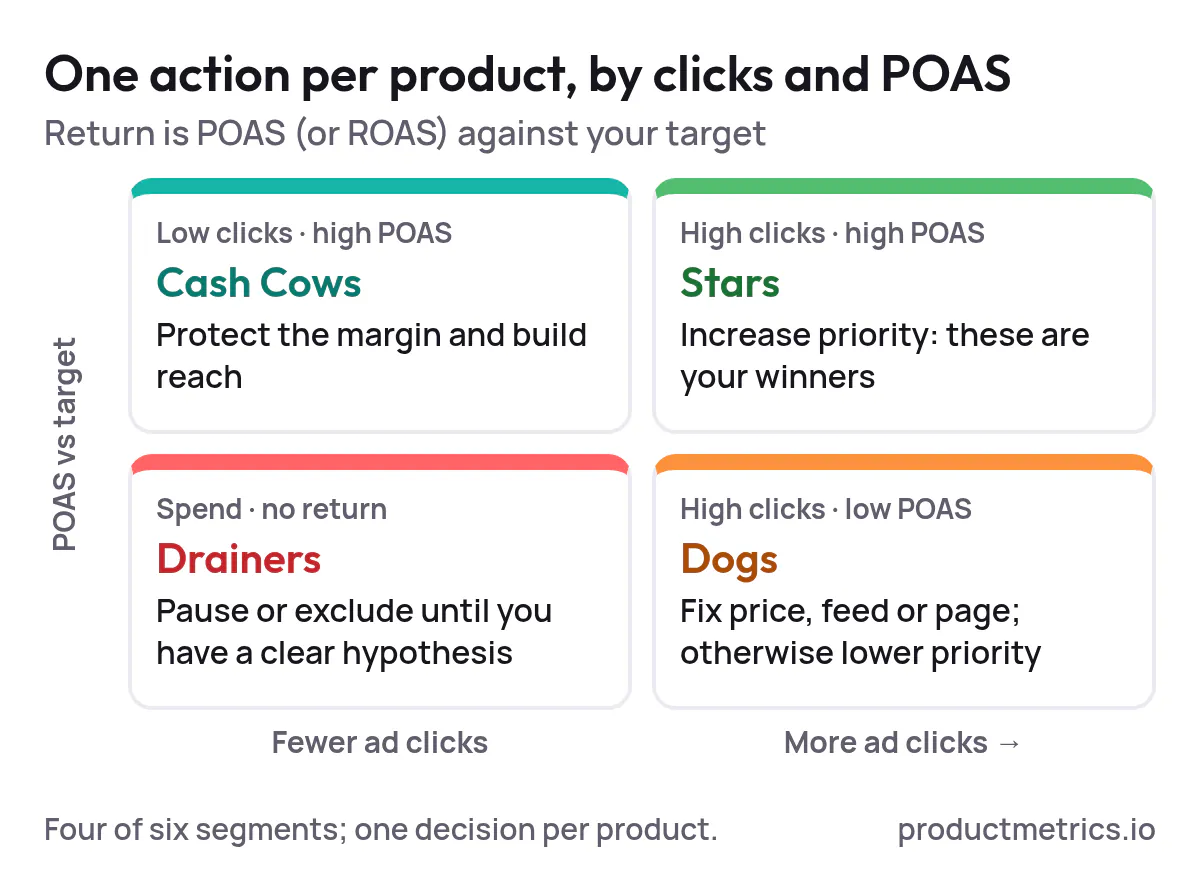
_Each quadrant gets one action, so the decision is made per product rather than per campaign._
Whether you implement this logic in Product Metrics or manually in BI, the shape is the same: **decisions at the product level, not just at campaign level**.
### 4.2 Use Merchant Center Labels As Your Control Plane
Google Merchant Center gives each product five [custom label](https://www.productmetrics.io/glossary/custom-labels) fields (`custom_label_0`–`custom_label_4`) that Shopping and Performance Max can use to include or exclude products from campaigns or listing groups. (Source: [Google Merchant Center Help – Custom label attributes](https://support.google.com/merchants/answer/6324473))
Best‑in‑class POAS setups use these labels as a **control plane**:
- One label for **performance segment** (e.g., Star, Dog, Drainer).
- One for **margin band** (e.g., low, medium, high contribution).
- One for **stock or lifecycle** (e.g., overstock, normal, end‑of‑line).
- Remaining labels for seasonality, brand tiers, or other business dimensions.
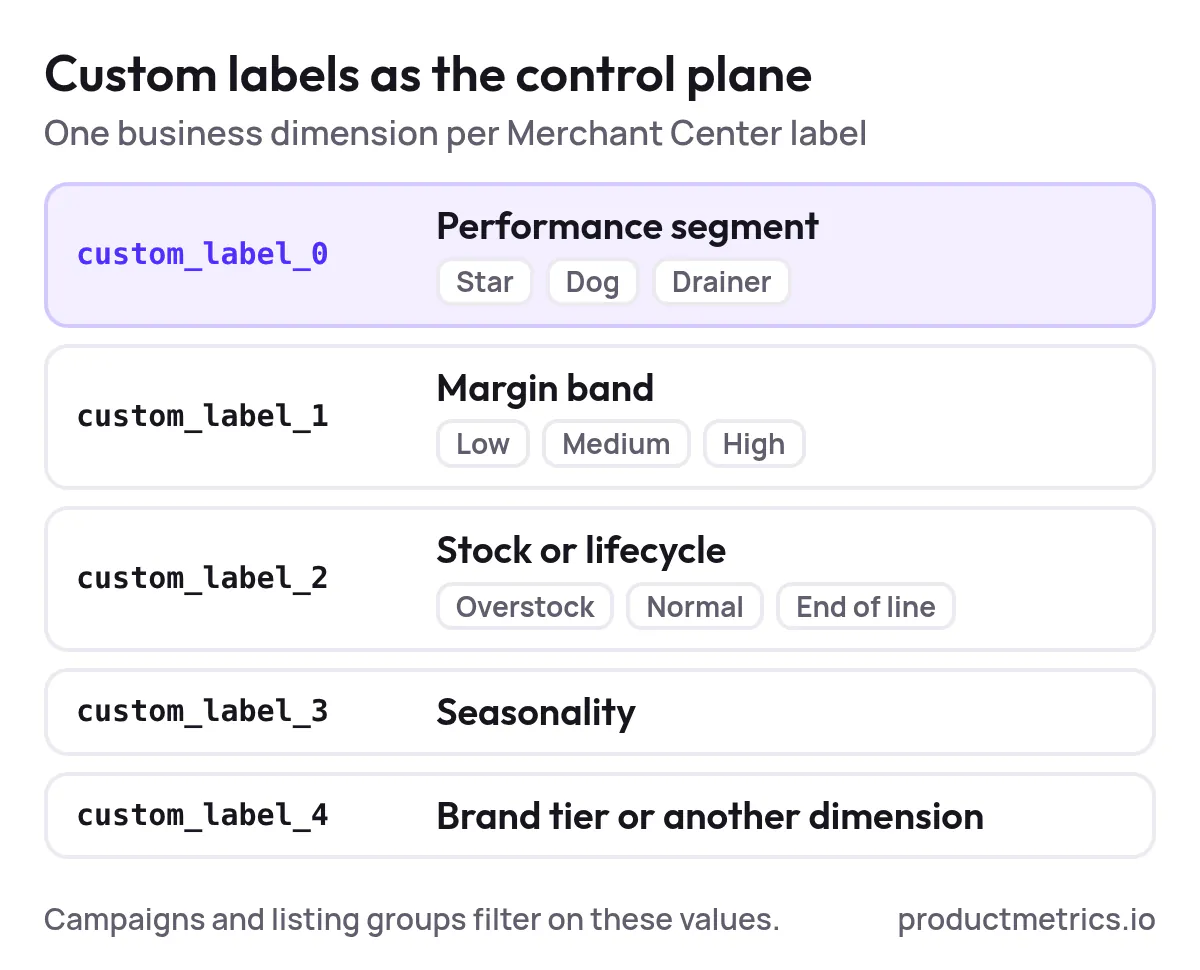
_One business dimension per custom label, with the performance segment in custom_label_0, gives every campaign a filter it can act on._
Product Metrics automates this pattern: its ML engine segments every product daily by ad clicks and ROAS/POAS, then writes the segment into a custom label you approve, which your Shopping and PMax campaigns then use as listing‑group filters. (Source: [Product Metrics – Product-Level Google Ads Optimisation](https://www.productmetrics.io/))
However you implement it, the core practice is the same: **no product sits in a generic bucket**. Every SKU belongs to a segment whose label your campaigns can act on.
> **Grow revenue with the products that perform best.** Every product segmented on profit, so you know which ones get more priority. [Analyse your products for free](https://app.productmetrics.io/) Log in with Google, no credit card.
### 4.3 Set POAS Targets That Reflect Your Profit Model
A [POAS target](https://www.productmetrics.io/poas-calculator) of 1.0 is always break‑even by definition: you are covering variable costs and ad spend, but not necessarily contributing margin to overheads and profit. (Source: [Blufire – POAS definition](https://blufire.com.au/resources/glossary/poas))
Where you set targets above 1.0 depends on:
- Fixed‑cost load and breakeven point
- Appetite for growth vs short‑term profit
- [Customer lifetime value (LTV)](https://www.productmetrics.io/blog/predicted-ltv) and retention dynamics
A few patterns many ecommerce teams use:
- **Acquisition campaigns** may accept a POAS slightly below 1.0 if there is strong, observed LTV, particularly for subscription or replenishable products. (Source: [Omniconvert – POAS and customer lifetime value](https://www.omniconvert.com/what-is/poas/))
- **Remarketing and branded campaigns** usually run with higher POAS targets, because they capture high‑intent, lower‑funnel traffic where profit should be strongest.
- **Overstock or end‑of‑season segments** can run at lower POAS targets to clear inventory.
Look at POAS, not just ROAS, when tuning these targets. A drop in blended ROAS is not necessarily bad if total contribution profit rises because spend shifts into better‑margin products. (Source: [Reddit – Google Ads tROAS campaigns performing well but only spending 1/3 of the budget](https://www.reddit.com/r/googleads/comments/1x1ry7u/google_shopping_troas_campaigns_performing_well/))
### 4.4 Handle New Versus Returning Customers Differently
Not all profit is equal. Profit from first‑time customers often has more strategic value than the same profit from a heavily discounted repeat order.
Advanced POAS setups send **separate conversion actions** for new vs returning customers, sometimes extending the value to include modeled 28‑day or 90‑day LTV. Product Metrics, for example, marks each Shopify order as new or returning by checking past paid orders, then sends separate revenue, profit, and LTV conversion actions to Google Ads and Meta. (Source: [Product Metrics – Shopify server‑side tracking](https://www.productmetrics.io/platforms/shopify))
Operationally, that lets you:
- Set more relaxed POAS targets on **acquisition** campaigns that focus on new customers and LTV.
- Keep stricter POAS targets on **retention** and remarketing, where orders should be profitable on their own.
- Understand which products and campaigns are truly driving customer file growth, not just last‑click revenue.
## 5. How To Analyze POAS Data For Better Ad Performance
With POAS tracking in place and products segmented, the next challenge is **analysis discipline**. The aim is not a perfect model; it’s a repeatable review that improves decision quality each week.
### 5.1 A Weekly POAS Review In Three Questions
Many high‑performing teams adopt a simple weekly cadence, especially for Google Ads and PMax:
1. **At the account or portfolio level**:
- Is total POAS over the last 30–90 days above, at, or below target?
- How does this compare to the previous period once you adjust for conversion lag and returns? (Source: [Product Metrics – ROAS optimization tools buyer’s guide](https://www.productmetrics.io/blog/roas-optimization-tools))
2. **By product segment** (Stars, Dogs, etc.):
- Which segments drive most of the profit?
- Are any low‑POAS segments consuming disproportionate spend?
3. **At product level within segments**:
- For outliers (very high spend, very low POAS), what does the product context say—price position, margin, stock, and downstream journeys? (Source: [Product Metrics – Product-Level Google Ads Optimisation](https://www.productmetrics.io/))
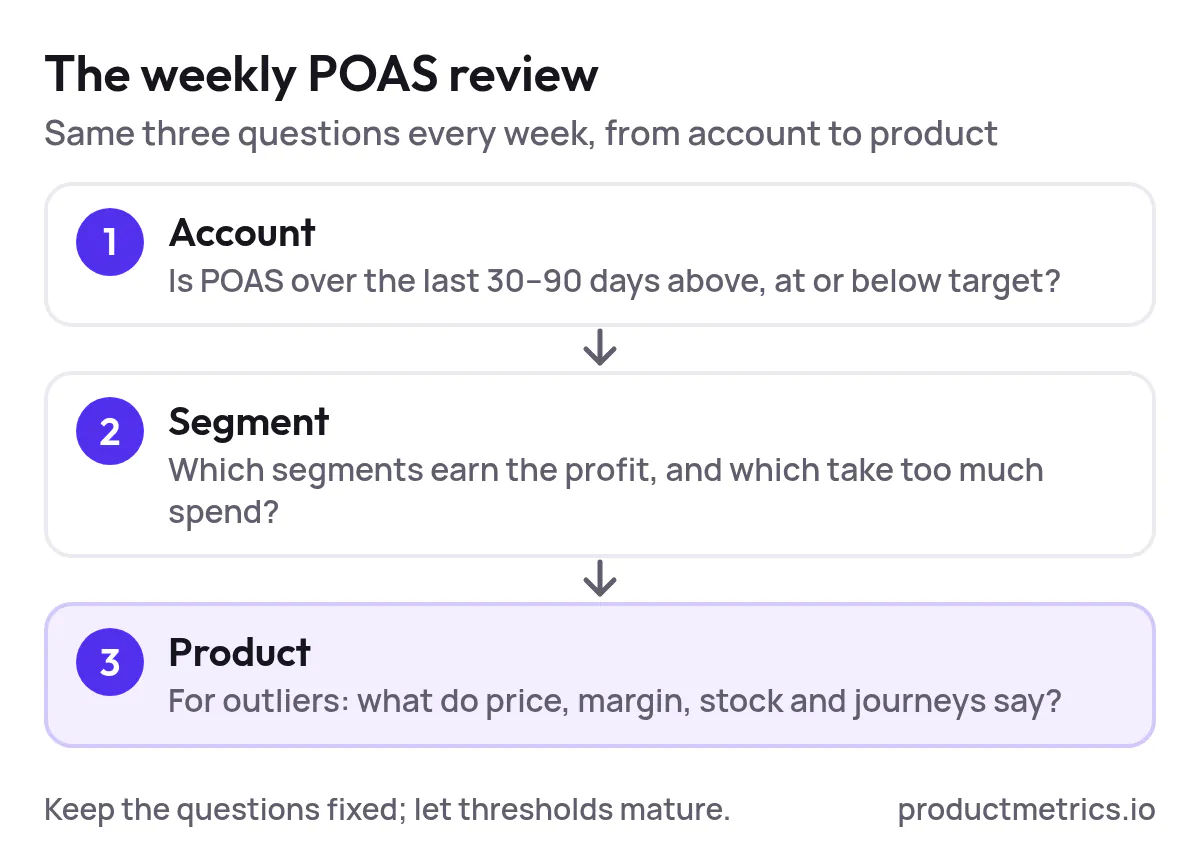
_The review narrows from account to segment to product, with the same three questions every week._
The key is to keep the questions stable over time while allowing your thresholds and cut‑offs to mature.
### 5.2 Diagnosing Low POAS Products Price Margin Or Experience
When a product or segment sits below target POAS, it’s tempting to cut bids immediately. A better pattern is to diagnose the **cause of low POAS** first:
1. **Margin issue**
- Are you structurally under‑margin on this SKU (e.g., aggressive wholesale cost, high shipping cost)?
- If so, can you raise price, improve buying terms, or move the product into a different acquisition/attachment role?
2. **Price‑position issue**
- Are you consistently above [comparable competitors](https://www.productmetrics.io/competitor-prices) in Google Ads for that product?
- Tools and playbooks from Google itself suggest using custom labels and COGS to separate high‑ and low‑margin products, then adjust bids and prices accordingly. (Source: [Think with Google – Maximise Growth with Data](https://www.thinkwithgoogle.com/_qs/documents/18473/Maximise_Growth_with_Data.pdf))
3. **Experience issue**
- Do [on‑site metrics](https://www.productmetrics.io/product-journeys) (bounce rate, PDP engagement, add‑to‑cart rates) suggest that the landing page or offer is weak relative to the query?
4. **Attribution or tracking issue**
- Have returns surged, or have ad blockers reduced the visible conversions for that product? Full Signal‑style server‑side tracking or similar solutions often reveal that some low‑POAS “Dogs” were partially an artifact of missing conversions. (Source: [Product Metrics – Enhanced conversions vs server‑side tracking](https://www.productmetrics.io/blog/enhanced-conversions-vs-server-side-tracking))
Only after you’ve answered these questions does it make sense to lower priority or exclude a product.
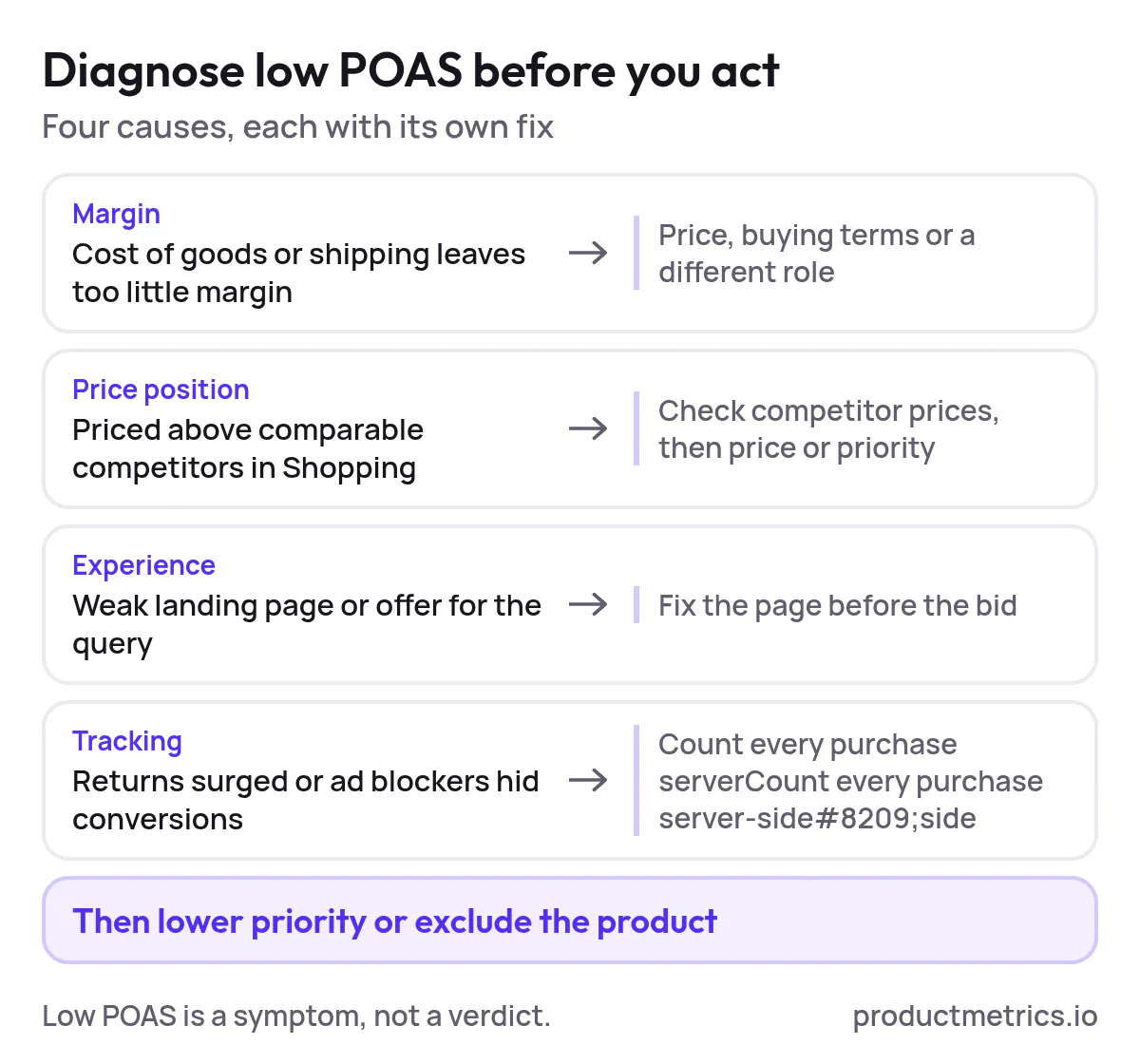
_Four causes of low POAS, each with a different fix; lowering priority comes last._
> **Get every conversion back into Google Ads and Meta.** Full Signal Tracking gets through every adblocker, so bidding works on your full revenue. Sends revenue, profit and new customers to Google Ads and Meta. [Book a demo](https://www.productmetrics.io/demo)
### 5.3 Avoiding Analysis Pitfalls
Three recurring pitfalls crop up in POAS analysis:
1. **Small‑number volatility**
POAS on ten clicks and one conversion is noise. Use minimum‑click thresholds before assigning products to segments or making bid decisions—Product Metrics does this automatically in its ML segmentation. (Source: [Product Metrics – Product segmentation glossary](https://www.productmetrics.io/glossary/product-segmentation))
2. **Mismatched attribution windows**
If Shopping campaigns use 30‑day, [data‑driven attribution](https://www.productmetrics.io/glossary/data-driven-attribution) but your BI operates on last‑click revenue with different windows, POAS numbers will diverge. Keep one governed source of truth for paid media POAS, ideally anchored on the same window Smart Bidding uses. (Source: [Google Ads Help – About attribution reports](https://support.google.com/google-ads/answer/6167122))
3. **Ignoring LTV and new vs returning splits**
A campaign with mediocre first‑order POAS but outstanding new‑customer LTV may warrant more investment than its headline POAS suggests—if you actually track and analyze those separate conversions. (Source: [Product Metrics – Shopify server‑side tracking](https://www.productmetrics.io/platforms/shopify))
## 6. Governance Keeping POAS Reliable As Your Team And Catalog Scale
POAS breaks down fastest not in small, technical ways, but in governance: undocumented changes, silent metric drift, and fragmented ownership.
### 6.1 The POAS Data Contract
Treat POAS like a **data product** with a contract:
- **Inputs**: exactly which fields from ecommerce, ERP, and ad platforms are used.
- **Transformations**: how discounts, taxes, shipping, payment fees, and returns are handled.
- **Outputs**: where POAS appears (Google Ads conversions, BI dashboards, Product Metrics, finance reports).
- **Change process**: who can change the definition and how changes are communicated.
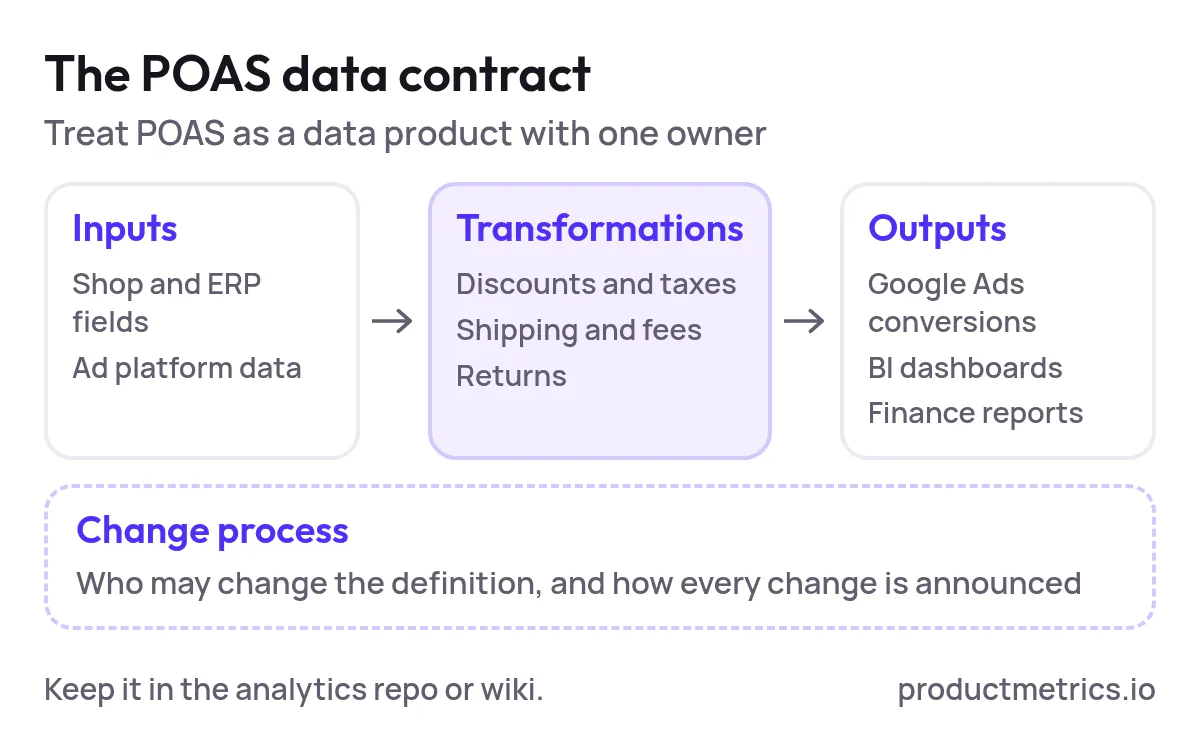
_A written contract fixes the inputs, transformations and outputs, and says who may change the definition._
Document this in your analytics repo or internal wiki and make it part of onboarding for both marketers and analysts.
### 6.2 Monitoring And Alerting
Governed metrics need monitoring. For POAS, sensible alerts include:
- Sudden drops in **conversion volume** or conversion value by channel (can indicate tracking or consent issues).
- Sharp changes in **average profit per order** at category level (can indicate mis‑keyed COGS or shipping costs).
- Broken **label distributions** (e.g., 80% of products suddenly tagged as Drainers after a data change).
Product Metrics’ own monitoring content emphasises daily checks on product segments, Merchant Center feed health, and campaign mapping to ensure labels continue to produce expected spend and performance splits. (Source: [Product Metrics – Google Ads monitoring](https://www.productmetrics.io/google-shopping-monitoring))
### 6.3 Giving Teams A Single Source Of Truth
Teams adopt POAS when it shows up consistently:
- In **Google Ads** as named conversion actions (Revenue, Profit, New Customer Profit, etc.).
- In your **product‑level dashboards** (whether bespoke or in Product Metrics).
- In **weekly trading decks** and finance reviews.
Product Metrics consolidates Google Ads, pricing, inventory, returns, and margin data into one product‑level workspace, then pushes decisions back into campaigns via custom labels. (Source: [GetApp – Product Metrics overview](https://www.getapp.com/all-software/a/product-metrics/))
Whatever stack you choose, the rule is the same: there is one canonical POAS metric, and everyone sees the same number.
## 7. A 90 Day Roadmap To Operational POAS
If you’re starting from a ROAS‑only baseline, a realistic 90‑day plan for a mid‑size ecommerce team might look like this.
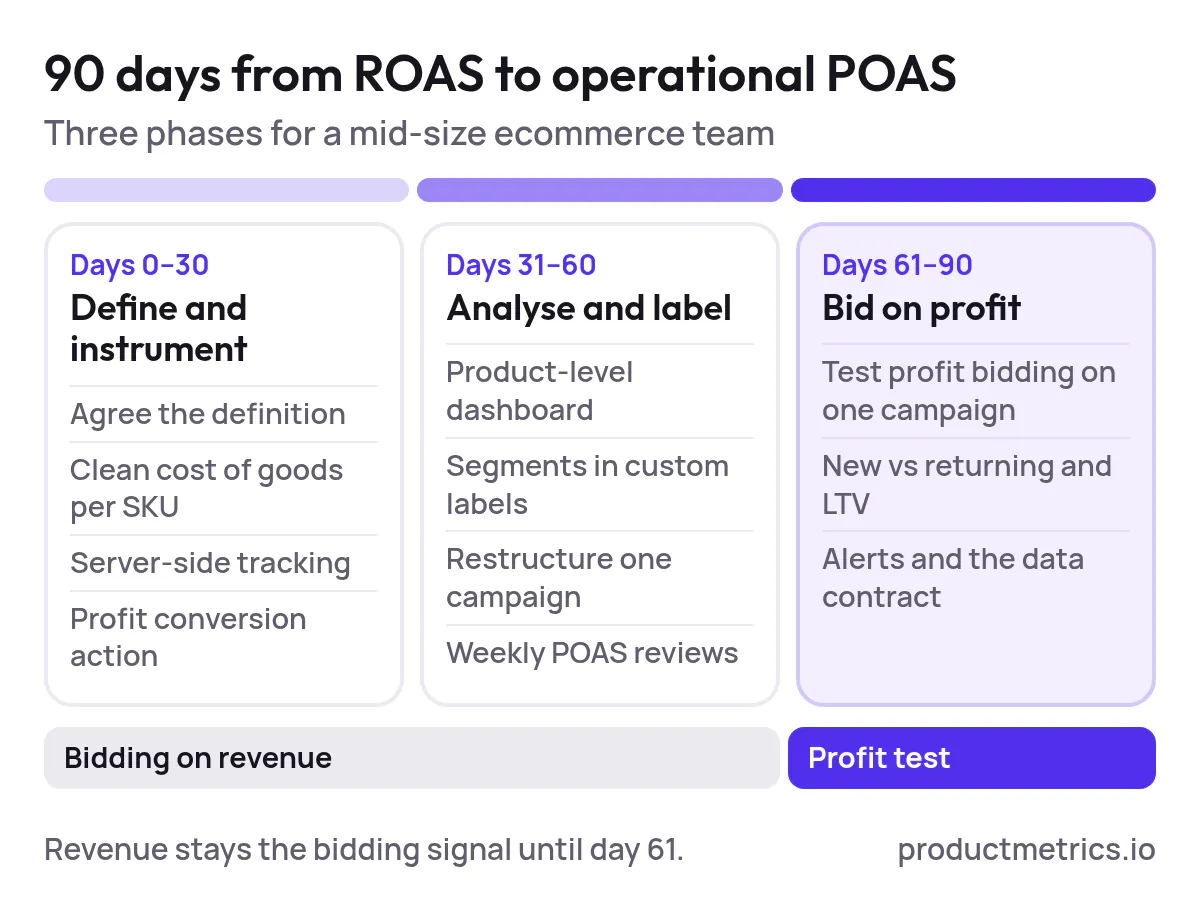
_Bidding stays on revenue for the first 60 days; profit bidding starts as a test on one campaign._
### Days 0–30 Definition And Instrumentation
- Agree the POAS definition with finance and analytics (Section 2).
- Populate or clean COGS fields per SKU in your ecommerce platform.
- Stand up server‑side tracking for Google Ads (Full Signal, server‑side GTM, or equivalent). (Source: [Product Metrics – Server-side tracking tools for ecommerce](https://www.productmetrics.io/blog/server-side-tracking-tools))
- Add a **profit conversion action** in Google Ads fed from server‑side events or offline imports.
- Keep bidding on revenue; use profit conversions as secondary for now.
### Days 31–60 Product-Level Analysis And Label-Driven Campaigns
- Build or adopt a [product‑level dashboard](https://www.productmetrics.io/blog/google-shopping-roas-dashboard) that shows clicks, spend, ROAS, and POAS per SKU.
- Segment products into performance buckets (Stars, Dogs, etc.) based on clicks and POAS, and map these into Merchant Center custom labels. (Source: [Product Metrics – Product segmentation marketing](https://www.productmetrics.io/blog/product-segmentation-marketing))
- Restructure at least one Shopping or feed‑only PMax campaign around these labels instead of generic product groups.
- Begin weekly POAS reviews, focusing on segment‑level insights and obvious drainer SKUs.
### Days 61–90 Profit-Based Bidding And Continuous Improvement
- For at least one campaign, test **bidding directly on profit** (either by switching the primary conversion to profit or adjusting [tROAS targets to align with contribution margin](https://www.productmetrics.io/blog/target-roas-from-margin)). (Source: [Reddit – Sending the actual margin as conversion value to Google](https://www.reddit.com/r/PPC/comments/1wxcyr1/sending_the_actual_margin_as_conversion_value_to/))
- Introduce **new vs returning** and LTV‑adjusted conversions where the data supports it. (Source: [Product Metrics – Shopify server-side tracking](https://www.productmetrics.io/platforms/shopify))
- Tighten governance: add POAS to trading decks, define alert thresholds, and formalize your “POAS data contract.”
By the end of this period, POAS should no longer be “a thing we look at in a dashboard,” but a metric embedded in how you segment products, structure campaigns, and negotiate targets.
## Where Product Metrics Fits In
You can implement POAS tracking with a homegrown stack of scripts, feeds, and spreadsheets. Many teams do. But as catalogs grow and teams multiply, the overhead of maintaining segmentation, labels, and tracking across thousands of SKUs becomes the limiting factor.
Product Metrics is designed specifically to solve that operational burden for Google Ads and Performance Max:
- **Full Signal Tracking** delivers server‑side, adblocker‑resilient conversion tracking that sends revenue, profit, and new vs returning conversions (with LTV) to Google Ads and Meta. (Source: [Product Metrics – Product-Level Google Ads Optimisation](https://www.productmetrics.io/))
- **ML product segmentation** classifies every product into one of six segments based on ad clicks and ROAS/POAS vs your targets, updated daily. (Source: [Product Metrics – Product segmentation glossary](https://www.productmetrics.io/glossary/product-segmentation))
- **Product Context** layers in journeys, competitor prices, margin, and stock so you understand why a product’s POAS looks the way it does before you change its priority. (Source: [Product Metrics – Product-Level Google Ads Optimisation](https://www.productmetrics.io/))
- **Product Rules and Merchant Center labels** turn those insights into controlled, repeatable actions by writing only the labels you approve back into Merchant Center, which your Shopping and PMax campaigns then use. (Source: [Product Metrics – Google Ads segmentation buyer’s guide](https://www.productmetrics.io/blog/google-shopping-segmentation-tracking-software))
For teams serious about POAS, the real win is not just “profit tracking” but the ability to:
See, explain, and act on POAS at the product level—across thousands of SKUs—without rebuilding your own tooling every quarter.
If that’s the next step in your Google Ads optimization, Product Metrics gives you a governed way to get there, starting with a free product‑level analysis of your catalog. (Source: [Product Metrics – About](https://www.productmetrics.io/about))
## Keep reading.
- [POAS In The Real World Passing Profit, Composing Conversion Value, And Bidding With Confidence](https://www.productmetrics.io/blog/poas-conversion-value-bidding)
- [Best POAS Tracking Tools for E‑commerce and Google Ads A Practical Buyer’s Guide](https://www.productmetrics.io/blog/poas-tracking-tools)
- [The Profit Segmentation Playbook For Google Shopping: From ROAS To POAS](https://www.productmetrics.io/blog/profit-segmentation-google-shopping)
---
Written by Berend Vrakking, founder of Product Metrics. Last updated 2026-11-09.
1M+ products analysed · Nominated at the Dutch Search Awards for Best Measurement Campaign (2023) and Best Use of Data (2024)
HTML version: https://www.productmetrics.io/blog/operationalizing-poas