---
title: "Tracking POAS In Google Ads & Shopping Setup Accuracy And Per-Product Profit"
description: "How to send profit as your Google Ads conversion value, check it against your own numbers and use per-product POAS in Shopping and Performance Max."
canonical: "https://www.productmetrics.io/blog/poas-tracking-google-ads"
pageType: article
language: en
publisher: "Product Metrics"
author: "Berend Vrakking"
datePublished: 2026-11-09
dateModified: 2026-11-09
image: "https://www.productmetrics.io/og/blog/poas-tracking-google-ads.png"
---
> Content index: https://www.productmetrics.io/llms.txt
# Tracking POAS In Google Ads & Shopping Setup Accuracy And Per-Product Profit
## Key takeaways
- **Profit on ad spend (POAS)** measures how much contribution profit before advertising your campaigns generate per unit of ad spend.
- Per-SKU POAS is what lets you decide which products to push, fix or pause in Shopping and Performance Max.
- Before you trust POAS in bidding decisions, you need to prove that the profit values Google Ads sees match your own systems.
If you run Google Ads or Performance Max on revenue-only ROAS, you can scale campaigns that look great in the UI but quietly lose money once costs land in the P&L. [Profit on ad spend (POAS)](https://www.productmetrics.io/glossary/poas) fixes that, but only if your tracking actually sends profit — not just revenue — back into Google Ads.
This guide walks through how to:
- Define POAS correctly for ecommerce
- Calculate profit per order and per SKU
- Send profit as your Google Ads conversion value
- QA the setup so numbers match finance
- Use per-product POAS to restructure Shopping and PMax
Along the way, you’ll see where a platform like Product Metrics can take the heavy lifting off your team by sending profit and product-level labels to Google Ads, Meta and Merchant Center automatically. (Source: [Product Metrics](https://www.productmetrics.io/))
## Quick Answer How To Track POAS In Google Ads And Shopping
At a high level, tracking POAS for Google Ads and Google Shopping campaigns looks like this:
1. **Define POAS** as contribution profit before advertising divided by ad spend. (Source: [Product Metrics](https://www.productmetrics.io/glossary/poas))
2. **Calculate profit per order (and ideally per SKU)** by starting from net revenue and subtracting product and variable order costs such as cost of goods, shipping that you subsidize, and payment fees. (Source: [Product Metrics](https://www.productmetrics.io/glossary/poas))
3. **Create a Google Ads purchase conversion action** that uses different values per conversion and accepts a dynamic `value` field. (Source: [Google Ads Help](https://support.google.com/google-ads/answer/6095947))
4. **Pass profit, not revenue, into the conversion tag** for each order via the Google tag or Google Tag Manager. (Source: [Google Developers](https://developers.google.com/tag-platform/devguides/conversions))
5. **Verify tracking accuracy** with Tag Assistant, test orders, and order-level reconciliations against your ecommerce and finance data. (Source: [Google Ads Help](https://support.google.com/google-ads/answer/1722054))
6. **Use per-SKU POAS in Shopping and PMax** by grouping products via Merchant Center custom labels (e.g., margin or POAS tiers) and adjusting bids/targets per group. (Source: [Google Merchant Center Help](https://support.google.com/merchants/answer/6324473))
7. **Layer on server-side tracking and enhanced conversions** to recover conversions lost to ad blockers and privacy changes, improving the accuracy of POAS as a signal. (Source: [Google Ads Help](https://support.google.com/google-ads/answer/15712870))
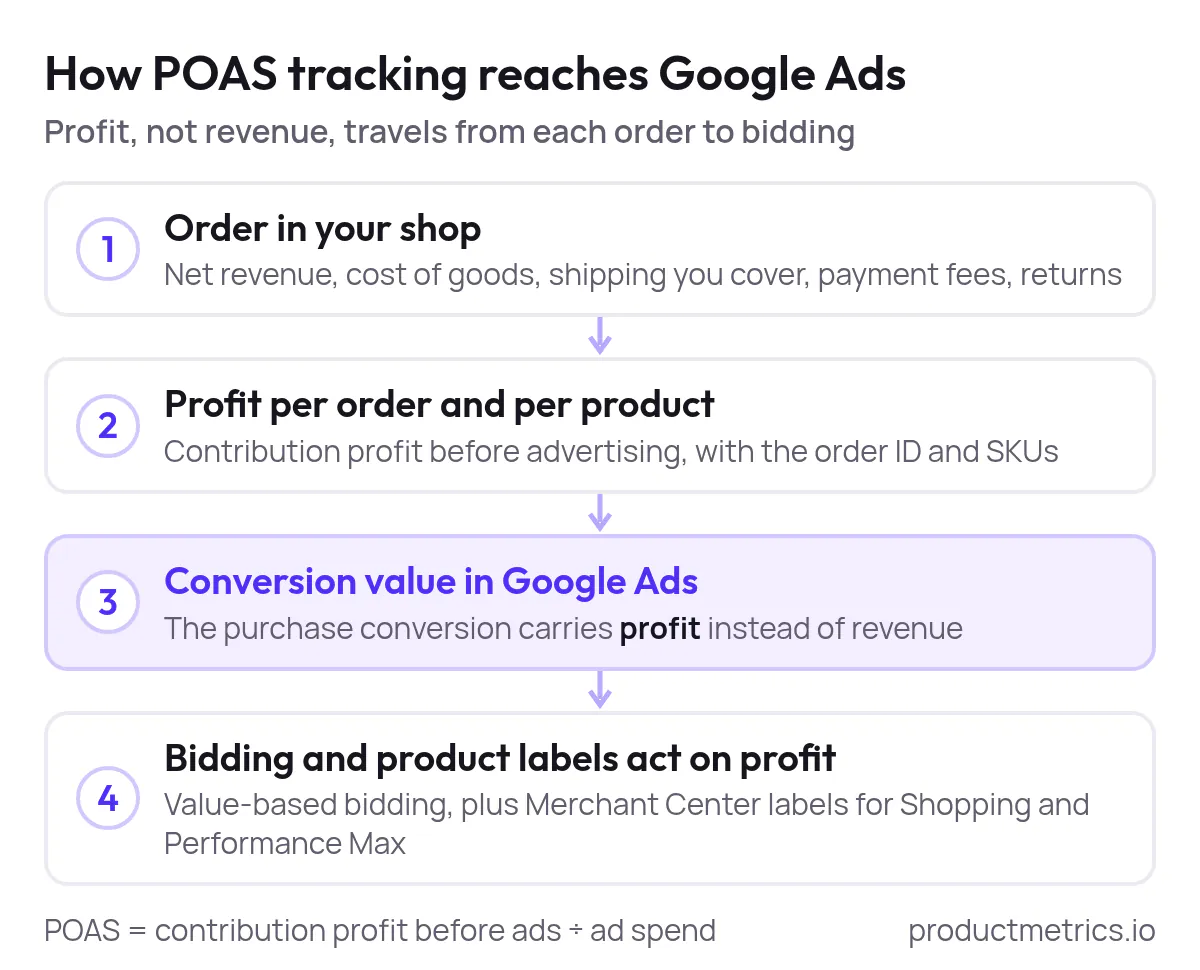
_POAS tracking is one route: each order's profit becomes the conversion value, and bidding and product labels act on that profit instead of revenue._
If you want this done for you, Product Metrics connects your shop, Merchant Center, Google Ads and Meta, then sends server-side conversion values for profit, revenue, new vs returning customers and LTV, plus product-level labels that campaigns can bid on. (Source: [Product Metrics](https://www.productmetrics.io/))
## 1 What POAS Is And How It Differs From ROAS In Google Ads
**Profit on ad spend (POAS)** measures how much contribution profit before advertising your campaigns generate per unit of ad spend. In Product Metrics’ definition:
> **POAS = contribution profit before ads ÷ ad spend**
where contribution profit before ads is net revenue minus product and variable order costs (for example, cost of goods, shipping you cover, payment fees, and returns). (Source: [Product Metrics](https://www.productmetrics.io/glossary/poas))
By contrast, **ROAS (return on ad spend)** divides revenue by ad spend and ignores cost of goods and fulfilment, so [two products with the same ROAS can be wildly different in profit](https://www.productmetrics.io/blog/poas-vs-roas). (Source: [WeProfit](https://www.weprofit.com/guides/roas-vs-poas))
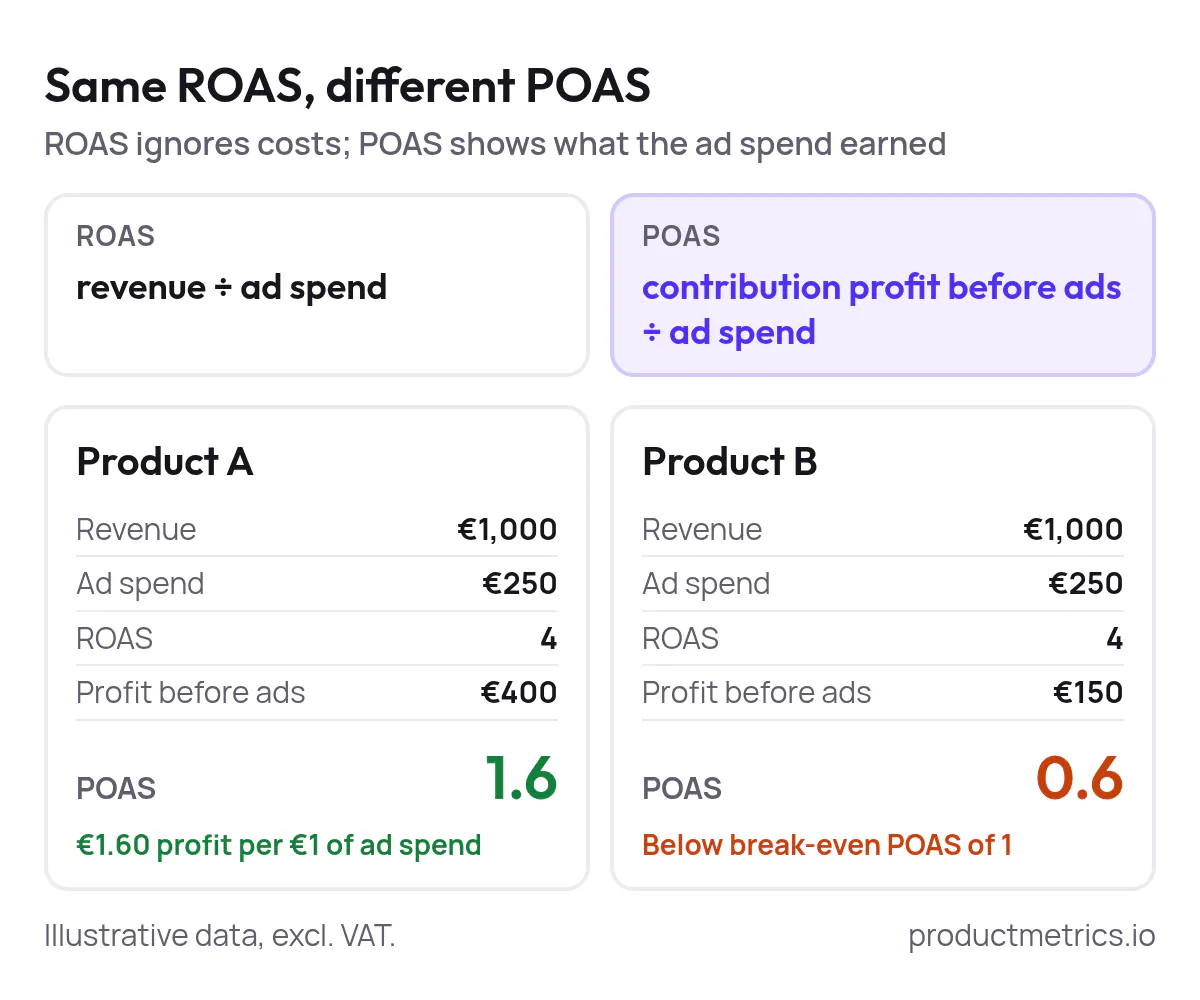
_Both products show a ROAS of 4, yet one returns €1.60 of profit per €1 of ad spend and the other stays below break-even POAS of 1. Illustrative data._
From a Google Ads perspective, this distinction matters because value-based bidding strategies such as **Maximize conversion value** and **Target ROAS** optimize toward whatever values you send back as conversions. (Source: [Google Ads Help](https://support.google.com/google-ads/answer/14792795)) If those values are profit instead of revenue, Smart Bidding learns to find buyers and products that grow profit, not just turnover.
## 2 Decide What Profit You Will Track Per Product
Before you touch tags or campaigns, decide exactly which costs you include in “profit.” A practical ecommerce definition for POAS usually starts from:
- **Net revenue** (after discounts, excluding sales tax where applicable)
- **Minus cost of goods sold per SKU**
- **Minus variable fulfilment costs per order**, such as shipping subsidies, packaging and payment processor fees
- **Minus expected returns cost** for that SKU or category, where you can estimate it
That yields **[contribution profit before advertising](https://www.productmetrics.io/glossary/contribution-margin)**, the numerator Product Metrics uses in its POAS definition. (Source: [Product Metrics](https://www.productmetrics.io/glossary/poas))
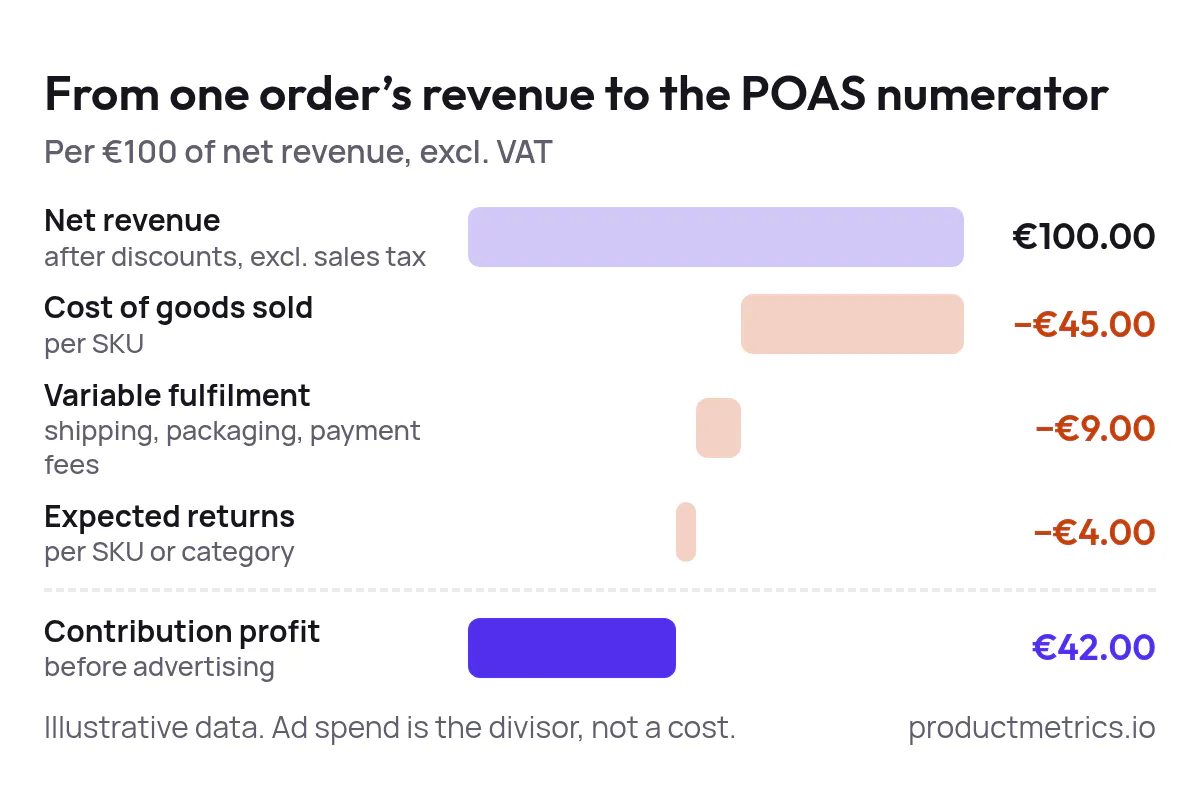
_From €100 of net revenue, €42 is left as contribution profit before advertising once cost of goods, fulfilment and expected returns are taken off. Illustrative data._
You can apply that at two levels:
- **Per order:** Sum profit across all items in the basket and pass that as the conversion value.
- **Per SKU:** Track which SKUs were in the order and attribute profit and ad spend at product level, so you can see POAS for each product rather than only the account average. (Source: [Product Metrics](https://www.productmetrics.io/glossary/poas))
Per-SKU POAS is what lets you decide which products to push, fix or pause in Shopping and [Performance Max](https://www.productmetrics.io/performance-max).
## 3 Choose Your POAS Tracking Architecture
There are three common ways to get profit into Google Ads as a conversion value:
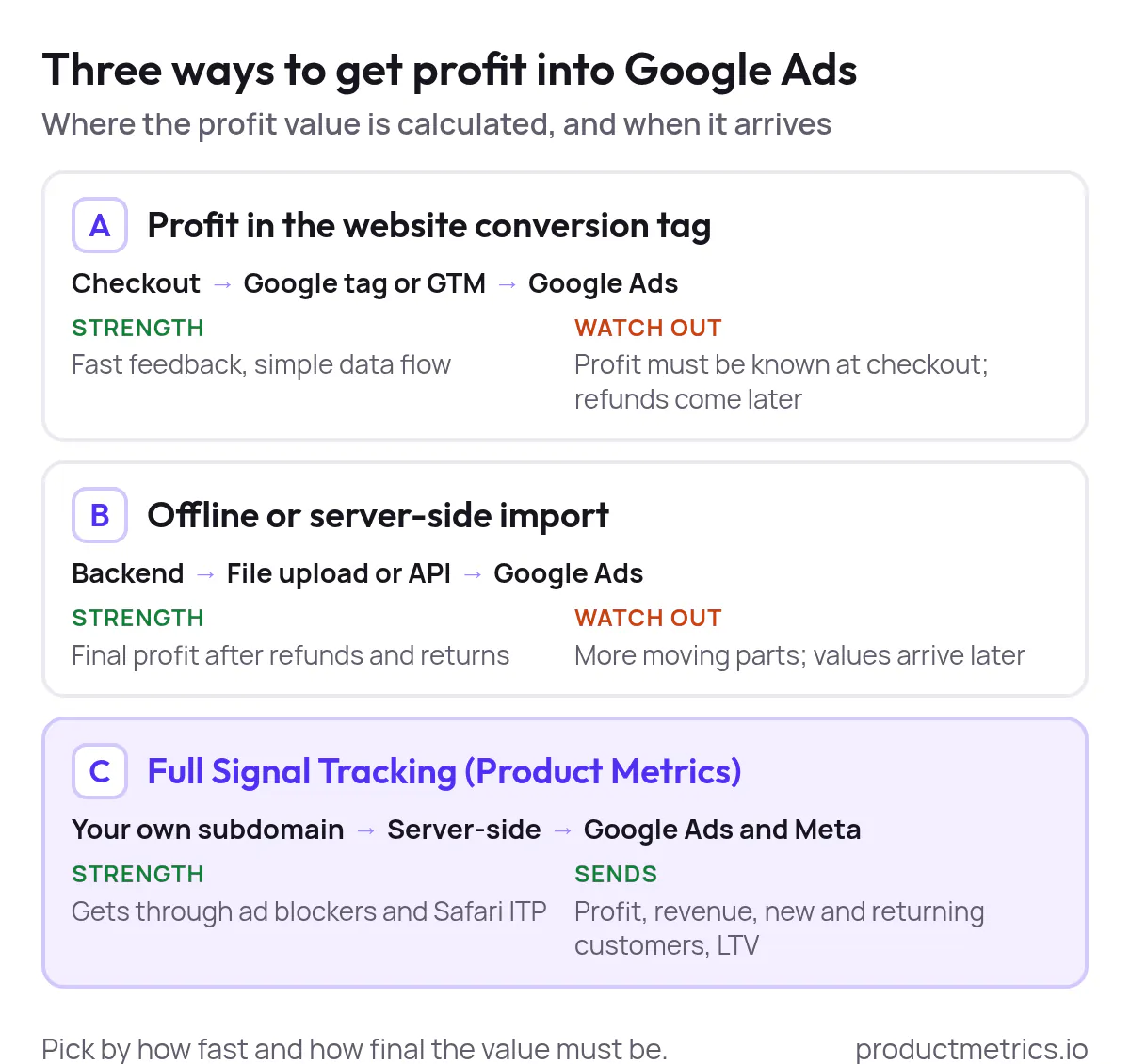
_The three routes differ in when the profit value arrives and how final it is; Full Signal Tracking also sends revenue, new and returning customers and LTV to Google Ads and Meta._
### Option A Real-Time Profit In The Website Conversion Tag
Here, you:
1. Calculate profit for the order at checkout.
2. Pass that profit into the `value` field of your Google Ads conversion tag (via the Google tag or Google Tag Manager) when the purchase happens. (Source: [Google Ads Help](https://support.google.com/google-ads/answer/6095947))
Pros:
- Fast feedback for bidding
- Simple data flow: browser → tag → Google Ads
Cons:
- Harder to adjust for cancellations, partial refunds or late returns
- Requires profit to be known at checkout
### Option B Offline Or Server-Side Import Of Profit Values
Here, you:
1. Capture the [Google click identifier (GCLID or equivalent)](https://www.productmetrics.io/glossary/gclid) and order ID with each order.
2. Compute final contribution profit after refunds and returns in your backend.
3. Upload a file or send an API call with GCLID, conversion name, time, value and currency to Google Ads as an offline conversion. (Source: [Google Ads Help](https://support.google.com/google-ads/answer/7014069))
Pros:
- Profit matches what finance sees after adjustments
- Easier to incorporate returns and transaction fees precisely
Cons:
- More moving parts and potential failure points
- Values arrive later, which can slow initial learning
### Option C Full Server-Side Tracking With Profit Product Metrics
Platforms like Product Metrics sit between your ecommerce platform and Google Ads and Meta. Product Metrics’ **[Full Signal Tracking](https://www.productmetrics.io/server-side-tracking)** collects click IDs and orders on your own subdomain, bypasses ad blockers and Safari’s ITP, then sends purchase conversions with order ID and value to Google Ads and Meta using a server-side endpoint. (Source: [Product Metrics](https://www.productmetrics.io/))
Full Signal Tracking is described as server-side, adblocker-proof conversion tracking that keeps sending purchases even when [the default Google Ads browser tag is blocked](https://www.productmetrics.io/ad-blocker-conversion-tracking), by rotating through a first-party endpoint. (Source: [Product Metrics](https://www.productmetrics.io/))
On top of that, Product Metrics’ LTV guides say it sends **profit, revenue, new customers, returning customers and lifetime value** as conversion actions to Google Ads and Meta, so Smart Bidding can work with richer signals. (Source: [Product Metrics](https://www.productmetrics.io/glossary/ltv-adjusted-roas))
If you don’t want to own a custom offline import pipeline, Option C gives you [server-side reliability](https://www.productmetrics.io/blog/what-is-server-side-tracking) plus profit-aware signals with a turnkey setup.
## 4 Implement POAS Tracking With Dynamic Conversion Values Hands-On
Below is a generic, platform-agnostic walkthrough you can adapt whether you eventually send profit directly or via a tool like Product Metrics.
### 4.1 Create Or Edit Your Purchase Conversion Action
1. In Google Ads, go to **Tools & Settings → Conversions**.
2. Create a new **Website** conversion (e.g., “Purchase – Profit”) or edit your existing purchase conversion.
3. Under **Value**, choose **“Use different values for each conversion”** and provide a fallback value for when none is sent. (Source: [Google Ads Help](https://support.google.com/google-ads/answer/6095947))
4. Set **Count = Every**, since each purchase has its own profit.
5. Save the conversion action and note the **conversion ID and label** for later tag configuration. (Source: [Google Developers](https://developers.google.com/tag-platform/devguides/conversions))
You can keep a separate [revenue-based conversion action](https://www.productmetrics.io/blog/google-ads-conversion-tracking) as a secondary metric for reporting while optimizing bidding on the profit-based one.
### 4.2 Calculate Profit Per Order And Per SKU
In your ecommerce backend or tag manager data layer, calculate fields like:
- `item_revenue` per SKU (net of discounts)
- `item_cogs` per SKU
- `order_shipping_subsidy` (what you actually absorb)
- `payment_fees` and other variable costs
Then compute, for example:
order_profit_before_ads = Σ(item_revenue - item_cogs) - order_shipping_subsidy - payment_fees
This matches the contribution profit before advertising definition used for POAS. (Source: [Product Metrics](https://www.productmetrics.io/glossary/poas))
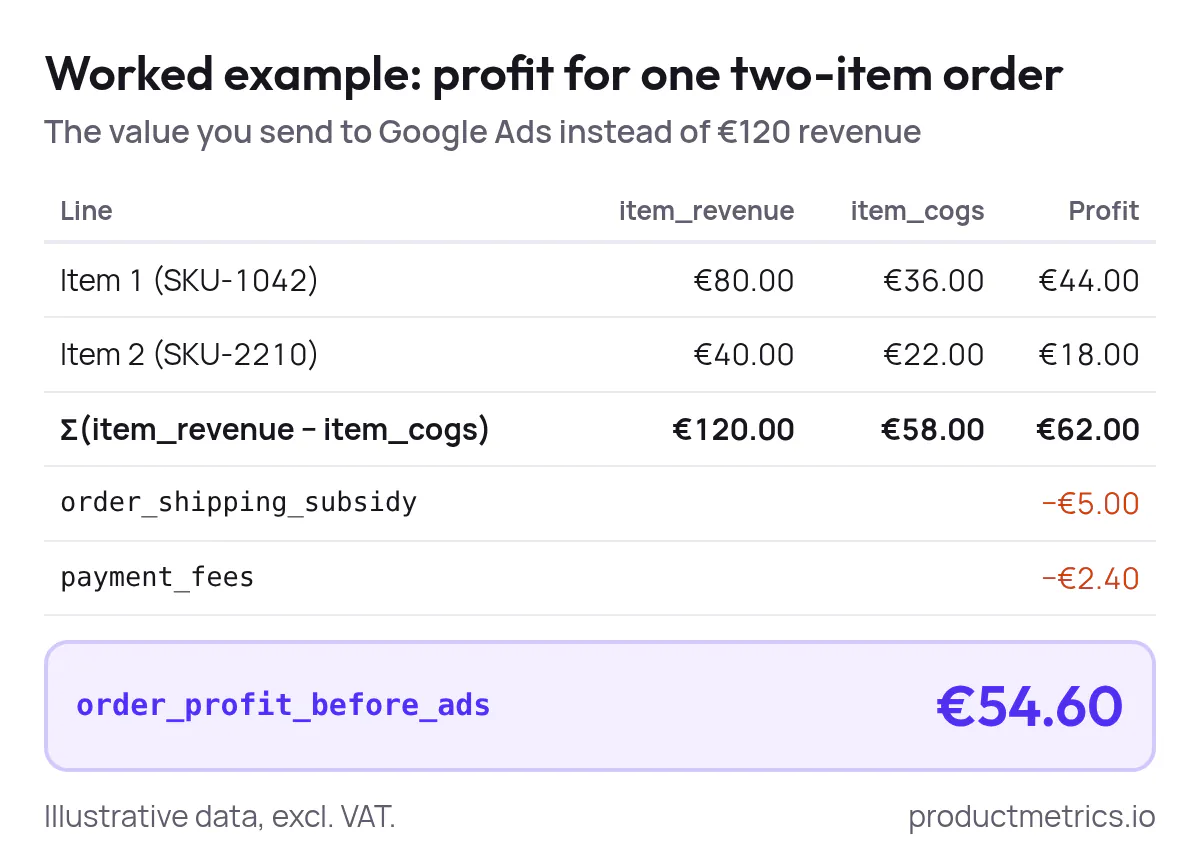
_A €120 order sends €54.60 to Google Ads as its conversion value once item costs, the shipping subsidy and payment fees are taken off. Illustrative data._
If you want per-SKU POAS, also persist profit and quantity per `item_id` or SKU alongside the order ID so you can reconcile back to Google Ads performance later. Google’s Shopping product reporting schema supports product-level revenue, gross profit and gross profit margin when cart data is enabled. (Source: [Google Developers](https://developers.google.com/google-ads/api/docs/shopping-ads/reporting))
### 4.3 Pass Profit Into The Google Ads Tag Or Google Tag Manager
You now need to send `order_profit_before_ads` to Google Ads as the `value` for your purchase conversion.
a) Using the Google tag (gtag.js)
On your order confirmation page (or server side, if you proxy the tag), call the conversion event with a dynamic `value` and `currency`:
```js
gtag('event', 'conversion', {
'send_to': 'AW-CONVERSION_ID/CONVERSION_LABEL',
'value': order_profit_before_ads, // your calculated profit
'currency': 'USD'
});
```
Google’s help docs specify that for transaction-specific values you dynamically set the `value` and `currency` parameters at runtime, passing the value as a number in the correct currency code. (Source: [Google Ads Help](https://support.google.com/google-ads/answer/6095947))
b) Using Google Tag Manager
1. Push an `order_completed` event to the data layer that includes `order_profit_before_ads`, order ID and line items.
2. In GTM, create a **Google Ads Conversion Tracking** tag, paste in the conversion ID and label from your conversion action, and set **Value** to a variable that reads `order_profit_before_ads` from the data layer. (Source: [Google Developers](https://developers.google.com/tag-platform/devguides/conversions))
3. Trigger the tag on the `order_completed` event.
4. Optionally send `transaction_id` so Google can deduplicate conversions, which the help center recommends when tracking purchases. (Source: [Google Ads Help](https://support.google.com/google-ads/answer/6386790))
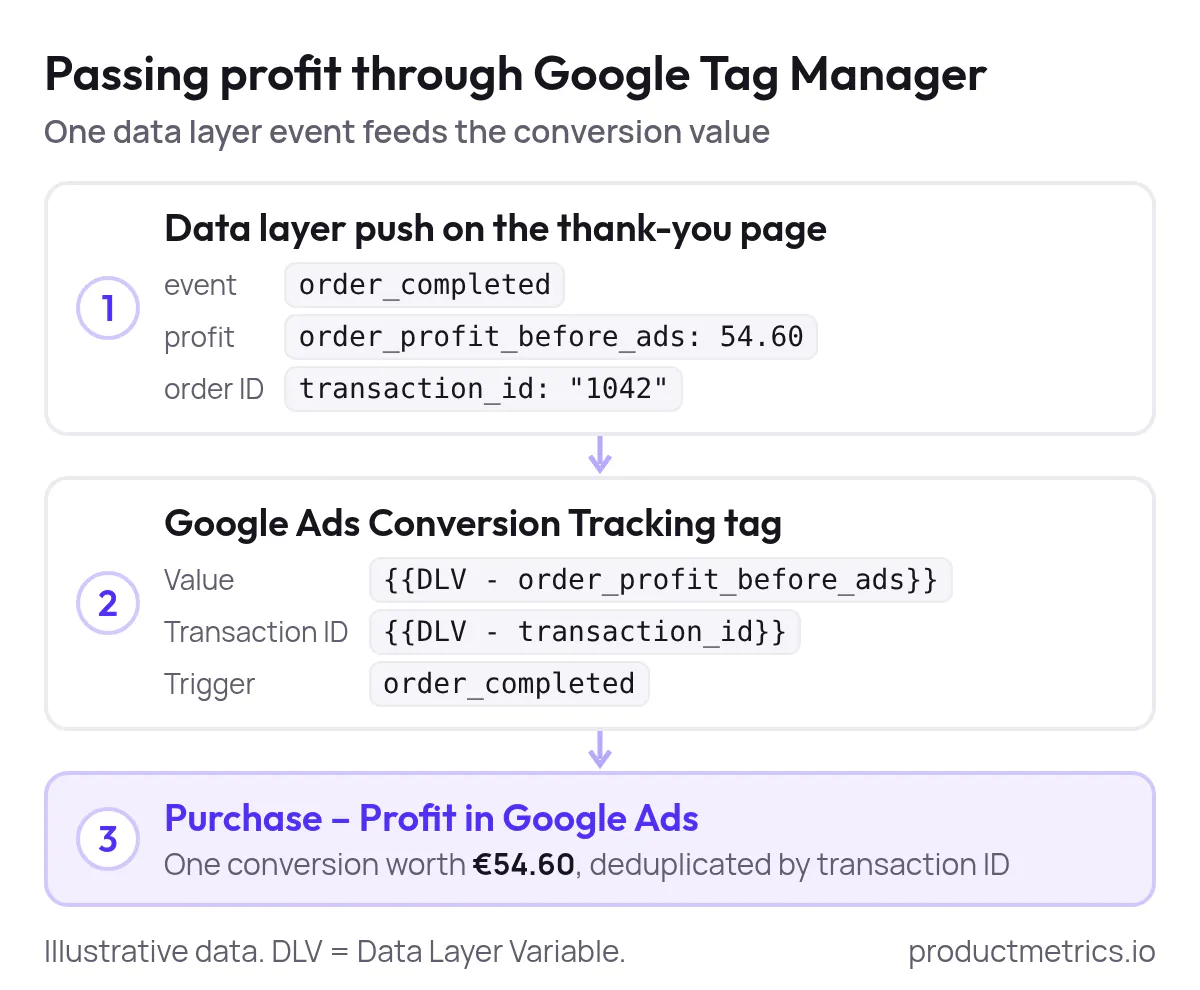
_One data layer event carries the profit and the order ID, so the tag sends profit as the value and Google can deduplicate the purchase. Illustrative data._
If you use Product Metrics’ Full Signal Tracking, this server-side pipeline performs the same job while avoiding browser-level blocks, then passes purchase conversions (with value and order ID) directly to Google Ads and Meta. (Source: [Product Metrics](https://www.productmetrics.io/))
### 4.4 QA Checklist Prove Your POAS Numbers Are Correct
Before you trust POAS in bidding decisions, you need to prove that the profit values Google Ads sees match your own systems.
1. **Tag firing & payloads**
- Use GTM’s Preview mode or browser tools plus Google Tag Assistant to confirm the purchase tag fires exactly once per order with the expected `value` and `transaction_id`. (Source: [Google Ads Help](https://support.google.com/google-ads/answer/1722054))
2. **Sample order reconciliation**
- Pick several real orders, compute contribution profit from your backend, and compare to the conversion values recorded in Google Ads for those transaction IDs.
3. **Currency and tax sanity check**
- Ensure you’re sending values in the same currency the Google Ads account expects, and that you’re not double-counting tax when you subtract costs.
4. **Duplicate prevention**
- Confirm you are not counting both GA4 imports and Google Ads tags as primary conversions for the same purchase. Google recommends being deliberate about which conversions are included in the main **Conversions** column. (Source: [Google Ads Help](https://support.google.com/google-ads/answer/1722054))
5. **Coverage vs revenue**
- Compare total revenue and total profit in Google Ads to your ecommerce platform over a representative window. If a large chunk of orders is missing, consider [server-side tracking](https://www.productmetrics.io/server-side-tracking) or [enhanced conversions](https://www.productmetrics.io/blog/enhanced-conversions-vs-server-side-tracking).
> **Send profit, not just revenue, back into Google Ads and Meta.** Full Signal Tracking gets through every adblocker, so bidding works on the profit of every order. Sends revenue, profit and new customers to Google Ads and Meta. [Book a demo](https://www.productmetrics.io/demo)
## 5 Alternative POAS Via Offline Or Server-Side Imports
For some businesses, especially those with longer fulfilment cycles or volatile returns, it’s cleaner to compute profit after the fact and import it.
### 5.1 Classic Offline Conversion Import
With Google’s offline conversion imports you can upload a file that ties each click to a later conversion with a specific value:
1. Capture the **GCLID** or other allowed click identifier with each lead or order.
2. When profit is known (for example, after shipment or return window), create a CSV with columns like **Google Click ID, Conversion Name, Conversion Time, Conversion Value, Conversion Currency**.
3. Upload it under **Tools & Settings → Conversions → Upload** or via the Google Ads API. (Source: [Google Ads Help](https://support.google.com/google-ads/answer/7014069))
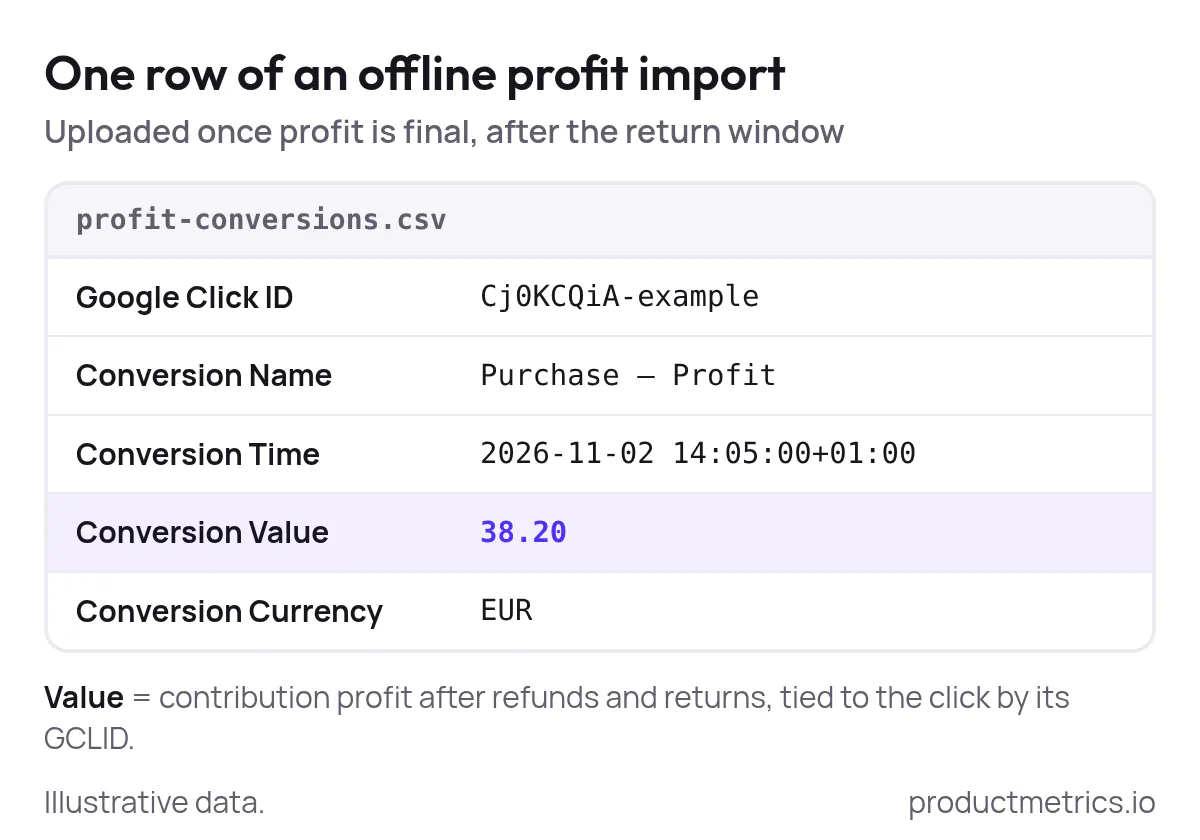
_Each row ties one click ID to the order's final profit, so the value Google Ads receives already reflects refunds and returns. Illustrative data._
This approach lets you send **true profit** after all adjustments, but requires careful monitoring of Google’s evolving policies around offline imports.
### 5.2 Enhanced And Server-Side Conversions
Google’s **enhanced conversions for web** allow you to add hashed first-party customer data (email, phone, address) to your conversion tags so more conversions are matched back to ads despite browser restrictions, improving measurement completeness. (Source: [Google Ads Help](https://support.google.com/google-ads/answer/15712870))
On the server side, Product Metrics’ Full Signal Tracking places a first-party endpoint on your domain, keeps click IDs and orders server-side, and then sends purchase conversions (with value and order ID) to Google Ads and Meta from your server even when the client-side tag is blocked. (Source: [Product Metrics](https://www.productmetrics.io/))
The net effect in both cases is the same: **more of your real, profit-carrying conversions reach Google Ads**, which makes POAS a more reliable signal for bidding.
## 6 Per-Product POAS For Google Ads And Performance Max
Once you have profit flowing into Google Ads, the next step is to make POAS visible **per product**, not just per campaign.
### 6.1 Use Merchant Center Custom Labels For Margin And POAS Tiers
Google Merchant Center offers five optional **custom label** attributes (`custom_label_0` through `custom_label_4`) that you can fill with your own values, up to 1,000 distinct values per attribute. (Source: [Google Merchant Center Help](https://support.google.com/merchants/answer/6324473)) These labels can be used in Shopping and PMax campaigns to subdivide product groups by things Google doesn’t know about, such as margin bands or POAS tiers. (Source: [Google Partners](https://storage.googleapis.com/support-kms-prod/CBEFECE0C83A0BAED9049AF9EF0A58FBCA9D))
A simple, profit-first scheme looks like this:
- `custom_label_0` → **margin or POAS tier**, e.g. `margin_high`, `margin_medium`, `margin_low`
- `custom_label_1` → lifecycle or seasonality
- `custom_label_2` → price position vs competitors
You can then:
- Subdivide Shopping or [PMax listing groups](https://www.productmetrics.io/blog/product-segmentation-google-shopping-pmax) by these labels
- Set **more aggressive targets** (lower tCPA / higher tROAS) for high-margin or high-POAS tiers
- Protect spend by tightening targets or even excluding **low-margin / low-POAS** tiers from paid traffic
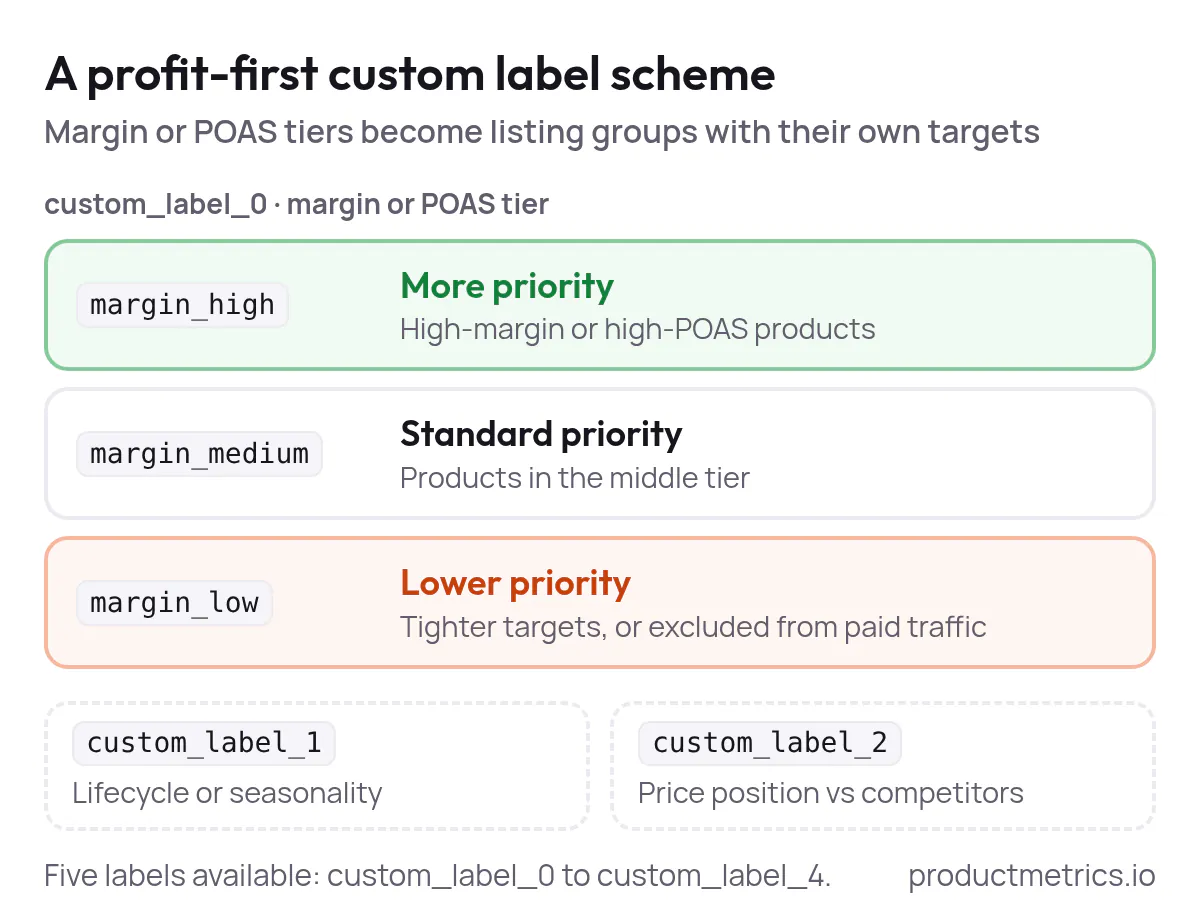
_One label for the margin or POAS tier gives each tier its own listing group, so high-margin products get more priority and thin-margin products less._
Google’s own Shopping optimization material recommends using custom labels to subdivide inventory and bid differently by goals such as margin or price band. (Source: [Google Marketing Platform](https://services.google.com/fh/files/misc/shape-up-your-shopping-campaigns-whitepaper.pdf))
### 6.2 How Product Metrics Automates Per-Product POAS
Product Metrics is designed for exactly this layer of work:
- It connects to **Shopify, WooCommerce, Magento, Lightspeed and Shopware 6**, then to Google Ads, Meta and Merchant Center. (Source: [Product Metrics](https://www.productmetrics.io/))
- It segments every product into [six segments](https://www.productmetrics.io/product-segmentation) — **Stars, Question Marks, Cash Cows, Dogs, Drainers and Ghosts** — based on ad clicks and return measured in POAS against your target. (Source: [Product Metrics](https://www.productmetrics.io/))
- Rules can then write segment labels such as `stars`, `dogs` or `drainers` into [Merchant Center custom labels](https://www.productmetrics.io/glossary/custom-labels), automatically. (Source: [Product Metrics](https://www.productmetrics.io/))
- Those labels become product groups your Shopping and PMax campaigns can bid on.
For example, the site shows a rule like:
> “When POAS ≥ target and margin ≥ threshold with enough stock, set `custom_label_0 = star_candidate`.” (Source: [Product Metrics](https://www.productmetrics.io/))
This closes the loop:
1. Server-side tracking captures more conversions with accurate values.
2. Profit and POAS are calculated per product.
3. Segmentation and rules convert that into Merchant Center labels.
4. Campaigns bid differently on each label.
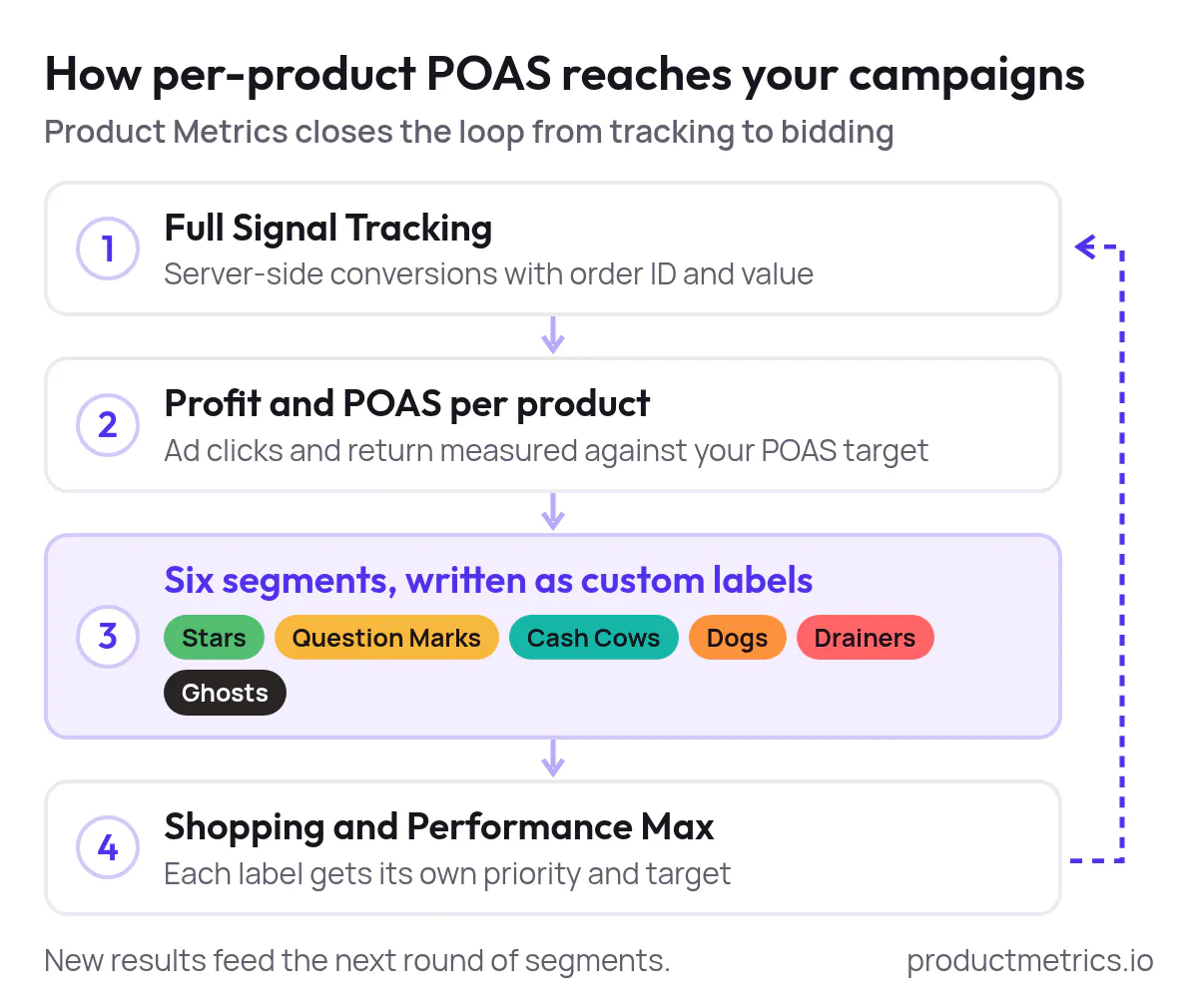
_Each new round of tracked profit updates the segments, and the custom labels carry them into Shopping and Performance Max without a feed export._
You get per-SKU POAS without maintaining spreadsheets, scripts or manual feed exports.
> **Grow revenue with the products that perform best.** Every product segmented on profit, so you know which ones get more priority. [Analyse your products for free](https://app.productmetrics.io/) Log in with Google, no credit card.
## 7 How To Improve POAS Tracking Accuracy Over Time
Even a good first implementation can drift. Here’s how to keep POAS trustworthy as the foundation for Google Ads decisions.
1. **Standardize your profit definition**
Ensure finance, marketing and [your tracking stack](https://www.productmetrics.io/blog/poas-tracking-tools) all agree that POAS uses contribution profit before ads, not net profit after fixed costs and not revenue. (Source: [Product Metrics](https://www.productmetrics.io/glossary/poas))
2. **Audit cost inputs regularly**
- Sync [cost of goods](https://www.productmetrics.io/glossary/cost-of-goods-sold) data from your ERP or catalogue into the ecommerce platform and Product Metrics.
- Refresh shipping and payment cost assumptions when carriers or providers change pricing.
3. **Tighten conversion measurement**
- Add enhanced conversions so more purchases match to ads. (Source: [Google Ads Help](https://support.google.com/google-ads/answer/15712870))
- Consider server-side tracking such as Full Signal Tracking to avoid adblocker losses. (Source: [Product Metrics](https://www.productmetrics.io/))
4. **Monitor import diagnostics and discrepancies**
If you import conversions or use APIs, regularly review Google Ads’ conversion diagnostics and investigate missing values, as Google’s offline import documentation recommends. (Source: [Google Ads Help](https://support.google.com/google-ads/answer/7014069))
5. **Reconcile cohorts, not just totals**
Periodically pick a week, pull all orders and ad clicks, and re-compute POAS per product and per campaign. Differences highlight where tracking, returns handling or attribution windows need adjustment.
6. **Document attribution windows**
Keep a record of the lookback windows used for revenue, profit and ad spend so everyone reads POAS numbers in the same context.
## 8 Turn POAS Signals Into Bidding And Optimization
With accurate profit values in place, you can finally [optimize for POAS, not just report on it](https://www.productmetrics.io/blog/operationalizing-poas).
### 8.1 Use Value-Based Bidding With Profit Values
Google recommends [value-based bidding](https://www.productmetrics.io/glossary/value-based-bidding) strategies such as **Maximize conversion value** and **Target ROAS** when you can send transaction-level values that reflect real business value. (Source: [Google Ads Help](https://support.google.com/google-ads/answer/14792795)) If your conversion value is profit rather than revenue, these same strategies effectively become **profit-based bidding**.
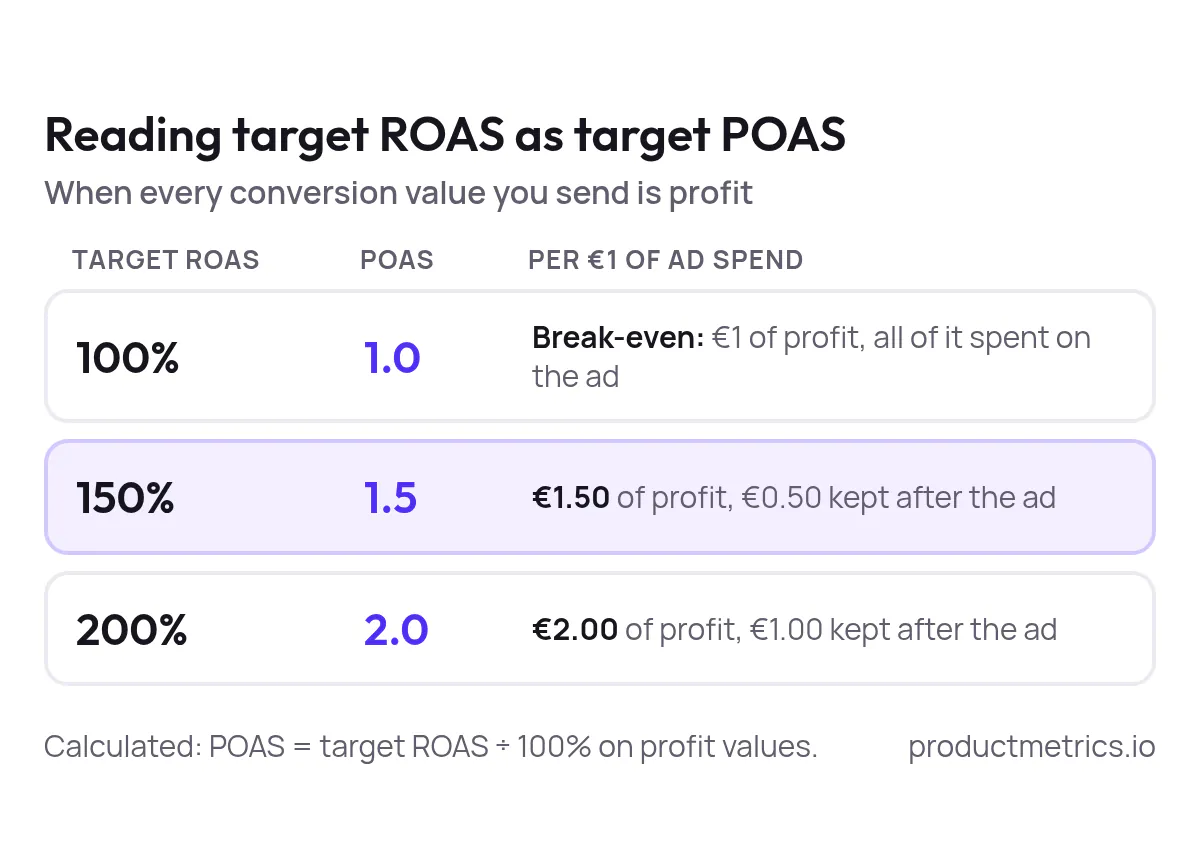
_With profit as the conversion value, a target ROAS of 150% asks for €1.50 of profit per €1 of ad spend: a POAS of 1.5, with €0.50 kept after the ad._
Practical steps:
- Start with **Maximize conversion value** using your profit-based purchase conversion as the primary goal.
- Once you have stable data, move to **Target ROAS**, interpreting that ROAS as “target POAS” because the values you send are profit. (Source: [Google Ads Help](https://support.google.com/google-ads/answer/15099424))
- [Set different targets per campaign or asset group](https://www.productmetrics.io/break-even-roas-calculator) based on margin and POAS tiers; for example, high-margin `stars` might support a lower ROAS target than thin-margin `question_marks`.
### 8.2 Decide When To Optimize For POAS Versus ROAS
- Use **ROAS** when you lack cost data or sell high-margin digital goods where revenue is a good proxy for profit.
- Use **POAS** when margins vary meaningfully by product, shipping or returns — especially in retail ecommerce. (Source: [JudeLuxe](https://www.judeluxe.com/poas-for-dtc/))
- At the account level, use **ROI or LTV:CPA** when you want to factor in fixed costs and customer lifetime value.
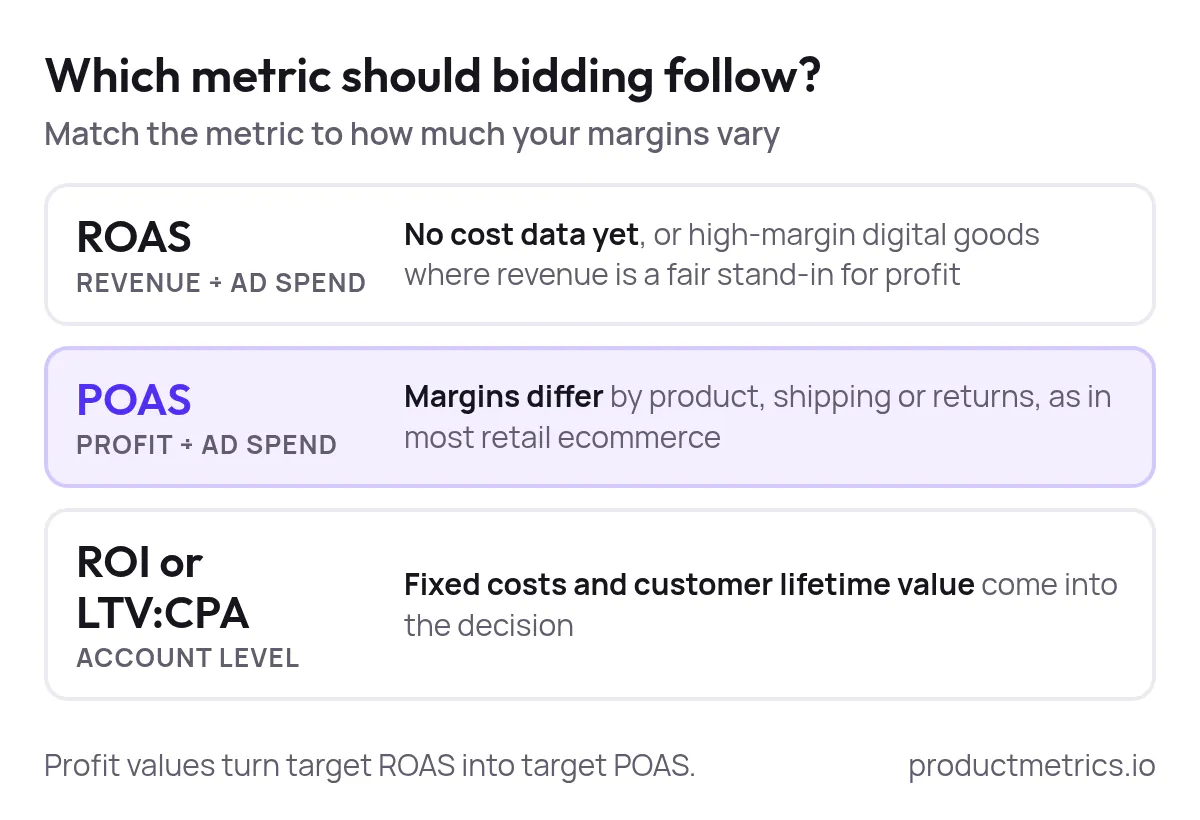
_The more your margins differ between products, the more POAS beats ROAS as the value bidding should follow._
Product Metrics supports both POAS and LTV-adjusted ROAS as metrics, and can send them together as separate conversion actions, so you can experiment safely without losing sight of first-order profitability. (Source: [Product Metrics](https://www.productmetrics.io/glossary/ltv-adjusted-roas))
## FAQ Common POAS Tracking Questions
### How Do I Calculate Profit On Ad Spend Per Product?
For each SKU:
1. Take **net revenue** from orders attributed to ads for that SKU (excluding tax where relevant).
2. Subtract **product and variable order costs** (COGS, shipping you subsidize, payment and fulfilment fees, expected returns cost).
3. Divide the result by **ad spend attributed to that SKU** over the same window.
That ratio is [POAS per product](https://www.productmetrics.io/poas-calculator), using the contribution profit before ads definition. (Source: [Product Metrics](https://www.productmetrics.io/glossary/poas))
### How Do I Track POAS In Google Ads For Ecommerce Campaigns?
- Create a **purchase conversion action** that uses different values per conversion.
- Calculate contribution profit per order at checkout or in your backend.
- Pass that profit into the `value` field of the Google Ads conversion tag or GTM tag.
- Use value-based bidding so Smart Bidding optimizes to those profit values.
Google’s documentation on transaction-specific conversion values shows how to configure dynamic values in the tag. (Source: [Google Ads Help](https://support.google.com/google-ads/answer/6095947))
### How Can I Improve POAS Tracking Accuracy For My Ads?
- Make sure your **cost inputs** (COGS, shipping, fees) are accurate and kept in sync.
- Use **enhanced conversions** and consider **server-side tracking** to recover conversions lost to browser restrictions. (Source: [Google Ads Help](https://support.google.com/google-ads/answer/15712870))
- Regularly reconcile a sample of orders between your store, Product Metrics (if you use it) and Google Ads.
### How Do I Track POAS Effectively For Google Ads And PMax?
- Ensure each purchase sends a **profit value** into Google Ads.
- Use **Merchant Center custom labels** to cluster products by margin or POAS tier. (Source: [Google Merchant Center Help](https://support.google.com/merchants/answer/6324473))
- Split Shopping or PMax listing groups by those labels and assign targets that reflect each tier’s required POAS.
- Use a tool like Product Metrics to keep these labels up-to-date automatically from product-level POAS and margin data. (Source: [Product Metrics](https://www.productmetrics.io/))
### How Does Product Metrics Help Agencies With POAS Tracking Across Clients?
Product Metrics runs as a **product-level optimization layer** across Google Ads and Performance Max for multiple stores. It:
- Connects each client’s shop, Merchant Center and Google Ads without developer work
- Uses machine learning to segment all products by POAS and volume (Stars, Dogs, Drainers, etc.)
- Writes those segments back to Merchant Center as custom labels
- Sends profit, revenue, new vs returning customers and LTV to Google Ads and Meta via Full Signal Tracking (Source: [Product Metrics](https://www.productmetrics.io/))
That lets an agency manage POAS-aware Shopping and PMax structures for many clients from a consistent playbook instead of bespoke spreadsheets and scripts.
If you want to skip the plumbing and go straight to **per-product POAS and profit-based bidding**, you can [analyse your products for free](https://app.productmetrics.io/) or book a demo to see how Product Metrics’ Full Signal Tracking and segmentation would look on your own Shopping and Performance Max data. (Source: [Product Metrics](https://www.productmetrics.io/))
## Keep reading.
- [Google Ads Conversion Tracking Integration The End‑to‑End Playbook](https://www.productmetrics.io/blog/google-ads-conversion-tracking)
- [The Accuracy Benchmark for Google Shopping ROAS: 2026 Vendor Tests, Error Rates, and Methodology](https://www.productmetrics.io/blog/google-shopping-roas-accuracy-benchmark)
- [10 server-side tracking tools for ecommerce teams](https://www.productmetrics.io/blog/server-side-tracking-tools)
---
Written by Berend Vrakking, founder of Product Metrics. Last updated 2026-11-09.
1M+ products analysed · Nominated at the Dutch Search Awards for Best Measurement Campaign (2023) and Best Use of Data (2024)
HTML version: https://www.productmetrics.io/blog/poas-tracking-google-ads