---
title: "Best Google Ads Conversion Tracking Apps for Shopify"
description: "Best Google Ads conversion tracking apps for Shopify, scored on five criteria: Littledata, Elevar, Nabu, Analyzify, Stape and Google’s own app."
canonical: "https://www.productmetrics.io/blog/shopify-google-ads-conversion-tracking-apps"
pageType: article
language: en
publisher: "Product Metrics"
author: "Berend Vrakking"
datePublished: 2026-11-25
dateModified: 2026-11-25
image: "https://www.productmetrics.io/og/blog/shopify-google-ads-conversion-tracking-apps.png"
---
> Content index: https://www.productmetrics.io/llms.txt
# Best Google Ads Conversion Tracking Apps for Shopify
## Key takeaways
- Three of the six Shopify options send purchases from a server, not the shopper’s browser; Littledata leads the weighted scores at 4.3 out of 5.
- Since 26 August 2026, tracking code pasted into the order status page no longer runs on any Shopify plan, so purchases need an app or a server.
- The free Google & YouTube app scores 3.3 of 5: keep it for Merchant Center, but its tag runs in the browser, with no profit value.
Google Ads conversion tracking on Shopify is how each sale in your store gets reported to Google Ads, so its automatic bidding ([Smart Bidding](https://www.productmetrics.io/glossary/smart-bidding "Smart Bidding is a set of Google Ads bidding strategies that use Google AI to optimise for conversions or conversion value in every auction.")) learns which ads sell. When orders go missing on the way, Google Ads learns from only part of your sales.
**Set up server-side tracking.** Today: Ad blockers hide your sales. With Product Metrics: Track every sale and improve your campaign performance. Connect the Product Metrics MCP server (https://www.productmetrics.io/mcp) to Claude, ChatGPT, Cursor or VS Code, or run `claude mcp add --transport http product-metrics https://www.productmetrics.io/mcp` in Claude Code ([how the connection works](https://www.productmetrics.io/docs/mcp/connect)). Then ask it: "Set up server-side conversion tracking for my store with Product Metrics, so Google Ads, Meta and ChatGPT Ads get every paid order. Check my setup status first, walk me through each open step, and give me the link when I need to click something." About 60 seconds in Claude, ChatGPT or Cursor.
I scored six options on five weighted criteria, using vendor docs and Shopify App Store listings from November 2026. You get:
- a weighted score per app, with its inputs
- prices as listed this month
- a pick for each situation
## Why Google Ads conversion tracking breaks on Shopify
Google Ads conversion tracking breaks on Shopify for three reasons: tracking code pasted into checkout no longer runs, tracking waits for the shopper’s consent, and ad blockers stop tracking in the browser.
Google calls the Google & YouTube app “the easiest way to set up conversion tracking” on Shopify. It asks you to remove older tracking code so orders aren’t counted twice. (Source: [Google Ads Help](https://support.google.com/google-ads/answer/13494537))
Shopify now runs checkout tracking through apps and its own pixels. The “Additional scripts” box for pasted code became view-only on 28 August 2025. Pasted code stopped running on the order status page that day for Shopify Plus, and on 26 August 2026 for every other plan. (Source: [Shopify Help Center](https://help.shopify.com/en/manual/checkout-settings/checkout-extensibility/checkout-upgrade); [Shopify.dev](https://shopify.dev/docs/apps/build/online-store/blocking-script-tags))
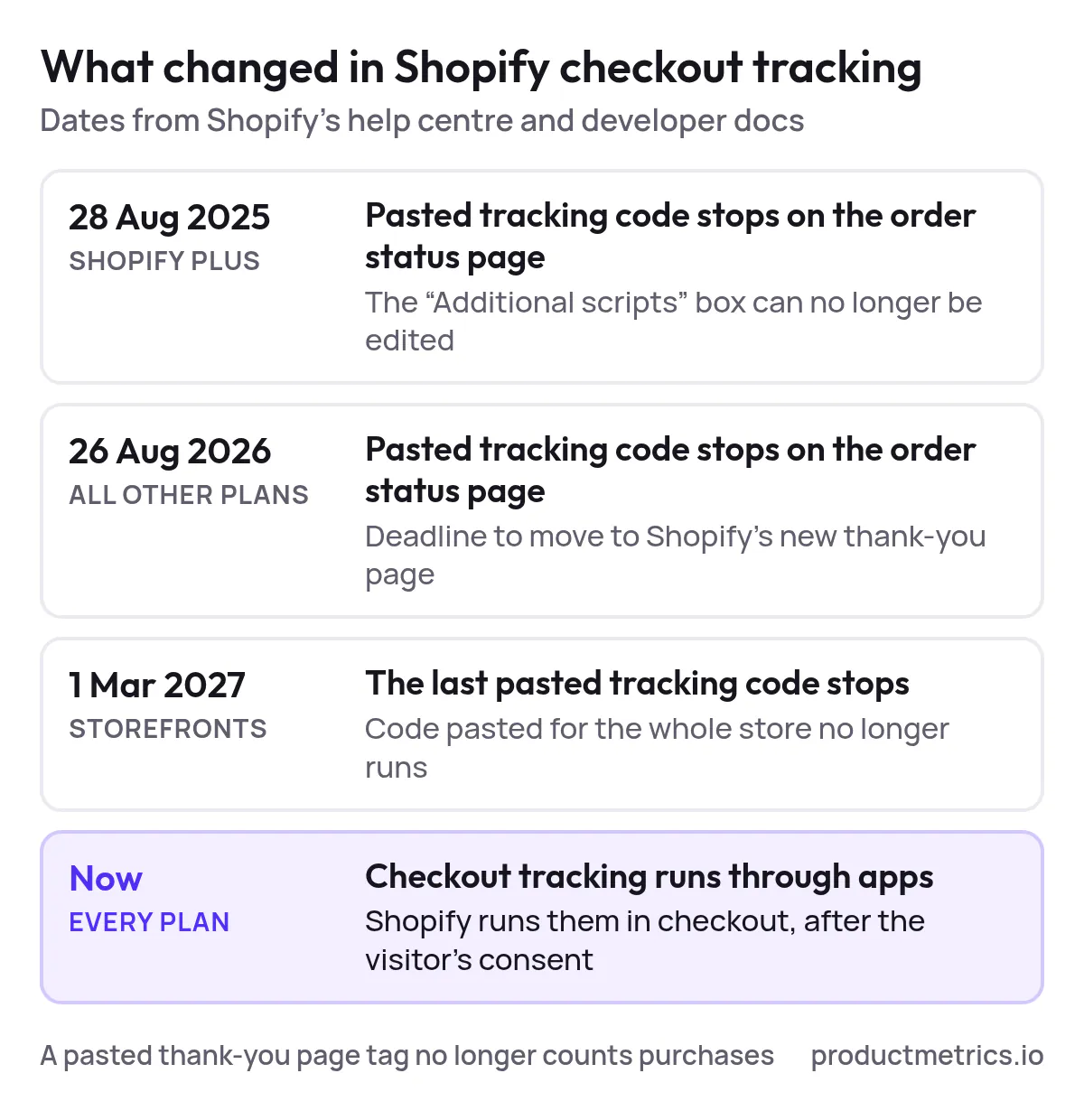
_By 26 August 2026, tracking code pasted into the thank-you page stopped counting purchases on every Shopify plan._
These pixels run on the store, checkout and thank-you pages. Where the law asks for consent, as in the EEA and the UK, they wait until the shopper agrees. (Source: [Shopify Help Center](https://help.shopify.com/en/manual/promoting-marketing/pixels/overview))
A pixel still runs in the shopper’s browser. Ad blockers stop Google’s standard tags (try our [ad blocker test](https://www.productmetrics.io/ad-blocker-conversion-tracking)), and Safari forgets the ad click after 7 days. [Server-side tracking](https://www.productmetrics.io/blog/what-is-server-side-tracking) reports the purchase from a server instead.
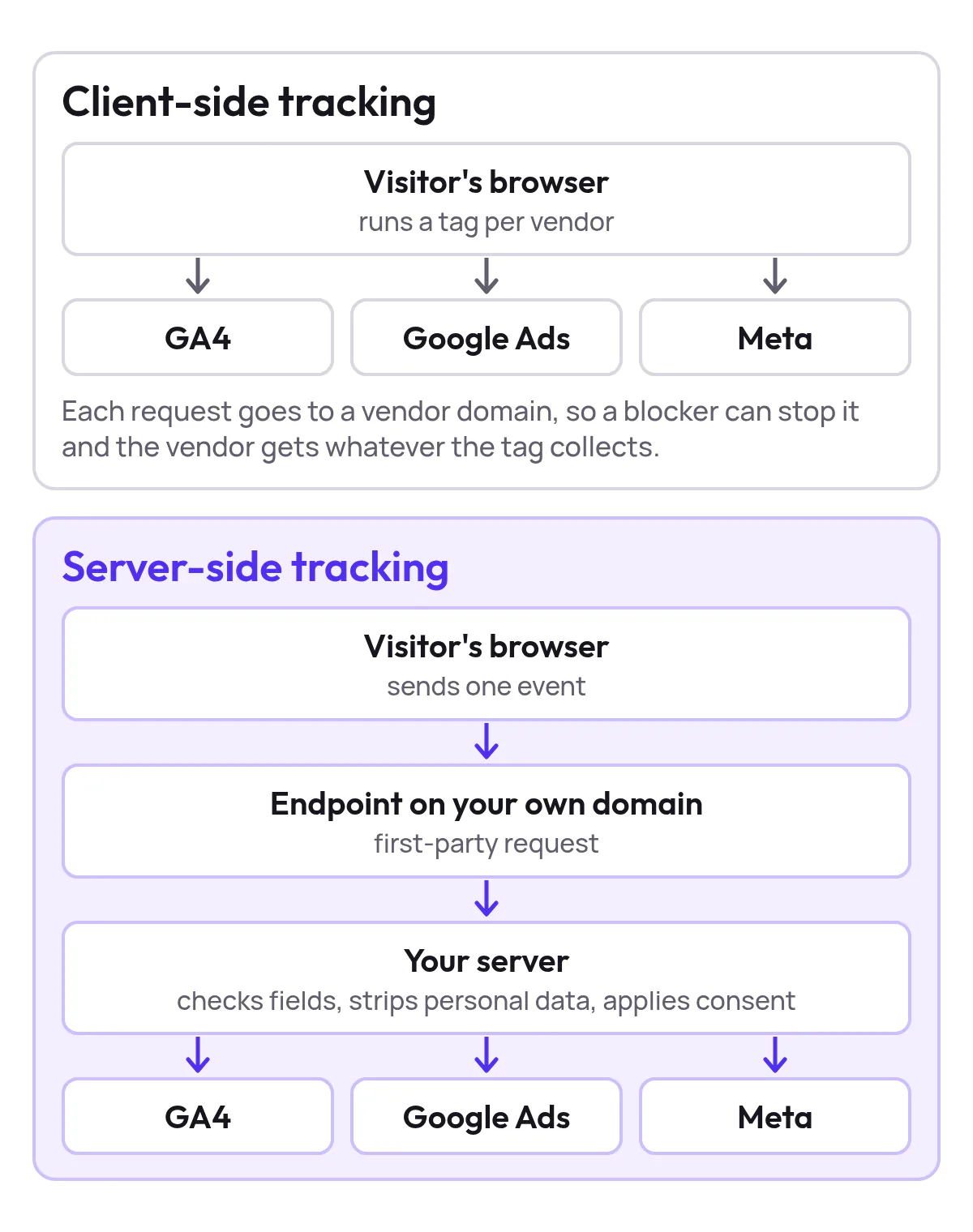
_A browser tag sends each purchase straight to Google’s or Meta’s address, which a blocker can stop; server-side tracking sends it to your own address first._
## How we evaluated Shopify conversion tracking apps
We judged each app on what reaches Google Ads after a Shopify purchase.
1. **Platform integration depth**
How closely the app works with Shopify, and which orders it sees.
2. **Conversion completeness**
How many real purchases reach Google Ads despite ad blockers, declined cookies and Safari’s 7-day limit.
3. **Signal depth**
What Google Ads learns about each order: revenue, profit, new or returning customer, lifetime value and refunds.
4. **Setup effort and maintenance**
The work to set it up and keep it running, including Google Tag Manager, Google’s tool for managing tracking code.
5. **Price and fit**
The published price for a typical store, and who the app is built for.
Everything here is based on vendor docs and public listings available as of November 2026.
## Scoring rubric
Each app gets a score from 1 to 5 per criterion. The weighted score adds up each score times its weight, rounded to one decimal.
| Criterion | What it means | Weight |
|---|---|---|
| Platform integration depth | App Store app, Shopify pixels, order data | 25% |
| Conversion completeness | Ad blockers, cookie consent, Safari, server-side | 25% |
| Signal depth | Revenue, profit, new vs returning, lifetime value, refunds | 20% |
| Setup effort and maintenance | Install steps, tag setup, upkeep | 15% |
| Price and fit | Published price and target store | 15% |
**Figure: How much each criterion counts in the score.** Platform integration depth and conversion completeness carry half of the score; setup effort and price carry 15% each.
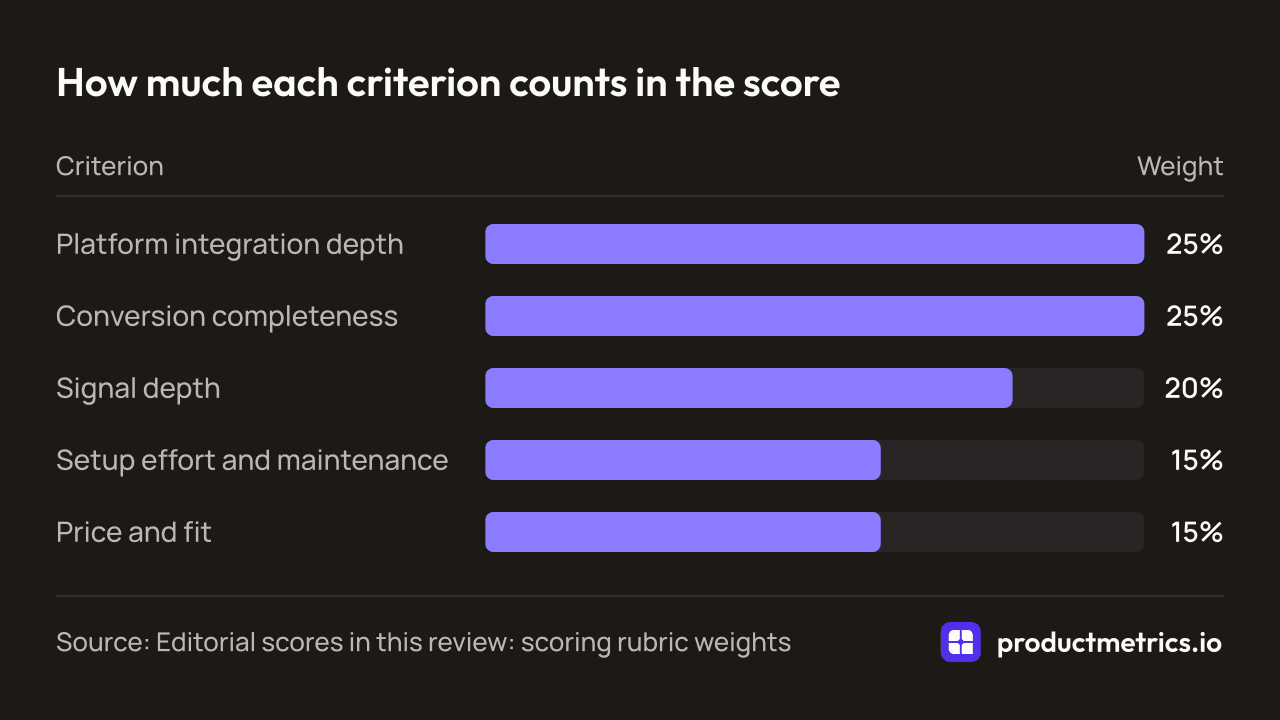
| Criterion | Weight |
| --- | --- |
| Platform integration depth | 25% |
| Conversion completeness | 25% |
| Signal depth | 20% |
| Setup effort and maintenance | 15% |
| Price and fit | 15% |
_Source: Editorial scores in this review: scoring rubric weights_
## The tools at a glance
Six options cover most Shopify stores: one free baseline and five apps.
**Baseline:**
- **Google & YouTube app**: Google’s free app sends your products to [Google Merchant Center](https://www.productmetrics.io/glossary/google-merchant-center "Google Merchant Center (GMC) is a free Google tool where a shop uploads and manages its product data, so its products can appear on Google Shopping and across Google.") and adds Google’s tag. (Source: [Shopify App Store](https://apps.shopify.com/google))
**Third-party apps:**
- **Littledata**: sends every order from a server, without code. (Source: [Littledata](https://www.littledata.io/shopify/google-ads))
- **Elevar**: sends purchases from a server to many ad and email platforms. (Source: [Shopify App Store](https://apps.shopify.com/gtm-datalayer-by-elevar))
- **Nabu: Google Ads Pixel**: adds a low-cost Google Ads tag. (Source: [Shopify App Store](https://apps.shopify.com/adwords-conversion-pixel))
- **Analyzify**: sets up Google Analytics 4 (GA4) and Google Ads tracking for you. (Source: [Shopify App Store](https://apps.shopify.com/analyzify))
- **Stape Conversion Tracking**: hosts a tracking server you set up yourself. (Source: [Shopify App Store](https://apps.shopify.com/server-gtm))
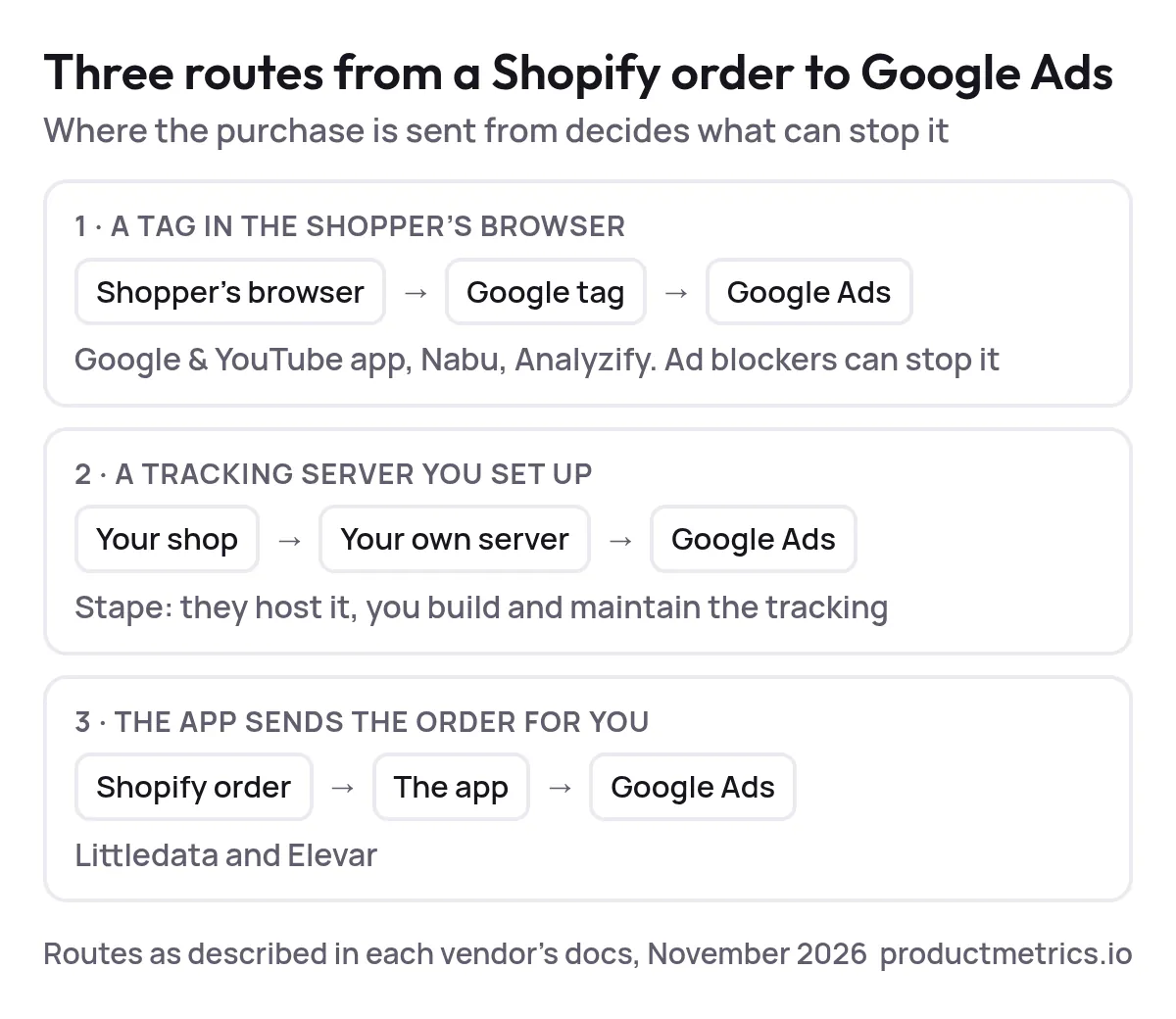
_The six options use three routes; the further from the browser a purchase is sent, the less an ad blocker or a closed tab can take away._
## Google & YouTube app – the free baseline
**Best for:** every Shopify store, as the free base for Google Merchant Center and a first Google Ads tag.
The Google & YouTube app is Google’s own Shopify app, launched on 28 November 2017 and rated 4.5 from 5,605 reviews. It syncs your products, deals and shipping to Merchant Center, the source of your Google Shopping ads, and adds the Google tag. (Source: [Shopify App Store](https://apps.shopify.com/google))
| Google & YouTube app | As listed, November 2026 |
|---|---|
| Install | Shopify App Store, by Google |
| Sends to Google Ads | Purchase, add to cart and checkout started by default |
| Server-side | Not described on the listing or in Google’s help |
| Price | Free to install |
**Strengths**
- Free, recommended by Google, with [enhanced conversions](https://www.productmetrics.io/glossary/enhanced-conversions "Enhanced conversions are a Google Ads feature that adds hashed first-party customer data, such as an email address, to your conversion tracking to improve measurement accuracy.") as one setting: the shopper’s scrambled email helps Google Ads match more orders to its ads.
- Keeps your products in Merchant Center, which every other app leaves to it.
**Limitations**
- It links one Google Ads account; more accounts, including those under an agency’s manager account, need manual setup. (Source: [Google Ads Help](https://support.google.com/google-ads/answer/13494537))
- Neither the listing nor Google’s help mentions profit or new-customer values, and the tag runs in the shopper’s browser.
**Scores**
- Platform integration depth: **5/5**
- Conversion completeness: **2/5**
- Signal depth: **1/5**
- Setup effort and maintenance: **4/5**
- Price and fit: **5/5**
For **Google Ads conversion tracking on Shopify** at no cost, start here.
> **Get every conversion back into Google Ads, Meta and ChatGPT Ads.** Full Signal Tracking gets through every adblocker, so bidding works on your full revenue. Sends revenue, profit and new customers to Google Ads, Meta and ChatGPT Ads. [Book a demo](https://www.productmetrics.io/demo)
## Littledata – server-side Enhanced Conversions for Shopify
**Best for:** Shopify brands that want orders sent from a server to GA4, Google Ads and Meta, with no code.
Littledata reports every order from Shopify’s servers, including subscriptions, in-store sales and post-purchase upsells. It uploads them to Google Ads as enhanced conversions, matched to your tag on the Shopify order so none counts twice. (Source: [Littledata](https://www.littledata.io/shopify/google-ads))
| Littledata | As listed, November 2026 |
|---|---|
| Install | Shopify App Store, Built for Shopify, about 10 minutes |
| Sends to Google Ads | Purchases with scrambled customer details; new vs returning customers |
| Server-side | Yes, from Shopify’s servers |
| Price | $0.35 per order (Flex) or $199 a month for 1,500 orders (Scale) |
**Strengths**
- “No GTM, no devs needed”, and it can run as a secondary conversion beside the Google & YouTube app while you compare the two. (Source: [Shopify App Store](https://apps.shopify.com/littledata))
- Profit Signal takes shipping, taxes, fees and product costs ([COGS](https://www.productmetrics.io/glossary/cost-of-goods-sold "Cost of goods sold (COGS) is what it cost you to buy or make the products you sold in a period.")) off the revenue and sends the rest as the order’s value.
**Trade-offs**
- Profit Signal is labelled beta, and combining your tag with Littledata’s data is still a Google Ads beta.
- Per-order pricing grows with your order count rather than with your results.
**Scores**
- Platform integration depth: **5/5**
- Conversion completeness: **4/5**
- Signal depth: **4/5**
- Setup effort and maintenance: **5/5**
- Price and fit: **3/5**
For **Shopify server-side tracking for Google Ads** that a marketer can set up alone in about 10 minutes, pick Littledata.
## Elevar – server-side tracking with many destinations
**Best for:** Shopify brands sending the same purchases to Google Ads, Meta, GA4, Klaviyo and TikTok.
Elevar Conversion Tracking sends purchases from a server to more than 50 ad, email and analytics platforms, and recognises returning shoppers. Elevar says it recovers “activity lost to ad blockers and browser restrictions”. (Source: [Shopify App Store](https://apps.shopify.com/gtm-datalayer-by-elevar))
| Elevar | As listed, November 2026 |
|---|---|
| Install | Shopify App Store app, connected to your Elevar account |
| Sends to Google Ads | Purchases with enhanced conversions, from the browser and a server |
| Server-side | Yes |
| Price | Free to 100 orders; Core $225 a month for 2,000 orders |
**Strengths**
- Sends enhanced conversion data “both browser side and via the API”, and can use an existing Google Ads conversion action. (Source: [Elevar docs](https://docs.getelevar.com/docs/how-to-set-up-our-google-ads-destination))
- Guided onboarding, and privacy and compliance tools on every plan.
**Trade-offs**
- Profit optimisation and predicted lifetime value start on the Advanced plan, at $650 a month for 10,000 orders.
- Google Ads access is requested by email, and its conversions start as secondary, which Google Ads doesn’t bid on.
**Scores**
- Platform integration depth: **5/5**
- Conversion completeness: **4/5**
- Signal depth: **3/5**
- Setup effort and maintenance: **3/5**
- Price and fit: **2/5**
If you need **Shopify server side tracking** that feeds every ad and email platform at once, choose Elevar.
## Nabu – a one-click Google Ads pixel
**Best for:** stores and agencies that want a clean Google Ads tag on several accounts for little money.
Nabu: Google Ads Pixel, by AdNabu, adds the Google Ads pixel in one click, with no theme changes. It tracks purchases, add to cart, checkout and post-purchase upsells, with enhanced conversions. (Source: [Shopify App Store](https://apps.shopify.com/adwords-conversion-pixel))
| Nabu | As listed, November 2026 |
|---|---|
| Install | Shopify App Store, Built for Shopify, one click |
| Sends to Google Ads | Purchases, add to cart and checkout, with enhanced conversions |
| Server-side | Not mentioned on the listing |
| Price | Free to 10 orders; Advanced $19.99 a month |
**Strengths**
- Works with several Google Ads accounts, including agency manager accounts, and stops the same order counting twice.
- You choose an order value with or without shipping and tax.
**Trade-offs**
- It runs in the shopper’s browser, so ad blockers and declined cookies still lose purchases.
- The listing describes order value and cart contents, not profit or customer type.
**Scores**
- Platform integration depth: **4/5**
- Conversion completeness: **2/5**
- Signal depth: **2/5**
- Setup effort and maintenance: **5/5**
- Price and fit: **5/5**
For **affordable Google Ads conversion tracking for Shopify stores**, Nabu is the cheapest paid upgrade.
## Analyzify – GA4 and Google Ads tracking, set up for you
**Best for:** stores that want GA4 and Google Ads tracking set up and checked by someone else.
Analyzify sets up Google Ads conversion tracking with enhanced conversions and dynamic remarketing (ads for the products a shopper viewed). It prepares your store for Google Tag Manager and supports Google’s [Consent Mode](https://www.productmetrics.io/glossary/consent-mode "Consent mode is a Google tag and Google Ads feature that passes each visitor’s cookie and data consent choices to Google, so tags adjust what they collect."). (Source: [Shopify App Store](https://apps.shopify.com/analyzify))
| Analyzify | As listed, November 2026 |
|---|---|
| Install | Shopify App Store, done-for-you setup available |
| Sends to Google Ads | Conversions with enhanced conversions, plus remarketing |
| Server-side | For GA4, Meta and TikTok |
| Price | From $145 a month for 5,000 orders |
**Strengths**
- “Our team handles the entire setup process for you”, included with yearly plans; otherwise it costs $295. (Source: [Analyzify](https://analyzify.com/))
- Built for Shopify’s new checkout and Google’s Consent Mode.
**Trade-offs**
- Google Ads isn’t among its server-side destinations, so Google Ads purchases still depend on the browser.
- No profit or customer-type values are described for Google Ads.
**Scores**
- Platform integration depth: **4/5**
- Conversion completeness: **3/5**
- Signal depth: **2/5**
- Setup effort and maintenance: **4/5**
- Price and fit: **3/5**
If you want a **Google Ads conversion tracking integration for Shopify with easy setup** and GA4 matters most, Analyzify does the work for you.
## Stape – server-side GTM for Shopify
**Best for:** teams who know Google Tag Manager and want full control of their own tracking server.
Stape Conversion Tracking is a Shopify app for server-side Google Tag Manager: a tracking server that Stape hosts and you configure. It adds Google Tag Manager to your store and sends purchases and refunds to that server. (Source: [Shopify App Store](https://apps.shopify.com/server-gtm))
| Stape | As listed, November 2026 |
|---|---|
| Install | Shopify App Store app, a Stape account and your own subdomain |
| Sends to Google Ads | What you set up; a setup wizard gives you starting templates |
| Server-side | Yes, on a tracking server you configure |
| Price | App free; hosting free up to 10K requests, Pro $20 a month |
**Strengths**
- Every hosting plan includes Custom Loader, which renames Google’s tracking files to make tracking harder for ad blockers to stop. (Source: [Stape pricing](https://stape.io/price))
- The cheapest way to a tracking server of your own.
**Trade-offs**
- This setup still starts in the shopper’s browser, and ad blockers stop it too ([how they compare](https://www.productmetrics.io/blog/google-tag-gateway-vs-server-side-tagging)).
- You set up and maintain the Google Ads tracking yourself, and the price rises with your traffic.
**Scores**
- Platform integration depth: **4/5**
- Conversion completeness: **3/5**
- Signal depth: **2/5**
- Setup effort and maintenance: **2/5**
- Price and fit: **5/5**
If you already use Google Tag Manager and want **Shopify server side tracking for Google Ads** on your own terms, use Stape.
## Side by side comparison
| App | Best for | Integration | Completeness | Signal | Setup | Price | Weighted | Notable strength |
|---|---|---|---|---|---|---|---|---|
| **Littledata** | No-code server-side tracking | 5 | 4 | 4 | 5 | 3 | 4.3 | [Orders uploaded through Google’s Data Manager](https://www.littledata.io/shopify/google-ads) |
| **Elevar** | Many destinations | 5 | 4 | 3 | 3 | 2 | 3.6 | [50+ integrations](https://apps.shopify.com/gtm-datalayer-by-elevar) |
| **Nabu** | A cheap tag on several accounts | 4 | 2 | 2 | 5 | 5 | 3.4 | [One-click Google tag](https://apps.shopify.com/adwords-conversion-pixel) |
| **Google & YouTube app** | Every store, as the baseline | 5 | 2 | 1 | 4 | 5 | 3.3 | [Google’s recommended route](https://support.google.com/google-ads/answer/13494537) |
| **Stape** | Your own tracking server | 4 | 3 | 2 | 2 | 5 | 3.2 | [Custom Loader on every plan](https://stape.io/price) |
| **Analyzify** | GA4 first, set up for you | 4 | 3 | 2 | 4 | 3 | 3.2 | [Done-for-you setup](https://analyzify.com/) |
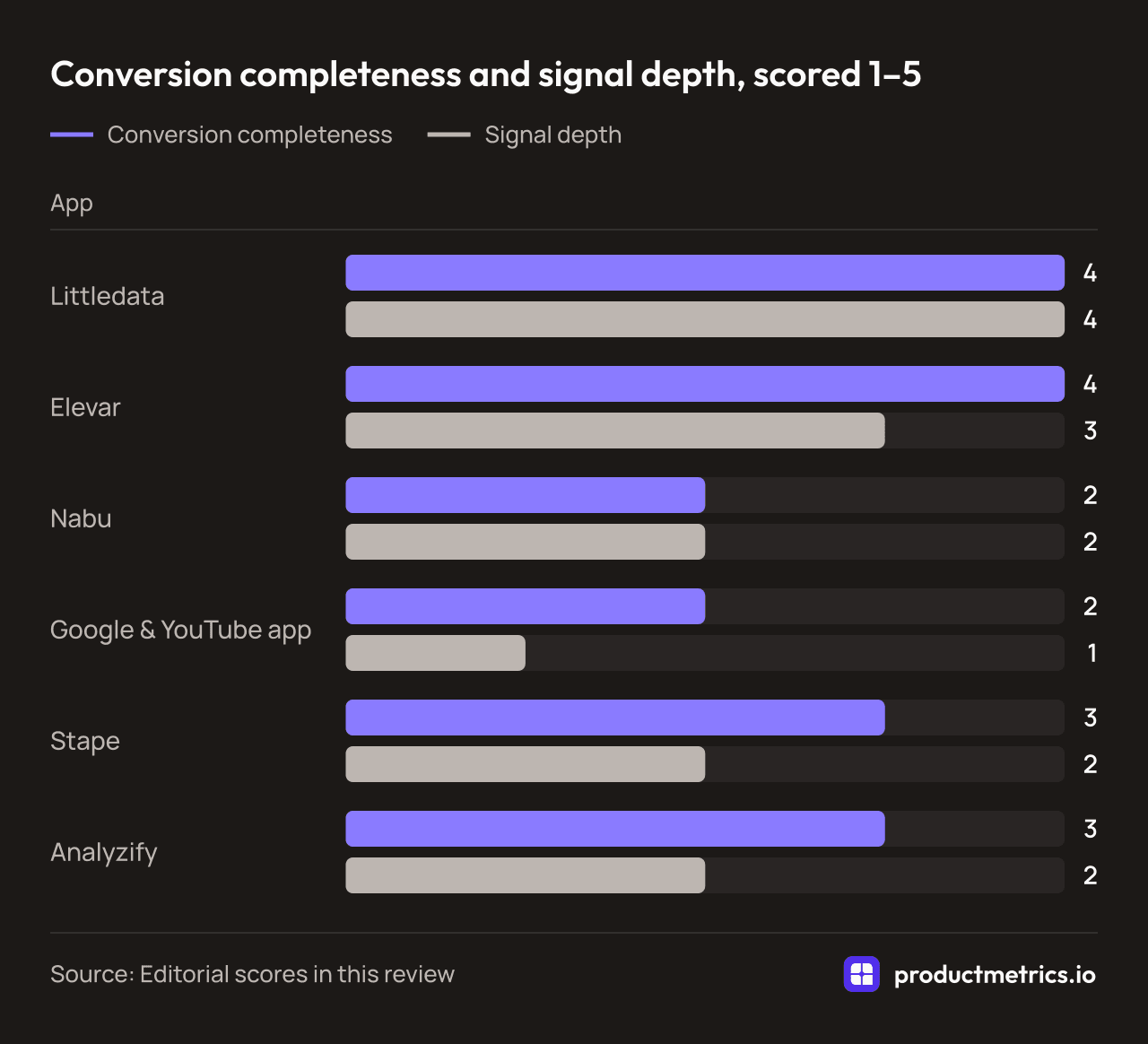
**Figure: Conversion completeness and signal depth, scored 1–5.** Littledata scores 4 on both, the highest here; the Google & YouTube app scores 2 for completeness and 1 for signal depth.
| App | Conversion completeness | Signal depth |
| --- | --- | --- |
| Littledata | 4 | 4 |
| Elevar | 4 | 3 |
| Nabu | 2 | 2 |
| Google & YouTube app | 2 | 1 |
| Stape | 3 | 2 |
| Analyzify | 3 | 2 |
_Source: Editorial scores in this review_
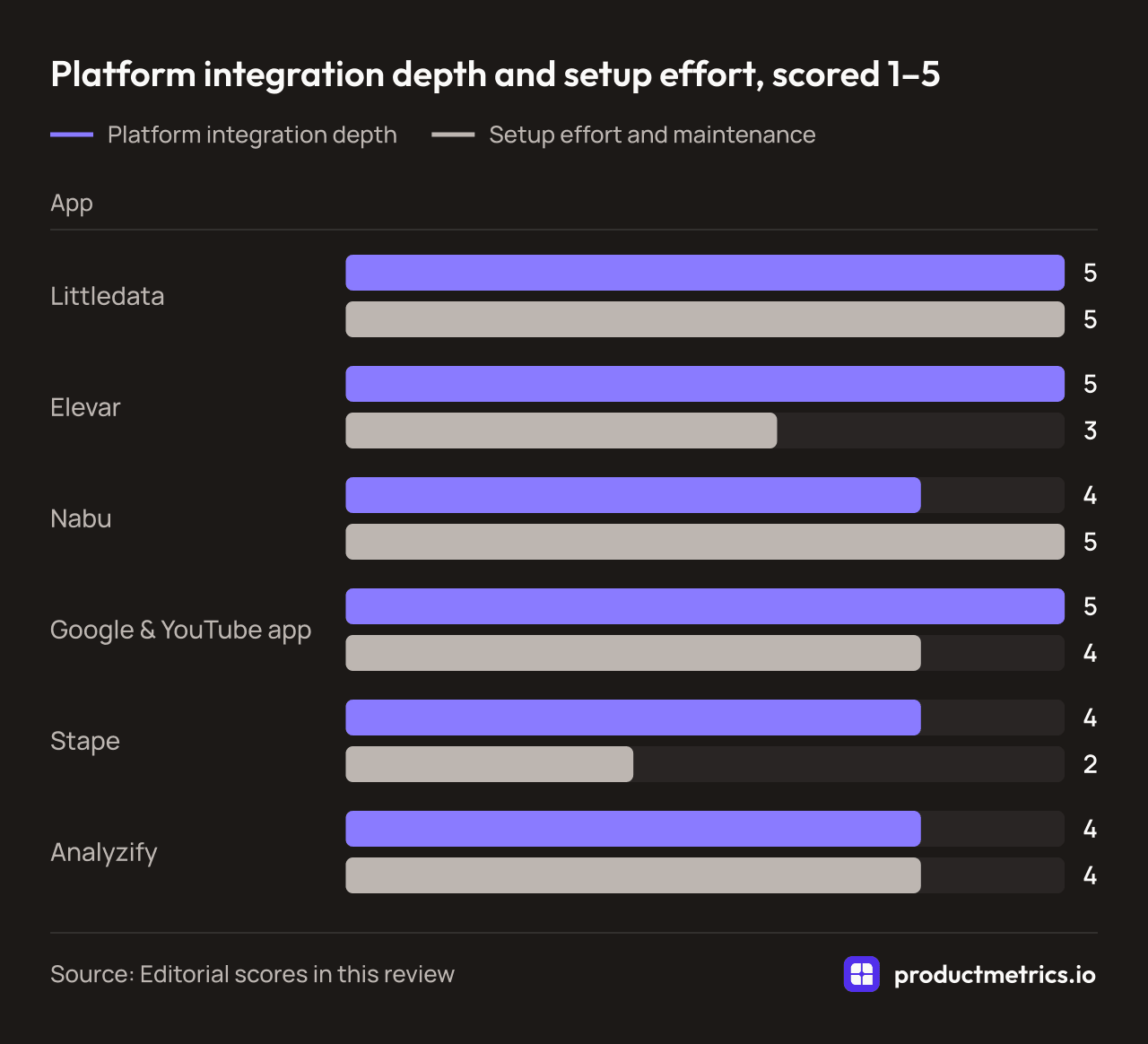
**Figure: Platform integration depth and setup effort, scored 1–5.** Littledata is the only app to score 5 on both integration and setup; Stape scores 2 on setup because you build and maintain the tracking yourself.
| App | Platform integration depth | Setup effort and maintenance |
| --- | --- | --- |
| Littledata | 5 | 5 |
| Elevar | 5 | 3 |
| Nabu | 4 | 5 |
| Google & YouTube app | 5 | 4 |
| Stape | 4 | 2 |
| Analyzify | 4 | 4 |
_Source: Editorial scores in this review_
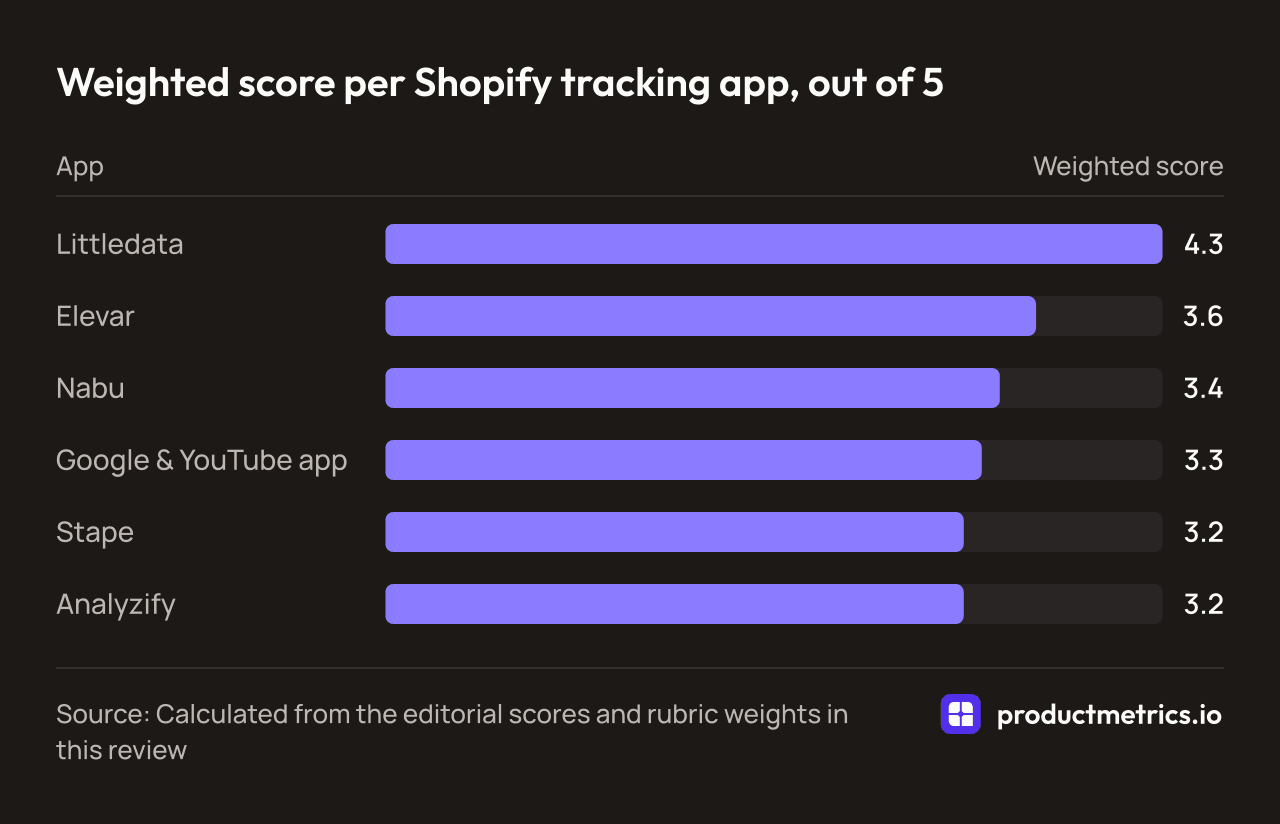
**Figure: Weighted score per Shopify tracking app, out of 5.** Weighted by the rubric, Littledata scores 4.3 and Elevar 3.6; the free Google & YouTube app scores 3.3.
| App | Weighted score |
| --- | --- |
| Littledata | 4.3 |
| Elevar | 3.6 |
| Nabu | 3.4 |
| Google & YouTube app | 3.3 |
| Stape | 3.2 |
| Analyzify | 3.2 |
_Source: Calculated from the editorial scores and rubric weights in this review_
## How to choose a Google Ads conversion tracking app for Shopify
The right app depends on what Google Ads should learn from each order:
1. **If a marketer must set up server-side tracking alone, in minutes** → choose Littledata.
2. **When the same purchases go to many ad and email platforms** → choose Elevar.
3. **If you need a cheap, clean tag across several Google Ads accounts** → choose Nabu.
4. **When GA4 matters most and someone else should set it up** → choose Analyzify.
5. **If your team uses Google Tag Manager and wants its own tracking server** → choose Stape.
Whatever you pick, make one purchase conversion primary so orders aren’t counted twice; our [Google Ads conversion tracking guide](https://www.productmetrics.io/blog/google-ads-conversion-tracking-guide) covers that check. For tools beyond Shopify, see the [server-side tracking tools](https://www.productmetrics.io/blog/server-side-tracking-tools) comparison.
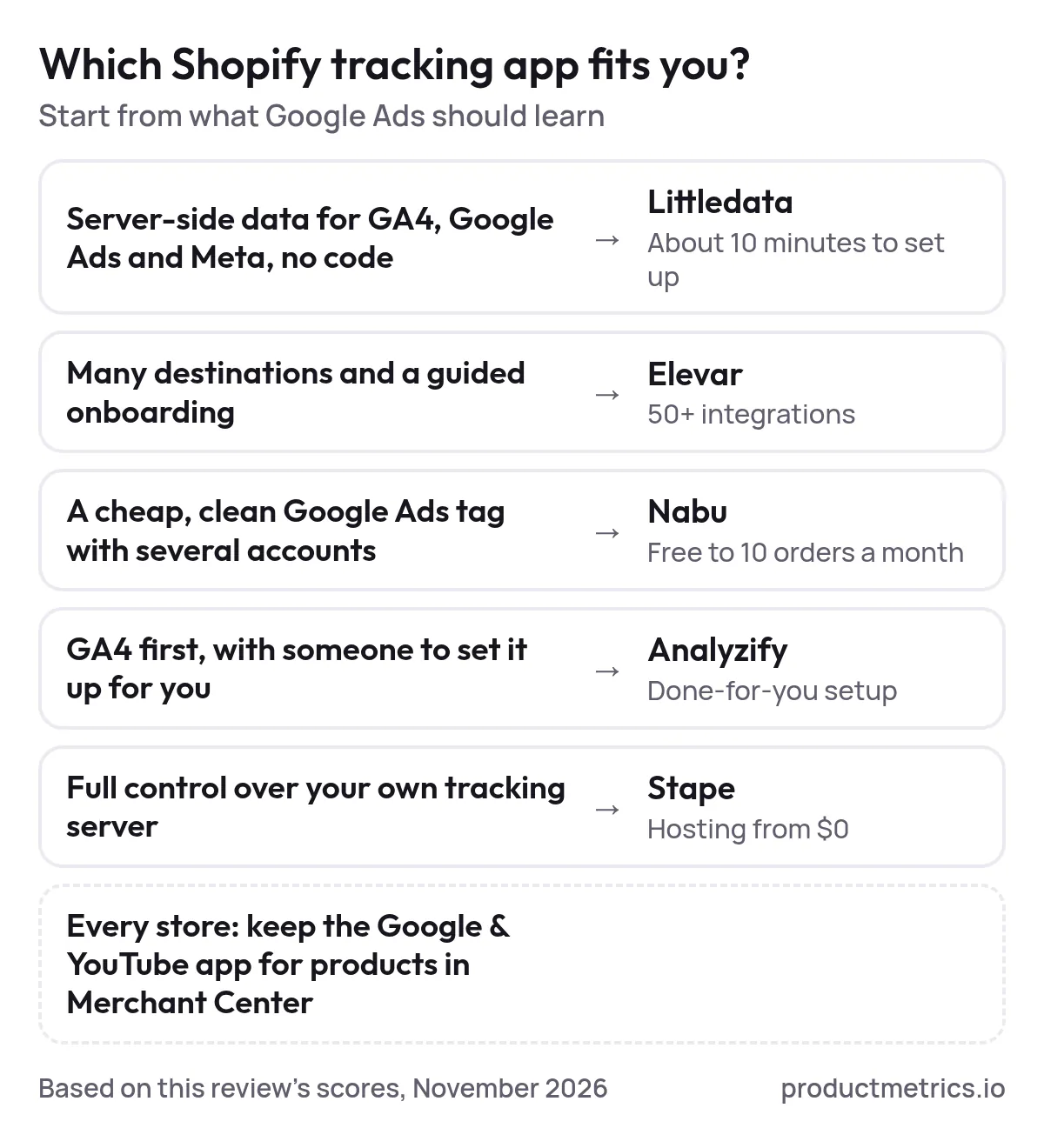
_Start from what Google Ads should learn; keep the Google & YouTube app with any choice for your products in Merchant Center._
> **Product Metrics on Shopify** No setup required: install from the Shopify App Store, and every order reaches Google Ads and Meta from your own store domain, with its profit. [See how it runs on Shopify](https://www.productmetrics.io/platforms/shopify)
## Frequently asked questions
### Why is my Shopify Google Ads conversion tracking inaccurate?
Shopify Google Ads conversion tracking is usually inaccurate for one of four reasons: tracking code pasted into the old thank-you page stopped running when Shopify switched it off in 2025 and 2026, two apps count the same order, shoppers declined tracking in the cookie banner, or ad blockers stopped the tag in the shopper’s browser. Compare a week of Shopify orders with Google Ads purchases to see which gap you have.
### How do I set up Shopify enhanced conversions without GTM?
In the Google & YouTube app, open Settings, find Enhanced conversions under Google Ads settings, select Turn on and accept Google’s customer data terms. Enhanced conversions send customer details, such as the email address, in scrambled (hashed) form, so Google Ads can match more orders to the ads behind them. You don’t need Google Tag Manager for this.
### How do I track profit in Google Ads for a Shopify store?
Send profit as the conversion value instead of revenue. Shopify keeps a cost per item on each product variant, so an app can read it for every product in an order, take off fees and shipping, and send the profit to Google Ads. A target ROAS then steers bidding on profit.
## Keep reading.
- [What Does Google Ads Conversion Tracking Cost? Setup, Tools, Hosting and Upkeep](https://www.productmetrics.io/blog/google-ads-conversion-tracking-cost)
- [How Much Does Server-Side Tracking Cost for Google Ads? Server-Side GTM vs a Hosted App](https://www.productmetrics.io/blog/google-ads-server-side-tracking-cost)
- [Best Google Ads Conversion Tracking Apps for Lightspeed eCom](https://www.productmetrics.io/blog/lightspeed-google-ads-conversion-tracking-apps)
---
Written by Berend Vrakking, founder of Product Metrics. Last updated 2026-11-25.
1M+ products analysed · Nominated at the Dutch Search Awards for Best Measurement Campaign (2023) and Best Use of Data (2024)
HTML version: https://www.productmetrics.io/blog/shopify-google-ads-conversion-tracking-apps