---
title: "Best Google Ads Conversion Tracking Plugins for WooCommerce"
description: "Best Google Ads conversion tracking plugins for WooCommerce: five options scored on completeness, profit signals, setup and price (November 2026)."
canonical: "https://www.productmetrics.io/blog/woocommerce-google-ads-conversion-tracking-plugins"
pageType: article
language: en
publisher: "Product Metrics"
author: "Berend Vrakking"
datePublished: 2026-11-25
dateModified: 2026-11-25
image: "https://www.productmetrics.io/og/blog/woocommerce-google-ads-conversion-tracking-plugins.png"
---
> Content index: https://www.productmetrics.io/llms.txt
# Best Google Ads Conversion Tracking Plugins for WooCommerce
## Key takeaways
- Pixel Manager leads at 3.7 of 5: one plugin for many ad channels, with refund corrections and lifetime value in its €135-a-year Pro.
- Google for WooCommerce, Pixel Manager and PixelYourSite report the Google Ads purchase from the shopper's browser; Conversios and Stape send it through a tracking server.
A WooCommerce store that reports Google Ads purchases from a tag on the thank-you page loses every order an ad blocker stops, and [Smart Bidding](https://www.productmetrics.io/glossary/smart-bidding "Smart Bidding is a set of Google Ads bidding strategies that use Google AI to optimise for conversions or conversion value in every auction.") learns only from the orders that remain.
**Set up server-side tracking.** Today: Ad blockers hide your sales. With Product Metrics: Track every sale and improve your campaign performance. Connect the Product Metrics MCP server (https://www.productmetrics.io/mcp) to Claude, ChatGPT, Cursor or VS Code, or run `claude mcp add --transport http product-metrics https://www.productmetrics.io/mcp` in Claude Code ([how the connection works](https://www.productmetrics.io/docs/mcp/connect)). Then ask it: "Set up server-side conversion tracking for my store with Product Metrics, so Google Ads, Meta and ChatGPT Ads get every paid order. Check my setup status first, walk me through each open step, and give me the link when I need to click something." About 60 seconds in Claude, ChatGPT or Cursor.
I compared five plugins that send WooCommerce purchases to Google Ads on their WordPress.org and WooCommerce.com listings and vendor pages on 12 November 2026.
What you get:
- a five-criterion score per plugin, with the arithmetic shown
- what each one sends: revenue only, or profit and new customers too
- a decision map for your store
## Why Google Ads Conversion Tracking Breaks on WooCommerce
WooCommerce Google Ads conversion tracking usually breaks in the shopper's browser. Most plugins report the purchase when the thank-you page loads and Google's tag runs, so anything that stops either loses the sale in Google Ads.
In our real-browser [ad blocker test](https://www.productmetrics.io/ad-blocker-conversion-tracking) on 30 September 2026, uBlock Origin Lite, Brave Shields and AdGuard stopped the standard Google Ads tag. Safari adds a limit of its own: it forgets the ad click after 7 days without a return visit. (Source: [WebKit](https://webkit.org/tracking-prevention/))
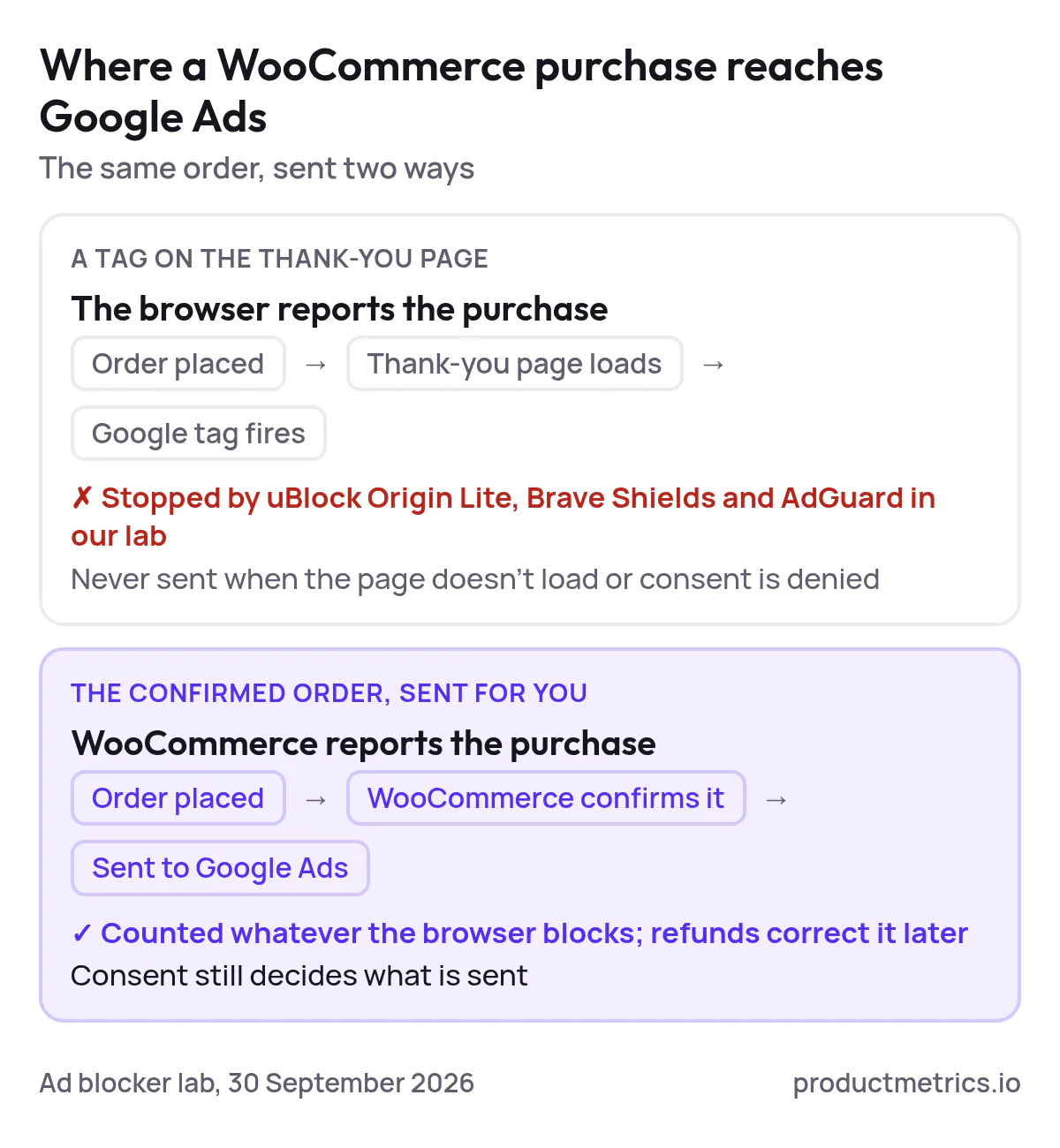
_A tag counts the purchase only if the thank-you page loads and the tag survives; the confirmed order is counted from WooCommerce itself._
Three WooCommerce changes shape which plugin fits:
| Change | Since | What it means for you |
|---|---|---|
| New stores keep orders in WooCommerce's faster order storage by default | [WooCommerce 8.2](https://developer.woocommerce.com/docs/features/high-performance-order-storage/), October 2023 | Check that your plugin supports it |
| Product costs built into WooCommerce | [WooCommerce 10.3](https://developer.woocommerce.com/2025/10/22/woocommerce-10-3-cogs-comes-to-core-and-mcp-beta/), 21 October 2025 | Profit per order can come from WooCommerce itself |
| Cart, checkout and account pages left out of page caching | [WooCommerce caching docs](https://developer.woocommerce.com/docs/best-practices/performance/configuring-caching-plugins/) | Test your tracking after adding a caching plugin |
### Why are WooCommerce Google Ads conversions not tracking?
WooCommerce Google Ads conversions stop tracking for four common reasons, and each has its own fix:
| Cause | What you see in Google Ads | Fix |
|---|---|---|
| An ad blocker stops the Google tag | Fewer conversions than WooCommerce orders | Send purchases from the order, not the browser |
| Two plugins tag the same purchase | Double conversions, or two purchase actions | Switch one tag off; keep one primary purchase action |
| The visitor declines cookies | Gaps on EU traffic | Connect your cookie banner to Consent Mode |
| The thank-you page never loads | Missing orders paid on an outside payment page | Count purchases from the order, not the page |
Consent Mode is Google's way of passing each visitor's cookie choice on to Google Ads.
Double counting is the easiest problem to miss. Google for WooCommerce runs "its own built-in Google tag" even when you track in Google Tag Manager, Google's free tool for managing tags. Its FAQ gives a code snippet to switch that tag off "to avoid double tracking". (Source: [Google for WooCommerce FAQ](https://woocommerce.com/document/google-for-woocommerce/faq/))
Google Ads only removes the double when both conversions carry the same order number in the same conversion action. (Source: [Google Ads Help](https://support.google.com/google-ads/answer/6386790))
## How We Evaluated WooCommerce Conversion Tracking Plugins
We scored each plugin on five criteria:
1. **Platform integration depth**
Whether it reads your WooCommerce orders, product costs and refunds.
2. **Conversion completeness**
How many real orders reach Google Ads despite ad blockers, declined cookies, Safari's 7-day limit and thank-you pages that never load.
3. **Signal depth**
What each purchase tells Google Ads: revenue only, or also profit, new versus returning customer, lifetime value (LTV) and [refunds that correct the same order](https://www.productmetrics.io/glossary/conversion-adjustments).
4. **Setup effort and maintenance**
Who can install it, and what has to be kept running afterwards.
5. **Price and fit**
The published price, and the store it suits.
Server-side tracking means the purchase reaches Google Ads from a server instead of the shopper's browser. A plugin that does this through a tracking server built on Google Tag Manager, or through Google tag gateway (Google's tag loaded from your own domain), scores 3 at most on completeness, because [ad blockers also block those routes](https://www.productmetrics.io/blog/google-tag-gateway-vs-server-side-tagging).
Everything here is based on vendor docs and public listings available as of November 2026.
## Scoring Rubric
Each plugin gets 1 to 5 per criterion (5 = excellent), and the weighted score rounds to one decimal.
| Criterion | What it means | Weight |
|---|---|---|
| **Platform integration depth** | Orders, product costs and refunds read from WooCommerce | 25% |
| **Conversion completeness** | Ad blockers, consent, Safari's 7-day limit, sent from a server | 25% |
| **Signal depth** | Revenue, profit, new vs returning, LTV, refunds | 20% |
| **Setup effort and maintenance** | Install time and what you maintain | 15% |
| **Price and fit** | Published price and the store it suits | 15% |
**Figure: How much each criterion counts in the score.** Platform integration and conversion completeness carry half the score between them; setup and price carry 15% each.
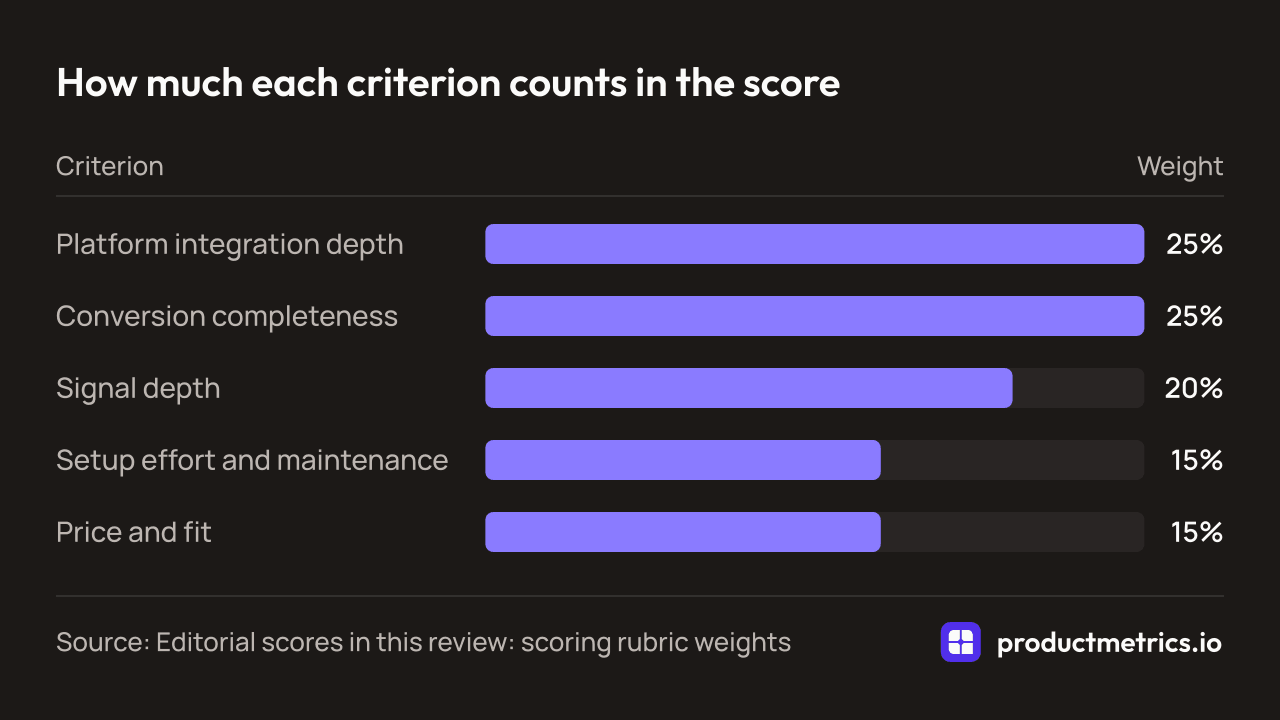
| Criterion | Weight |
| --- | --- |
| Platform integration depth | 25% |
| Conversion completeness | 25% |
| Signal depth | 20% |
| Setup effort and maintenance | 15% |
| Price and fit | 15% |
_Source: Editorial scores in this review: scoring rubric weights_
## The WooCommerce Plugins at a Glance
**Baseline:**
- **Google for WooCommerce** – Woo's free extension that sends your products to Google, runs Google's automated [Performance Max](https://www.productmetrics.io/glossary/performance-max "Performance Max is a goal-based Google Ads campaign type that uses automation to reach customers across Google advertising channels.") campaigns and adds a Google tag. (Source: [WooCommerce.com](https://woocommerce.com/products/google-listings-and-ads/))
**Third-party plugins:**
- **Pixel Manager for WooCommerce** (SweetCode) – one plugin for the tracking tags of many ad channels, with a paid Pro version. (Source: [WordPress.org](https://wordpress.org/plugins/woocommerce-google-adwords-conversion-tracking-tag/))
- **PixelYourSite Pro** – Meta and Google tracking from one plugin, with Google Ads in Pro. (Source: [PixelYourSite](https://www.pixelyoursite.com/plugins/pixelyoursite-professional))
- **Conversios** – tracking plus a [product feed](https://www.productmetrics.io/glossary/product-feed "A product feed is a file or data source that lists your products, one per row, with attributes such as ID, title, price and availability."), with a plan that sets up a tracking server for you. (Source: [WordPress.org](https://wordpress.org/plugins/enhanced-e-commerce-for-woocommerce-store/))
- **Stape Conversion Tracking** – sends your shop's events to a tracking server you set up and maintain. (Source: [WordPress.org](https://wordpress.org/plugins/gtm-server-side/))
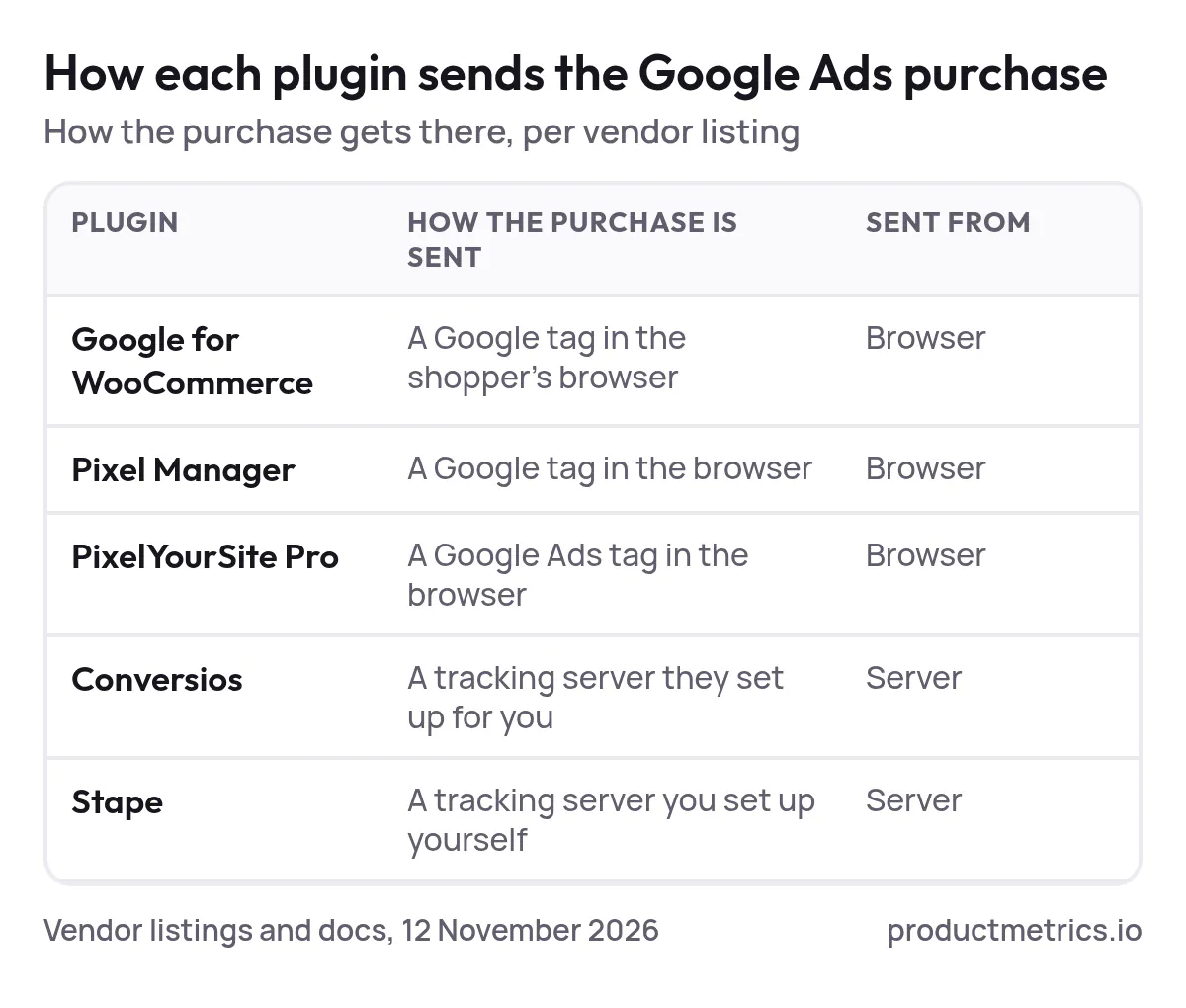
_Three of the five plugins send the Google Ads purchase from the shopper's browser, where an ad blocker can stop it; two send it from a tracking server._
## Baseline: Google for WooCommerce
**Best for:** New WooCommerce stores that want products in Merchant Center and a first Performance Max campaign, free.
Google for WooCommerce is the official extension "by Woo", with 800K+ installs. It sends your products to [Google Merchant Center](https://www.productmetrics.io/glossary/google-merchant-center "Google Merchant Center (GMC) is a free Google tool where a shop uploads and manages its product data, so its products can appear on Google Shopping and across Google.") and tracks conversions with its own Google tag. (Source: [Google for WooCommerce](https://woocommerce.com/products/google-listings-and-ads/))
| At a glance | Google for WooCommerce |
|---|---|
| Install | Free extension from WooCommerce.com |
| Google Ads route | Its own Google tag in the shopper's browser |
| Server-side for Google Ads | No |
| Price as listed, November 2026 | Free (ad spend billed by Google) |
**Strengths**
- Sets up five conversion actions when you create a campaign: Purchases, page view, product page, add to cart and cart page. (Source: [Google for WooCommerce FAQ](https://woocommerce.com/document/google-for-woocommerce/faq/))
- Enhanced conversions, which add scrambled customer details to each purchase so Google Ads matches more orders, take one tick in its settings and a switch in Google Ads.
**Limitations**
- Only the Purchases action gets a [conversion value](https://www.productmetrics.io/glossary/conversion-value "Conversion value is the amount you tell Google Ads a conversion is worth, such as sales revenue or profit margin.") at setup; the FAQ lists no profit or new-customer value.
- Requires WordPress 6.9 and WooCommerce 10.9 or later. (Source: [Google for WooCommerce](https://woocommerce.com/products/google-listings-and-ads/))
**Scores**
- Platform integration depth: **4/5**
- Conversion completeness: **2/5**
- Signal depth: **1/5**
- Setup effort and maintenance: **5/5**
- Price and fit: **5/5**
Start here, then add a plugin below once ad blockers or profit matter.
> **Get every conversion back into Google Ads, Meta and ChatGPT Ads.** Full Signal Tracking gets through every adblocker, so bidding works on your full revenue. Sends revenue, profit and new customers to Google Ads, Meta and ChatGPT Ads. [Book a demo](https://www.productmetrics.io/demo)
## Pixel Manager for WooCommerce – Many Channels From One Plugin
**Best for:** Stores on Google Ads, Meta, TikTok and more that want one plugin at a low yearly price.
Pixel Manager for WooCommerce by SweetCode lists 40,000+ active installations and a 4.9 out of 5 rating. The free version covers Google Ads "conversion value tracking, dynamic remarketing, cart item data" and marks new customers. (Source: [WordPress.org](https://wordpress.org/plugins/woocommerce-google-adwords-conversion-tracking-tag/))
| At a glance | Pixel Manager |
|---|---|
| Install | Free on WordPress.org; Pro from WooCommerce.com |
| Google Ads route | A Google tag in the browser, optionally through Google tag gateway |
| Server-side for Google Ads | No; Google Ads isn't on Pro's server-side list |
| Price as listed, November 2026 | Pro €135 for one year, €216 for two |
**Strengths**
- Consent Mode v2 for free, with more than 15 cookie banners supported.
- Pro adds Google Ads enhanced conversions, refunds that correct the order in Google Ads, and customer lifetime value on orders. (Source: [WooCommerce.com](https://woocommerce.com/products/pixel-manager-pro-for-woocommerce/); [WordPress.org](https://wordpress.org/plugins/woocommerce-google-adwords-conversion-tracking-tag/))
- Pro sends purchases from a server to Meta, TikTok, Pinterest and GA4, among others, and its nightly Automatic Conversion Recovery sends orders the browser missed.
**Trade-offs**
- The Google Ads purchase still goes from the shopper's browser.
- The listing doesn't offer profit as the purchase value; it names Cost of Goods plugins only as compatible.
**Scores**
- Platform integration depth: **4/5**
- Conversion completeness: **3/5**
- Signal depth: **3/5**
- Setup effort and maintenance: **4/5**
- Price and fit: **5/5**
**Figure: Conversion completeness and signal depth, scored 1–5.** Pixel Manager is the only plugin to score 3 on both; Google for WooCommerce scores 1 on signal depth because only its Purchases action carries a value.
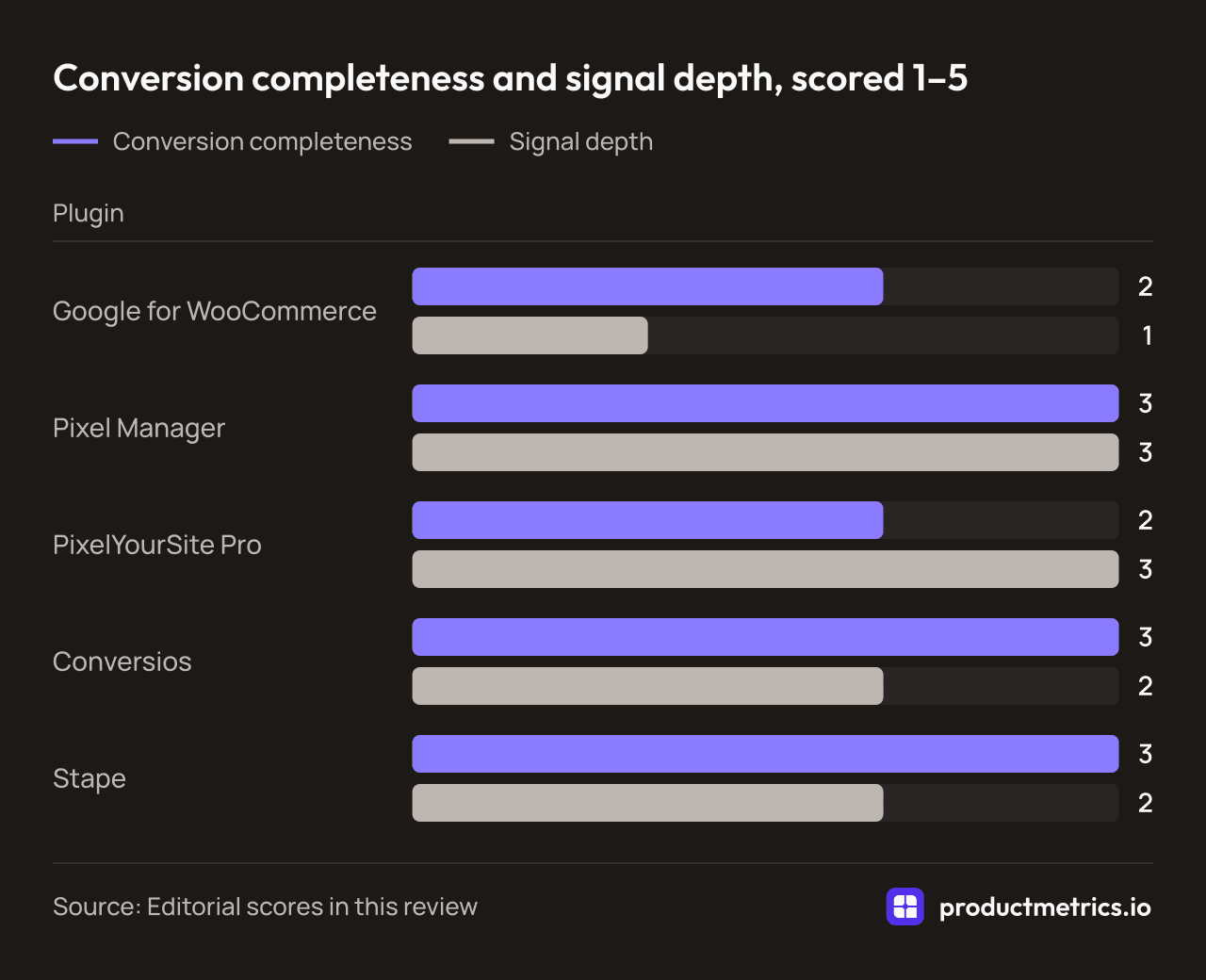
| Plugin | Conversion completeness | Signal depth |
| --- | --- | --- |
| Google for WooCommerce | 2 | 1 |
| Pixel Manager | 3 | 3 |
| PixelYourSite Pro | 2 | 3 |
| Conversios | 3 | 2 |
| Stape | 3 | 2 |
_Source: Editorial scores in this review_
If you need the **best Google Ads conversion tracking plugin for WooCommerce** on a tight budget, across many ad channels, Pixel Manager is the strongest value here.
## PixelYourSite Pro – Meta First, With Profit as Value
**Best for:** Meta-first stores that want the Conversions API and Google Ads tags in one plugin.
PixelYourSite's free version (400,000+ active installations) covers the Meta Pixel and GA4, plus Meta's Conversions API, which sends purchases to Meta from a server. (Source: [WordPress.org](https://wordpress.org/plugins/pixelyoursite/)) Pro adds Google Ads conversion tracking, enhanced conversions and dynamic remarketing. (Source: [PixelYourSite Pro](https://www.pixelyoursite.com/plugins/pixelyoursite-professional))
| At a glance | PixelYourSite Pro |
|---|---|
| Install | WordPress plugin with a licence key |
| Google Ads route | A Google Ads tag in the browser |
| Server-side for Google Ads | No; from a server only to Meta, GA4, TikTok and OpenAI |
| Price as listed, November 2026 | $199 a year for 1 site, $249 for 10, $699 for 100 |
**Strengths**
- "With WooCommerce Cost of Goods, each purchase can carry the order's profit as its value."
- Purchase value as the order total, or without tax and shipping.
- Checks the visitor's consent before anything is sent.
**Trade-offs**
- Cost of Goods is a separate plugin in the All Access bundle, from $359 a year, not in the Starter, Advanced or Agency licences.
**Scores**
- Platform integration depth: **4/5**
- Conversion completeness: **2/5**
- Signal depth: **3/5**
- Setup effort and maintenance: **4/5**
- Price and fit: **4/5**
For **WooCommerce POAS tracking** on Meta first, PixelYourSite Pro with Cost of Goods is the shortest route among the plugins that track in the browser.
## Conversios – Server-Side Tracking Set Up for You
**Best for:** Stores that want a tracking server without building it, plus a product feed for Merchant Center.
Conversios lists 10,000+ active installations and a 4.3 out of 5 rating. Google Ads purchase tracking with enhanced conversions is in Pro; the product feed to Merchant Center and Consent Mode v2 are free. (Source: [WordPress.org](https://wordpress.org/plugins/enhanced-e-commerce-for-woocommerce-store/))
| At a glance | Conversios |
|---|---|
| Install | WordPress plugin; Conversios sets up the tracking for you |
| Google Ads route | A tracking server hosted on Google Cloud (Server Side Tracking plan) |
| Server-side for Google Ads | Yes, through Google Tag Manager on that server |
| Price as listed, November 2026 | Server Side Tracking $998 a year at the regular price |
**Strengths**
- The Server Side Tracking plan includes "Google Cloud Hosting" and sends from the server to GA4, Google Ads, Facebook and Snapchat. (Source: [Conversios pricing](https://www.conversios.io/pricings/))
- A free setup service builds both the website and the server side of the tracking. (Source: [Conversios server-side tracking](https://www.conversios.io/server-side-tracking/))
**Trade-offs**
- The listing doesn't mention profit as a conversion value.
- Two Google Tag Manager setups stay yours to keep running, and the plugin doesn't include a cookie banner.
**Scores**
- Platform integration depth: **4/5**
- Conversion completeness: **3/5**
- Signal depth: **2/5**
- Setup effort and maintenance: **4/5**
- Price and fit: **3/5**
If you want a **reliable conversion tracking integration for Google Shopping that supports WooCommerce** and comes with a feed, Conversios bundles both.
## Stape – Server-Side Tracking You Build Yourself
**Best for:** Teams with a tracking specialist who want full control of their own tracking server.
Stape Conversion Tracking (10,000+ active installations) adds Google Tag Manager to your shop and sends your shop's events to a tracking server you set up and maintain. It also offers an option that Stape says "makes Google Tag Manager and Google Analytics tracking invisible to ad blockers". (Source: [WordPress.org](https://wordpress.org/plugins/gtm-server-side/))
| At a glance | Stape |
|---|---|
| Install | WordPress plugin, plus Google Tag Manager on your site and on a server |
| Google Ads route | A Google Ads tag on your tracking server |
| Server-side for Google Ads | Yes, once you build it |
| Price as listed, November 2026 | Free up to 10K requests; Pro $20 a month for 500K |
**Strengths**
- Sends purchase and refund data straight from WooCommerce, has a Cookie Keeper setting, and can route browser tracking through your own domain.
**Trade-offs**
- For Google Ads you add two tags to the tracking server yourself and connect a custom domain.
- Stape's docs advise tracking Google Ads either in the browser or on the server, not both. (Source: [Stape docs](https://stape.io/helpdesk/documentation/how-to-set-up-google-ads-conversion-tracking))
- Profit and customer type only arrive if you add that data yourself.
**Scores**
- Platform integration depth: **3/5**
- Conversion completeness: **3/5**
- Signal depth: **2/5**
- Setup effort and maintenance: **2/5**
- Price and fit: **4/5**
**Figure: Platform integration and setup effort, scored 1–5.** Google for WooCommerce scores 5 on setup; Stape scores 2, because you build and maintain the tracking server yourself.
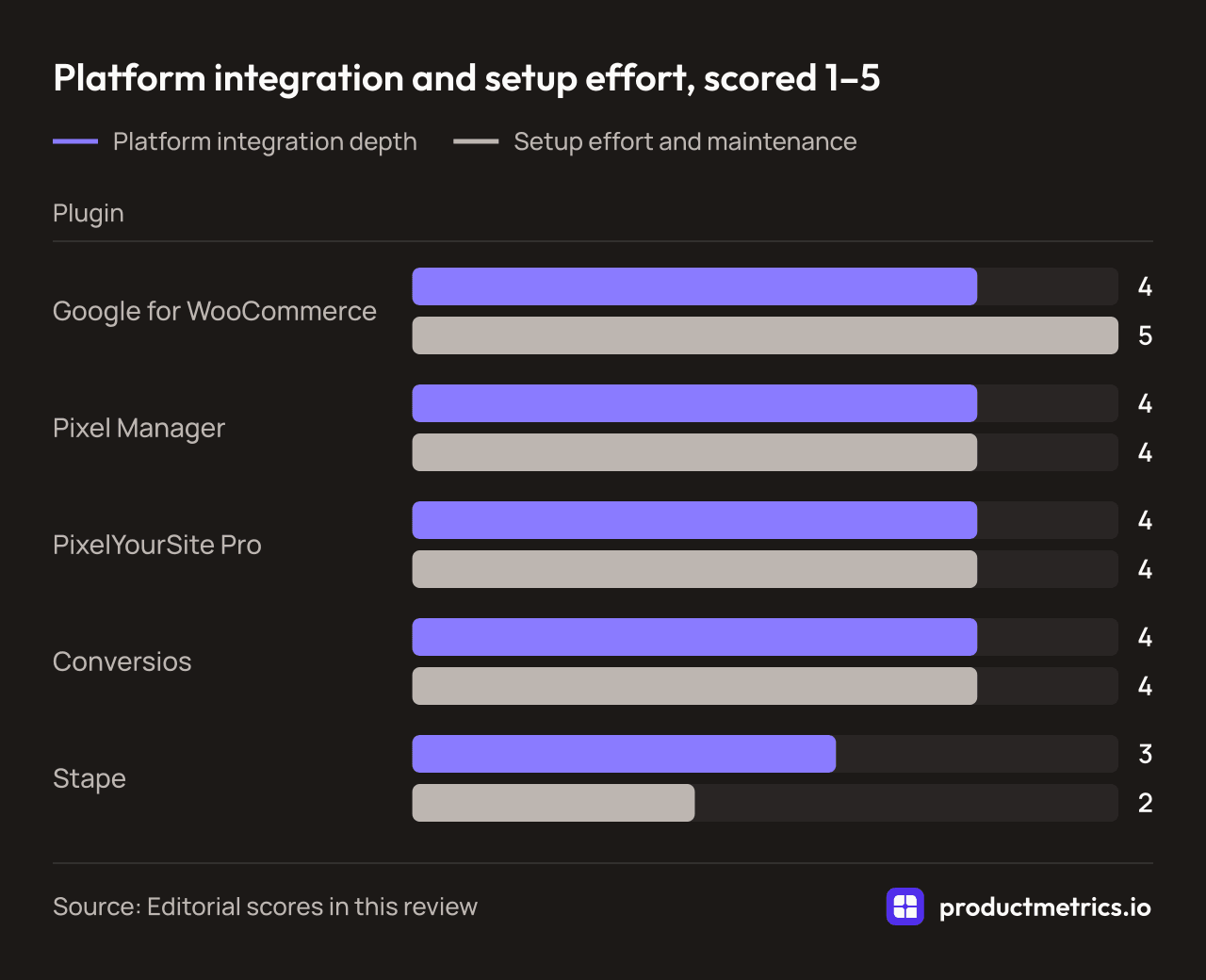
| Plugin | Platform integration depth | Setup effort and maintenance |
| --- | --- | --- |
| Google for WooCommerce | 4 | 5 |
| Pixel Manager | 4 | 4 |
| PixelYourSite Pro | 4 | 4 |
| Conversios | 4 | 4 |
| Stape | 3 | 2 |
_Source: Editorial scores in this review_
Stape answers a **conversion tracking tool for Google Shopping that is compatible with my WordPress site** for teams that build tags themselves.
## Side by Side Comparison
Pixel Manager leads the weighted scores at 3.7, ahead of PixelYourSite Pro at 3.3. Each weighted score adds up score times weight: Pixel Manager is 4 × 0.25 + 3 × 0.25 + 3 × 0.20 + 4 × 0.15 + 5 × 0.15 = 3.7.
| Plugin | Best for | Integration (25%) | Completeness (25%) | Signal (20%) | Setup (15%) | Price (15%) | Weighted | Notable strength |
|---|---|---|---|---|---|---|---|---|
| **Google for WooCommerce** | Free start | 4 | 2 | 1 | 5 | 5 | 3.2 | Products and conversions in one Woo extension ([FAQ](https://woocommerce.com/document/google-for-woocommerce/faq/)) |
| **Pixel Manager** | Many channels, low price | 4 | 3 | 3 | 4 | 5 | 3.7 | Refund corrections and lifetime value in Pro ([WooCommerce.com](https://woocommerce.com/products/pixel-manager-pro-for-woocommerce/)) |
| **PixelYourSite Pro** | Meta first | 4 | 2 | 3 | 4 | 4 | 3.3 | Profit as value with Cost of Goods ([PixelYourSite](https://www.pixelyoursite.com/plugins/pixelyoursite-professional)) |
| **Conversios** | Tracking server set up for you | 4 | 3 | 2 | 4 | 3 | 3.2 | Hosted tracking server plus feed ([pricing](https://www.conversios.io/pricings/)) |
| **Stape** | Tracking server you build | 3 | 3 | 2 | 2 | 4 | 2.8 | Free tier, tracking from your own domain ([WordPress.org](https://wordpress.org/plugins/gtm-server-side/)) |
**Figure: Weighted score per WooCommerce plugin, out of 5.** Weighted by the rubric, Pixel Manager scores 3.7 and PixelYourSite Pro 3.3; the free Google for WooCommerce baseline scores 3.2.
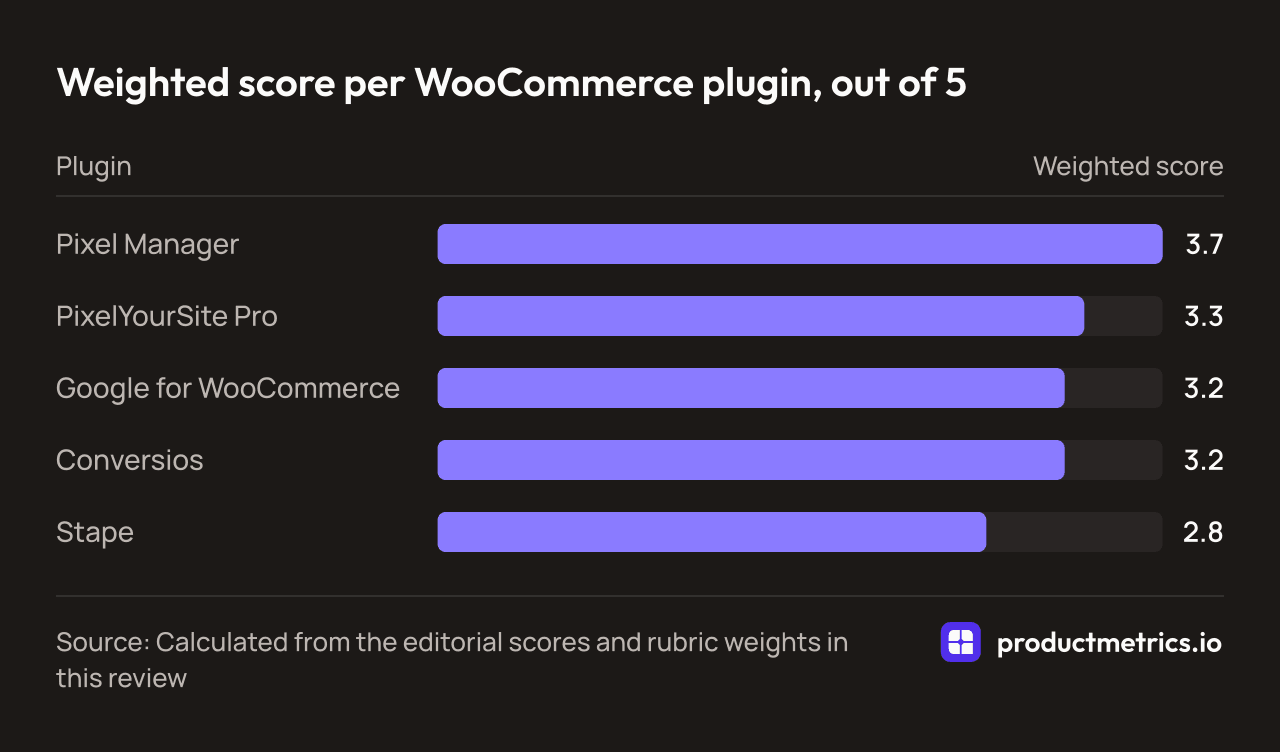
| Plugin | Weighted score |
| --- | --- |
| Pixel Manager | 3.7 |
| PixelYourSite Pro | 3.3 |
| Google for WooCommerce | 3.2 |
| Conversios | 3.2 |
| Stape | 2.8 |
_Source: Calculated from the editorial scores and rubric weights in this review_
### What does WooCommerce Google Ads conversion tracking cost?
WooCommerce Google Ads conversion tracking costs from nothing to about $1,000 a year as listed in November 2026, depending on whether you need sending from a server or profit:
| Plugin | Entry price | Server-side or profit |
|---|---|---|
| Google for WooCommerce | Free | Not offered |
| Pixel Manager | Pro €135 a year | Server-side for Meta, GA4 and others in Pro |
| PixelYourSite Pro | $199 a year for 1 site | Cost of Goods in All Access, from $359 a year |
| Conversios | Pixel Pro (paid plan) | Server Side Tracking $998 a year at the regular price |
| Stape | Free up to 10K requests | Pro $20 a month for 500K requests ([pricing](https://stape.io/price)) |
## How To Choose a WooCommerce Google Ads Tracking Plugin
Pick the plugin by the one thing your Google Ads account lacks today:
1. **If you have no tracking yet** → Google for WooCommerce, free, with enhanced conversions switched on.
2. **If you advertise on many channels and watch the budget** → Pixel Manager Pro.
3. **If Meta leads and you want profit as the value there** → PixelYourSite Pro with Cost of Goods.
4. **If you want a tracking server without building it** → Conversios.
5. **If a specialist runs your tags** → Stape.
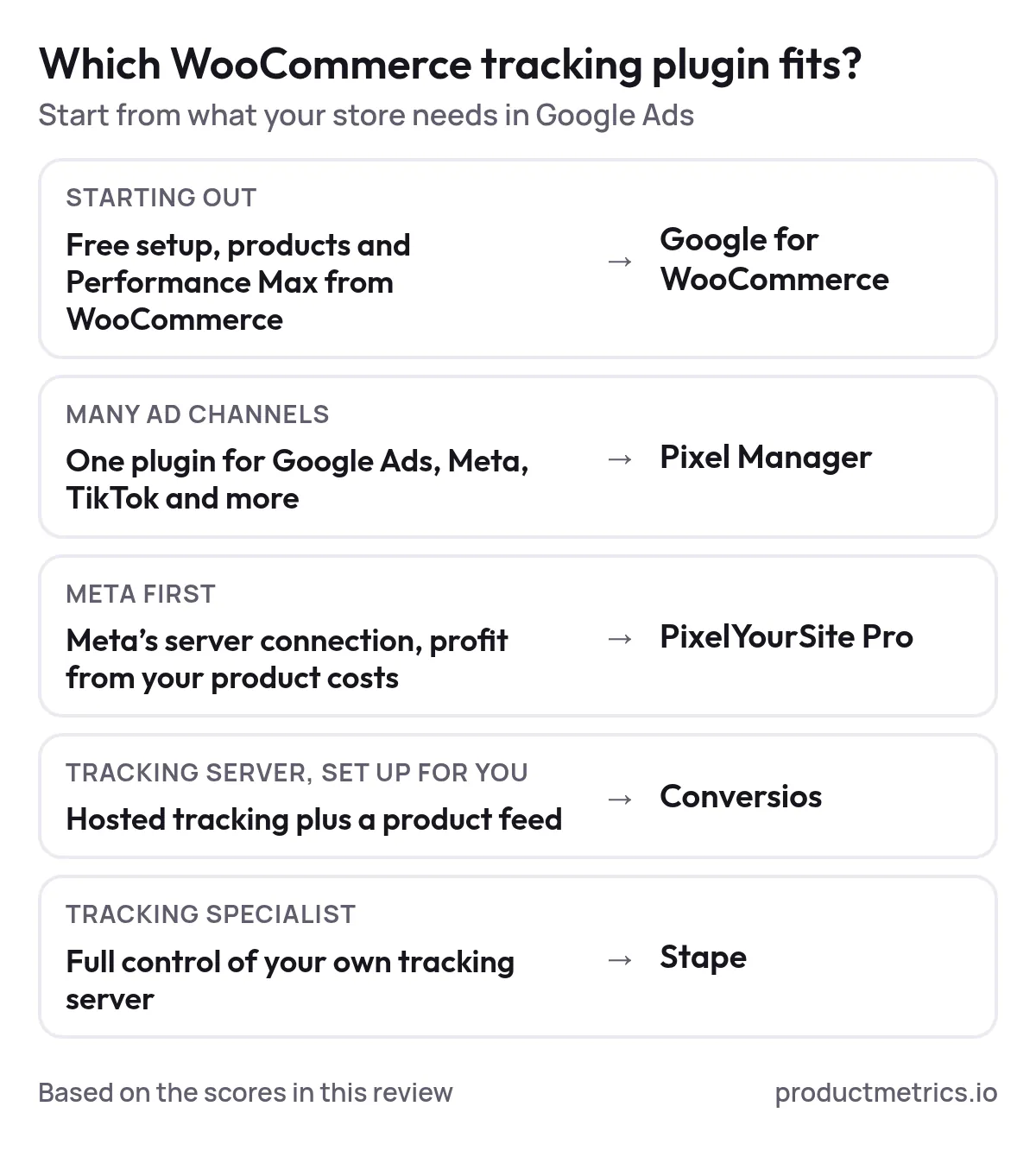
_Start from what Google Ads is missing today: a first tag, more channels, Meta first, or a tracking server._
Whichever you pick, compare a week of Google Ads purchases with WooCommerce orders. For stacks beyond WooCommerce, see the [real-time conversion tracking tools](https://www.productmetrics.io/blog/real-time-google-ads-conversion-tracking-tools) benchmark.
> **Full Signal Tracking on WooCommerce** No setup required: install the plugin, paste a token, and every WooCommerce order reaches Google Ads and Meta with its revenue, profit, customer type and lifetime value. [See how it runs on WooCommerce](https://www.productmetrics.io/platforms/woocommerce)
## Frequently asked questions
### How do I send profit margin from WooCommerce to Google Ads?
Send each order's profit as the value of its purchase conversion. Turn on product costs in WooCommerce (built in since version 10.3), then use a plugin that takes them off each order: PixelYourSite Pro, for example, can send profit as the purchase value with its Cost of Goods add-on. A target ROAS on that action then steers on profit.
### Which WooCommerce enhanced conversions plugin should I use?
Google for WooCommerce includes enhanced conversions for free: tick Send Enhanced Conversions data to Google Ads in its settings and turn on enhanced conversions for web in Google Ads. Pixel Manager and Conversios put enhanced conversions in their paid plans, and PixelYourSite lists them in Pro.
## Keep reading.
- [What Does Google Ads Conversion Tracking Cost? Setup, Tools, Hosting and Upkeep](https://www.productmetrics.io/blog/google-ads-conversion-tracking-cost)
- [How Much Does Server-Side Tracking Cost for Google Ads? Server-Side GTM vs a Hosted App](https://www.productmetrics.io/blog/google-ads-server-side-tracking-cost)
- [Best Google Ads Conversion Tracking Apps for Lightspeed eCom](https://www.productmetrics.io/blog/lightspeed-google-ads-conversion-tracking-apps)
---
Written by Berend Vrakking, founder of Product Metrics. Last updated 2026-11-25.
1M+ products analysed · Nominated at the Dutch Search Awards for Best Measurement Campaign (2023) and Best Use of Data (2024)
HTML version: https://www.productmetrics.io/blog/woocommerce-google-ads-conversion-tracking-plugins