 Log in with Google
What is price intelligence? A Google Shopping guide
Price intelligence turns competitor prices into context for pricing and ad decisions. See the data it needs, three Shopping use cases and a worked example.
Price intelligence is collecting competitor prices and turning them into context for pricing and advertising decisions: which competitor products compare with yours, where your price sits among them, and what that does to profit. Price monitoring only collects the prices. Price intelligence explains them.
For Google Shopping merchants that means reading each product’s price position next to POAS, margin and stock, so a price gap becomes a reason you can act on or ignore.
How is price intelligence different from price monitoring and repricing?
The three terms describe three jobs, and mixing them up leads to buying the wrong tool.
| Job | What it does | Who decides the price |
|---|---|---|
| Price monitoring | Collects competitor prices on a schedule | You |
| Price intelligence | Matches comparable products and explains your price position next to margin, stock and ad performance | You |
| Repricing | Changes your prices automatically by rule | The rule |
Competitor Prices in Product Metrics covers the first two jobs. It shows where you stand and never changes a price: you decide.
What data does price intelligence need?
Competitor prices on their own mislead, because a cheaper competitor product may not be comparable, and a gap means nothing until you know what you earn on the product. Five inputs make the difference.
| Input | Why it matters |
|---|---|
| Matched competitor products, including own-brand alternatives | Only comparable products give a fair price position |
| Prices and availability over time | One snapshot hides movement, and an out-of-stock competitor is not a real alternative |
| A stated shipping basis | Compare every product the same way. Competitor Prices compares prices without shipping |
| Your margin or POAS | It shows how much room you have and whether the gap costs you |
| Your stock | Low stock weakens the case for chasing a competitor’s price, and heavy stock makes a gap worth a closer look |
Our guide to POAS vs ROAS explains why profit per ad spend is the figure to read a price gap against. For a product with no margin on file, ROAS is the fallback.
How does price intelligence work?
Software can take the first three steps. The fourth stays with you.
- CollectCheck competitor prices on a schedule: daily, weekly or monthly, depending on how fast your category moves.
- MatchPair each of your products with comparable competitor products, by GTIN for branded products and by dimensions for own-brand ones.
- ComparePut every price on one basis, list price without shipping, and read your position, the matched median and the gap.
- DecideRead the gap next to margin, stock and ad results, then act or leave it. This step stays with you.
To pick software for the first three, use the checklist in how to track competitor prices.
How do you match products without a GTIN?
Matching decides whether the numbers mean anything. For branded products the GTIN does it: the same barcode is the same product. Own-brand products have no twin elsewhere, so a GTIN lookup finds nothing.
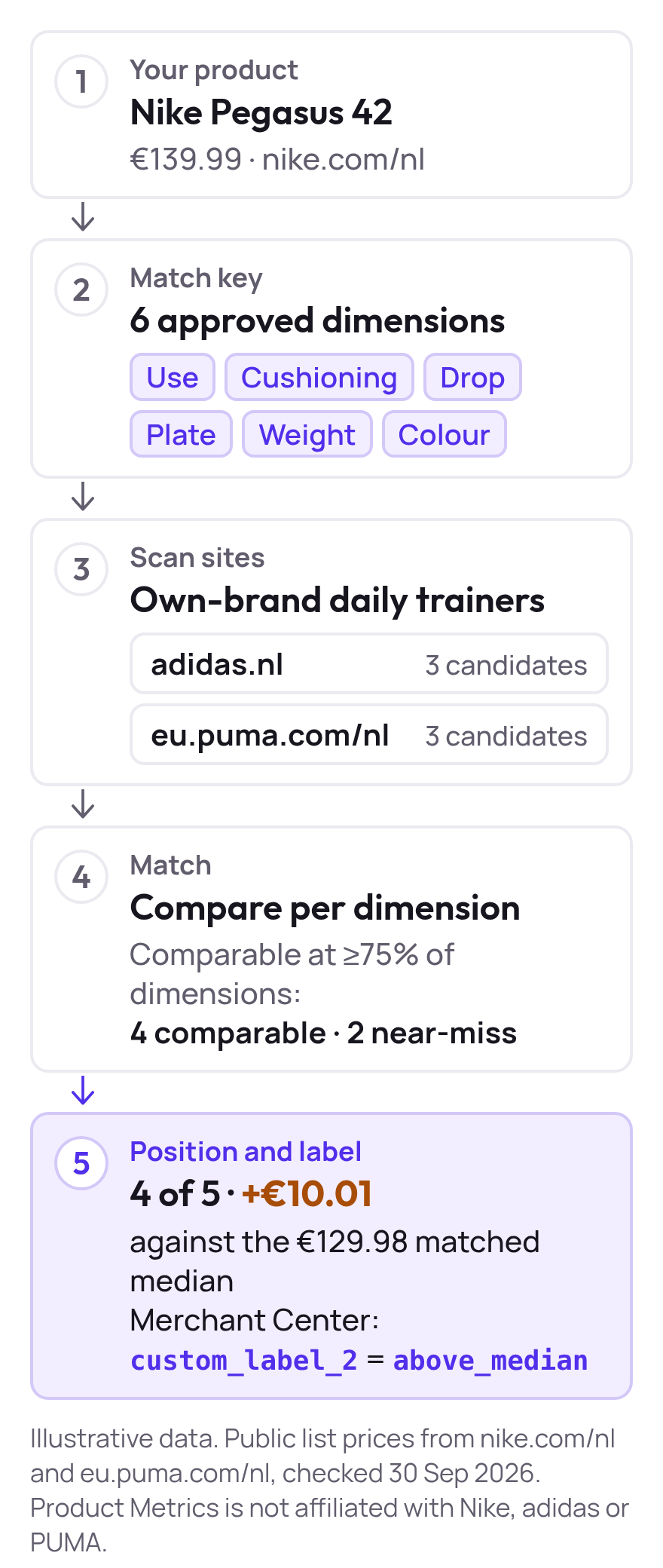
Compare on the dimensions shoppers weigh instead, such as use, cushioning, drop, plate, weight and colour, and count a product as comparable when it matches most of them. That also covers alternatives from other brands that a shopper weighs against yours.
How do you read a price position?
Three numbers describe where a product stands among its comparable competitor products:
- Price position is your rank among the comparable products, counting yourself, where 1 is the cheapest.
- Price ratio is your price divided by the matched median. A ratio above 1.00 means you are more expensive than the middle of the market.
- Price difference is your price minus the matched median, in euros.
A €139.99 product against a €129.98 median has a price ratio of 1.08 and a price difference of €10.01. Position tells you how many competitors are under you, while ratio and difference tell you how far from the middle you are. You need both, because a product can rank third and still sit only €1.00 above the median.
What does price intelligence look like over eight weeks?
Take a product priced at €139.99 and three comparable competitor products checked weekly. A single check in week 8 tells you Competitor 2 charges €138.99. The series shows what happened.
| Week | Your price | Matched median | Your rank (1 = cheapest of 4) |
|---|---|---|---|
| 1 | €139.99 | €150.00 | 1 |
| 3 | €139.99 | €150.00 | 2 |
| 6 | €139.99 | €138.99 | 3 |
| 8 | €139.99 | €138.99 | 3 |
The matched median is the median of the three competitor prices. Your price never moved, yet you went from €10.01 below the median to €1.00 above it, and from cheapest to third of four. Competitor 1 went under you in week 3 and Competitor 2 in week 6. The numbers are illustrative; the full series, with every competitor’s price, is in how to track competitor prices for Google Shopping.
Whether the slide cost you shows up next to clicks and POAS. If the product kept its POAS, the gap may not matter. If clicks held but POAS fell, a price above the competition is one plausible reason.
How do Google Shopping merchants use price intelligence?
Each use case ends in a decision you make. None of them is a price change made for you.
A product gets clicks but misses its POAS target
You see that it sits above the matched median, for example €139.99 against €129.98. Before you lower its priority, check the price: the gap may be why shoppers click and then buy elsewhere. Decision: look at price and margin first, and lower priority only if neither explains the result.
A product below the median has a high POAS
You are cheaper than comparable products and still profitable. Decision: hold the price and keep its priority. There is no reason to follow a competitor down, and the margin gives you room if the gap narrows.
An own-brand product has no GTIN match
Barcode lookups return nothing, so the product has no price position at all. Decision: pick the dimensions shoppers compare on, approve the matches, and compare by dimensions. Until you do, treat the product’s price as unknown, not as fine. Many price monitoring tools match by GTIN, which finds nothing for own-brand products.
How does price position feed ad decisions?
A price gap alone says little. Next to POAS, margin and stock it tells you what to do with a product’s priority. In Product Metrics the market position joins the product’s context, feeds the Price Competitiveness weight in Product Score, and is exported as a Merchant Center custom label such as custom_label_2: above_median. Your Performance Max and Shopping campaigns can use that label, and your rules decide what it changes. Product Metrics writes only the labels you approve.
| Price position | POAS against target | A sensible first read |
|---|---|---|
| Above the median | Below | Price may be part of the problem. Check price and margin before lowering priority |
| Above the median | On target | The gap is not hurting. Leave price and priority alone |
| Below the median | On target or above | There is room to hold your price. Keep priority |
| Below the median | Below | Price is unlikely to explain it. Look at margin, returns and the product page |
Which do you need: price monitoring, price intelligence or repricing?
Choose by the question you are trying to answer.
- Price monitoring answers “what do competitors charge today?” It fits when you already know which products compare and only need the numbers.
- Price intelligence answers “does our price position cost us profit?” It fits when you advertise products on Google Shopping and need to know whether a gap matters.
- Dynamic pricing or repricing answers “what should the price be, by rule?” It changes prices automatically, so it only suits a range where a rule can safely own the margin.
Intelligence sits between the other two. It takes monitoring’s data and stops before the rule. Because a competitor cutting its price is not on its own a reason to follow it down, the person who knows the margin stays in charge of the decision.
Start with ten products and a spreadsheet
List your ten highest-spend products and find three or four close competing products for each. Write down every price on the same basis and note the date. Repeat weekly, then read the gap next to margin and POAS before you change a price or a product’s priority. Our free competitor price analysis template has the formulas, and competitive pricing examples shows how other companies price against competitors.
When that stops fitting in a spreadsheet, Competitor Prices tracks it for you, and price monitoring software compared sets the options side by side.
Keep reading.
Competitor price analysis template (free spreadsheet)
Download a free competitor price analysis template: compare your prices with three competitors, see price position and ratio, and log changes weekly.
How to track competitor prices for Google Shopping
Track competitor prices when nobody sells your product: match own-brand products by dimensions, compare list prices, then read price position next to POAS.
Price monitoring software compared for Google Shopping
Ten ways to monitor prices compared on cost at 1,000 products, matching and update frequency: Merchant Center, Prisync, Pricefy, Wiser, Minderest and more.
Frequently asked questions.
What is price intelligence?
What is the difference between price intelligence and price monitoring?
Is price intelligence the same as dynamic pricing?
What data does price intelligence need?
How do you get price intelligence for products without a GTIN?
How does price intelligence help Google Shopping ads?
Is price intelligence legal?
How often should you check competitor prices?
See which of your products to push, fix or pause. Start with your own products, or a 30-second estimate.
Check one product first: work out its break-even ROAS in the calculator. Then see where all your products stand.
Not ready to connect? Book a demo: a video call with Berend, then a demo account.