 Log in with Google
Enhanced conversions vs server-side
What enhanced conversions are, how to set them up and check them, how they differ from server-side tracking and how Full Signal fits. With our ad blocker lab.
Enhanced conversions send hashed first-party customer data, such as an email address, to Google with a conversion your tag already reports, so Google can match it to the ad. Server-side tracking sends the conversion from a server instead of the visitor’s browser. They solve different problems, and setting up the wrong one first can cost you weeks.
Product Metrics, which makes product-level optimisation software for Google Shopping and Performance Max, publishes this guide, and the blocker results come from our own real-browser lab; the method and sources are at the end.
1. What are enhanced conversions in Google Ads?
Enhanced conversions send hashed first-party customer data to Google with a conversion that your tag already reports. According to Google Ads Help (“About enhanced conversions”), they supplement existing conversion tags with data such as email, name, home address and phone number. The data is normalised and hashed with SHA-256 before it is sent, and Google says this improves measurement accuracy.
Their job is matching. The conversion is already on its way, and the extra data helps Google tie it to the right ad interaction. With the tag routes, they don’t change how the tag loads or where the request goes.
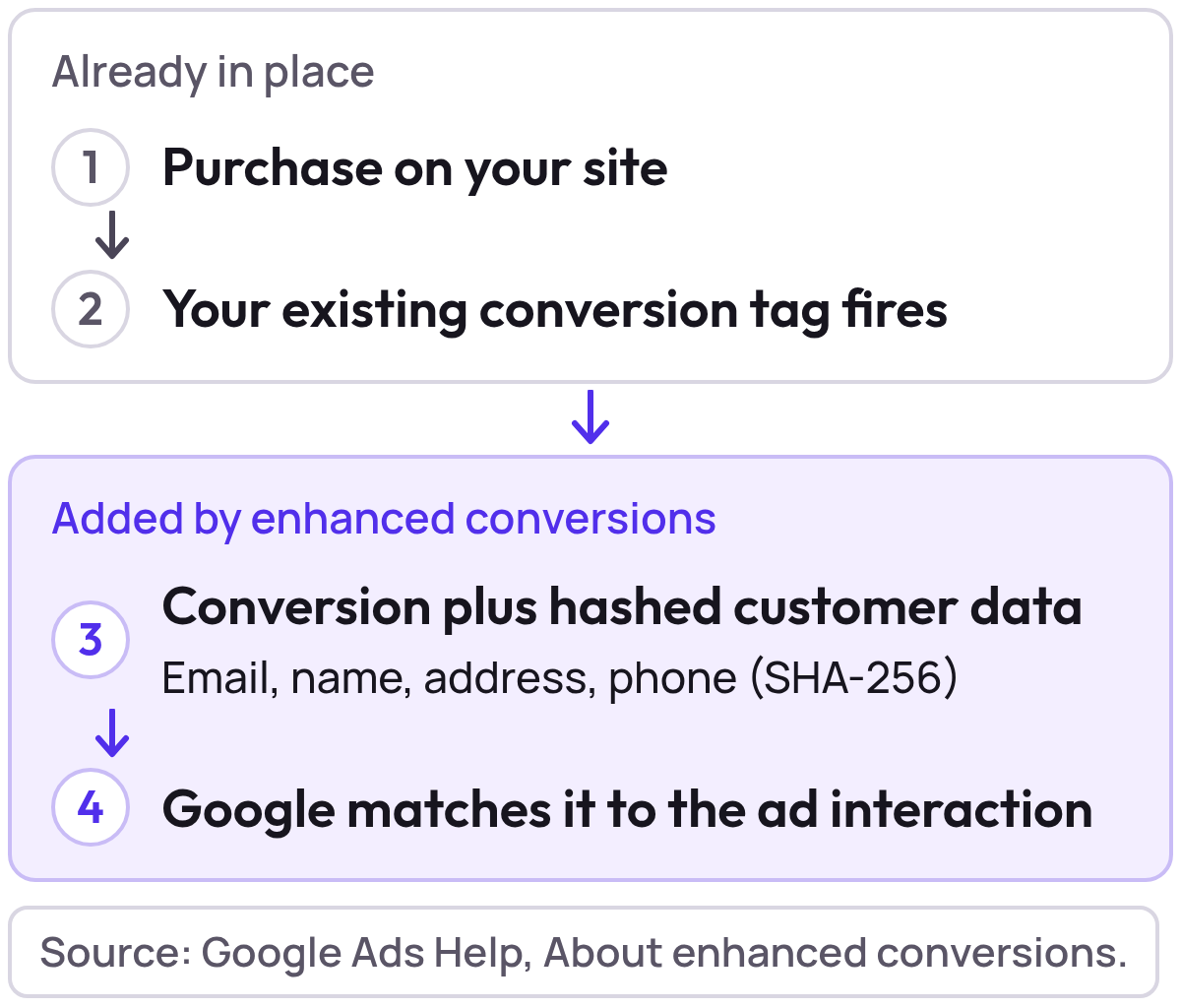
You need the customer fields available at purchase and a conversion tag that already fires. For a visitor whose tag doesn’t fire, there’s no conversion for the extra data to supplement.
2. How do you set up enhanced conversions in Google Ads?
You turn them on in Google Ads, choose how the customer data reaches Google, and pass at least one customer field. The steps below follow Google’s own guides for the Google tag and Google Tag Manager.
Before you start, Google asks you to have:
- The exact URL where the conversion tag fires, and its conversion event trigger.
- First-party customer data on that page: an email address, full name and home address, and/or a phone number.
- A developer for any code change.
- Confirmation that you can comply with Google’s customer data policies.
Google offers three routes:
| Method | When Google suggests it | Google’s guide |
|---|---|---|
| Google tag | Conversion tracking already runs on the page through the Google tag | Set up with the Google tag |
| Google Tag Manager | You already use Google Tag Manager for conversion tracking | Set up with Google Tag Manager |
| Google Ads API | You want more flexibility and control over the data | Set up with the Google Ads API |
How do you set up enhanced conversions with the Google tag?
Google’s steps:
- In Google Ads, go to Goals, then Settings, and expand the “Enhanced conversions” section.
- Tick “Turn on enhanced conversions” and agree to the customer data terms.
- Choose “Google tag” in the method dropdown. If you are unsure, select “Which method should I use?” and enter your domain.
- If Google Ads says “your tag will collect user-provided data from your website”, select Save. Otherwise select Tag details.
- In Tag details, pick how the tag captures the data: automatic detection, CSS selectors or JavaScript variables, or a code snippet. Select Save.
- Validate the set-up, as described in the next section.
How do you set up enhanced conversions with Google Tag Manager?
The Tag Manager steps:
- In your Google tag settings, select “Allow user-provided data capabilities” and choose a collection method. Google recommends this for a first set-up.
- In Google Ads, go to Goals, then Settings, expand the enhanced conversions panel and tick “Turn on enhanced conversions”. Agree to the compliance statement.
- Choose “Google Tag Manager” as the method and select “Go to Google Tag Manager”.
- In Tag Manager, open the Google tag that has your Ads account as a destination, select Manage, then “Allow user provided data capabilities”, and choose the collection method.
- If the customer data sits on an earlier page than the conversion page, Google describes a separate “Google Ads User-Provided Data Event” tag with a form submission trigger.
- Save, publish and validate.
Whichever route you choose, Google describes three ways to collect the data: automatic detection, CSS selectors or JavaScript variables you point to, or a code snippet that sends it directly. Email is preferred. An address needs a first name, last name, postal code and country.
Google’s pages differ on one label. The setup guides still name the panel “Enhanced conversions”, while the updates page calls it “Customer data use”. Follow the label your account shows.
2026 changes: web, leads and one setting
Google’s page “Updates to your enhanced conversions settings” says Google Ads accepts user-provided data from website tags, Data Manager and API connections at the same time from April 2026. It says enhanced conversions for web and for leads become one feature with an on/off switch from June 2026, and that existing users need no action. You can still opt out per conversion action.
The same page says that from 15 June 2026, offline conversion imports and enhanced conversions for leads uploads move to the Data Manager API and are blocked in the Google Ads API.
Consent
Google says data collection won’t begin until you accept the terms of service and, where applicable, the necessary consent parameters are set to “granted”. It also says that if you use Consent Mode, the ads cookie follows the ad_storage consent status (Google tag and Google Tag Manager guides). Whether you may collect the data is a question for your legal adviser; this is not legal advice.
How do you turn off enhanced conversions?
For the whole account, go to Goals, then Settings, expand the enhanced conversions section, untick it and select Save. For one conversion action, open Summary, select the action, then Settings, expand the section, untick it and select Save. Google says that turning them off stops their use for bidding and reporting but does not affect your existing conversion data (Google tag guide).
3. How do you check if enhanced conversions are working?
Google documents two checks, and a third shows up once the feature has had time to train.
| Check | Where | What to look for |
|---|---|---|
| Request payload | Chrome DevTools, Network tab, filter for “google”, the request to googleadservices.com/pagead/conversion/, then Payload | An em parameter with a hashed value, shown as “tv.1~em” followed by the hash |
| Diagnostics report | Google Ads, Goals, Summary, the conversion action with enhanced conversions on, then Diagnostics | Health checks on your implementation (timing below) |
| Impact card | Google Ads, after the learning period | The status “Recording (enhanced conversions)” and the impact on reported conversions, shown for 30 days |
Google’s DevTools check also lists google.com/pagead/1p-conversion/ for “some browsers”. If you see only “tv.1~em” with no hash after it, Google says the parameter is being sent empty, which can happen when the customer data isn’t available at the time of conversion.
When the diagnostics report appears
Google gives a different number on each page, and no single page says “48 to 72 hours”:
| Google page | What it says |
|---|---|
| Set up with the Google tag | The tag diagnostics report can be viewed about 72 hours after implementing |
| Set up with Google Tag Manager | The tag diagnostics report can be viewed about 48 hours after implementing |
| Set up with the Google Ads API | Not a report time: send the data within 24 hours of the conversion |
| Diagnostics report | The coverage rate is available within hours of requests; the match rate updates within 24 hours |
Diagnostics statuses and match rates
Google’s diagnostics page lists four data quality statuses:
| Status | What Google says |
|---|---|
| Excellent | The set-up is active and fully optimised |
| Good | Active, with further improvements available, for example sending more user data |
| Needs attention | Active, but errors need your attention, such as missing information |
| No recent data | Enhanced conversions have not recorded data in the last 7 days |
The same page defines the match rate column:
| Match rate | Meaning |
|---|---|
| Insufficient volume | Fewer than 20 valid pings |
| No matches | Exactly zero matches |
| Low | Between 0% and 15% |
| High | Above 15% |
| Unknown | Shown “when privacy concerns are not satisfied” |
Google says alerts are not shown when you have fewer than 20 conversions in the past 7 days, and that enhanced conversions are most helpful at 20 or more conversions a week. Coverage is the number of enhanced conversion events with the parameter divided by the number of conversion events.
The errors Google lists include accepting the customer data terms (data sent before that isn’t processed), missing or empty fields, badly formatted email or phone numbers, missing address fields (country, first name, last name and postal code are all needed) and pages not served over HTTPS. If the report flags a problem, fix the implementation before you judge the results.
Do ad blockers stop the request that carries the hashed email?
In three of six setups, yes. On 7 October 2026 we sent the two conversion requests named for this check, googleadservices.com/em parameter. Brave Shields, uBlock Origin Lite and AdGuard with Tracking Protection blocked both; the other three setups, and a browser with no blocker, let both reach Google.
The em parameter changed no result: each request with em got the same outcome as the same request without it. So if you run Google’s DevTools check in a profile with one of the first three blockers, expect the request not to appear.
Brave Shields
- Standard conversion request
googleadservices.com/Blockedpagead/ conversion/ - The same request with
emgoogleadservices.com/Blockedpagead/ conversion/ ?em=… 1p-conversionrequest withemgoogle.com/Blockedpagead/ 1p-conversion/ ?em=…
Google's DevTools check won't show the request in a profile with this blocker.
uBlock Origin Lite
- Standard conversion request
googleadservices.com/Blockedpagead/ conversion/ - The same request with
emgoogleadservices.com/Blockedpagead/ conversion/ ?em=… 1p-conversionrequest withemgoogle.com/Blockedpagead/ 1p-conversion/ ?em=…
Google's DevTools check won't show the request in a profile with this blocker.
AdGuard with Tracking Protection
- Standard conversion request
googleadservices.com/Blockedpagead/ conversion/ - The same request with
emgoogleadservices.com/Blockedpagead/ conversion/ ?em=… 1p-conversionrequest withemgoogle.com/Blockedpagead/ 1p-conversion/ ?em=…
Google's DevTools check won't show the request in a profile with this blocker.
AdGuard, default filters
- Standard conversion request
googleadservices.com/Reachedpagead/ conversion/ - The same request with
emgoogleadservices.com/Reachedpagead/ conversion/ ?em=… 1p-conversionrequest withemgoogle.com/Reachedpagead/ 1p-conversion/ ?em=…
The request reaches Google, with or without em.
AdBlock
- Standard conversion request
googleadservices.com/Reachedpagead/ conversion/ - The same request with
emgoogleadservices.com/Reachedpagead/ conversion/ ?em=… 1p-conversionrequest withemgoogle.com/Reachedpagead/ 1p-conversion/ ?em=…
The request reaches Google, with or without em.
AdGuard DNS
- Standard conversion request
googleadservices.com/Reachedpagead/ conversion/ - The same request with
emgoogleadservices.com/Reachedpagead/ conversion/ ?em=… 1p-conversionrequest withemgoogle.com/Reachedpagead/ 1p-conversion/ ?em=…
The request reaches Google, with or without em.
No blocker: all three requests reached Google. Product Metrics ad blocker lab, 7 October 2026: real browsers with the real blockers.
Test what your own browser blocksThe doubleclick.net view-through request with em was blocked in every setup except AdBlock in Brave.
4. Do enhanced conversions work with server-side tracking?
Google documents one server route: the Google Ads API. It supplements a conversion that a tag has already recorded, so it does not replace the tag.
- A tag still records the conversion. Google’s API guide says you must record conversions using a regular conversion tracking tag, then send hashed first-party data over an API connection up to 24 hours after the conversion.
- The server holds the customer data. Google’s developer documentation says the tag sends the click identifier (such as a GCLID) and an order ID at conversion. You import the order ID with the hashed data later, within 24 hours of the original conversion.
- Duplicates and hashing. The API guide says to use a transaction ID so Google can match tag conversions with API conversions, to send over HTTPS, and to normalise and hash the data with SHA-256.
- More than one source at once. Google says that from April 2026 Google Ads accepts user-provided data from website tags, Data Manager and API connections at the same time (updates page).
The Google pages we read do not mention server-side tagging containers or ad blockers. Product Metrics’ own route is on the Full Signal Tracking page and in the next section. To compare Google tag gateway, server-side tagging and Full Signal Tracking, see Google tag gateway vs server-side tagging.
5. What is server-side tracking and how does it work?
Server-side tracking sends the conversion to Google from a server rather than from the visitor’s browser. The aim is that a purchase still counts when something in the browser would have stopped the standard tag.
Full Signal Tracking is Product Metrics’ version. It gets through every adblocker: in our 30 September 2026 lab, a Full Signal-style first-party endpoint was reached in all 6 blocker setups tested (Brave Shields, uBlock Origin Lite, AdGuard with Tracking Protection, AdGuard default filters, AdBlock and AdGuard DNS).
Full Signal Tracking works in four parts. The example codes are the ones on the Full Signal Tracking page, which also shows the setup per platform:
- A unique endpoint on your own domain. An opaque path on your shop domain, such as
yourshop.com/x7Kq2mVd…, with no “collect”, “track” or “pixel” in it, so adblockers let it through. - Auto-rotation keeps it reachable. If a blocker ever catches your endpoint, it rotates to a fresh one on your domain (
/x7Kq2mVd…→/Qm7vXt2L…). No tag edits, no tickets. - Click IDs kept first-party. The gclid (
gclid=Cj0KQ…x7Rw) is kept first-party and server-side, so a purchase days after the click still carries it. - Server-side delivery to Google Ads. Purchases go from our server into your conversion actions, with enhanced conversions and Consent Mode v2. Refunds adjust later.
Every purchase then reaches Google Ads and Smart Bidding from your own domain.
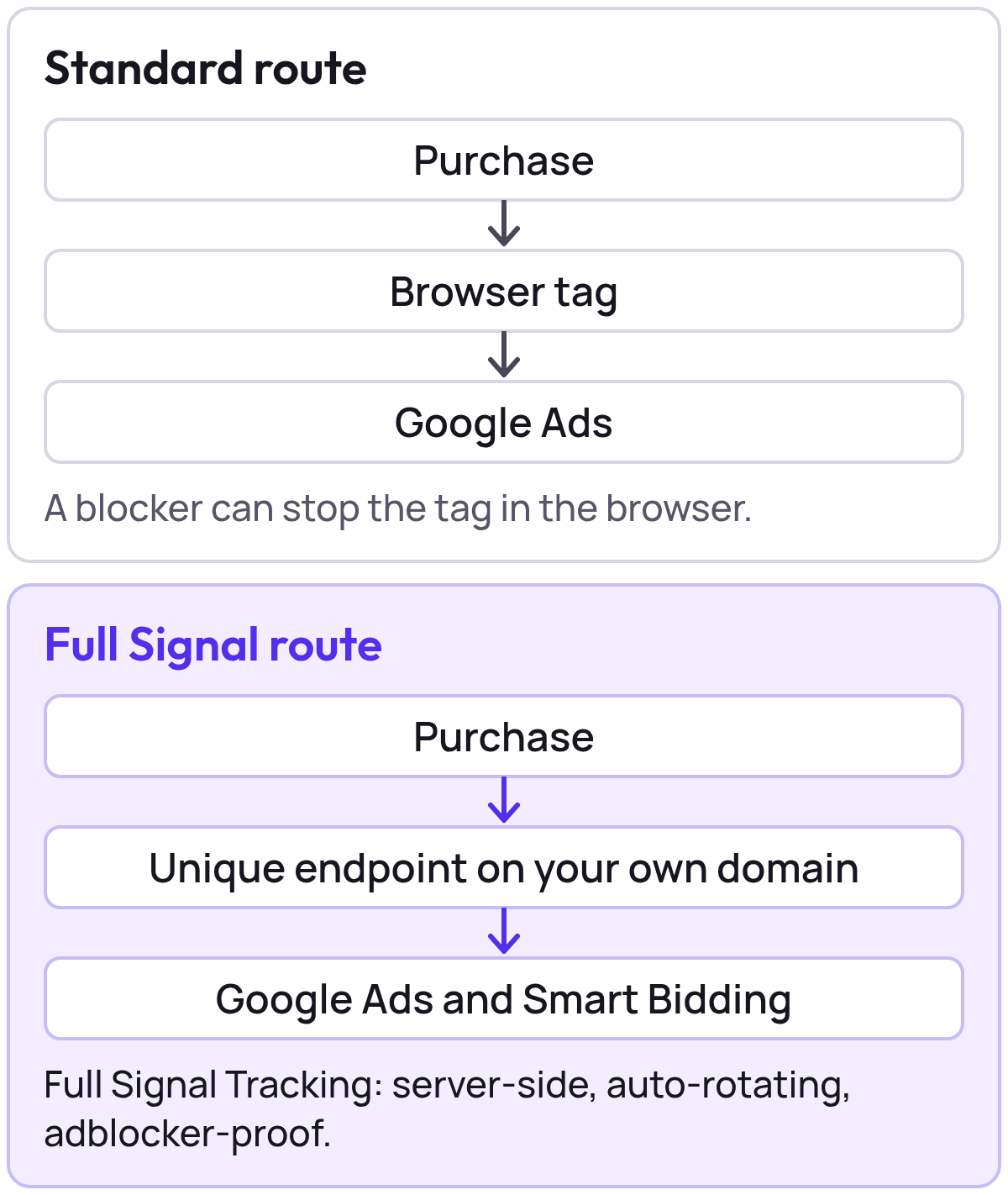
To check it yourself, run the ad blocker tracking test in your own browser to see what each blocker stops and whether Full Signal gets through, and paste a request into the SDK debugger to decode it and see whether the collector would accept it.
Full Signal handles both the route and the matching data. It sends hashed customer data with the purchase, so it works with enhanced conversions; the fields depend on the customer data your checkout provides.
First-party is not consent-free. Full Signal reads the visitor’s consent choice before sending anything, as the Full Signal Tracking page describes:
- It respects Consent Mode v2:
ad_storage,ad_user_dataandad_personalization. - It works with Shopify Customer Privacy, Cookiebot, OneTrust, Usercentrics and Osano.
- Customer data is hashed before it leaves our server.
Auto-rotation changes the path, never the consent rules: declined consent stays declined.
6. Enhanced conversions and server-side tracking side by side
Enhanced conversions improve how Google matches a conversion that reaches it. Server-side tracking decides whether the conversion is sent at all. Each fixes a different gap.
| Enhanced conversions | Server-side tracking | |
|---|---|---|
| What it fixes | Matching a conversion that reaches Google | Whether the conversion is sent |
| What it sends | Hashed first-party data (email, name, address, phone) with the conversion, or up to 24 hours later through the API | The conversion, from a server or an endpoint on your domain. Full Signal sends it with hashed customer data |
| What it needs | Customer data at checkout and a conversion tag that already fires | A server-side route set up for your shop platform |
| What it does not decide | Whether the conversion is sent at all | Which customer data travels (Full Signal: hashed customer data, fields depend on your checkout) |
An order can be lost at either step.
100 shop orders: how many reach Google Ads, and how many are credited to an ad?
Show the dataHide the data
| Step on the way to Google Ads | Orders still counted (of 100) |
|---|---|
| Orders in the shop | 100 |
| Conversion reaches Google | 85 |
| Credited to an ad | 75 |
In this example, 15 of 100 orders never reach Google, and 10 more arrive but cannot be credited to an ad. Enhanced conversions target the second gap and server-side delivery the first. A shop can run both, in either order. Which pays off first depends on where your own losses sit, and that you can measure.
7. What our ad blocker lab showed
You need it when the standard tag may never send the conversion, and our lab showed that happens in some setups. We ran the standard Google tags in real browsers with different blockers. The standard Google Tag Manager, GA4 and Google Ads tags, and the Google Ads conversion requests, were blocked, redirected or replaced by a stub in Brave Shields, uBlock Origin Lite and AdGuard with Tracking Protection.
How many of 4 standard Google requests did each blocker setup stop?
Show the dataHide the data
| Blocker setup | Requests stopped or replaced (of 4) |
|---|---|
| Brave Shields | 4 |
| uBlock Origin Lite | 4 |
| AdGuard + Tracking Protection | 4 |
| AdBlock | 0 |
The lab loaded each tag the way a shop does, in real browsers, each in a fresh, throwaway profile on a public origin (example.com). A request counted as blocked when the browser reported net::ERR_BLOCKED_BY_CLIENT or the blocker swapped the response for a stand-in. The results were the same in Brave and in Chrome for Testing for every extension tested in both.
Not every blocker stops the Google Ads tag. AdGuard on its default filters, AdBlock and AdGuard DNS did not block it. On its default filters, AdGuard blocked only the view-through conversion request; the conversion hit and the tags got through. AdBlock blocked the Meta Pixel instead. A Full Signal-style first-party endpoint was reached in every run.
In how many of 6 blocker setups did each request get through?
Show the dataHide the data
| Request tested | Setups where it got through (of 6) |
|---|---|
| Standard Google Ads tag | 3 |
| Full Signal-style first-party endpoint | 6 |
Per setup, the lab recorded this for the Google Ads requests and the Full Signal-style endpoint:
| Setup | Google Ads tag | Google Ads conversion hits | Full Signal-style endpoint |
|---|---|---|---|
| Brave Shields | Replaced by a stub | Blocked | Reached |
| uBlock Origin Lite | Redirected | Blocked | Reached |
| AdGuard with Tracking Protection | Blocked | Blocked | Reached |
| AdGuard, default filters | Reached | Only the view-through request blocked | Reached |
| AdBlock | Reached | Reached | Reached |
| AdGuard DNS | Reached | Only the view-through request blocked | Reached |
The 7 October run added the requests that carry the hashed email, and they followed the standard conversion request in every setup (table in section 3). Where that request is stopped, the data that rides on it is stopped with it. That is why how the conversion is delivered matters before how it is matched.
Safari works differently: WebKit tracking prevention restricts cookies instead of blocking loads, so tags still load.
How many days does a cookie last in Safari?
Show the dataHide the data
| How the cookie is set | Cookie lifetime in days |
|---|---|
| Set by a script | 7 |
| Full Signal first-party cookie | 30 |
Shoppers often buy days after the click, so a cookie that expires sooner makes a returning visitor more likely to arrive without the data that links them back to the ad. Our ad blocker conversion tracking test shows Safari as a sixth blocker for that reason.
8. Should you turn on enhanced conversions or set up server-side tracking first?
Set up server-side tracking first if conversions are missing, and enhanced conversions first if most arrive but are not matched. So find out whether you have a delivery problem or a matching problem. The quickest check is to compare the orders in your shop with the conversions in Google Ads over the same days.
Orders in the shop against conversions in Google Ads, week by week
- Orders in the shop
- Conversions in Google Ads
Show the dataHide the data
| Week | Orders in the shop | Conversions in Google Ads |
|---|---|---|
| Week 1 | 100 | 85 |
| Week 2 | 120 | 102 |
| Week 3 | 110 | 94 |
| Week 4 | 130 | 110 |
| Week 5 | 125 | 106 |
| Week 6 | 115 | 98 |
Not every order comes from an ad, so compare like with like, for example orders that carry a Google click ID. Then work through the steps below, changing one thing at a time.
- Compare orders with conversionsCount the orders in your shop and the conversions in Google Ads for the same days, and allow for conversion lag.
- Run the ad blocker testSee which of your tags a visitor with a blocker never sends.
- Fix delivery if the count has a gapMissing conversions call for server-side tracking. A conversion that is never sent has nothing to supplement.
- Add enhanced conversions if the count is closeWhen most conversions arrive, hashed customer data can help Google match them. Check your consent setup first.
- Re-check after your usual conversion delayCompare orders and conversions again over the same kind of period, then decide whether you need the other one too.
Before you start, ask your developer which customer fields checkout exposes, whether consent is captured before that data is sent, and which route the conversion takes today.
If the count has a gap, set up server-side tracking first. Full Signal Tracking is included in the Pro subscription and not billed separately; see pricing. If the count is close but you pass little customer data to Google, enhanced conversions are the next step, and you can use both.
9. Missing conversions skew product decisions
Smart Bidding and your product decisions learn from conversions. When they go missing, the products that lose them look worse than they are, and a ROAS or POAS decision can be wrong. What is a good ROAS explains why the verdict depends on the product’s own break-even.
The worked example on our Full Signal Tracking page shows how far this can go. One product priced at €139.99 had 55 orders in 30 days from Google Ads clicks. With the browser tag alone, adblockers and browser privacy kept 14 of them out of Google Ads.
55 orders from Google Ads clicks: how many reach Google Ads?
Show the dataHide the data
| Where the orders are counted | Orders counted (of 55) |
|---|---|
| Orders in your shop from Google Ads clicks | 55 |
| What Google Ads received from the browser tag | 41 |
| What Google Ads receives with Full Signal Tracking | 55 |
On the same €2,000 of ad spend, the 14 missing purchases change the product’s numbers in Google Ads and its segment in Product Segmentation:
| Same €2,000 spend | Browser tag alone (41 purchases) | Full Signal Tracking (55 purchases) |
|---|---|---|
| Conversion value | €5,739.59 | €7,699.45 |
| ROAS | 2.87 | 3.85 |
| Profit at €50.91 per order | €2,087.31 | €2,800.05 |
| POAS | 1.04 | 1.40 |
| Segment | Dogs (high volume, low return) | Question Marks (high volume, medium return) |
Illustrative data. Profit is €50.91 per order after product cost, 36.4% of the €139.99 price, and POAS is profit divided by ad spend (ROAS times 36.4%). Both POAS values are above break-even (1), so the product earns a small profit either way. Product Segmentation judges return against your target, not against break-even. With a POAS target of 2, 1.04 is a low return on a high-volume product, which is a Dog, and 1.40 is a medium return, which is a Question Mark.
In Google Ads, the 41 purchases the browser tag also saw are worth €5,739.59. The 14 that only Full Signal Tracking sent, blocked in the browser, add €1,959.86, so €7,699.45 is credited to your campaigns. The order ID is sent as the transaction ID, so Google Ads counts each order once. Google Ads does the attributing.
With the browser tag alone, the product looks like one for lower priority. With every purchase counted, it is a product to test on price and feed instead.
Judge each product against its own break-even, not an account average, whether you measure ROAS or POAS (POAS vs ROAS). Break-even ROAS per product shows the maths, and the break-even ROAS calculator does it for you. Product Segmentation then segments your products by clicks and return, using ROAS straight away and POAS once you connect margins.
This week: orders against conversions
This week, compare your orders with your conversions, then run the ad blocker test on your own shop. Once Full Signal is installed, confirm the requests with the SDK debugger. For numbers per product, Product Segmentation shows where the return sits once your conversions are complete, and you can start with the free analysis. Look at this comparison again after a month; shops, consent setups and blockers change.
Method and sources
Last reviewed 7 October 2026. Where Google’s pages differ, we say which page says what. The set-up steps follow Google’s pages.
The ad blocker results come from our own lab on 30 September and 7 October 2026 (method in section 7). We used Brave 1.96.59 (Chromium 154) and Chrome for Testing 151, with uBlock Origin Lite 2026.930.1227, AdGuard 5.5.2.3 (MV3) and AdBlock 6.47.0 (6.48.0 in the 7 October run). The URL paths of the requests that carry the hashed email come from a third-party DevTools guide and a Chrome checker extension, because Google’s help pages name none.
What Full Signal sends comes from Product Metrics’ Full Signal Tracking page.
All sources checked October 2026:
- Google Ads Help: About enhanced conversions
- Google Ads Help: Set up with the Google tag
- Google Ads Help: Set up with Google Tag Manager
- Google Ads Help: Set up with the Google Ads API
- Google Ads Help: Diagnostics report
- Google Ads Help: Impact results
- Google Ads Help: Updates to your enhanced conversions settings
- Google Ads API: Manage online click conversions
- Product Metrics: Full Signal Tracking
- Product Metrics: ad blocker conversion tracking test
Keep reading.
Google tag gateway vs server-side tagging: how to choose
Google tag gateway, server-side tagging and Full Signal Tracking compared: what each moves first-party, what it costs and which gets past ad blockers.
Customer acquisition cost formula for ecommerce
Customer acquisition cost is ad spend divided by new customers. See the formula, a worked example, and the most you can pay for a first order.
How to set a target ROAS from your margin
Set target ROAS as 1 ÷ (margin − profit kept). Includes a margin lookup table, what Google Ads documents about target level, and the target CPA equivalent.
Frequently asked questions.
What are enhanced conversions in Google Ads?
How do you set up enhanced conversions?
How do you check if enhanced conversions are working?
Do enhanced conversions work with ad blockers?
What is server-side tracking and how does it work?
Are enhanced conversions the same as server-side tracking?
Do enhanced conversions work with server-side tracking?
What match rate is good for enhanced conversions?
See which of your products to push, fix or pause. Start with your own products, or a 30-second estimate.
See what a blocker stops with the ad blocker tracking test. Then see how your products perform once every conversion is counted.
Not ready to connect? Book a demo: a video call with Berend, then a demo account.