
Multiple conversion actions in Google Ads for ecommerce: which should be primary?
Multiple conversion actions in Google Ads for ecommerce: send revenue, profit, new customers and LTV, keep one primary per campaign, never count an order twice.
Multiple conversion actions means sending one purchase to Google Ads several times, each with a different value: revenue, profit, new customer or lifetime value. That is safe as long as only one of them feeds bidding.
In my example store, two primary purchase actions turn 100 orders into 200 conversions. The numbers are illustrative; the settings follow Google Ads Help as checked on 24 November 2026.
Should you use one or multiple purchase conversion actions in Google Ads?
Use several purchase conversion actions for reporting, but let only one carry each order into bidding. Google Ads adds up every primary action in the goals a campaign uses, so two primary purchase actions count every order twice.
| Conversion action | Value sent per order | What it tells you |
|---|---|---|
| Revenue | Order revenue | ROAS |
| Profit | Revenue minus the order’s variable costs | POAS, what you keep |
| New customer | Value of first orders only | What acquisition brings |
| Returning customer | Value of repeat orders only | What retention brings |
| Lifetime value | The customer’s orders so far | Which customers come back |
Each action answers a different question in reports. Bidding needs one answer per campaign: the value it should maximise.
What is the difference between primary and secondary conversion actions?
A primary conversion action counts in the Conversions column and is used for bidding; a secondary one is observe-only and counts in All conv.
| Primary | Secondary (observe only) | |
|---|---|---|
| Column | Conversions and All conv. | All conv. only |
| Used for bidding | When the campaign uses its goal | Only inside a custom goal |
| Typical use | The value the campaign maximises | Reports, comparisons, a later switch |
Smart Bidding “considers only conversions reported in the ‘Conversions’ column when optimising towards your target” (Google Ads Help, 24 November 2026). Secondary actions cost nothing in bidding, so keep every extra value you want to see there.
To change the setting: Goals, Conversions, Summary; find the goal; Edit goal; under “Conversion action optimisation” pick Primary or Secondary (observe only); Save (Google Ads Help).
How does a campaign choose which conversion actions it bids on?
A campaign bids on the conversion goals it uses. By default that is the account-default goals; a campaign-specific goal or a custom goal overrides them for one campaign.
| Goal setting | Where you set it | What the campaign bids on |
|---|---|---|
| Account-default goals | Goals, Conversions, Summary | Primary actions in every default goal |
| Campaign-specific goals | Campaigns, Settings, Conversion goals | Primary actions in the goals you pick |
| Custom goal | Goals, Summary, Custom goals, Add custom goal | Every action in it, primary or secondary |
Google recommends account-default goals across all campaigns and keeps custom goals for “rare situations when you have a non-standard advertising objective” (same page as above).
A campaign can use one custom goal, alongside standard goals. If it keeps the account-default Purchase goal next to a custom goal, it bids on both.
How do you avoid counting one order twice?
Keep one value action per order primary in the goals each campaign uses. Every other purchase action, including the one your shop platform’s Google app created, goes to secondary or out of that campaign’s goals.
What does bidding see from 100 orders?
For example, take a store with 100 orders at €120 revenue and €42 profit each, 40 of them from new customers. Five setups give bidding five different numbers:
| Primary in the campaign’s goals | Conversions | Conversion value | Bidding maximises |
|---|---|---|---|
| The platform’s purchase action | 100 | €12,000 | Revenue |
| Profit | 100 | €4,200 | Profit |
| New customer profit | 40 | €1,680 | Profit from new customers |
| Revenue and profit | 200 | €16,200 | Neither |
| The platform’s purchase action and revenue | 200 | €24,000 | Revenue, counted twice |

Show the dataHide the data
| Primary actions in the campaign's goals | Conversion value |
|---|---|
| Revenue only | €12,000 |
| Profit only | €4,200 |
| New customer profit only | €1,680 |
| Revenue and profit | €16,200 |
| Two revenue actions | €24,000 |
The last two rows look like growth: twice the conversions overnight. With two revenue actions primary, ROAS on €3,000 of spend jumps from 4 to 8, and Smart Bidding values every order at double.
Where does a second count come from?
Most duplicates come from a new action added next to an old one, with both left primary.
| Source of the second count | Fix |
|---|---|
| A shop app’s purchase tag and a server-side purchase action | Make one secondary |
| Revenue and profit actions | Keep one primary |
| A purchase imported from Google Analytics next to the Google Ads tag | Keep the import secondary |
| A custom goal plus the account-default Purchase goal | Use only the custom goal on that campaign |
Purchases imported from Google Analytics start secondary, so check the ones someone made primary later (Google Ads Help).
The settings are the easy part. The hard part is a correct profit, customer status and lifetime value on every order, with refunds taken back out.
How do you switch a campaign from revenue to profit bidding?
Make a profit action the one primary value in the campaign’s goals, and multiply the target ROAS by your margin in the same change.
- Check that the profit action records every orderCompare its All conv. over the last 30 days with the orders in your shop. As a secondary action it reports there without touching bidding.
- Convert the target ROASMultiply the current target by your margin: 400% × 35% = 140%. The campaign then asks the same return in profit that it asked in revenue.
- Choose account-wide or one campaignAccount-wide: edit the Purchase goal, set the profit action to Primary and the old purchase action to Secondary (observe only). One campaign: create a custom goal that holds only the profit action.
- Leave one purchase value in the campaign's goalsUnder Campaigns, Settings, Conversion goals, select the custom goal and remove the Purchase goal for that campaign, or keep the account default if you changed it.
- Enter the converted target in the same sessionSave the goal change and the 140% together, so the campaign never asks 400% of profit.
- Wait, then adjust in stepsGoogle advises against frequent changes to targets and goals while bidding learns, and to update targets gradually after a goal change. Log the date and the old values.
The same 400% target converts differently per margin:
| Revenue target ROAS | Margin | Profit target ROAS |
|---|---|---|
| 400% | 25% | 100% |
| 400% | 35% | 140% |
| 400% | 50% | 200% |
| 600% | 35% | 210% |
A 100% profit target is break-even after ads: every euro of spend returns a euro of profit (POAS vs ROAS). Below it, the campaign buys orders at a loss.
Which conversion actions does Product Metrics create?
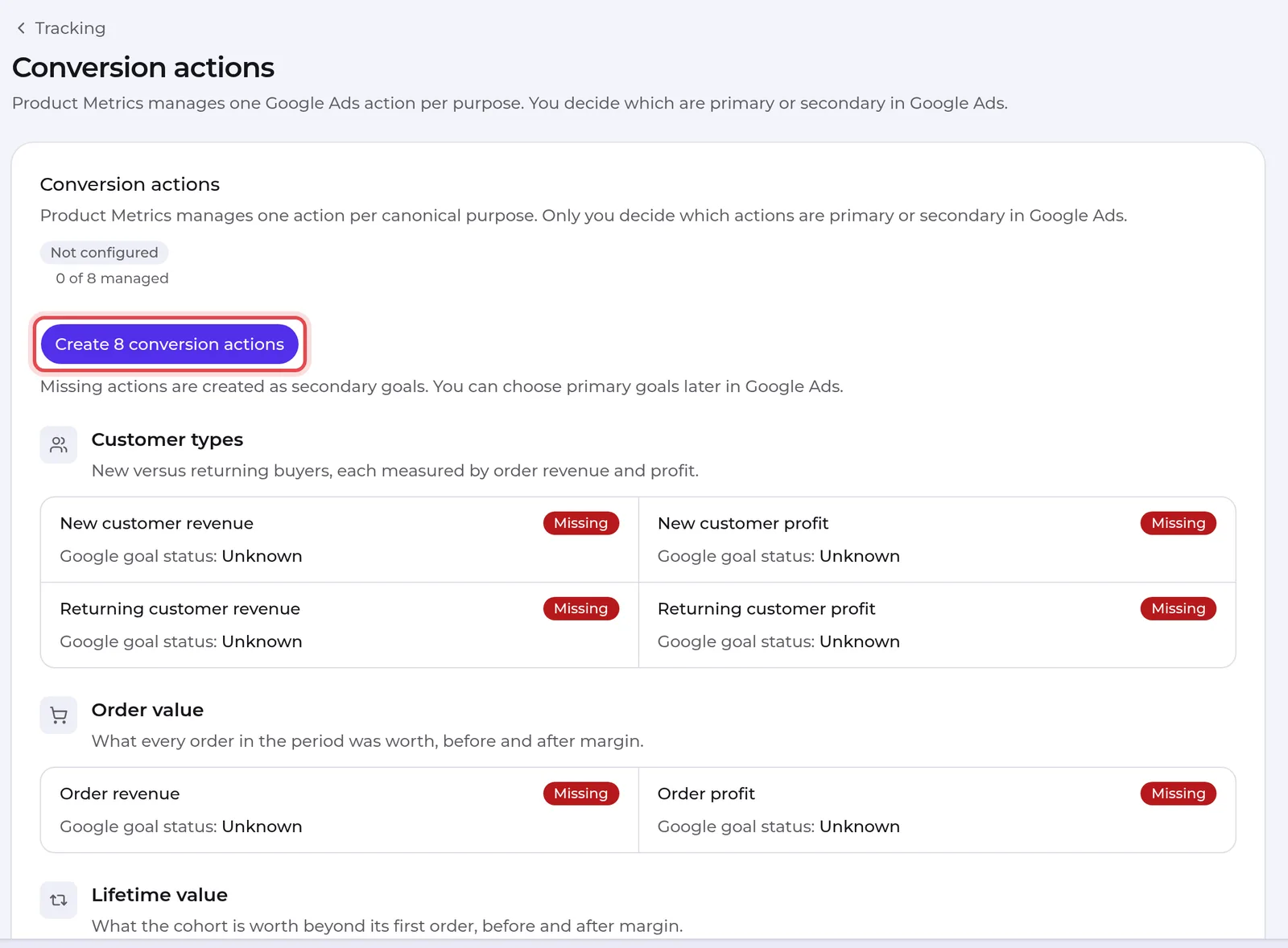
Product Metrics creates eight purchase conversion actions in Google Ads, all secondary, so nothing changes your bidding until you choose. Making one primary, or adding it to a campaign’s custom goal, is your step, with the clicks above.
| Conversion action | Value per order | Make it primary to bid on |
|---|---|---|
| Product Metrics - Revenue | Order revenue | Revenue |
| Product Metrics - Profit | Order profit | Profit (POAS) |
| Product Metrics - New Customer | Revenue of first orders | Revenue from new customers |
| Product Metrics - New Customer Profit | Profit of first orders | Profit from new customers |
| Product Metrics - Returning Customer | Revenue of repeat orders | Revenue from returning customers |
| Product Metrics - Returning Customer Profit | Profit of repeat orders | Profit from returning customers |
| Product Metrics - Revenue LTV | The customer’s revenue so far | Customers who come back |
| Product Metrics - Profit LTV | The customer’s profit so far | Customers who come back profitably |
Lifetime value here is what the customer has ordered so far, not a prediction (predicted LTV).
Meta and ChatGPT Ads get the same values per purchase, through the Meta Conversions API and the OpenAI Conversions API. Picking the optimisation event there is your step too (Full Signal Tracking).
Product Metrics is a profit optimisation platform for ecommerce advertising: one app for server-side tracking, profit bidding, product segmentation and campaign planning across Google Ads, Meta and ChatGPT Ads.
It sends each order’s profit, new or returning status and lifetime value to the ad platforms, so merchants can bid on POAS, new customers and LTV.
Machine learning segments every product into custom labels for Shopping and Performance Max, and the campaign plan sets out the ideal campaign structure for those segments. A dashboard shows profit, customers, stock and returns.
Final thoughts
Extra conversion actions cost nothing until two of them bid. Keep one value primary per campaign, and let the others show what that choice earns.
Start with today’s Purchase goal: if more than one action in it is primary, your orders already count twice.
Written by
Berend Vrakking, Founder of Product Metrics
1M+ products analysed · Nominated at the Dutch Search Awards for Best Measurement Campaign (2023) and Best Use of Data (2024)
Keep reading.
Google Ads Conversion Tracking: Set Up, Test and Fix
Set up Google Ads conversion tracking, test that each purchase fires once with the right value, fix gaps and duplicates, then send profit as the value.
What Does Google Ads Conversion Tracking Cost? Setup, Tools, Hosting and Upkeep
What does Google Ads conversion tracking cost? The five parts of the bill, priced from Google's own figures and our price list, plus what to ask.
Google Ads Conversion Tracking Pricing: How Cost Scales from Small Stores to Agencies
Google Ads conversion tracking pricing models compared, per order, event, ad spend, flat or one-off, with worked costs from small stores to agencies.
Frequently asked questions.
Should add to cart be a conversion action for ecommerce?
Do you need a separate conversion action to bid on new customers?
How do you see profit while bidding on revenue?
See which of your products to push, fix or pause. Start with your own products, or a 30-second estimate.
See what a blocker stops with the ad blocker tracking test. Then see how your products perform once every conversion is counted.
Questions, or want to spar about your products? Book a demo: a video call with Berend, then a demo account.