
What Does Google Ads Conversion Tracking Cost? Setup, Tools, Hosting and Upkeep
What does Google Ads conversion tracking cost? The five parts of the bill, priced from Google's own figures and our price list, plus what to ask.
Google Ads conversion tracking is the setup that tells Google Ads which ad clicks led to an order and what each order was worth. Quotes for it usually show one number, a setup fee or a monthly fee, but the bill has five parts.
The fee is rarely the biggest part; the orders Google Ads never sees can be. I priced each part from Google’s own documentation and our price list, both checked on 24 November 2026.
What does Google Ads conversion tracking cost?
Google Ads conversion tracking costs five things: setup work, a tool or app, hosting for any server you run, upkeep when your store changes, and the revenue of orders that never reach Google Ads.
Google charges nothing for its conversion tag, and calls Google Tag Manager free (checked 24 November 2026).
| Cost part | What you pay for | When you pay |
|---|---|---|
| Setup work | Installing a tag, app or server and testing the first orders | Once |
| Tool or app | A subscription priced per order, event, request, ad spend or flat | Every month |
| Hosting | A tagging server, if you run server-side Google Tag Manager | Every month |
| Upkeep | Fixing tracking after checkout, theme or consent changes | Each time the store changes |
| Missed orders | Revenue that bidding never learns from | Every day, out of sight |
The first two parts appear on a quote. The last three rarely do, so two quotes with the same fee can cost a store very different amounts.
What does each part of the cost include?
Each part depends on the route your conversions take to Google Ads: a platform app, a tag in Google Tag Manager, a GA4 import or a server-side setup.
The Google Ads conversion tracking guide walks through setting up each route.
Setup work
Setup work is the one-off job of getting each purchase, with its value and order ID, into a Google Ads conversion action and checking that every order counts once.
The effort is low for a platform app, medium for a tag in Google Tag Manager and high for a server-side setup you build yourself.
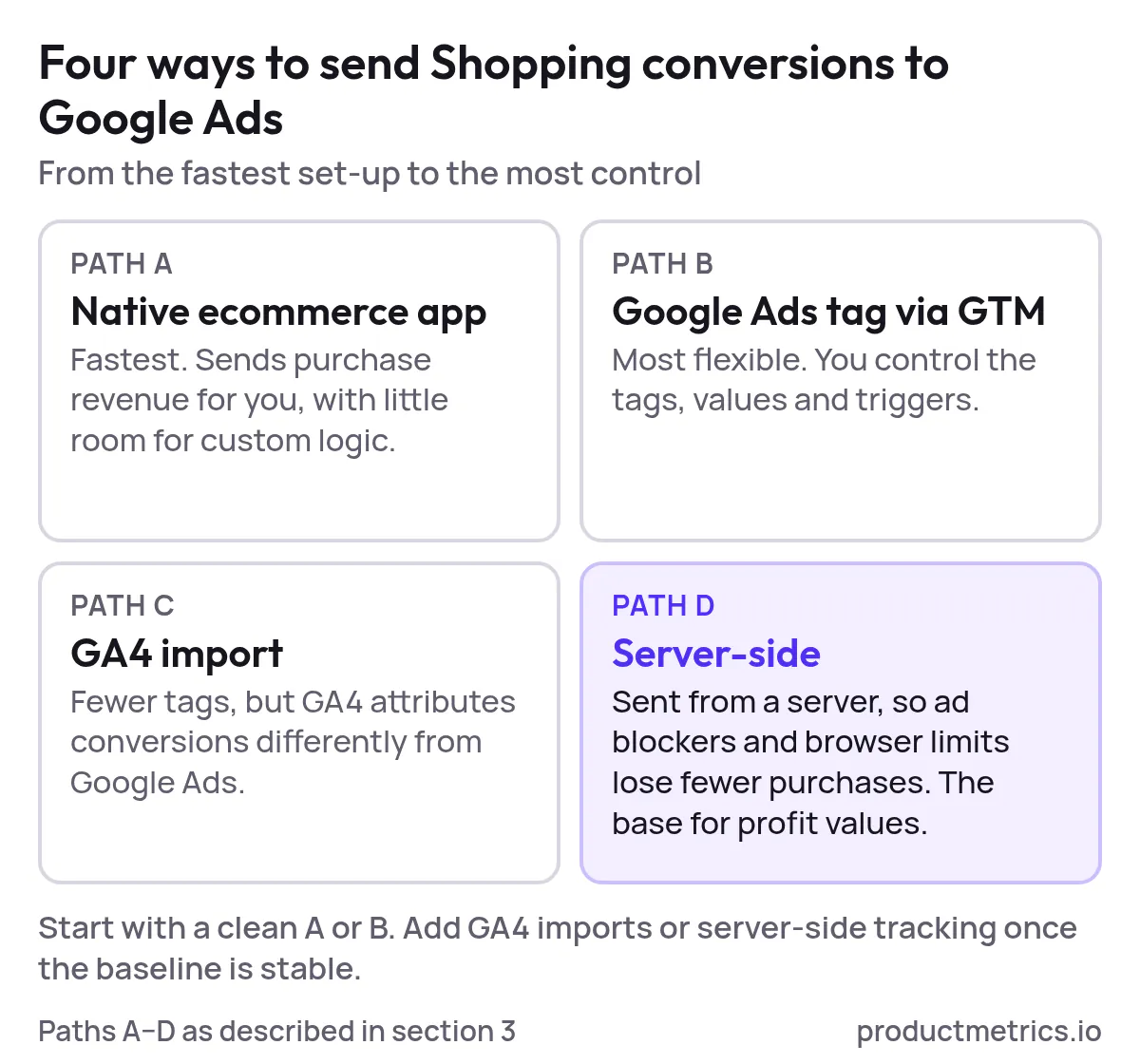
A fixed setup price from an agency or freelancer buys this job. Ask which conversions and which ad platforms it covers.
Tool or app
A tracking tool or app is a subscription priced on one of five models: per order, per event or request, a share of ad spend, a flat monthly fee or a one-off fee.
The cheapest model is tied to the number you expect to grow least. How tracking pricing scales works through each model at several store sizes.
Hosting
Hosting is a cost only when you run your own tagging server, which server-side Google Tag Manager needs.
Google’s Cloud Run setup guide says “each server costs approximately $45 /month (USD)” and recommends at least two (checked 24 November 2026).
| Route | Server you host | Running cost |
|---|---|---|
| Google tag in the browser | None | Free |
| Server-side Google Tag Manager | At least two Cloud Run servers | About $45 a month per server |
| Hosted tracking app | None; the provider runs it | Part of the subscription |
The full comparison of running a server against paying an app is in what server-side tracking costs.
Upkeep
Upkeep is the recurring work of keeping tracking right after your store changes. Each fix costs someone’s time, and with a hand-built tag that is usually the person who built it.
| Change in your store | What it can break |
|---|---|
| New theme or checkout | A tag that reads the thank-you page stops firing |
| New consent banner | Tags wait for a consent choice stored somewhere new |
| Refunds and cancellations | Google Ads keeps revenue you gave back, unless adjustments are sent |
| A new ad platform | Another tag or connection to set up and test |
Missed orders
Missed orders cost the revenue you never get to bid on, because Smart Bidding learns only from the conversions it receives.
In our ad blocker test of 30 September 2026, three of six blocker setups stopped the standard Google Ads conversion requests in real browsers.
| Blocker setup (lab, 30 Sep 2026) | Standard Google Ads conversion requests | Full Signal Tracking endpoint |
|---|---|---|
| Brave Shields | Blocked | Reached |
| uBlock Origin Lite | Blocked | Reached |
| AdGuard with Tracking Protection | Blocked | Reached |
| AdGuard, default lists | View-through request blocked | Reached |
| AdGuard DNS | View-through request blocked | Reached |
| AdBlock | Got through | Reached |
For example, a store spending €50,000 a month with €200,000 in sales has a ROAS of 4. If 10% of its orders never reach Google Ads, Google Ads reports 3.6; at 20%, 3.2.

Show the dataHide the data
| Orders that reach Google Ads | Reported ROAS |
|---|---|
| Every order counted | 4 |
| 10% of orders missed | 3.6 |
| 20% of orders missed | 3.2 |
A target ROAS strategy then bids as if those products earned less than they do. No quote shows this cost, and checking every product’s orders against Google Ads by hand doesn’t scale.
How does Product Metrics price Google Ads conversion tracking?
Product Metrics includes its server-side conversion tracking, Full Signal Tracking, in the Pro subscription and doesn’t bill it separately.
Pro is a graduated share of your rolling 30-day Google Shopping spend with no minimum: the first €10K is free every month, and €50,000 a month costs €247.50 excl. VAT.
Grow revenue and profit from every order and every product.
Product Metrics is a profit optimisation platform for ecommerce advertising: one app for server-side tracking, profit bidding, product segmentation and campaign planning across Google Ads, Meta and ChatGPT Ads. It sends each order’s profit, new or returning status and lifetime value to the ad platforms, so merchants can bid on POAS, new customers and LTV. Machine learning segments every product into custom labels for Shopping and Performance Max, and the campaign plan sets out the ideal campaign structure for those segments. A dashboard shows profit, customers, stock and returns.
Compare the free analysis and Pro| Monthly Google Shopping spend | Product Metrics per month (excl. VAT) | Share of spend |
|---|---|---|
| €10,000 | €0 | 0% |
| €25,000 | €97.50 | 0.39% |
| €50,000 | €247.50 | 0.50% |
| €100,000 | €547.50 | 0.55% |
Each rate applies only to the spend inside its band. At €50,000, the first €10,000 is free, the next €15,000 costs 0.65% (€97.50) and the last €25,000 costs 0.60% (€150).
Because the rates fall in higher bands, the share of spend peaks at 0.55% at €100,000 and drops above it.
| Cost part | With Product Metrics |
|---|---|
| Setup work | No setup on Shopify, WooCommerce, Shopware and Lightspeed; a developer installs the Magento module once |
| Tool | Included in Pro, from €0 a month |
| Hosting | No server container to host |
| Upkeep | The endpoint on your own domain auto-rotates if it is ever blocked; refunds and cancellations go back as conversion adjustments |
| Missed orders | Full Signal Tracking gets through every ad blocker |
Every order reaches Google Ads, Meta and ChatGPT Ads with its revenue, profit, new or returning status and lifetime value.
The eight Google Ads conversion actions it creates start as secondary, so you decide which one your campaigns bid on.
The free analysis needs a Google login and no credit card. The 30-day Pro trial needs a card, and cancelling within it costs nothing (pricing).
How do you get a quote you can compare?
Ask every provider the same six questions, so each quote covers all five parts of the cost.
- Ask what the fee is based onOrders, events, requests, ad spend or a flat amount. Price it at today's numbers and at double them.
- Ask what the setup includesWhich conversions, which ad platforms and who tests the first orders.
- Ask who hosts the serverIf there is one, ask whose cloud account pays for it and what happens when traffic grows.
- Ask what happens after a store changeA new theme, checkout or consent banner: is the fix included, and how quickly is it done?
- Ask what reaches each ad platformRevenue only, or also profit and customer data, for every ad platform you run.
- Ask for proof it gets through ad blockersTest the provider's setup in a browser with an ad blocker before you sign.
Costs that don’t appear on the first page of a quote usually sit in one of four places.
| Cost that hides | Where it hides | What to ask |
|---|---|---|
| Overage | Plans priced per order, event or request | What happens above the allowance? |
| Hosting | Your own cloud account | Is the server in the price? |
| Fixes | Hourly rates after launch | Are changes after setup included? |
| Extra ad platforms | Meta or ChatGPT Ads sold as add-ons | Are all ad platforms included? |
For a Product Metrics quote, type your monthly Shopping spend into the pricing calculator: the amount it shows is the Pro fee, tracking included.
Final thoughts
The cheapest tracking quote is the one that still counts every order a year from now, after the next theme, checkout and ad blocker update. Start with what you’re missing: run the ad blocker test in your own browser, then compare quotes on all five parts.
Written by
Berend Vrakking, Founder of Product Metrics
1M+ products analysed · Nominated at the Dutch Search Awards for Best Measurement Campaign (2023) and Best Use of Data (2024)
Keep reading.
How Much Does Server-Side Tracking Cost for Google Ads? Server-Side GTM vs a Hosted App
How much does server-side tracking cost for Google Ads? Hosting, setup and upkeep for server-side GTM against a hosted app, with Google's figures.
Best Google Ads Conversion Tracking Apps for Lightspeed eCom
Best Google Ads conversion tracking apps for Lightspeed eCom (C-Series), scored on five criteria: ROASaurus, ProfitMetrics, AdPage and more.
Best Google Ads Conversion Tracking Extensions for Magento
Best Google Ads conversion tracking extensions for Magento, scored on five criteria: Stape, Magefan, Anowave, Webkul and Mageplaza.
Frequently asked questions.
Can I track Google Ads conversions for free?
Does sending conversions to Meta and ChatGPT Ads cost extra with Product Metrics?
Are Product Metrics prices with or without VAT?
See which of your products to push, fix or pause. Start with your own products, or a 30-second estimate.
See what a blocker stops with the ad blocker tracking test. Then see how your products perform once every conversion is counted.
Questions, or want to spar about your products? Book a demo: a video call with Berend, then a demo account.