
Best Google Ads Conversion Tracking Apps for Lightspeed eCom
Best Google Ads conversion tracking apps for Lightspeed eCom (C-Series), scored on five criteria: ROASaurus, ProfitMetrics, AdPage and more.
Google Ads conversion tracking on Lightspeed eCom is how each sale in your webshop gets reported to Google Ads, so its automatic bidding (Smart Bidding) learns which ads sell. When orders go missing on the way, Google Ads learns from only part of your sales.
I scored five options on five weighted criteria, using vendor pages and Lightspeed’s help centre in November 2026. You get:
- a weighted score per option, with its inputs
- prices as listed this month
- a pick for each situation
Why Google Ads conversion tracking misses orders on Lightspeed eCom
Google Ads conversion tracking misses orders on Lightspeed eCom because the standard setup is a tag on the thank-you page, in the shopper’s browser. If that page doesn’t load, or the tag is stopped, the sale never reaches Google Ads.
Lightspeed eCom (C-Series) is the webshop platform whose back office has Settings › Web extras. It runs on two separate regions, Europe and North America. Lightspeed eCom (E-Series) is a different, newer product, offered as an upgrade to certain North American merchants. (Source: Lightspeed eCom help centre; About eCom (E-Series))
Lightspeed eCom is searched for in Dutch more than in English. In Ahrefs on 7 October 2026, “google shopping lightspeed” had 60 searches a month in the Netherlands, and “lightspeed google shopping” had none measured in the US, the UK or the Netherlands.
On Lightspeed, tracking code goes in the Tracking box under Web extras, where it “can be executed on your Thank You page after customers place an order”. Lightspeed adds that it “does not provide support for writing tracking codes”. (Source: Lightspeed eCom help centre)
Lightspeed’s cookie bar passes the shopper’s consent choice to Google only for the Google Analytics 4 ID set in the back office. Google Tag Manager, Google’s tool for managing tracking code, needs extra code to respect it. (Source: Lightspeed Google Consent mode FAQ)
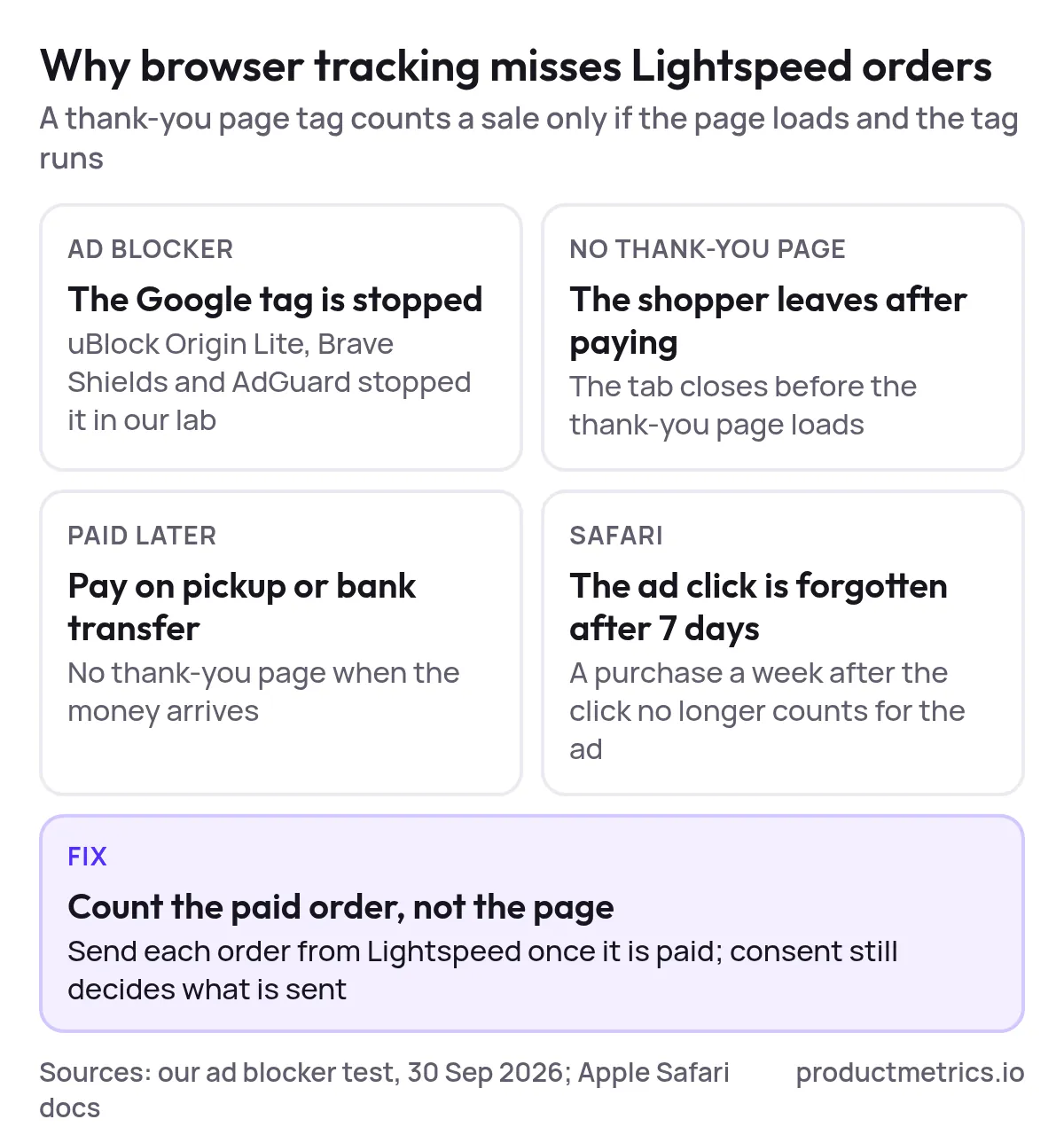
Why is Lightspeed Google Ads purchase tracking not working?
Lightspeed Google Ads purchase tracking usually stops working for one of four reasons, and each has its own fix:
| Cause | What you see in Google Ads | Fix |
|---|---|---|
| An ad blocker stops the Google tag | Fewer purchases than Lightspeed orders | Send purchases from the order, not the browser |
| The order is paid later | Pay-on-pickup and bank transfer orders missing | Count the order once Lightspeed marks it paid |
| Two tags count the same order | Double purchases, or two purchase actions | Remove one tag; keep one purchase action primary |
| Consent isn’t passed on | Gaps or warnings on EU traffic | Connect your consent tool to Consent Mode |
In our real-browser ad blocker test on 30 September 2026, uBlock Origin Lite, Brave Shields and AdGuard stopped the standard Google Ads tag. Safari also forgets the ad click after 7 days. (Source: WebKit)
Server-side tracking means the purchase is reported from a server instead of the shopper’s browser.
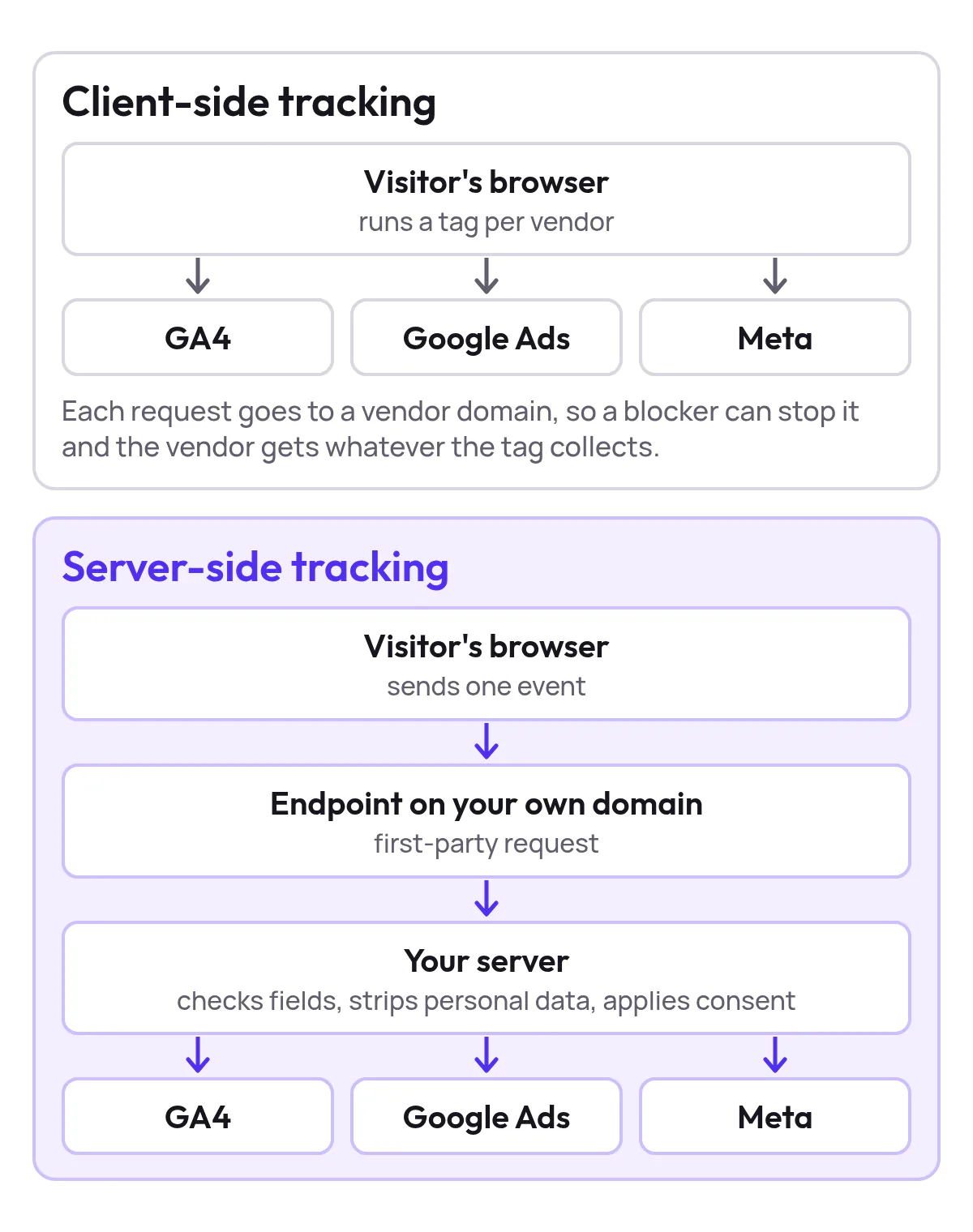
How we evaluated Lightspeed conversion tracking apps
We judged each option on what reaches Google Ads after a Lightspeed purchase.
- Platform integration depth
How closely it works with Lightspeed eCom (C-Series): order data from Lightspeed itself, both regions, refunds. - Conversion completeness
How many real purchases reach Google Ads despite ad blockers, declined cookies, late payments and Safari forgetting ad clicks after 7 days. - Signal depth
What Google Ads learns about each order: revenue, profit, new or returning customer, lifetime value, and whether it was refunded. - Setup effort and maintenance
The work to set it up and keep it running: steps, code and Google Tag Manager. - Price and fit
The published price for a typical shop, and who the option is built for.
Everything here is based on vendor docs and public listings available as of November 2026.
Scoring rubric
Each option gets a score from 1 to 5 per criterion. The weighted score adds up each score times its weight, rounded to one decimal.
| Criterion | What it means | Weight |
|---|---|---|
| Platform integration depth | Order data from Lightspeed, both regions, refunds | 25% |
| Conversion completeness | Ad blockers, cookie consent, late payments, Safari | 25% |
| Signal depth | Revenue, profit, new vs returning, lifetime value, refunds | 20% |
| Setup effort and maintenance | Install steps, tag setup, upkeep | 15% |
| Price and fit | Published price and target shop | 15% |

Show the dataHide the data
| Criterion | Weight |
|---|---|
| Platform integration depth | 25% |
| Conversion completeness | 25% |
| Signal depth | 20% |
| Setup effort and maintenance | 15% |
| Price and fit | 15% |
The tools at a glance
Five options cover Lightspeed eCom (C-Series) today: one free baseline and four tools. Few tracking tools document C-Series support, so two of the four are tracking servers rather than Lightspeed apps.
Baseline:
- Lightspeed’s own tracking: a Google Ads tag you paste into the thank-you page, or Google Tag Manager. (Source: Lightspeed eCom help centre)
Third-party tools:
- ROASaurus: sends every paid Lightspeed order from a server to Meta, Google Ads and more. (Source: ROASaurus)
- ProfitMetrics: reads every Lightspeed order and sends profit to Google Ads and Meta. (Source: ProfitMetrics)
- AdPage: a Dutch tracking server for Google Tag Manager, with its own Lightspeed connection. (Source: AdPage)
- Stape or TAGGRS: hosts a tracking server that you set up and maintain. (Source: Stape pricing; TAGGRS pricing)
Lightspeed’s own tracking – the free baseline
Best for: every Lightspeed shop, as a free first Google Ads tag next to the built-in Google Shopping feed.
Lightspeed eCom has no Google Ads app for conversion tracking on C-Series. Its help centre tells you to add the Google Ads conversion code “to the Thank You page of your online store” through Settings › Web extras. (Source: Lightspeed eCom help centre)
| Lightspeed’s own tracking | As listed, November 2026 |
|---|---|
| Install | Paste code under Settings › Web extras |
| Sends to Google Ads | The code you write, on the Thank You page |
| Server-side | No |
| Price | Included in Lightspeed eCom |
Strengths
- Free, and Google Tag Manager can go in through the same Web extras page. (Source: Lightspeed eCom help centre)
- Lightspeed fills in order details for you, such as the order number, products and customer email. (Source: Lightspeed eCom help centre)
- Your products reach Google Shopping through Lightspeed’s own Google product feed. (Source: Lightspeed eCom help centre)
Limitations
- Lightspeed calls the tracking box “suitable only for experienced users”, and says code in Web extras needs “to be updated by a customization partner”. (Source: Adding a web tracking code; Setting up Google Tag Manager)
- The tag runs in the shopper’s browser, and Lightspeed’s guides describe no profit or new-customer value.
Scores
- Platform integration depth: 3/5
- Conversion completeness: 2/5
- Signal depth: 1/5
- Setup effort and maintenance: 2/5
- Price and fit: 5/5
For Google Ads conversion tracking on Lightspeed at no extra cost, start here, then add a tool below once ad blockers or profit matter.
ROASaurus – paid orders from a server, priced per order
Best for: Lightspeed shops on Meta, TikTok and Google Ads that want server-side tracking at a low monthly price.
ROASaurus connects to Lightspeed eCom (C-Series) on the Europe and North America regions, and sends only orders with the payment status paid. It also checks for updated orders every 5 minutes, so late payments are picked up. (Source: ROASaurus Lightspeed guide)
| ROASaurus | As listed, November 2026 |
|---|---|
| Install | A script and a thank-you snippet in Web extras, plus a Lightspeed key |
| Sends to Google Ads | Every paid order, from the server |
| Server-side | Yes |
| Price | Free to 100 orders a month; Starter $49 a month for 500 orders |
Strengths
- “ROASaurus uploads every paid order to Google Ads from the server”, and makes it the primary purchase action so orders aren’t counted twice. (Source: ROASaurus Google Ads)
- It can correct purchase values later “to the real margin, or after a refund”.
Trade-offs
- Lightspeed orders are sent at the price including VAT, so the ROAS you see is higher than on revenue without VAT. (Source: ROASaurus Lightspeed guide)
- Its Lightspeed guide lists the order total, customer and products among what it reads, but no cost price or new-customer flag.
Scores
- Platform integration depth: 4/5
- Conversion completeness: 4/5
- Signal depth: 3/5
- Setup effort and maintenance: 4/5
- Price and fit: 5/5
For Lightspeed webshop server side tracking on several ad platforms at a per-order price, ROASaurus is the cheapest start. A done-for-you setup costs $299 once. (Source: ROASaurus pricing)
ProfitMetrics – profit tracking with a dashboard
Best for: Lightspeed shops that want a profit dashboard and an account manager who sets tracking up for them.
ProfitMetrics “imports all orders from LightSpeed and calculates exact profits for each one of them”, and lets you optimise for POAS on Google Ads and Meta. It promises an “easy 15-minute setup”. (Source: ProfitMetrics)
| ProfitMetrics | As listed, November 2026 |
|---|---|
| Install | Two scripts in Web extras, plus a Lightspeed key |
| Sends to Google Ads | Orders with their profit |
| Server-side | Yes |
| Price | Usage-based, not published; 14-day trial without a card |
Strengths
- Its Lightspeed (C-Series) guide is two scripts pasted into Web extras. (Source: ProfitMetrics knowledge base)
- Every account includes server-side tracking, a dedicated account manager and a done-for-you account set-up. (Source: ProfitMetrics pricing)
Trade-offs
- No price is published: you calculate it on the pricing page, per website.
- The Lightspeed page doesn’t mention new or returning customers, refunds or ad blockers, and its shop script loads from a ProfitMetrics web address, not yours.
Scores
- Platform integration depth: 4/5
- Conversion completeness: 4/5
- Signal depth: 4/5
- Setup effort and maintenance: 4/5
- Price and fit: 3/5

Show the dataHide the data
| Option | Conversion completeness | Signal depth |
|---|---|---|
| ROASaurus | 4 | 3 |
| ProfitMetrics | 4 | 4 |
| AdPage | 3 | 3 |
| Stape or TAGGRS | 3 | 2 |
| Lightspeed’s own tracking | 2 | 1 |
If you want Lightspeed eCom server-side tracking with a profit dashboard and someone to set it up, choose ProfitMetrics.
AdPage – a Dutch tracking server for Google Tag Manager
Best for: Dutch shops and agencies that already work in Google Tag Manager and want a hosted tracking server.
AdPage says it has “its own Lightspeed solution, including a data layer” that measures every step “from view_item to purchase”, server-side, to get past ad blockers. You then send purchases to Google Ads through your own Google Tag Manager setup. (Source: AdPage, translated from Dutch)
| AdPage | As listed, November 2026 |
|---|---|
| Install | AdPage’s Lightspeed connection plus Google Tag Manager |
| Sends to Google Ads | The tags you set up in Google Tag Manager |
| Server-side | Yes, through Google Tag Manager |
| Price | Starter from €49 a month, billed yearly |
Strengths
- Starter includes the hosted tracking server and order tracking from the shop’s back end; Performance, from €99 a month, adds steering on profit. (Source: AdPage pricing)
- AdPage can do the one-off Google Tag Manager setup for you, at extra cost.
Trade-offs
- A setup through Google Tag Manager still starts in the browser, and ad blockers block those setups too (how they compare).
Scores
- Platform integration depth: 3/5
- Conversion completeness: 3/5
- Signal depth: 3/5
- Setup effort and maintenance: 3/5
- Price and fit: 4/5
For the best Google Ads conversion tracking app for Lightspeed eCom inside an agency’s own Google Tag Manager work, AdPage fits.
Stape or TAGGRS – a tracking server you build yourself
Best for: shops with a tracking specialist who wants full control of server-side Google Tag Manager.
Stape and TAGGRS host the server half of Google Tag Manager, which sends events to Google Ads from a server instead of the browser. Neither has an app for Lightspeed eCom (C-Series): Stape lists no Lightspeed app, and TAGGRS’ Lightspeed app is for E-Series shops. (Source: Stape apps; TAGGRS docs)
| Stape or TAGGRS | As listed, November 2026 |
|---|---|
| Install | Google Tag Manager in Web extras, plus a tracking server you build |
| Sends to Google Ads | The tags you build |
| Server-side | Yes, once you set it up |
| Price | Free to 10K requests a month; Stape Pro $20 a month, TAGGRS Basic €22 a month billed yearly |
Strengths
- The cheapest route to a tracking server you own. Every Stape plan changes the addresses Google’s scripts load from, to make them harder for blockers to spot. (Source: Stape pricing)
- TAGGRS adds profit (POAS) tracking from its Pro plan, €57 a month billed yearly. (Source: TAGGRS pricing)
Trade-offs
- You or a partner write the shop data on the thank-you page, the tags and the consent code, and keep them working.
- Ad blockers also block server-side Google Tag Manager setups, and profit and customer type need your own data.
Scores
- Platform integration depth: 2/5
- Conversion completeness: 3/5
- Signal depth: 2/5
- Setup effort and maintenance: 1/5
- Price and fit: 5/5

Show the dataHide the data
| Option | Platform integration depth | Setup effort and maintenance |
|---|---|---|
| ROASaurus | 4 | 4 |
| ProfitMetrics | 4 | 4 |
| AdPage | 3 | 3 |
| Stape or TAGGRS | 2 | 1 |
| Lightspeed’s own tracking | 3 | 2 |
If your specialist wants Lightspeed server-side tracking with Google Tag Manager on their own terms, host it on Stape or TAGGRS.
Side by side comparison
ROASaurus leads the weighted scores at 4.0, just ahead of ProfitMetrics at 3.9. Each weighted score adds up score times weight: ROASaurus is 4 × 0.25 + 4 × 0.25 + 3 × 0.20 + 4 × 0.15 + 5 × 0.15 = 3.95, rounded to 4.0.
| Option | Best for | Integration (25%) | Completeness (25%) | Signal (20%) | Setup (15%) | Price (15%) | Weighted | Notable strength |
|---|---|---|---|---|---|---|---|---|
| ROASaurus | A low price per order | 4 | 4 | 3 | 4 | 5 | 4.0 | Late payments picked up |
| ProfitMetrics | A profit dashboard, set up for you | 4 | 4 | 4 | 4 | 3 | 3.9 | Profit on every order |
| AdPage | Agencies in Google Tag Manager | 3 | 3 | 3 | 3 | 4 | 3.2 | Lightspeed shop data, hosted |
| Stape or TAGGRS | Your own tracking server | 2 | 3 | 2 | 1 | 5 | 2.6 | Free up to 10K requests |
| Lightspeed’s own tracking | A free first tag | 3 | 2 | 1 | 2 | 5 | 2.5 | Built into Web extras |

Show the dataHide the data
| Option | Weighted score |
|---|---|
| ROASaurus | 4.0 |
| ProfitMetrics | 3.9 |
| AdPage | 3.2 |
| Stape or TAGGRS | 2.6 |
| Lightspeed’s own tracking | 2.5 |
What does Lightspeed Google Ads conversion tracking cost?
Lightspeed Google Ads conversion tracking costs from nothing to about €100 a month on the fixed plans, as listed in November 2026; ProfitMetrics follows the size of your account instead:
| Option | Entry price | Next step up |
|---|---|---|
| Lightspeed’s own tracking | Included in Lightspeed eCom | None |
| ROASaurus | Free to 100 orders a month | Starter $49 a month, or $0.20 per order |
| ProfitMetrics | Not published; 14-day trial | Usage-based, per website |
| AdPage | Starter from €49 a month, billed yearly | Performance from €99 a month |
| Stape or TAGGRS | Free to 10K requests a month | Stape Pro $20 a month; TAGGRS Basic €22 a month, billed yearly |
How to choose a Google Ads conversion tracking app for Lightspeed
The right option depends on what Google Ads should learn from each order:
- If you have no tracking yet → start with Lightspeed’s own tracking.
- If you want server-side tracking for a low price per order → choose ROASaurus.
- If you want a profit dashboard and an account manager → choose ProfitMetrics.
- If your agency works in Google Tag Manager and wants it hosted → choose AdPage.
- If a specialist builds your tracking → host it on Stape or TAGGRS.
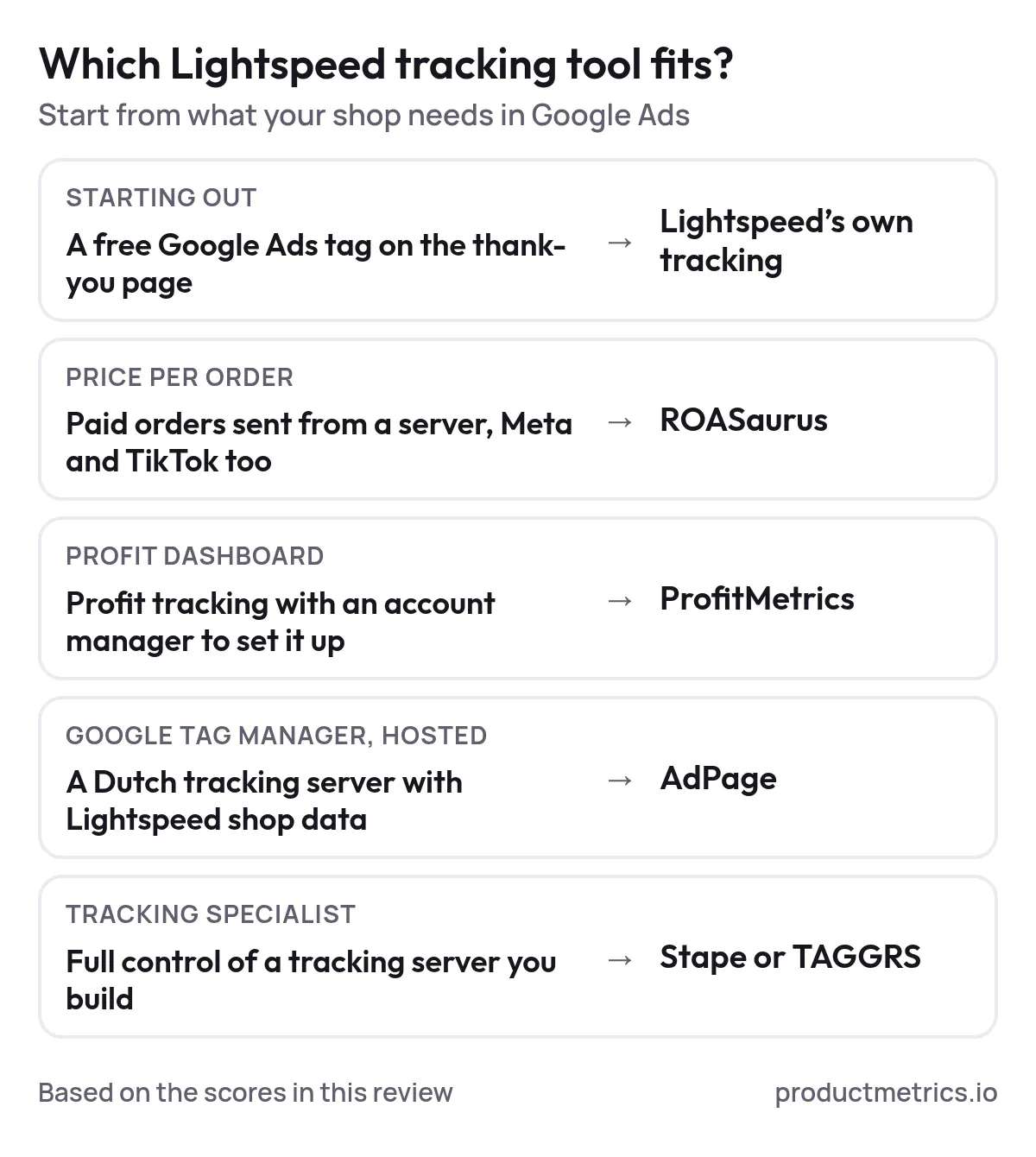
Whatever you pick, keep one purchase action primary so orders aren’t counted twice, and compare a week of Google Ads purchases with Lightspeed orders.
Running shops on other platforms? See the same comparison for Shopify and WooCommerce.
Shopware and Magento shops have their own: read the Shopware and Magento versions.
Written by
Berend Vrakking, Founder of Product Metrics
1M+ products analysed · Nominated at the Dutch Search Awards for Best Measurement Campaign (2023) and Best Use of Data (2024)
Keep reading.
What Does Google Ads Conversion Tracking Cost? Setup, Tools, Hosting and Upkeep
What does Google Ads conversion tracking cost? The five parts of the bill, priced from Google's own figures and our price list, plus what to ask.
How Much Does Server-Side Tracking Cost for Google Ads? Server-Side GTM vs a Hosted App
How much does server-side tracking cost for Google Ads? Hosting, setup and upkeep for server-side GTM against a hosted app, with Google's figures.
Best Google Ads Conversion Tracking Extensions for Magento
Best Google Ads conversion tracking extensions for Magento, scored on five criteria: Stape, Magefan, Anowave, Webkul and Mageplaza.
Frequently asked questions.
How do I set up Google Ads conversion tracking in Lightspeed eCom C-Series?
How do I track profit in Google Ads for a Lightspeed store?
See which of your products to push, fix or pause. Start with your own products, or a 30-second estimate.
See what a blocker stops with the ad blocker tracking test. Then see how your products perform once every conversion is counted.
Questions, or want to spar about your products? Book a demo: a video call with Berend, then a demo account.