
Best Google Ads Conversion Tracking Extensions for Magento
Best Google Ads conversion tracking extensions for Magento, scored on five criteria: Stape, Magefan, Anowave, Webkul and Mageplaza.
Google Ads conversion tracking on Magento is how each paid order reaches Google Ads as a sale, with its value, so bidding learns which ads sell. Most Magento shops send it from the thank-you page, and that is where sales go missing.
I scored Magento’s own setting and five extensions on five weighted criteria, from vendor pages and docs checked on 13 November 2026. You get:
- a score per extension, with its inputs
- prices as listed this month
- a pick for each situation
Why does Google Ads conversion tracking break on Magento?
Google Ads conversion tracking breaks on Magento because the standard setup waits for the shopper’s browser to load the thank-you page. Four everyday things get in the way.
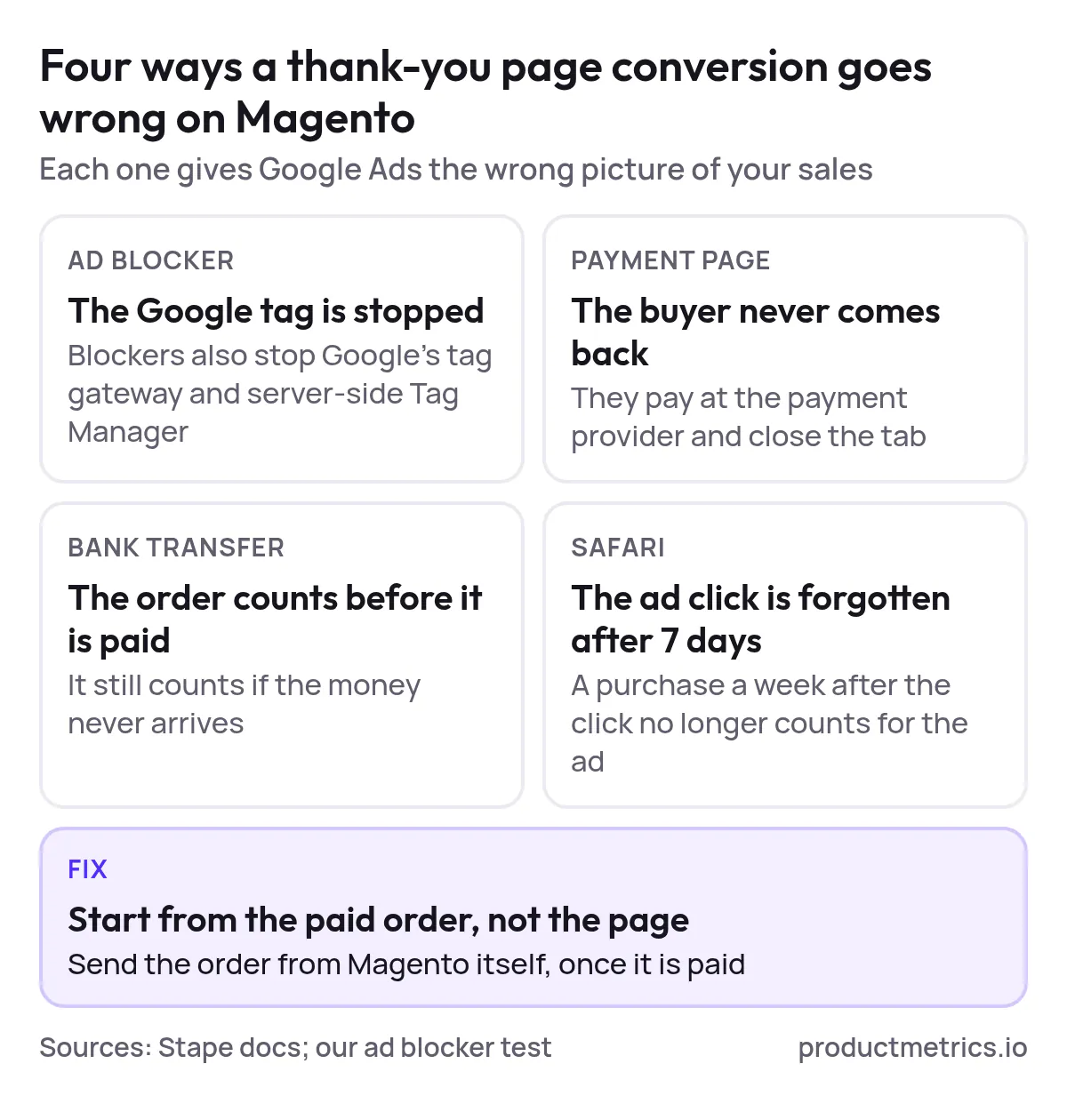
A buyer who pays at the payment provider and closes the tab never loads the page. A bank transfer order counts before any money arrives.
Ad blockers stop the Google tag, and also Google tag gateway and server-side Google Tag Manager setups. Our ad blocker conversion tracking test shows it in your own browser. Safari forgets the ad click after 7 days, so a purchase a week later no longer counts for the ad.
Server-side tracking means the sale goes to Google Ads from a server, not from the shopper’s browser, so a blocker or a closed tab can’t stop it.
Enhanced conversions send Google a scrambled (hashed) copy of the buyer’s email address, so Google can match more sales to ad clicks. (Source: Google Ads Help – About enhanced conversions) They improve the match for a sale that arrives; they don’t bring back a sale that never fires, as enhanced conversions vs server-side tracking explains.
How we evaluated Magento Google Ads conversion tracking extensions
We judged each option on what reaches Google Ads after a Magento order. Platform-neutral tools are in our real-time conversion tracking tools review.
- Platform integration depth
How well it fits Magento: a proper extension, real orders, refunds, versions. - Conversion completeness
How many real sales reach Google Ads despite ad blockers, cookie banners, Safari and skipped thank-you pages. - Signal depth
What each sale tells Google Ads: revenue, profit, new or returning customer, lifetime value, refunds. - Setup effort and maintenance
Who can install it, and what someone must keep running afterwards. - Price and fit
The published price, and the shop it suits.
Everything here is based on vendor docs and public listings available as of November 2026.
Scoring rubric
Each option scores 1 to 5 per criterion, and the weighted score is Σ(score × weight), rounded to one decimal.
| Criterion | What it means | Weight |
|---|---|---|
| Platform integration depth | Extension, orders, refunds, versions | 25% |
| Conversion completeness | Ad blockers, consent, Safari, server-side | 25% |
| Signal depth | Revenue, profit, new vs returning, LTV, refunds | 20% |
| Setup effort and maintenance | Install and upkeep | 15% |
| Price and fit | Published price and target shop | 15% |

Show the dataHide the data
| Criterion | Weight |
|---|---|
| Platform integration depth | 25% |
| Conversion completeness | 25% |
| Signal depth | 20% |
| Setup effort and maintenance | 15% |
| Price and fit | 15% |
The tools at a glance
Magento’s own setting is the free baseline; five extensions follow.
Baseline:
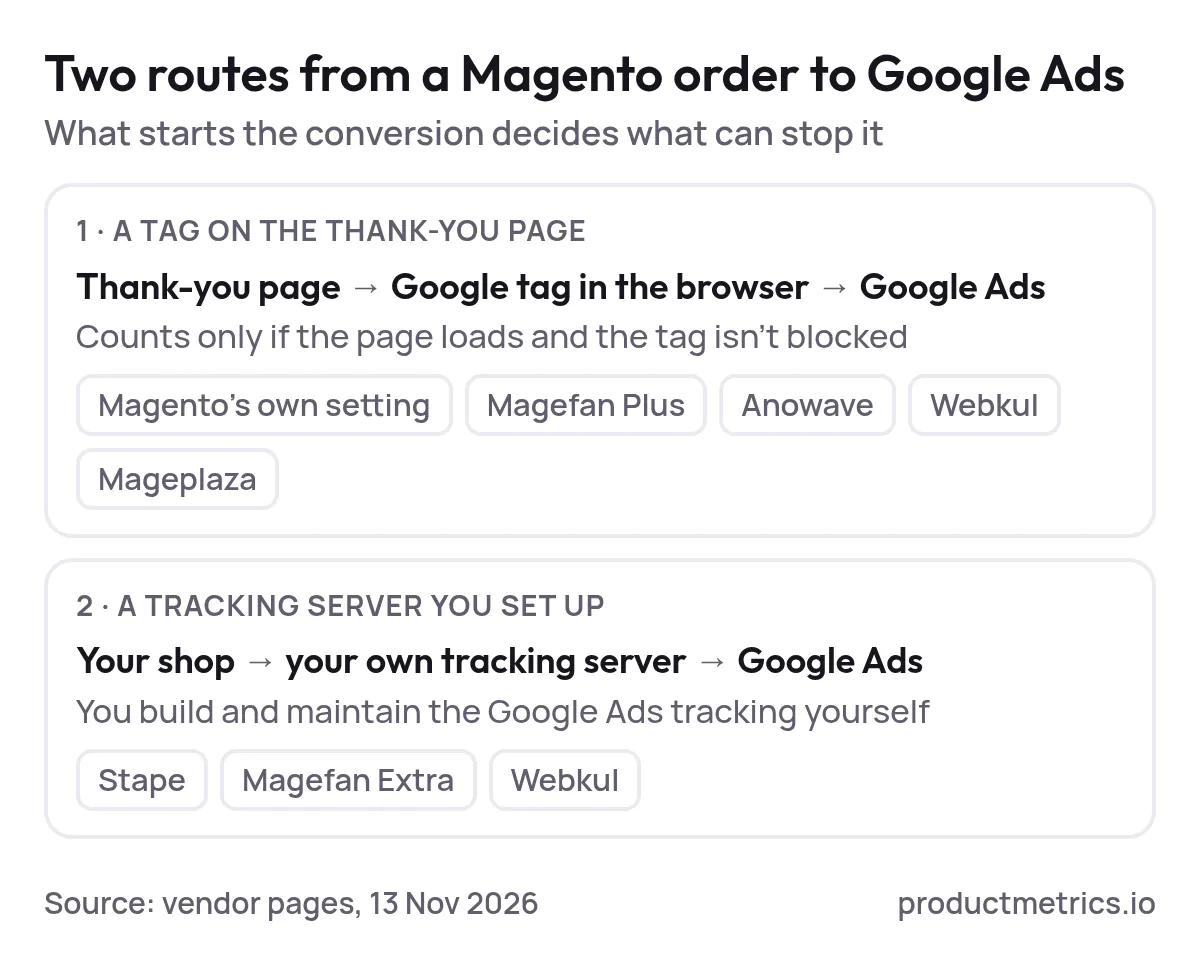
- Magento’s Google AdWords setting or Google Tag Manager: the Google tag on the thank-you page, set up in the Magento admin. (Source: Adobe Commerce – Google AdWords)
Extensions:
- Stape: a free extension that feeds a tracking server you run. (Source: Stape docs)
- Magefan Google Tag Manager: Google Ads in its Plus edition, server-side in Extra. (Source: Magefan)
- Anowave GA4 GTM: a Google Ads tag built into the extension. (Source: Anowave)
- Webkul Google Tag Manager: Google Ads and enhanced conversions, with an optional tracking server. (Source: Webkul)
- Mageplaza GA4 with GTM Support: GA4 first, with Google Ads conversions through Tag Manager. (Source: Mageplaza)
Baseline – Magento’s Google AdWords setting or Google Tag Manager
Best for: Magento shops that need a working purchase conversion today, at no cost.
Magento’s Google AdWords setting fires a purchase conversion when the thank-you page loads. Google Tag Manager, Google’s free tool for managing website tags, can do the same.
| Built-in option | Where in the admin | What it does |
|---|---|---|
| Google AdWords | Stores › Configuration › Sales › Google API | Sends the order amount to one conversion |
| Google Tag Manager | Same menu, Google Analytics | Adobe Commerce only, not Magento Open Source |
| Enhanced conversions | Not in Adobe’s docs | Needs an extension or Tag Manager |
(Source: Adobe Commerce – Google Tag Manager)
Strengths
- No licence and no extra server.
- Google Tag Manager can find the buyer’s details on the page by itself for enhanced conversions. (Source: Google Ads Help)
Limitations
- The conversion fires in the browser on the thank-you page, so every problem in the figure above applies.
- The value is revenue. Google Ads shows gross profit only when the sale lists the products bought and your Merchant Center feed holds each product’s cost. (Source: Google Ads Help)
Scores
- Platform integration depth: 2/5
- Conversion completeness: 1/5
- Signal depth: 1/5
- Setup effort and maintenance: 2/5
- Price and fit: 5/5
For Google Ads conversion tracking on Magento at no cost, start here and check it in Google Tag Assistant. Our Google Ads conversion tracking guide covers the setup.
Stape – a free Magento 2 extension for your own tracking server
Best for: Magento 2 teams that already run Google Tag Manager on a tracking server of their own.
Stape’s free Magento 2 extension adds Google Tag Manager to your shop and passes shop events to a tracking server you set up and maintain. You can use it without a Stape account. (Source: Stape – Magento 2 extension)
| Stape | As listed, November 2026 |
|---|---|
| Install | Free extension on the Adobe Commerce Marketplace |
| Sends to | Your tracking server, then Google Ads, GA4, Meta and others |
| Server-side | Yes, through a tracking server you run |
| Price | Extension free; hosting free to 10K requests, Pro from $17 a month billed yearly |
Strengths
- Orders completed in the admin, or after a payment page that skipped the thank-you page, are sent from the shop itself.
- The Custom Loader, on every plan including the free one, is meant to help Tag Manager get past ad blockers. (Source: Stape pricing)
Trade-offs
- Google Ads is listed as a destination, but the docs give no Google Ads setup: your team builds it.
- Profit and new-customer values aren’t mentioned.
Scores
- Platform integration depth: 4/5
- Conversion completeness: 4/5
- Signal depth: 2/5
- Setup effort and maintenance: 2/5
- Price and fit: 4/5

Show the dataHide the data
| Option | Conversion completeness | Signal depth |
|---|---|---|
| Magento setting | 1 | 1 |
| Stape | 4 | 2 |
| Magefan | 3 | 3 |
| Anowave | 3 | 3 |
| Webkul | 3 | 2 |
| Mageplaza | 2 | 2 |
If your team runs Google Tag Manager and wants Magento 2 server-side tracking for Google Ads on its own server, Stape’s extension is the free start. Our server-side tracking tools list compares the hosting.
Magefan Google Tag Manager – Google Ads editions at a one-time price
Best for: Magento 2 shops that want Google Ads conversions and enhanced conversions from one extension, paid once.
Magefan sells three editions: Basic for GA4, Plus with Google Ads conversion tracking, enhanced conversions and “Google Ads new customer data”, and Extra with server-side tracking. (Source: Magefan)
| Magefan | As listed, November 2026 |
|---|---|
| Install | Magento 2 extension, 2.3.0 to 2.4.9 |
| Sends to | Google Ads and GA4 through Google Tag Manager |
| Server-side | Extra edition only |
| Price | Basic €89, Plus €134, Extra €179, one-time |
Strengths
- Works on Adobe Commerce on Cloud and with Hyvä themes, with separate prices per edition. (Source: Magefan pricing)
- A year of updates and support, then optional renewal at half the price.
Trade-offs
- Server-side tracking sits in the top edition.
- No profit value for Google Ads is listed.
Scores
- Platform integration depth: 4/5
- Conversion completeness: 3/5
- Signal depth: 3/5
- Setup effort and maintenance: 3/5
- Price and fit: 4/5
For Adobe Commerce server side tracking for Google Ads on Cloud, Magefan Extra lists a Cloud price.
Anowave GA4 GTM – a Google Ads tag built into the extension
Best for: Magento 2 shops that want the Google Ads tag ready-made, with refunds sent to GA4.
Anowave’s extension has the Google Ads conversion tag built in: “You don’t need to define anything in terms of GTM tag/configuration.” It lists enhanced conversions and “Support for POAS or ROAS strategy”. (Source: Anowave)
| Anowave | As listed, November 2026 |
|---|---|
| Install | Magento 2 extension up to 2.4.9, on Anowave’s base Tag Manager module |
| Sends to | Google Ads from the browser; refunds to GA4 from the server |
| Server-side | Refunds and cancellations to GA4 |
| Price | €149.90, one-time, lifetime updates |
Strengths
- A credit memo sends a refund to GA4, and orders placed in the admin are tracked too.
- It can add the buyer’s hashed details to a Google Ads sale up to 24 hours later.
Trade-offs
- The Google Ads conversion itself is the browser tag, so blockers and skipped thank-you pages still cost sales.
- It runs on top of a second Anowave module.
Scores
- Platform integration depth: 4/5
- Conversion completeness: 3/5
- Signal depth: 3/5
- Setup effort and maintenance: 3/5
- Price and fit: 4/5
For Magento 2 enhanced conversions setup without building tags by hand, Anowave covers the Google Ads side in the extension.
Webkul Google Tag Manager – Google Ads with an optional tracking server
Best for: shops still on Magento 2.0 to 2.3 that need Google Ads, enhanced conversions and remarketing together.
Webkul’s extension switches on Google Ads conversion tracking, enhanced conversions with hashed data and remarketing audiences. It can also send events through a tracking server you set up. (Source: Webkul)
| Webkul | As listed, November 2026 |
|---|---|
| Install | Magento 2 extension, 2.0 to 2.4 |
| Sends to | Google Ads and GA4 through Google Tag Manager |
| Server-side | Optional, through a tracking server you run |
| Price | $199; Adobe Commerce editions $199 extra |
Strengths
- Supports Magento 2.0 to 2.4, including 2.4.9.
- Dynamic remarketing is included, with a 30-day money-back guarantee.
Trade-offs
- No refund tracking, profit or new customers described.
- Installation and longer support cost extra.
Scores
- Platform integration depth: 4/5
- Conversion completeness: 3/5
- Signal depth: 2/5
- Setup effort and maintenance: 3/5
- Price and fit: 4/5

Show the dataHide the data
| Option | Setup effort and maintenance | Price and fit |
|---|---|---|
| Magento setting | 2 | 5 |
| Stape | 2 | 4 |
| Magefan | 3 | 4 |
| Anowave | 3 | 4 |
| Webkul | 3 | 4 |
| Mageplaza | 3 | 4 |
For a Magento 2 Google Ads conversion tracking extension with an optional tracking server at a fixed price, Webkul is the one to compare.
Mageplaza GA4 with GTM Support – GA4 first, Google Ads alongside
Best for: Magento 2.4 shops that want GA4 reports first, and Google Ads next to them.
Mageplaza’s extension feeds Google Tag Manager, with Google Ads conversion tracking and dynamic remarketing. Since version 4.8.0 it sends purchases and refunds to GA4 from the server. (Source: Mageplaza)
| Mageplaza | As listed, November 2026 |
|---|---|
| Install | Magento 2 extension, 2.4.4 to 2.4.9 |
| Sends to | GA4, with Google Ads through Google Tag Manager |
| Server-side | Purchases and refunds to GA4 only |
| Price | $149 first year; $349 for Adobe Commerce and Cloud |
Strengths
- Works with Hyvä themes and Hyvä Checkout.
- A year of support and updates, with a setup service for $99.50.
Trade-offs
- Server-side tracking goes to GA4, so the Google Ads conversion still depends on the browser.
- Enhanced conversions, profit and new customers aren’t mentioned.
Scores
- Platform integration depth: 4/5
- Conversion completeness: 2/5
- Signal depth: 2/5
- Setup effort and maintenance: 3/5
- Price and fit: 4/5
If GA4 comes first and you want a Magento 2 Google Tag Manager extension that adds Google Ads, Mageplaza fits.
Side-by-side comparison, with costs
This Google Shopping conversion tracking integration for Magento with cost comparison shows each option’s scores and listed price.
| Option | Price as listed | Integration | Completeness | Signal | Setup | Price | Weighted |
|---|---|---|---|---|---|---|---|
| Magefan | €134 Plus, one-time | 4 | 3 | 3 | 3 | 4 | 3.4 |
| Anowave | €149.90, one-time | 4 | 3 | 3 | 3 | 4 | 3.4 |
| Stape | Free, plus hosting | 4 | 4 | 2 | 2 | 4 | 3.3 |
| Webkul | $199 | 4 | 3 | 2 | 3 | 4 | 3.2 |
| Mageplaza | $149 first year | 4 | 2 | 2 | 3 | 4 | 3.0 |
| Magento setting | Free | 2 | 1 | 1 | 2 | 5 | 2.0 |

Show the dataHide the data
| Option | Weighted score |
|---|---|
| Magefan | 3.4 |
| Anowave | 3.4 |
| Stape | 3.3 |
| Webkul | 3.2 |
| Mageplaza | 3.0 |
| Magento setting | 2.0 |
Five of the six options score between 3.0 and 3.4, so the choice comes down to where your team wants the tracking to run: in the browser, or on a tracking server it maintains.
How to choose a Google Ads conversion tracking extension for Magento
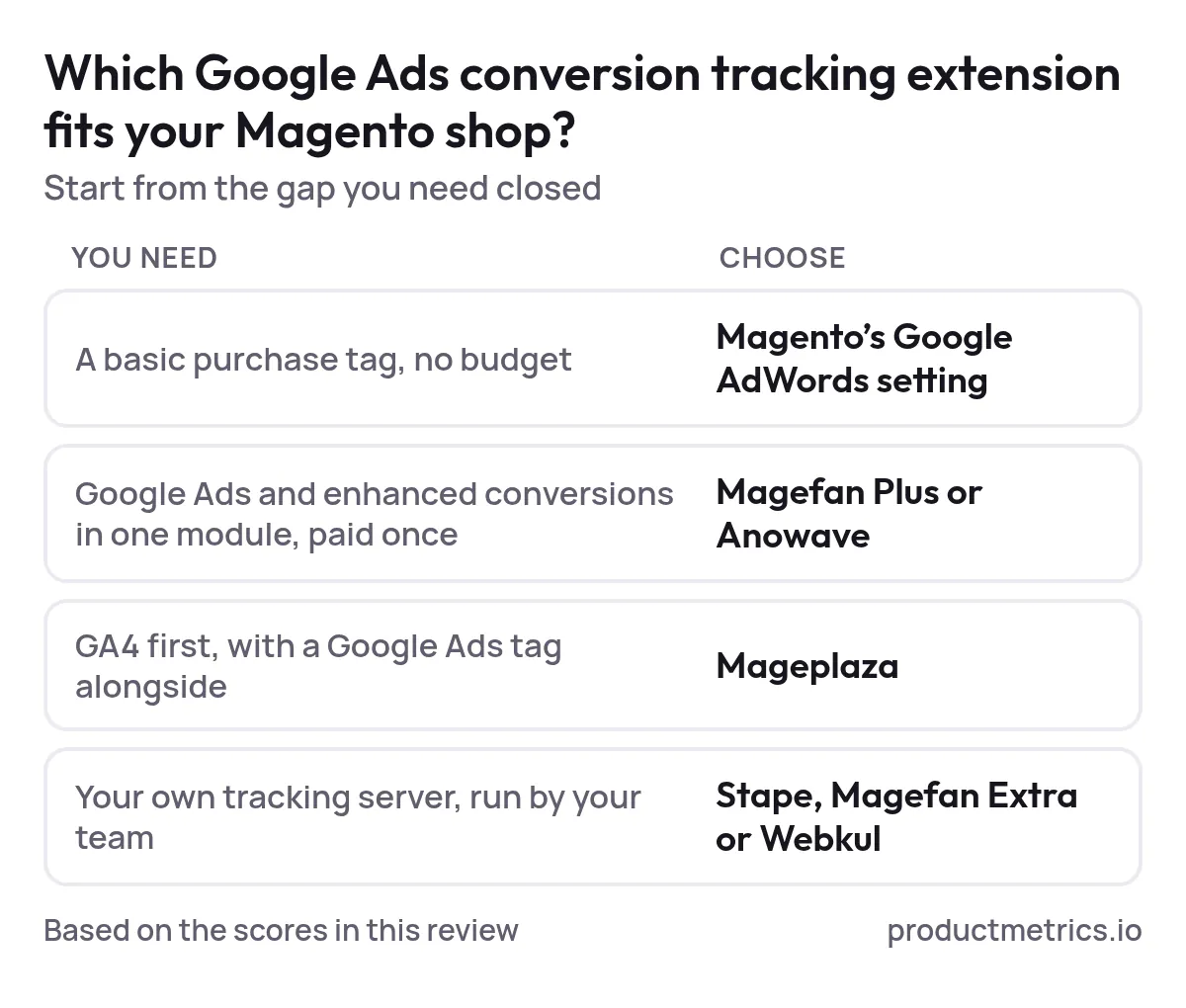
The right extension depends on what Google Ads should learn from each Magento order:
- If you only need a purchase tag today → Magento’s Google AdWords setting.
- If you want Google Ads and enhanced conversions in one extension, paid once → Magefan Plus, or Anowave for the built-in tag.
- If GA4 matters most → Mageplaza.
- If your team runs its own tracking server → Stape, Magefan Extra or Webkul.
Whatever you pick, decode a request in our SDK debugger to see what it sends.
On another platform? Read the same comparison for Shopware 6 or Lightspeed.
We also cover Shopify and WooCommerce.
Written by
Berend Vrakking, Founder of Product Metrics
1M+ products analysed · Nominated at the Dutch Search Awards for Best Measurement Campaign (2023) and Best Use of Data (2024)
Keep reading.
What Does Google Ads Conversion Tracking Cost? Setup, Tools, Hosting and Upkeep
What does Google Ads conversion tracking cost? The five parts of the bill, priced from Google's own figures and our price list, plus what to ask.
How Much Does Server-Side Tracking Cost for Google Ads? Server-Side GTM vs a Hosted App
How much does server-side tracking cost for Google Ads? Hosting, setup and upkeep for server-side GTM against a hosted app, with Google's figures.
Best Google Ads Conversion Tracking Apps for Lightspeed eCom
Best Google Ads conversion tracking apps for Lightspeed eCom (C-Series), scored on five criteria: ROASaurus, ProfitMetrics, AdPage and more.
Frequently asked questions.
How do I set up Magento 2 enhanced conversions?
Do I still need a Google Shopping feed extension on Magento?
Will Google Ads count a Magento order twice if I run two tracking tools?
See which of your products to push, fix or pause. Start with your own products, or a 30-second estimate.
See what a blocker stops with the ad blocker tracking test. Then see how your products perform once every conversion is counted.
Questions, or want to spar about your products? Book a demo: a video call with Berend, then a demo account.