
How Much Does Server-Side Tracking Cost for Google Ads? Server-Side GTM vs a Hosted App
How much does server-side tracking cost for Google Ads? Hosting, setup and upkeep for server-side GTM against a hosted app, with Google's figures.
Server-side tracking is conversion tracking that sends each order to Google Ads from a server instead of from the shopper’s browser.
You pay for it in one of two ways: hosting, setup and upkeep when you run the server yourself, or a subscription when an app runs it for you.
I set Google’s own hosting figures, checked on 24 November 2026, against our price list to show where each route costs less.
How much does server-side tracking cost for an online store?
Server-side tracking costs an online store about $90 a month in Google Cloud hosting before any setup, if it runs server-side Google Tag Manager the way Google recommends, or a monthly subscription if a hosted app does the work.
Google’s Cloud Run setup guide says “each server costs approximately $45 /month (USD)” and recommends “a minimum of 2 instances to reduce the risk of data loss in case of a server outage”.
| Way to run it | Hosting | Setup work | Upkeep |
|---|---|---|---|
| Server-side GTM you host | Your Google Cloud bill | A specialist builds it | Yours |
| Server-side GTM on a managed host | A plan priced by requests, as at Stape | You still build the tags | Shared |
| Hosted tracking app | In the subscription | Install and sign in | The provider’s |

Show the dataHide the data
| Cloud Run servers | Hosting per month (USD) |
|---|---|
| 1 server | $45 |
| 2 servers (Google's minimum) | $90 |
| 10 servers (35–350 requests a second) | $450 |
Cloud Run adds servers as traffic grows.
Google expects 2 to 10 servers to handle 35 to 350 requests a second, and calls the maximum server setting “the worst case scenario for how much you will need to pay”.
What do you pay for when you run server-side GTM yourself?
Running server-side Google Tag Manager yourself means paying for hosting, for the specialist who builds it and for every change after launch.
Google’s guide also asks for a Google Cloud billing account and warns that request logs above about 1 million requests a month “may incur significant logging charges” unless you switch them off.
| Job | What it involves | How often |
|---|---|---|
| Google Cloud project | A billing account and a budget alert | Once, then a monthly bill |
| Tagging servers | At least two Cloud Run servers | Every month |
| Your own subdomain | A DNS record so the server runs on your domain | Once |
| Tags in the server container | The Google Ads conversion tag and its settings | At every change |
| The tag in your shop | Sending events to your server instead of to Google | After theme and checkout changes |
Each ad platform is one more set of tags. Meta and ChatGPT Ads each need their own connection in the container, and profit values need your margins in the data before the tag can send them.
Server-side GTM vs a hosted tracking app: which costs less?
A hosted tracking app costs less for most stores without an in-house developer, because hosting, setup and upkeep are in its price. Server-side GTM costs less only where a team already runs Google Cloud and builds its own tags.
| Server-side GTM you host | Product Metrics (hosted app) | |
|---|---|---|
| Hosting | About $90 a month for two servers | None to host |
| Setup | Specialist work | None on Shopify, WooCommerce, Shopware and Lightspeed |
| Who fixes it | You or your specialist | Product Metrics |
| What reaches Google Ads | What your tags send | Revenue, profit, new or returning status and lifetime value |
| Meta and ChatGPT Ads | A connection to build for each | Included |
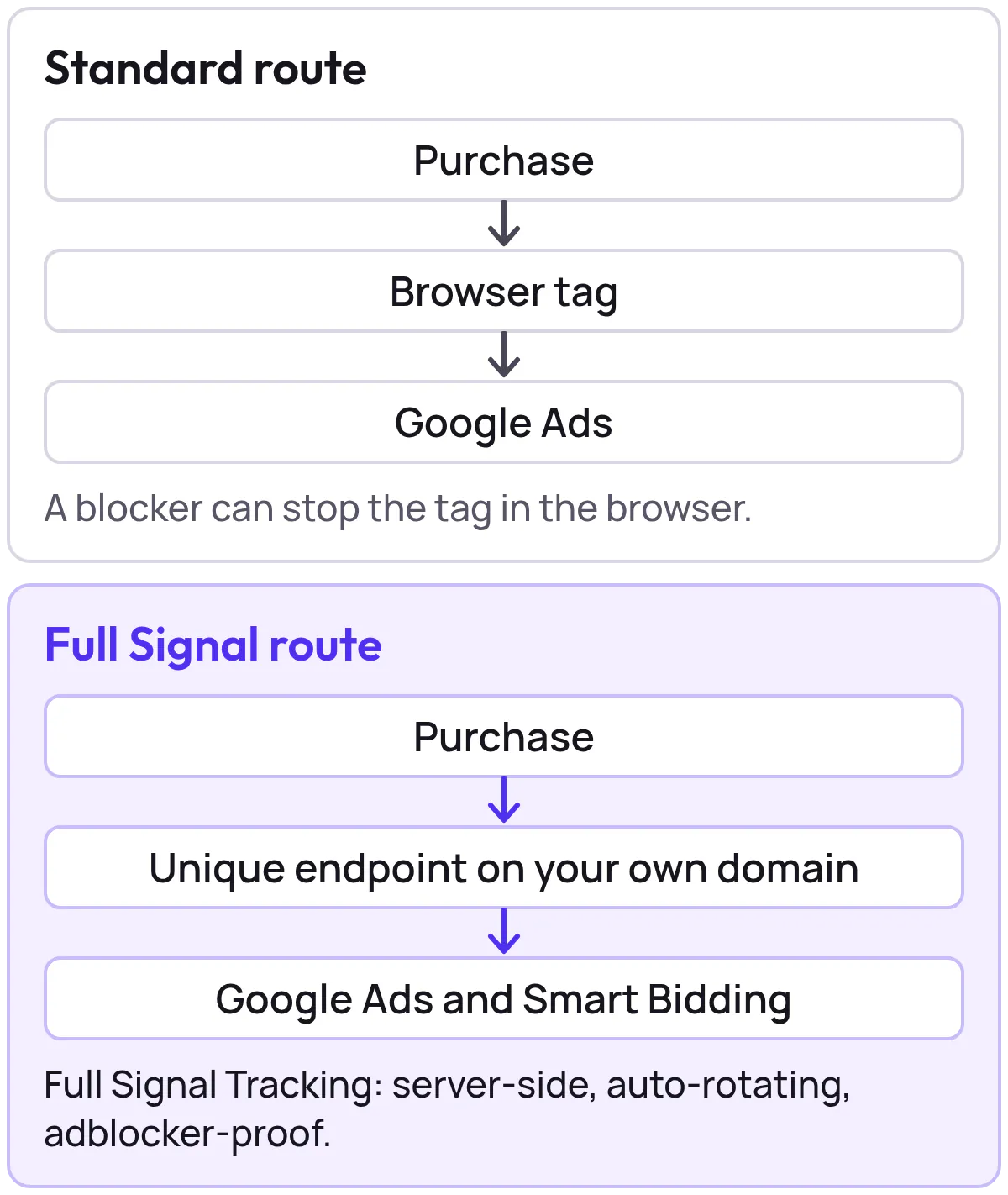
| Ad blockers | Blocked too | Gets through every ad blocker |
Ad blockers also block server-side Google Tag Manager and Google tag gateway setups, because the browser part still looks like a tracking request.
Full Signal Tracking gets through: in our ad blocker test, its endpoint was reached in all six blocker setups.
A server container also needs rebuilding as your needs grow: profit values, new customers, a second ad platform. Each is another round of specialist hours.
How do you get server-side tracking for Google Ads without a developer or a GTM server container?
Use a hosted app that reads each order from your shop platform and sends it to Google Ads from its own server. Then there is no container to build and, except on Magento, no developer to hire.
Google’s own route without a container is to import conversions with their click IDs through Google’s Data Manager (About offline conversion imports, checked 24 November 2026).
Making that import automatic takes a developer.
| Route without a container | Needs a developer | What you pay |
|---|---|---|
| Data Manager import with click IDs | Yes, to automate it | Developer time |
| Google tag gateway | No | Free on Cloudflare; it serves Google’s tag, it isn’t server-side tracking |
| Hosted tracking app | No, except on Magento | A subscription |
The Google tag gateway comparison explains what the gateway moves and what it leaves in the browser. With Product Metrics, the setup is three steps.
- Sign in with GoogleConnect Google Ads and Merchant Center to Product Metrics.
- Connect your storeInstall the Shopify app or the WooCommerce or Shopware plugin, or connect Lightspeed. On Magento, a developer installs the module once.
- Choose what your campaigns bid onThe eight conversion actions start as secondary; you pick the one your campaigns bid on.
On Magento and Adobe Commerce, the Magento module is the one step that needs a developer, once. Headless stores connect through the SDK.
Can you pay for server-side tracking once, or yearly?
A one-time payment can buy the setup, but not the tracking: a server handles every order, so someone pays a running cost each month.
Annual plans, where a provider offers them, prepay that cost. Stape, for example, offers monthly or annual billing (stape.io/price, checked 24 November 2026).
| How you pay | What it covers | What still runs monthly |
|---|---|---|
| One-time fee | Setup by an agency or freelancer | Hosting, upkeep and any app |
| Annual plan | A year of subscription, paid upfront | Nothing until renewal |
| Monthly fee | The running cost, month by month | Nothing else |
Product Metrics charges a monthly fee on your rolling 30-day Google Shopping spend. A month under €10,000 costs nothing, and a quieter month costs less.

Show the dataHide the data
| Monthly Google Shopping spend | Product Metrics per month (excl. VAT) |
|---|---|
| €10,000 | €0.00 |
| €15,000 | €32.50 |
| €20,000 | €65.00 |
| €25,000 | €97.50 |
Full Signal Tracking is included in Pro and isn’t billed separately (pricing). The free analysis needs no credit card; the 30-day trial does, and cancelling within it costs nothing.
Final thoughts
The server is the cheap part of server-side tracking; the specialist hours around it are not.
If nobody on your team builds tags, pay for an app that includes them, then check its claims in the ad blocker test. The full cost breakdown lists every other part of the bill.
Written by
Berend Vrakking, Founder of Product Metrics
1M+ products analysed · Nominated at the Dutch Search Awards for Best Measurement Campaign (2023) and Best Use of Data (2024)
Keep reading.
What Does Google Ads Conversion Tracking Cost? Setup, Tools, Hosting and Upkeep
What does Google Ads conversion tracking cost? The five parts of the bill, priced from Google's own figures and our price list, plus what to ask.
Best Google Ads Conversion Tracking Apps for Lightspeed eCom
Best Google Ads conversion tracking apps for Lightspeed eCom (C-Series), scored on five criteria: ROASaurus, ProfitMetrics, AdPage and more.
Best Google Ads Conversion Tracking Extensions for Magento
Best Google Ads conversion tracking extensions for Magento, scored on five criteria: Stape, Magefan, Anowave, Webkul and Mageplaza.
Frequently asked questions.
Does server-side tracking replace my Google tag?
Is server-side tracking GDPR compliant?
Do I still need enhanced conversions with server-side tracking?
See which of your products to push, fix or pause. Start with your own products, or a 30-second estimate.
See what a blocker stops with the ad blocker tracking test. Then see how your products perform once every conversion is counted.
Questions, or want to spar about your products? Book a demo: a video call with Berend, then a demo account.