 Log in with Google
Google Merchant Center errors: common issues and fixes
Google Merchant Center errors and Google Shopping feed errors by Google's own issue names, with the cause and fix of each and how to trace one to its source.
Google Merchant Center errors are the issues Merchant Center lists under Needs attention when product data, a landing page or an account setting breaks one of Google’s rules.
Each one has a fixed name, and Google keeps a “How to fix” page for most of them.
Most come down to the same four things: price, availability, identifiers and images. The fix that lasts changes the first wrong value in the chain from your shop to Google, not the last one you can see.
What are the most common Google Shopping feed errors?
These ten issues, by the name Merchant Center shows, cover most product disapprovals and limitations (Google Merchant Center Help, checked 23 October 2026):
| Issue in Merchant Center | Usual cause | Fix |
|---|---|---|
| Mismatched product price | Feed price differs from the page HTML or structured data | Correct the source or feed rule; check prices added by JavaScript |
| Inaccurate price status due to inconsistency between feed and landing page | Repeated price mismatches across products | Fix the price update path, then request a review |
| Automatic updates: Mismatched availability | Stock in the feed differs from the page | Update stock more often; check local data sources |
| Incorrect GTIN | A GTIN that doesn’t belong to the product | Use the manufacturer’s GTIN from the packaging |
| Missing or incorrect GTIN | No GTIN on a product that has one | Add it; never invent one |
| Limited performance due to missing value: GTIN | GTIN missing, product still serves | Add the GTIN, or brand plus MPN if none exists |
| Image too small | Below 100 × 100 px (250 × 250 for apparel) | Upload the original image; never upscale |
| Generic placeholder image | A “no image” or logo placeholder | Submit a real product photo |
| Missing shipping costs | No shipping settings for the country | Set shipping in Merchant Center, override per product |
| Missing shipping weight | Weight-based shipping without shipping_weight |
Add the weight to each product |
Price and availability mismatches can turn into preemptive item disapprovals, which count as account-level enforcement and need a review to clear (product data quality disapprovals). Fix those first.
Where do you find Merchant Center errors?
Under Products → Needs attention, filtered by issue; account-level problems sit under “View setup and policy issues” (Issues in Merchant Center). Read the status before you choose a fix:
| Status | What it means | First action |
|---|---|---|
| Not approved | An issue blocks the affected use | Open the issue and its products |
| Limited | Some countries or marketing methods are restricted | Check which ones |
| Under review | Google is still checking | Wait for the review result |
| Approved, few impressions | Not a feed error | Look at demand, bids and price |
An approved product with no impressions isn’t disapproved, and a fix for one country doesn’t approve the product everywhere (product visibility and status).
How do you trace an error to its cause?
Follow one affected variant from its source to the page Google crawls, and stop at the first wrong value:
- Read the exact issueRecord the product ID, country, marketing method and the issue name as Merchant Center shows it.
- Inspect the processed productCheck the final price, availability, identifiers and the data source that supplied them.
- Trace the inputCompare the source record, the export and any feed rules for the same variant ID.
- Compare the buyable offerOpen the exact variant and check its page, structured data and checkout.
- Correct the causeFix the first wrong value where it lives: source, feed rule, shop or policy.
- Verify after the next updateConfirm the issue has gone, then look again after the next feed run.
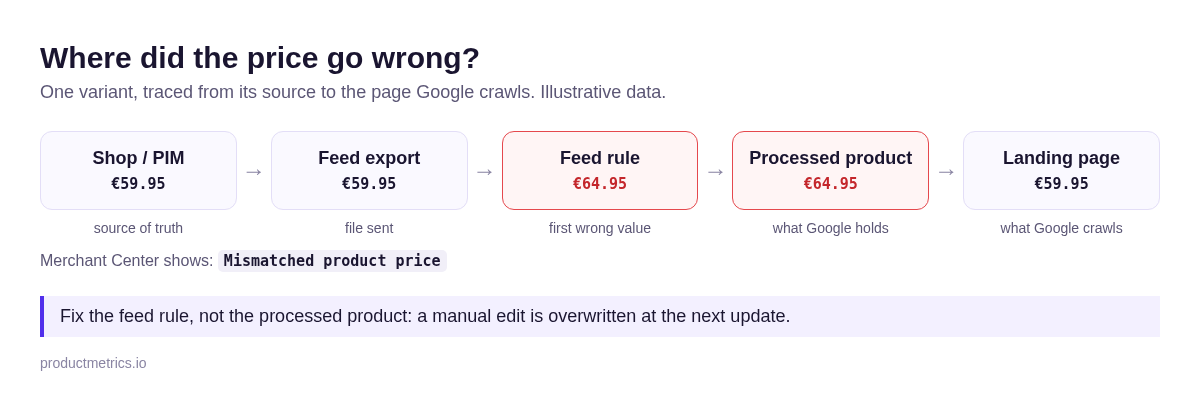
If Google never received the data, the problem is delivery, not content. The data-source troubleshooter covers that layer:
| You see | Check first |
|---|---|
| File can’t be fetched | File URL and access |
| Rows fail to parse | Format, headers, row structure |
| Product missing from the export | Export filters, market, variant scope |
| Right export, wrong processed value | Feed rules and supplemental sources |
Keep product IDs stable while you test: a new ID makes a new product rather than fixing the old one (ID requirements).
Who should fix each error?
The owner of the first wrong value, so the fix survives the next update:
| First wrong layer | Owner | Done when |
|---|---|---|
| Product copy or identifier | Product-data team | Source value approved, export correct |
| Feed rule or fallback | Feed manager | Affected sample correct after processing |
| File delivery | Integration owner | Current version delivered |
| Page or checkout | Ecommerce team | Variant page matches the feed |
| Account policy | Merchant or policy owner | Cause fixed, review completed |
An account suspended for misrepresentation is a different job: Merchant Center suspended for misrepresentation covers it. The PIM-to-Merchant Center workflow assigns an owner to every field upstream.
How do you check that a fix held?
Check the processed product and the issue after Google has re-processed it, and again after the next feed update. A connector’s “upload successful” isn’t Google’s approval.
| Check | Evidence to keep |
|---|---|
| Source corrected | The approved value and its owner |
| Current version delivered | Export and submission time |
| Processed product correct | Final attribute and its data source |
| Issue gone for the affected country | Product status |
| Still correct after the next update | A repeat check |
Once products are eligible, the next question is which ones earn their spend. A first campaign is covered in the Google Shopping ads beginner’s guide; how to optimise Google Shopping ads picks up from there.
Final thoughts
Every Merchant Center error has a name and an owner; the slow fixes are the ones made in the wrong place.
Open Needs attention, sort by the number of affected products, and trace one variant per issue to its first wrong value. The feed optimisation checklist covers each attribute once the cause is known.
Keep reading.
Google product feed: how it works, IDs, sync and fixes
A Google product feed sends your products to Merchant Center. The attributes Google requires, why the ID never changes, how often to sync and what to fix first.
Google product category: how to choose and map it
The Google product category (google_product_category) explained: pick the most specific ID, map it at scale, and keep it apart from product_type and labels.
How Google Shopping ads work, from feed to sale
How Google Shopping ads work: Merchant Center, the campaign, the auction, where ads show and how Google Shopping ads tracking records the click and the sale.
Frequently asked questions.
Is a warning the same as a disapproval?
Why is my product still disapproved after I fixed the feed?
How long does Merchant Center take to clear an error?
See which of your products to push, fix or pause. Start with your own products, or a 30-second estimate.
Check one product first: work out its break-even ROAS in the calculator. Then see where all your products stand.
Questions, or want to spar about your products? Book a demo: a video call with Berend, then a demo account.