 Log in with Google
Google product feed: how it works, IDs, sync and fixes
A Google product feed sends your products to Merchant Center. The attributes Google requires, why the ID never changes, how often to sync and what to fix first.
A Google product feed is the product data you send to Google Merchant Center: one item per product, with attributes such as id, title, price and availability.
Every Shopping ad and free listing starts from it.
Approval is the easy half. The feed also has to keep each product’s identity fixed and its price current, and approval says nothing about which products earn paid clicks.
I checked every Google rule here against Google’s documentation on 24 October 2026.
How does a Google product feed work?
A Google product feed works as a data source: Merchant Center reads it, checks each item against Google’s rules and uses approved items in Shopping ads, Performance Max and free listings.
In a text file, one line is one item. Google uses the attributes “to match your products to the right queries”, says its product data specification. A vaguely described product matches the wrong searches, or none.
Products reach Merchant Center in four ways (Google Merchant Center Help and Google Ads Help, checked 24 October 2026):
| Data source | How it updates | Fits |
|---|---|---|
| File at a URL | Google fetches it, every 24 hours by default | Any shop that exports a feed |
| File by upload or SFTP | Each time you send it | Exports from a PIM or ERP |
| Google Sheets template | When the sheet changes | A short product list |
| Merchant API or platform connection | When your system pushes a change | Fast-moving prices and stock |
If a plugin or feed tool still uses the Content API for Shopping, check its move to the Merchant API now. Google’s sunset notice, checked 24 October 2026, sets these dates:
| Date | Content API for Shopping |
|---|---|
| 18 August 2026 | Sunset; the Merchant API is its successor |
| 1 September 2026 | Requests without an extension start failing intermittently |
| Early 2027 | Full shutdown; every request fails |
How does Shopify or WooCommerce product data reach Google Merchant Center?
Shopify and WooCommerce product data reaches Google Merchant Center through an official app that syncs each product change automatically, so neither store needs a feed file. Shopify Help, Merchant Center Help and WooCommerce.com, checked 25 October 2026:
| Shopify | WooCommerce | |
|---|---|---|
| App | Google & YouTube, managed by Google | Google for WooCommerce, by Woo |
| Before you connect | Merchant Center admin’s Google email, a store without a password, refund policy and terms | A WordPress.com account |
| Merchant Center account | Standalone; no Multi-Client Account | Standalone; no Multi-Client Account |
Once connected, each app keeps the products in step:
| Shopify | WooCommerce | |
|---|---|---|
| What syncs | Products available to the online store | Simple and variable products; no services or digital products |
| When it syncs | When product information changes | On create or update, plus a daily re-sync before products expire |
| Identifiers | GTIN, or MPN and brand without one | GTIN, MPN and brand from global attributes |
| Fix values in | The Shopify product page or bulk editor | The WooCommerce product and its Google for WooCommerce tab |
When price, availability or a GTIN disagrees with the page, fix it in the store: both apps send what the product record holds.
On Shopify, a product marked Under review has changes that haven’t synced yet, so wait before editing it again. On WooCommerce, a GTIN set on the product’s own tab overrides the global attribute rules.
Version 3.8.1 of Google for WooCommerce moved the extension to the Merchant API. Update anything older before the Content API shuts down.
Product Metrics doesn’t replace these apps. It connects to the store for orders and to your Google account, reads Google Ads and Merchant Center data, and adds each product’s segment as a custom label once you approve it.
Which attributes does a Google product feed need?
Every product needs seven attributes: id, title, description, link, image_link, availability and price. Google’s product data specification adds these limits and conditions:
| Attribute | Required for | Rule |
|---|---|---|
id |
All products | Max 50 characters; use the SKU |
title |
All products | Max 150 characters |
description |
All products | Max 5,000 characters |
price, availability |
All products | Match the landing page |
brand |
New products, except films, books and music | Max 70 characters |
gtin or mpn |
GTIN strongly recommended; MPN without a GTIN | GTIN up to 14 digits |
item_group_id |
Variants in Brazil, France, Germany, Japan, the UK and the US | Use the parent SKU |
Optional attributes such as colour, size, material and a specific Google product category widen the searches a product can match.
Why must the id never change?
The id must never change because it is the product’s identity in Merchant Center and Google Ads. Google’s product data specification asks you to use the SKU, keep the ID on every update and reuse it across countries and languages.
A changed ID doesn’t rename a product. It creates a new one with no history, and every label or rule keyed on the old ID stops matching.
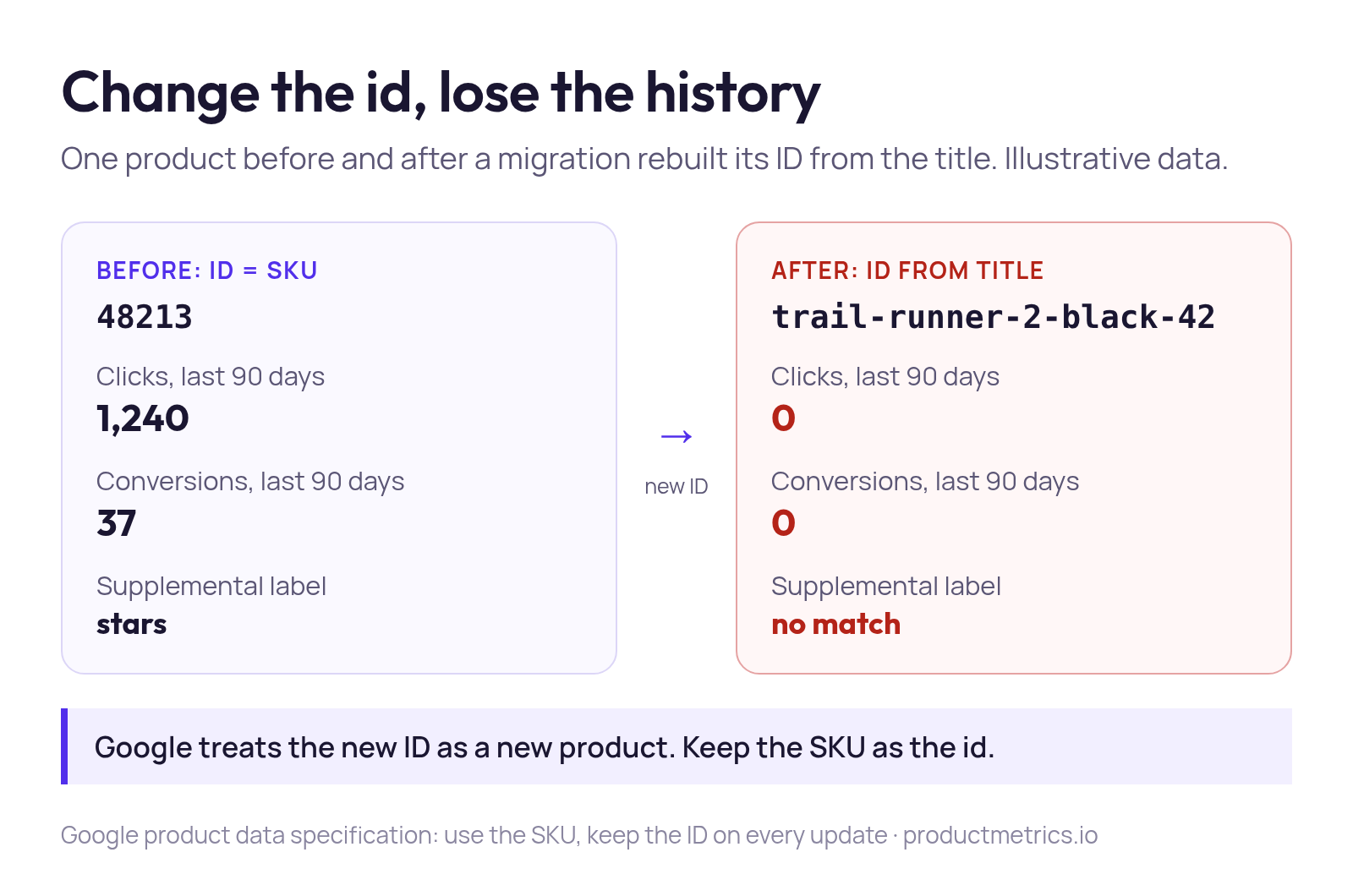
Each variant gets its own id, and item_group_id ties variants to their parent. Never build an ID from the title, price or stock, because those fields are meant to change:
| Keep stable | Change when the product changes |
|---|---|
id (the variant’s SKU) |
price, sale_price |
item_group_id (the parent SKU) |
availability |
gtin, brand, mpn |
title, description, images |
| Feed label of the data source | custom_label_0 to custom_label_4 |
Migrating platforms? Keep the old IDs, or map each one to its new record before the switch.
How often should a Google product feed update?
A Google product feed should send the full file at least daily and push price and stock changes as they happen. Google’s limits on 24 October 2026:
| Rule | Value | Source |
|---|---|---|
| Product expiry without a refresh | 30 days after the last refresh | expiration_date specification |
| Default fetch of a file at a URL | Every 24 hours, adjustable | Google Ads Help |
| New products pending data quality checks | Up to 72 hours | Google for Developers, “Create a feed” |
| Maximum file size | 4 GB | Google Ads Help |
Thirty days is the cliff, not the schedule: a price that changed this morning stays wrong in Shopping until the next update.
A new product that hasn’t served within those 72 hours isn’t a broken feed: its checks are still running.
- Scheduled full refreshSend the complete file at least daily. It adds new products, removes ones that left the file and repairs anything an update missed.
- Updates for price and stockPush price and availability through the Merchant API or your platform connection when they change, instead of waiting for the next file.
- Structured data on the landing pageMark up the product in the page HTML so Google can check the feed against what the shopper sees, and correct it where they differ.
The third layer has an exact requirement. Google’s structured data guide requires price, priceCurrency, availability and condition for automatic item updates, which correct a feed value from your page.
Google adds that these automations don’t replace regular updates. The PIM-to-Merchant Center workflow keeps all three layers on one record, with one owner per field.
How do you diagnose a Google product feed problem?
Diagnose a feed problem by separating status from performance. A product that never served has a data problem; one that served and disappointed has a commercial one. The Google Ads API keeps them apart in its Shopping reporting resources:
| Report | What it shows | Use it for |
|---|---|---|
shopping_product |
Current state of every product, served or not | What blocks serving |
shopping_performance_view |
History of products that served ads | Clicks, cost and conversions |
product_group_view |
Statistics per Shopping product group | Standard Shopping structure |
asset_group_product_group_view |
Products in Performance Max listing groups | Performance Max structure |
Then group symptoms by cause, not by Merchant Center’s order: one wrong export rule can fill hundreds of rows.
| Symptom | Likely cause | First check |
|---|---|---|
| Price or availability mismatch | Feed behind or ahead of the page | The page’s structured data |
| Image disapproved | Placeholder, overlay or broken URL | A crawlable product photo |
| Missing GTIN warning | GTIN missing or copied from the parent | Each variant’s own GTIN |
| Approved, almost no impressions | Vague title or broad category | Title and category |
| Clicks but no sales | Price position, page or journey | What shoppers buy instead |
The first three are data errors. The Merchant Center errors guide lists each by Google’s issue name and traces it to the first wrong value.
The last two aren’t errors at all, so no diagnostics screen will flag them.
Does an approved product deserve ad budget?
No, an approved product doesn’t automatically deserve ad budget: approval means Google accepted the product’s data, not that paid clicks on it will pay back. Google’s guide to correcting an existing feed stops once items are accepted.
A hard risk stops the product serving, and Merchant Center flags it. A soft risk lets the product serve while it loses money:
| Signal | Risk | Product serves? | Flagged? |
|---|---|---|---|
| Mismatched price | Hard | No | Yes |
| Placeholder image | Hard | No | Yes |
| Thin margin | Soft | Yes | No |
| Few units in stock | Soft | Yes | No |
| Price above comparable offers | Soft | Yes | No |
| High return rate | Soft | Yes | No |
Give every approved product one of four actions:
- Fix now: disapproved, or approved with a mismatch that wastes the next click.
- Promote: in stock, a margin that clears its break-even ROAS, a competitive price and a page that converts. Increase its priority.
- Delay: too few units to fulfil more orders, or too little data to judge. Hold its priority.
- Free listing only: sells without ads, or returns eat the profit. Lower its priority or exclude it from Shopping ads.
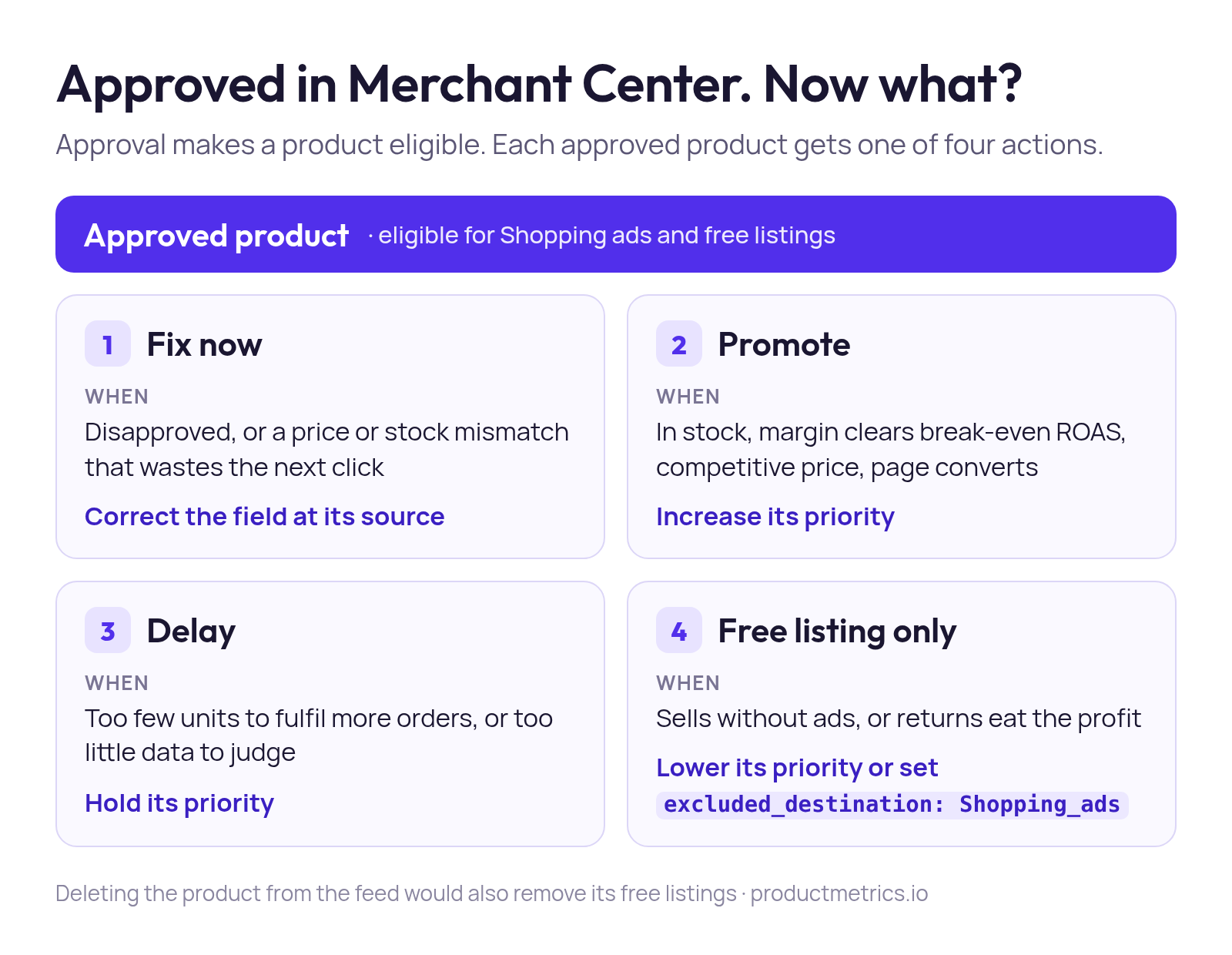
The fourth action is where feeds get damaged: deleting a product also removes its free listings. The same specification offers gentler switches:
| Method | Shopping ads | Free listings | Use it for |
|---|---|---|---|
| Delete from the feed | Off | Off | Products you no longer sell |
excluded_destination: Shopping_ads |
Off | On | Exclusions over 14 days |
pause: ads |
Off | On | Breaks of up to 14 days |
| Custom label excluded in a campaign | Off in that campaign | On | One campaign’s decision |
The Performance Max exclusion guide compares these switches inside Performance Max.
By hand, this works for a short product list. Across thousands of products, each action needs recalculating as clicks, margin and stock move, then writing back as a label campaigns can read.
That is what Product Segmentation does.
Product Metrics segments every product into six segments on advertising clicks and ROAS or POAS against your target. It writes each segment to a custom label in Merchant Center, and only the labels you approve go out.
With the GA4 BigQuery export connected, Product Journeys shows whether a click bought that product or another one. Competitor Prices and Inventory Insights add the price position and stock cover behind the promote and delay calls.
Which tool fixes which feed failure?
Pick the tool by the failure you have: data tools fix what Google receives, and a decision layer fixes which products get priority.
| Failure | Layer | Typical fix |
|---|---|---|
| Disapprovals on a short product list | Data | Merchant Center by hand |
| Wrong values at the source | Data | The PIM, ERP or shop record |
| Formatting across many products and channels | Data | A feed platform or attribute rules |
| Approved products that miss their target | Decision | Segments written to custom labels |
Merchant Center by hand works while one person can read every issue, but it never shows margin.
Feed rules stay as current as the condition someone wrote: a custom_label_2 of “high margin” still says so after returns have erased the margin.
For the data layer, start with the 12 feed fixes ranked by profit.
Final thoughts
Every row in a Google product feed promises the same product, under the same ID, at the price on the page. Approval checks that promise. It doesn’t tell you which products to back.
This week, pull shopping_product for the products that never served and fix those. Then decide which of the approved ones deserve paid clicks before you touch a target.
For the business case behind Merchant Center work, 3228 Digital explains why Google Merchant Centre matters for ecommerce in 2026.
If you also run Search campaigns next to Shopping, landing-page experience is one of three Quality Score signals there. This Google Ads Quality Score guide covers how to improve it.
When you map a PIM or shop system into Merchant Center, RUIT’s documentation on product attributes is a compact reference for what product and custom attributes are for.
Keep reading.
Google Merchant Center errors: common issues and fixes
Google Merchant Center errors and Google Shopping feed errors by Google's own issue names, with the cause and fix of each and how to trace one to its source.
Google product category: how to choose and map it
The Google product category (google_product_category) explained: pick the most specific ID, map it at scale, and keep it apart from product_type and labels.
How Google Shopping ads work, from feed to sale
How Google Shopping ads work: Merchant Center, the campaign, the auction, where ads show and how Google Shopping ads tracking records the click and the sale.
Frequently asked questions.
Is a Google product feed the same as a Google Shopping feed?
What is the difference between a primary and a supplemental feed?
Which file formats does a Google product feed accept?
See which of your products to push, fix or pause. Start with your own products, or a 30-second estimate.
Check one product first: work out its break-even ROAS in the calculator. Then see where all your products stand.
Questions, or want to spar about your products? Book a demo: a video call with Berend, then a demo account.