
Conversion Tracking Integration for Google Ads The Complete 2026 Guide
How to set up Google Ads conversion tracking that sends every purchase straight away, for Shopping and other campaigns: four patterns and a rollout plan.
If your Google Shopping and Performance Max campaigns are fuelled by incomplete or delayed conversions, every “smart” optimization Google runs is based on guesswork.
In 2026, three things make Google Ads conversion tracking harder and more important than ever:
- Privacy features like Safari ITP and stricter cookie rules
- Widespread adblocker use
- Google’s own push toward AI bidding that relies directly on your conversion goals and values
Google explicitly tells advertisers that conversion goals and actions “directly guide Google AI to deliver results against those goals,” and recommends setting up accurate conversion measurement before you optimize bids. (Source: Google Ads Performance Max Best Practices)
This guide walks through how to design a durable, real-time–oriented conversion tracking setup for Google Ads, and how Product Metrics’ Full Signal Tracking gives you server-side, adblocker-proof conversions that your campaigns can actually trust. (Source: Product Metrics Home)
1. Why Conversion Tracking Is the Real Engine of Google Ads Performance in 2026
Shopping and Performance Max Run on Your Conversion Signal
For Shopping and Performance Max campaigns, you don’t set keywords. You set:
- A product feed from Merchant Center
- Bidding goals (ROAS/CPA)
- Conversion goals with values
Google’s own Storebuilder blueprint describes the basic flow: you create a ConversionAction in Google Ads, place the conversion tag on your site, a cookie is set when someone clicks an ad, and when they complete the action, Google recognizes that cookie and records a conversion with its value. (Source: Google Storebuilder Conversion Tracking)
Performance Max then uses those conversion signals and values to steer bids and placements across Search, Shopping, YouTube, and other surfaces. (Source: Google Ads Performance Max Best Practices)
If the conversions behind your Shopping campaigns are:
- Under-reported (blocked tags, short cookies, missing payment flows)
- Mis-valued (revenue without margin, returns ignored)
- Delayed (offline imports, slow analytics)
…Google’s AI is optimizing toward the wrong thing.
Real-Time Tracking vs Google Ads Reporting Delays
There are two clocks to care about:
- Delivery clock – how fast your site sends a conversion to Google Ads.
- Reporting clock – how fast that conversion appears in Google Ads UI and can safely drive bidding.
Google’s data freshness documentation says that most metrics – including conversions on a last‑click model – are refreshed hourly, though some non–last click conversions can take longer. (Source: Google Ads About Data Freshness)
It also notes that conversions imported from Google Analytics can take ~12–24 hours to become available, compared with approximately 3–15 hours for native Google Ads conversion tracking depending on the attribution model. (Source: Google Ads About Data Freshness)
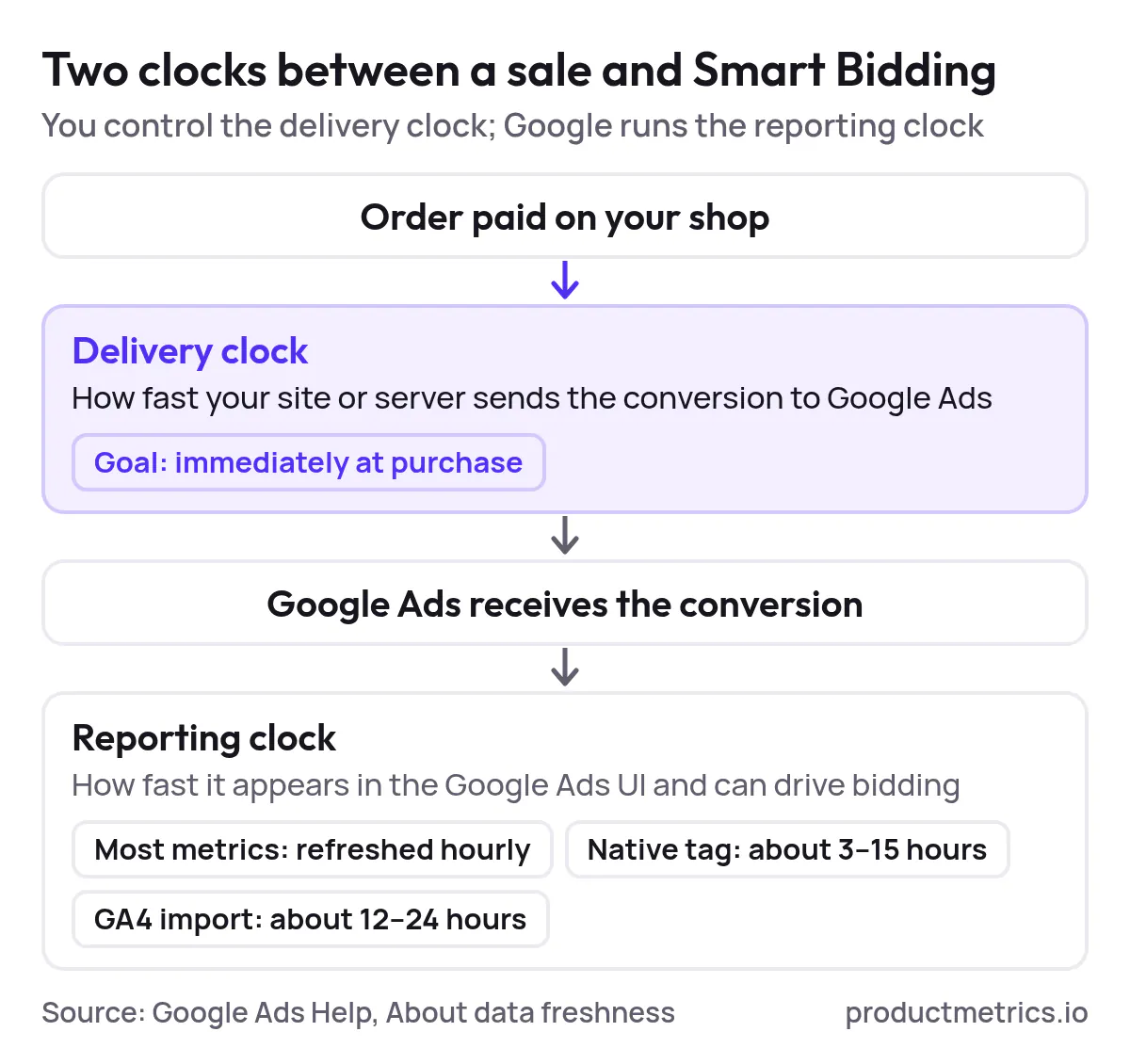
In this guide, when we talk about real-time data tracking, we focus on the delivery clock:
- Conversions should leave your site immediately at purchase.
- Your own dashboards (for example, Product Metrics product-level views) should update in near real time.
- Google Ads should receive a complete, deduplicated stream of purchases with the richest values you can legally send.
You can’t remove every minute of Google’s own processing time, but you can build an integration that doesn’t add more lag or lose conversions on the way.
2. What Real-Time Conversion Tracking Actually Means for Google Ads
Real-Time Delivery From Click to Conversion Event
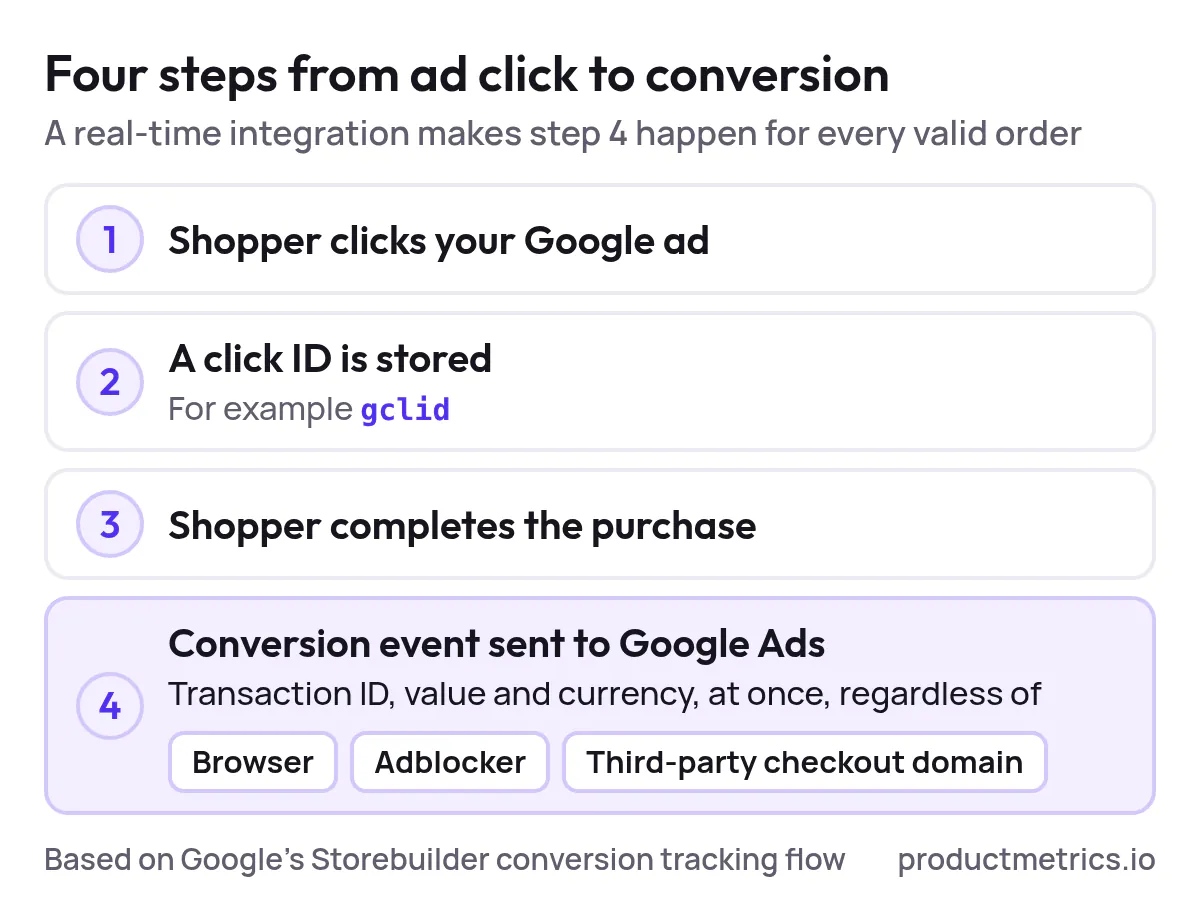
From Google’s perspective, a basic Shopping purchase conversion follows four steps: (Source: Google Storebuilder Conversion Tracking)
- A shopper clicks your Shopping ad.
- A temporary identifier (for example,
gclid) is stored. - The shopper completes the purchase.
- Your conversion tag or server sends an event with transaction ID, value, and currency back to Google Ads.
A real-time Google Ads conversion tracking integration ensures that step 4 happens immediately and reliably every time a valid order is created, regardless of:
- Which browser the shopper uses
- Whether they run an adblocker
- Whether checkout runs on a third-party domain
Real-Time for Decision-Making vs UI Refreshes
Google Ads Help is clear that performance data “isn’t available instantly,” and that conversions in particular have varying data freshness depending on the attribution model and source. (Source: Google Ads About Data Freshness)
That means your teams need two layers of real-time:
- Operational layer – a platform like Product Metrics, where each product’s Shopping performance, margin, and stock update as close to real time as possible, so you can decide what to push, fix, or pause.
- Bidding layer – Google Ads, which ingests conversion events continuously but may display them with some delay; your goal is to send all eligible conversions, enriched with the right values and customer types, as soon as they occur.
Product Metrics is explicitly built to show what each product earns in Google Shopping and Performance Max, combining ad data with margin and stock so you can control priorities at the product level. (Source: Product Metrics Home)
3. Core Google Ads Conversion Tracking Integration Patterns
If you’re evaluating solutions for real-time data tracking in Google Ads conversion integration, you’ll typically encounter four patterns.
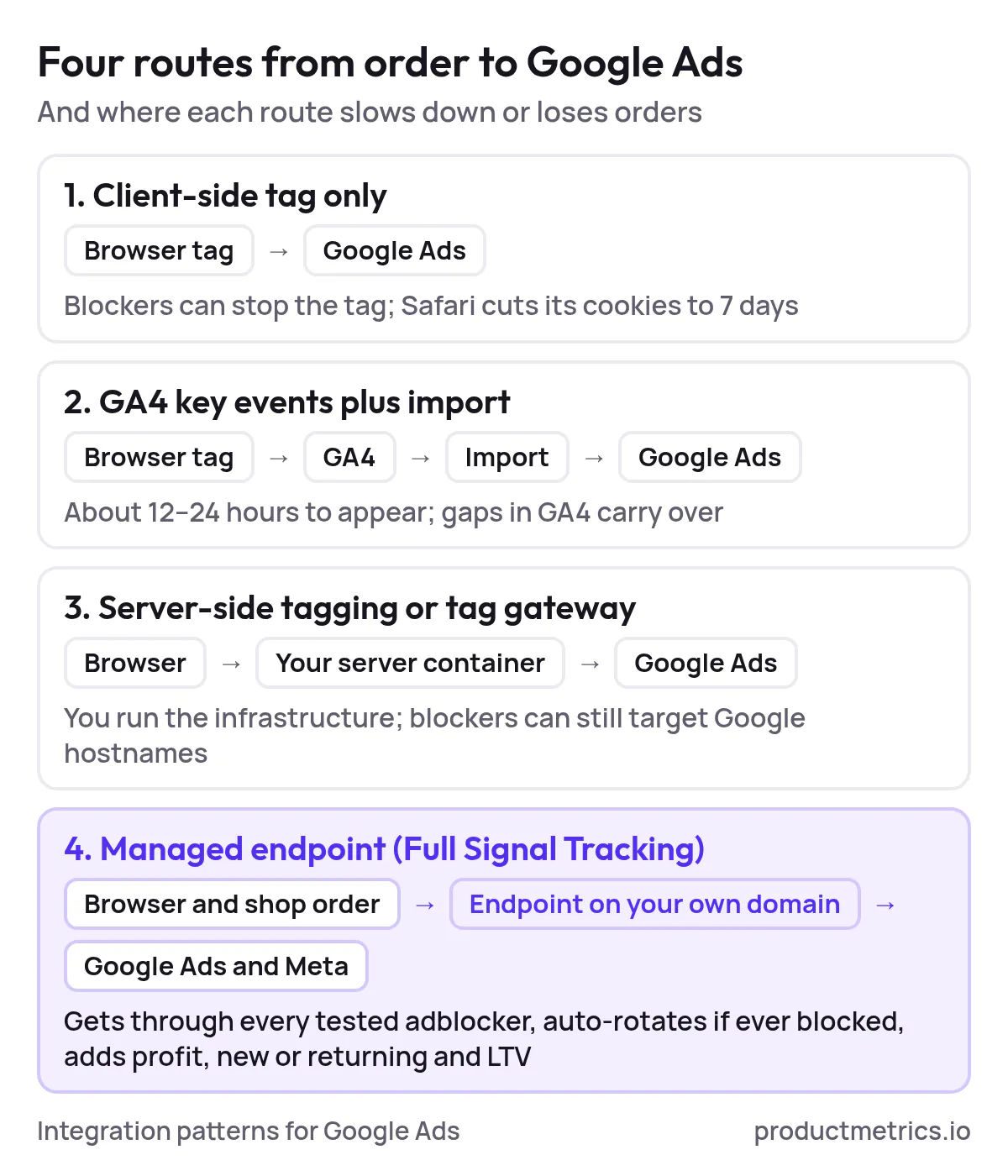
3.1 Client-Side Google Tag or Google Tag Manager Browser-Only
This is the classic setup:
- A Google tag (gtag.js) or Google Tag Manager container runs in the browser.
- A Google Ads conversion tag fires on your thank-you page.
Google documents this flow in its conversion tracking guides and Shopping automation articles, including how to place tags via Tag Manager or directly in code. (Source: Google Ads Conversion Tracking – Dev Guide, Shopping Conversion Tracking Article)
Pros
- Fast to implement.
- Works for basic revenue-only tracking.
Limits for real-time Shopping data
- Highly exposed to adblockers and browser restrictions.
- Cookies set by client-side scripts are often cut to 7 days in Safari, which can break attribution for buyers who return in week two. (Source: Product Metrics Server-Side Tracking Guide)
- Hard to add profit, new-vs-returning flags, and LTV as conversion values without custom engineering.
Google Tag Manager’s own documentation notes that client-side tagging can make it difficult to ensure data consistency and that server-side tagging puts you “in control of the data,” allowing you to validate events and reduce data loss before they reach vendor endpoints. (Source: Google Tag Manager Client vs Server-Side Tagging)
3.2 GA4 Key Events Plus Imported Conversions
Many ecommerce teams record purchases in Google Analytics 4 and then import those conversions into Google Ads:
- GA4 tracks
purchaseevents. - Google Ads imports them as conversion actions.
Google’s documentation explicitly lists this as a valid route for Shopping conversions via GA linking and goal import. (Source: Shopping Conversion Tracking Article)
Pros
- Central analytics view in GA4.
- Less tagging duplication if you already run GA4.
Limits for real-time Shopping data
- According to Google’s data freshness table, goals and transactions imported from Google Analytics can take around 12–24 hours to appear in Google Ads, compared with roughly 3–15 hours for native Ads conversion tracking depending on attribution. (Source: Google Ads About Data Freshness)
- Any gaps in GA4 event collection (blocked scripts, consent, cross-domain issues) propagate into your Google Ads conversion data.

Show the dataHide the data
| Conversion source | Fastest (hours) | Slowest (hours) |
|---|---|---|
| Native Google Ads conversion tracking | 3 | 15 |
| Imported from Google Analytics | 12 | 24 |
For true live data feeds into Shopping bidding, GA4 imports are better used as a secondary signal or backup, not the primary engine.
3.3 Server-Side Tagging and Google Tag Gateway
Here, you keep a web container or tag on the page, but move the heavy lifting to a server:
- Server-side Google Tag Manager (sGTM) runs in a server container.
- The browser sends events to a first-party endpoint (for example,
analytics.yourstore.com). - The server container fires a Google Ads Conversion Tracking tag, which reads transaction ID, conversion value, and currency from ecommerce fields and forwards them to Google Ads. (Source: Google Ads Conversions – Server-Side Setup)
Google also introduced Google tag gateway for advertisers, which routes Google tags through your own server or CDN (such as Cloudflare or Google Cloud CDN) without changing page code, to improve conversion signal accuracy and resilience. Early adopters saw an 11% uplift in measurement signals. (Source: Google Tag Gateway Announcement)
Google positions server-side tagging as a way to improve data quality, site performance, and privacy by processing measurement data on a server you control, while the browser still collects initial events. (Source: Intro to Server-Side Tagging, Client vs Server-Side Tagging)
Pros
- More resilient to browser changes.
- Ability to enrich or sanitize events (for example, add profit from a database) before they reach Google Ads. (Source: Google Ads Conversions – Server-Side Setup)
Limits for real-time Shopping data
- Still vulnerable when adblockers target the hostnames (such as
googletagmanager.com) that scripts load from. - Requires you to run and maintain the server container or gateway and its infrastructure.
3.4 Fully Managed Server-Side Tracking Full Signal Style Endpoints
A newer category of ecommerce solutions for real-time Google Ads conversion tracking integration moves beyond generic sGTM and into managed, platform-specific tracking.
Product Metrics’ Full Signal Tracking is one example:
- It runs a unique endpoint on your own domain (for example,
yourstore.com/apps/...or a random REST route), with no “track” or “pixel” in the path, so adblockers see it as first-party traffic. (Source: Product Metrics Shopify Tracking, WooCommerce Tracking) - If an adblocker ever catches the endpoint, it auto-rotates to a fresh path without you changing tags. (Source: Product Metrics Enhanced Conversions vs Server-Side Tracking)
- Click IDs like
gclidare kept first-party and server-side, so purchases days after a click can still be matched back to the right Shopping ad. (Source: Product Metrics Enhanced Conversions vs Server-Side Tracking)
In a September 30, 2026 lab test, Product Metrics found that a standard Google Ads tag was blocked in 3 of 6 adblocker setups, while a first-party endpoint of the Full Signal type got through in all 6. (Source: Product Metrics What Is Server-Side Tracking?)
On top of transport, Product Metrics reads real ecommerce orders (Shopify, WooCommerce, Magento, Lightspeed, Shopware), and sends revenue, profit, new vs returning status, and lifetime value into Google Ads and Meta as separate conversion actions, enabling POAS-based bidding. (Source: Product Metrics Home, Shopify Tracking, WooCommerce Tracking)
For merchants who want a live, enriched conversion feed into Shopping and Performance Max without running their own sGTM infrastructure, this fully managed model is often the most durable choice.
4. Designing a Durable Google Ads Conversion Tracking Architecture
Think about your Google Ads tracking setup as an architecture, not a tag wizard. A robust design covers goals, data sources, integration, governance, and QA.
Step 1 Define Biddable Conversion Goals and Values
Google advises you to “pick conversion goals that matter to your business” and to set up conversion values that reflect the relative importance of different actions, so that bidding can prioritize the right ones. (Source: Google Ads Performance Max Best Practices)
For Shopping and Performance Max, that typically means:
- A primary purchase conversion used for bidding.
- Optional secondary conversions (email sign-ups, add-to-cart) used for reporting not bidding.
- Value-based bidding (Maximize conversion value with a ROAS target) once you trust order values. (Source: Google Ads Performance Max Best Practices)
With Product Metrics’ server-side tracking on Shopify and WooCommerce, each order reaches Google Ads with profit as well as revenue, so you can move from ROAS to POAS once margins are wired. (Source: Shopify Tracking, WooCommerce Tracking)
Step 2 Map Data Sources Latency and Reliability
List the systems involved in an order lifecycle:
- Ecommerce platform (Shopify, WooCommerce, Magento, etc.)
- Payment providers (Shop Pay, PayPal, Klarna, etc.)
- Back-office systems for returns and cancellations
- Analytics and ad platforms (GA4, Google Ads, Meta)
Use Google’s data freshness guidance as a benchmark: native Google Ads conversion tracking generally becomes available faster than imported GA4 goals, and non–last click conversions can take longer to finalize. (Source: Google Ads About Data Freshness)
Your architecture should aim to:
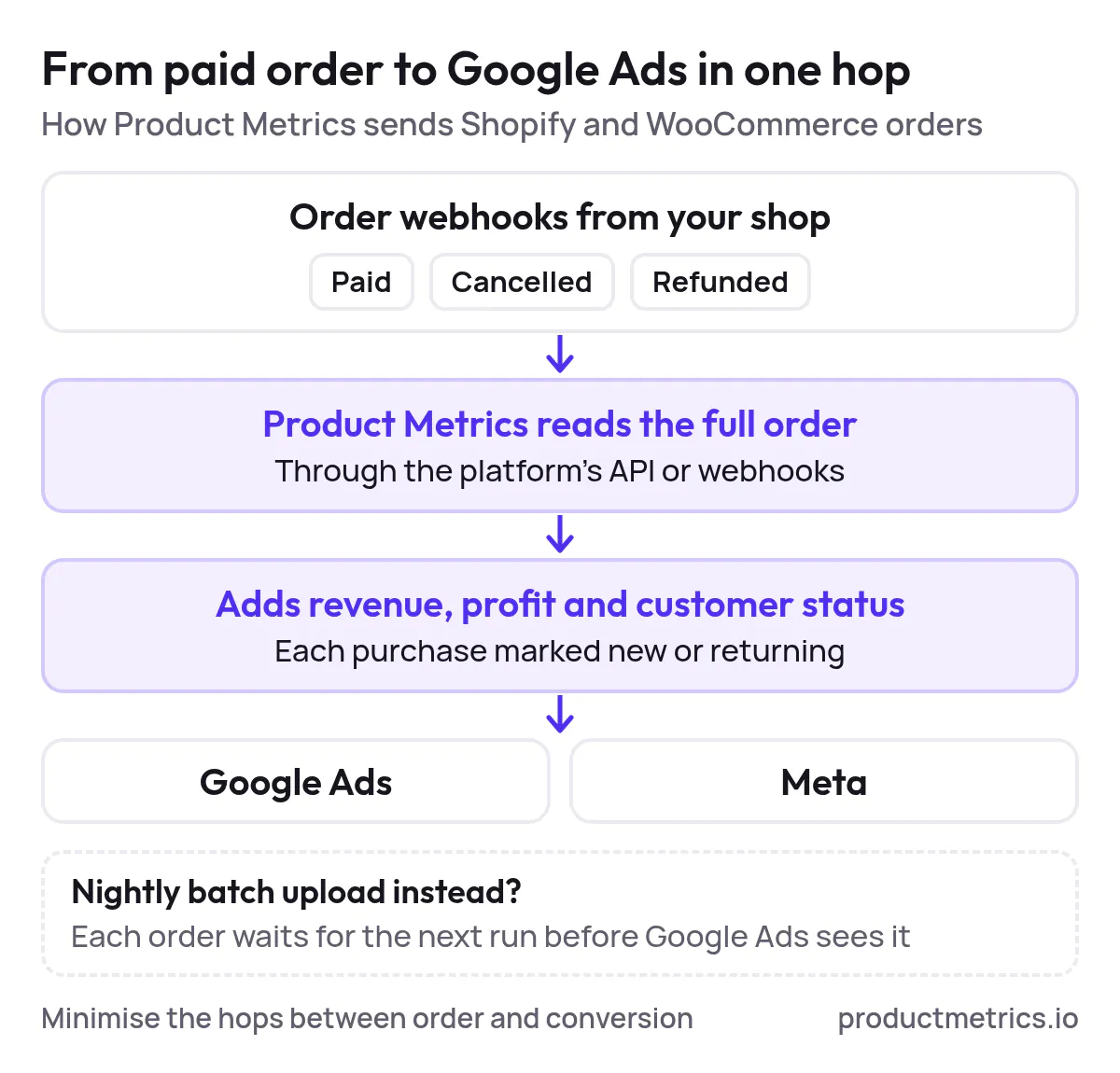
- Minimize hops between “order created” and “conversion sent”.
- Prefer push-based delivery (server-side events on order webhooks) over nightly batch uploads whenever possible.
Product Metrics, for example, listens to Shopify and WooCommerce webhooks for paid, cancelled, and refunded orders, reads the full order via API or webhooks, and then sends the purchase with revenue, profit, and customer status directly into Google Ads and Meta. (Source: Shopify Tracking, WooCommerce Tracking)
Step 3 Choose Your Integration Pattern Deliberately
A simple mental model:
| Pattern | Real-time delivery | Resilience | Enrichment |
|---|---|---|---|
| Client-side only | Moderate (tag firing) | Low (adblockers, ITP) | Low |
| GA4 import | Slow (12–24h+) | Medium | Medium |
| sGTM / tag gateway | Fast | Medium–High | High (if engineered) |
| Managed endpoint (Full Signal style) | Fast | Very high (adblocker-resistant) | Very high (profit, new vs returning, LTV) |
(Sources: Google Ads About Data Freshness, Google Tag Manager Server-Side Ads Setup, Product Metrics Full Signal Overview, Product Metrics Server-Side Tracking Guide)
For most mid-sized and larger ecommerce brands relying heavily on Shopping and Performance Max, the durable choice is:
- A managed server-side endpoint as the primary conversion feed (for example, Product Metrics Full Signal).
- Optional client-side tags and/or GA4 imports as backup and for comparison not as the main bidding signal.
Step 4 Govern Conversion Actions and Naming
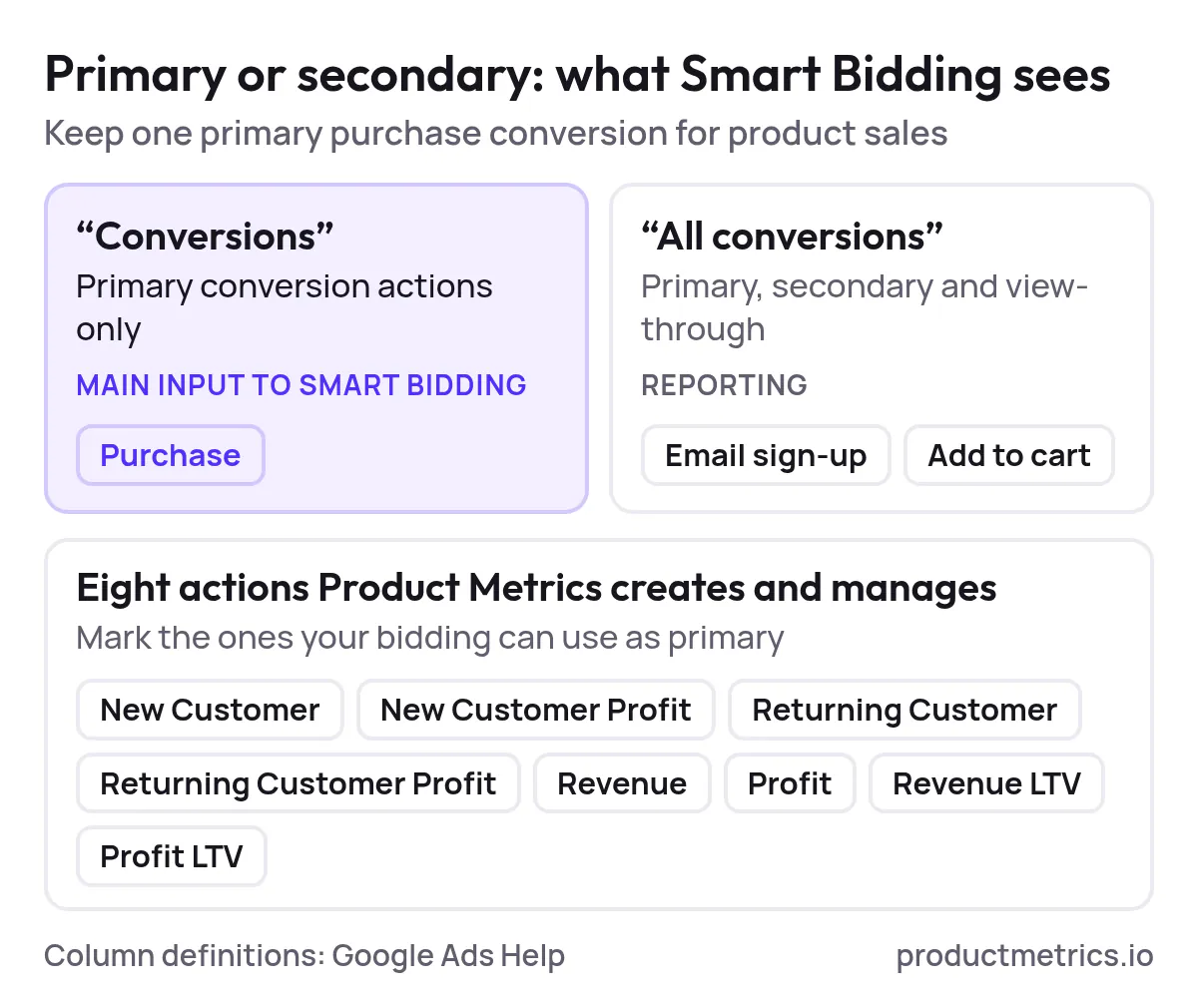
Google’s “Understand your conversion tracking data” guide emphasizes that the “Conversions” column is built from primary conversion actions and is the main input to Smart Bidding, while “All conversions” includes secondary and view-through events. (Source: Google Ads Understand Your Conversion Tracking Data)
Practical governance for Shopping:
- Keep one primary purchase conversion for product sales.
- If you add profit or new-customer actions, either:
- Use them in value rules and bidding, or
- Keep them as reporting-only conversions if your bidding model can’t yet use them.
On Shopify, Product Metrics automatically creates and manages eight Google Ads conversion actions (for example, New Customer, New Customer Profit, Returning Customer, Revenue, Profit, Revenue LTV, Profit LTV), all fed by server-verified orders, so you can selectively mark which ones are primary. (Source: Product Metrics Shopify Tracking)
Step 5 Establish QA and Monitoring
Durable conversion tracking is governed, not “set and forget.” At a minimum:
- Compare shop orders vs. Google Ads purchases over defined windows.
- Use browser tools and debuggers to check that events fire and reach your endpoint.
- Watch for unexpected drops or spikes in conversions and investigate change history.
Product Metrics offers an Adblocker benchmark and an SDK debugger that help you test which blockers stop standard Google tags and decode tracking payloads, so you can see exactly what an SDK or endpoint receives. (Source: Product Metrics WooCommerce Tracking, Product Metrics SDK Debugger)
5. Real-Time Data Tracking Solutions for Google Ads Conversion Integration
If your goal is real-time data tracking solutions for Google Ads conversion integration, look for three capabilities rather than just a tag.
5.1 First-Party Adblocker-Resistant Delivery
Google’s own guidance on server-side tagging focuses on data quality and performance, but not all server-side setups are equally resilient to blockers; if the endpoint still sits on a well-known Google domain, popular extensions can block it. (Source: Client vs Server-Side Tagging)
In independent tests described by Product Metrics, the standard Google Ads tag to googletagmanager.com was blocked in half of tested blocker setups (Brave Shields, uBlock Origin Lite, AdGuard with Tracking Protection), while a first-party endpoint on the shop’s own domain got through in all of them. (Source: Product Metrics What Is Server-Side Tracking?)

Show the dataHide the data
| Request | Setups it got through |
|---|---|
| Standard Google Ads tag (googletagmanager.com) | 3 |
| First-party endpoint on the shop's own domain | 6 |
Full Signal Tracking takes this further by:
- Using a random path on your own domain.
- Auto-rotating the path if a blocker ever catches it.
- Keeping click IDs like
gclidfirst-party so long-tail purchases still match the original Shopping click. (Source: Product Metrics Full Signal Overview, Enhanced Conversions vs Server-Side Tracking)
5.2 Order-Verified Enriched Conversions
For Shopping, a “conversion” is only as good as its alignment with your order system. Ideal real-time integrations:
- Take orders from your platform (via webhooks or APIs) as the source of truth.
- Attach transaction ID, revenue, profit, customer type, and LTV at the time of the event.
- Send these as separate conversion actions that Google Ads can bid on.
Product Metrics’ Shopify and WooCommerce integrations do exactly this: every paid order is confirmed from Shopify or WooCommerce, enriched with cost of goods and Shopify Payments fees (where applicable), then sent to Google Ads and Meta as purchase conversions with revenue, profit, and new/returning status. (Source: Shopify Tracking, WooCommerce Tracking)
This is what turns Google Shopping from a revenue-only ROAS machine into a profit-aware POAS engine.
5.3 Consent-Aware Compliant Event Routing
Server-side tracking doesn’t replace consent; it just moves where decisions are enforced. Product Metrics stresses that a server can “enforce what happens to data after the browser sends it, but it can’t create permission a visitor refused.” (Source: Product Metrics What Is Server-Side Tracking?)
Look for setups that:
- Read consent from your CMP (or from Shopify Customer Privacy on Shopify).
- Map that state into Google Consent Mode v2 signals.
- Only send hashed customer data (for enhanced conversions) when consent is granted. (Sources: WooCommerce Tracking, Shopify Tracking, Google Ads Enhanced Conversions via Tag Manager)
Product Metrics integrates with mainstream consent tools and passes their signals into Google Ads via Consent Mode v2 as part of its managed setup. (Source: WooCommerce Tracking, Shopify Tracking)
6. How Product Metrics Implements Real-Time Server-Side Conversion Tracking for Google Ads
If you’re actively shopping for Google Shopping optimization platforms with real-time conversion tracking integration, Product Metrics is designed specifically for that use case.
6.1 Full Signal Tracking Server-Side Adblocker-Proof Conversions
From the Product Metrics homepage:
- Full Signal Tracking is described as “server-side, adblocker-proof conversion tracking” that “gets through every adblocker, and auto-rotates if its endpoint is ever blocked.” (Source: Product Metrics Home, Full Signal Section)
- A visual flow shows how the default Google Ads tag to
googletagmanager.comcan be blocked, losing a Shopping order, while a Full Signal endpoint on your domain passes through, matches order to click, and delivers the purchase conversion back to Google Ads. (Source: Product Metrics Full Signal Overview)
For Shopify and WooCommerce specifically:
- The endpoint lives under
/apps/...or as a WordPress REST route on your own domain. - Every purchase is sent through every tested adblocker in Product Metrics’ adblocker lab. (Source: Shopify Tracking, WooCommerce Tracking, Enhanced Conversions vs Server-Side Tracking)
6.2 Product-Level Enrichment Profit New Customers and LTV
Product Metrics is more than a tracker; it’s a product-level Google Shopping optimization platform:
- It segments every product into six segments (Stars, Question Marks, Cash Cows, Dogs, Drainers, Ghosts) using ML on your Shopping performance data.
- It combines click and conversion data with margin, competitor prices, stock cover, and returns to decide which products to push, fix, or pause. (Source: Product Metrics Home)
Full Signal Tracking ties that segmentation back into conversion tracking by:
- Sending profit per order and new vs returning status into Google Ads and Meta, enabling POAS bidding and new customer value bidding.
- Creating and maintaining the relevant conversion actions for you (for example, New Customer Profit, Revenue LTV). (Sources: Shopify Tracking, WooCommerce Tracking)
That means your Google Ads conversion tracking integration with live data feed isn’t just about “did they buy?” but “did this product’s sale actually grow profit and new customers?”
6.3 Feed-Level Control Merchant Center Labels From Real Performance
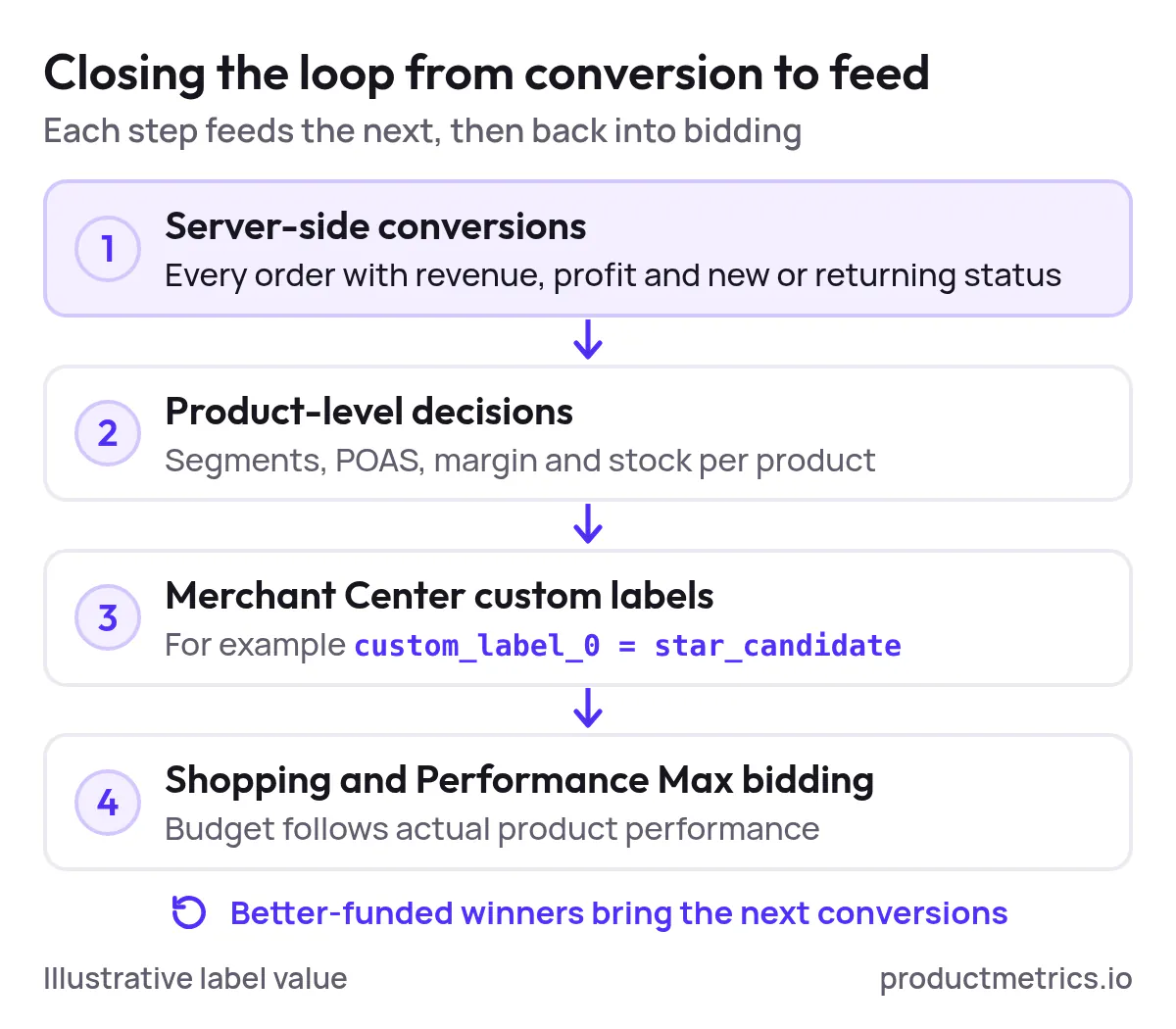
On top of tracking, Product Metrics writes Merchant Center custom labels based on its segmentation and business rules, so Shopping and Performance Max campaigns can allocate budget by actual product performance rather than static feed labels. (Source: Product Metrics Home)
Example:
- A rule like “Promote Star candidates” can set
custom_label_0 = star_candidatefor products above a POAS threshold with sufficient stock, so Shopping campaigns automatically push profitable winners. (Source: Product Metrics Home)
This closes the loop: full-fidelity, server-side conversions feed product-level decisions, which feed back into your Shopping feed and bidding.
7. Implementation Blueprint Moving to a Modern Real-Time Google Ads Tracking Stack
Here’s a practical rollout plan if you want to upgrade your Google Ads tracking to a full, real-time stream without building your own server-side infrastructure.
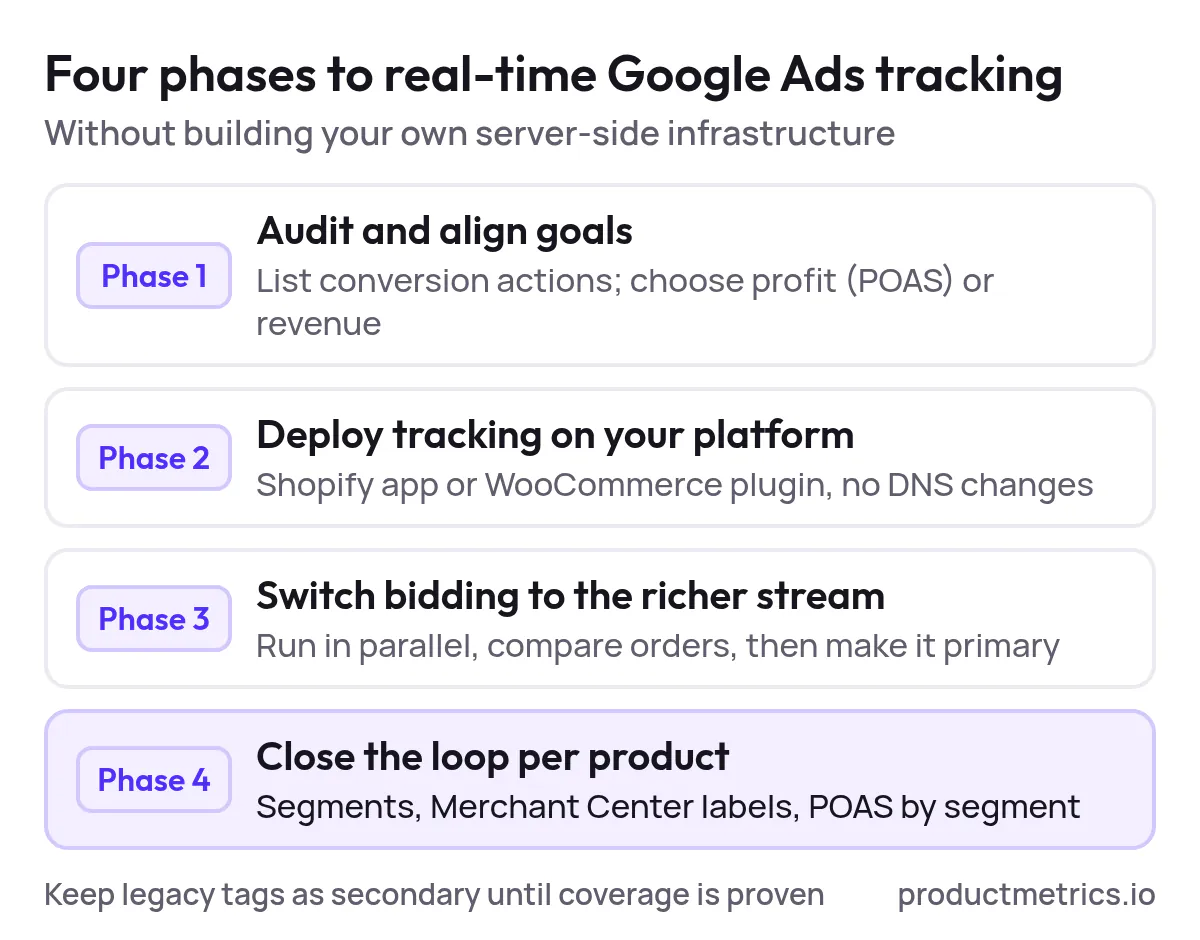
Phase 1 Audit and Goal Alignment
-
Inventory current tags and conversions
- List existing Google Ads conversion actions and whether they’re primary or secondary. (Source: Google Ads Understand Your Conversion Tracking Data)
- Note whether purchases come from a native Google Ads tag, GA4 imports, or both.
-
Clarify business goals
- Decide if you ultimately want to bid on profit (POAS) or revenue.
- Decide whether new customer acquisition should be valued differently; Google recommends setting a new customer acquisition goal if you want to prioritize new buyers. (Source: Google Ads Performance Max Best Practices)
Phase 2 Deploy Product Metrics Tracking on Your Platform
For Shopify:
- Install the Product Metrics app from the Shopify App Store.
- Link your Product Metrics account.
- Turn on the theme app embed so the checkout Web Pixel runs.
- Connect Google Ads in Product Metrics Workspace → Tracking and pick your purchase conversion action. (Source: Product Metrics Shopify Tracking)
For WooCommerce:
- Install the Product Metrics plugin and paste your one-time setup token.
- Confirm which order statuses count as paid and where cost-of-goods is stored.
- Send initial orders (for example, last 30 days) into Product Metrics.
- Connect Google Ads and choose where purchases land. (Source: Product Metrics WooCommerce Tracking)
In both cases, you get Full Signal Tracking with no DNS changes and no need to host your own server container. (Sources: Shopify Tracking, WooCommerce Tracking)
Phase 3 Switch Bidding to the Richer Conversion Stream
-
Run parallel tracking
- Keep your existing purchase conversion action active for a period.
- Let Product Metrics’ purchase (revenue) and profit actions run in parallel.
-
Compare volumes and values
- Use Product Metrics and Google Ads reports to compare orders vs conversions.
- Validate that each paid order appears exactly once with the correct value.
-
Transition bidding
- When you’re confident in coverage, set the Product Metrics purchase/POAS actions as primary for Shopping and Performance Max.
- Optionally keep legacy tags as secondary or move them to “All conversions” only. (Source: Google Ads Understand Your Conversion Tracking Data)
Phase 4 Close the Loop With Product-Level Optimization
Once conversion tracking is stable:
- Use Product Metrics’ Product Segmentation and Product Context views to find Stars, Drainers, and high-potential products. (Source: Product Metrics Home)
- Export Merchant Center labels from Product Metrics or sync them via integrations so your Shopping structure reflects real product performance.
- Review POAS and new-customer metrics by segment to refine bid targets and budgets.
At that point, you’ve moved from “does conversion tracking work?” to “are we buying the right conversions at the product level?”
8. Evaluation Checklist Ecommerce Solutions for Real-Time Google Ads Conversion Tracking Integration
When you evaluate ecommerce solutions for real-time Google Ads conversion tracking integration, use this checklist to compare platforms:
-
Transport & resilience
- Does it use a first-party endpoint on your own domain?
- Has it been tested against major adblockers like Brave Shields, uBlock Origin, and AdGuard, and does it get through them? (Source: Product Metrics What Is Server-Side Tracking?)
-
Order source of truth
- Are conversions confirmed from platform orders (Shopify/WooCommerce/Magento/etc.) or just from browser events?
- Are refunds and cancellations reflected as adjustments to the same order ID? (Source: Shopify Tracking, WooCommerce Tracking)
-
Data richness
- Can it send profit, customer type (new/returning), and LTV into Google Ads as separate conversion actions?
- Can you use those values for value-based bidding and new customer acquisition strategies? (Sources: Shopify Tracking, Google Ads Performance Max Best Practices)
-
Consent and privacy
- Does it integrate with your consent tools and map decisions into Consent Mode v2?
- Is customer data hashed before it’s sent, in line with Google’s enhanced conversions guidance? (Sources: WooCommerce Tracking, Google Ads Enhanced Conversions via Tag Manager)
-
Integration breadth
- Does it support your ecommerce platform(s) with native apps or plugins (Shopify, WooCommerce, Magento, Lightspeed, Shopware)? (Source: Product Metrics Home)
- Does it send profit, revenue, and LTV to both Google Ads and Meta so you can align Shopping and paid social?
-
Pricing and ROI
- Is pricing aligned to Shopping spend (so smaller advertisers can start cheaply) or to events/requests?
- Product Metrics, for example, charges a graduated share of your rolling 30‑day Google Shopping spend, with the first €10,000 free each month and Pro plans including Full Signal Tracking at no extra charge. (Source: Product Metrics Pricing)
-
Product-level optimization
- Beyond tracking, does the platform help you decide which products to scale or pause, and can it write labels back into Merchant Center based on that logic? (Source: Product Metrics Home)
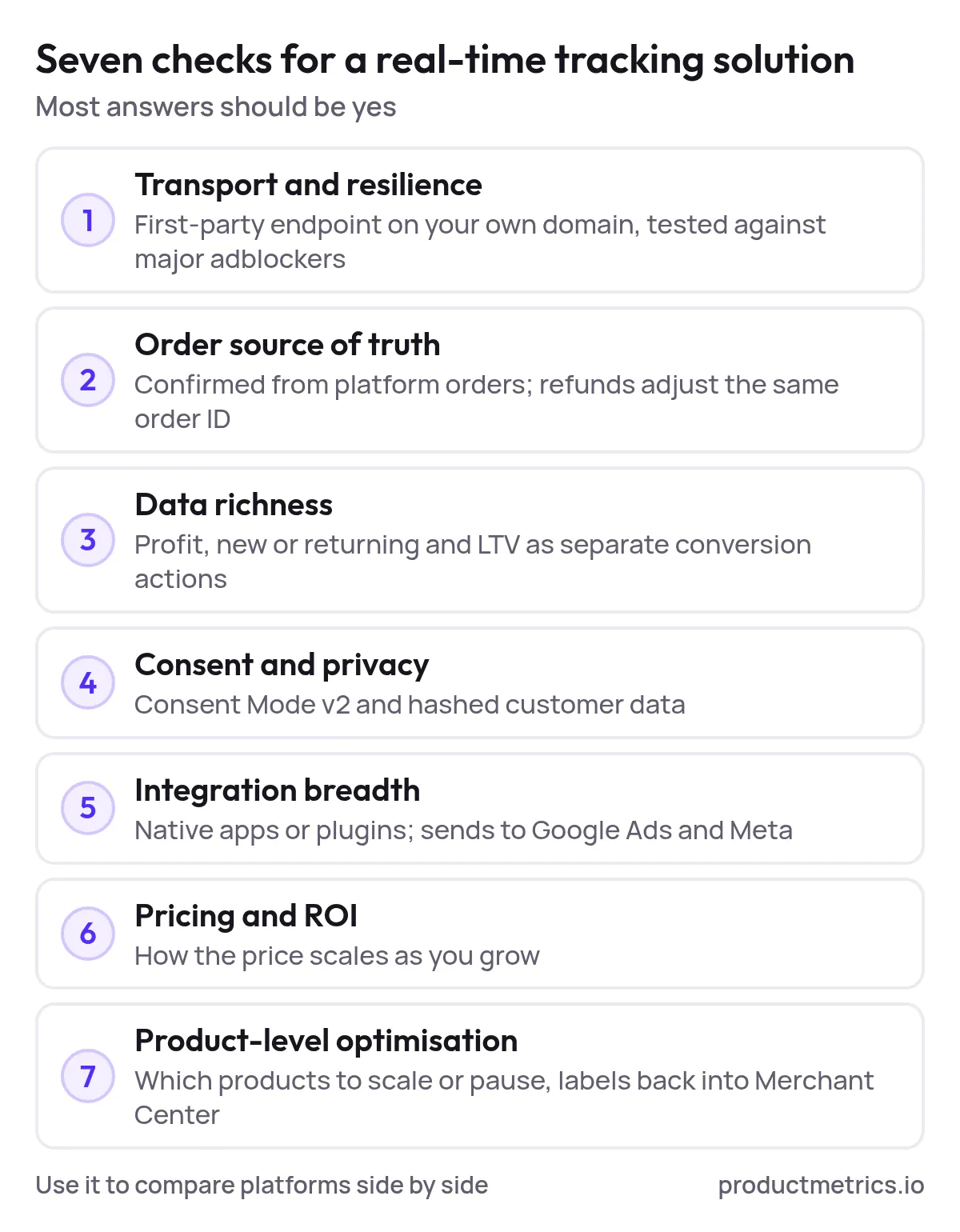
If a solution can’t answer “yes” to most of the above, it’s unlikely to stay durable as browsers, adblockers, and Google’s own infrastructure continue to evolve.
9. Next Steps Get Real-Time Product-Level Conversion Tracking for Your Google Ads Campaigns
If you’re ready to move beyond basic tags and one-dimensional ROAS, the next steps are straightforward:
-
See your current Shopping performance at the product level
- Connect your Google Ads and Merchant Center accounts to Product Metrics and run a free analysis to see each product’s segment and Shopping performance. (Source: Product Metrics Home)
-
Turn on Full Signal Tracking on your ecommerce platform
- Install the Shopify app or WooCommerce plugin (or the Magento/Lightspeed/Shopware integrations) and follow the guided steps to start sending server-side purchases with revenue, profit, and customer status into Google Ads. (Sources: Shopify Tracking, WooCommerce Tracking, Magento Tracking)
-
Shift your Shopping bidding onto better data
- Once you’ve validated coverage, move your Shopping and Performance Max campaigns to use Product Metrics’ purchase and profit conversions as their primary bidding signals, keeping legacy tags as backup.
-
Use segmentation and labels to unlock more profit
- Let Product Metrics segment your catalog and write Merchant Center labels, then restructure Shopping and Performance Max around Stars, Drainers, and high-potential products instead of blind, feed-only groupings. (Source: Product Metrics Home)
With a real-time, server-side conversion stream and product-level governance in place, your Google Shopping setup stops being a black box and becomes a controllable system: you know which products earn profit, which customers are truly worth acquiring, and how each marginal euro or dollar of Shopping spend comes back.
That’s what a durable Google Ads conversion tracking integration looks like in 2026—and it’s exactly the problem Product Metrics is built to solve.
Written by
Berend Vrakking, Founder of Product Metrics
1M+ products analysed · Nominated at the Dutch Search Awards for Best Measurement Campaign (2023) and Best Use of Data (2024)
Keep reading.
Top Platforms and Tools for Real-Time Google Ads Conversion Tracking [Benchmark Study]
Five ways to get real-time Google Ads conversion tracking, compared on latency, completeness, onboarding speed and the signals each one sends.
What Is Server-Side Tracking? How It Works and Its Limits
What is server-side tracking? Your site sends events to a server you control, which checks them and decides what GA4, Google Ads and Meta receive.
10 server-side tracking tools for ecommerce teams
Server-side tracking tools compared: ten providers by job and published pricing, from managed server-side GTM to ecommerce connectors, checked October 2026.
See which of your products to push, fix or pause. Start with your own products, or a 30-second estimate.
See what a blocker stops with the ad blocker tracking test. Then see how your products perform once every conversion is counted.
Questions, or want to spar about your products? Book a demo: a video call with Berend, then a demo account.