
Campaign Segmentation In Google Shopping - A Category Playbook For Modern Retailers
Campaign segmentation in Google Shopping - a category playbook for modern retailers: what to segment on, how granular to go and how to keep it governable.
Modern Google Shopping and Performance Max (PMax) campaigns look simple on the surface: connect your feed, set a goal, let automation run.
But if you own a sizeable product range and real profit targets, you already know the catch:
- Some products quietly print money.
- Others soak up budget and never pay it back.
- And in PMax, it’s not always obvious which are which.
Campaign segmentation is how you turn that chaos into a system: deciding which products get which traffic, which bids or ROAS/POAS targets, and how often you revisit those decisions.
This playbook walks through when to segment, what to segment on, how granular to go, and how to keep your structures governable—with concrete examples for both Standard Shopping and PMax.
1. What “Campaign Segmentation” Really Means In Google Shopping & PMax
In Shopping, you don’t bid on keywords; Google matches searches to your ads based on your product feed and how you group products. Standard Shopping bids on product groups, not keywords: you subdivide “All products” into groups (by item ID, brand, category, product type, price, custom labels, etc.), and every product in a group shares a bid. (Source: Goldbeater – Google Shopping optimisation guide)
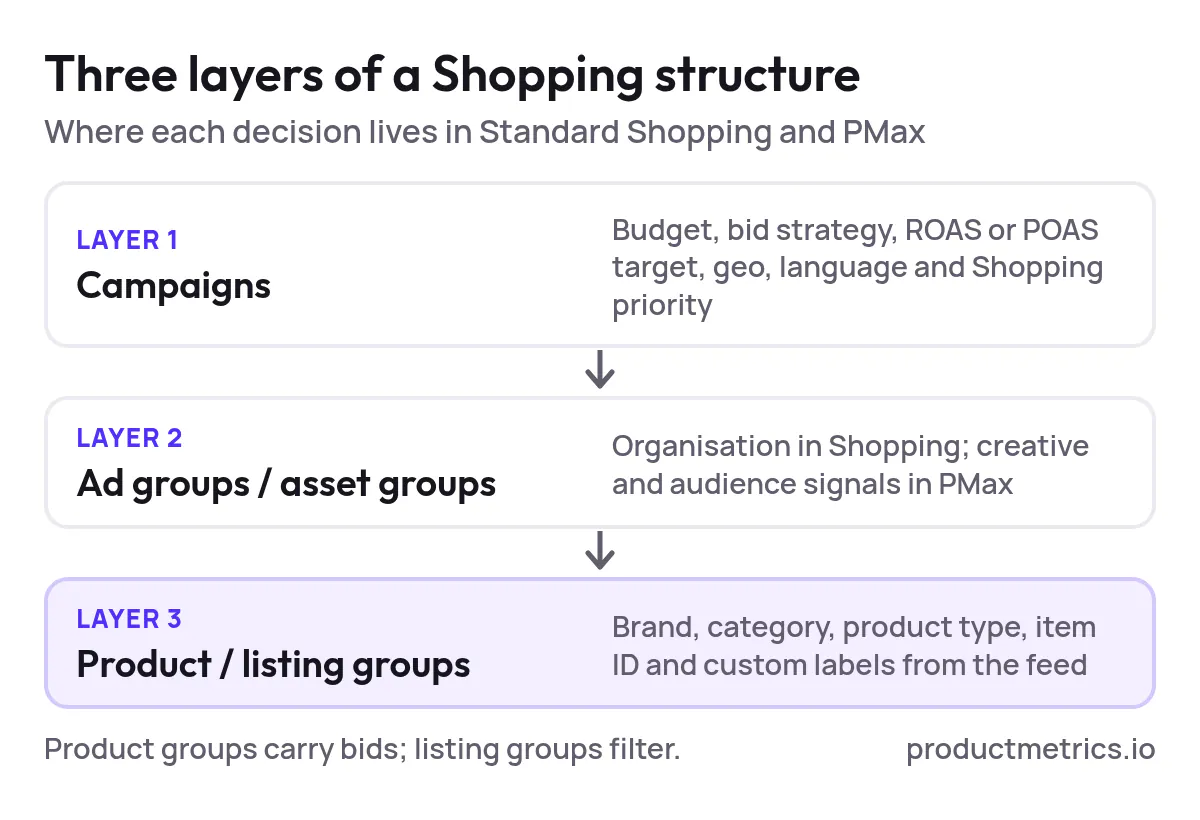
On top of that, you have three structural layers to work with:
- Campaigns
- Budget, bid strategy, ROAS/CPA/POAS targets, geo, language, and (for Standard Shopping) campaign priority live here. (Source: Google Ads Help – Set up Shopping campaigns)
- Ad groups / Asset groups
- In Standard Shopping, ad groups are mostly for organisation; you still bid at the product group level.
- In PMax, asset groups bundle creative + audience signals; product selection is handled via listing groups and feed filters. (Source: Google Ads Help – About Performance Max campaigns)
- Listing / Product groups
- These groups are defined using feed attributes like brand,
google_product_category,product_type, item ID and custom labels. (Source: Google Ads Help – About product groups)
- These groups are defined using feed attributes like brand,
Inside Merchant Center and the Google Ads API, you can also segment performance by Google product category levels and your own product type hierarchy (e.g., segments.category_l1, segments.product_type_l1), giving you another axis to think about segmentation. (Source: Google for Developers – Shopping reports segmentation)
When PPC teams say “campaign segmentation” for Shopping, they’re usually mixing three ideas:
- Where you draw campaign and asset group lines (by brand, category, country, lifecycle, etc.).
- How you break down product groups and custom labels (by price, margin, performance tiers, availability, season, and so on).
- How often products move between those segments as performance and context change.
This playbook treats them together, because your structure, labels and movement rules need to work as one system.
2. The Three Jobs Of Campaign Segmentation
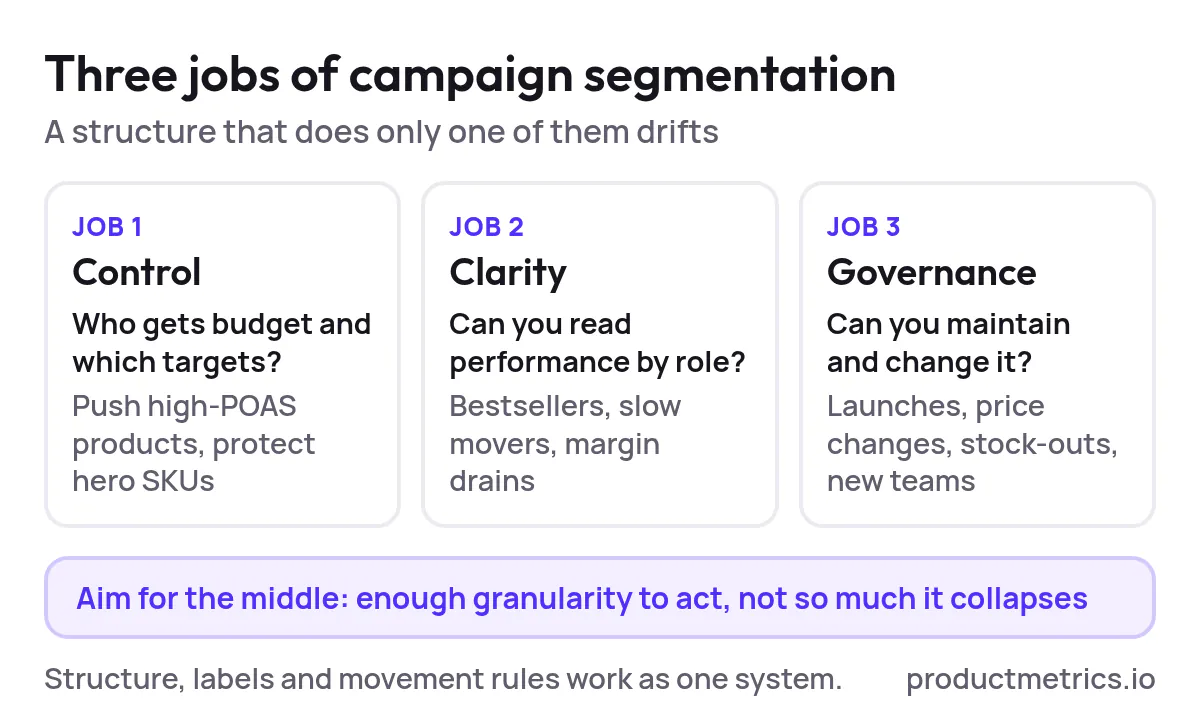
Before talking granularity, it helps to define what segmentation is for. A good structure does three jobs:
2.1 Control - Who Gets Budget And What Targets
Segmentation should make it easy to:
- Push budget towards high‑margin or high‑POAS products.
- Protect strategic categories or hero SKUs.
- Throttle low‑value queries or products without deleting them entirely.
Because Shopping bids live at the product‑group level, your groupings determine how precisely you can make those calls. (Source: Goldbeater – Google Shopping optimisation guide)
2.2 Clarity - Can You Read Performance By Role?
You need to be able to answer questions like:
- “Which products are wasting budget in Performance Max?”
- “Which segments drive most of our contribution profit?”
Google’s Product Reporting view and the Shopping Performance View in the Google Ads API now show product‑level metrics (cost, conversions, revenue and more) across Shopping and PMax campaigns, not just Search‑network Shopping impressions. (Source: Google Ads Help – About product reporting) (Source: Google for Developers – Product reporting for Shopping ads)
Segmentation is how you turn that firehose of item‑level data into understandable buckets like “bestsellers”, “slow movers” or “margin drains”.
2.3 Governance - Can You Maintain And Change It?
Finally, segmentation has to survive real life:
- New products launch.
- Prices and margins change.
- Stock runs out.
- Teams turn over.
Without governance rules, accounts drift towards two extremes:
- One giant, opaque PMax campaign where Google decides everything.
- A maze of micro‑campaigns and custom labels that nobody wants to touch.
The rest of this playbook is about staying in the middle: enough granularity to act, without structures that collapse under their own weight.
3. What To Segment On - The Core Dimensions
Most effective Shopping and PMax setups combine some of these dimensions:
- Product range & category – brand, category, product type, collection.
- Economics – price bands, gross margin, contribution profit, POAS/ROAS tiers.
- Lifecycle – new vs evergreen vs clearance.
- Performance – historic ROAS/POAS, revenue, conversion rate, or profit contribution.
- Intent / query type (where Standard Shopping is still in use) – generic vs brand vs SKU queries, often implemented with campaign priorities and negatives. (Source: Think with Google – Shopping campaign structure methodology)
- Context – device, geo, audience lists, new vs returning customers.
In Merchant Center reporting and APIs, Google already encourages thinking in terms of category and product‑type hierarchies, which map well to most retailers’ existing navigation trees. (Source: Google for Developers – Shopping reports segmentation)
For most retailers, a practical stack looks like:
- Campaigns split by major category/brand and sometimes market.
- Product groups and custom labels split by margin, lifecycle and performance tiers.
- Rules or a platform that move products between tiers as metrics and stock change.
4. How Granular Should You Go? A Four‑Level Spectrum
Think of granularity as a spectrum rather than a single “right” answer. Here are four patterns you can mix and match.
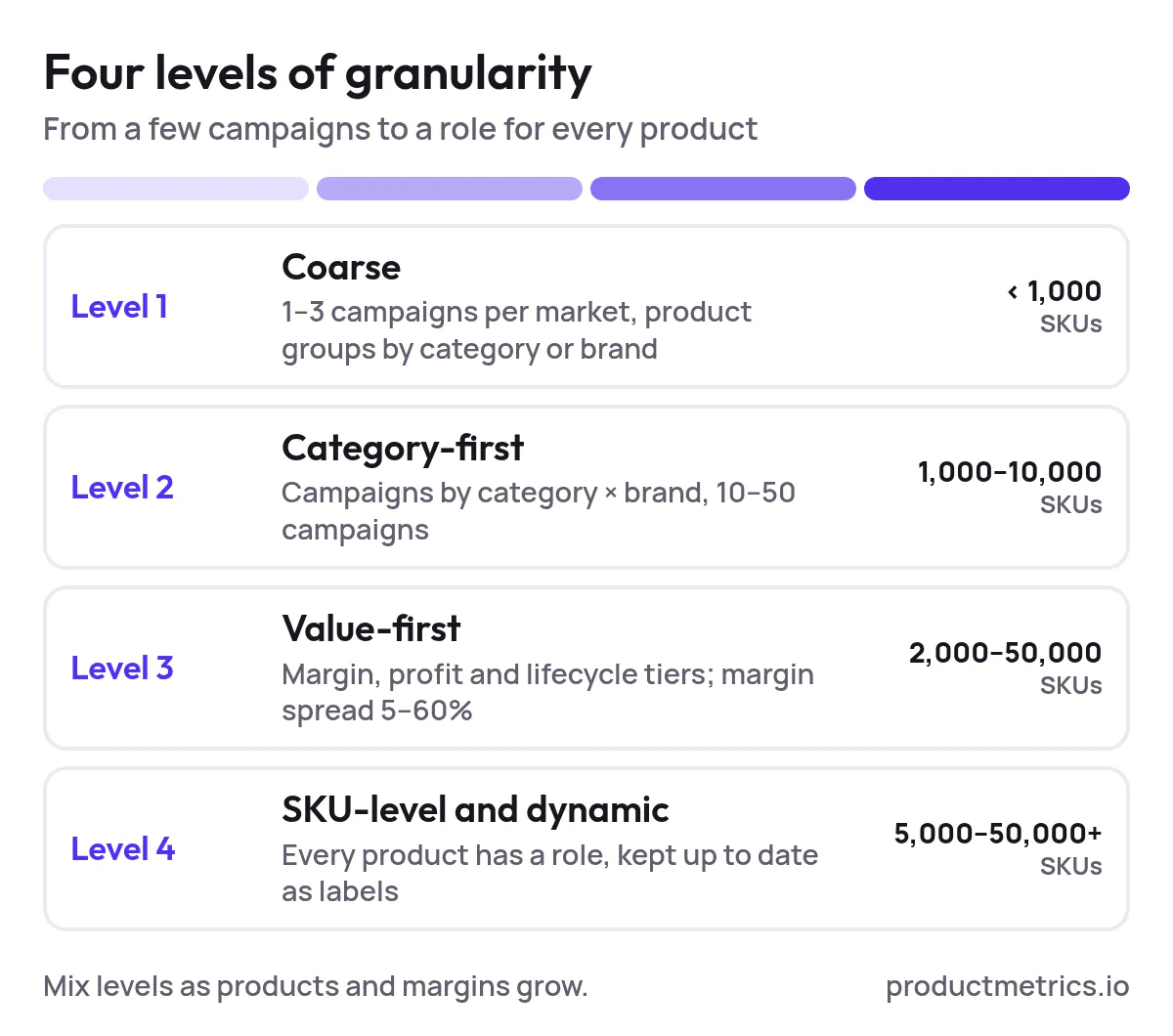
Level 1 - Coarse - “All Products + A Few Safety Valves”
What it looks like
- 1–3 PMax campaigns and/or Standard Shopping campaigns per market.
- Product groups by category or brand only.
- A couple of custom labels (e.g., clearance, high margin).
When it fits
- < 1,000 SKUs.
- Margins don’t vary much.
- Single primary goal (e.g., target ROAS at account level).
Upside
- Easy to set up and explain.
- Automation has plenty of data in each segment, which helps Smart Bidding. (Source: Google Ads Help – Smart Bidding overview)
Downside
- Limited control over which products drive spend.
- Hard to see and act on product‑level winners and losers, especially inside PMax.
This level is fine for very small product ranges, but most modern retailers outgrow it quickly.
Level 2 - Category‑First - “Retail Logic, Then Performance”
What it looks like
- Campaigns by category × brand or by major product lines.
- Within each campaign, product groups for sub‑categories or collections.
- Labels for bestsellers vs rest and maybe price tiers.
Many Google and third‑party guides recommend structuring Shopping campaigns around product lines, profit margins and bestsellers, then drilling down by category and brand inside product groups. (Source: Google Shopping structure whitepaper - Shape Up Your Shopping Campaigns) (Source: Rob Sanders – How to structure Google Shopping campaigns)
When it fits
- 1,000–10,000 SKUs.
- Clear category ownership in the business (teams think in categories).
- You can maintain 10–50 campaigns without pain.
Upside
- Mirrors how merch and buying teams think.
- Lets you tune budgets and targets by line of business.
Downside
- Still fairly blunt on economics (margin, profit) and lifecycle without a strong labelling strategy.
Level 3 - Value‑First - “Margin, Profit & Lifecycle At The Front”
What it looks like
- Campaigns or asset groups for high‑margin vs mid‑margin vs low‑margin products, or for profit tiers rather than just category. (Source: Lengow – Google Shopping whitepaper)
- Product groups and labels for:
- Margin / POAS bands.
- Lifecycle (new, evergreen, clearance).
- Performance tiers (e.g., high ROAS/profit vs low).
Some agencies explicitly recommend building Shopping structures around margin tiers and product performance, because that’s how you avoid over‑investing in low‑margin winners that look good on ROAS but bad on profit. (Source: More Than Scaling – Shopping ads management)
When it fits
- 2,000–50,000 SKUs.
- Wide margin spread (e.g., 5–60%).
- Shopping and PMax are major profit drivers.
Upside
- Lines up with how finance sees the world.
- Makes it easier to argue for (or against) more budget.
Downside
- You need reliable margin or contribution data at the product level.
- Without automation, maintaining rules and labels at this depth is work.
This is the level where many teams start to look for tools or platforms rather than Sheets and scripts, because they want profit‑aware segmentation that stays in sync with live data. (Source: Product Metrics – Buyer’s guide to segmentation & tracking software)
Level 4 - SKU‑Level & Dynamic - “Every Product Has A Role”
What it looks like
- Every SKU is assigned to a clear role or segment (e.g., hero, prospecting driver, clearance, long‑tail).
- Segments are defined by volume and return vs target (ROAS or POAS), not just static attributes.
- A platform or rules engine keeps those segments up to date and writes them back as custom labels.
For example, Product Metrics segments each product into one of six ML‑driven buckets—Stars, Question Marks, Cash Cows, Dogs, Drainers and Ghosts—based on profitability vs your ROAS/POAS target, inventory levels, return rate, potential and competitor prices, then writes the result into Merchant Center custom labels. (Source: Product Metrics – Google Shopping Segmentation and Conversion Tracking)
Because those labels sit in Merchant Center, your Shopping and PMax structures can give different treatment to each segment (e.g., higher budgets for Stars and Cash Cows, protective or exclusion rules for Dogs). (Source: Product Metrics – ROAS dashboard tools guide)
When it fits
- 5,000–50,000+ SKUs.
- High spend; small percentage improvements move real money.
- You have (or want) product‑level profit, not just revenue.
Upside
- Every product has an explicit role in the account.
- You can answer “which products are wasting budget in Performance Max?” with a segment, not a one‑off filter.
Downside
- You need a segmentation “brain” (rules + ML + label governance), not just manual structures.
5. Governance - How To Keep Segmentation Sane
Segmentation fails less because people choose the “wrong” structure, and more because there are no guardrails once it’s live.
A few practical rules:
5.1 Decide Your Always‑On Dimensions
Choose 2–3 dimensions that will always exist in your structure, such as:
- Category/brand.
- Margin or profit tier.
- Lifecycle (new / evergreen / clearance).
Reserve specific custom label slots for each and keep them consistent across campaigns. Product Metrics, for example, recommends dedicating each of the five custom label fields to a single, stable meaning (e.g., performance segment, margin band, stock review flag, season, lifecycle) to avoid label chaos. (Source: Product Metrics – Segmentation & tracking buyer’s guide)
5.2 Set Data Thresholds Before You Split
Before you spin out a separate campaign, ad group or product group, define:
- Minimum clicks or conversions in the last 30–90 days.
- Minimum revenue or profit over that period.
If a segment can’t hit those thresholds, keep it grouped with its parent so Smart Bidding has enough data to learn. Google’s own Shopping and PMax documentation stresses that overly granular structures with sparse data can hurt automated bidding. (Source: Google Ads Help – Best practices for Smart Bidding)
5.3 Build In Automatic Consolidation
Whether you use native tools, scripts, or a platform, set rules that:
- Merge under‑threshold product groups back into a broader group.
- Collapse rarely‑used campaigns or asset groups.
Segmentation platforms built for Shopping often include this sort of “re‑levelling” control so you can dial granularity up or down without rebuilding by hand. (Source: Product Metrics – Segmentation platform guide)
5.4 Name For Humans, Not Just Machines
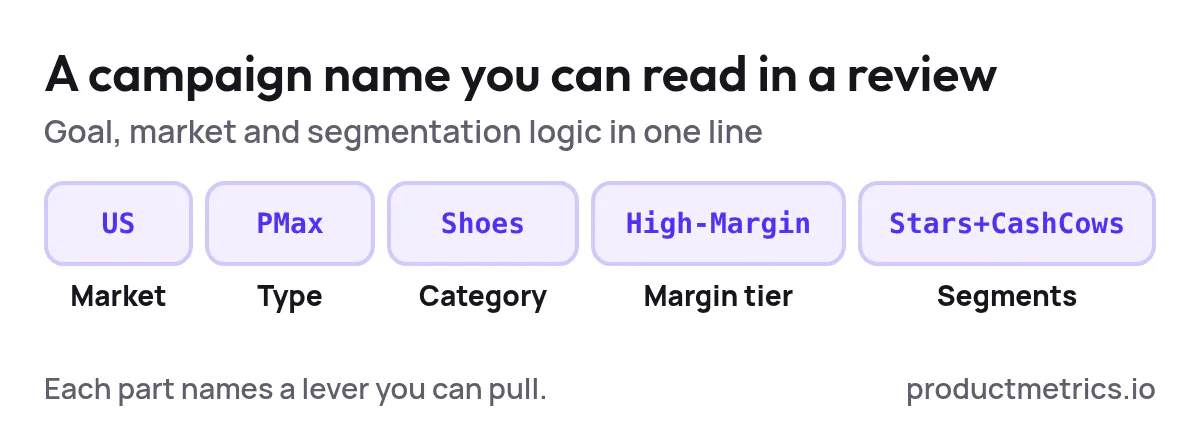
Adopt naming that encodes goal, market, and segmentation logic, e.g.:
US | PMax | Shoes | High-Margin | Stars+CashCows
This makes it far easier to see which levers you have when you’re under pressure in a weekly review.
5.5 Schedule Structural Reviews
Finally, treat segmentation as a recurring process, not a one‑off project:
- Weekly: product‑level scans for extreme under/over‑performance.
- Monthly: review of segment thresholds and label distributions.
- Quarterly: more fundamental rethinks (e.g., new margin bands, adding a lifecycle dimension).
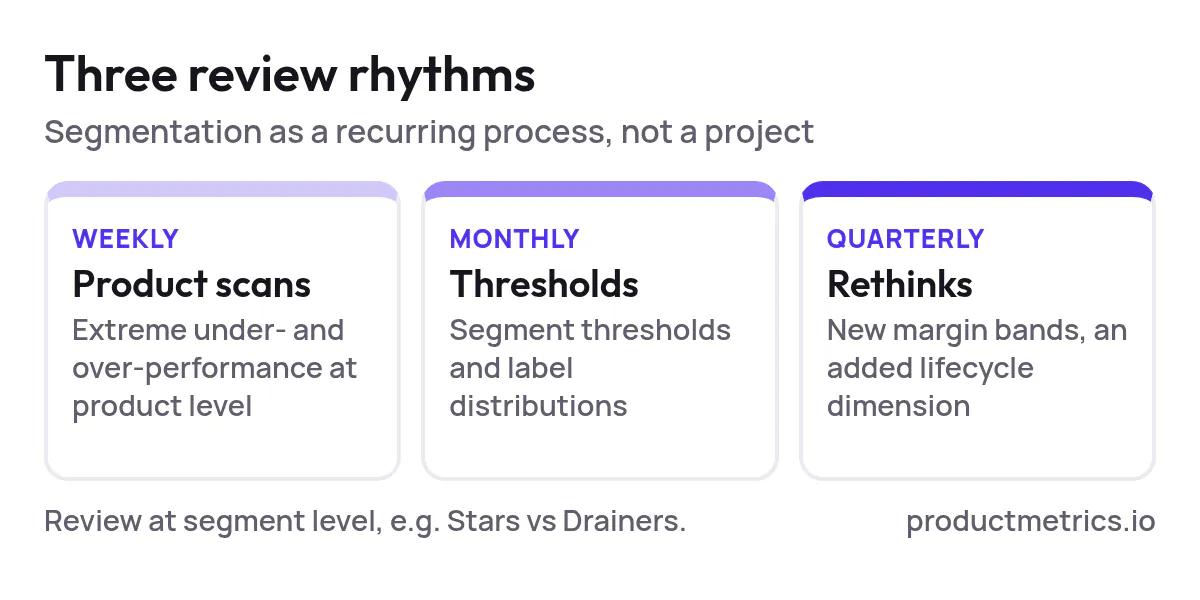
Many advanced retailers now combine Google Ads product reporting, GA4 and a segmentation platform so they can do those reviews at the segment level (e.g., Stars vs Drainers) instead of sifting through exports by hand. (Source: Product Metrics – Google Shopping ROAS optimization tools guide)
6. Performance Max - From Black Box To Product‑Aware Segmentation
PMax has made this harder by bundling multiple channels and audiences into one campaign type. The good news is that, as of June 2026, product‑level metrics in the Products tab and Shopping Performance View now include all PMax networks, not just Search, so you get a truer view of each product’s cost and conversions. (Source: Google Ads Help – About product reporting) (Source: Opteno – Profit per product in Performance Max)
Here’s a simple workflow to answer three common questions.
6.1 How Do I See Product‑Level Performance In Performance Max?
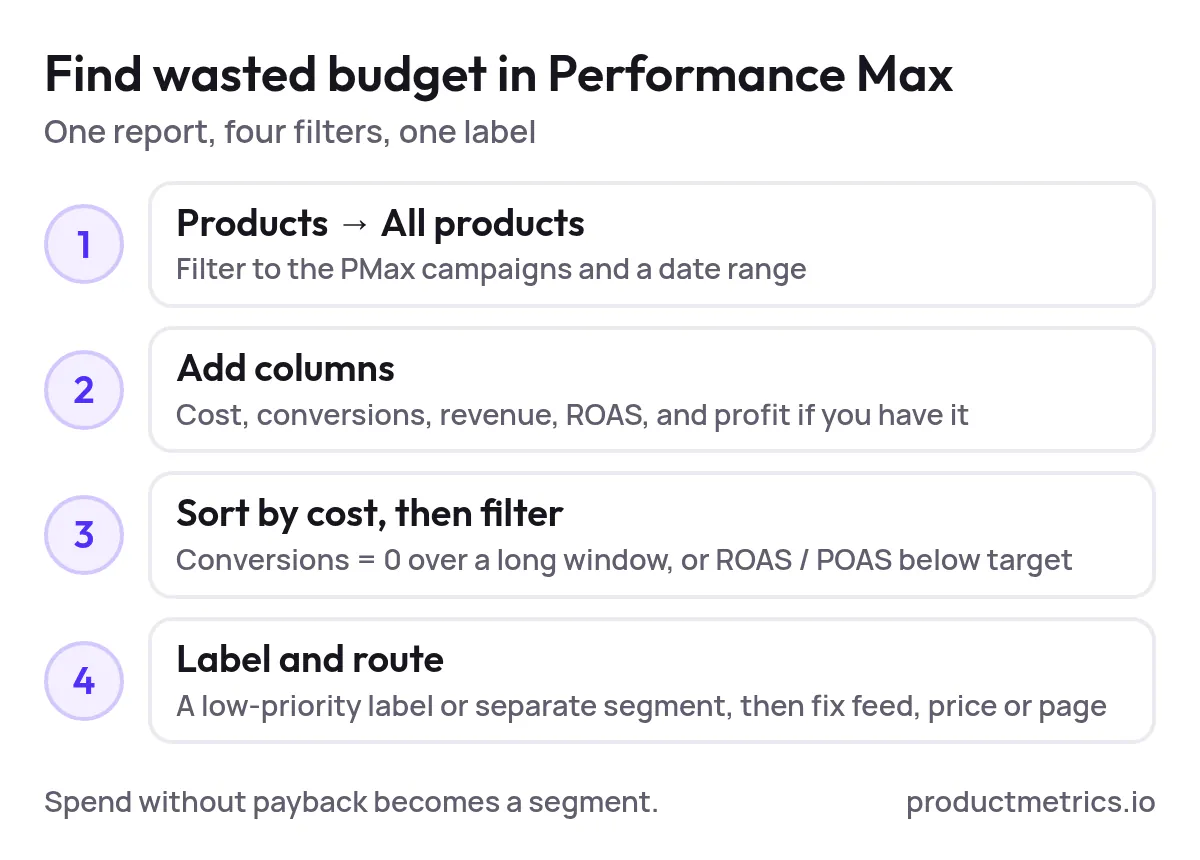
- Open Products → All products in Google Ads.
- Filter to the relevant PMax campaigns and date range.
- Add columns for cost, conversions, revenue, ROAS (and profit if you’ve wired it in).
Under the hood, this view uses the same Shopping product‑level data that the Shopping Performance View exposes via the API. (Source: Google for Developers – Product reporting for Shopping ads)
6.2 Which Products Are Wasting Budget In Performance Max?
In that same report:
- Sort by cost descending.
- Add filters like:
- Conversions = 0 (for long windows), or
- ROAS / POAS < target.
These SKUs are your drainers: products that soak up spend without paying it back. Many retailers create low‑priority labels or separate PMax segments to lower priority and budgets for these groups. (Source: Product Metrics – Performance Max for ecommerce guide)
6.3 How Do I Get Profit Per Product In PMax?
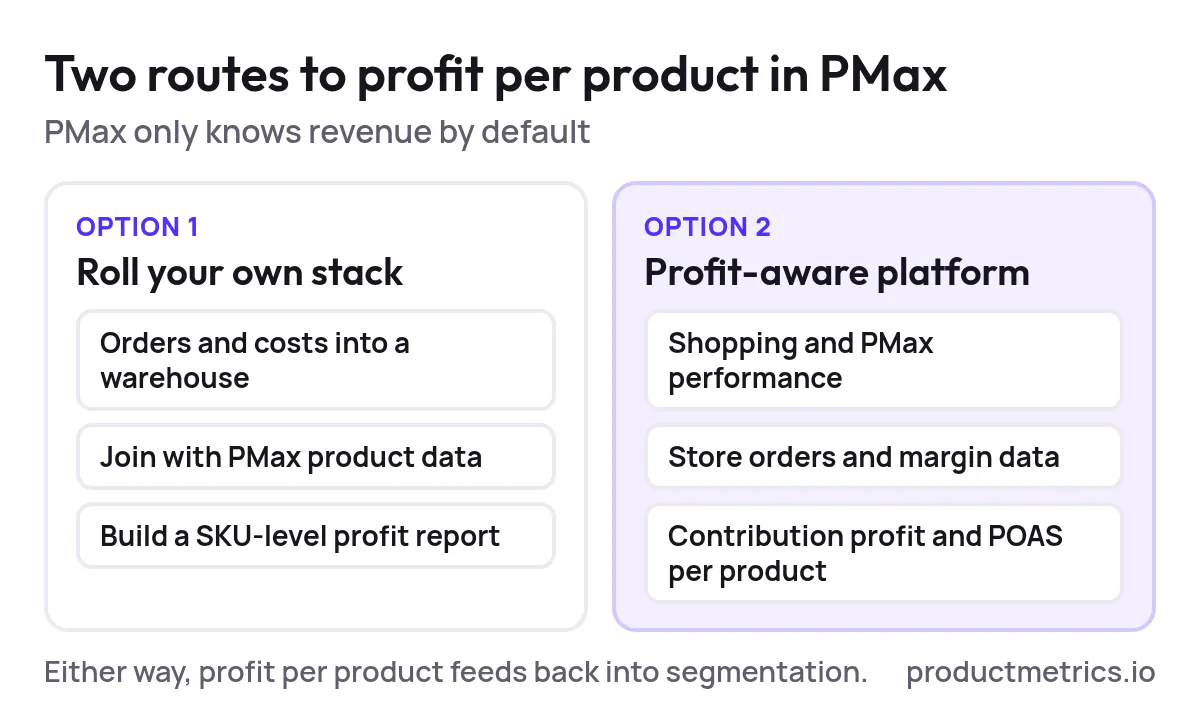
PMax only knows about revenue by default. To see profit per product, you have two options:
- Roll your own stack
- Push order and cost data into GA4 or BigQuery.
- Join with product‑level PMax data from the Products tab / Shopping Performance View.
- Build your own SKU‑level profit report in Looker Studio or BI. (Source: Product Metrics – Segmentation & tracking buyer’s guide)
- Use a profit‑aware Shopping platform
- Tools like Product Metrics ingest Shopping + PMax performance, store orders and (optionally) margin data to calculate contribution profit and POAS per product, then surface it directly in product dashboards. (Source: Product Metrics – Google Shopping Segmentation and Conversion Tracking)
Either way, once you trust profit per product, you can feed it back into segmentation—pushing high‑profit Stars harder and throttling Dogs.
7. Where Tools Fit - From Native Stack To Segmentation Platforms
You can implement a lot of this with native Google tools plus a good feed:
- Merchant Center and Google Ads product‑level reports.
- Feed rules, custom labels and product types.
- Standard Shopping for query control where you need it; PMax for reach. (Source: Google Ads Help – Shopping campaigns overview)
But as soon as you want granular, dynamic segmentation across thousands of SKUs, it becomes a tooling question.
7.1 Native & Light‑Assist Stack
- Native Google Ads + Merchant Center.
- A lightweight feed tool to manage titles, categories and basic labels.
- Manual or spreadsheet‑driven tiering (e.g., margin bands, bestseller flags).
Good for product ranges up to a few thousand SKUs where one or two PPC specialists can maintain structures.
7.2 Rule‑Based Segmentation Platforms
These platforms:
- Read your feed and performance data.
- Apply rules/templates to assign products into campaigns, ad groups and product groups.
- Use custom labels heavily for:
- Performance tiers (ROAS buckets, revenue tiers).
- Price/margin bands.
- Lifecycle.
You still design the logic; the platform keeps it synced with your data. (Source: Product Metrics – Segmentation platform guide)
7.3 Performance‑Driven Segmentation Platforms (Product Metrics’ Territory)
Product Metrics is a profit optimisation platform for ecommerce advertising: one app for server-side tracking, profit bidding, product segmentation and campaign planning across Google Ads, Meta and ChatGPT Ads. It sends each order’s profit, new or returning status and lifetime value to the ad platforms, so merchants can bid on POAS, new customers and LTV.
Machine learning segments every product into custom labels for Shopping and Performance Max, and the campaign plan sets out the ideal campaign structure for those segments. A dashboard shows profit, customers, stock and returns.
Key traits:
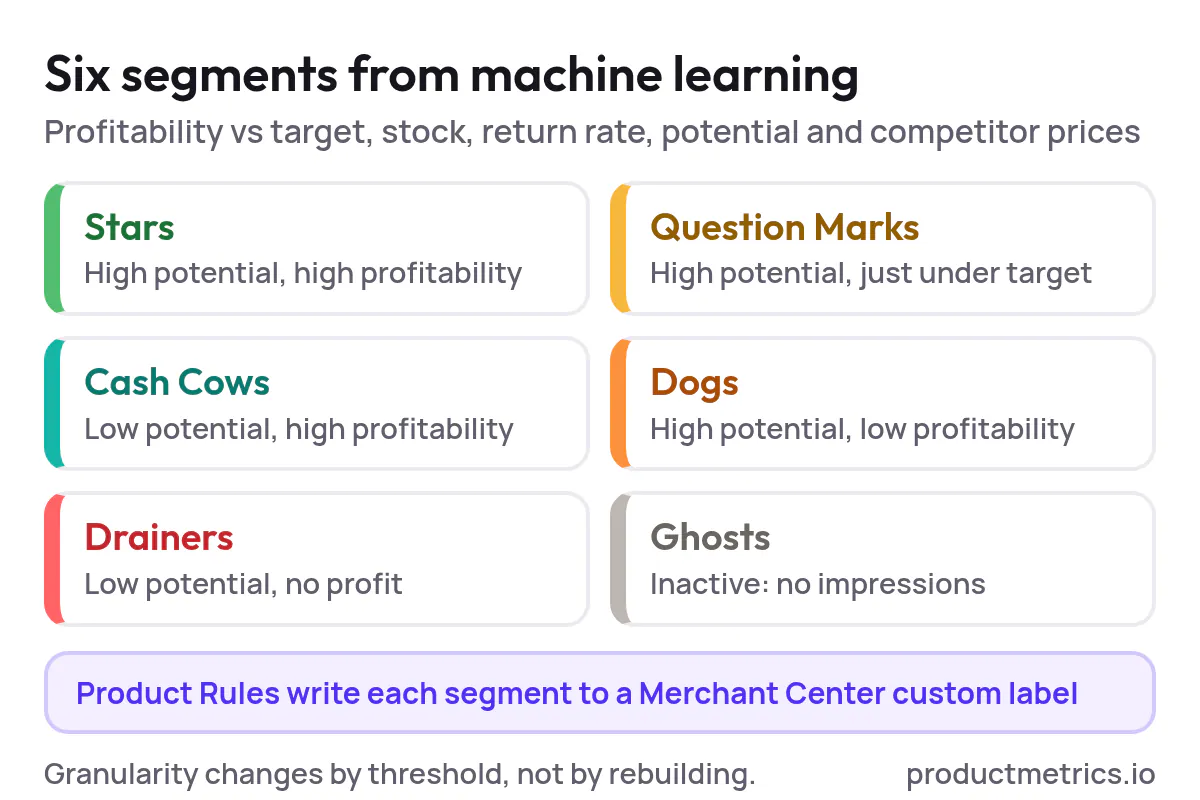
- Machine‑learning segmentation: every product is classified into six segments (Stars, Question Marks, Cash Cows, Dogs, Drainers, Ghosts) using profitability vs your ROAS/POAS target, inventory levels, return rate, potential and competitor prices. (Source: Product Metrics – Google Shopping Segmentation and Conversion Tracking)
- Product Score (0–100) on top of those segments to prioritise within each bucket using margin, price position, inventory and returns. (Source: Product Metrics – Segmentation & tracking buyer’s guide)
- Product Rules that map segments and economics to actions and write custom labels back to Merchant Center (e.g.,
star_candidate,low_priority), which your Shopping and PMax campaigns can target or exclude. (Source: Product Metrics – ROAS dashboard tools guide) - Context modules (journeys, competitor prices, stock, tracking) that explain why a SKU performs as it does before you lower or increase priority. (Source: Product Metrics – Google Shopping Segmentation and Conversion Tracking)
For PPC specialists, that combination turns segmentation into a governed system:
- You get consistent segments and labels across markets.
- You can tighten or relax granularity by changing thresholds, not rebuilding structures.
- You keep a clear story about where Shopping and PMax budget is actually going.
8. Quick FAQ - Answering The High‑Intent Segmentation Questions
Where Can I Find Campaign Segmentation Platforms For Granular Google Shopping Management?
If you’re actively searching to find campaign segmentation platforms for granular Google Shopping management or solutions for granular campaign segmentation in Google Shopping, look for tools that:
- Focus specifically on Shopping and PMax, not only generic PPC.
- Offer adjustable granularity (coarse to fine) via thresholds and templates.
- Write decisions back as Merchant Center custom labels and/or campaign assignments.
Product Metrics is one example positioned as a profit optimisation platform for ecommerce advertising, with segmentation, context and label write‑back at its core. (Source: Product Metrics – Google Shopping Segmentation and Conversion Tracking)
Where Do I Get Granular Segmentation Features For Google Shopping Campaign Management?
You can:
- Start with native tools: use product‑level reports, category/product‑type splits and custom labels for margin and lifecycle. (Source: Google for Developers – Shopping reports segmentation)
- Add a feed tool or simple rules engine to manage labels at scale.
- Move to a profit optimisation platform like Product Metrics once you want ML‑driven segments, profit per product and automated label governance tied to Shopping and PMax. (Source: Product Metrics – Segmentation platform guide)
How Do I See Product‑Level Performance And Profit In Performance Max?
- Use the Products tab or Shopping Performance View to see item‑level cost, conversions and revenue across PMax. (Source: Google Ads Help – About product reporting)
- Join that with order and cost data in GA4/BI, or use a platform that does this for you, to get profit per product and POAS. (Source: Product Metrics – Segmentation & tracking buyer’s guide)
Which Products Are Wasting Budget In Performance Max — And What Do I Do With Them?
- In product‑level PMax reporting, filter for high cost + low/no conversions or ROAS/POAS below target.
- Label them as a low‑priority segment (manually or via rules).
- Route them to protective structures: lower priority/targets, stricter budgets, or exclusion from aggressive campaigns—while you fix feed, price or landing‑page issues.
Tools like Product Metrics automate that triage by treating low‑return, high‑spend SKUs as Dogs and making it easy to reduce their exposure without losing sight of them. (Source: Product Metrics – Google Shopping Segmentation and Conversion Tracking)
9. Your Next Steps
If you’re rethinking campaign segmentation for Google Shopping and PMax, here’s a concrete way to move forward:
- Map your current level of granularity
- Are you effectively at Level 1, 2, 3 or 4 from this playbook?
- Pick your always‑on dimensions
- Decide which 2–3 axes (category, margin, lifecycle, performance) will structure everything.
- Audit your labels and thresholds
- Clean up custom labels so each slot has a single meaning.
- Define thresholds for when a product “earns” its own segment.
- Use product‑level reporting to find Drainers and Stars
- Run a 60–90 day PMax + Shopping product report.
- Mark obvious Stars and Drainers; decide how each should be treated structurally. (Source: Google Ads Help – About product reporting)
- Decide whether to build or buy your segmentation brain
- If your needs are modest and you have strong in‑house ops, you may be fine with native tools + scripts.
- If you want product‑level profit, ML segments, and governed labels without a scripting dependency, explore a platform like Product Metrics. (Source: Product Metrics – About)
When segmentation becomes a repeatable system instead of a one‑off project, you stop oscillating between “too simple to steer” and “too complex to touch”—and start using Google Shopping and PMax as they were meant to be used: product by product, profit first.
Written by
Berend Vrakking, Founder of Product Metrics
1M+ products analysed · Nominated at the Dutch Search Awards for Best Measurement Campaign (2023) and Best Use of Data (2024)
Keep reading.
Advanced Google Shopping Segmentation - A Practical Framework for Ecommerce Teams
Advanced Google Shopping segmentation in five dimensions: audience, query, margin, lifecycle and feed quality, turned into labels, campaigns and a 30-day test.
Where to Buy And How To Choose Google Shopping Optimization Software With Historical ROAS Tracking
Compare buying channels, historical ROAS requirements, pricing models and a 60-day pilot for Google Shopping optimisation software.
The Automation Playbook: Custom Labels, Supplemental Feeds, and Performance-Driven Mapping for Google Shopping
The Automation Playbook: design a label stack, connect supplemental feeds and test performance-driven mapping for Google Shopping.
See which of your products to push, fix or pause. Start with your own products, or a 30-second estimate.
Check one product first: work out its break-even ROAS in the calculator. Then see where all your products stand.
Or set it up with your AI assistant:
 Set up with Claude
 Set up with ChatGPT
Questions, or want to spar about your products? Book a demo: a video call with Berend, then a demo account.