
Which Segmentation Platform Fits Your Google Shopping Stack? Recommendations and How to Find Adjustable-Granularity Tools
Which segmentation platform fits your Google Shopping stack? A decision framework, scenario-based picks and how to spot adjustable-granularity tools.
If you run serious Shopping or PMax spend, you’ve probably felt both extremes of segmentation:
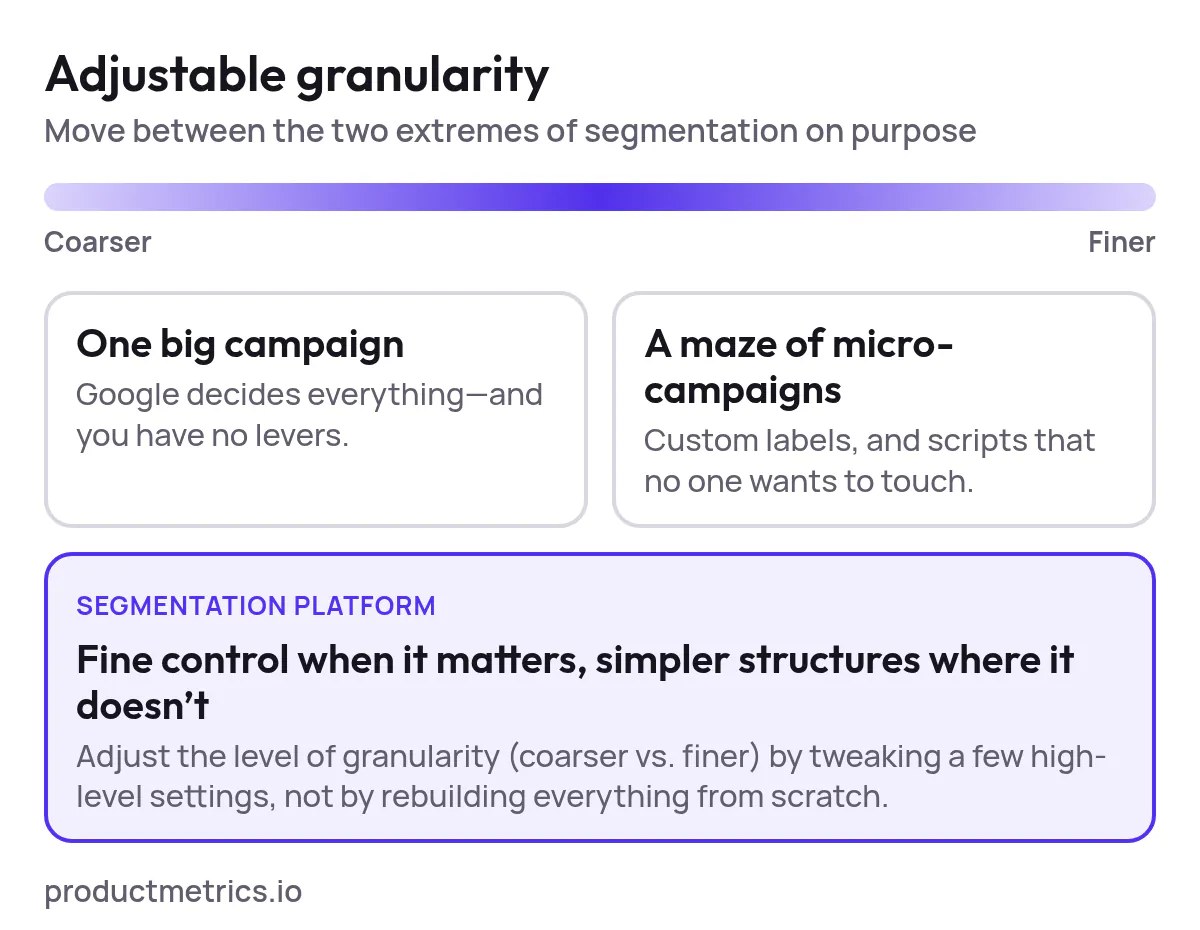
- One big campaign where Google decides everything—and you have no levers.
- A maze of micro-campaigns, custom labels, and scripts that no one wants to touch.
The right segmentation platform is what lets you move between those extremes on purpose. You get adjustable granularity: fine control when it matters, simpler structures where it doesn’t.
This guide is built for PPC specialists evaluating tools and platforms for Google Shopping campaign segmentation. It gives you:
- A clear definition of segmentation granularity in Shopping.
- An interactive-style decision framework to pick the type of platform you really need.
- Scenario-based recommendations (small catalog, scaling DTC, large retail, agencies).
- A checklist of requirements specific to adjustable campaign segmentation granularity.
- How a platform like productmetrics.io can sit in your stack.
1. What “Segmentation Granularity” Really Means in Google Shopping
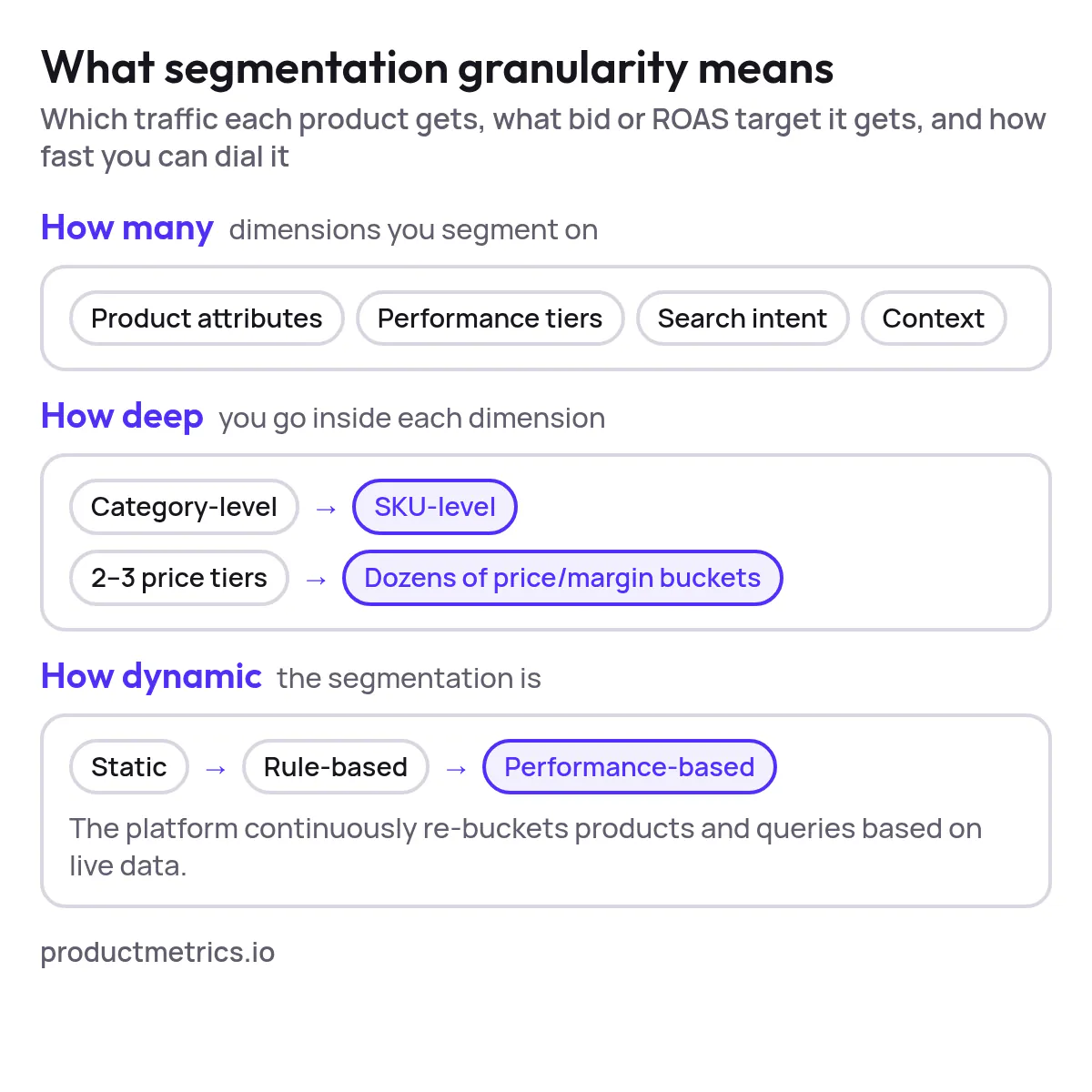
When people say they want “granular” Google Shopping campaigns, they usually mean some combination of:
-
How many dimensions you segment on:
- Product attributes (brand, category, product type, price, margin, seasonality, inventory).
- Performance tiers (ROAS, CPA, revenue, contribution margin).
- Search intent (generic vs. brand vs. SKU-level / long-tail queries).
- Context (device, geo, audience lists, new vs. returning users).
-
How deep you go inside each dimension:
- Category-level only vs. individual SKU-level.
- 2–3 price tiers vs. dozens of fine price/margin buckets.
- Simple “bestsellers vs. rest” vs. multi-level performance tiers.
-
How dynamic the segmentation is:
- Static: one-off structure you rarely change.
- Rule-based: segments update when rules or feed values change.
- Performance-based: the platform continuously re-buckets products and queries based on live data.
Segmentation granularity isn’t just about more campaigns. It’s about how precisely you can decide which traffic each product gets, what bid or ROAS target it gets, and how fast you can dial that precision up or down without rebuilding everything.
When you evaluate tools for advanced segmentation granularity in Google Shopping, you’re asking:
- What can I segment on?
- How precisely can I define those segments?
- How easily can I change that level of detail over time?
2. When Granularity Becomes a Platform Problem (Not a Simple Settings Problem)
You can do a lot with native Google Ads + Merchant Center:
- Campaign and ad-group splitting
- Product groups and item IDs
- Custom labels and feed rules
- Campaign priorities
- Negative keywords and query sculpting (for Standard Shopping)
For small catalogs, this may be enough. Granularity becomes a platform selection problem when at least three of these are true:
-
Catalog scale:
- > 2,000 SKUs, or
- Multiple brands / categories with very different economics.
-
Margin spread:
- Wide variation in product margins (e.g., 5% vs. 60%) and you need margin-aware bidding.
-
Mixed goals:
- Some lines are for profit, others for acquisition, others for liquidation.
-
Data volume and noise:
- Many products with sparse data, plus a long tail that may never get clicks under basic PMax.
-
Limited in-house ops capacity:
- Your team cannot maintain complex scripts and sheet-based structures at scale.
If this sounds familiar, you don’t just need “a better structure”. You need a segmentation platform that:
- Encodes your business logic into reusable templates.
- Automatically keeps products and queries in the right buckets as data changes.
- Lets you adjust the level of granularity (coarser vs. finer) by tweaking a few high-level settings, not by rebuilding everything from scratch.
3. A Practical Decision Framework for Choosing a Segmentation Platform
Use this as a text-based, interactive framework. Answer the questions, keep track of your “score”, then see which platform types best fit you.
Step 1: Profile Your Catalog & Goals
For each question, note the option that fits you best.
-
Catalog size
- A. < 1,000 SKUs
- B. 1,000–10,000 SKUs
- C. > 10,000 SKUs
-
Margin variability
- A. Margins are fairly similar across SKUs.
- B. Some big differences, but only in a few categories.
- C. Very wide spread; margin is a key driver of bidding.
-
Primary Shopping objective
- A. Simpler goal: steady ROAS and volume.
- B. Mixed goals: profit on some lines, growth on others.
- C. Multi-layer goals by category, audience, and market.
-
Performance appetite
- A. I’m okay with “good enough” if management is simple.
- B. I want more control over top categories and hero SKUs.
- C. I want full-funnel, query- and margin-aware optimization.
Step 2: Assess Your Team & Tech Stack
-
Ops capacity for complexity
- A. No in-house scripting; one PPC generalist.
- B. 1–2 PPC specialists comfortable with rules and Sheets.
- C. Dedicated performance team / agency; can manage advanced tooling.
-
Tech stack maturity
- A. Only Google Ads + Merchant Center.
- B. Add a feed tool (or plan to) and basic reporting.
- C. Data warehouse/BI, multi-channel attribution, and automation appetite.
-
Shopping setup
- A. Mostly PMax, minimal Standard Shopping.
- B. PMax + Standard split, plus some query sculpting.
- C. Heavily structured Shopping + PMax experiments, multiple markets.
Step 3: Map Yourself to a Segmentation Platform Type
Score yourself:
- Each A = 1 point
- Each B = 2 points
- Each C = 3 points
Total score range: 7–21
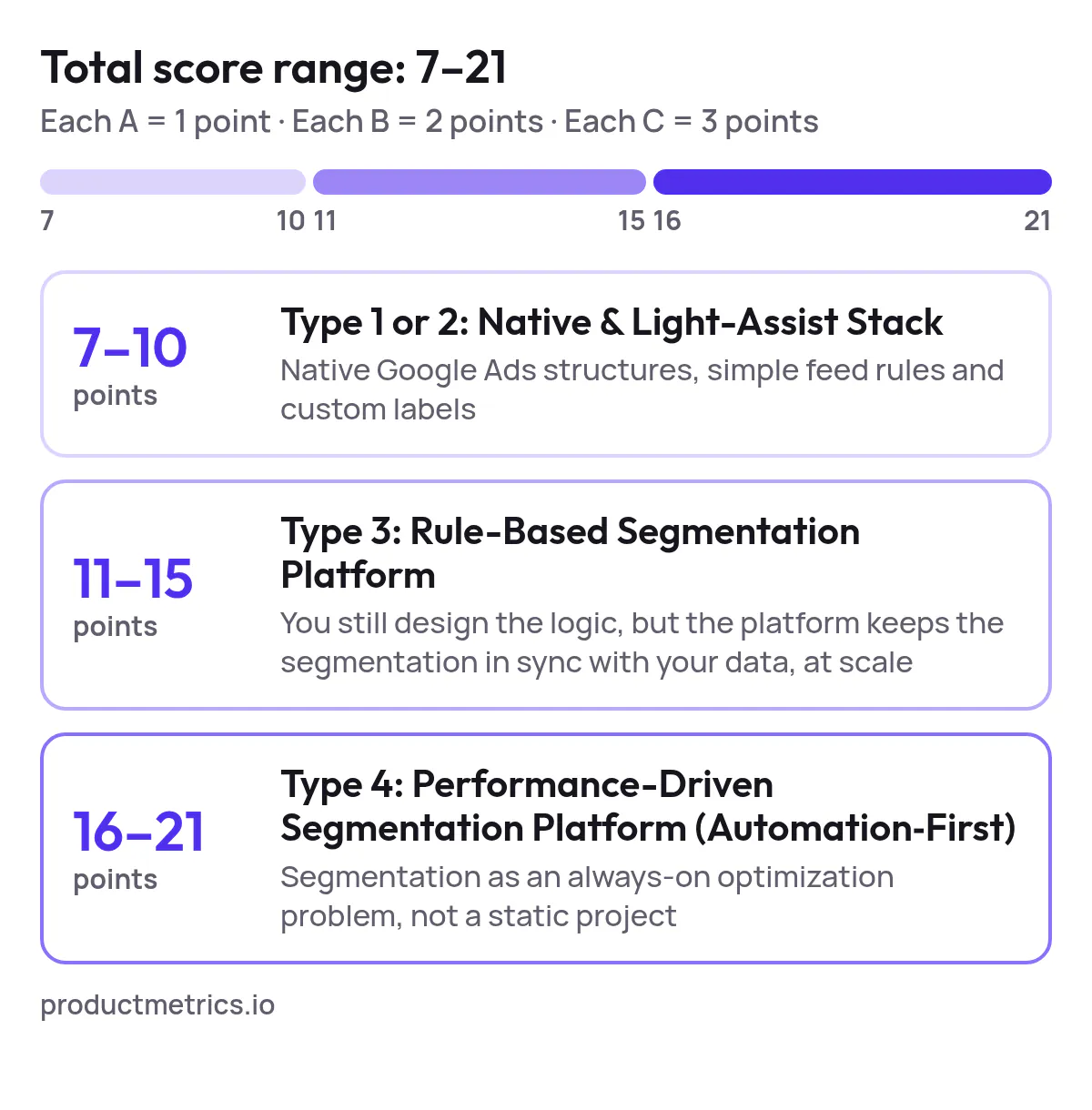
7–10 points → Type 1 or 2: Native & Light-Assist Stack
You can usually combine:
- Native Google Ads structures (PMax + a few Standard Shopping campaigns).
- Simple feed rules and custom labels (in Merchant Center or a lightweight feed tool).
You likely do not need an enterprise segmentation platform yet. Look instead for tools that help you implement sensible but not over-fragmented structures (e.g., brand, category, bestsellers, maybe 2–3 price or margin tiers).
11–15 points → Type 3: Rule-Based Segmentation Platform
You’ve outgrown one-off, manual structures. You need a platform that:
- Reads your feed and performance data.
- Applies rules/templates to assign products into campaigns, ad groups, and product groups.
- Uses custom labels extensively for:
- Performance tiers (ROAS buckets, revenue tiers).
- Price and margin bands.
- Lifecycle (new, evergreen, clearance).
Key trait: You still design the logic, but the platform keeps the segmentation in sync with your data, at scale.
16–21 points → Type 4: Performance-Driven Segmentation Platform (Automation-First)
You’re running complex Shopping at scale. The most impactful tools are those that:
- Continuously move SKUs between campaigns based on observed performance.
- Incorporate query-level information, not just product attributes.
- Support margin-based or profit-based optimisation across large catalogs.
- Integrate with PMax (e.g., pushing the right products/audiences into the right structures) while still giving you campaign-level levers.
You’ll want a platform that treats segmentation as an always-on optimization problem, not a static project.
4. What Adjustable Granularity Looks Like in Practice
Regardless of platform type, tools for granular Google Shopping segmentation with adjustable granularity should allow you to:
-
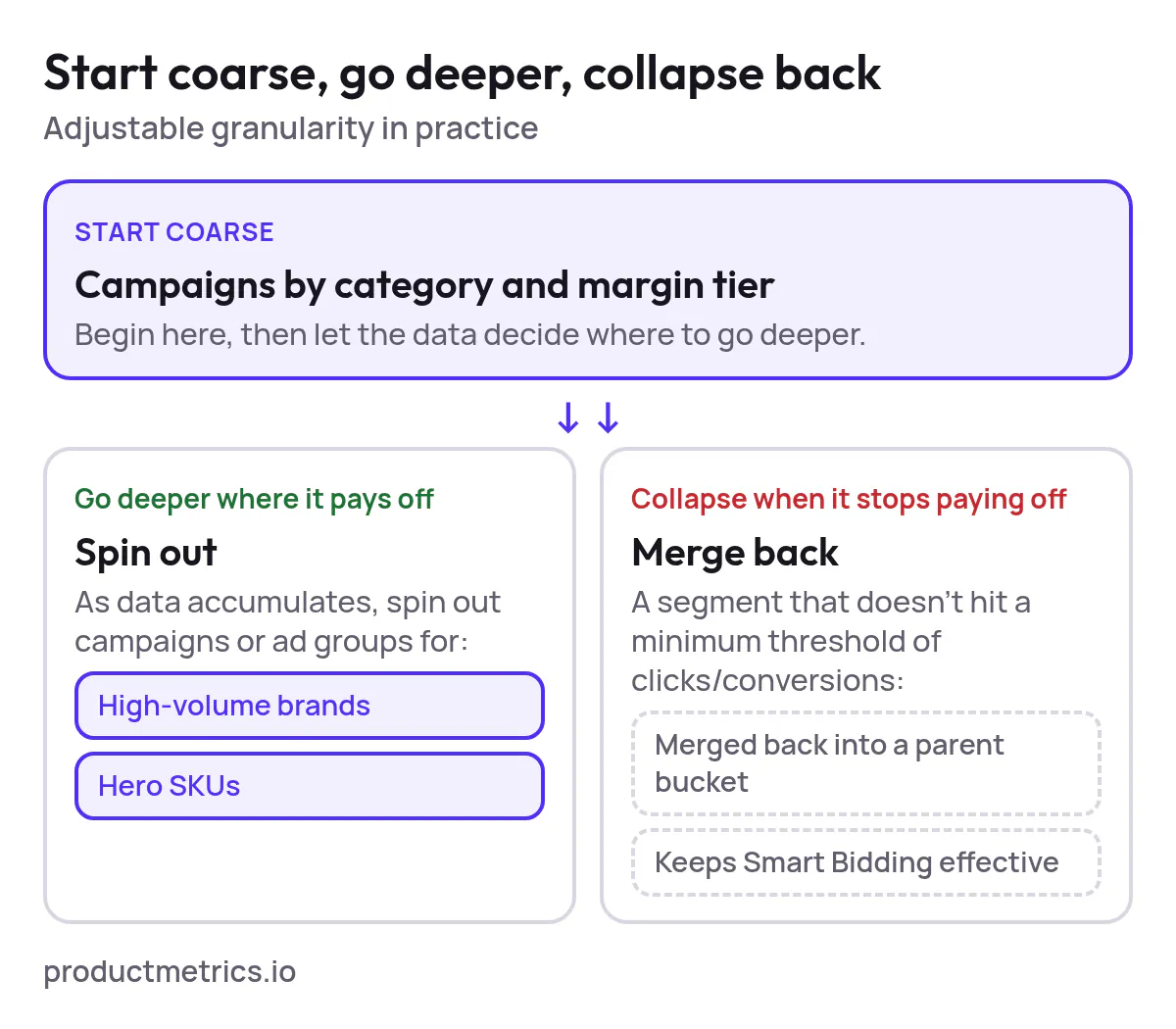
Start coarse, then go deeper where it pays off.
- Example: Begin with campaigns by category and margin tier. As data accumulates, automatically spin out campaigns or ad groups for high-volume brands or hero SKUs.
-
Collapse complexity when it stops paying off.
- Example: If a segment doesn’t hit a minimum threshold of clicks/conversions, it’s merged back into a parent bucket to keep Smart Bidding effective.
-
Switch the unit of optimization.
- From revenue to ROAS to profit to contribution margin, without rebuilding the whole account.
-
Mix segmentation dimensions.
- E.g., campaigns segmented by margin and lifecycle; product groups segmented by category and price; rules that push queries with high purchase intent into more aggressive campaigns.
-
Run safe experiments.
- A/B test two segmentation templates (e.g., “margin-first” vs. “query-first”) while the platform keeps all the labels and groupings in sync.
When you evaluate campaign segmentation tools for Google Shopping with adjustable granularity, pressure-test how easily you can re-level segmentation without weeks of manual work.
5. Platform Types, With Scenario-Based Recommendations
Let’s anchor this in real-world scenarios. For each, we’ll outline:
- Your likely situation.
- The segmentation granularity you actually need.
- The platform type that usually fits best.
| Scenario | Scale | Recommended platform type |
|---|---|---|
| A: Growing DTC Brand | 300–2,000 SKUs | Type 1–2: Native & Light-Assist Stack |
| B: Mid-Market Retailer | 2,000–20,000 SKUs | Type 3: Rule-Based Segmentation Platform |
| C: Enterprise / Aggregator | 20,000+ SKUs, multi-market | Type 4: Performance-Driven Segmentation Platform (Automation-First) |
| D: Performance Agency | 5–50+ clients | Type 3 or 4, depending on your client mix |
Scenario A: Growing DTC Brand with 300–2,000 SKUs
Situation
- A few core categories, some hero products.
- Mostly PMax today with a single or small number of campaigns.
- Limited team (one PPC specialist, maybe an external agency).
Segmentation needs
- Separate bestsellers from the long tail.
- Ensure new products don’t get buried.
- Some price or margin tiers, but not dozens.
Recommended platform type
- Type 1–2: Native & Light-Assist Stack
What to look for:
- A feed or labeling tool that makes it easy to tag:
- New vs. evergreen products.
- Bestsellers (by revenue/orders over a trailing window).
- Gross margin bands (e.g., low / medium / high).
- Templates that spin this into 2–4 Shopping/PMax campaigns, not 20+.
This is advanced segmentation granularity for your scale without overcomplicating things. Tools that promise very fine-grained query-level sculpting may be overkill here.
Scenario B: Mid-Market Retailer with 2,000–20,000 SKUs
Situation
- Multiple brands and categories.
- Clear margin differences across product lines.
- Shopping is a major revenue driver.
- Mix of PMax and Standard Shopping; perhaps early query sculpting.
Segmentation needs
- Margin-based and performance-based segmentation.
- More aggressive treatment of high-LTV or high-margin lines.
- Tight control over non-brand vs. brand vs. SKU-intent queries (where Standard Shopping is still used).
Recommended platform type
- Type 3: Rule-Based Segmentation Platform
What to look for in a rule-based segmentation tool for granular Google Shopping management:
- Ability to create logic layers such as:
- “If margin ≥ X and revenue ≥ Y in last 30 days, move to Tier 1 campaign.”
- “If stock < Z days of cover, throttle into a protective segment.”
- “If product is in Brand A and category B, assign to premium ROAS target.”
- A library of segmentation templates:
- Category × margin.
- Lifecycle × performance.
- Price band × brand.
- Bulk editing and previewing of campaign/ad group/product group structures before pushing changes live.
Key is that you can adjust rules to raise or lower granularity—e.g., consolidating 5 performance tiers into 3—without rewriting everything manually.
Scenario C: Enterprise / Aggregator with 20,000+ SKUs and Multi-Market Presence
Situation
- Huge, frequently changing catalog; multiple countries and currencies.
- Mix of PMax and Standard Shopping, sometimes multiple CSS partners.
- Dedicated performance team and/or agency.
Segmentation needs
- Query-aware segmentation (e.g., generic vs. brand vs. SKU terms) where allowed.
- Continuous re-allocation of SKUs based on profitability, pricing competitiveness, and lifecycle.
- Sophisticated rules that consider not just product attributes but behavioral and market data.
Recommended platform type
- Type 4: Performance-Driven Segmentation Platform (Automation-First)
What to look for in a truly advanced segmentation solution for Google Shopping:
- Automated re-bucketing of SKUs into campaigns based on:
- ROAS or profit vs. target.
- Price competitiveness vs. marketplace benchmarks.
- Inventory risk and sell-through.
- Ability to incorporate query-level signals where applicable:
- Separate “high-intent” traffic into more aggressive structures.
- Protect budgets from low-intent, high-CPC queries.
- Integrations with your broader stack:
- BI tools, offline conversions, CLV models.
- Other paid channels if you want multi-channel budget logic.
Here you’re explicitly shopping for campaign segmentation solutions for Google Shopping that can handle:
- Fine-grained segmentation today.
- The ability to dial that complexity up or down as your strategy, catalog, or Google’s behavior changes.
Scenario D: Performance Agency Managing Many Shopping Clients
Situation
- 5–50+ clients on Shopping/PMax at any time.
- Repeatedly solving the same segmentation problems at different scales.
- Need repeatable frameworks and client-specific flexibility.
Segmentation needs
- Template- and library-based workflows.
- Fast onboarding: from feed → segmentation design → campaign build.
- Clear, explainable structures you can show to clients.
Recommended platform type
- Type 3 or 4, depending on your client mix.
For you, the most important feature is adjustable and reusable segmentation logic:
- Create a few “golden templates” (e.g., by catalog size and vertical).
- Apply them to new accounts with minimal work.
- Fine-tune the granularity per client by adjusting thresholds and toggles.
Look for segmentation platforms that support multi-account management, workspaces, and templated rules without sacrificing low-level control when a big client needs something bespoke.
6. How to Evaluate Tools for Advanced Campaign Segmentation Granularity in Google Shopping
When you’re shortlisting platforms—whether generic PPC tools, Shopping-specific software, or a specialist like productmetrics.io—interrogate them on granularity controls, not just features.
Use this checklist:
6.1. Segmentation Dimensions
Ask:
- Which product attributes can I segment on?
- Brand, category, product type, custom labels, price, margin, stock, rating, etc.
- Can I bring in external attributes?
- Profit data from ERP, CLV from a CDP, inventory risk scores, etc.
- Can I combine multiple dimensions?
- E.g., margin × lifecycle × performance tier in the same template.
6.2. Granularity Controls
Ask how the tool lets you tune segmentation level:
- Can I set thresholds (e.g., minimum clicks/conversions) before a SKU gets its own campaign/ad group?
- Can I merge underperforming or low-volume segments automatically?
- Can I change the number of performance tiers (e.g., 3 vs. 5) without a full rebuild?
- Can I switch the optimization metric (from revenue to profit, etc.) and have segments realign accordingly?
6.3. Automation vs. Control
You want automation that respects your strategy.
Ask:
- Does the platform support both rule-based and performance-based segmentation?
- Can I override automated decisions for specific hero SKUs or strategic categories?
- How transparent are the rules and movements?
- Can I audit why a product moved from Campaign A to Campaign B?
6.4. PMax and Standard Shopping Support
In Google Shopping today, most stacks are hybrid:
- PMax for scale and reach.
- Standard Shopping for control over queries, testing, or strategic lines.
Ask tools explicitly:
- How do you support PMax segmentation while avoiding pointless fragmentation?
- How do you handle Standard Shopping query control (where applicable):
- Campaign priorities
- Negative keywords and query sculpting
- Intent tiers (generic vs. brand vs. SKU)
- Can the platform orchestrate coherent segmentation across both PMax and Standard without cannibalization?
6.5. Operational Reality
Finally, test whether the tool will actually make your life easier:
- How long would it take to migrate your current structure into the platform?
- How often are segmentation rules run (daily, hourly, on-demand)?
- What guardrails prevent accidental over-fragmentation (e.g., automatic consolidation, warnings)?
- What does ongoing maintenance look like for a PPC specialist week-to-week?
7. Build vs. Buy: Should You Roll Your Own Granular Segmentation?
Some PPC teams build their own segmentation systems using:
- Spreadsheets or BI tools to define tiers and rules.
- Scripts (Google Ads Scripts / API) to push structure changes.
- Ad hoc labels and priorities.
This can work well—for a while. Consider building if:
- You have strong engineering support.
- Your needs are highly bespoke to your vertical.
- You’re comfortable fully owning maintenance.
However, if you want repeatable, adjustable segmentation granularity that scales across brands, markets, and years, a dedicated platform usually wins because it:
- Encodes best-practice structures out of the box.
- Offers visual, auditable rules instead of hidden scripts.
- Reduces the risk that your one scripting specialist becomes a single point of failure.
That’s why many teams now actively shop for Google Shopping optimization tools focused on segmentation granularity, rather than relying solely on one-off scripts.
8. Where productmetrics.io Fits Into Your Google Shopping Stack
Given your focus—advanced campaign segmentation granularity in Google Shopping—you don’t just need another reporting layer. You need a platform that treats segmentation as a first-class object.
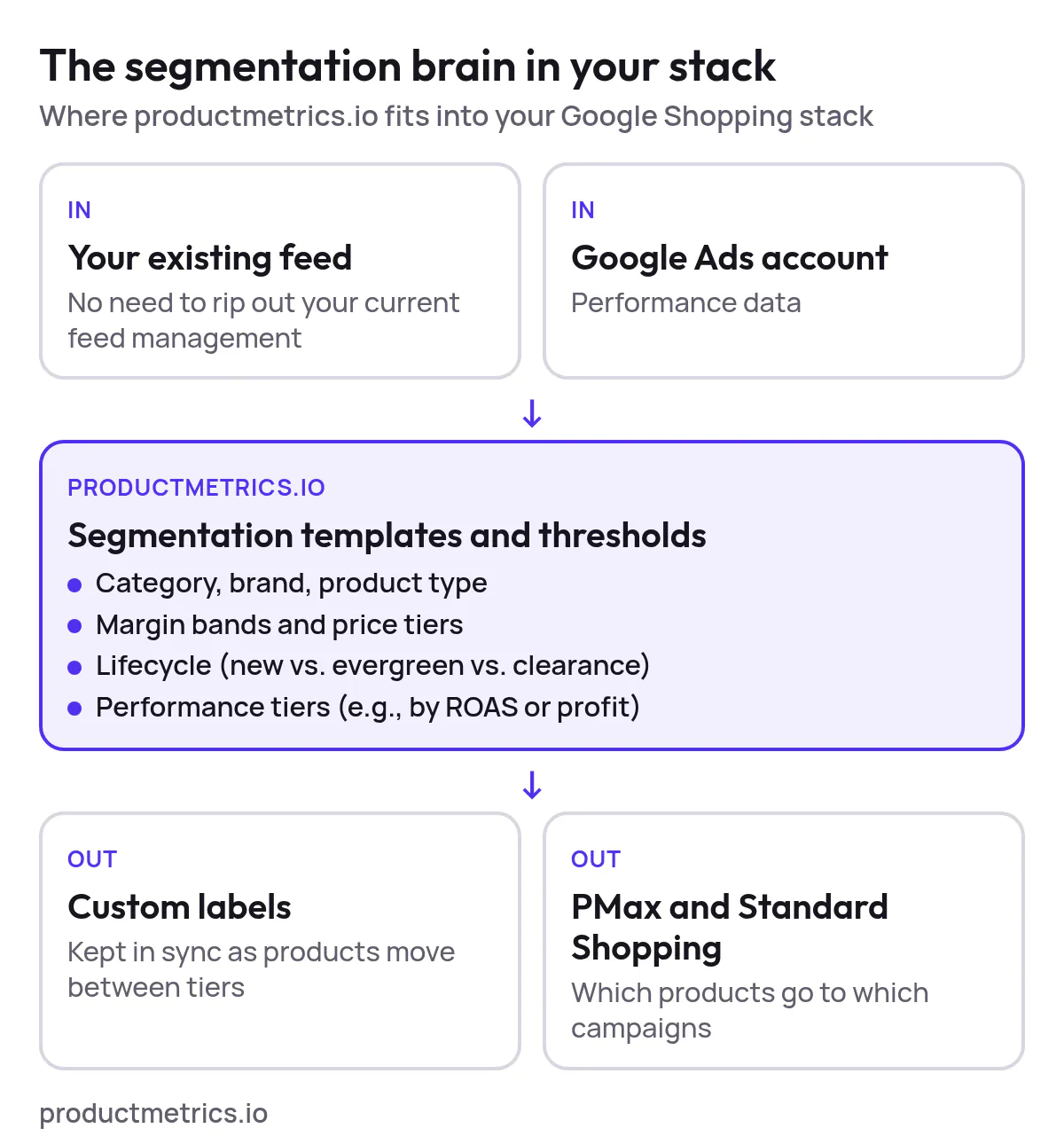
A platform like productmetrics.io can sit in your stack as the segmentation brain that:
-
Connects to your existing feed and Google Ads account
- No need to rip out your current feed management if it’s working.
- Instead, productmetrics.io can consume your feed + performance data, then drive segmentation decisions.
-
Lets you design segmentation templates visually
- Define how you want to split by:
- Category, brand, product type
- Margin bands and price tiers
- Lifecycle (new vs. evergreen vs. clearance)
- Performance tiers (e.g., by ROAS or profit)
- Save templates and reuse them across campaigns, markets, or clients (for agencies).
- Define how you want to split by:
-
Implements adjustable granularity by design
- Set minimum data thresholds for when a product or segment “earns” its own campaign or ad group.
- Allow low-volume products to consolidate into broader segments to keep bidding stable.
- Move top performers or strategic SKUs into more granular, higher-control segments.
-
Keeps segmentation in sync with performance
- As products move between performance tiers or lifecycle stages, productmetrics.io can update:
- Custom labels
- Campaign and ad group memberships
- Bidding targets tied to those segments
- As products move between performance tiers or lifecycle stages, productmetrics.io can update:
-
Respects both PMax and Standard Shopping
- Use productmetrics.io to structure which products go to which PMax campaigns and how budgets/targets reflect their business role.
- Where you still run Standard Shopping, layer in intent-based and margin-based segmentation without hand-building every campaign.
-
Makes structures explainable
- Instead of opaque black-box automation, you can show stakeholders:
- The segmentation hierarchy.
- The rules driving movements.
- The performance of each segment and why it exists.
- Instead of opaque black-box automation, you can show stakeholders:
In short, productmetrics.io aims to give PPC specialists a controllable, data-driven way to find and maintain the right level of segmentation granularity—and to change that level as your catalog, Google’s automation, or your strategy evolves.
9. Putting It All Together: Your Next Steps
If you’re actively searching to find campaign segmentation platforms for granular Google Shopping management or purchase granular segmentation tools for Google Shopping campaign optimization, use this to move from research to action:
- Classify yourself using the decision framework (score 7–21) to identify your likely platform type (1–4).
- Shortlist 3–5 tools that clearly position around:
- Shopping/PMax
- Segmentation and feed logic
- Performance-based automation (if you’re in Type 4 territory)
- Run vendor calls focused on granularity, not just features.
- Use the evaluation questions in section 6 as your script.
- Pilot on a meaningful subset of your catalog.
- One market, one major category, or a representative slice of SKUs.
- Focus on whether the tool can sustain a good level of granularity with low maintenance, not just initial gains.
- Codify your segmentation doctrine.
- Document the segmentation tiers, rules, and business logic you want baked into any platform.
- Implement that doctrine via a platform like productmetrics.io so it can scale with you.
If you get the platform + doctrine pairing right, you’ll stop oscillating between “too simple to control” and “too complex to manage”—and end up with a Google Shopping stack where segmentation granularity is a strategic lever you adjust on demand, not a one-off project you dread revisiting.
Written by
Berend Vrakking, Founder of Product Metrics
1M+ products analysed · Nominated at the Dutch Search Awards for Best Measurement Campaign (2023) and Best Use of Data (2024)
Keep reading.
Campaign Segmentation in Google Shopping - Principles, Pitfalls, and Governance
Campaign segmentation in Google Shopping - principles, pitfalls and governance for Shopping and Performance Max structures that keep enough data to learn.
Implementing Profit Segmentation In Google Shopping And Performance Max
Implementing profit segmentation in Google Shopping and Performance Max, step by step: margin bands, custom labels, campaigns and target ROAS.
Evaluating Product Group Relevance In Google Shopping: Measurement Frameworks, Benchmarks And Tooling
Evaluating product group relevance in Google Shopping: score each group on structure, performance and intent, benchmark it and decide what to split.
See which of your products to push, fix or pause. Start with your own products, or a 30-second estimate.
Check one product first: work out its break-even ROAS in the calculator. Then see where all your products stand.
Questions, or want to spar about your products? Book a demo: a video call with Berend, then a demo account.