
What Is Server-Side Tracking? How It Works and Its Limits
What is server-side tracking? Your site sends events to a server you control, which checks them and decides what GA4, Google Ads and Meta receive.
Server-side tracking is a setup in which your site sends each event, such as a purchase, to a server you control, and that server decides what GA4, Google Ads and Meta receive. The browser still sees the click.
What moves is delivery and control.
That move matters most where blockers are involved. On 30 September 2026 we tested a standard Google Ads tag and a first-party endpoint in real browsers against six blocker setups. Half of them stopped the tag; none stopped the endpoint.
What is server-side tracking?
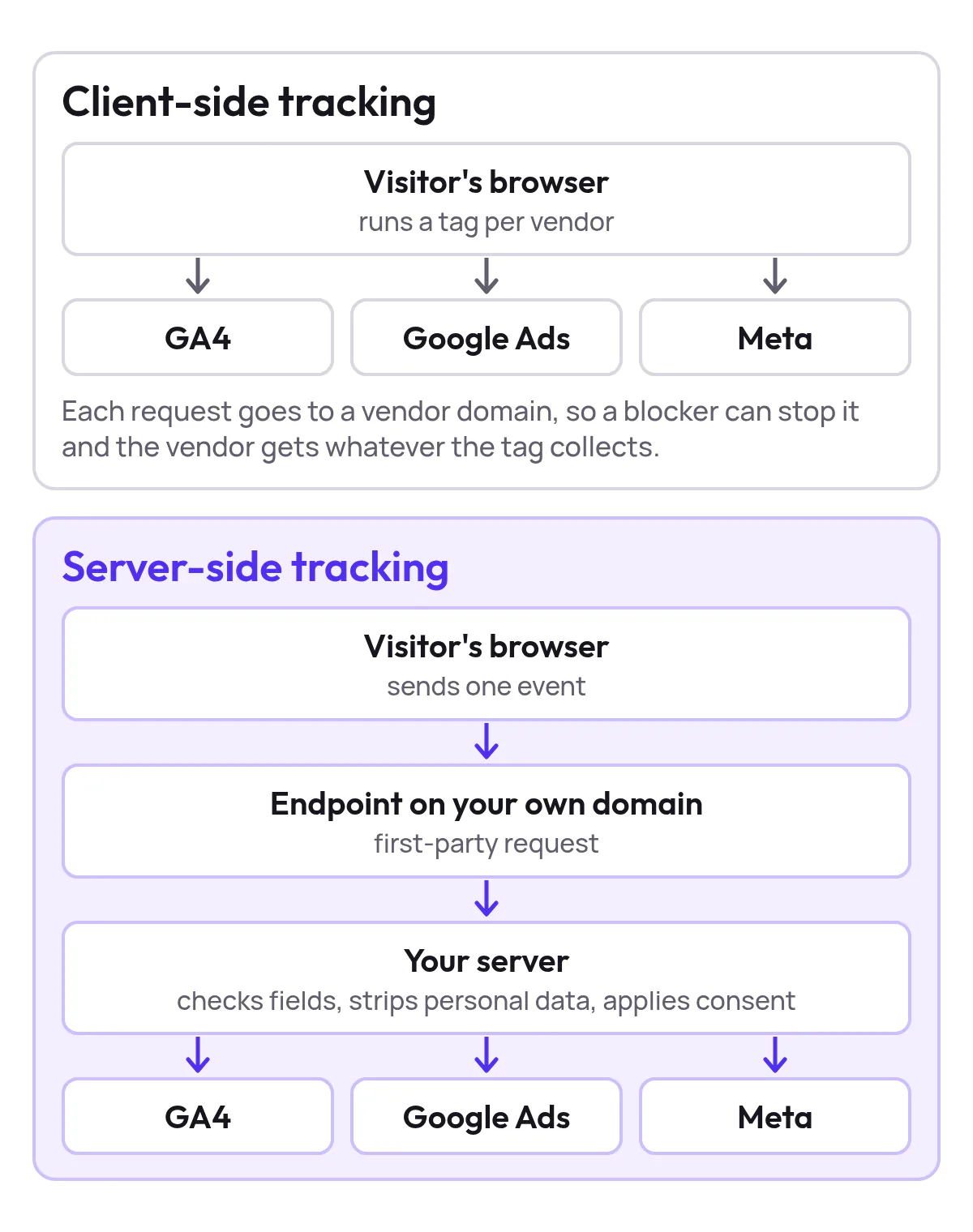
Server-side tracking puts a server you control between your site and the platforms: page views, add-to-carts and purchases reach that server first, and it forwards them on. Think of it as a front desk: the guest makes one request, and the desk checks it and calls only the right suppliers.
Google’s introduction to server-side tagging says the container “doesn’t run in the user’s browser or on their phone”, and only you can see the data until you send it on. The browser still captures the click or the checkout.
Server-side tracking changes where that event is checked and routed next.
The server also accepts events that never touch a browser. Google’s server containers ship with a Measurement Protocol client, so a backend can send refunds, cancellations or offline sales into the same pipeline.
A subscription shop can report a cancellation weeks after the order, and bidding stops chasing a customer who already left.
The term describes a routing and governance layer, not a product you buy off the shelf. The value sits in the rules you write, test and review on that server.
How does server-side tracking differ from client-side tracking?
Client-side tracking runs every vendor’s tag in the visitor’s browser, which sends a separate request to each vendor’s domain; server-side tracking sends one request to your own domain and lets your server forward it.
| Aspect | Client-side tracking | Server-side tracking |
|---|---|---|
| Where vendor logic runs | The visitor’s browser | A server you control |
| Requests from the browser | One per vendor tag | One to your endpoint |
| Cookie context | Often third-party | First-party on your domain |
| Scripts on the page | One library per vendor | Far fewer |
| Filtering before sending | Limited | Validate, strip or block |
| Ad blocker exposure | High | Lower, depends on the endpoint |
| Setup effort | Tag snippets | Server, hosting and a subdomain |
The first rows are about where the work happens. Client-side, the browser runs GA4, Google Ads and Meta and talks to each directly.
Server-side, the browser makes one call and your server fans the event out, which is why pages get lighter.
The middle rows are about control. A browser tag fires and the data is gone.
A server sits in between, so you can check fields, drop personal data or stop an event before any vendor sees it.
Why do first-party cookies matter?
First-party cookies matter because browsers increasingly restrict cookies in a third-party context. Google’s guide to upgrading your tagging infrastructure says cookies read and written by a server container on your own subdomain count as first-party cookies, which “can greatly improve the quality of your data collection”.

Show the dataHide the data
| How the cookie is set | Cookie lifetime in days |
|---|---|
| Set by a script in the browser | 7 |
| Set by the server (Full Signal Tracking) | 30 |
Safari is the sharpest case. Its tracking prevention lets tags load but limits the cookies they set from the browser, so a visitor who clicks an ad on Monday and buys the following week may arrive without their click attached.
The last table row is the trade-off. Client-side tracking is quicker to launch and fine for a simple site with two or three tags.
Server-side tracking adds hosting, a subdomain and maintenance. If your conversions already arrive but Google can’t tie them to an ad, read how enhanced conversions differ from server-side tracking first: they fix a different loss.
How does one purchase travel through a server container?
One purchase travels in six steps: a first-party request, parsing, field checks, transformation, a consent check and delivery to each platform. Each step has one realistic way to go wrong.
- The browser sends one first-party requestThe request goes to an endpoint on your own domain. What goes wrong: the endpoint sits on a vendor's domain, so nothing is first-party.
- The container turns it into a named eventA client parses the raw request into an event such as purchase. What goes wrong: the names don't match GA4's ecommerce events, so reports stay empty.
- The server checks the required fieldsTransaction ID, value and currency must be present, or the event is rejected. What goes wrong: no transaction ID, so one order counts twice.
- The server transforms the dataIt hashes the email address or drops the IP address. What goes wrong: it strips a field conversion matching needs, and match rates fall.
- The server applies the visitor's consentIt reads the consent state sent with the event and holds back what isn't allowed. What goes wrong: no consent state arrives, so everything is forwarded.
- The server delivers to each permitted platformOrder ID, value, currency and click ID go to GA4, Google Ads and Meta. What goes wrong: no deduplication key, so the order arrives twice.
Notice who talks to the vendor at the end. Google’s guide to why and when to use server-side tagging says the server can “validate, parse, anonymize, or even block” requests, and the vendor “only sees a request from the server, not from the user’s browser or device”.
The same server is where your event schema gets fixed once. If the checkout calls a field one thing and the product feed another, you normalise it on the server instead of inside every vendor tag.
None of this cleans bad input. A duplicate purchase event is still a duplicate on the server, just delivered more reliably.
Test that each order arrives exactly once, with the right transaction ID, before you trust the numbers.
Does server-side tracking get past ad blockers?
A server-side setup gets past ad blockers only when its endpoint doesn’t look like tracking. In our 30 September 2026 lab, the standard Google Ads tag got through 3 of 6 blocker setups, and a request to a first-party endpoint got through all 6.

Show the dataHide the data
| Request tested | Setups where it got through (of 6) |
|---|---|
| Standard Google Ads tag | 3 |
| First-party endpoint | 6 |
How many purchases you lose depends on which blockers your buyers run:
| Blocker setup | Standard Google Ads tag | First-party endpoint |
|---|---|---|
| Brave Shields | Blocked | Reached |
| uBlock Origin Lite | Blocked | Reached |
| AdGuard with Tracking Protection | Blocked | Reached |
| AdGuard, default lists | Got through | Reached |
| AdBlock | Got through | Reached |
| AdGuard DNS | Got through | Reached |
A subdomain alone isn’t enough. Blocker lists match well-known script names and paths as well as vendor domains, so Google tag gateway and server-side Google Tag Manager setups get blocked too.
You can run the ad blocker test in your own browser to see which of your tags a blocker stops, and decode a tracking request to check what it carries.
Keeping an endpoint ahead of the lists is the part that doesn’t scale by hand. Every time a list catches a self-run endpoint, purchases stop reaching Google Ads until someone notices the gap and moves it.
Full Signal Tracking runs a unique endpoint on your own domain that auto-rotates if it is ever blocked, so it gets through every adblocker.
Disclose that endpoint. A 2024 study by Fouad, Laperdrix and Santos found 389 of 7,367 visited websites tracking users behind a cloaked domain, and argued that such server-side setups can breach the GDPR and the ePrivacy Directive.
Name your endpoint in your privacy notice, and never use it to disguise third-party collection.
Does server-side tracking replace consent?
No, server-side tracking doesn’t replace consent. A server can enforce what happens to data after the browser sends it, but it can’t create permission a visitor refused.
Google’s Consent Mode shows why. When a visitor denies ad storage, that choice has to travel with the event and be honoured on the server, exactly as in the browser.
Google’s help page on client-side versus server-side tagging adds a practical warning: with several server containers, you must initialise consent in each one.
Treat the server as the place where your privacy rules run, and settle three questions before launch:
| Question | What to decide | Example |
|---|---|---|
| Which fields get deleted? | What the server removes, event by event | IP address, free-text fields, URLs with email addresses |
| How does consent persist? | How the original choice travels with later events | A refund processed six weeks after the order |
| What does the log show? | What each vendor received after transformation | An answer for a customer or a regulator |
A container with no rules is hosting, not governance. Consent, lawful basis and retention still apply in full; the server only gives you one consistent place to enforce them.
Is server-side tracking worth setting up?
Server-side tracking is worth setting up when your shop records purchases that your ad platforms never see. Count the orders in your shop and the purchases in GA4 and Google Ads for the same month, allowing for conversion lag; the gap is your business case.
| Signal | Set it up now | Wait |
|---|---|---|
| Orders missing in ad platforms | A clear, steady gap | Counts already agree |
| Browser events | Purchase fires once, with value and ID | Events still broken |
| Consent setup | Working and passed with events | Unresolved |
| Who runs it | A developer, or a managed service | Nobody |
Fix the events first. A server receives whatever the browser sends, so a purchase that fires twice or without a value is still wrong after the move.
A server container built on a shaky consent setup only moves that problem. Here is what moving to a server fixes, and what it leaves for you:
| Problem | Fixed by a server? | Why |
|---|---|---|
| Vendor domains blocked | Yes, with an unrecognised endpoint | The request goes to your own domain |
| Safari’s 7-day cookies | Yes | The server sets a first-party cookie |
| Personal data sent to vendors | Yes, if you write the rules | The server strips fields first |
| Missing consent | No | The server can only apply a choice |
| Duplicate or broken events | No | The server forwards what it receives |
What does a server-side setup involve?
A standard server-side setup has five parts:
| Part | What it does |
|---|---|
| First-party subdomain | Receives the browser’s request on your domain |
| Server container | Parses, checks and transforms each event |
| Hosting | Runs the container, in your cloud project or a managed host |
| Browser tag | Sends events to the subdomain instead of each vendor |
| Platform connections | Forward each event to GA4, Google Ads and Meta |
If you only want Google’s tags served from your domain, compare Google tag gateway with server-side tagging before you commit to a full container.
Then run the old and new setups side by side until both agree with your order system. Keep the browser tags live during that period, and switch them off only once the server’s counts are steady.
A managed route skips the container. Full Signal Tracking installs as an app on Shopify, a plugin on WooCommerce, a module on Magento or a relay on Lightspeed, with no custom development.
It sends each purchase from your own domain with its click ID, enhanced conversions and Consent Mode v2, and it’s included in Pro at no extra cost.
Final thoughts
Moving tracking to a server settles who controls an event after the shopper acts; the endpoint settles whether it arrives at all. Start with one month of orders against recorded purchases; the size of that gap tells you whether to build anything.
If your legal or privacy team wants a longer read on consent and data minimisation before they sign off a server container, Up North Media’s server-side tracking privacy considerations covers both, along with deduplication.
When your Shopify numbers already disagree before any server work starts, Presidio’s guide to find Shopify conversion tracking issues walks through reconciling orders with GA4, Meta and Google Ads, including test orders with consent accepted and declined.
If you’d rather not run a container yourself, AdManage.ai’s list of server-side tracking platform options covers hosted tools such as Stape, Elevar and Tracklution. Judge each by the six steps above.
Our own comparison of ten server-side tracking tools adds published prices.
Written by
Berend Vrakking, Founder of Product Metrics
1M+ products analysed · Nominated at the Dutch Search Awards for Best Measurement Campaign (2023) and Best Use of Data (2024)
Keep reading.
Conversion Tracking Integration for Google Ads The Complete 2026 Guide
How to set up Google Ads conversion tracking that sends every purchase straight away, for Shopping and other campaigns: four patterns and a rollout plan.
Top Platforms and Tools for Real-Time Google Ads Conversion Tracking [Benchmark Study]
Five ways to get real-time Google Ads conversion tracking, compared on latency, completeness, onboarding speed and the signals each one sends.
10 server-side tracking tools for ecommerce teams
Server-side tracking tools compared: ten providers by job and published pricing, from managed server-side GTM to ecommerce connectors, checked October 2026.
Frequently asked questions.
Is server-side tracking the same as the Meta Conversions API?
Does server-side tracking slow down a website?
How much does server-side tracking cost?
See which of your products to push, fix or pause. Start with your own products, or a 30-second estimate.
See what a blocker stops with the ad blocker tracking test. Then see how your products perform once every conversion is counted.
Questions, or want to spar about your products? Book a demo: a video call with Berend, then a demo account.