
Top Platforms and Tools for Real-Time Google Ads Conversion Tracking [Benchmark Study]
Five ways to get real-time Google Ads conversion tracking, compared on latency, completeness, onboarding speed and the signals each one sends.
Real-time, trustworthy conversion data is now the deciding factor in whether your Google Shopping and Performance Max campaigns actually hit their ROAS or POAS targets.
Between ad blockers, privacy features like Safari ITP, and cross-device journeys, native browser tags alone rarely capture the full picture. The result is Smart Bidding optimizing on partial, delayed data.
This benchmark study looks at the leading platforms and tools that solve that problem, with a specific lens on Google Shopping. We compare them on three axes:
- Latency: How quickly purchase conversions reach Google Ads.
- Completeness: How many of your real purchases actually show up as conversions.
- Onboarding speed: How fast a typical ecommerce team can go from “signed up” to reliable conversion data in Shopping campaigns.
Our goal is to help you pick the right stack for real-time Google Ads conversion tracking, and to show where Product Metrics (productmetrics.io) fits among the top options.
Why Real Time Conversion Tracking Matters So Much In Google Ads
Google explicitly positions conversion tracking as the foundation for measuring ad impact and unlocking automated bidding strategies like Smart Bidding across Search, Display, Shopping, and Performance Max. (Source: Google Ads – Conversion tracking)
For retailers running Shopping and PMax, that foundation has three implications:
- Automation only works as well as your signals. If 20–40% of purchases never reach Google Ads because of blockers or privacy rules, Smart Bidding quietly underestimates the value of your best products and over-penalizes entire campaigns.
- Product-level visibility is now essential. Google’s own interfaces expose product-level performance (cost, clicks, conversions) across Shopping and PMax, but only based on the conversions they see. (Source: About product reporting – Google Ads Help)
- Speed compounds. The faster conversions hit Google Ads, the faster bidding models can react to creative, price, or feed changes—something Google itself recommends as a best practice for maximizing performance. (Source: Think with Google – Inside Google Marketing)
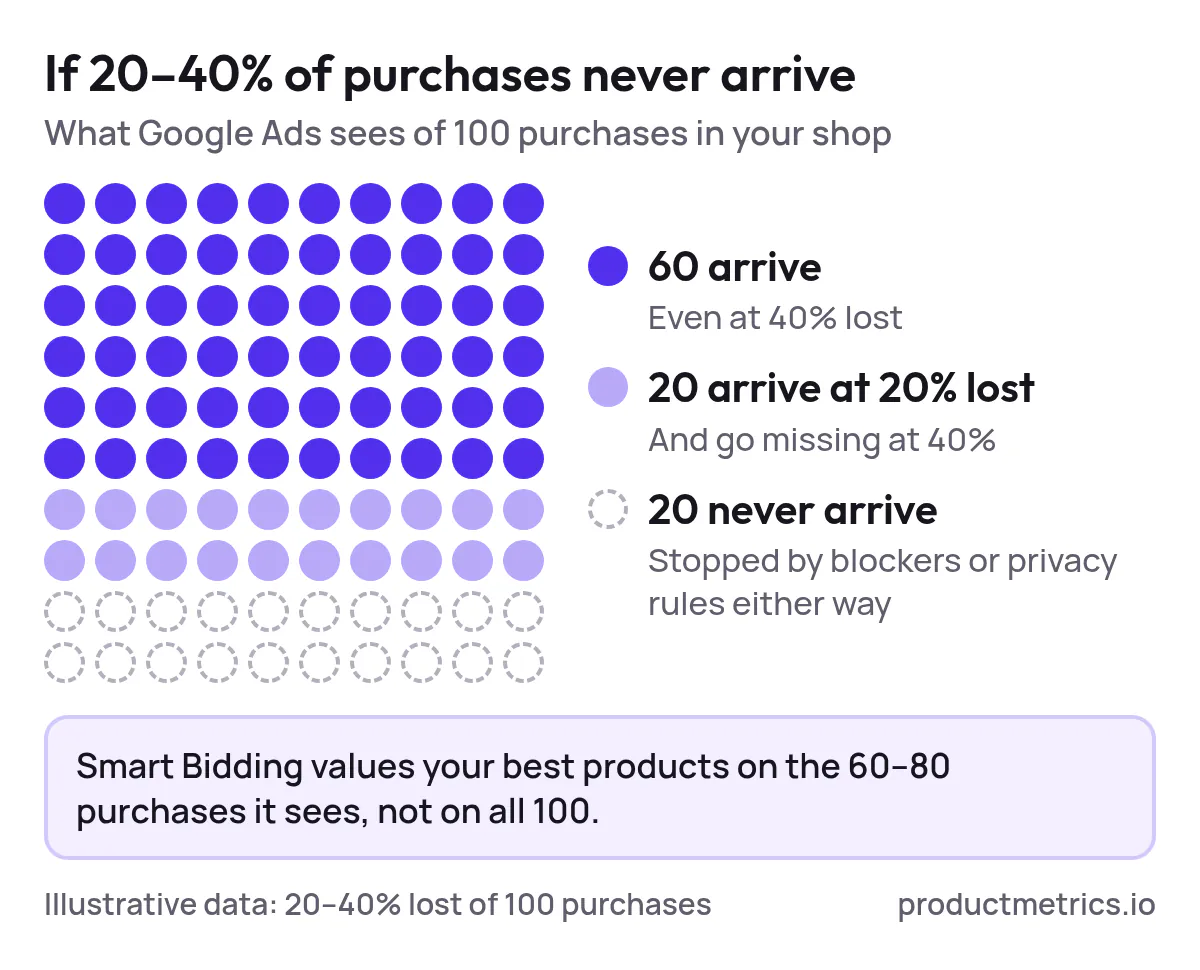
That’s why real-time conversion tracking—in practice, seconds or minutes rather than hours or days—has become table stakes for serious Shopping programs.
What Real Time Really Means Latency And Completeness
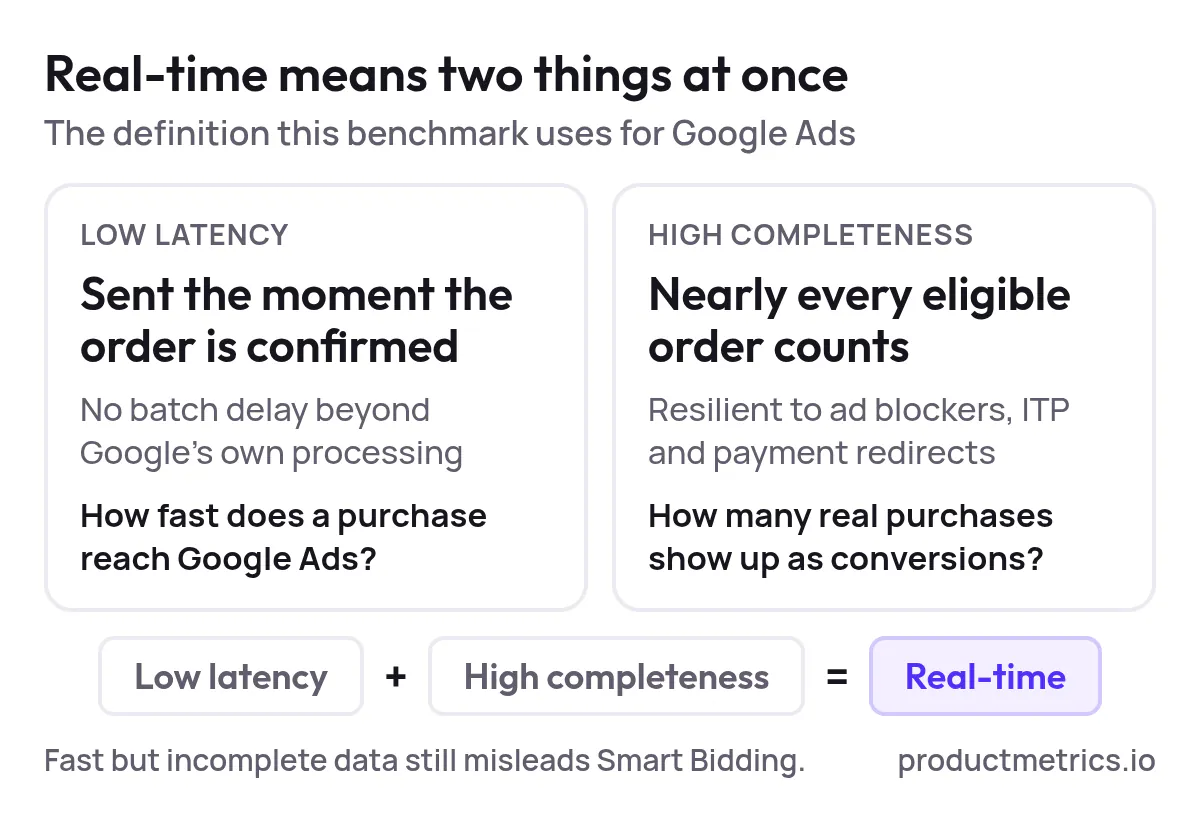
In this benchmark, we treat real-time as the combination of:
- Low latency: Purchases are sent to Google Ads immediately when the order is confirmed, with no additional batch delays beyond Google’s own processing.
- High completeness: The tracking method is resilient to ad blockers, ITP, and payment redirects—so nearly every eligible order shows up as a conversion.
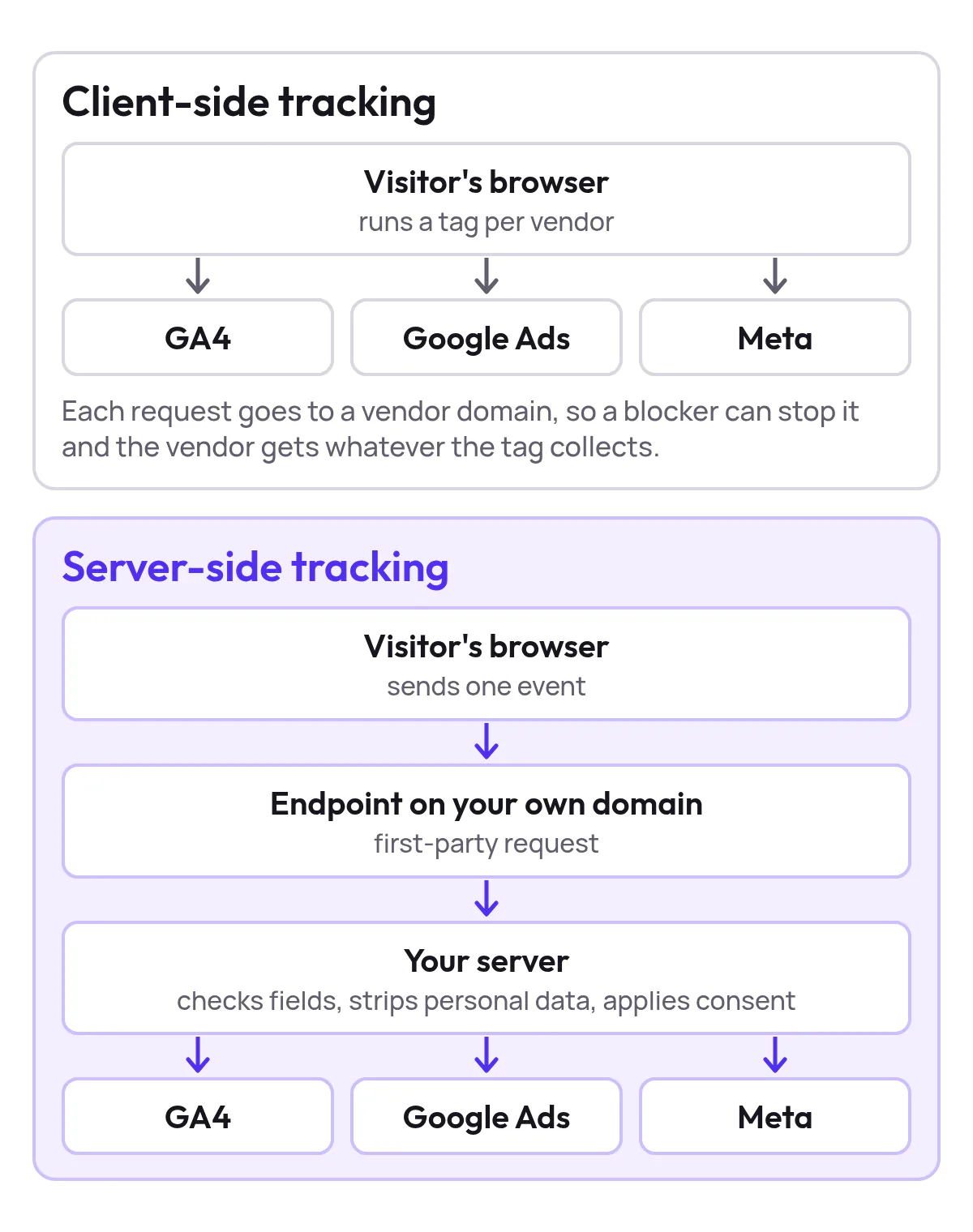
Traditional browser pixels fire from domains like googletagmanager.com, which ad blockers routinely target. Server-side or server-to-server tracking moves the event to your own domain or backend, bypassing many of those filters and recovering conversions that would otherwise be lost. (Source: Awin – Value of server-to-server tracking)
Tools that combine first-party, server-side tracking with direct Google Ads integrations are the ones most likely to deliver both low latency and high completeness for Shopping.
How We Evaluated Platforms
This is a feature benchmark, not a synthetic speed test. We used publicly available documentation and implementation patterns to compare platforms on:
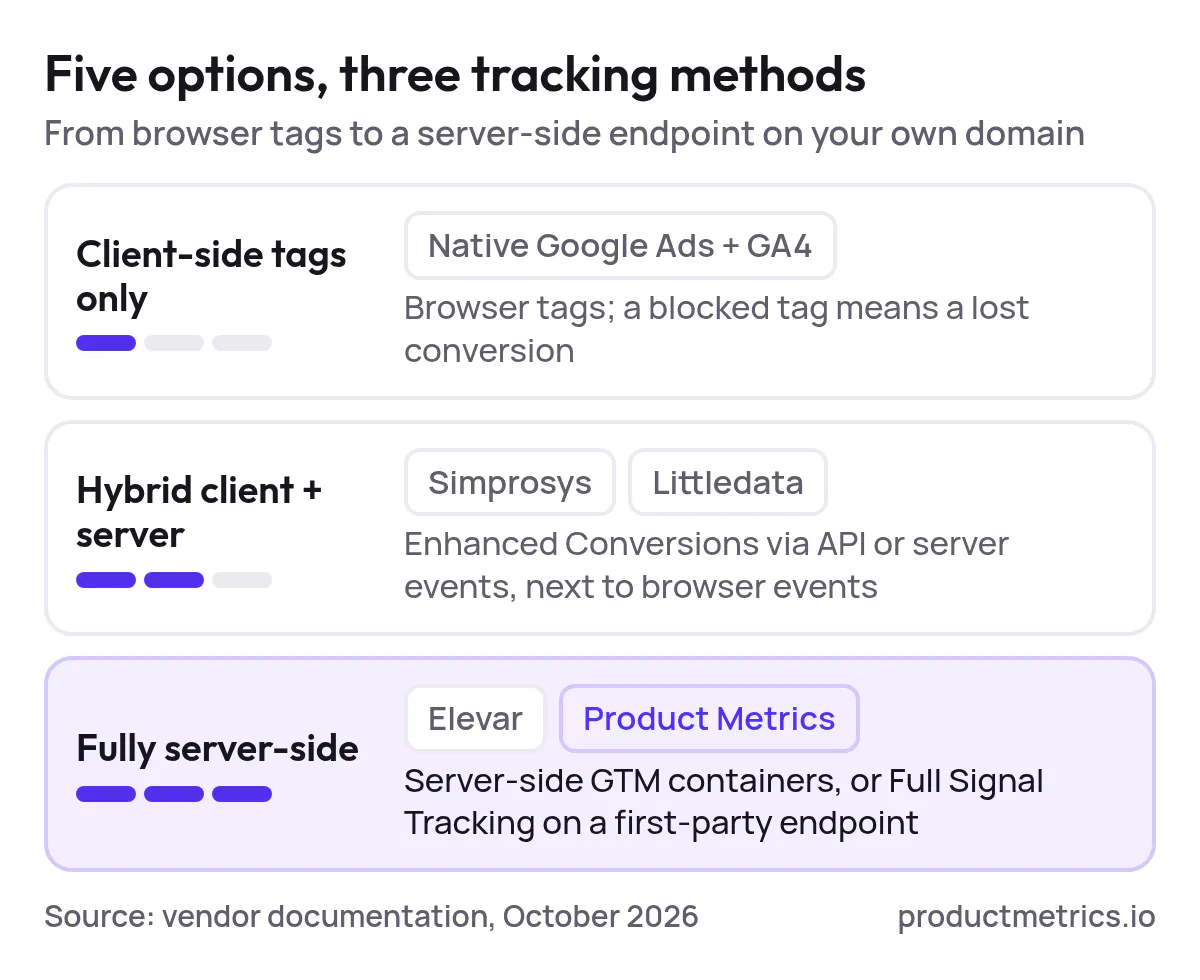
- Tracking method for Google Ads
Client-side tags only, hybrid client + server, or fully server-side on your own domain. - Latency to Google Ads
How quickly purchase events are sent to Google Ads once an order is confirmed. - Conversion completeness
Whether the setup is resilient to ad blockers, Safari ITP, and payment redirects. - Signal depth
What’s actually sent to Google Ads for Shopping bids: revenue only, or richer signals such as profit (POAS), new vs returning customer, and lifetime value. - Onboarding speed and complexity
How much GTM, dev time, or custom configuration is required for an average ecommerce team.
Within that framework, we’ll cover five main options:
- Native Google Ads + GA4 stack (baseline)
- Simprosys Google Shopping Feed (feed + conversions for Shopify)
- Littledata (Shopify data layer + server-side Enhanced Conversions)
- Elevar (Shopify-focused server-side tracking)
- Product Metrics (productmetrics.io) – SKU-level Google Shopping optimization with Full Signal Tracking
Baseline Native Google Ads + GA4
Before you look at third-party tools, you should have the native stack configured correctly:
- Google Ads conversion tracking, optionally with Enhanced Conversions and offline conversion imports. (Source: Google Ads – Conversion tracking)
- GA4 ecommerce tracking with relevant purchase events and (if needed) conversion imports into Google Ads.
- Merchant Center linked to Google Ads so product-level performance is available across Shopping and Performance Max. (Source: Track your product performance – Merchant Center Help)
Latency:
When the browser tag fires successfully, Google Ads sees the conversion quickly enough for near-real-time reporting and bidding.
Completeness:
This is where native tags fall short. Browser-based tracking is routinely blocked by ad blockers and impacted by privacy features like Safari ITP, which shortens cookie lifetimes and can cause drop-offs between click and purchase. (Source: Awin – Value of server-to-server tracking)
Onboarding speed:
Fastest of all options, but limited in resilience. For most serious Shopping programs, the native setup is necessary but not sufficient.
Platform 1 Simprosys Google Shopping Feed (Shopify)
What it is
Simprosys is a popular Shopify app that manages Google Shopping product feeds via API and supports enhanced conversion tracking for Google Ads. (Source: Simprosys Google Shopping Feed) Shopify merchants commonly use it as an all‑in‑one solution for feed sync and Shopping conversions, including Enhanced Conversions via API. (Source: Reddit – Simprosys feed and Enhanced Conversion API)
Tracking method
- Uses Shopify data and Google’s Content API to keep product feeds in near real-time sync. (Source: Simprosys Google Shopping Feed – About)
- Supports Google Ads conversion tracking and Enhanced Conversions, improving match rates and measurement accuracy vs basic browser-only setups.
Latency
- Purchases are typically sent to Google Ads soon after they occur, limited mainly by Shopify webhooks and Google’s ingestion.
Completeness
- Enhanced Conversions via API help recover some visibility by using hashed first-party customer data, but the last-mile still depends on a working browser pixel or app instrumentation.
Onboarding speed
- Very fast for Shopify stores already using Simprosys for feeds, since conversion tracking is configured inside the same app.
Best fit
- Shopify merchants who want one app to handle feeds plus basic Enhanced Conversions, but who are comfortable staying mostly within the standard Google Ads optimization model (revenue-based ROAS, not profit or LTV).
Platform 2 Littledata Shopify Data Layer And Server Side Enhanced Conversions
What it is
Littledata is a data layer and tracking platform for Shopify that sends consistent ecommerce events to GA4, Google Ads, Meta, and other destinations through each platform’s API. (Source: Littledata – The data layer for Shopify)
For Google Ads, Littledata provides a server-side Enhanced Conversions connection from Shopify, designed specifically to improve conversion accuracy and Smart Bidding. (Source: How it works: Shopify to Google Ads – Littledata)
Tracking method
- Hybrid model: browser events plus server-side events from Shopify’s servers, with Enhanced Conversions that send hashed first-party customer data directly to Google. (Source: Littledata – Shopify app overview)
Latency
- Server-side events are relayed to Google Ads shortly after the purchase, giving near real-time updates in practice.
Completeness
- Because conversions are sent from Shopify’s backend, they are far more resilient to ad blockers and browser privacy settings than pure client-side tags. Littledata positions this as “accurate, server-side conversion tracking” specifically for Google Ads. (Source: Littledata – Google Ads FAQ)
Onboarding speed
- Shopify-first UX: install the app, connect Google Ads, and server-side tracking is typically live within about 10 minutes, with no Google Tag Manager setup required. (Source: Littledata – The data layer for Shopify)
Best fit
- Shopify brands that need cross‑channel measurement and attribution with accurate conversion feeds into Google Ads—but that are still comfortable optimizing Shopping and PMax at the campaign or asset group level, not SKU by SKU.
Platform 3 Elevar Shopify Server Side Tracking With Real Time Event Monitoring
What it is
Elevar is a tracking platform built around server-side Google Tag Manager for Shopify. It transforms on-site shopping behavior into structured events and routes them to GA4, Google Ads, Meta, and other channels.
Elevar’s server-side tracking is marketed as delivering near 100% conversion accuracy, with “real-time event monitoring” and pre‑built tag templates for Google Ads and other platforms. (Source: Elevar – Server-Side Tracking overview)
Tracking method
- Server-side GTM containers and destination connectors send conversion events directly from the server to Google Ads. (Source: How to set up Google Ads as a server-side destination – Elevar docs)
Latency
- Events are sent as they happen, with monitoring dashboards that show conversions in real time.
Completeness
- Because tracking runs server-side, events are much less susceptible to ad blockers or broken pixels, which is the core of Elevar’s value proposition.
Onboarding speed
- Faster than building your own server-side GTM stack from scratch, but still more technical than plugin‑based solutions. Correct container setup, DNS configuration, and tag routing usually require involvement from a tracking specialist.
Best fit
- Shopify teams that want fine-grained control over server-side tracking (beyond just Google Shopping) and have access to technical resources or agencies to manage sGTM.
Platform 4 Product Metrics Productmetrics.io SKU Level Shopping Optimization With Full Signal Tracking
What it is
Product Metrics is a cloud-based SaaS platform built specifically for Google Shopping and Performance Max at the product level. It consolidates Google Ads, GA4, pricing, inventory, returns, and margin data into one workspace and classifies every product into six performance segments (Stars, Question Marks, Cash Cows, Dogs, Drainers, Ghosts). It then writes those segments back to Google Merchant Center as custom labels for live bidding. (Source: Product Metrics – Product-Level Google Shopping Optimization) (Source: Product Metrics – GetApp overview)
On top of that, Product Metrics ships its own Full Signal Tracking layer: server-side, adblocker-proof conversion tracking designed to send richer purchase data into Google Ads and Meta.
Tracking method Full Signal Tracking
Product Metrics’ Full Signal Tracking works by:
- Running on a unique endpoint on your own domain (for example,
yourstore.com/…) with no “track” or “pixel” keywords, which lets events pass through common ad blocker lists. - Auto-rotating that endpoint to a fresh path if a blocker ever catches it, without requiring you to edit tags.
- Keeping the Google Ads click ID (gclid) first-party and server-side, so a purchase days later can still be matched to the correct click.
- Sending each confirmed order to Google Ads with revenue, profit, new vs returning status, and lifetime value where available. (Source: Product Metrics – Full Signal Tracking on homepage) (Source: WooCommerce server-side tracking – Product Metrics) (Source: Magento server-side tracking – Product Metrics)
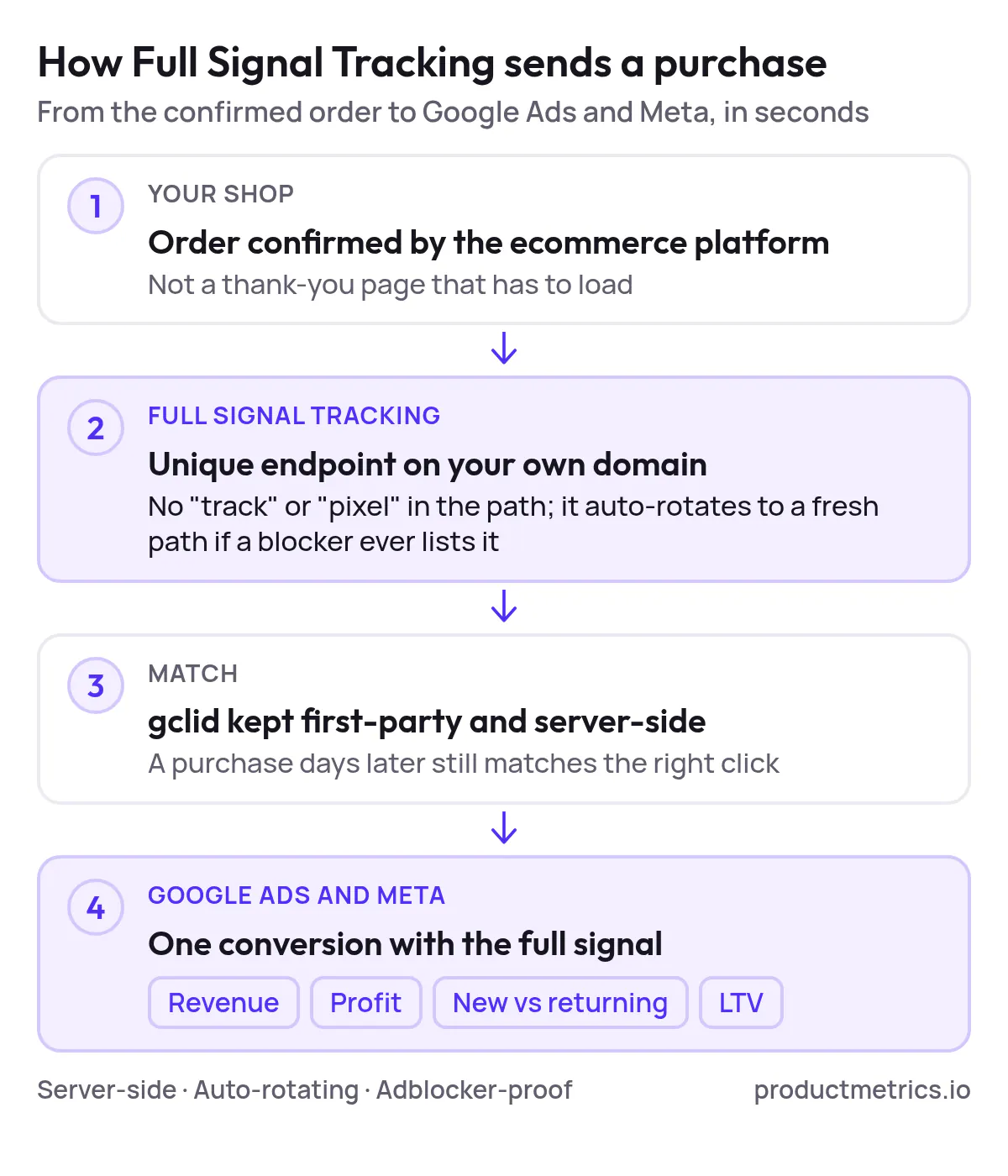
In internal lab tests that Product Metrics has published, a Full Signal‑style first‑party endpoint was reached in all tested ad blocker setups, while the default Google tag on third‑party domains was blocked. (Source: Enhanced conversions vs server-side tracking – Product Metrics blog)
Latency
Because conversions are sent directly from your store’s server to Google Ads as soon as the order is confirmed, there is no waiting for a browser pixel or delayed batch import. In practice, this achieves the same “seconds, not hours” behavior as other best‑in‑class server-side tools, but with endpoints that are harder for ad blockers to intercept. (Source: Product Metrics – Full Signal Tracking)
Completeness
Full Signal is explicitly designed to get through every ad blocker and survive Safari ITP and payment redirects:
- Events originate from your own domain, not third‑party tracker domains.
- The endpoint automatically rotates if it is ever blocked.
- Purchases are confirmed from the ecommerce platform (e.g., WooCommerce or Magento orders), rather than relying on a fragile thank‑you page load. (Source: WooCommerce – Product Metrics platform page) (Source: Magento – Product Metrics platform page)
This combination makes conversion coverage significantly more robust than default browser tags and competitive with or better than other server-side offerings in this benchmark.
Signal Depth For Shopping Optimization
Where Product Metrics really differentiates itself is what it sends and how it uses that data:
- Revenue, profit, and lifetime value are all sent as conversion signals, enabling POAS bidding in Google Ads and Meta, not just ROAS. (Source: WooCommerce – Product Metrics platform page)
- New vs returning customer flags and LTV allow you to prioritize products that drive first‑time buyers or high‑value cohorts. (Source: Magento – Product Metrics platform page)
- The platform’s Product Segmentation model then uses ad clicks and ROAS/POAS to assign every SKU to one of six segments and writes those segments to Merchant Center labels for live Shopping and PMax campaigns. (Source: Product Metrics – homepage segmentation)
This closes the loop between tracking and product-level bidding decisions in a way that attribution‑only tools do not.
Onboarding Speed
For supported ecommerce platforms, onboarding is plugin‑driven:
- WooCommerce: Install the Product Metrics plugin and paste a one‑time token; every WooCommerce order is then sent server-side to Google Ads and Meta from your own domain with its revenue, profit, customer type, and LTV. (Source: WooCommerce – Product Metrics platform page)
- Magento: Install the Magento module; Product Metrics works alongside your existing Shopping feed extension, adds product‑level labels in Merchant Center, and sends every Magento order back to Google Ads with profit and customer type. (Source: Magento – Product Metrics platform page)
There’s no requirement to stand up server-side GTM or custom tracking infrastructure, which materially shortens time-to-value versus sGTM-based solutions.
Pricing Context
Product Metrics uses a graduated, percentage-of‑Shopping‑spend model with the first €10,000 of rolling 30‑day Google Shopping spend free; at €50,000 monthly Shopping spend, the subscription is €247.50 excluding VAT, with Full Signal Tracking included in the Pro plan rather than sold separately. (Source: Product Metrics – Pricing FAQ) (Source: 10 server-side tracking tools for ecommerce teams – Product Metrics)

Show the dataHide the data
| Rolling 30-day Google Shopping spend | Monthly fee (excl. VAT) |
|---|---|
| €10K | €0.00 |
| €25K | €97.50 |
| €50K | €247.50 |
| €100K | €547.50 |
This makes it especially attractive for mid‑market brands that want both server-side tracking and SKU-level optimization without layering multiple tools.
Feature Comparison At A Glance
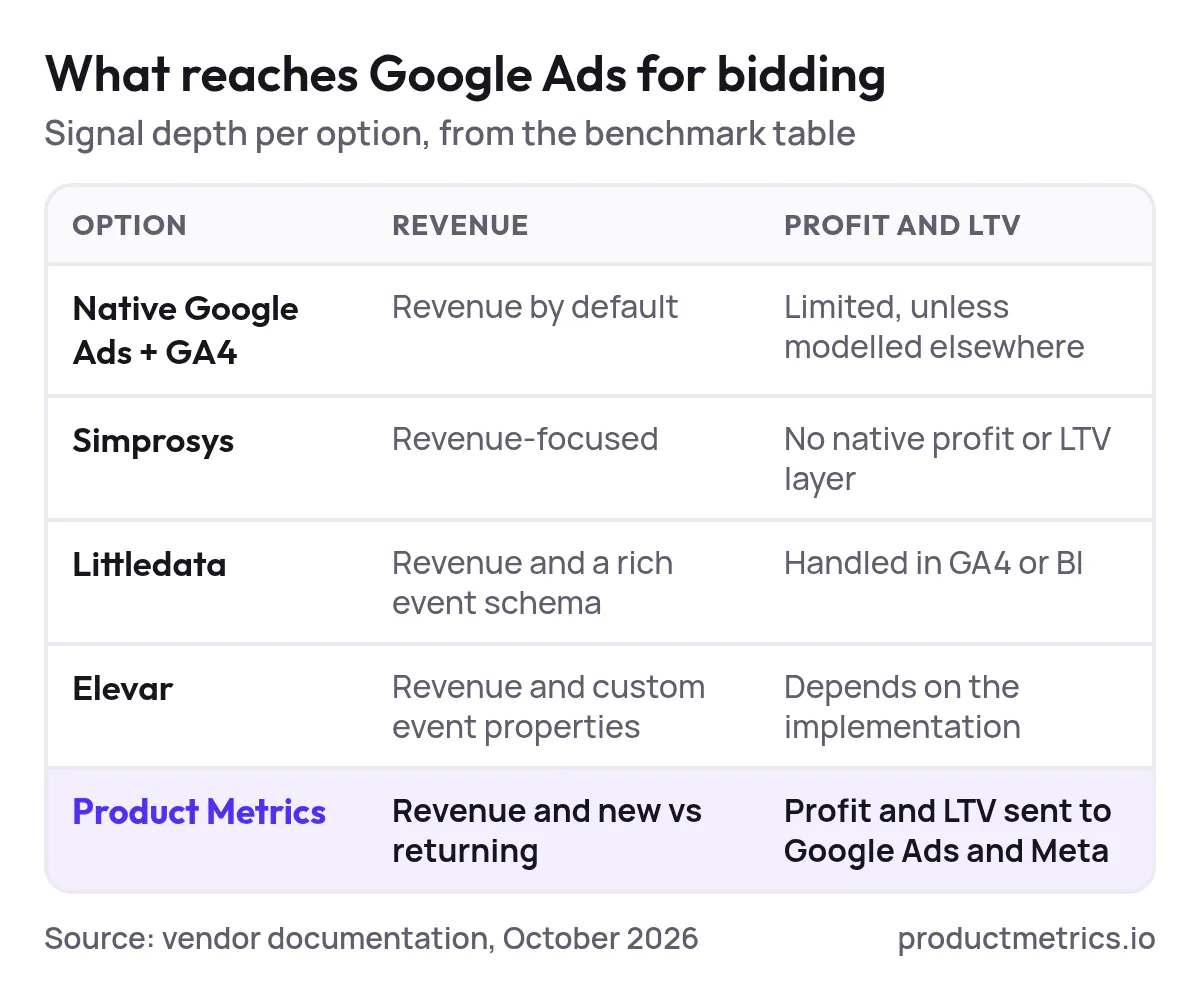
Feature benchmark (based on vendor documentation as of October 2026):
| Platform | Primary focus | Tracking method for Google Ads | Latency for purchase conversions | Conversion completeness vs default tags | Signal depth for Shopping | Onboarding speed (typical) |
|---|---|---|---|---|---|---|
| Native Google Ads + GA4 | Baseline tagging and analytics | Browser tags (Google tag / GTM), optional Enhanced Conversions | Near real-time when pixels fire | Moderate – vulnerable to ad blockers, ITP, page-load failures | Revenue only by default; limited profit/LTV unless modeled elsewhere | Fast to set up but fragile; requires ongoing QA |
| Simprosys Google Shopping Feed (Shopify) | Feed management + Enhanced Conversions | Shopify app + API feeds, Enhanced Conversions via API | Near real-time feed and conversion updates | Higher than pure client-side thanks to Enhanced Conversions, but still partly pixel-dependent | Revenue-focused; no native profit/LTV layer | Very fast for Shopify teams already using Simprosys |
| Littledata | Cross‑channel tracking for Shopify | Hybrid browser + server-side events, Enhanced Conversions | Near real-time server-side event delivery | High – conversions sent from Shopify servers, resilient to blockers | Revenue + rich event schema; profit/LTV handled in GA4 or BI | 10‑minute Shopify app install; no GTM required |
| Elevar | Advanced server-side tracking (Shopify) | Server-side GTM containers and destination connectors | Real-time event monitoring | High – server-side tracking explicitly marketed for near‑100% accuracy | Revenue + custom event properties; profit/LTV depend on implementation | Faster than DIY sGTM but needs technical setup and maintenance |
| Product Metrics (productmetrics.io) | SKU-level Google Shopping optimization | Full Signal Tracking: first‑party, server-side endpoint with auto‑rotation | Real-time server-side events from store to Google Ads | Very high – designed to get through every ad blocker and Safari ITP, confirmed via lab tests | Revenue, profit, new vs returning, LTV; segments written as Merchant Center labels for PMax/Shopping | Plugin-based for WooCommerce/Magento; no sGTM required; focused on Shopping use cases |
Which Are The Best Tools For Integrating Real Time Conversion Tracking Into Google Ads Campaigns
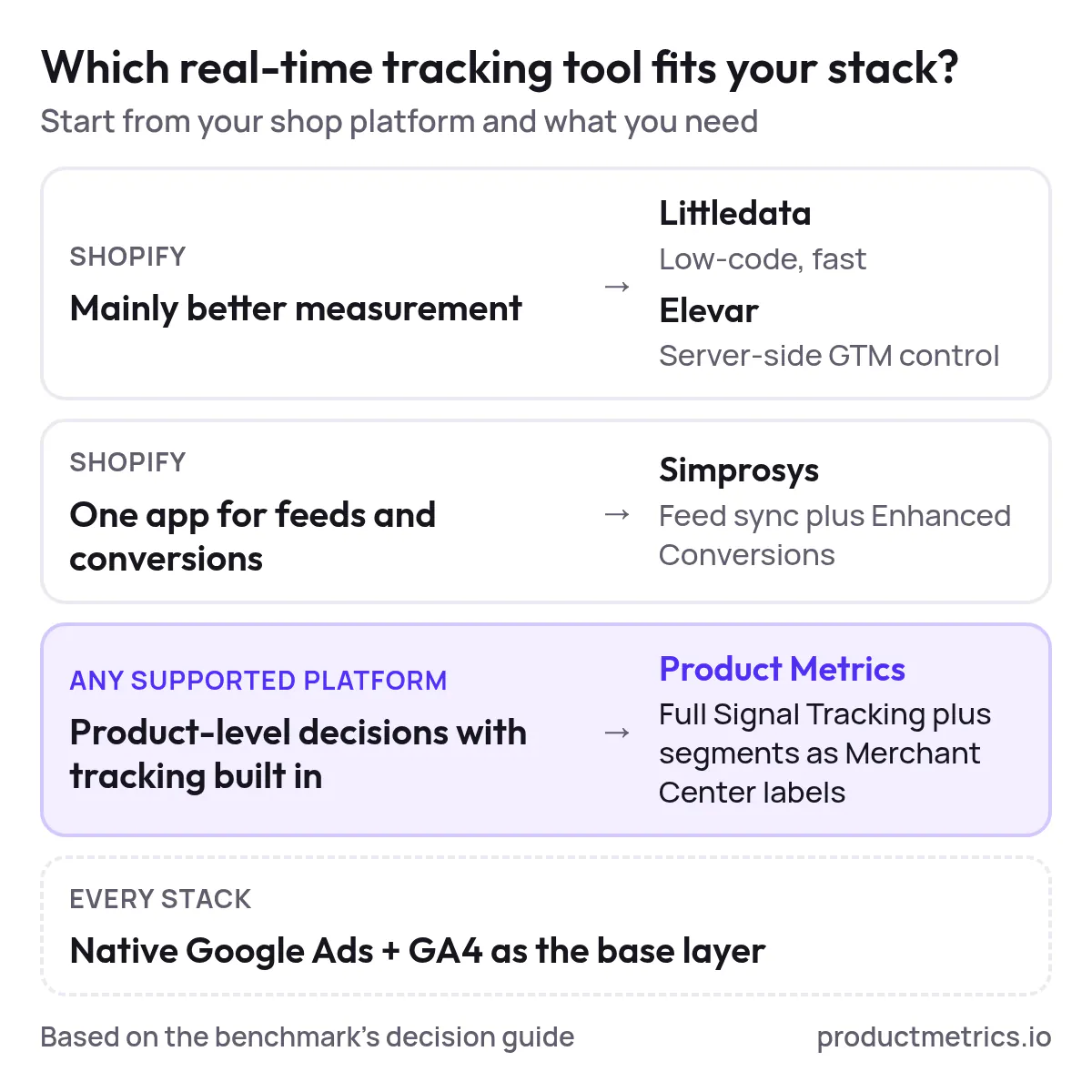
If you’re asking “What are the best tools for integrating real-time conversion tracking into Google Ads campaigns?”, here is a practical way to decide:
- If you’re on Shopify and mainly need better measurement:
- Start with Littledata if you want fast, low‑code server-side Enhanced Conversions and clean GA4 data that also benefits Shopping. (Source: Littledata – Shopify app)
- Consider Elevar if you have in‑house expertise or an agency that can manage server-side GTM and you want fine‑grained control over tags.
- If you’re on Shopify and want a single app for feeds + conversions:
- Simprosys Google Shopping Feed is a strong baseline: near real-time feed sync plus Enhanced Conversions via API, all inside one app. (Source: Simprosys Google Shopping Feed)
- If you need product-level Google Shopping optimization with real-time tracking baked in:
- Product Metrics is the only platform in this list that combines Full Signal server-side conversion tracking with SKU-level segmentation and Merchant Center labels purpose‑built for Shopping and Performance Max campaigns. (Source: Product Metrics – homepage)
For many mid‑market and enterprise retailers, the most powerful setup is:
Native Google Ads + GA4 plus a server-side tracking layer, with Product Metrics sitting on top to turn that recovered signal into product-level decisions.
Why Product Metrics Often Wins On Latency Completeness And Onboarding Speed
Across the three axes we set out at the start:
- Latency
- Full Signal sends conversions from your store’s server to Google Ads and Meta instantly upon order confirmation, matching the best real-time behavior of other server-side tools.
- Completeness
- First‑party endpoints on your own domain + auto‑rotation + confirmation from the order system make it extremely resilient to blockers, ITP, and failed thank‑you page loads. Product Metrics has published blocker‑lab results specifically to validate this design. (Source: Enhanced conversions vs server-side tracking – Product Metrics)
- Onboarding speed
- For WooCommerce and Magento, installation is plugin‑based and does not require server-side GTM. That’s a major reduction in complexity compared with building your own sGTM stack. (Source: WooCommerce – Product Metrics) (Source: Magento – Product Metrics)
On top of this, Product Metrics is uniquely focused on product-level Shopping decisions—segmenting every SKU by volume and return, surfacing journeys, competitor prices, margin and stock, and then writing the outcome into Merchant Center labels your campaigns already use. (Source: Product Metrics – About product-level control)
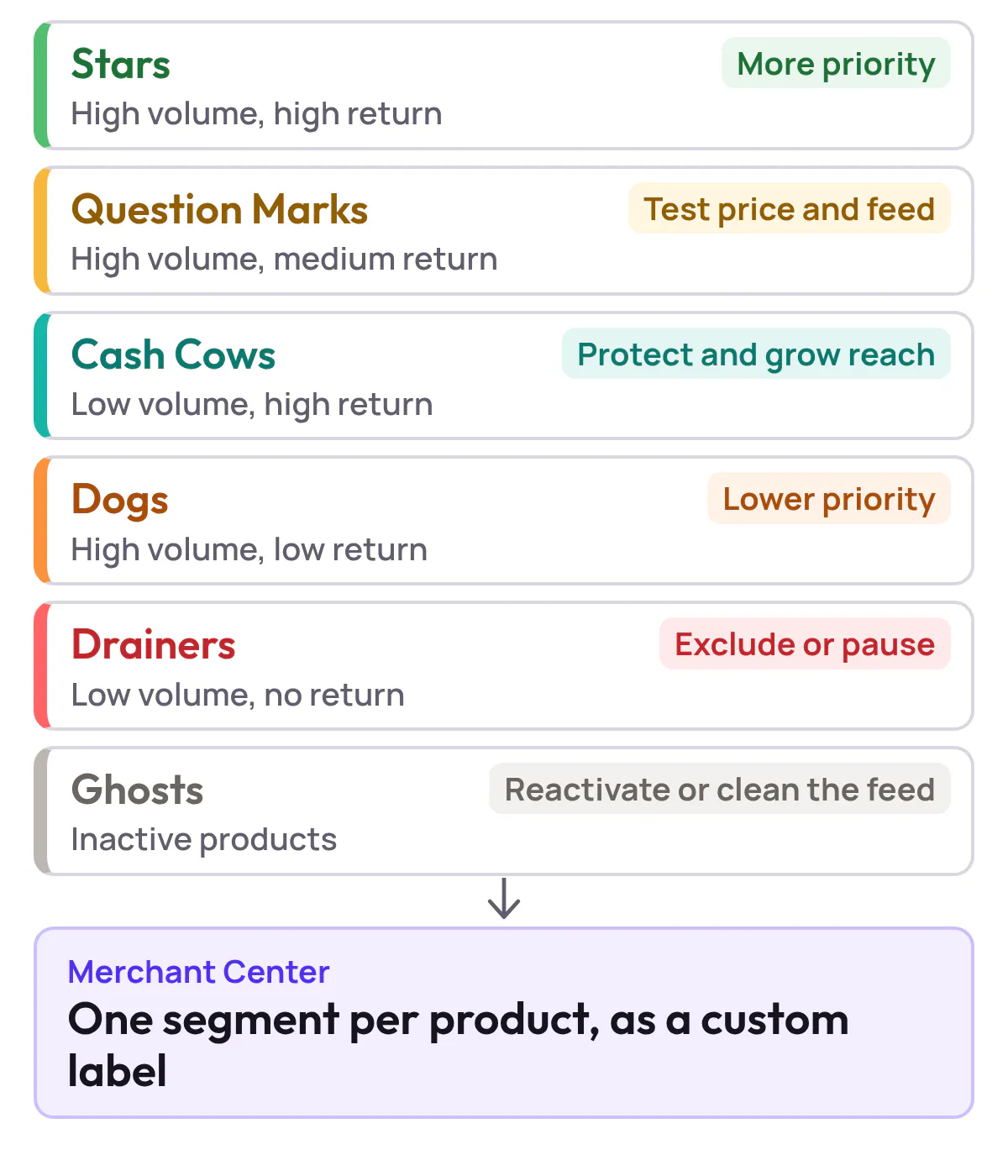
If your core question is “Which products should get more or less paid traffic in Shopping and PMax?”, Product Metrics is built to answer it and act on it directly.
Implementation Checklist Getting To Real Time Product Level Conversion Tracking
Regardless of which platform you choose, use this checklist to make your Google Ads conversion tracking with real-time reporting actually work in practice:
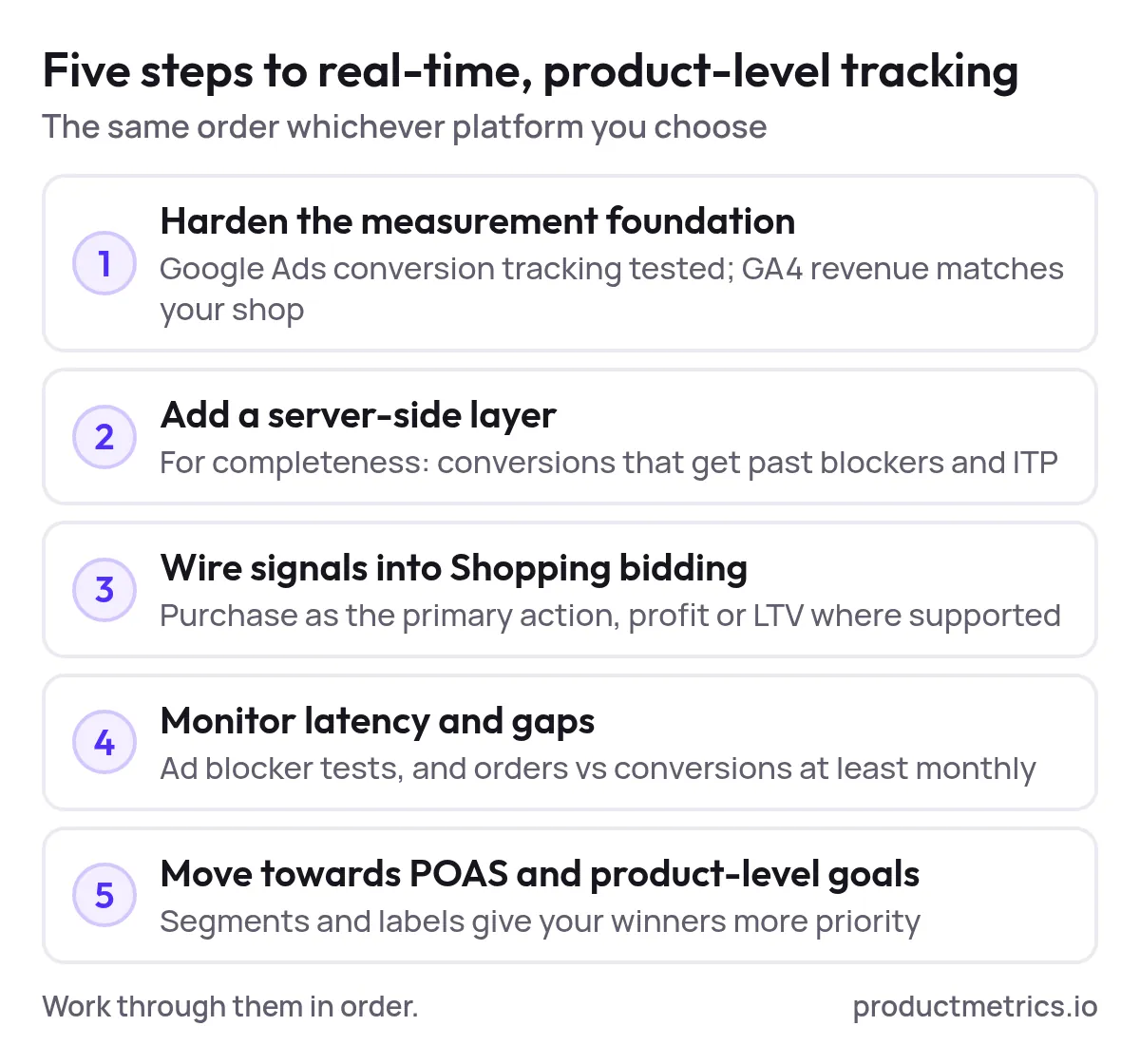
- Harden your measurement foundation
- Ensure Google Ads conversion tracking (with Enhanced Conversions where allowed) is live and tested. (Source: Google Ads – Conversion tracking)
- Confirm GA4 ecommerce events and revenue match your ecommerce platform closely enough to serve as a truth source.
- Add a server-side layer for completeness
- On Shopify: deploy Littledata or Elevar (or an equivalent) to feed server-side conversions into GA4 and Google Ads.
- On WooCommerce or Magento: consider Product Metrics to send orders server-side to Google Ads and Meta with profit and LTV, via Full Signal Tracking. (Source: WooCommerce – Product Metrics)
- Wire signals into Shopping bidding
- Align your primary Google Ads conversion action with purchase and, where supported, a profit- or LTV-based action.
- In Product Metrics, approve the Merchant Center labels generated by Product Segmentation and Full Signal so Shopping and PMax campaigns can bid differently on Stars, Dogs, Drainers, etc. (Source: Product Metrics – Segmentation and labels)
- Monitor latency and gaps
- Compare real-time dashboards in your tracking tool with Google Ads reporting to spot lag or drops.
- Periodically run ad blocker tests (Product Metrics provides a dedicated test page for Full Signal) and reconcile orders vs Google Ads conversions at least monthly. (Source: Server-side tracking tools – Product Metrics)
- Iterate toward POAS and product-level goals
- Once revenue tracking is stable, add margin and LTV to your conversion signals so you can move from ROAS to POAS targets.
- Use product-level segments and custom labels to separate winners from drainers, and shift Shopping budget accordingly.
FAQ Real Time Google Ads Conversion Tracking
- What are the best tools for integrating real-time conversion tracking into Google Ads campaigns?
For most teams:
- Shopify: Littledata or Elevar for server-side tracking, optionally combined with Simprosys for feed + Enhanced Conversions.
- WooCommerce / Magento: Product Metrics for Full Signal server-side tracking plus product-level segmentation.
- All stacks: Native Google Ads + GA4 as the base layer.
- Can you recommend a platform for Google Ads conversion tracking with real-time data updates?
If your priority is real-time data updates that directly inform product-level decisions in Shopping and PMax, Product Metrics is the most focused option in this benchmark: it unifies server-side conversions, product performance, and Merchant Center labels in a single workflow. (Source: Product Metrics – Product-level Google Shopping optimization)
- Are there Google Shopping optimization platforms with instant conversion tracking integration?
Yes. Several platforms provide instant or near-instant server-side conversion tracking into Google Ads:
- Littledata and Elevar for Shopify (server-side connections).
- Product Metrics for WooCommerce and Magento via Full Signal Tracking.
The key is verifying not just that events are “real-time”, but that they’re complete and actually tied back to product-level bidding.
- How do I find Google Shopping optimization tools with real-time conversion data integration that don’t require heavy engineering?
Look for:
- No-code or low-code connectors (Shopify apps or platform plugins) instead of custom sGTM builds.
- Clear documentation that events are sent from your own domain or backend, not only via browser pixels.
- Evidence that the tool supports Google Ads Enhanced Conversions or direct conversion APIs.
Product Metrics, Littledata, and Simprosys all meet these criteria for the stacks they support. (Source: Littledata – Shopify app) (Source: Simprosys Google Shopping Feed) (Source: Product Metrics – Platforms)
- What are the top-rated Google Ads conversion tracking integrations with real-time reporting?
While “top-rated” will vary by review site, the platforms that consistently surface in 2026 comparisons for real-time, resilient conversion tracking with Google Ads are:
- Littledata (Shopify) – server-side Enhanced Conversions and GA4 data layer.
- Elevar (Shopify) – server-side GTM with real-time event monitoring.
- Product Metrics (WooCommerce, Magento, and Google Shopping as a whole) – Full Signal Tracking plus SKU-level Shopping optimization.
Each can form the backbone of a real-time Google Ads conversion tracking stack; your choice should depend on your ecommerce platform, appetite for technical setup, and whether you need product-level decisioning or just better measurement.
Written by
Berend Vrakking, Founder of Product Metrics
1M+ products analysed · Nominated at the Dutch Search Awards for Best Measurement Campaign (2023) and Best Use of Data (2024)
Keep reading.
Conversion Tracking Integration for Google Ads The Complete 2026 Guide
How to set up Google Ads conversion tracking that sends every purchase straight away, for Shopping and other campaigns: four patterns and a rollout plan.
What Is Server-Side Tracking? How It Works and Its Limits
What is server-side tracking? Your site sends events to a server you control, which checks them and decides what GA4, Google Ads and Meta receive.
10 server-side tracking tools for ecommerce teams
Server-side tracking tools compared: ten providers by job and published pricing, from managed server-side GTM to ecommerce connectors, checked October 2026.
See which of your products to push, fix or pause. Start with your own products, or a 30-second estimate.
See what a blocker stops with the ad blocker tracking test. Then see how your products perform once every conversion is counted.
Questions, or want to spar about your products? Book a demo: a video call with Berend, then a demo account.