
Buyer’s Guide: Choosing a Google Shopping Segmentation Platform That Prioritises Listing Group Relevance
Buyer’s guide to Google Shopping segmentation platforms: three tool types, 10 questions to ask vendors, a custom label blueprint and a 30-day rollout.
If you’ve ever typed something like “where can I buy software for advanced Google Shopping campaign segmentation by listing group relevance?” into Google, you’re exactly who this guide is for.
Once your product range passes a few hundred SKUs, one “All products” group and a couple of brand splits stop being enough. The campaigns still spend, but:
- The same handful of products hoover up budget.
- High‑margin bestsellers barely show.
- “Zombie” products sit in your feed with no impressions.
At that point, you don’t just need more levers. You need software that understands product‑level performance and can turn that into relevant product groups automatically.
This guide will help you:
- Understand what “listing group relevance” actually means in Shopping and Performance Max (PMax).
- Decide what kind of tool you should be shopping for.
- Compare platforms using a simple, buyer‑side evaluation framework.
- See how Product Metrics fits if you want deep, automated listing group relevance.
1. First, Clear Up The Jargon: Product Groups, Listing Groups And Listing Group Relevance
Before you compare tools, it helps to pin down how Google itself thinks about products inside Shopping and PMax.
Product Groups In Standard Shopping
In Standard Shopping campaigns, you don’t bid on keywords. You bid on product groups: slices of your Merchant Center inventory built from attributes like category, product type, brand, item ID and custom labels. Google creates an “All products” product group by default, and you can subdivide it as many times as you like using those attributes. (Source: Google Ads Help – Product and listing groups)
Best‑practice material from Google recommends subdividing product groups so they reflect your real product lines, profit margins and volume, and then going deeper where a single group is taking most of the traffic. (Source: Google – Shape Up Your Shopping Campaigns)
Listing Groups In Performance Max
In Performance Max retail campaigns, the equivalent building block is a listing group inside each asset group. Listing groups decide which products are included or excluded for that asset group, again using feed attributes and custom labels rather than keywords. (Source: Google Ads API – Listing Groups for Retail)
PMax is opinionated: Google’s own guidance is to use listing groups to target groups of products via dimensions like custom labels or brand, rather than managing individual items one by one. (Source: Google Ads API – Listing Groups for Retail)
Custom Labels: The Control Layer All Good Tools Plug Into
Custom labels (custom_label_0–custom_label_4) are special Merchant Center attributes you define yourself to group products for reporting and bidding in Shopping and Performance Max. Google explicitly calls them out for use cases like marking “bestseller”, “seasonal”, “clearance” or margin tiers, because they let you create product groups that don’t exist in your product taxonomy. (Source: Google Merchant Center Help – Custom label 0–4)
In their Performance Max best‑practice guide for retailers, Google recommends using custom labels to signal high‑priority products such as bestsellers and holiday items so you can treat them differently in campaigns. (Source: Google Ads Help – Retailer best practices for AI‑powered Performance Max campaigns)
What Listing Group Relevance Really Means
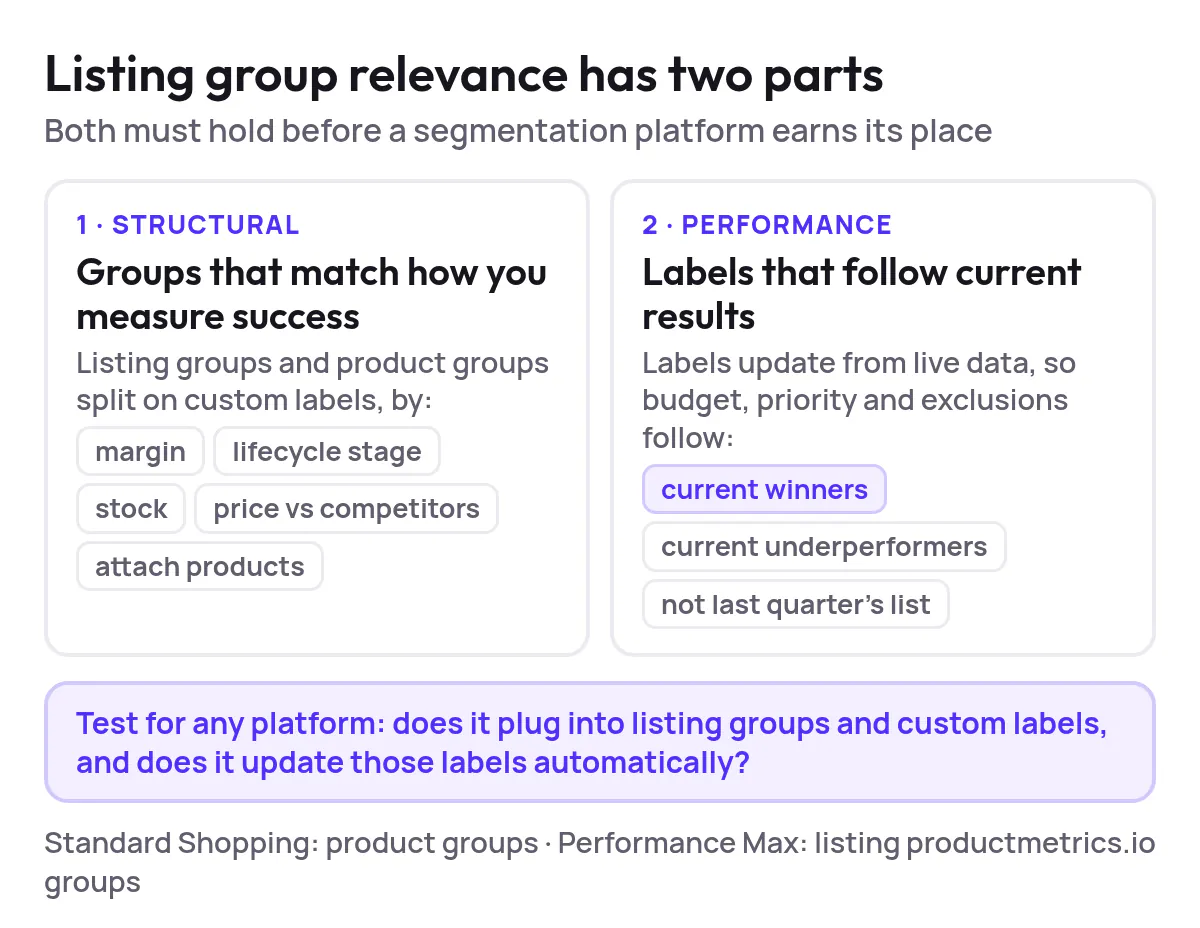
In this guide, listing group relevance means two things coming together:
- Structural relevance – using the same building blocks Google uses (product groups/listing groups + custom labels) to create segments that actually reflect how you measure success: margin, lifecycle stage, stock, price vs competitors, attach products, etc.
- Performance relevance – keeping those segments in sync with reality as performance shifts, so budget, priority and exclusions follow current winners and underperformers instead of last quarter’s.
Any platform you consider should make both parts easier: it should plug into product groups/listing groups and custom labels, and it should be able to update those labels automatically from live data.
2. Signs You’ve Outgrown Manual And Feed-Only Segmentation
If you’re evaluating tools to buy for Google Shopping campaign segmentation, chances are at least a few of these sound familiar:
- One “All products” group still exists in key campaigns and soaks up most of the impressions and cost.
- You can see product‑level performance in reports, but translating that into product groups or listing groups is a weekly spreadsheet exercise.
- Performance Max is a black box: you know ROAS at campaign level, but not which product groups deserve more or less budget.
- High‑margin bestsellers are trapped inside mixed groups with low‑margin or poor‑conversion products.
- Your team has a backlog of “bestsellers vs the rest”, “margin tiers” or “zombie product” splits they never get to.
When these patterns show up, the question stops being “how do I restructure my campaigns?” and becomes “which software should I purchase that keeps listing group relevance up‑to‑date for me?”
3. The Three Types Of Tools You’ll See When You Shop For Google Shopping Segmentation Software
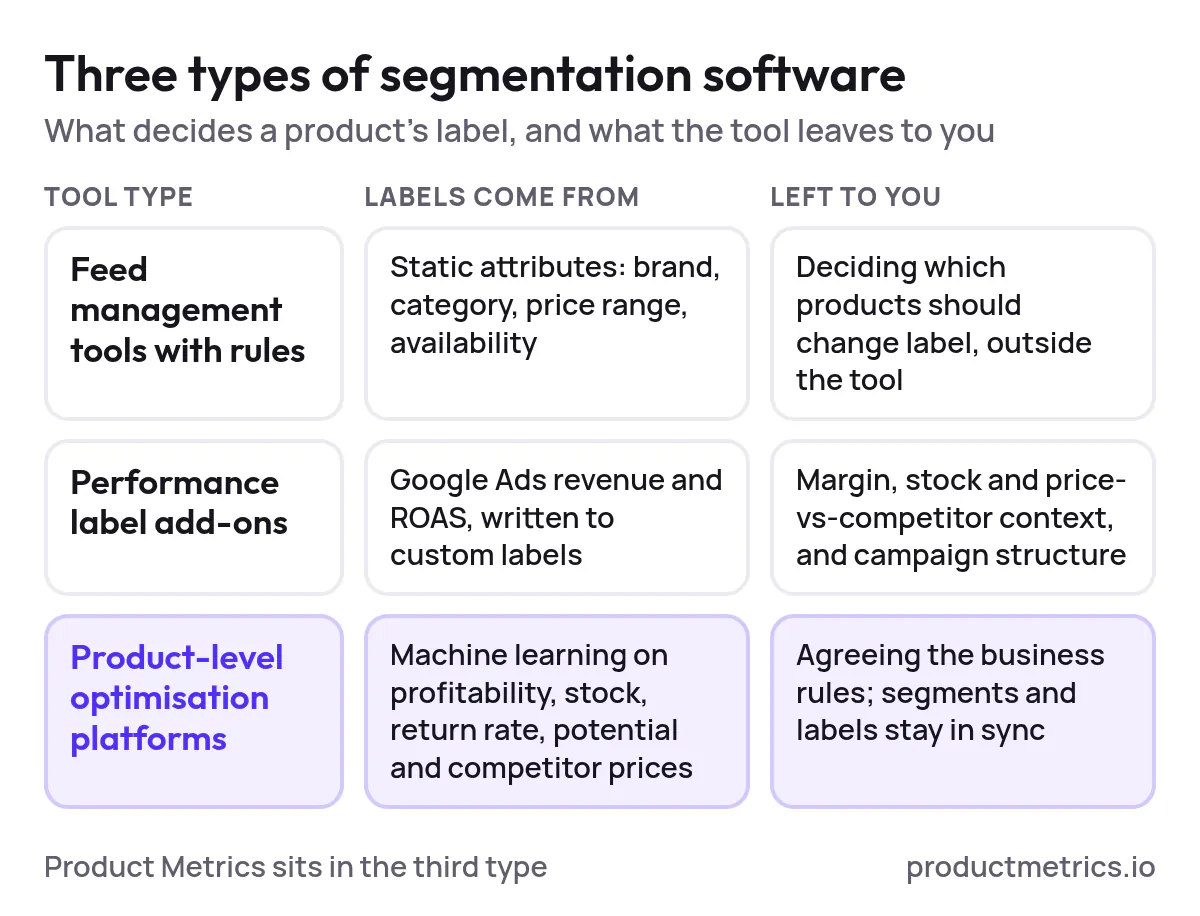
When you start looking to buy campaign segmentation software for Google Shopping focused on listing group relevance, you’ll generally see three categories.
3.1 Feed Management Tools With Rules
Traditional feed platforms focus on sending your product data to multiple channels and often include rules‑based transformations and basic custom label rules.
Typical strengths:
- Strong mapping from your products/PIM to Merchant Center.
- Rules based on static attributes (brand, category, price range, availability).
- Some automation for pausing out‑of‑stock products or pushing promotions.
Limitations for listing group relevance:
- Performance data (cost, clicks, ROAS, margin) usually isn’t first‑class.
- Labels are often static or updated infrequently.
- You still need external analysis to decide which products should change label.
3.2 Performance Label Add-Ons
Some feed tools and dedicated add‑ons focus on turning Google Ads performance metrics into labels, grouping products as top performers, solid, potential or underperformers and writing those groups into custom labels in your feed. (Source: DataFeedWatch – Performance Labels for Google Shopping & PMax)
This is a good step if your primary question is “which products get the most revenue and ROAS?” and you want that reflected in Shopping and PMax without manual work.
Typical strengths:
- Daily performance‑based label updates.
- Direct mapping to custom labels that campaigns can filter on.
Limitations:
- Often no margin, stock or price‑vs‑competition context.
- Less opinionated about how to structure campaigns around those labels.
3.3 Product-Level Optimisation Platforms (Product Metrics Category)
The third category, where Product Metrics sits, treats segmentation as the first step in a broader product‑level optimisation workflow.
Product Metrics connects segmentation, product journeys, competitor prices, stock, margin and tracking in one platform. It ingests Google Ads and Merchant Center data plus your ecommerce backend, then uses machine learning to segment products on profitability, inventory levels, return rate, potential and price against competitors before writing those segments into custom labels via a supplemental feed. (Source: Product Metrics – Google Shopping Segmentation and Conversion Tracking)
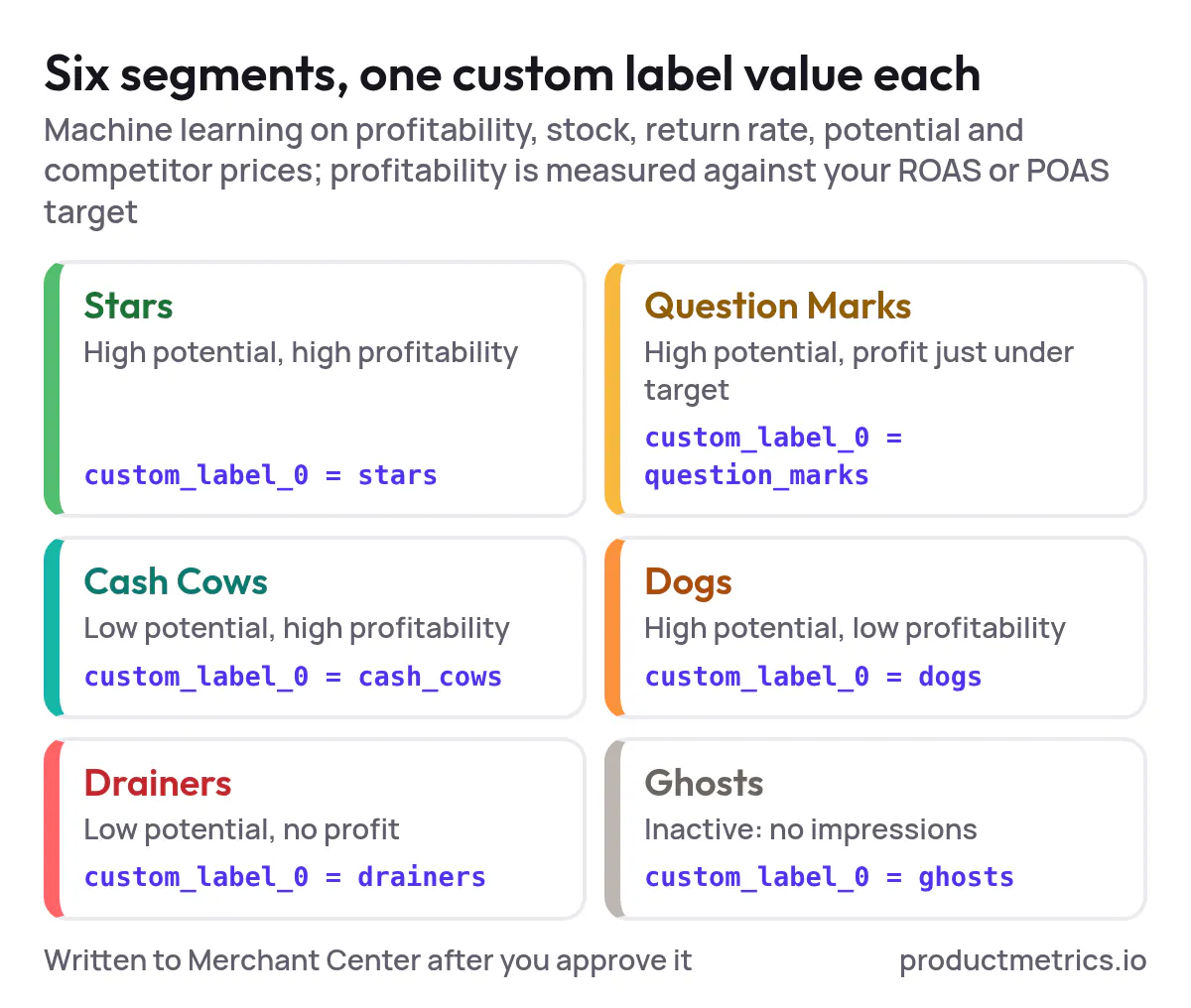
The Product Segmentation feature, for example, classifies every product into six segments — Stars, Question Marks, Cash Cows, Dogs, Drainers and Ghosts — based on profitability, inventory levels, return rate, potential and price against competitors, with clicks as just one signal among many, and then assigns segment‑specific custom labels like stars, dogs or ghosts. (Source: Product Metrics – Product Segmentation)
This gives you:
- A stable map of how each product actually performs.
- Merchant Center labels that campaigns can immediately use in product groups or listing groups.
- A direct connection between product analytics and campaign structure.
If your main goal is listing group relevance with automation, this third category is usually where you should focus your shortlist.
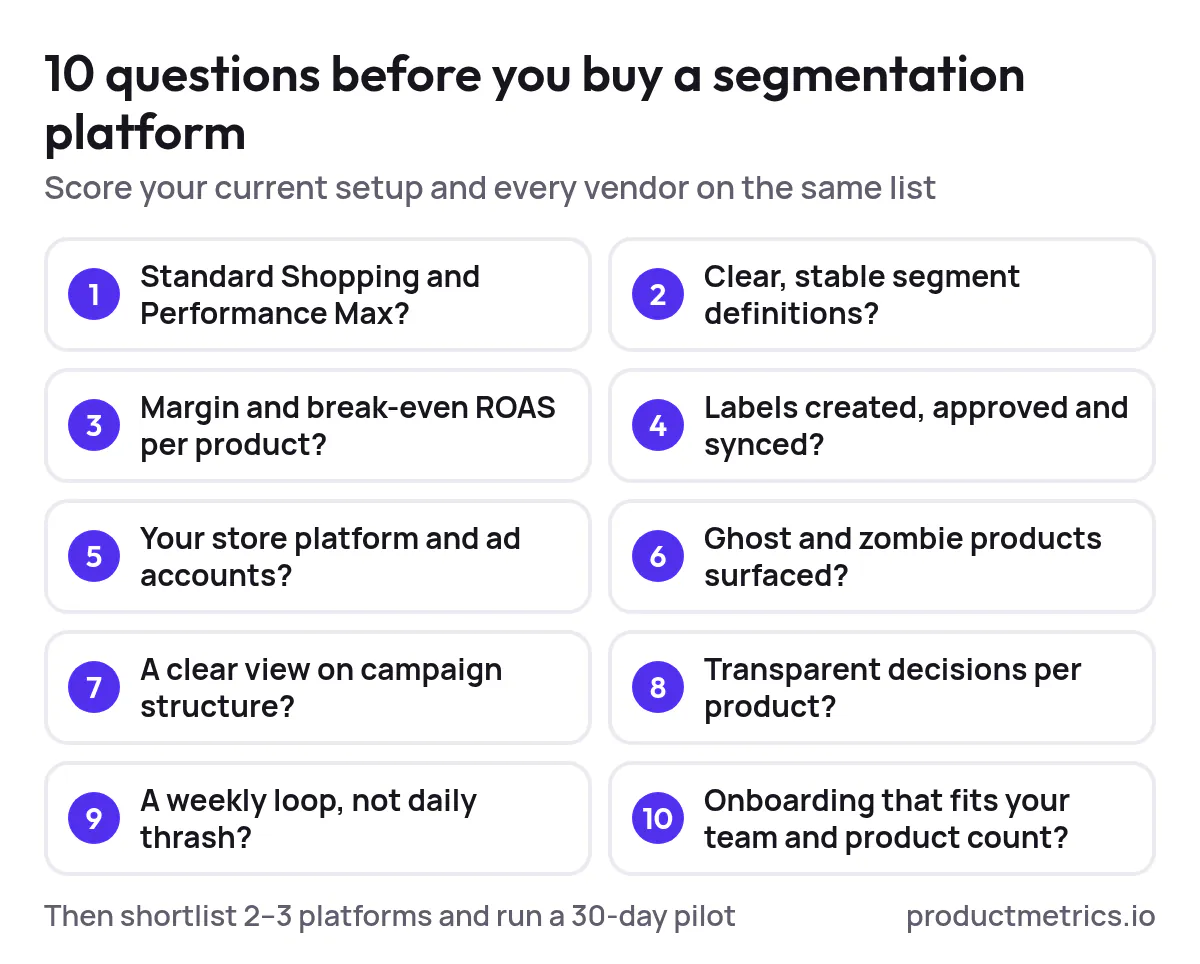
4. Evaluation Framework: 10 Questions To Answer Before You Purchase A Platform
Use these questions as a checklist when you purchase solutions for automating product group segmentation in Google Shopping campaigns.
1. Does It Support Both Standard Shopping And Performance Max?
You want segmentation that survives changes in Google’s campaign mix.
- Why it matters: Standard Shopping uses product groups; PMax uses listing groups. Both can filter on Merchant Center custom labels, so your tool should write labels in a way that works in either structure. (Source: Google Ads API – Listing Groups for Retail)
- What great looks like: The vendor can show examples of label‑driven structures for both campaign types, and how labels flow from their platform into Merchant Center and then into campaigns.
2. How Does It Define Segments, And Are They Stable?
Segmentation only drives better campaign decisions if segments actually mean something and don’t change daily.
- Why it matters: Product Metrics, for instance, places each product in one of six segments based on profitability (ROAS or POAS) against your target, inventory levels, return rate, potential and price against competitors, and a product only changes segment when the model has enough evidence, so segments don’t constantly flip. (Source: Product Metrics – Product Segmentation)
- Questions to ask:
- Are segments built from clear inputs (clicks, cost, revenue, margin, stock)?
- How often are they recalculated?
- Is there a minimum data threshold before a product moves?
3. Does It Take Margin And Break-Even ROAS Into Account?
Campaign‑level ROAS can hide loss‑making products. Profit‑first teams judge each product against its own break‑even ROAS, calculated as 1 ÷ contribution margin. (Source: Product Metrics – Ecommerce PPC: costs, metrics and a profit‑first strategy)
- Why it matters: A ROAS of 4 can be excellent for a 50% margin product and a loss for a 20% margin product.
- What great looks like: Your segmentation platform can ingest margin data from your shop backend, calculate per‑product break‑even ROAS, and distinguish between “above break‑even but below target” and “below break‑even” products.

Show the dataHide the data
| Contribution margin | Break-even ROAS |
|---|---|
| 50% margin | 2 |
| 20% margin | 5 |
4. How Are Custom Labels Created, Approved And Synced To Merchant Center?
This is the core of any platform you order for Google Shopping optimisation that improves listing group relevance in campaign segmentation.
- Why it matters: Google allows up to five custom label attributes and expects you to use them for internal grouping and bid logic. (Source: Google Merchant Center Help – Custom label 0–4)
- What great looks like:
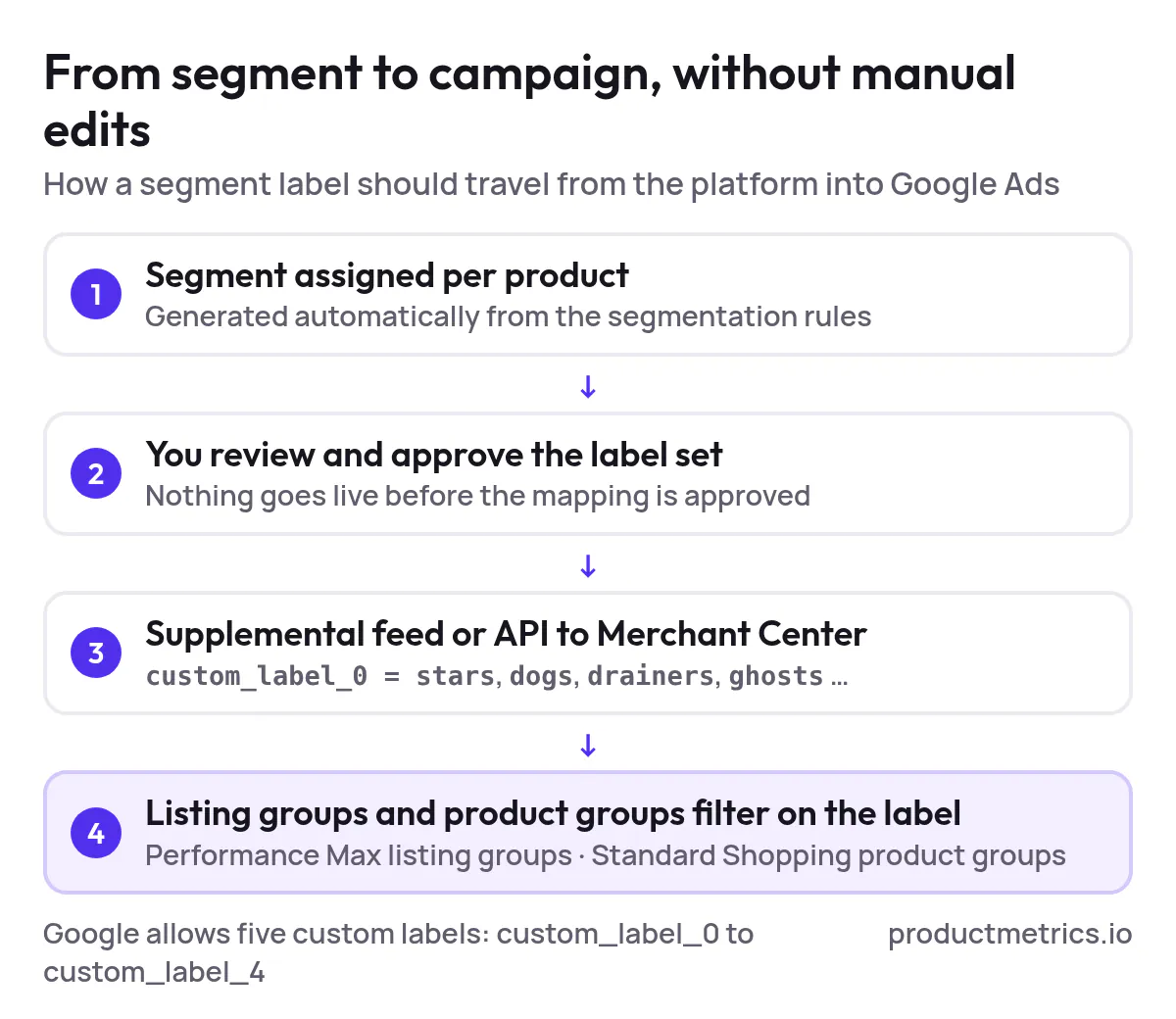
- Labels are generated automatically from segmentation rules.
- They’re written via a supplemental feed or API into Merchant Center.
- You can review and approve label sets before they go live.
- Updates run daily so campaigns always reflect the latest segments.
Product Metrics, for example, writes each product’s segment into custom_label_0 via a supplemental feed after you approve the mapping, so your PMax listing groups or Shopping product groups can filter on stars, dogs, drainers, ghosts and so on without manual edits. (Source: Product Metrics – Performance Max for Ecommerce: Exclude Products by Profit)
5. Which Ecommerce Platforms And Ad Accounts Does It Integrate With?
- Why it matters: Clean, low‑friction integrations are the difference between “live in a week” and “stalled IT ticket”.
- What great looks like:
- Direct connections to major ecommerce platforms such as Shopify, WooCommerce, Magento, Lightspeed and Shopware 6.
- Native connections to Google Ads, Merchant Center and (optionally) Meta, so profit and customer signals can feed multiple channels. (Source: Product Metrics – Google Shopping Segmentation and Conversion Tracking)
6. Can It Surface And Act On Ghost Or Zombie Products?
Every product range has products that get no impressions (ghosts) or tiny spend with no returns (often called zombies).
- Why it matters: These products either need feed fixes, better pricing/positioning or deliberate exclusion so they don’t clutter campaigns.
- What great looks like:
- A dedicated segment for products with no impressions.
- Recommendations on whether to clean the feed, test in a focused campaign or exclude them.
- The ability to label them for special treatment (e.g.,
custom_label_0 = ghosts). (Source: Product Metrics – Product Segmentation)
7. How Opinionated Is The Platform About Campaign Structure?
Buying software is not just about data; you’re also buying a point of view on how to structure campaigns.
Look for platforms that can show:
- Example structures for:
- Bestsellers vs the rest.
- Margin tiers.
- New products.
- Dogs/drainers you want to exclude from main campaigns.
- Step‑by‑step instructions on how labels map into product groups or listing groups in Google Ads. Product Metrics’ own guides, for instance, walk through how to subdivide listing groups on a custom label and exclude a segment like
dogsfrom PMax. (Source: Product Metrics – Performance Max for Ecommerce: Exclude Products by Profit)
8. How Transparent Is The Decision Making?
Avoid black boxes. When you buy a Google Shopping campaign management platform with product group segmentation features, you want to know why a product is in a segment.
- What great looks like:
- Clear dashboards that show clicks, cost, ROAS/POAS and share of spend by segment.
- Per‑product drill‑downs combining ads performance with journeys, competitor prices, margin and stock, so you can see why the algorithm calls something a Star vs a Dog. (Source: Product Metrics – Product Context)
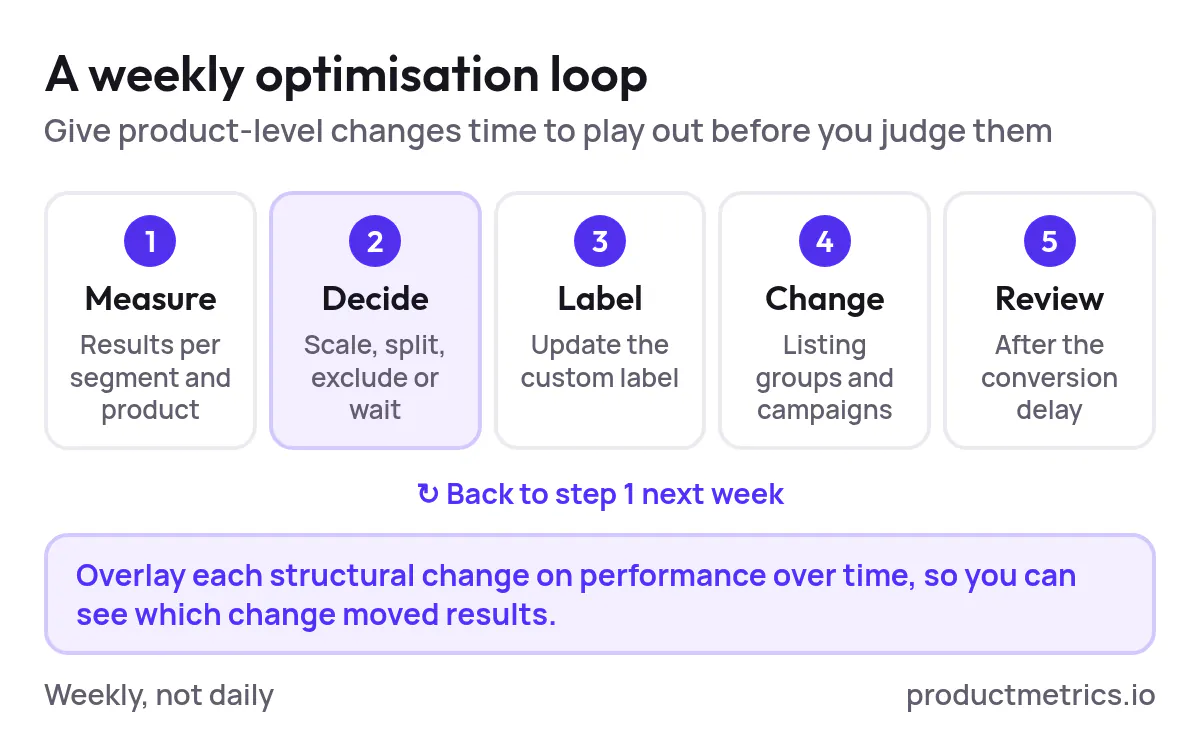
9. Does It Help You Run A Weekly Optimisation Loop, Not Daily Thrash?
Product‑level decisions in Shopping and PMax need time to play out. Google itself recommends letting enough time pass for conversions to be attributed before judging changes to Performance Max. (Source: Google Ads Help – About Performance Max campaigns)
- What great looks like:
- A clear loop: measure → decide (scale, split, exclude, wait) → label → change campaigns → review.
- Tools to overlay structural changes on performance over time so you can see what actually moved results. Product Metrics’ Campaign changes page, for example, overlays campaign changes with ROAS and target ROAS for Shopping and PMax across a conversion delay window. (Source: Product Metrics – Performance Max for Ecommerce: Exclude Products by Profit)
10. What Does Onboarding Look Like For Your Team Size And Number Of Products?
Finally, make sure the platform you order is designed for your reality:
- Number of products (hundreds vs tens of thousands of SKUs).
- Team structure (solo in‑house marketer vs specialist agency vs in‑house + agency blend).
- Appetite for change (how much structure you’re ready to rework in the first 30 days).
Product Metrics is positioned for ecommerce teams running roughly 500 to 50,000 products on Shopping and Performance Max, with guided onboarding and real-time automated segmentation once connected. (Source: Product Metrics – Google Shopping Segmentation and Conversion Tracking)
5. How Product Metrics Approaches Listing Group Relevance
Product Metrics is a profit optimisation platform for ecommerce advertising: one app for server-side tracking, profit bidding, product segmentation and campaign planning across Google Ads, Meta and ChatGPT Ads. It sends each order’s profit, new or returning status and lifetime value to the ad platforms, so merchants can bid on POAS, new customers and LTV.
Machine learning segments every product into custom labels for Shopping and Performance Max, and the campaign plan sets out the ideal campaign structure for those segments. A dashboard shows profit, customers, stock and returns.
Here’s how Product Metrics lines up if you’re specifically looking to buy a Google Shopping campaign segmentation platform for optimising listing group relevance.
Unified ML-Driven Product Segmentation
- Segments every product into Stars, Question Marks, Cash Cows, Dogs, Drainers and Ghosts using machine learning on profitability (ROAS or POAS against your targets), inventory levels, return rate, potential and price against competitors.
- Only changes a product’s segment when the model has enough evidence, so segments stay stable from week to week instead of flapping on low data.
- Keeps the logic transparent: for each product you can see its clicks, return vs target, and segment. (Source: Product Metrics – Product Segmentation)
Automatic, Controlled Custom Labels For Shopping And PMax
- Writes segment labels (for example
stars,dogs,ghosts) into a custom label via a supplemental feed once you approve them. - Lets you create additional rules such as “Promote Star candidates” that combine POAS, margin and stock cover, then output labels like
star_candidatefor campaigns to pick up. (Source: Product Metrics – Google Shopping Segmentation and Conversion Tracking) - Updates labels in real time so your product groups and listing groups always have fresh inputs.
Built To Work With Your Existing Stack
- Connects directly to Shopify, WooCommerce, Magento, Lightspeed and Shopware 6 via native apps or plugins.
- Sends profit, revenue and customer signals back to Google Ads and Meta, so your bid strategies can optimise on real contribution instead of just revenue. (Source: Product Metrics – Google Shopping Segmentation and Conversion Tracking)
Product Context Beyond The Ad Click
Segmentation alone doesn’t tell you why a product behaves the way it does. Product Metrics layers in:
- Product journeys: which other products buyers add to the basket after landing on a given product page.
- Competitor prices: how your price compares to similar products on other sites, with a label like
above_medianwritten back into a custom label for use in campaigns. (Source: Product Metrics – Competitor Prices) - Margin & inventory: whether a product already clears break‑even ROAS and how many weeks of stock you have.
That context lets you adjust listing group relevance not just on “what converted” but on what should get priority, given profit and stock.
Measurement That Survives Ad Blockers
Because a lot of ecommerce traffic now runs behind tracking prevention and ad blockers, Product Metrics includes Full Signal, a server‑side tracking layer designed to keep purchase conversions flowing back to Google Ads and Meta even when the default client‑side tag is blocked. (Source: Product Metrics – Full Signal Tracking)
That matters for segmentation: if conversions are under‑reported, low‑volume winners can be mis‑classified as Drainers.
6. A Sample Segmentation Blueprint You Can Run On Any Good Platform
Once you’ve chosen a tool, here’s a simple segmentation schema you can implement to keep your product groups relevant in both Shopping and PMax.
Step 1: Segment By Performance And Profit
Product Metrics machine learning weighs profitability, inventory levels, return rate, potential and price against competitors, with clicks as just one signal among many, and places every product in one of six segments. Create segments roughly along these lines (names can change, logic shouldn’t):
- Stars: High potential, high profitability. Proven winners that beat your target.
- Question Marks: High potential, medium profitability. Room to grow, profit just under target.
- Cash Cows: Low potential, high profitability. Efficient products with less room to grow.
- Dogs: High potential, low profitability. They take budget without paying back.
- Drainers: Low potential, no profit. Spend with nothing to show for it.
- Ghosts: Inactive: no impressions. Google is not showing them.
These are the same six segments as Product Metrics’ Product Segmentation, with each segment receiving its own label value. (Source: Product Metrics – Product Segmentation)
Step 2: Map Segments Into Custom Labels
Pick one custom label (for example custom_label_0) and map your segments:
starsquestion_markscash_cowsdogsdrainersghosts
Your platform should write these automatically into Merchant Center.
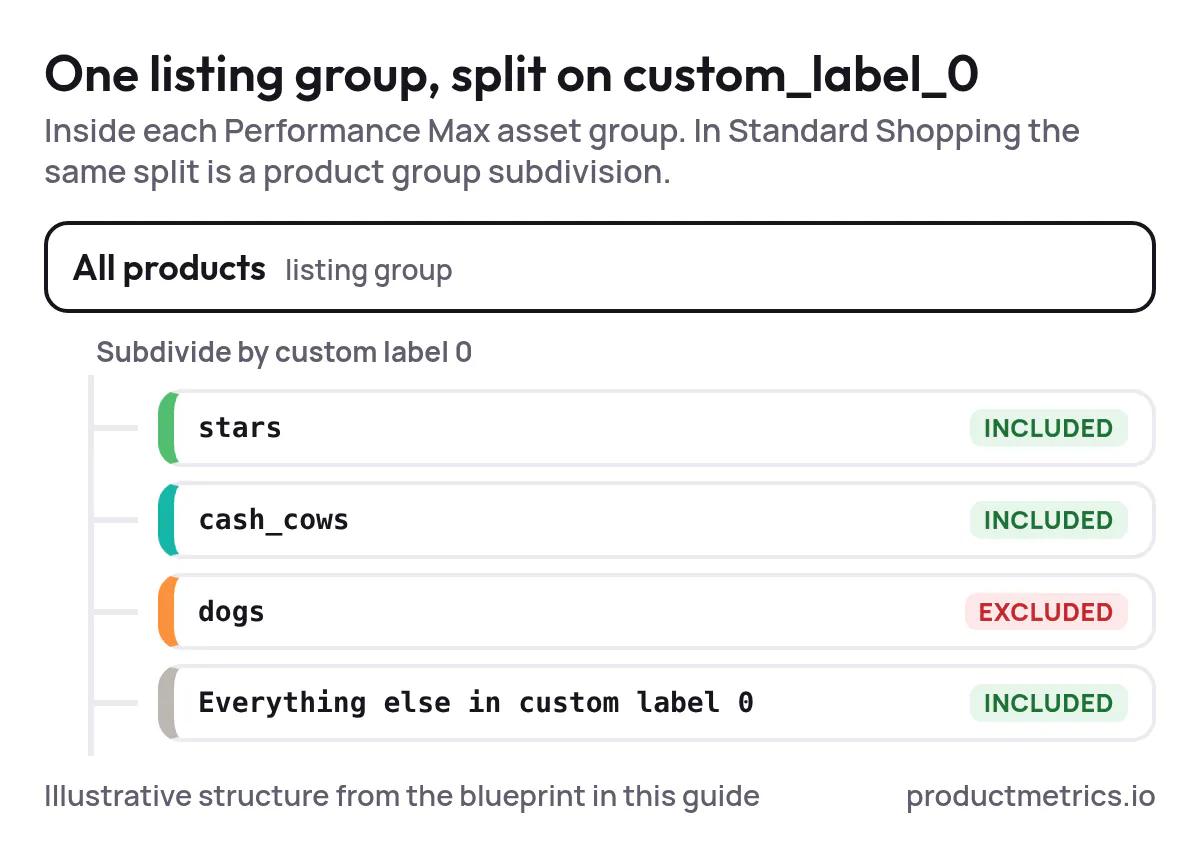
Step 3: Build Product Groups Or Listing Groups Around Those Labels
In Standard Shopping:
- Subdivide product groups by
custom_label_0so you can bid and report per segment.
In Performance Max:
- Subdivide each asset group’s listing group on
custom_label_0and setdogsto Excluded, while keepingstarsandcash_cowsincluded. (Source: Product Metrics – Performance Max for Ecommerce: Exclude Products by Profit)
You now have product groups that are structurally simple but deeply relevant to how products perform.
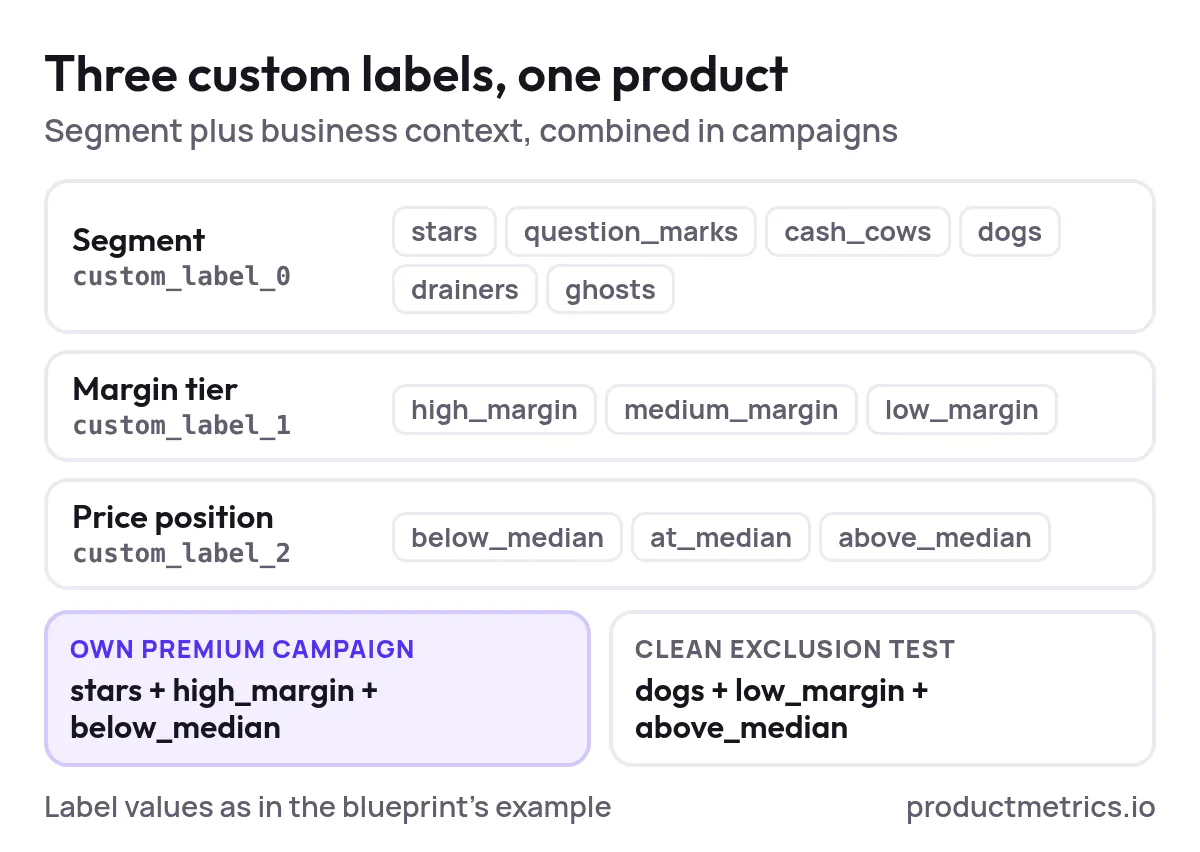
Step 4: Add Two More Custom Labels For Business Context
Examples:
custom_label_1: margin tier (high_margin,medium_margin,low_margin).custom_label_2: price position (below_median,at_median,above_median). (Source: Product Metrics – Competitor Prices)
You can then, for example, give high‑margin Stars below market median price their own premium campaign, or separate low‑margin Dogs above median into a clean exclusion test.
7. From Order To Live Campaigns: A 30-Day Rollout Plan
When you’re ready to order a Google Shopping campaign segmentation solution for better product group targeting, use a simple 30‑day plan.
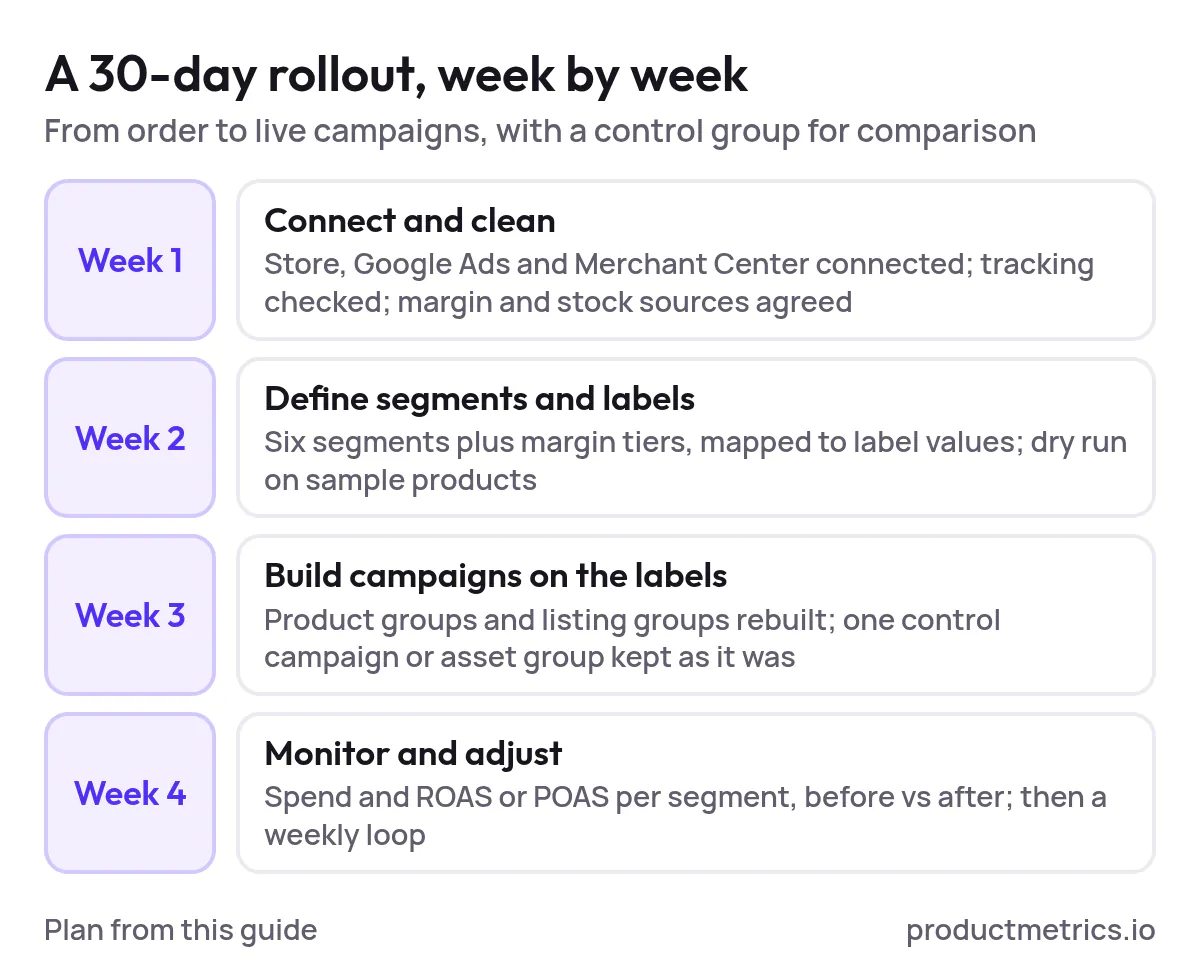
Week 1: Connect And Clean
- Connect your ecommerce platform, Google Ads and Merchant Center.
- Confirm that tracking is accurate and deduplicated so segmentation isn’t based on bad data.
- Align on key business inputs: margin sources, stock feeds, product group priorities.
Week 2: Define Segments And Labels
- Agree on initial segmentation logic (e.g., six performance segments + margin tiers).
- Map each segment to custom label values.
- Run a dry‑run segmentation and review a sample of products per segment.
Week 3: Build Campaigns Around Listing Group Relevance
- For Standard Shopping, rebuild product groups around your new labels (Stars, Dogs, Ghosts, etc.).
- For PMax, rebuild listing groups per asset group to include/exclude the right label values.
- Keep one “control” campaign or asset group with your old structure for comparison.
Week 4: Monitor And Adjust
- Compare spend and ROAS/POAS by segment before and after.
- Tighten rules: for example, move some Question Marks into an experimental campaign or narrow which Dogs are excluded.
- Document learnings and lock in a weekly optimisation loop.
With Product Metrics, much of this is guided: segmentation, label writing and suggested campaign structures are baked into the platform and its documentation, so the main tasks for your team are connecting data sources and agreeing on business rules. (Source: Product Metrics – Google Shopping Segmentation and Conversion Tracking)
8. Next Steps: Turn This Framework Into Your Shortlist
If you’ve read this far, you’re not just browsing. You’re trying to shop for a Google Shopping campaign management platform with listing group relevance features that’s worth the time and budget to implement.
Here’s a simple way to move from research to decision:
- Score your current setup against the 10 questions above.
- Shortlist 2–3 platforms that:
- Plug into both Shopping and PMax via custom labels.
- Offer clear, stable segmentation logic with margin and stock.
- Show transparent, product‑level explanations.
- Run a 30‑day pilot on a meaningful slice of your products.
- Buy the platform that makes weekly product‑level decisions feel obvious instead of painful.
If you want to see how this looks on your own products, you can connect Product Metrics to your Google Ads and Merchant Center accounts and start with its default segmentation and labelling rules, then adapt them to your business. (Source: Product Metrics – Google Shopping Segmentation and Conversion Tracking)
From there, every new change you make to campaigns will rest on a stronger foundation: product groups that are finally as relevant as the products and margins behind them.
Written by
Berend Vrakking, Founder of Product Metrics
1M+ products analysed · Nominated at the Dutch Search Awards for Best Measurement Campaign (2023) and Best Use of Data (2024)
Keep reading.
Best Platforms For Advanced Google Shopping Segmentation: A Comparative Evaluation Framework
Best platforms for advanced Google Shopping segmentation, scored 1–5 on inputs, automation, PMax fit, scale and reporting, with a 7-step evaluation.
The Definitive Buyer’s Guide To Granular Google Shopping Campaign Segmentation Tools (2026 Edition)
The definitive buyer’s guide to granular Google Shopping campaign segmentation tools: three tool types, vendor criteria and a 60–90 day pilot.
Best Google Shopping Segmentation Software In 2026: Clear Structure, Analytics, And Visualization Compared
Best Google Shopping Segmentation Software In 2026: four platform types scored 1–5 on structure clarity, analytics, visualisation and workflow.
See which of your products to push, fix or pause. Start with your own products, or a 30-second estimate.
Check one product first: work out its break-even ROAS in the calculator. Then see where all your products stand.
Or set it up with your AI assistant:
 Set up with Claude
 Set up with ChatGPT
Questions, or want to spar about your products? Book a demo: a video call with Berend, then a demo account.