
The Definitive Buyer’s Guide To Granular Google Shopping Campaign Segmentation Tools (2026 Edition)
The definitive buyer’s guide to granular Google Shopping campaign segmentation tools: three tool types, vendor criteria and a 60–90 day pilot.
If you’re typing things like “where can I buy software for detailed segmentation in Google Shopping campaigns?” into Google, you’re not looking for theory.
You want a short list of tools you can actually buy, a way to compare them, and a low‑risk pilot plan so you don’t blow up Performance Max in the process.
This guide is written for PPC specialists who:
- Run serious revenue through Shopping and Performance Max.
- Feel stuck between “one giant PMax” and “a labyrinth of micro‑campaigns.”
- Need segmentation granularity to become a lever, not a full‑time hobby.
By the end, you’ll know:
- Which type of tool fits your account.
- How to evaluate vendors on segmentation granularity (not just pretty dashboards).
- How to run a 60–90 day pilot with a clear decision matrix.
- Where a platform like Product Metrics (productmetrics.io) fits if you want profit‑driven, product‑level control.
1. What “Segmentation Granularity” Really Means In Google Shopping
Google Shopping doesn’t use keywords; it uses product data, product groups, and Merchant Center labels to decide what shows where and at what bid. Google explicitly recommends splitting that “All products” bucket into smaller product groups so you can bid more precisely. (Source: Google Shopping Advertising exam refresher)
In practice, segmentation granularity has three parts:
- How many dimensions you segment on
Typical dimensions include:- Brand, category, product type, item ID.
- Price and margin bands.
- Lifecycle (new, evergreen, clearance).
- Stock/inventory risk.
- Performance tiers (ROAS, POAS, revenue, orders).
- Intent tiers (brand vs generic vs SKU, where Standard Shopping is still in play).
- How deep you go inside each dimension
- Category only vs SKU‑level.
- Three simple price tiers vs dozens of fine‑grained buckets.
- A single “bestsellers” label vs multi‑tier performance bands.
- How dynamic your segmentation is
- Static: one‑off splits that never change.
- Dynamic: products move between segments as performance, price, or stock change.
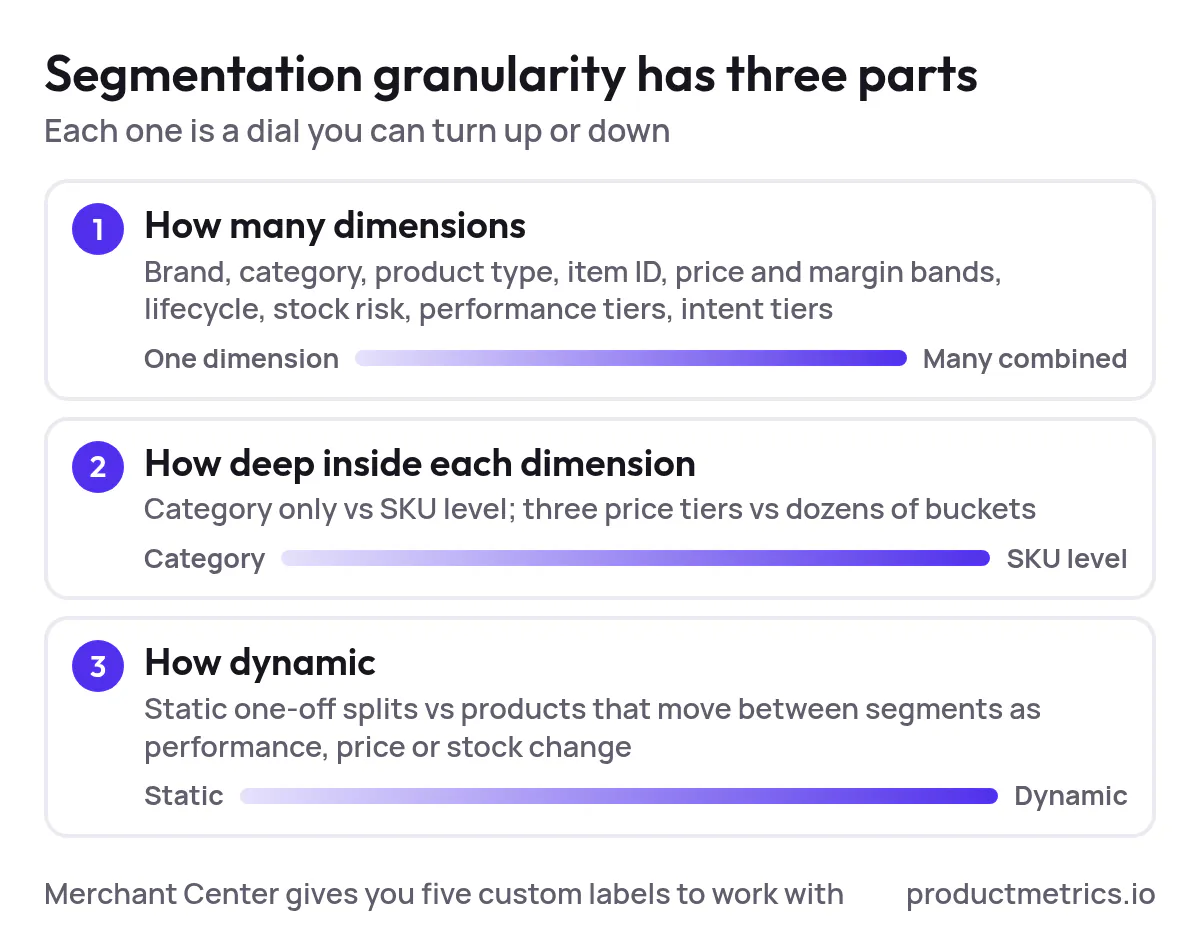
Merchant Center supports five custom label slots (custom_label_0–custom_label_4) precisely so you can group products for reporting and bidding (for example, seasonal, clearance, or high‑margin products). (Source: Google Merchant Center – Custom label 0–4)
On top of that, the Merchant/Reporting APIs let you segment performance by attributes such as category, product type, and custom labels for granular analysis. (Source: Google Merchant API – Reports segmentation)
In 2026, Google has also expanded product‑level reporting across Shopping and Performance Max, so you can see impressions, clicks, cost, conversions, and revenue per product across more networks than before. (Source: Google Ads Help – About product reporting, Google Ads API – Shopping Performance View)
That’s the raw material. Segmentation tools decide how to use it.
2. Do You Really Need Segmentation Software? A 3‑Question Check
Before you go shopping for “campaign segmentation solutions for Google Shopping with fine granularity,” sanity‑check your situation.
If at least three of these are true, you’re in the market for a tool:
- Number of products: You manage more than ~300 SKUs or your product range turns over quickly.
- Margin spread: Different lines have very different margins, and blended ROAS hides losers.
- Hybrid setup: You run both Performance Max and some Standard Shopping for query control.
- Ops pain: You already spend hours every month restructuring campaigns, labels, or scripts.
- Multi‑market or multi‑brand: You manage several countries/brands and want consistent structures.
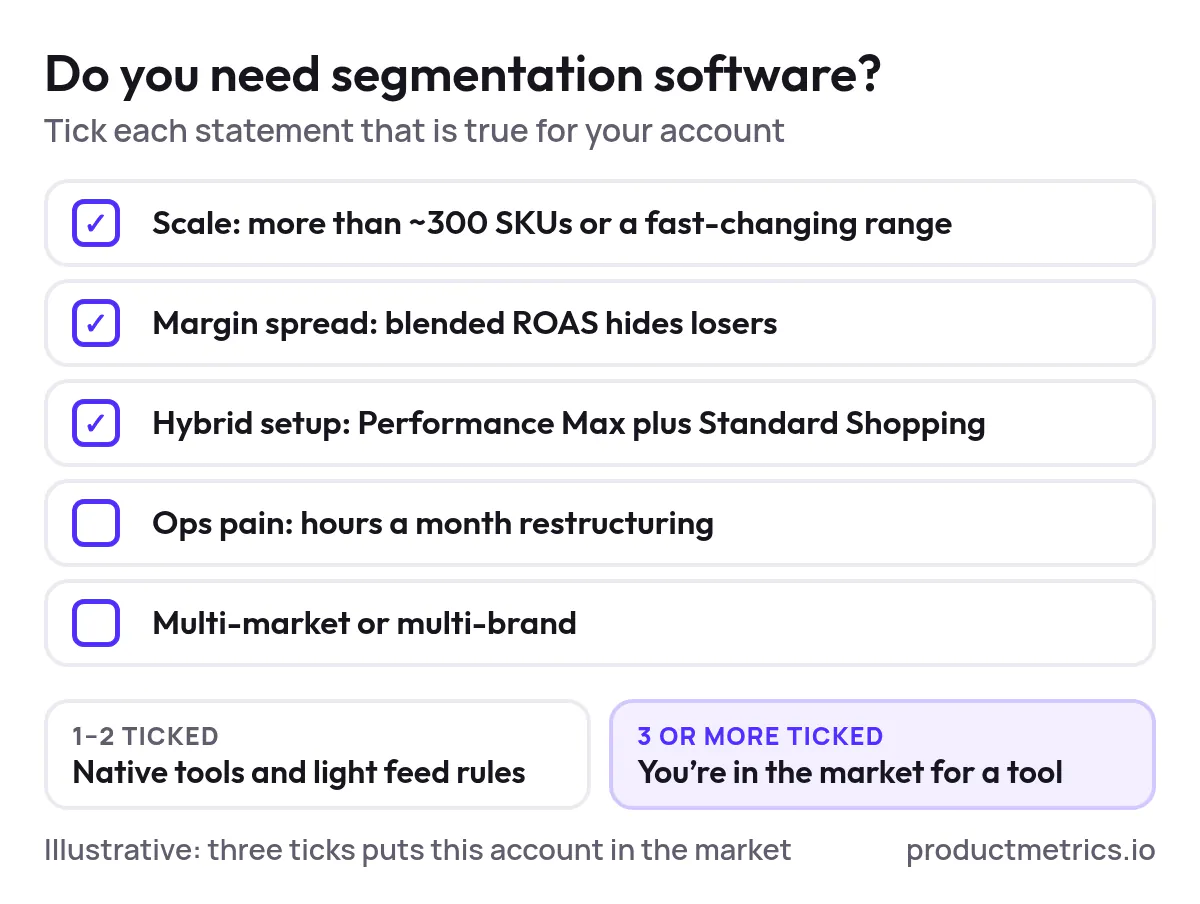
If only one or two are true, you may get away with native tools + lightweight feed rules for now:
- Use custom labels or product_type to create a few sensible product groups. (Source: Google Shopping Optimization Handbook)
- Split by brand/category, plus maybe “bestsellers” and simple price/margin tiers. (Source: Plytix – Google Shopping Best Practices)
Once you hit that “three‑or‑more” threshold, segmentation granularity becomes a platform question, not a simple campaign‑settings tweak.
3. The Tool Landscape - 3 Ways To Get Granular Segmentation
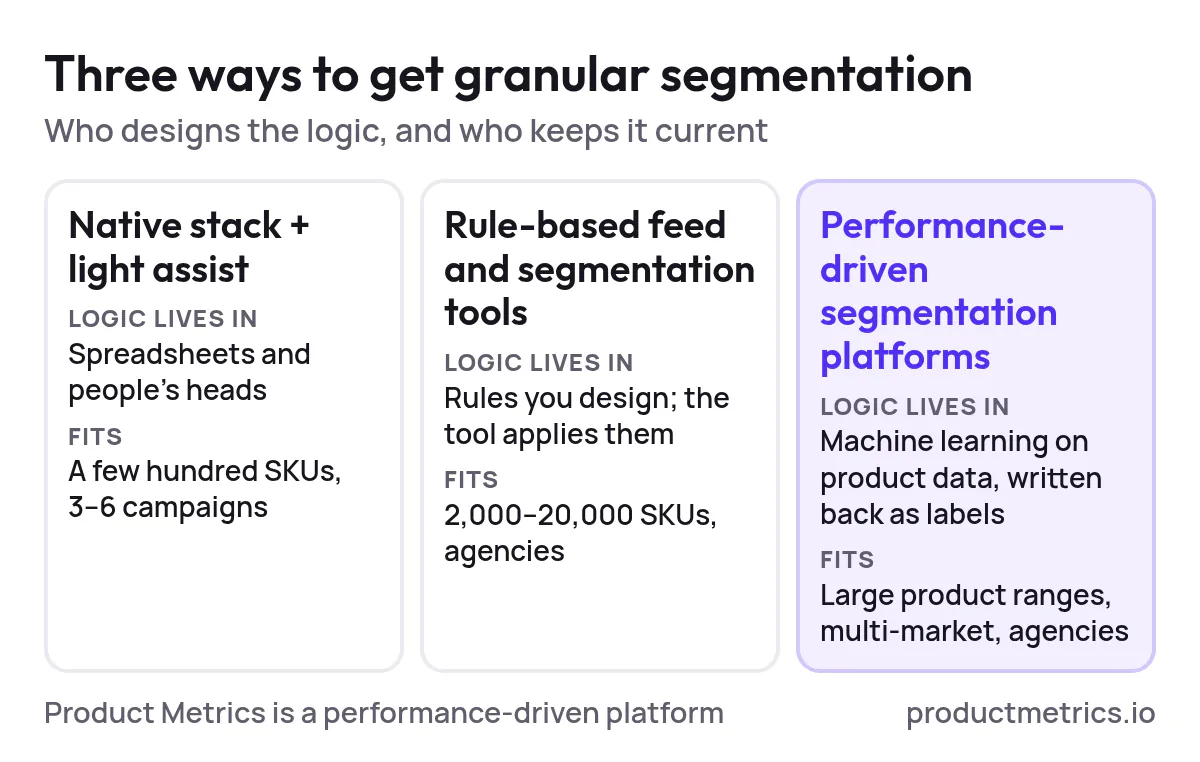
When someone searches “shop for Google Shopping optimization tools focused on segmentation granularity,” they usually end up looking at three broad categories of solution.
3.1 Native Stack + Light Assist
You stay mostly inside Google’s own tools, sometimes with a basic feed app:
- Product groups and campaign priorities in Shopping.
- Custom labels managed via Merchant Center rules, sheets, or a simple feed app. (Source: How to use custom labels – Cypress North)
- A few PMax campaigns (for example, brand vs non‑brand, high‑margin vs the rest).
Who this fits:
- Growing brands with a few hundred SKUs.
- Teams happy to manage 3–6 carefully designed campaigns, not dozens.
Limitations:
- Segmentation logic lives in spreadsheets and people’s heads.
- Hard to keep labels and structures fresh as assortment, prices, and performance change. (Source: Google Shopping feed setup discussion – Reddit)
3.2 Rule‑Based Feed & Segmentation Tools
These tools help you:
- Maintain a clean feed.
- Create rules for custom labels (for example, price buckets, margin bands, “bestsellers”).
- Push those labels into Merchant Center automatically. (Source: Custom Label Merchant Center overview)
You still design the segmentation rules, but the platform executes them consistently.
Who this fits:
- Mid‑market retailers with 2,000–20,000 SKUs.
- Agencies that want reusable label schemes across multiple clients.
Limitations:
- Rules are usually static; they don’t learn from performance automatically.
- Most tools don’t combine profit, journeys, competitor prices, and stock in one view.
3.3 Performance‑Driven Segmentation Platforms
This is where purpose‑built SKU‑level Shopping optimisation software lives.
Platforms in this category are designed to:
- Pull product‑level performance from Google Ads and Merchant Center.
- Join it with margin, stock, and sometimes competitor prices.
- Use machine learning to classify products into performance segments.
- Write those segments back to Merchant Center as custom labels. (Source: Product Metrics – Google Shopping Segmentation and Conversion Tracking, Product Metrics – Product segmentation glossary)
Product Metrics (productmetrics.io) is a clear example:
- It connects Google Ads, Merchant Center, and your store (Shopify, WooCommerce, Magento, Lightspeed, Shopware 6). (Source: Product Metrics – Google Shopping Segmentation and Conversion Tracking)
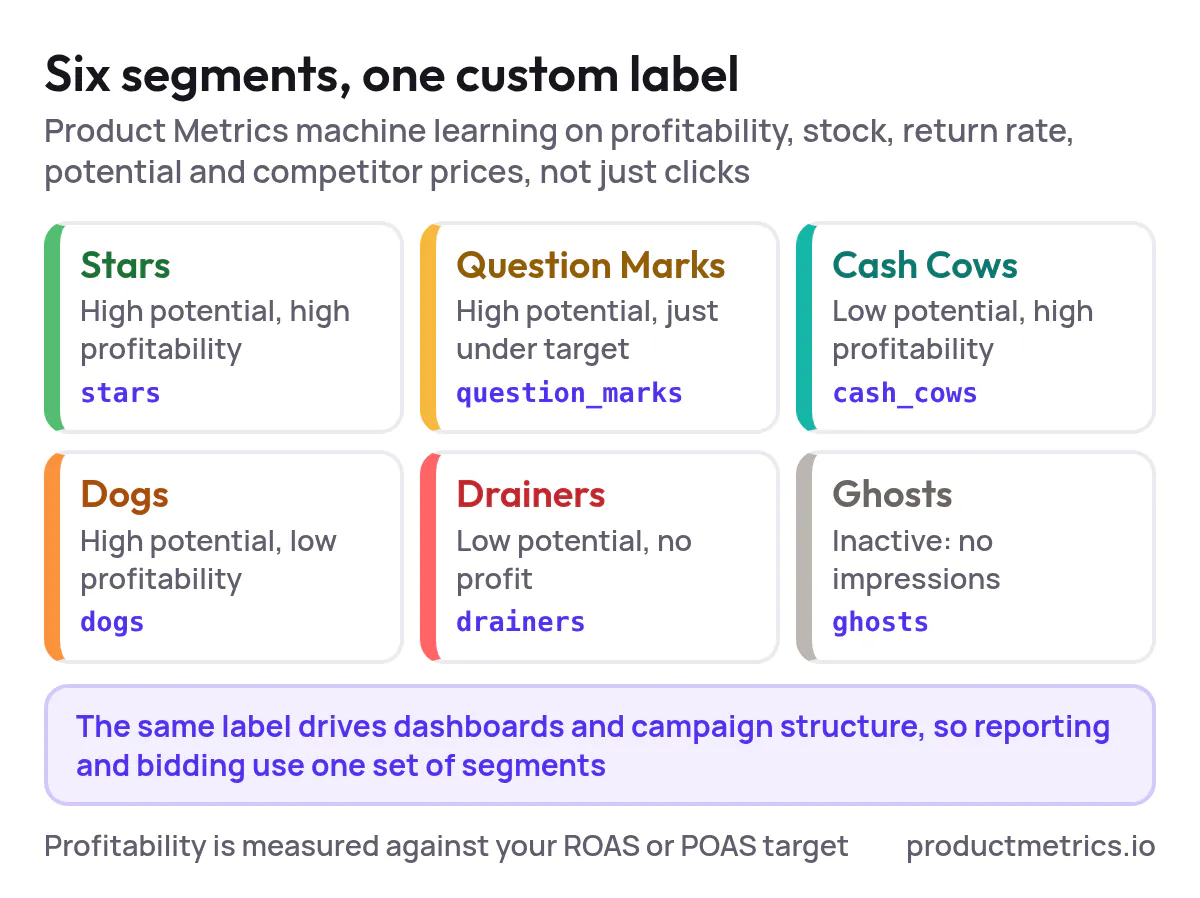
- Machine learning groups products into six segments (Stars, Question Marks, Cash Cows, Dogs, Drainers, Ghosts) based on profitability, inventory levels, return rate, potential and price against competitors, with clicks as just one signal among many, then writes those segments to Merchant Center as custom labels. (Source: Product Metrics – Product segmentation glossary, Product Metrics – Google Shopping ROAS reporting)
- Those labels become the backbone of both dashboards and campaign structure.
Who this fits:
- Larger product ranges, multi‑market setups, and performance agencies.
- Teams that want profit per product, not just ROAS averages.
4. Decision Matrix - Match Your Situation To The Right Tool Type
Use this matrix as a quick “what should I buy?” shortcut.
| Your Situation | Native + Light Assist | Rule‑Based Feed / Segmentation | Performance‑Driven Segmentation Platform |
|---|---|---|---|
| Number of products | Up to ~500 SKUs, low churn | 500–20,000 SKUs, moderate churn | 5,000–1M+ SKUs, high churn |
| Margin spread | Fairly even margins | Noticeable margin tiers | Large spread; some products barely break even |
| Markets / brands | 1–2 markets, one brand | Several markets/brands | Multi‑country, multi‑brand, franchise/aggregator |
| Channel mix | Mostly PMax, few Shopping campaigns | Hybrid PMax + Standard Shopping | Heavy PMax plus complex Shopping and other channels |
| Ops capacity | 1 PPC specialist with limited time | Small team (in‑house or agency), some ops support | Dedicated performance + analytics/ops resources |
| Segmentation goal | A handful of sensible splits (brand / category / bestsellers) | Systematic label rules (margin, lifecycle, performance bands) | Always‑on, performance‑driven segmentation with labels updated daily |
| Likely answer | Stay native for now; maybe add a light feed tool | Buy a rule‑based feed/segmentation tool | Buy a performance‑driven platform like Product Metrics |
If your answers lean heavily into the right‑hand column, it’s time to purchase granular segmentation tools for Google Shopping campaign optimisation, not just another reporting dashboard.
5. Evaluation Criteria - How To Compare Granular Segmentation Tools
When you evaluate vendors, you want more than “we do custom labels.” You want proof that they handle segmentation granularity at scale.
Use this as your RFP / shortlisting checklist.
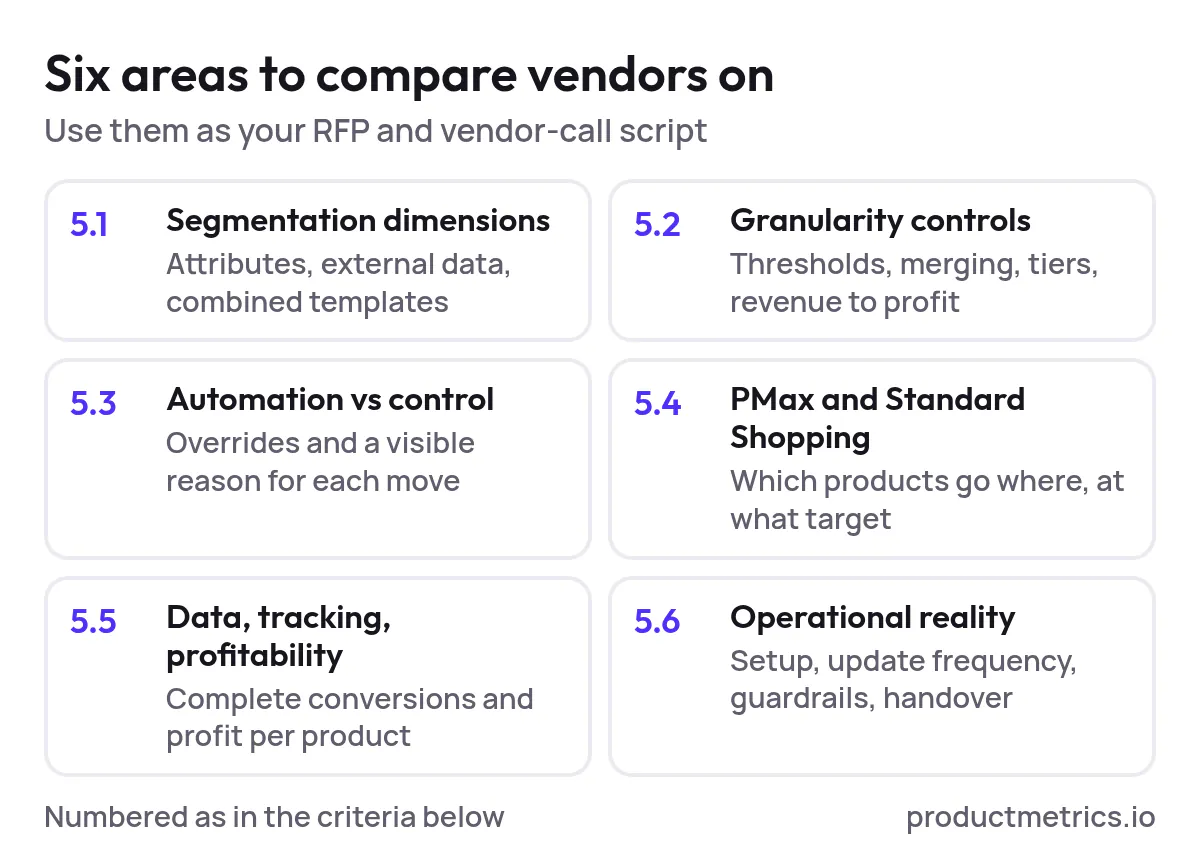
5.1 Segmentation Dimensions
Ask each vendor:
- Which product attributes can I segment on?
At minimum you want brand, category, product type, item ID, price, margin, inventory, and custom labels. Google explicitly calls out custom labels as a way to group products for reporting and bidding. (Source: Google Merchant Center – Custom label 0–4) - Can I bring in external attributes?
- Margin and cost of goods from your store/ERP.
- LTV or CLV segments from your CRM/CDP.
- Stock coverage or inventory risk.
- Can I combine multiple dimensions in one template?
For example, margin × lifecycle × performance tier.
5.2 Granularity Controls
You need software that lets you dial granularity up or down without rebuilding your account.
Questions to ask:
- Can I set thresholds (for example, minimum clicks or conversions) before a SKU earns its own campaign or ad group?
- Can the system merge low‑volume segments back into a parent bucket automatically?
- Can I change the number of performance tiers without re‑implementing everything?
- Can I switch from revenue to profit (POAS) as the main metric and have segments realign?
Product Metrics, for example, supports adding cost of goods so you can move from ROAS to POAS and profit per product. (Source: Product Metrics – Google Shopping ROAS reporting)
5.3 Automation vs Control
You want automation that respects your strategy.
Ask vendors:
- Do you support both rule‑based and performance‑based segmentation?
- Can I override automated decisions for hero SKUs, key categories, or strategic brands?
- Can I see why a product moved from one segment or campaign to another (audit log, rule history)?
5.4 PMax And Standard Shopping Support
In 2026 most serious accounts are hybrids:
- Performance Max for scale and reach.
- Standard Shopping (or other formats) for strict query control, brand/non‑brand separation, or testing. (Source: Product Metrics – Google Performance Max guide)
Check:
- Can the tool help you decide which products go into which PMax campaigns or asset groups, and at what targets?
- Does it support query‑level strategies where Standard Shopping is still used (priorities, negatives, intent tiers)?
- How does it avoid pointless fragmentation in PMax now that product reporting covers more networks and can show more granular product performance trends? (Source: Google Ads Help – About product reporting)
5.5 Data, Tracking, And Profitability
Advanced segmentation without solid data is just… prettier chaos.
Ask:
- How do you validate that revenue/conversion data is complete and de‑duplicated?
- Do you support server‑side or enhanced tracking to recover data hidden by ad blockers, then translate that into reliable ROAS/POAS per product? (Source: Product Metrics – Google Shopping ROAS reporting)
- Can you calculate profit per product, not just revenue, and surface it in the same UI as segmentation?
5.6 Operational Reality
Even the best segmentation logic fails if you can’t live with it week to week.
Probe for:
- Setup: How long to connect Google Ads, Merchant Center, and your store? Does the tool avoid custom development? Product Metrics, for instance, is sold as a SaaS platform you can connect without engineering work (on Magento, a developer installs the module once). (Source: Product Metrics – Terms & Conditions, Product Metrics – Google Shopping Segmentation and Conversion Tracking)
- Update frequency: Are labels and segments recalculated daily? Hourly? On demand?
- Guardrails: What protects you from over‑fragmentation (warnings, automatic consolidation)?
- Ownership: Could another PPC specialist understand and maintain the setup in a handover?
If a vendor can’t answer these questions clearly, think twice before you buy Google Shopping campaign segmentation software with advanced granularity features from them.
6. Your 60–90 Day Pilot Plan (Without Nuking Performance Max)
Once you’ve shortlisted one or two platforms, treat them like any other major bidding or analytics change: run a contained, measurable pilot.
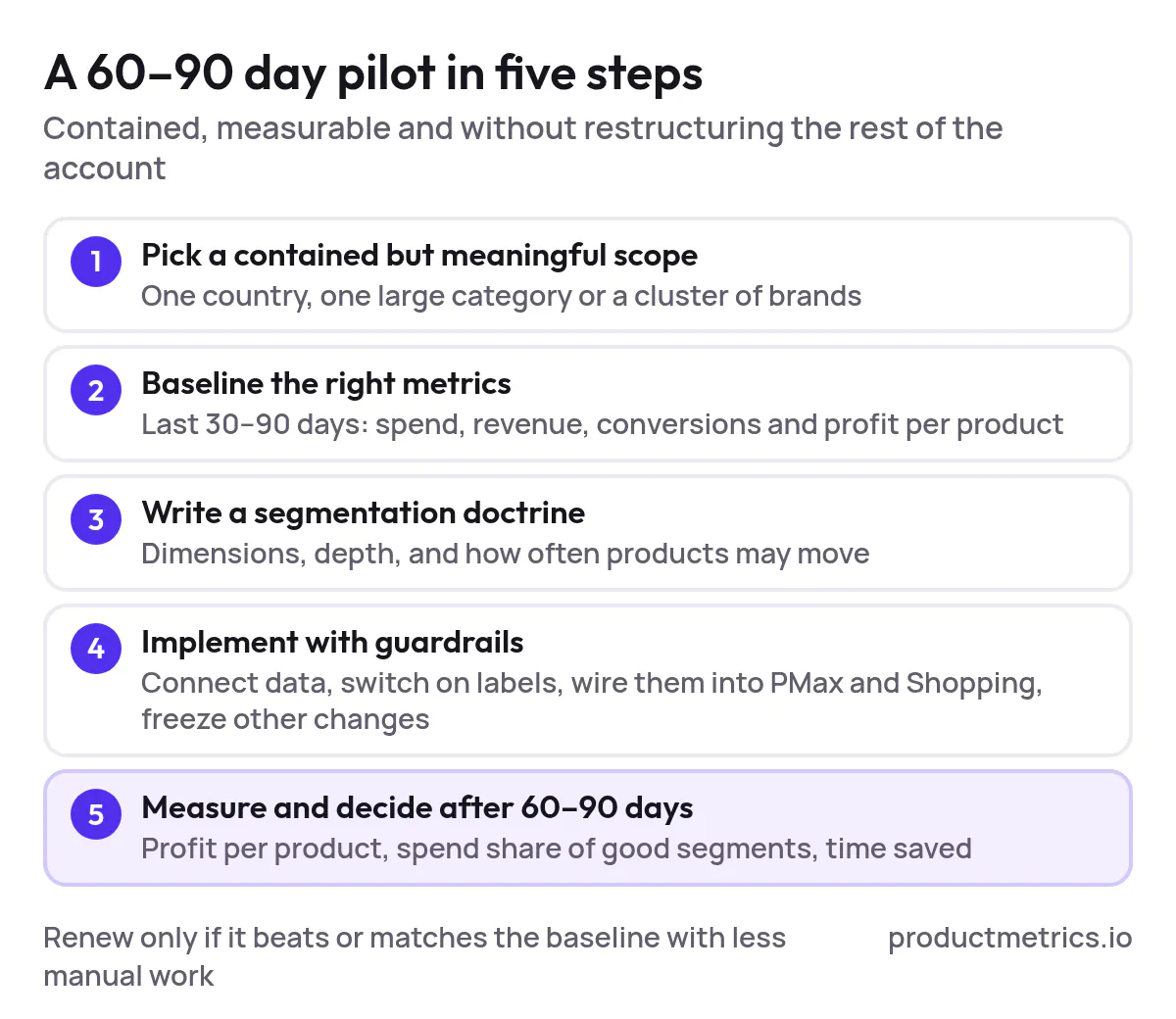
Step 1 – Pick a Contained but Meaningful Scope
Good pilot slices:
- One country or region.
- One large category with a mix of margins and price points.
- A cluster of brands where you suspect budget leaks.
Make sure there’s enough volume to see statistically meaningful differences in 60–90 days.
Step 2 – Baseline the Right Metrics
Use Google’s product‑level reporting (or Shopping Performance View via the API) to export the last 30–90 days of data for your pilot slice. (Source: Google Ads API – Shopping Performance View)
Create a simple baseline:
- Spend, revenue, and conversions per product.
- ROAS and, if available, profit per product.
- Share of spend going to top segments (for example, top 10% of SKUs by revenue vs long tail).
Step 3 – Define a “Segmentation Doctrine”
Write down, in plain language:
- Which dimensions you care about (margin, lifecycle, brand vs generic intent, etc.).
- How deep you’re prepared to go (for example, SKU‑level only for high‑volume products).
- How often products are allowed to move between segments.
This doctrine becomes the blueprint you test the tool against.
Step 4 – Implement With Guardrails
With your chosen vendor:
- Connect data sources (Google Ads, Merchant Center, store/ERP, optional GA4).
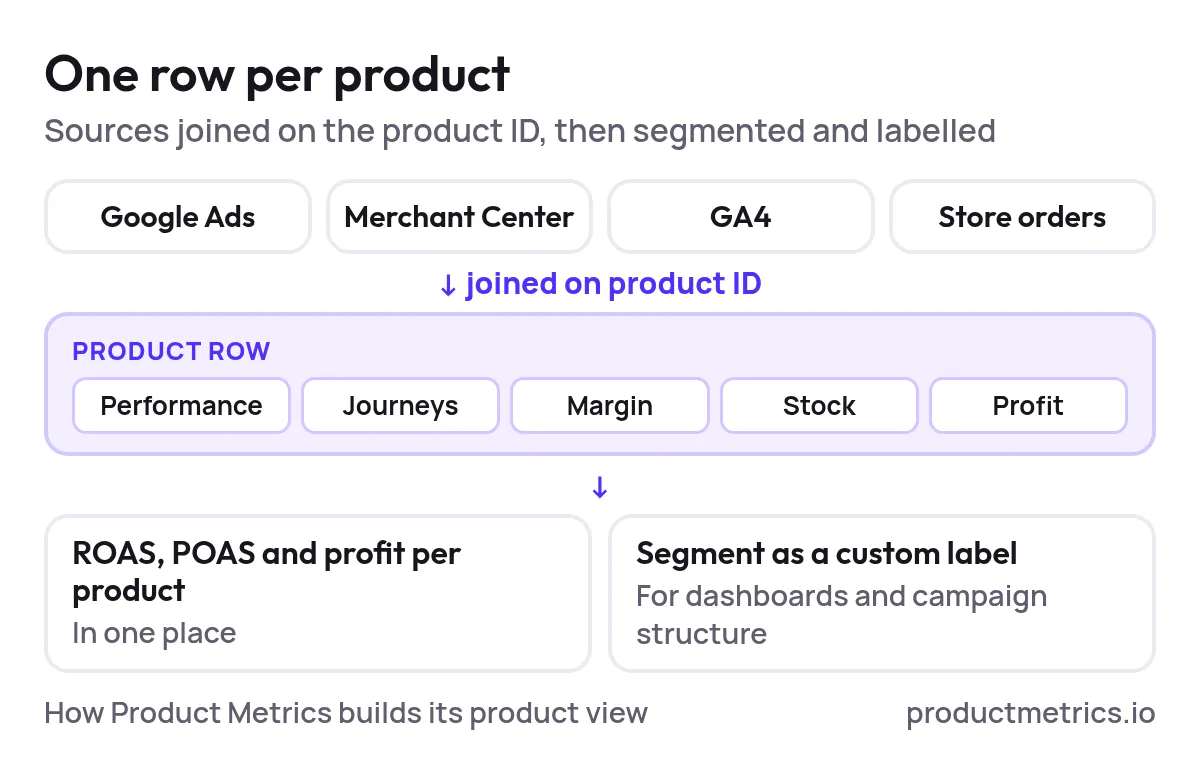
Product Metrics, for instance, joins Google Ads, Merchant Center, GA4, and store data on the product ID so each product gets one row with performance, journeys, margin, and stock. (Source: Product Metrics – Google Shopping ROAS reporting) - Switch on segmentation and labels
- Approve the rules or ML segments.
- Map each segment to a clear use in campaigns (priority, bid strategy, inclusion/exclusion).
- Wire labels into PMax and Shopping
- For PMax, build campaigns or asset groups based on segments (for example, Stars vs Dogs).
- For Standard Shopping, use labels or product_type for product groups and priorities.
- Freeze structural changes outside the pilot logic for the test duration.
Step 5 – Measure And Decide
After 60–90 days, compare against baseline:
- Profit (or contribution margin) per product and overall.
- Share of spend captured by your “good” segments (for example, Stars and Cash Cows).
- Time saved on manual restructuring and reporting.
This is where a performance‑driven platform should shine—by making it obvious which products to push, fix, or pause, and by automatically keeping labels in sync.
If the tool can’t beat or at least match your previous results with less manual effort, don’t renew.
7. Where To Actually Buy / Order Granular Segmentation Tools
Let’s translate those “purchase / order / shop / find” queries into concrete buying paths.
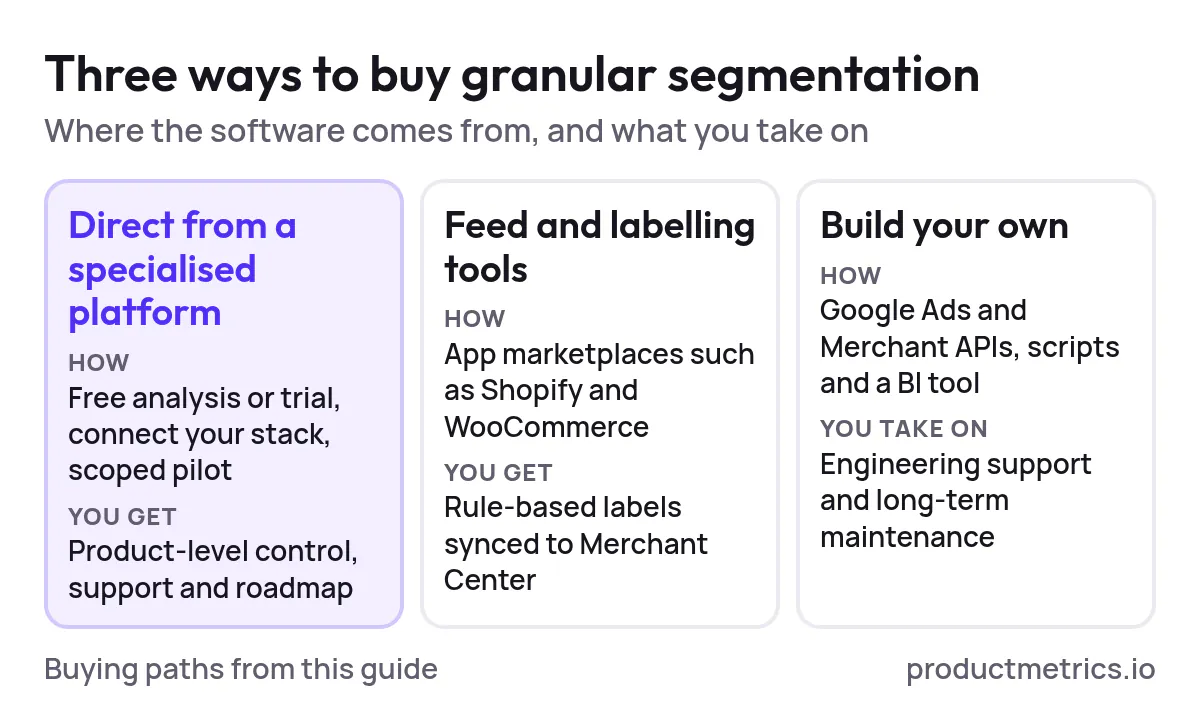
7.1 Direct From Specialised Platforms
For teams explicitly looking to order Google Shopping campaign segmentation solutions with customisable granularity, purpose‑built platforms are usually bought direct from the vendor:
- Sign up for a free analysis or trial.
- Connect your stack.
- Run a scoped pilot as described above.
Product Metrics sells a profit optimisation platform for ecommerce advertising, typically with a 30‑day trial available for selected services. (Source: Product Metrics – Terms & Conditions)
From the homepage you can:
- Analyse your products for free (no credit card; connect Google Ads, Merchant Center, and your shop). (Source: Product Metrics – Google Shopping Segmentation and Conversion Tracking)
- Find your hidden profit with a simple calculator for break‑even ROAS and product‑level profitability. (Source: Product Metrics – About)
- Book a demo, which pairs a call with the founder and a demo account. (Source: Product Metrics – About)
If your core need is to buy platforms for Google Shopping campaign segmentation with advanced granularity, this is the category—and vendor—that most directly addresses product‑level control.
7.2 Through Feed / Labelling Tools
If you’re not ready for full performance‑driven segmentation, you can instead purchase campaign segmentation platforms for Google Shopping with fine‑tuned granularity in the form of feed tools and label managers.
Look for tools that:
- Expose custom label fields clearly and sync them to Merchant Center. (Source: Merchant Center Custom Labels tutorial)
- Support rule‑based label assignment (for example, based on price, category, margin, or performance data). (Source: AxiTrace – Product Labels API)
These are often found in app marketplaces (Shopify, WooCommerce, etc.) and are a good interim answer if you mostly want to “buy tools for optimizing Google Shopping campaigns with detailed segmentation” but don’t yet need end‑to‑end analytics.
7.3 Build Vs Buy
Some teams consider building their own solution:
- Exporting product‑level data via the Google Ads and Merchant APIs. (Source: Google Ads API – Shopping Performance View, Merchant API – Reporting)
- Writing custom scripts to maintain labels.
- Piping everything into a BI tool.
This can work for a while, but you’ll need engineering support and a clear owner for long‑term maintenance.
If what you really want is to order advanced segmentation granularity software for Google Shopping campaigns with support, roadmap, and SLAs, buying is usually saner.
8. Where Product Metrics Fits In Your Stack
Product Metrics is a profit optimisation platform for ecommerce advertising: one app for server-side tracking, profit bidding, product segmentation and campaign planning across Google Ads, Meta and ChatGPT Ads. It sends each order’s profit, new or returning status and lifetime value to the ad platforms, so merchants can bid on POAS, new customers and LTV.
Machine learning segments every product into custom labels for Shopping and Performance Max, and the campaign plan sets out the ideal campaign structure for those segments. A dashboard shows profit, customers, stock and returns.
If you’ve read this far, you’re probably not just “curious about custom labels.” You’re actively trying to find campaign segmentation platforms for granular Google Shopping management.
Here’s how Product Metrics fits that brief:
- It is built around profit per product, not a generic channel dashboard. (Source: Product Metrics – About, Product Metrics – Google Shopping Segmentation and Conversion Tracking)
- Machine learning segments every product into one of six segments (Stars, Question Marks, Cash Cows, Dogs, Drainers, Ghosts) based on profitability (ROAS/POAS), inventory levels, return rate, potential and price against competitors, with clicks as just one signal among many, then writes that segment to a Merchant Center custom label. (Source: Product Metrics – Product segmentation glossary, Product Metrics – Google Shopping ROAS reporting)
- Those labels become the backbone of both granular campaign structures and dashboards, so segmentation, bidding, and reporting all speak the same language. (Source: Product Metrics – Google Shopping segmentation & tracking buyer’s guide)
- It joins data from Google Ads, Merchant Center, optional GA4, and your store to calculate ROAS, POAS, and profit per product in one place. (Source: Product Metrics – Google Shopping ROAS reporting)
In other words: if your shopping list reads like “buy Google Shopping campaign management tools with segmentation granularity options,” Product Metrics is designed to be the segmentation brain of that stack.
9. From Search Query To Signed Contract - Your Next Steps
To recap, if you’re trying to purchase campaign segmentation platforms for Google Shopping with fine‑tuned granularity, here’s a simple path:
- Score yourself using the decision matrix in section 4 to decide which tool category you’re in.
- Shortlist 3–5 tools that clearly position around Google Shopping / PMax and product‑level segmentation.
- Use the evaluation criteria in section 5 as your vendor‑call script.
- Run a 60–90 day pilot on a meaningful slice of your products.
- Commit or churn: renew only if the tool makes segmentation granularity a controllable lever—more profit, more control, less manual chaos.
When you’re ready to see what that looks like in practice, you can:
- Analyse your products for free in Product Metrics and see real product‑level segments on your own data. (Source: Product Metrics – Google Shopping Segmentation and Conversion Tracking)
- Or book a demo to walk through how segmentation granularity would change your specific Shopping and Performance Max account.
Either way, treat this guide as your procurement blueprint. You’re not just buying software—you’re buying the level of control you’ll have over your Google Shopping budget for the next few years.
Written by
Berend Vrakking, Founder of Product Metrics
1M+ products analysed · Nominated at the Dutch Search Awards for Best Measurement Campaign (2023) and Best Use of Data (2024)
Keep reading.
Best Platforms For Advanced Google Shopping Segmentation: A Comparative Evaluation Framework
Best platforms for advanced Google Shopping segmentation, scored 1–5 on inputs, automation, PMax fit, scale and reporting, with a 7-step evaluation.
Buyer’s Guide: Choosing a Google Shopping Segmentation Platform That Prioritises Listing Group Relevance
Buyer’s guide to Google Shopping segmentation platforms: three tool types, 10 questions to ask vendors, a custom label blueprint and a 30-day rollout.
Best Google Shopping Segmentation Software In 2026: Clear Structure, Analytics, And Visualization Compared
Best Google Shopping Segmentation Software In 2026: four platform types scored 1–5 on structure clarity, analytics, visualisation and workflow.
See which of your products to push, fix or pause. Start with your own products, or a 30-second estimate.
Check one product first: work out its break-even ROAS in the calculator. Then see where all your products stand.
Or set it up with your AI assistant:
 Set up with Claude
 Set up with ChatGPT
Questions, or want to spar about your products? Book a demo: a video call with Berend, then a demo account.