
The 2026 Buyer’s Guide to Google Shopping Campaign Segmentation Platforms (Product Group Relevance, Performance, and Automation)
The 2026 Buyer’s Guide to Google Shopping Campaign Segmentation Platforms: a test-forward, procurement-ready framework for PPC specialists.
If you are actively looking to buy software for advanced Google Shopping campaign segmentation by product group relevance, you are not alone.
By 2026, most ecommerce accounts have grown past simple “All products” structures. Bidding algorithms are strong, but without the right product group relevance, they are optimizing the wrong inventory. A tiny slice of your catalog drives most of your revenue while a long tail of SKUs quietly spends or never shows. The result is stale structures, noisy reporting, and hard-to-prove ROI.
This guide is written for PPC specialists who want a test-forward, procurement-ready framework to evaluate and purchase Google Shopping campaign segmentation platforms that actually move performance.
1. What “advanced Google Shopping campaign segmentation by product group relevance” Really Means
Before you shop for tools, it helps to align on definitions.
Product Groups, Segmentation, and Relevance
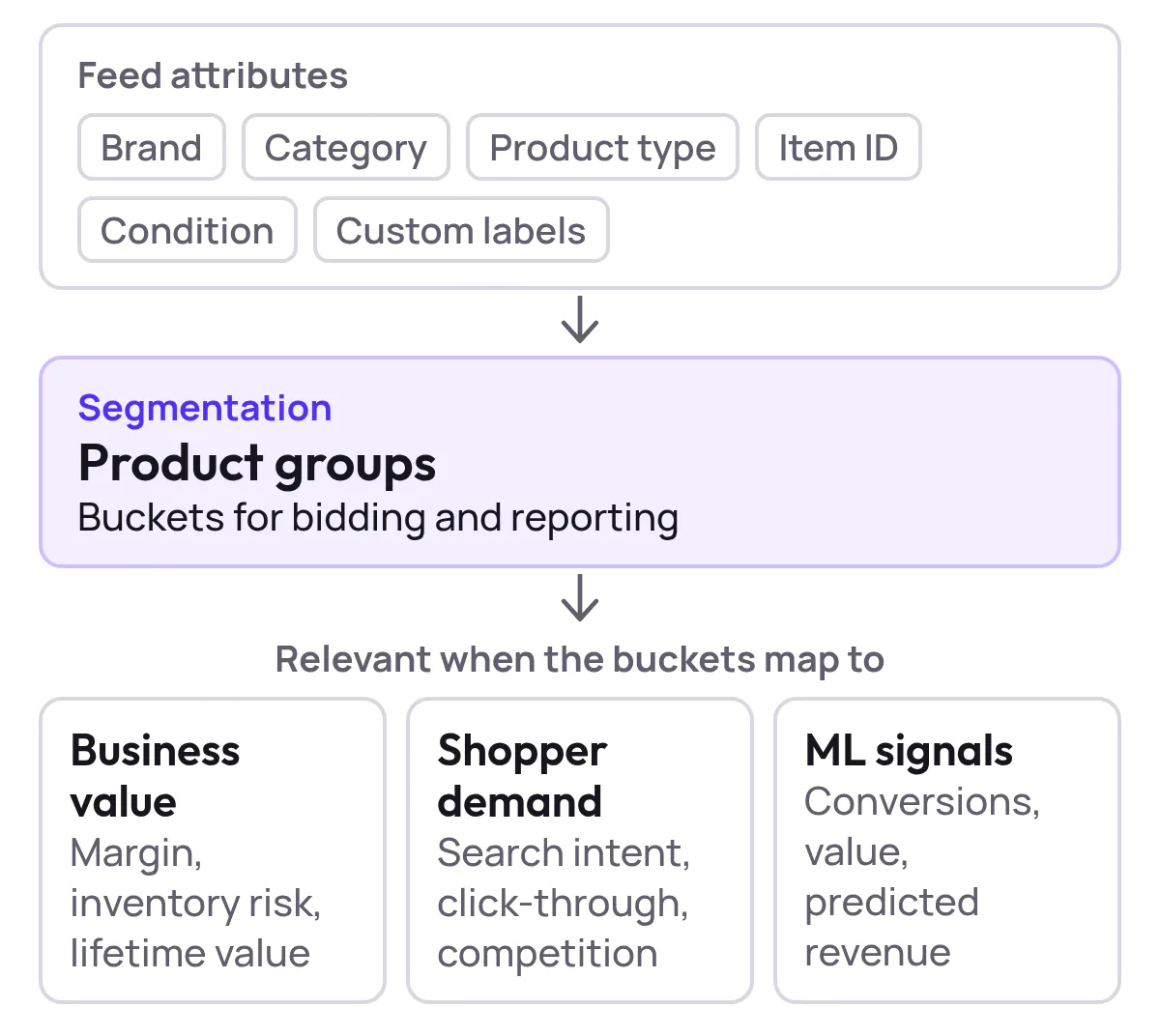
In Shopping and Performance Max, product groups are subsets of your feed based on attributes such as brand, category, product type, item ID, condition, or custom labels. Segmentation is how you decide which combinations of those attributes become their own buckets for bidding and reporting.
Product group relevance is about how well those buckets map to:
- Real business value (margin, inventory risk, lifetime value)
- Real shopper demand (search intent, click-through, competition)
- Real machine learning signals (conversions, conversion value, predicted revenue)
A relevant structure gives your bidding strategies and budgets clear, high-signal segments to learn from. An irrelevant structure hides signal in noisy averages.
Why Tools Are Now Required, Not Optional
You can absolutely build solid segmentation in the native Google Ads UI. But at scale:
- Catalogs run into tens or hundreds of thousands of SKUs
- Attributes and custom labels must be refreshed frequently
- Performance-based buckets (top performers vs poor performers) need constant reshuffling
- Performance Max blurs the line between Shopping, Search, and Display, so you need a consistent logic layer above campaigns
At that point, manual work and spreadsheets become brittle. That is when investing in a Google Shopping campaign segmentation platform starts paying off.
2. When Should You Buy Campaign Segmentation Software for Google Shopping?
A few concrete thresholds where buying software is usually justified:
- SKU Volume and Complexity
- More than 1,000–2,000 active SKUs, or many variants per product.
- Multiple brands, categories, and price bands with very different margins.
- Performance Variance
- A small set of “hero” products drives most Shopping revenue.
- A large portion of inventory receives almost no impressions or conversions.
- Operational Pain
- Weekly or monthly restructuring in the UI or via bulk sheets.
- Difficulty maintaining consistent structures across markets, languages, or channels.
- Testing Ambitions
- You want to run controlled experiments on segmentation logic (for example, margin tiers vs price tiers vs lifecycle tiers) and you cannot do that reliably with your current setup.
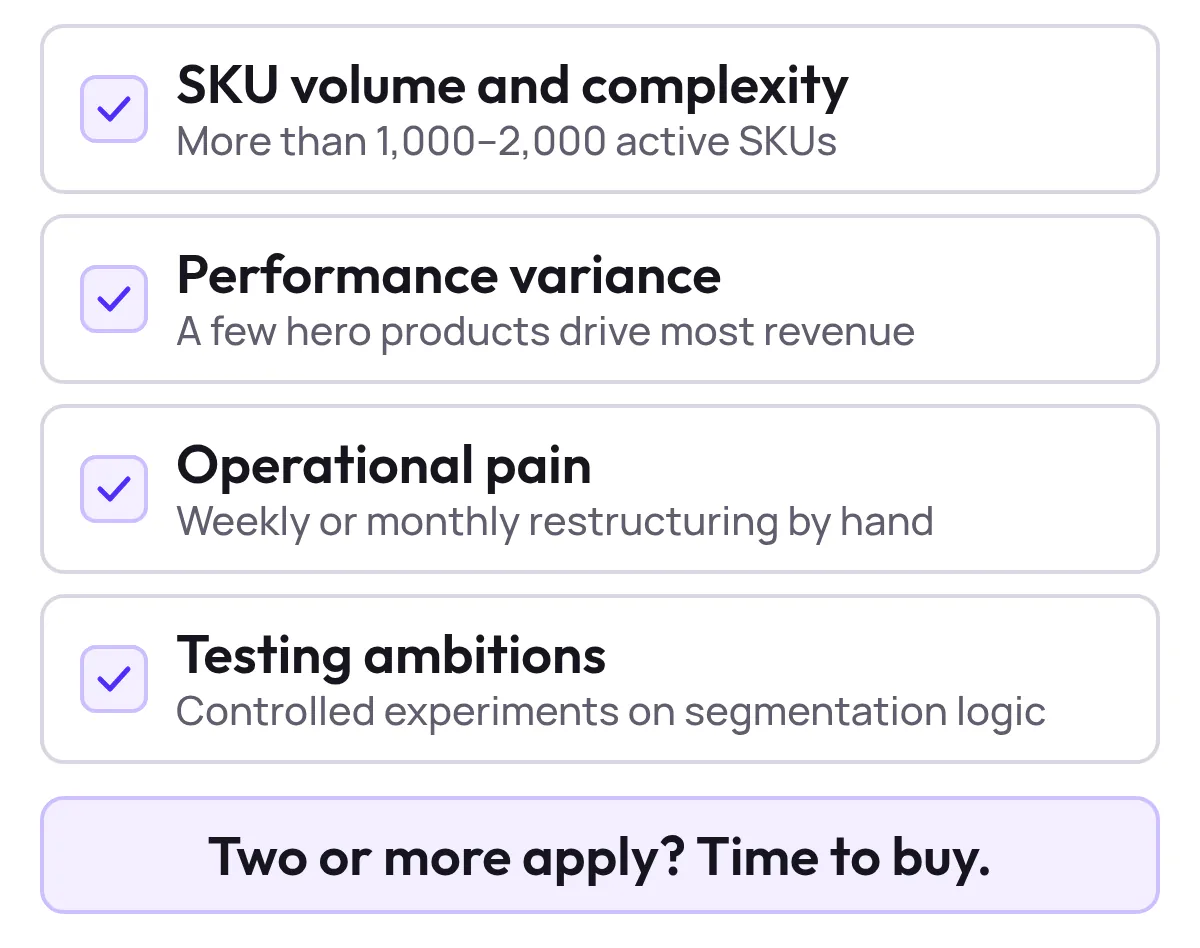
If two or more of these describe your account, it is time to buy campaign segmentation software for Google Shopping focused on product group relevance instead of layering more manual processes on top.
3. Types of Google Shopping Campaign Segmentation Platforms
When you start researching, you will see several categories of tools. Most buyers end up with one of these combinations.
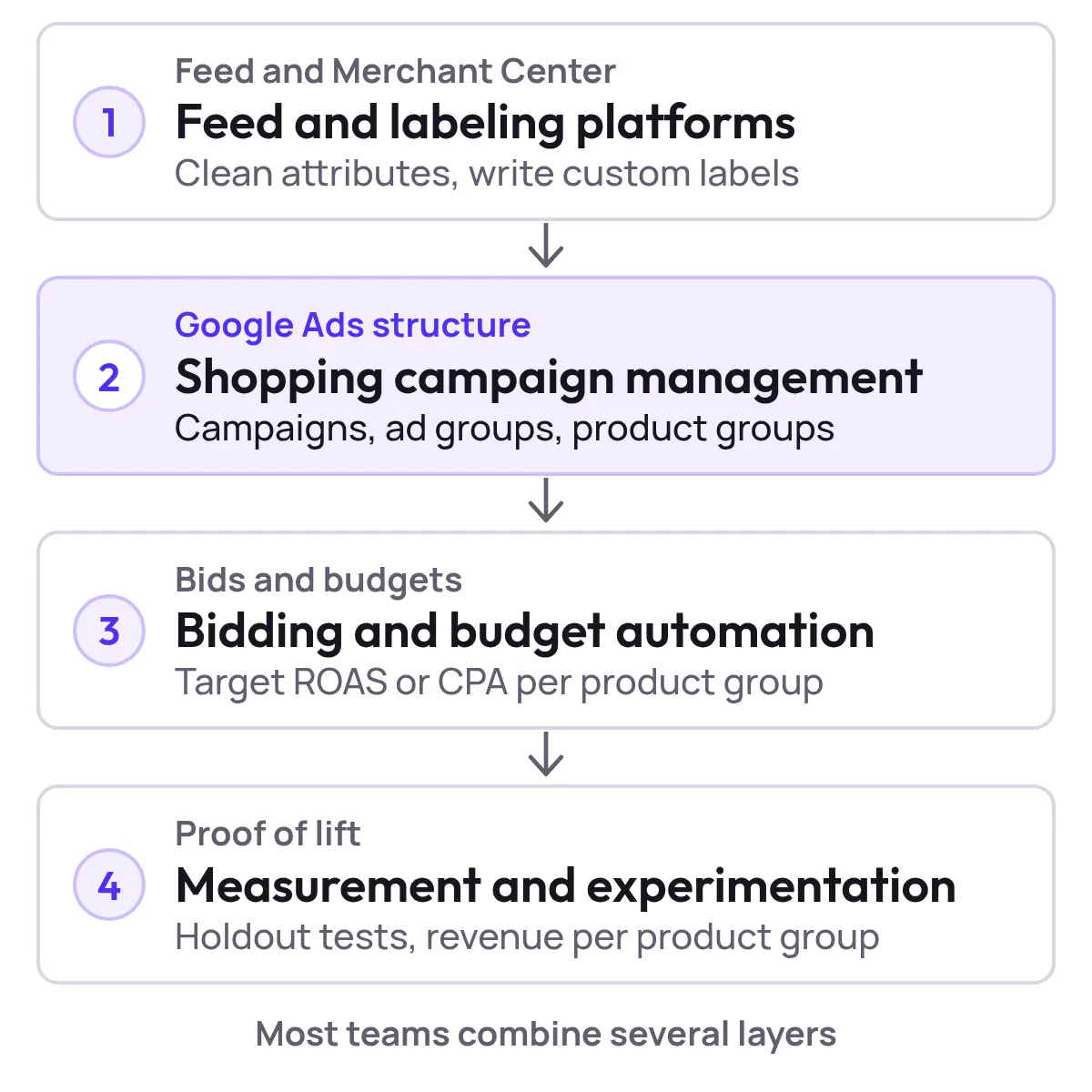
3.1 Feed and Labeling Platforms
These tools focus on ingesting your product catalog, cleaning and enriching attributes, and writing back structured data and custom labels to Merchant Center. Typical strengths:
- Powerful rule engines based on brand, category, product type, price, margin, stock, or text patterns in titles and descriptions
- Ability to generate performance-oriented custom labels (for example, margin tiers, demand tiers, lifecycle tags)
- Cross-channel feed management (Google, Bing, Meta, marketplaces) from one place
If your biggest blocker is inconsistent feed quality or you lack the labels to build smart product groups, this type of platform is often the first purchase.
3.2 Shopping Campaign Management and Automation Platforms
These platforms sit closer to Google Ads. They specialize in:
- Automatically creating and maintaining campaigns, ad groups, and product groups based on logic you define
- Enforcing consistent naming conventions and structures across accounts and markets
- Applying bid strategies, budgets, and negative keywords at the right layer
- Surfacing Shopping-specific performance views (for example, product group ROAS, impression share, cost per product group)
If you already have clean feeds but your campaign structures keep drifting or you cannot keep up with change requests, this category is attractive.
3.3 Bidding and Budget Automation Platforms
These tools focus primarily on bids and budgets, but many now expose segmentation features:
- Layering business data (margin, LTV, inventory) on top of Google’s conversion data
- Allocating budgets and target ROAS or CPA at product-group or label level
- Running structured experiments on bid policies across campaigns
If you are already heavily invested in Performance Max and smart bidding, look for whether your bidding platform gives you product-group-level control and reporting, not just campaign-level knobs.
3.4 Measurement and Experimentation Platforms
Finally, there are tools that specialize in clean measurement, holdout tests, and incrementality. The best ones:
- Allow you to compare one segmentation approach vs another in parallel
- Control for noise from seasonality and other channels
- Attribute revenue and profit back to product groups, not just last-click keywords or campaigns
If your biggest blocker is proving that a new segmentation platform or strategy actually drove incremental lift, this category matters.
Most advanced Google Shopping orgs in 2026 end up with a combination of these capabilities, whether from one vendor or several tightly integrated ones.
4. Where Can I Buy Software for Advanced Google Shopping Campaign Segmentation by Product Group Relevance?
If your search queries look like this:
- Where can I buy software for advanced Google Shopping campaign segmentation by product group relevance?
- Purchase solutions for automating product group segmentation in Google Shopping campaigns
- Buy a Google Shopping campaign segmentation platform for optimizing product group relevance
…then you are clearly in high-intent, solution-shopping mode.
Here is how to turn that intent into a practical shortlist instead of a random list of vendor tabs.
4.1 Start From Your Stack, Not From a Generic “Top Tools” List
First map what you already have:
- Feed management or PIM system
- Analytics stack (for example, your main source of truth for revenue and margin)
- Any existing PPC automation or bid management tools
You want segmentation software that slots into this ecosystem, not a disconnected silo.
4.2 Define Must-Have Integrations
For most ecommerce advertisers, the non-negotiables are:
- Direct integration with Google Merchant Center and Google Ads
- Ability to read and write custom labels and other feed attributes
- Support for both standard Shopping and Performance Max structures
With those in place, you can safely order a Google Shopping optimization tool that improves product group relevance in campaign segmentation without re-platforming everything else.
4.3 Build a Targeted Vendor List
Once you know your boundaries and integrations, you can:
- Ask your existing partners which segmentation or Shopping optimization modules they offer
- Look for vendors that explicitly mention product group segmentation, custom labels, and performance-based product buckets in their feature set
- Shortlist 3–5 candidates for deeper demos instead of trying to evaluate ten or more platforms superficially
The rest of this guide gives you the framework to evaluate those candidates rigorously.
5. Core Capabilities of Top-Rated Google Shopping Campaign Segmentation Tools for Product Group Optimization
When you evaluate top-rated Google Shopping campaign segmentation tools for product group optimization, anchor on capabilities rather than UI gloss.
5.1 Flexible, Business-Aware Grouping Logic
You should be able to combine multiple dimensions when defining product groups, for example:
- Brand + product type
- Category + price band
- Margin tier + inventory level
- Lifecycle stage (new, evergreen, end-of-life) + performance tier
Strong platforms let you express these rules in a way that non-technical marketers can understand and maintain.
5.2 Performance-Based Product Buckets
Great Shopping structures do not only reflect catalog attributes; they also reflect how products actually perform.
Look for platforms that can automatically:
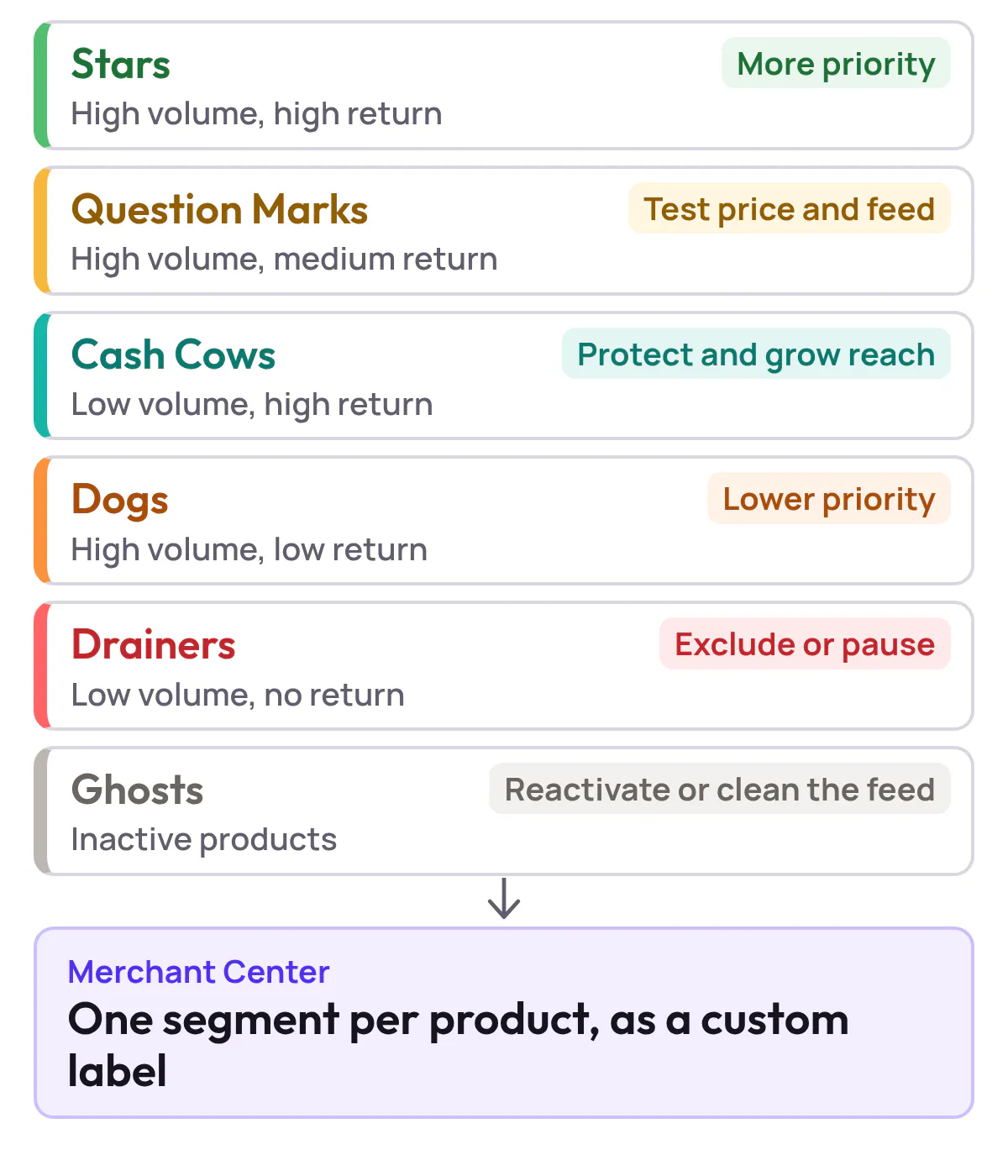
- Create “hero” buckets for high-converting, high-margin products
- Group “sidekicks” that show promise but need optimization
- Isolate “problem” products that spend heavily with poor return
- Flag “invisible” products that get almost no impressions
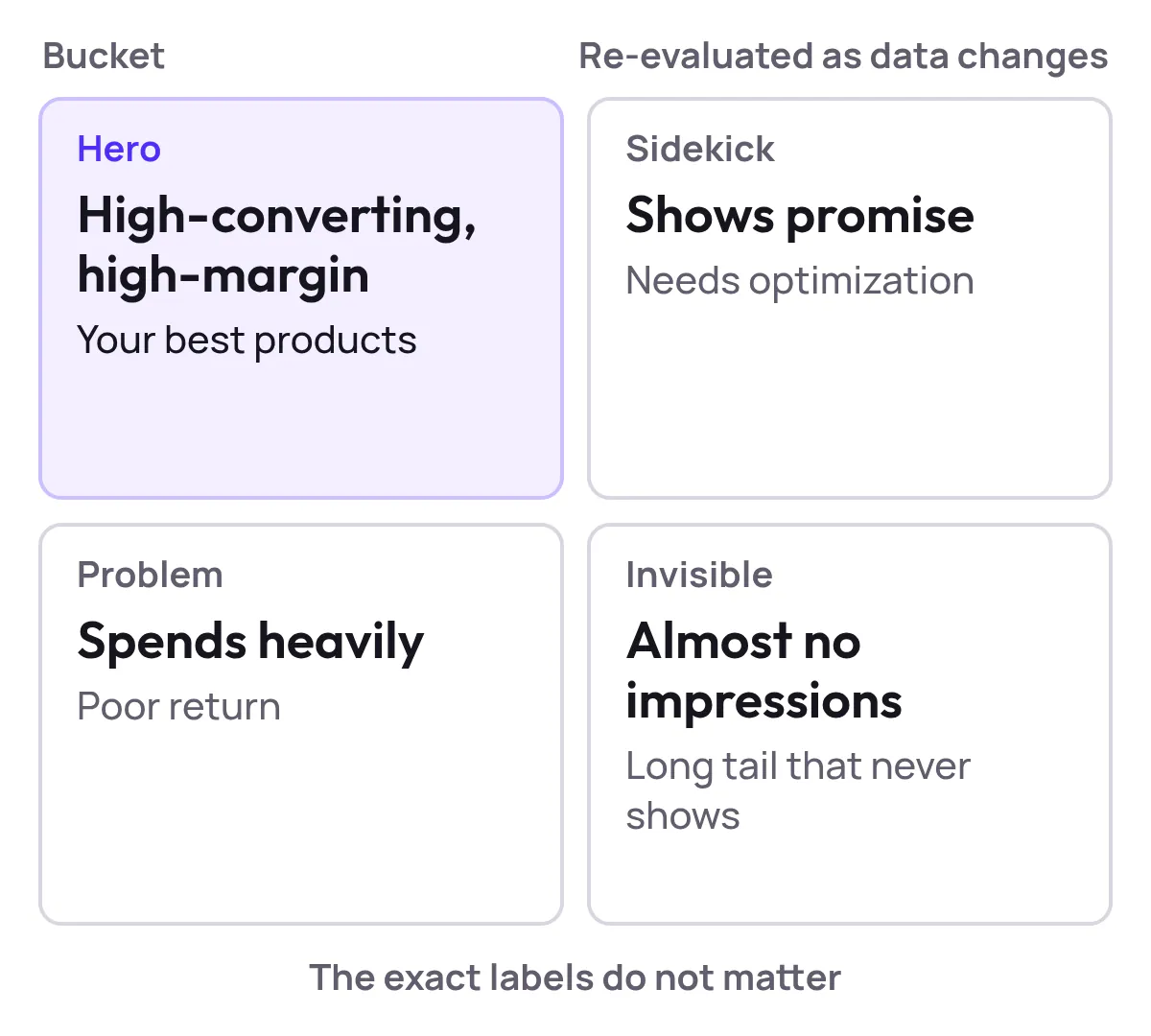
The exact labels do not matter. What matters is that the system continuously re-evaluates which products belong where as data changes.
5.3 Automation That Respects Human Control
Automation should not mean a black box. For product group relevance, you want:
- User-defined guardrails and rules that automation must respect
- Simulation or preview modes that show which products will move where before changes go live
- Change logs so you can audit why a product moved between groups and what impact that had
5.4 Support for Real-World Shopping Structures
In practice, you will want to:
- Maintain different segmentation logic for branded vs generic campaigns
- Separate high-priority campaigns (for hero products or key categories) from catch-all campaigns
- Combine campaign priorities, negative keyword sculpting (where applicable), and product group logic into a single, documented strategy
Your platform should make these patterns easy to express and copy across markets.
5.5 Reporting at the Level You Actually Optimize
Finally, the platform must let you see performance at the same level at which you make decisions, including:
- Product group or label-level ROAS and profit
- Visibility of how much budget goes to each relevance bucket
- Trend views so you can see whether restructures improved or hurt results over time
Without this, you are buying a fancier way to push changes with no better insight into impact.
6. Automation Features to Look For When You Purchase Solutions for Automating Product Group Segmentation
If your goal is specifically to purchase solutions for automating product group segmentation in Google Shopping campaigns, focus on how automation is triggered and governed.
Key questions to ask vendors:
- What events can trigger regrouping?
- Performance thresholds (for example, ROAS above or below target over a lookback window)
- Catalog changes (new products, price changes, stock levels)
- Seasonal labels or promotional flags
- How often does the system evaluate and sync changes?
- Near-real-time, hourly, daily?
- Can you control cadence so testing windows remain clean?
- Can we run automation in “recommendation only” mode?
- This is critical for test-forward teams who want to inspect proposed changes before pushing them live.
- How are conflicts resolved?
- For example, a product qualifies as both a high-margin item and a clearance item. Which rule wins?
- The best platforms allow explicit priority rules.
- What happens when data is sparse?
- You need sensible defaults for low-traffic products so the long tail is not ignored or misclassified.
Automation that cannot answer these questions transparently may move fast but is hard to trust.
7. A Test-Forward Framework for Evaluating Segmentation Platforms
Buying software is the easy part. Proving that it works is harder.
Here is a pragmatic, test-forward process you can apply to any platform on your shortlist when you buy a Google Shopping campaign segmentation platform for optimizing product group relevance.
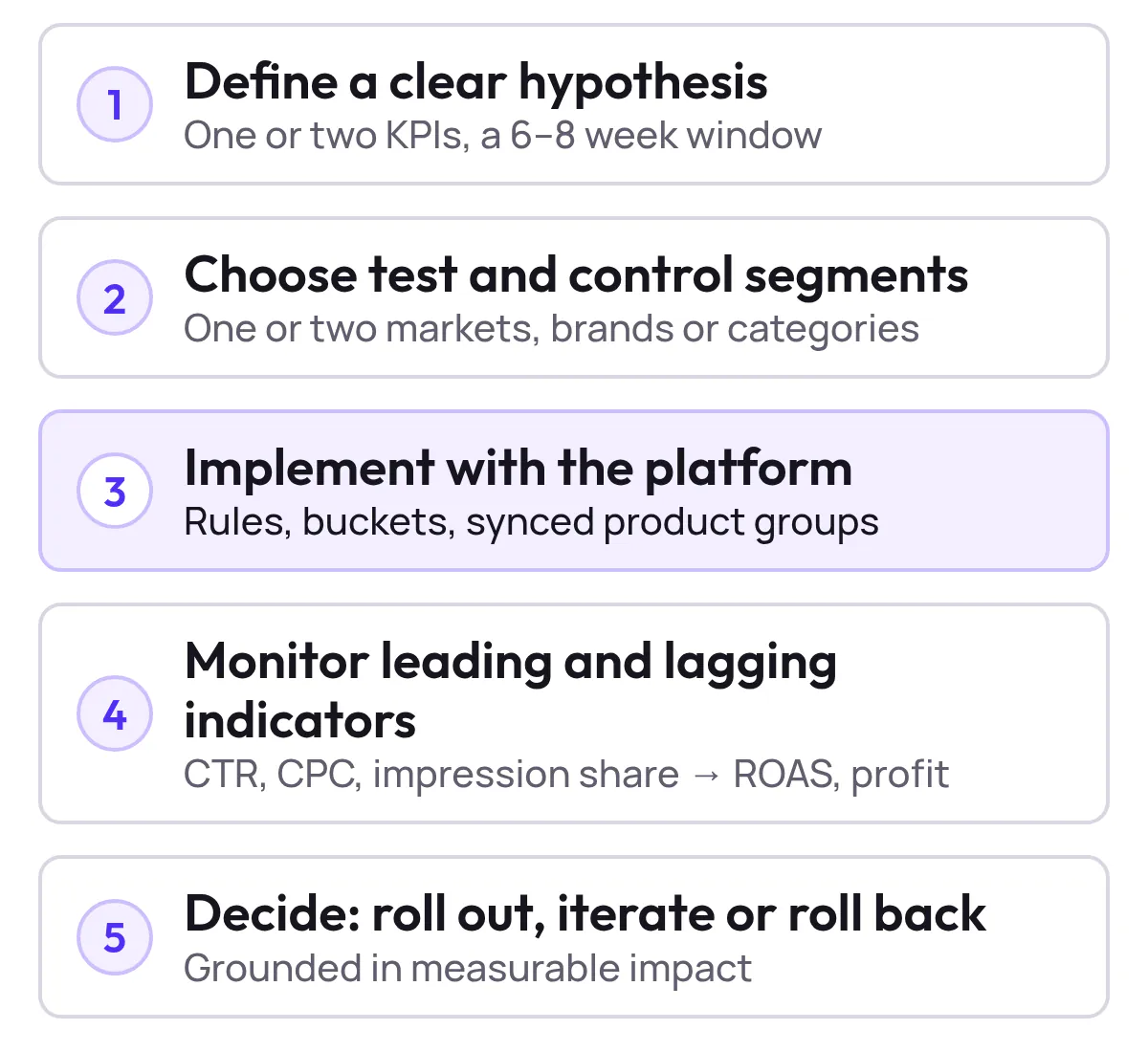
Step 1: Define a Clear Hypothesis
Examples:
- Using performance-based product buckets will increase Shopping ROAS by a target percentage at flat spend.
- Introducing margin-aware product groups will increase contribution profit even if ROAS is flat.
- Moving from a single All products structure to a multi-tiered relevance structure will reduce wasted spend on poor performers.
Tie your hypothesis to one or two primary KPIs and a time-bound testing window (for example, 6–8 weeks).
Step 2: Choose Comparable Test and Control Segments
Avoid testing across your entire account at once. Instead:
- Pick one or two markets, brands, or categories with meaningful volume
- Split them into segments where you will apply the new tool-driven structure vs segments that retain your legacy structure
- Keep other levers (budgets, bid strategies, creatives) as stable as possible during the test
Step 3: Implement the New Segmentation With the Platform
Use your chosen platform to:
- Define product-group rules and performance buckets
- Generate or sync new campaigns and product groups
- Document exactly how the new structure differs from the old one
Make sure your team understands how to revert if unexpected behavior occurs.
Step 4: Monitor Leading and Lagging Indicators
During the test window, watch both:
- Leading indicators (click-through rate, cost per click, impression share, search top impression share)
- Lagging indicators (conversions, revenue, ROAS, profit)
What you want to see is better allocation of spend into high-value product groups without a deterioration in unit economics.
Step 5: Decide and Roll Out or Iterate
At the end of the test window, decide whether to:
- Roll out the new segmentation more broadly via the platform
- Iterate on rules, thresholds, or bucket definitions and re-test
- Or, in rare cases, roll back if the structure underperforms or adds complexity without benefit
This process keeps your procurement grounded in measurable impact rather than demo theatrics.
8. A Practical Scoring Sheet for Buying Google Shopping Segmentation Software
Use a simple, 1–5 scoring model across criteria that matter to your account. Here is a template you can adapt when you shop for Google Shopping campaign management platforms with product group relevance features.
| Criterion | Description | Weight (1–3) | Vendor A Score (1–5) | Vendor B Score (1–5) | Vendor C Score (1–5) |
|---|---|---|---|---|---|
| Product-group flexibility | Can we build the relevance structure we want without hacks? | 3 | |||
| Performance-based automation | Can the tool automatically regroup products based on results? | 3 | |||
| Feed and label control | Can it read/write custom labels and other key attributes reliably? | 2 | |||
| PMax and Shopping support | Does it fully support our current and planned campaign types? | 2 | |||
| Reporting depth | Does it report at the same level we optimize (product group, label, bucket)? | 3 | |||
| Testing and safety | Does it support experiments, previews, and rollbacks? | 2 | |||
| Integration fit | How cleanly does it plug into our stack and workflows? | 2 | |||
| Ease of use | Can the PPC team own it without constant developer help? | 2 | |||
| Support and roadmap | Does the roadmap align with where Shopping and AI are heading? | 1 |
Multiply each score by the weight, sum totals by vendor, and you have a more objective view of which Google Shopping campaign segmentation solution to purchase.

Show the dataHide the data
| Criterion | Weight (1–3) |
|---|---|
| Product-group flexibility | 3 |
| Performance-based automation | 3 |
| Reporting depth | 3 |
| Feed and label control | 2 |
| PMax and Shopping support | 2 |
| Testing and safety | 2 |
| Integration fit | 2 |
| Ease of use | 2 |
| Support and roadmap | 1 |
9. Where Productmetrics.io Fits in Your Shortlist
If you are evaluating tools and thinking:
- I am looking to purchase a Google Shopping campaign tool for segmenting by product group relevance.
- I want automation, but I need to understand and control the logic.
- I care as much about measurement and testing as I do about convenience.
…then Productmetrics.io is built for that intersection.
While every buyer’s needs are different, the platform is designed around a few core principles that align with this guide:
- Relevance-first segmentation
Productmetrics puts product group relevance at the center of its model, so you can group and prioritize products based on performance, profitability, and strategic importance. - Automation With Guardrails
Rather than a black box, automation is driven by rules you can inspect, adjust, and test, helping you safely move from manual campaign segmentation into scalable workflows. - Test-Forward Workflows
The product emphasizes structured experiments and clear reporting, making it easier to prove that new segmentation approaches are delivering incremental performance, not just prettier structures.
If you are ready to order a Google Shopping campaign segmentation solution for better product group targeting, it is worth seeing how Productmetrics.io could fit into your stack and evaluation framework.
Next step: Share your current Shopping structure, budget, and goals with the Productmetrics.io team and walk through a live example of how your catalog would be segmented and automated. From there, you can scope a 60–90 day pilot using the test framework in this guide.
10. FAQ Buying Google Shopping Campaign Segmentation Software for Product Group Relevance
What is the best software to buy for Google Shopping campaign segmentation by product group relevance?
There is no single universal best tool. The right choice depends on your stack, SKU complexity, and whether your biggest gap is feed quality, campaign structure, bidding, or measurement. Use the scoring sheet above to rank candidates against your specific priorities instead of relying on generic rankings.
Where can I buy software for advanced Google Shopping campaign segmentation by product group relevance?
Look for specialized ecommerce or PPC platforms that explicitly mention product group segmentation, custom labels, and performance-based product buckets in their Shopping or Performance Max feature sets. Shortlist 3–5 vendors that integrate with your Merchant Center, Google Ads, and analytics stack, then run structured demos and a time-boxed pilot.
How do I purchase Google Shopping campaign tools that allow segmentation by product group performance?
In vendor conversations, ask to see:
- How the tool ingests and interprets performance metrics at product level
- How performance thresholds map products into different relevance buckets
- How often products are re-evaluated and regrouped
- What reporting you get by performance bucket or product group
If a platform cannot show this clearly in a demo, it is not the right fit for performance-based segmentation.
What should I look for when I order a Google Shopping campaign management solution with product group segmentation features?
Focus on:
- Flexibility of segmentation rules and custom labels
- Automation controls (previews, rollbacks, conflict resolution)
- Quality of Shopping and Performance Max reporting
- Ability to support experiments comparing different structures or rules
These matter more long term than any single convenience feature.
Is it better to buy a standalone Google Shopping optimization tool or an all-in-one PPC platform?
If Shopping is your primary revenue driver and you need deep, product-level control, a specialized tool often moves faster and goes deeper. If Shopping is one of several important channels and you value unified workflows and reporting, an all-in-one platform may be more pragmatic. Many teams end up combining a strong feed and segmentation layer with a broader PPC or analytics platform.
How do I know I am ready to purchase a Google Shopping optimization platform for segmenting campaigns by product group?
You are usually ready when:
- Manual restructures and spreadsheets cannot keep up with catalog or performance changes
- You see clear differences between product groups, but cannot reflect that easily in your current setup
- Stakeholders are asking for more predictable and demonstrable Shopping performance
At that point, a dedicated platform for campaign segmentation by product group relevance is one of the highest-leverage investments you can make.
Written by
Berend Vrakking, Founder of Product Metrics
1M+ products analysed · Nominated at the Dutch Search Awards for Best Measurement Campaign (2023) and Best Use of Data (2024)
Keep reading.
Campaign Segmentation in Google Shopping - Principles, Pitfalls, and Governance
Campaign segmentation in Google Shopping - principles, pitfalls and governance for Shopping and Performance Max structures that keep enough data to learn.
Implementing Profit Segmentation In Google Shopping And Performance Max
Implementing profit segmentation in Google Shopping and Performance Max, step by step: margin bands, custom labels, campaigns and target ROAS.
Evaluating Product Group Relevance In Google Shopping: Measurement Frameworks, Benchmarks And Tooling
Evaluating product group relevance in Google Shopping: score each group on structure, performance and intent, benchmark it and decide what to split.
See which of your products to push, fix or pause. Start with your own products, or a 30-second estimate.
Check one product first: work out its break-even ROAS in the calculator. Then see where all your products stand.
Questions, or want to spar about your products? Book a demo: a video call with Berend, then a demo account.