
Best Google Ads Conversion Tracking Plugins for Shopware 6
Best Google Ads conversion tracking plugins for Shopware 6, scored on five criteria: Tanmar, Stape, Biloba IT, Feedlingo, LENZ and more.
Google Ads conversion tracking on Shopware 6 is how a paid order in your shop reaches Google Ads, where Smart Bidding learns from it. Most shops report the sale from the finish page, and that page is where orders go missing.
I scored seven options on five weighted criteria, from Shopware Store listings and vendor pages checked on 13 November 2026. You get:
- a weighted score per plugin, with its inputs
- prices as listed this month
- a pick for each situation
Why Google Ads conversion tracking misses orders on Shopware 6
Google Ads conversion tracking misses orders on Shopware 6 because most setups wait for the shopper’s browser to load the finish page, and many paid orders never get there.
Shopware 6 has no built-in Google Ads conversion. A sales channel’s Analytics tab connects Google Analytics and has an Enhanced Conversions switch, which sends the buyer’s email address, scrambled, to Google Ads after a purchase.
There is no field for a Google Ads conversion ID or label, and you can’t add your own tags there. (Source: Shopware – Sales channel settings)
Enhanced conversions add scrambled customer details, such as an email address, to a conversion so Google can match it to a Google account. (Source: Google Ads Help – About enhanced conversions) They help match a sale that arrives; they don’t bring back one that never does, as enhanced conversions vs server-side tracking explains.
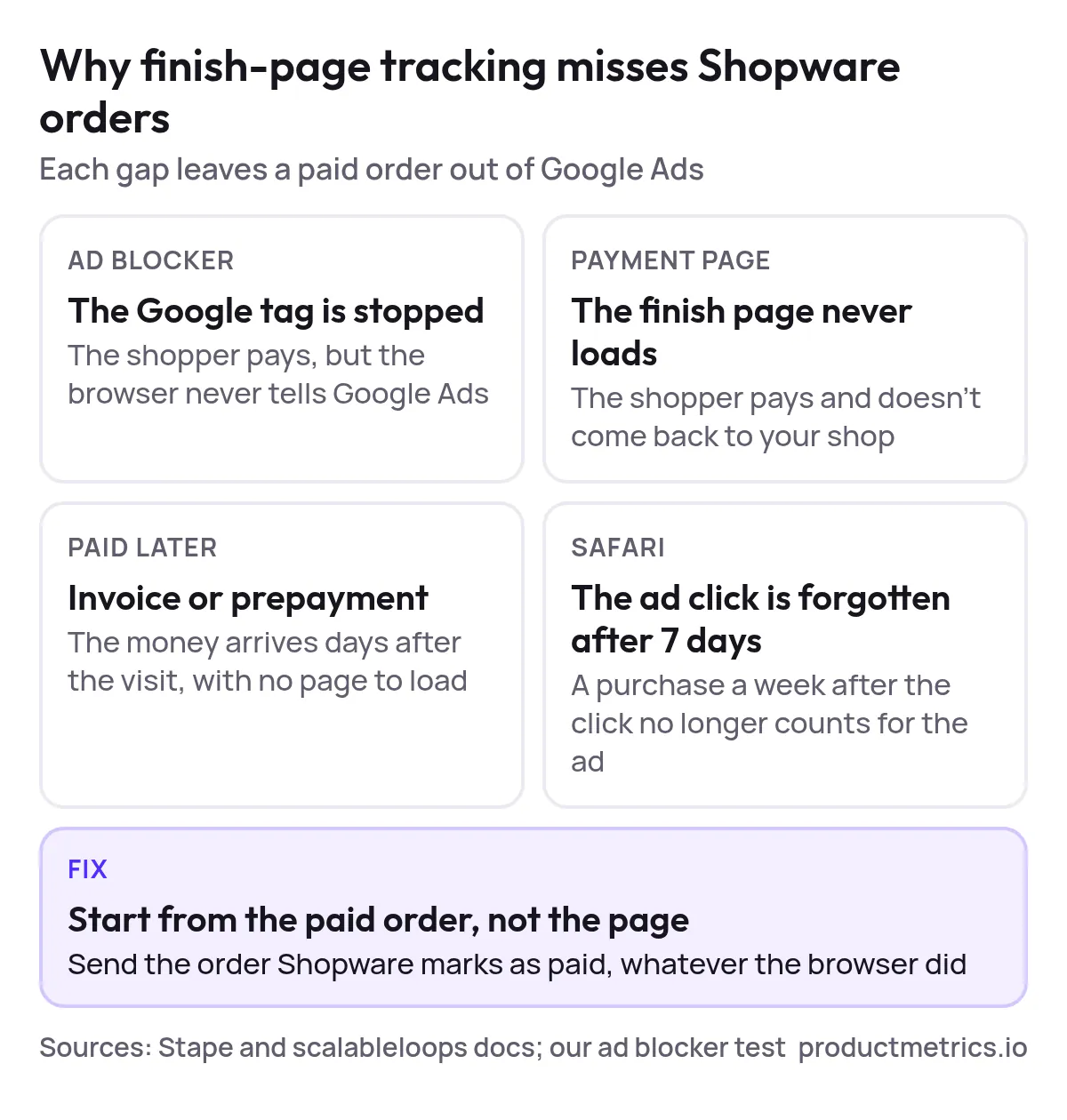
Ad blockers stop the standard Google tag, which you can check in your own browser with our ad blocker conversion tracking test. Safari also forgets the ad click after 7 days, so a slow buyer loses the link to the ad.
How we evaluated Shopware 6 tracking plugins
We judged each option on what reaches Google Ads after a Shopware 6 order. Tools that aren’t built for Shopware are in our real-time conversion tracking tools review.
- Platform integration depth
A Shopware plugin, the orders it sees, refunds and versions. - Conversion completeness
How many paid orders reach Google Ads despite ad blockers, consent, Safari and skipped finish pages. - Signal depth
What each conversion carries: revenue, profit, new or returning customer, lifetime value, and refunds. - Setup effort and maintenance
Who can install it, and what must keep running. - Price and fit
The published price, and the shop it suits.
Everything here is based on vendor docs and public listings available as of November 2026.
Scoring rubric
Each option scores 1 to 5 per criterion; the weighted score is the sum of each score times its weight, rounded half up to one decimal.
| Criterion | What it means | Weight |
|---|---|---|
| Platform integration depth | Shopware plugin, orders, refunds, versions | 25% |
| Conversion completeness | Ad blockers, consent, Safari, skipped pages | 25% |
| Signal depth | Revenue, profit, new vs returning, LTV, refunds | 20% |
| Setup effort and maintenance | Install, settings, upkeep | 15% |
| Price and fit | Published price and shop fit | 15% |

Show the dataHide the data
| Criterion | Weight |
|---|---|
| Platform integration depth | 25% |
| Conversion completeness | 25% |
| Signal depth | 20% |
| Setup effort and maintenance | 15% |
| Price and fit | 15% |
The tools at a glance
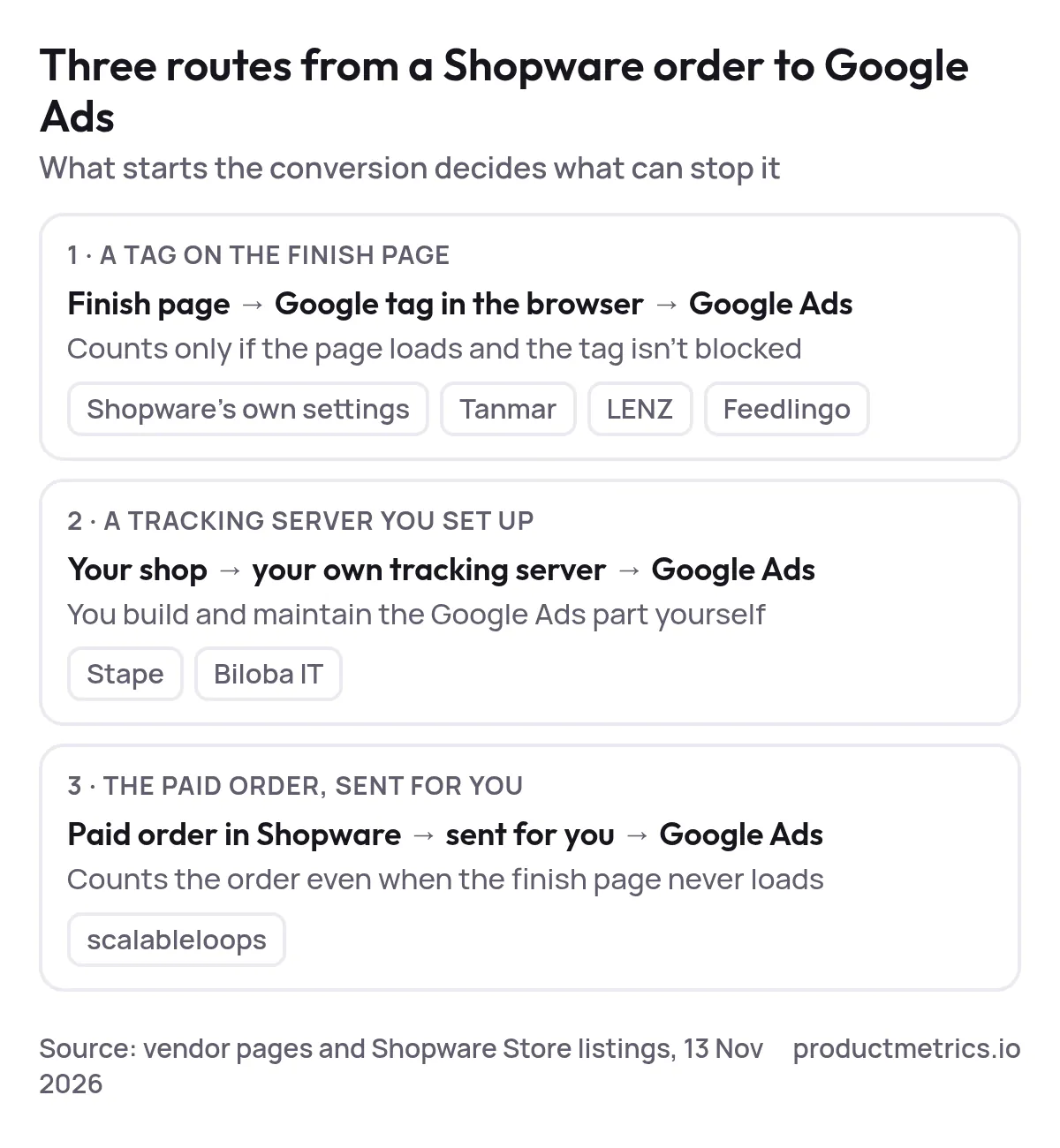
Seven options cover most Shopware 6 shops: Shopware’s own settings and six plugins.
Baseline:
- Shopware’s own settings: the sales channel Analytics tab, with an Enhanced Conversions switch. (Source: Shopware docs)
Plugins:
- Tanmar: a low-cost Google Ads tag for shops without Tag Manager. (Source: Shopware Store)
- Stape: a free plugin that feeds a tracking server you run. (Source: Shopware Store)
- Biloba IT: Tag Manager, Google Analytics and Google Ads in one plugin. (Source: Shopware Store)
- Feedlingo: Google Ads and Google Analytics without Tag Manager. (Source: Shopware Store)
- LENZ: a Google Ads conversion tag with few settings. (Source: Shopware Store)
- scalableloops SlGoogleAds: uploads orders to Google Ads once they are paid. (Source: scalableloops)
Shopware’s own settings – the free baseline
Best for: every Shopware 6 shop, as a free first step for Google Analytics and enhanced conversions.
Shopware’s own settings live in each sales channel’s Analytics tab: a Google Analytics ID, order tracking, IP anonymising and the Enhanced Conversions switch. (Source: Shopware – Sales channel settings)
| Shopware’s own settings | As documented, November 2026 |
|---|---|
| Where | Sales channel › Analytics tab |
| Google Ads conversion | No field; needs a plugin or Tag Manager |
| Enhanced conversions | The buyer’s email address, scrambled, after a purchase |
| Price | Free, built in |
Strengths
- Free, built into every sales channel, with a single switch for enhanced conversions.
Limitations
- It doesn’t count the purchase in Google Ads on its own, so you add a tag anyway.
- The value is revenue: Google Ads reports gross profit only when cart data and product costs are in your Merchant Center feed. (Source: Google Ads Help)
Scores
- Platform integration depth: 2/5
- Conversion completeness: 1/5
- Signal depth: 1/5
- Setup effort and maintenance: 2/5
- Price and fit: 5/5
For free Shopware enhanced conversions for Google Ads, switch them on here, then add one of the plugins below to count the purchase.
Tanmar – a Google Ads plugin for Shopware 6 without Tag Manager
Best for: Shopware 6 shops that want a cheap Google Ads tag and remarketing without Google Tag Manager.
Tanmar’s plugin puts the Google Ads conversion tag on the checkout finish page with the order number, so a reload isn’t counted twice. Version 4.2.0 added a new-customer flag to each conversion, and 4.3.0 the items in the cart. (Source: Shopware Store – Tanmar)
| Tanmar | As listed, November 2026 |
|---|---|
| Install | Shopware Store plugin, rated 4.9 from 7 reviews |
| Sends to Google Ads | Purchases with order number, new-customer flag and cart items |
| Server-side | No, a tag in the browser |
| Price | €4.90 a month or €50 a year, excl. VAT, first month free |
Strengths
- Enhanced conversions pass the scrambled email address, and Consent Mode works with Shopware’s cookie banner or four other consent tools.
- Version 4.3.0 supports Shopware 6.7.0.0 to 6.7.16.0.
Trade-offs
- A finish-page tag, so blocked tags and shoppers who don’t come back still cost sales.
- No profit value.
Scores
- Platform integration depth: 4/5
- Conversion completeness: 2/5
- Signal depth: 3/5
- Setup effort and maintenance: 5/5
- Price and fit: 5/5
As a Google Ads conversion tracking plugin for Shopware 6 on a tight budget, Tanmar is the simplest install here.
Stape – Shopware 6 server-side tracking with your own tracking server
Best for: shops with a tracking specialist who runs Google Tag Manager and a tracking server.
Stape Conversion Tracking is a free Shopware plugin. It adds Google Tag Manager to every page and can send purchases and refunds from your shop to a tracking server you set up and maintain, once the payment is paid or authorised. (Source: Shopware Store – Stape)
| Stape | As listed, November 2026 |
|---|---|
| Install | Shopware Store plugin, Shopware 6.6.8.0 to 6.7.15.1 |
| Sends to Google Ads | The Google Ads tags you build on your tracking server |
| Server-side | Yes, through your own tracking server |
| Price | Plugin free; Stape hosting free up to 10K requests, Pro $20 a month |
Strengths
- Orders count even when the shopper never returns to the finish page, because the shop sends them itself. (Source: Stape – Shopware extension)
- Stape’s hosting can serve Tag Manager from your own shop address.
Trade-offs
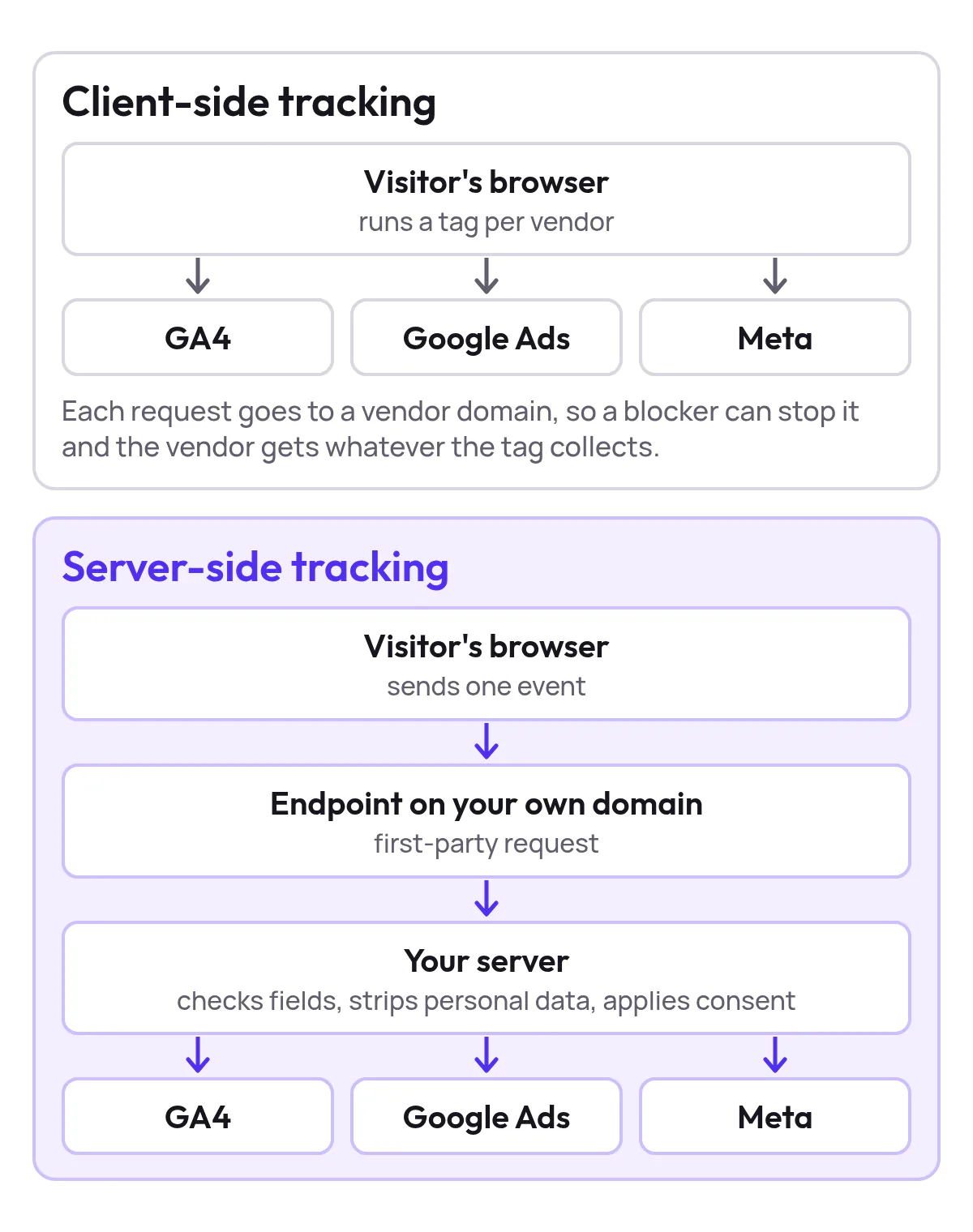
- A Tag Manager tracking server still starts with a browser request, and ad blockers block those setups too (how they compare).
- Stape’s docs describe no Google Ads setup or profit value; you build those tags yourself.
Scores
- Platform integration depth: 4/5
- Conversion completeness: 4/5
- Signal depth: 2/5
- Setup effort and maintenance: 2/5
- Price and fit: 4/5

Show the dataHide the data
| Option | Conversion completeness | Signal depth |
|---|---|---|
| Tanmar | 2 | 3 |
| Stape | 4 | 2 |
| Biloba IT | 3 | 2 |
| Feedlingo | 2 | 2 |
| LENZ | 2 | 1 |
| scalableloops | 4 | 2 |
| Shopware settings | 1 | 1 |
If your team knows Tag Manager and wants Shopware 6 server side tracking for Google Ads under its own control, Stape is the free start. Our server-side tracking tools list compares hosting options.
Biloba IT – Tag Manager, Google Analytics and Google Ads for Shopware
Best for: Shopware shops on Google Tag Manager that may later add their own tracking server.
Biloba IT’s plugin runs Google Tag Manager or the Google tag, tracks Google Analytics shop events, and sends Google Ads conversions, dynamic remarketing and enhanced conversions. Tracking can run “via your own server container instead of directly to Google”. (Source: Shopware Store – Biloba IT)
| Biloba IT | As listed, November 2026 |
|---|---|
| Install | Shopware Store plugin, versions for 6.5, 6.6 and 6.7 |
| Sends to Google Ads | Conversions, remarketing, enhanced conversions |
| Server-side | Optional, through a tracking server you run |
| Price | €14.99 a month or €149 a year, excl. VAT, first month free |
Strengths
- Enhanced conversions can carry name, billing address and phone number as well as the email address.
- Saves the campaign and ad source of each visit on the order, and works with seven cookie banners.
Trade-offs
- The tracking server is yours to host and set up.
- No profit value for Google Ads is listed, and Biloba IT says not to run it next to Shopware’s own Google settings, or orders count twice.
Scores
- Platform integration depth: 4/5
- Conversion completeness: 3/5
- Signal depth: 2/5
- Setup effort and maintenance: 3/5
- Price and fit: 4/5
For Shopware enhanced conversions for Google Ads with more than the email address, Biloba IT adds name, address and phone.
Feedlingo – Google Ads and Google Analytics without Tag Manager
Best for: Shopware 6 shops that want Google Ads and Google Analytics from one plugin, with no Tag Manager.
Feedlingo’s plugin sends purchases to Google Ads with your conversion ID and label, adds enhanced conversions with email, name, postcode and country, and feeds remarketing with the same product numbers as Merchant Center. Refunds go to Google Analytics only. (Source: Shopware Store – Feedlingo)
| Feedlingo | As listed, November 2026 |
|---|---|
| Install | Shopware Store plugin, Shopware 6.5 to 6.7, no reviews yet |
| Sends to Google Ads | Purchases with enhanced conversions; remarketing events |
| Server-side | No for Google Ads; refunds to Google Analytics only |
| Price | €12.90 a month or €119 a year, excl. VAT, first month free |
Strengths
- Detects eight cookie banners by itself, including Shopware’s own, Cookiebot and OneTrust.
Trade-offs
- A browser tag for Google Ads, so ad blockers and skipped finish pages still cost sales.
- New on the Store in 2026, with fewer than 10 downloads listed.
Scores
- Platform integration depth: 4/5
- Conversion completeness: 2/5
- Signal depth: 2/5
- Setup effort and maintenance: 4/5
- Price and fit: 4/5

Show the dataHide the data
| Option | Setup effort and maintenance | Price and fit |
|---|---|---|
| Tanmar | 5 | 5 |
| Stape | 2 | 4 |
| Biloba IT | 3 | 4 |
| Feedlingo | 4 | 4 |
| LENZ | 5 | 5 |
| scalableloops | 2 | 2 |
| Shopware settings | 2 | 5 |
If you want Google Ads conversion tracking on Shopware 6 and Google Analytics from one plugin without Tag Manager, Feedlingo covers both.
LENZ – a Google Ads conversion tag with few settings
Best for: Shopware 6.7 shops that only need a purchase conversion in Google Ads, set up in minutes.
LENZ eBusiness’s Google Ads Conversion Tracking stores your Google tag ID and a conversion label, and lets you send the order value net or gross, with or without shipping. Version 7.0.0 needs Shopware 6.7 and supports Google’s Consent Mode. (Source: Shopware Store – LENZ)
| LENZ | As listed, November 2026 |
|---|---|
| Install | Shopware Store Premium App, by a Premium Extension Partner |
| Sends to Google Ads | The order value, net or gross |
| Server-side | Not described on the listing |
| Price | €5 a month or €50 a year, excl. VAT, first month free |
Strengths
- Few settings: tag ID, label and which order value to send.
Trade-offs
- Enhanced conversions aren’t mentioned on the listing.
- No reviews yet, and no profit or new-customer value.
Scores
- Platform integration depth: 3/5
- Conversion completeness: 2/5
- Signal depth: 1/5
- Setup effort and maintenance: 5/5
- Price and fit: 5/5
For Google Ads conversion tracking on Shopware 6 with the fewest settings to fill in, LENZ does that one job.
scalableloops SlGoogleAds – orders sent to Google Ads once paid
Best for: Shopware 6.6 and 6.7 shops with invoice or prepayment orders paid days after the click.
SlGoogleAds sends each conversion from the finish page and again from your shop’s server, and Google keeps one by the order number. The ad click is saved when the shopper lands, and the order is uploaded once it is paid, which covers “invoice, prepayment or late-confirmed PayPal”. (Source: scalableloops)
| scalableloops | As listed, November 2026 |
|---|---|
| Install | Shopware plugin; Google must approve your account |
| Sends to Google Ads | Paid orders with scrambled email, phone and name |
| Server-side | Yes, from your shop’s server |
| Price | On request; implementation quoted separately |
Strengths
- Unpaid orders keep their link to the ad for 63 days by default, and customer details are scrambled in the shop.
Trade-offs
- Google’s approval “can take time”, and a background process must run all the time.
- No profit value, and orders from before setup aren’t uploaded.
Scores
- Platform integration depth: 4/5
- Conversion completeness: 4/5
- Signal depth: 2/5
- Setup effort and maintenance: 2/5
- Price and fit: 2/5
For Google Ads conversion tracking on Shopware 6.6 with slow payment methods, scalableloops is built around the paid order.
Side by side comparison
| Option | Best for | Integration | Completeness | Signal | Setup | Price | Weighted |
|---|---|---|---|---|---|---|---|
| Tanmar | A cheap Google Ads tag | 4 | 2 | 3 | 5 | 5 | 3.6 |
| Stape | Your own tracking server | 4 | 4 | 2 | 2 | 4 | 3.3 |
| Biloba IT | Tag Manager plus richer enhanced conversions | 4 | 3 | 2 | 3 | 4 | 3.2 |
| Feedlingo | Google Ads and Analytics, no Tag Manager | 4 | 2 | 2 | 4 | 4 | 3.1 |
| LENZ | One purchase conversion, few settings | 3 | 2 | 1 | 5 | 5 | 3.0 |
| scalableloops | Invoice payments on 6.6 | 4 | 4 | 2 | 2 | 2 | 3.0 |
| Shopware’s own settings | Free enhanced conversions | 2 | 1 | 1 | 2 | 5 | 2.0 |

Show the dataHide the data
| Option | Weighted score |
|---|---|
| Tanmar | 3.6 |
| Stape | 3.3 |
| Biloba IT | 3.2 |
| Feedlingo | 3.1 |
| LENZ | 3.0 |
| scalableloops | 3.0 |
| Shopware settings | 2.0 |
Completeness and setup pull against each other. Stape and scalableloops score 4 on completeness, but someone has to build or run their server part, so Tanmar’s low-cost browser tag still leads at 3.6.
How to choose a Google Ads conversion tracking plugin for Shopware 6
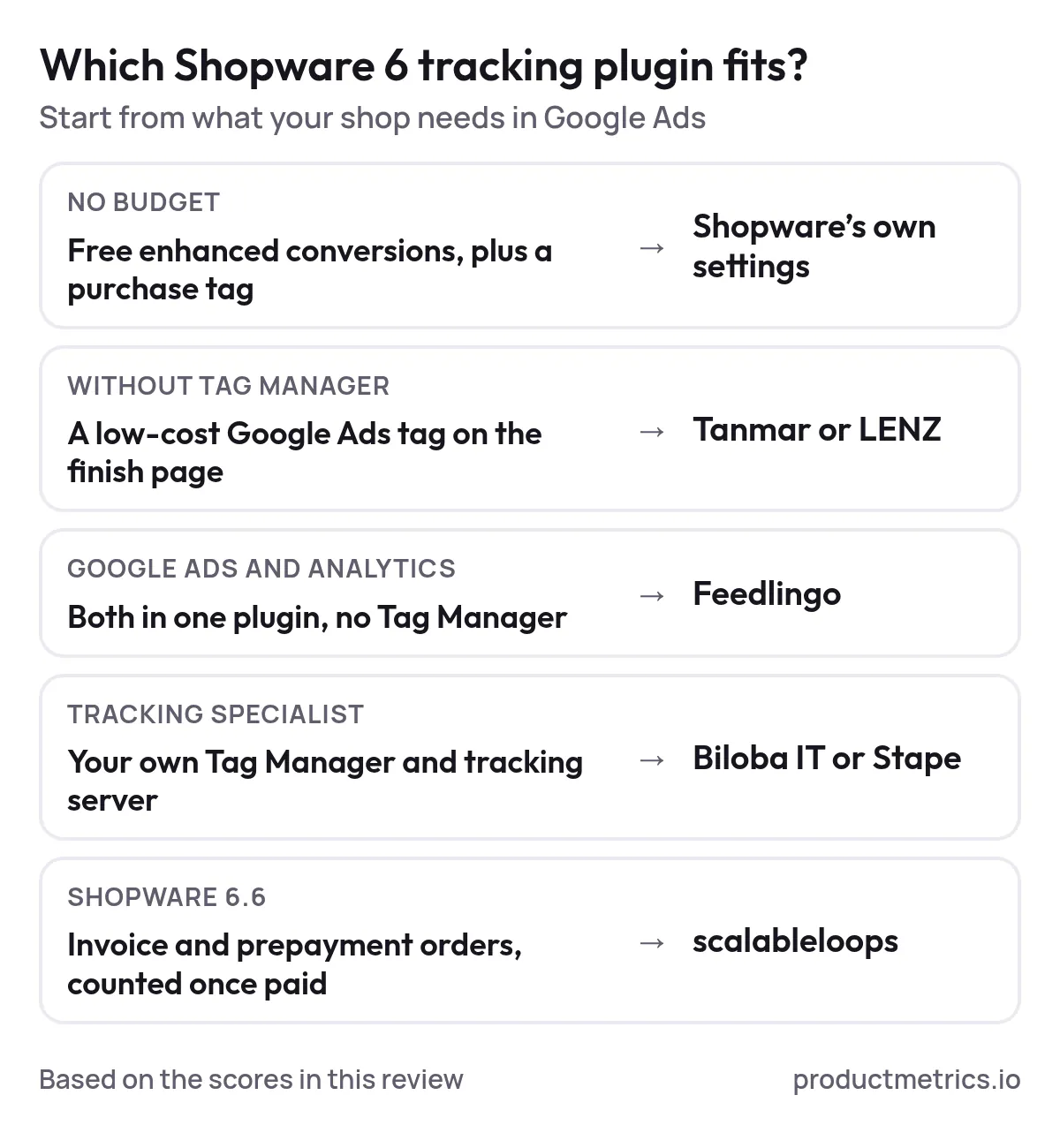
The right plugin depends on what Google Ads should learn from each Shopware order:
- If you only need free enhanced conversions → Shopware’s own settings, plus a purchase tag.
- If you want a cheap Google Ads tag without Tag Manager → Tanmar, or LENZ for the fewest settings.
- When Google Ads and Google Analytics should come from one plugin → Feedlingo.
- If your team runs Tag Manager and a tracking server → Biloba IT or Stape.
- If invoice payments arrive days later on Shopware 6.6 → scalableloops.
Whatever you pick, keep one purchase action primary so orders aren’t counted twice; our Google Ads conversion tracking guide covers that check.
On another platform, see the Magento extensions or the Lightspeed apps in this series.
Written by
Berend Vrakking, Founder of Product Metrics
1M+ products analysed · Nominated at the Dutch Search Awards for Best Measurement Campaign (2023) and Best Use of Data (2024)
Keep reading.
What Does Google Ads Conversion Tracking Cost? Setup, Tools, Hosting and Upkeep
What does Google Ads conversion tracking cost? The five parts of the bill, priced from Google's own figures and our price list, plus what to ask.
How Much Does Server-Side Tracking Cost for Google Ads? Server-Side GTM vs a Hosted App
How much does server-side tracking cost for Google Ads? Hosting, setup and upkeep for server-side GTM against a hosted app, with Google's figures.
Best Google Ads Conversion Tracking Apps for Lightspeed eCom
Best Google Ads conversion tracking apps for Lightspeed eCom (C-Series), scored on five criteria: ROASaurus, ProfitMetrics, AdPage and more.
Frequently asked questions.
How do I turn on Shopware enhanced conversions for Google Ads?
Will Google Ads count orders twice if I run two tracking plugins?
Do I still need a Google Shopping feed on Shopware 6?
See which of your products to push, fix or pause. Start with your own products, or a 30-second estimate.
See what a blocker stops with the ad blocker tracking test. Then see how your products perform once every conversion is counted.
Questions, or want to spar about your products? Book a demo: a video call with Berend, then a demo account.