
POAS In The Real World Passing Profit, Composing Conversion Value, And Bidding With Confidence
POAS in the real world passing profit to Google Ads: what to send as conversion value, which costs to include, how to keep margins private and test it.
Most teams now agree that ROAS alone is not enough. The question that keeps coming back is more practical:
How do we actually send profit to Google Ads, include real costs, and run POAS experiments without handing Google our margin table?
This guide walks through exactly that, from picking a profit definition to wiring it into conversion value and testing it safely.
Key Takeaways
- Google Ads doesn’t care whether your conversion value is revenue, profit or a proxy. It optimises toward whatever numbers you send as
value. (Source: Google Ads Help – About conversion values) - You can pass order-level profit directly as the
valueparameter in your Google Ads conversion tag, or send it via offline/imported conversions, then let Target ROAS and Maximize conversion value bid on that profit. (Source: Google Ads Help – Track transaction‑specific values, Google Ads Help – Value-based bidding) - Conversions with cart data plus
cost_of_goods_soldin Merchant Center unlock native gross profit and gross profit margin metrics for Shopping and PMax, but they usually exclude shipping, payment fees and returns unless you bake them into COGS. (Source: Google Ads Help – About conversions with cart data, Merchant Center Help – cost_of_goods_sold, Google Ads API – Shopping reporting) - Refunds and cancellations should flow back into Google Ads as conversion adjustments so POAS reflects kept profit, not gross revenue that never landed. (Source: Google Ads Help – About conversion adjustments, Google Ads API – Upload conversion adjustments)
- You can keep exact margins private by calculating profit server-side, sending only the final value to Google Ads, or by using indexed/scaled values and adjusting your Target ROAS accordingly. (Source: Think with Google – Maximise Growth with Data, Google – Changing Biddable Conversion Actions)
1. From ROAS To POAS The Implementation Gap
ROAS uses revenue as conversion value; POAS replaces revenue with profit before ad spend:
- ROAS = revenue ÷ ad spend
- POAS = contribution profit ÷ ad spend
In Product Metrics’ framework, contribution profit means revenue excluding VAT/sales tax minus cost of goods and variable order costs (shipping subsidies, payment fees, packaging, expected returns). (Source: Product Metrics – POAS vs ROAS)
That definition is what makes a POAS of 1.0 break-even: ad‑driven sales have covered product and variable costs and the ads that drove them. (Source: Product Metrics – POAS vs ROAS)
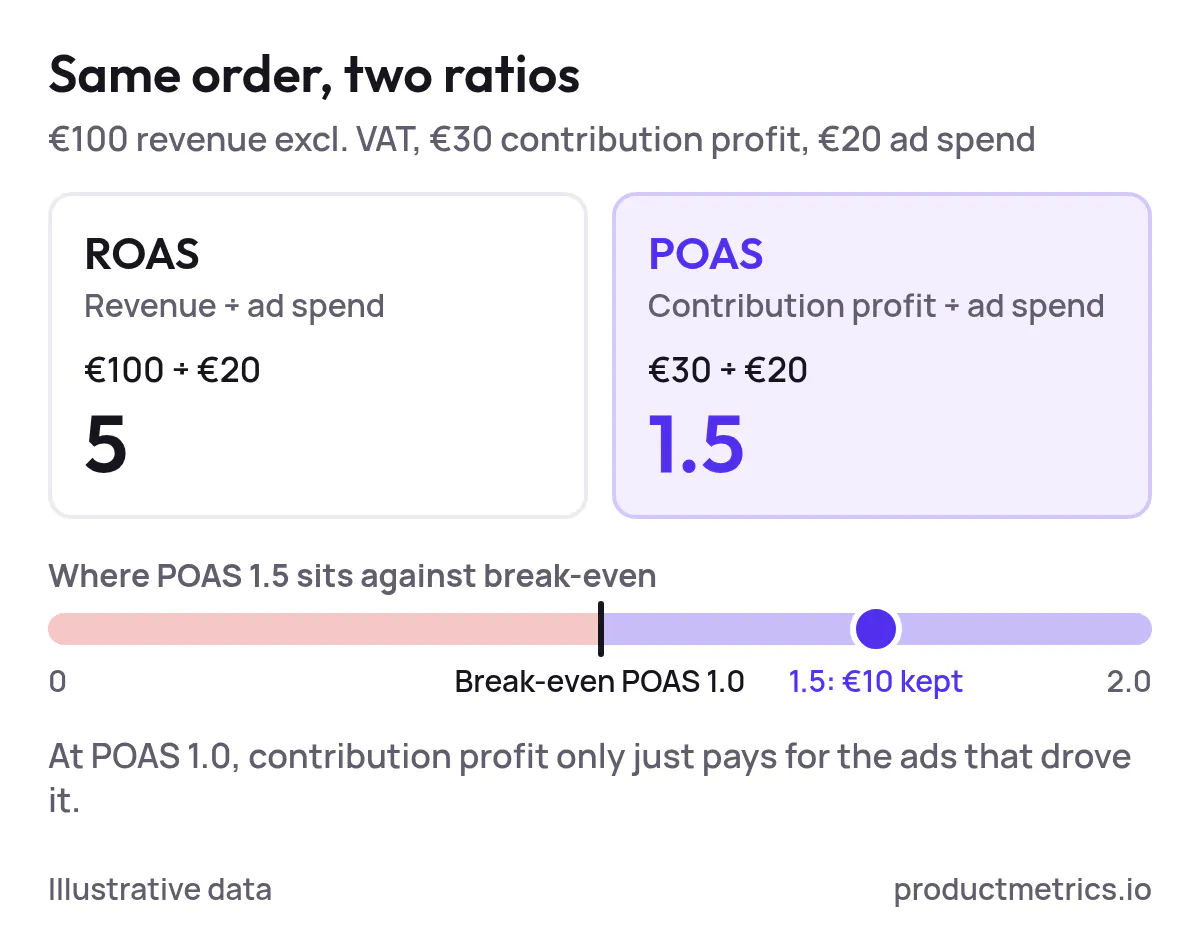
Conceptually, POAS is straightforward. In practice, most accounts still:
- Send order total including tax and shipping as conversion value.
- Never subtract refunds or cancellations.
- Let Smart Bidding optimise on revenue that the business doesn’t keep. (Source: Google Ads Help – Track transaction‑specific values, Google Ads Help – About conversion values)
Fixing this requires two things:
- A clear, per‑order profit formula.
- A plan to compose that profit into Google’s single
valuefield without leaking sensitive margin data.
The rest of this guide is about those two pieces.
2. Decide What “Profit” You Want Google To See
Before touching tags or bid strategies, standardise how you’ll calculate profit at order level. That choice matters more than any code snippet.
2.1 Fix Your Revenue Basis
Google’s own examples assume conversion value is usually net revenue, not including VAT or sales tax. (Source: Google Ads Help – About conversion values)
For US retailers, that normally means:
- Start from item subtotal (price after discounts).
- Exclude sales tax and any non-refundable duties from the value you send.
This keeps POAS consistent with how finance sees revenue.
2.2 Choose A Profit Definition You Can Maintain
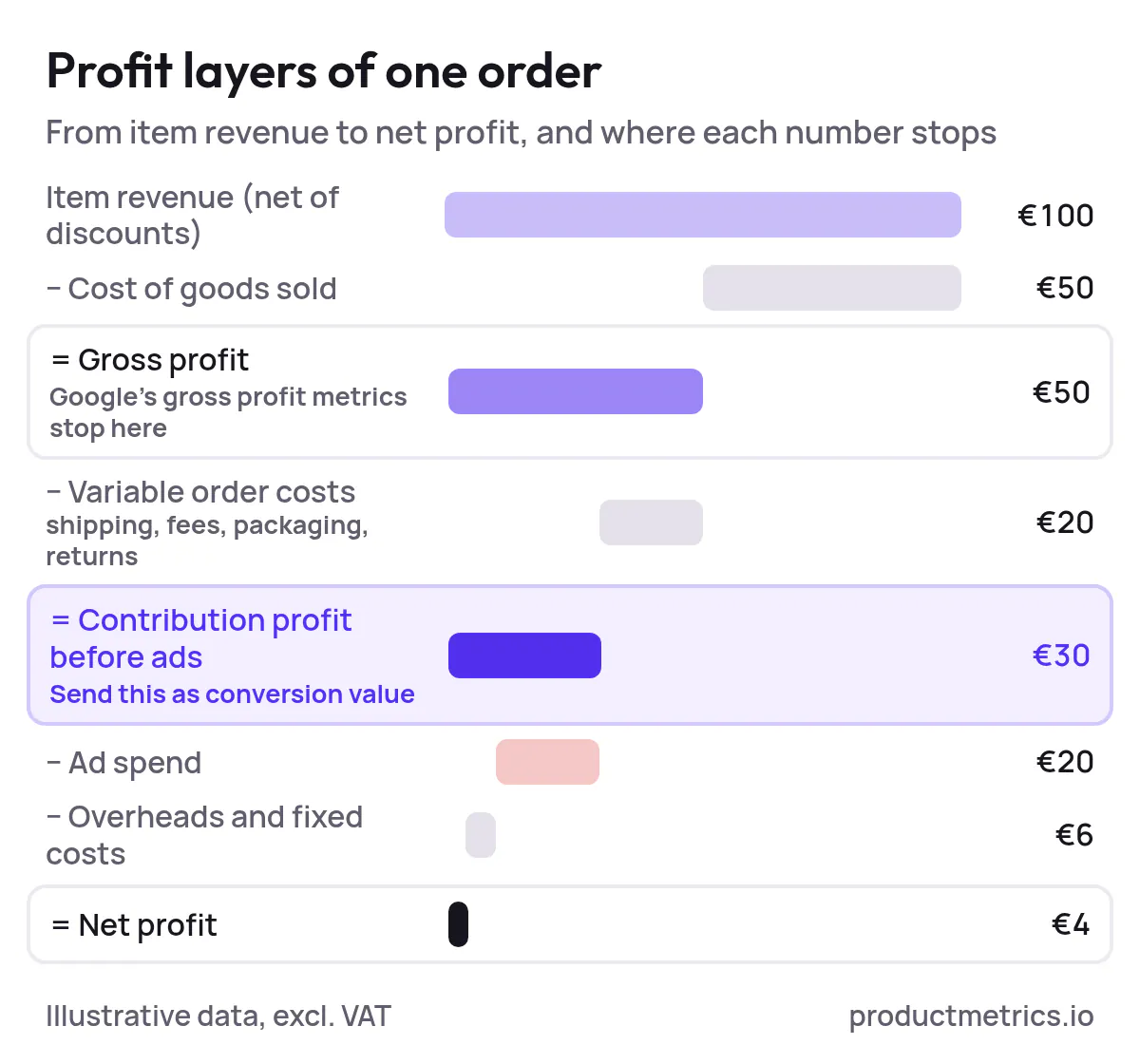
Think in layers. A typical ecommerce stack looks like this per order:
- Item revenue (net of discounts)
- − Cost of goods sold (product cost)
- − Variable order costs (shipping subsidies, payment fees, packaging, expected returns)
- = Contribution profit before ads
- − Ad spend
- − Overheads and fixed costs
- = Net profit
Google’s gross profit metrics from conversions with cart data and cost_of_goods_sold stop at revenue − COGS. They don’t automatically subtract your shipping subsidies, payment fees or returns unless you fold those into COGS yourself. (Source: Google Ads Help – Metrics with conversions with cart data, Merchant Center Help – cost_of_goods_sold)
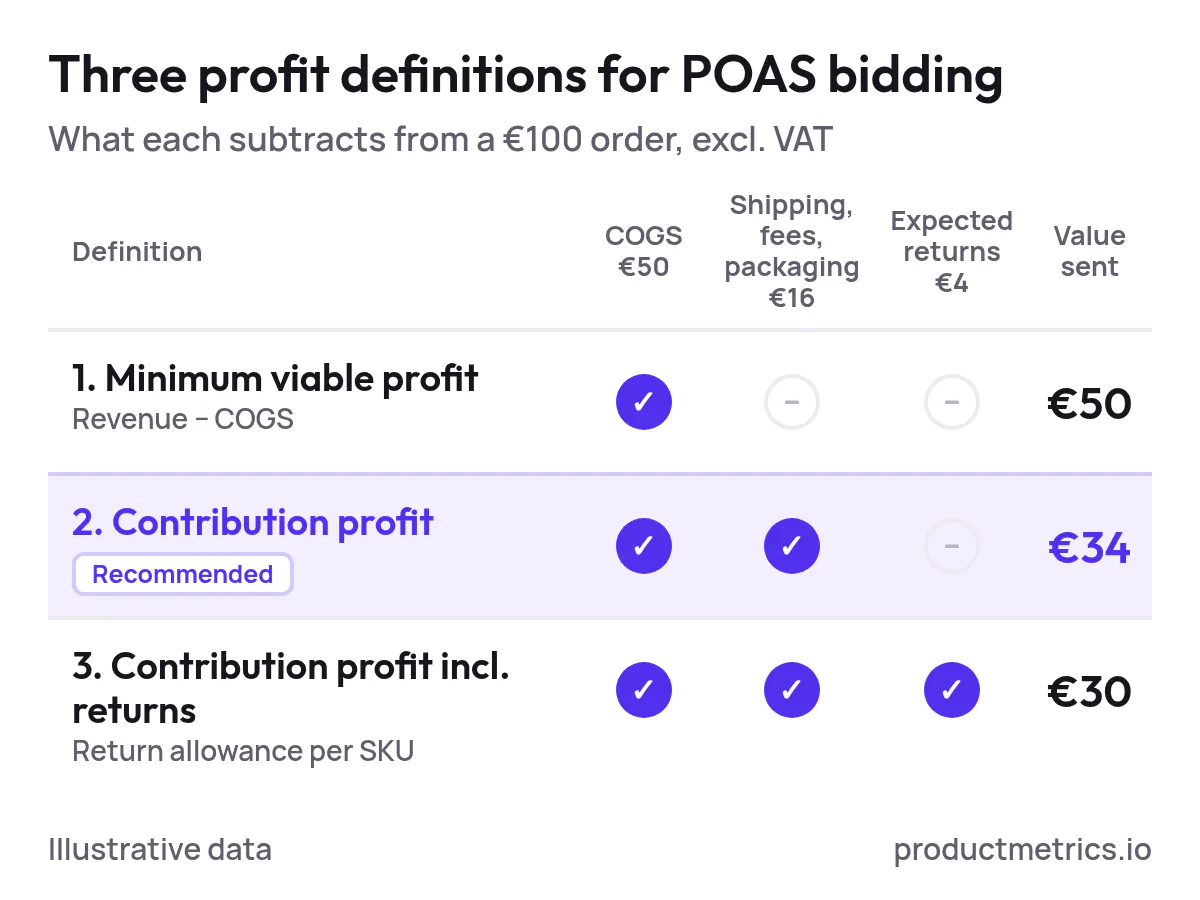
For POAS bidding, most retailers use one of three definitions:
- Minimum viable profit: revenue − COGS.
- Contribution profit (recommended): revenue − COGS − variable order costs.
- Contribution profit including expected returns: same as (2), but with a return allowance per SKU.
Pick one that:
- You can compute per order and per SKU from your ecommerce platform.
- You can keep consistent across websites, currencies and channels.
This is the profit number we’ll send to Google Ads as conversion value.
3. How Google Ads Treats Conversion Value
Google Ads defines conversion value as the numeric amount you record for each conversion, which can represent revenue, profit margin or other business value. (Source: Google Ads Help – About conversion values)
A few consequences for POAS:
- Bid strategies like Target ROAS and Maximize conversion value optimise for whatever number you send as
value, not specifically revenue. (Source: Google Ads Help – Bidding FAQ, Google Ads Help – Smart Bidding using value-based bidding) - Google’s value‑based bidding docs explicitly list profit margins and lifetime value as valid optimisation targets when used as conversion value. (Source: Google Ads Help – Value-based bidding best practices)
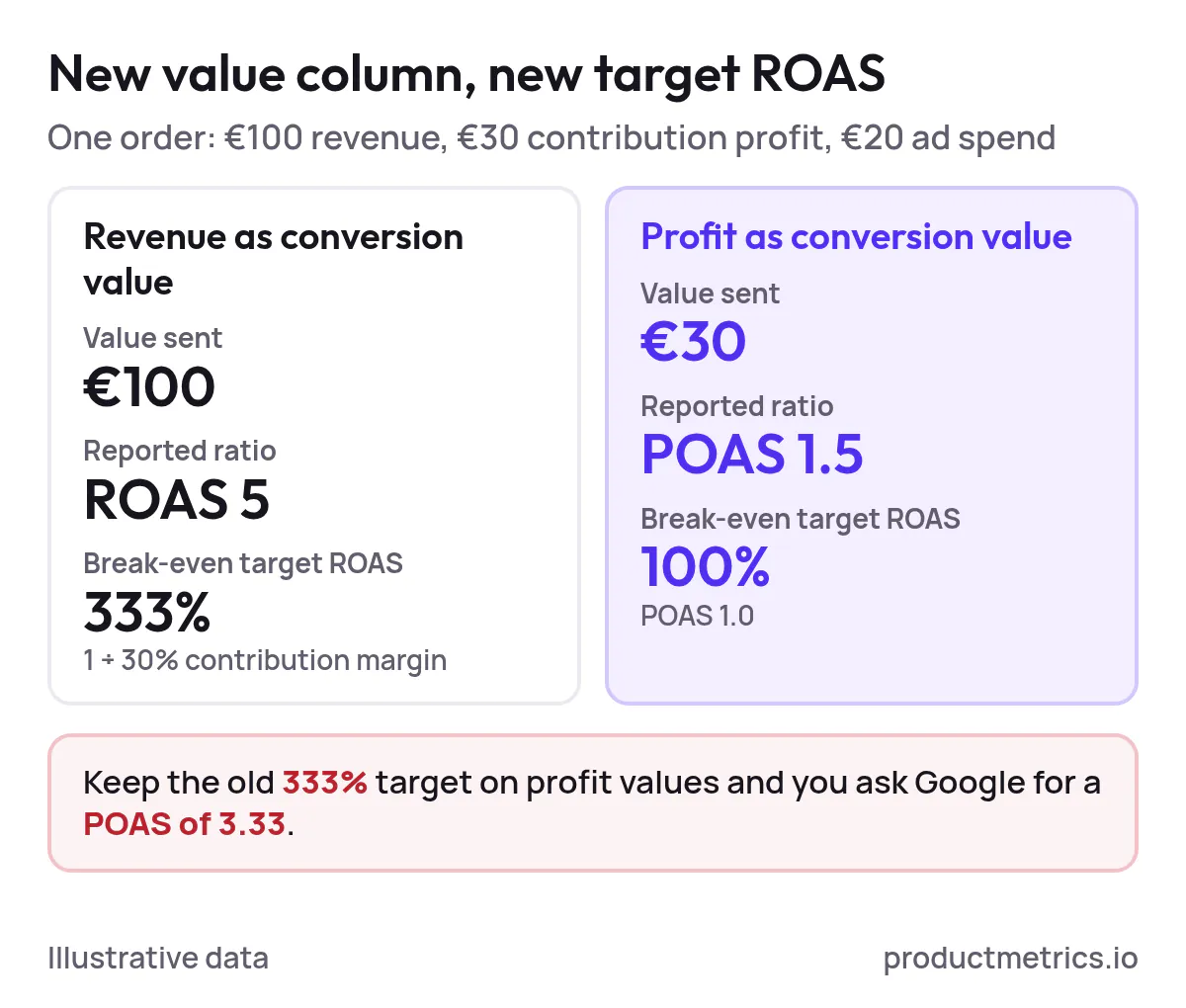
- If you change from revenue to profit as conversion value, you must also change your Target ROAS so that the new ratio matches your profit expectations. (Source: Product Metrics – Target ROAS meaning and margin formula, Think with Google – Maximise Growth with Data)
So “bidding on profit” in Google Ads is not a special feature. It’s standard Target ROAS or Maximize conversion value, pointed at a profit‑based value column.
4. Route 1 - Send Profit Instead Of Revenue As Conversion Value
This route answers the queries:
- “How to send profit instead of revenue as conversion value to Google Ads?”
- “How to pass gross profit per order to Google Ads?”
- “How to bid on profit in Google Ads without showing Google my margins?”
At a high level:
- Compute order‑level profit in your backend.
- Pass that profit to your Google Ads conversion as the
valuefield. - Point a Target ROAS or Maximize conversion value strategy at that conversion.
4.1 Compute Profit Per Order
On your ecommerce platform, for each order:
net_revenue = sum(line_item_price_excl_tax_after_discounts)
product_cogs = sum(line_item_cogs)
variable_costs = shipping_subsidy + payment_fees + packaging + expected_returns

profit_before_ads = net_revenue - product_cogs - variable_costs
This is the number you’ll send to Google Ads.
If you cannot yet calculate all variable costs per order, start with revenue − COGS and mark this as an interim definition while you expand cost coverage.
4.2 Map Profit To The value Parameter (Browser-Side)
If you use the Google tag directly, Google’s documentation shows how to dynamically pass a transaction‑specific value and currency via the value and currency parameters: (Source: Google Ads Help – Track transaction-specific conversion values)
<script>
  gtag('event', 'conversion', {
    'send_to': 'AW-XXXXXXXXX/YYYYYYYYYY',
    'transaction_id': 'ORDER_ID_123',
    'value': PROFIT_BEFORE_ADS,    // e.g. 42.15
    'currency': 'USD'
  });
</script>
In a Google Tag Manager Google Ads Conversion Tracking tag, you’d set Conversion Value to a variable that holds profit_before_ads. (Source: Google Ads Help – Use the Google tag for conversion tracking, Google Ads Help – Track transaction-specific conversion values)
From Google’s perspective, this is identical to sending revenue. It simply sees a number.
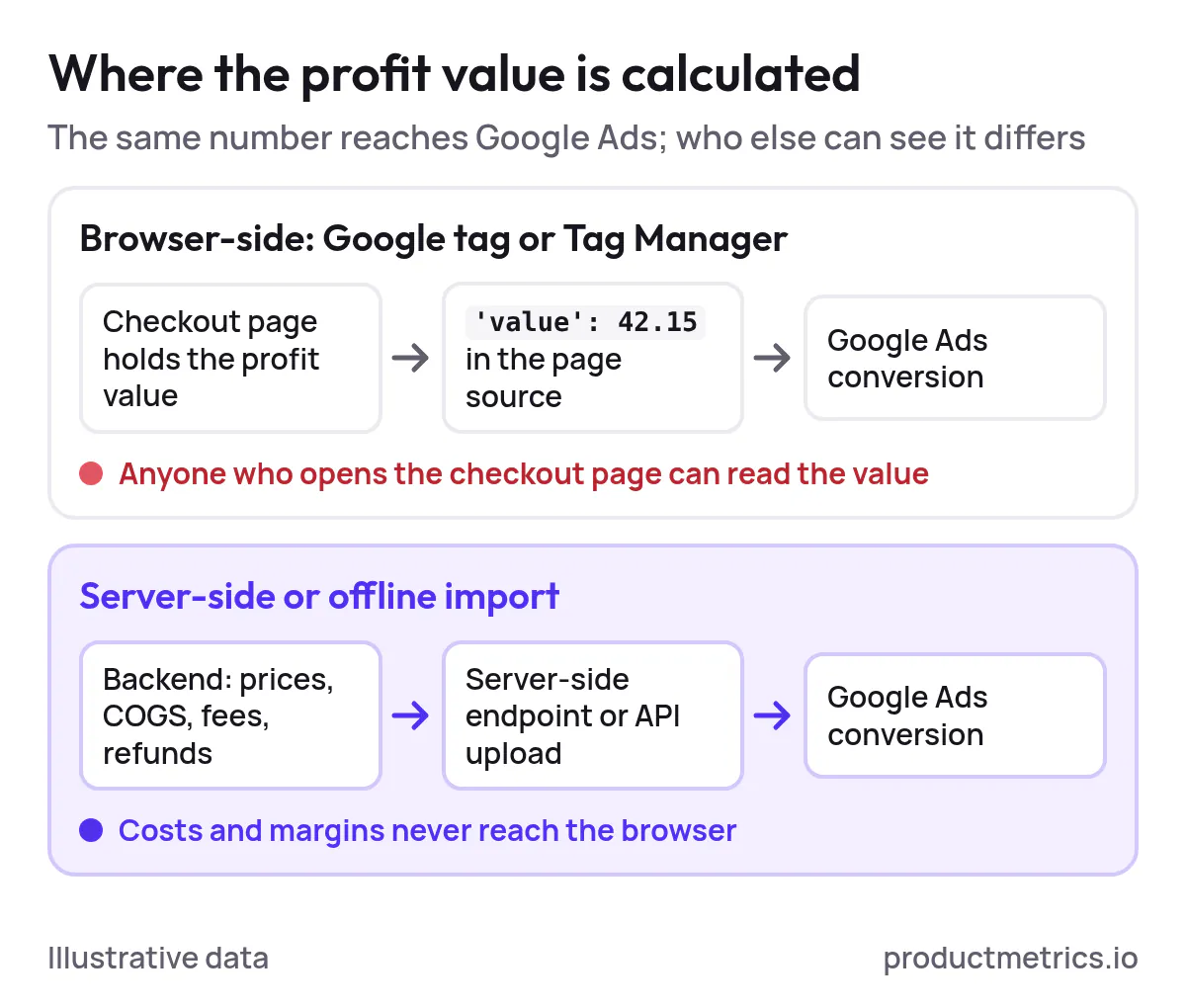
4.3 Server-Side And Offline Profit Uploads
If you don’t want profit visible in the page source at all, compute it server-side and send conversions via:
- A server‑side tagging setup (for example, server‑side GTM or a first‑party endpoint) that forwards conversions to Google Ads with
valueset to profit. (Source: Google Ads Help – How Google Ads tracks website conversions, Google Developers – Reporting for Retail) - Offline or API‑based conversion imports where each row includes
order_id,gclidorclick_id, conversion time and a profit value. (Source: Google Ads Help – Import conversions, Google Ads API – Upload conversions)
Google’s own value‑based bidding playbooks describe passing profit as conversion value via offline import or API for Search and Shopping. (Source: Think with Google – Maximise Growth with Data, Think with Google – Making a Bid for Profit)
When everything runs server-side, neither Google nor anyone inspecting your checkout page sees raw COGS or per‑SKU margins.
4.4 Adjust Target ROAS To Match Profit Values
Once profit flows into Google Ads as conversion value:
- Break-even POAS is 1.0 (profit equals ad spend) when you use contribution profit. (Source: Product Metrics – POAS vs ROAS)
- Your Target ROAS must now be set on that profit value instead of revenue; a revenue‑based target will be wrong. (Source: Product Metrics – Target ROAS meaning and margin formula, Google Ads Help – Bidding FAQ)
A simple way to set the new targets is to work backwards from your contribution margin and desired profit after ads, as in Product Metrics’ target ROAS guide. (Source: Product Metrics – How to set a target ROAS from your margin)
5. Route 2 - Use Conversions With Cart Data And COGS For Gross Profit
If your main question is “How to include cost of goods sold in Google Ads conversion value?”, you can also use Google’s native retail stack.
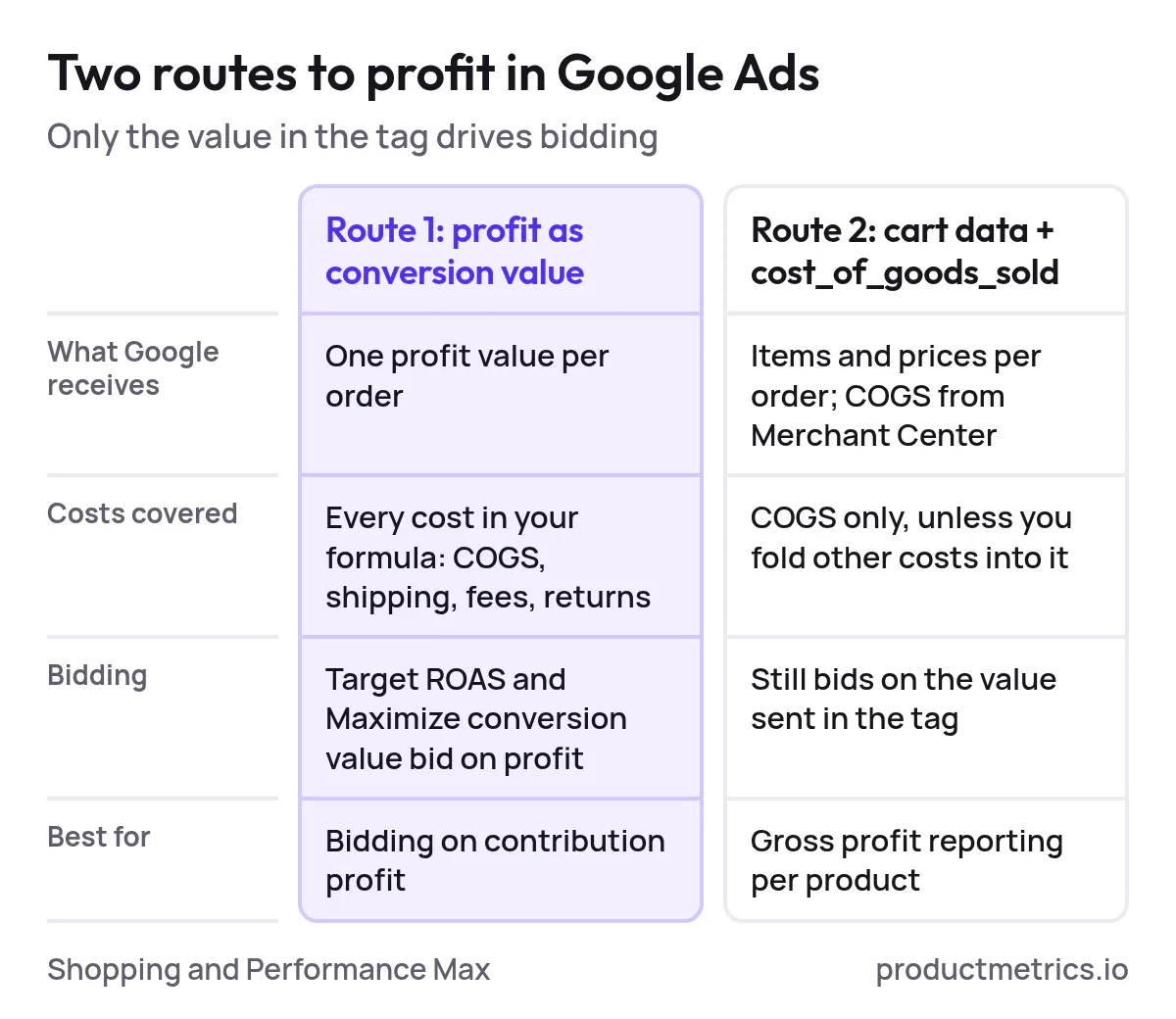
Conversions with cart data let you send item‑level cart contents with your purchase conversions (product IDs, quantities, prices). When you also provide cost_of_goods_sold in your Merchant Center feed, Google can calculate and report revenue, gross profit, gross profit margin and units sold per product. (Source: Google Ads Help – About conversions with cart data, Google Ads Help – Metrics with conversions with cart data, Merchant Center Help – cost_of_goods_sold)
At a high level:
- Add
cost_of_goods_soldfor each product to your Merchant Center feed. - Implement conversions with cart data on your purchase event (via Google tag or GTM).
- Link Merchant Center and Google Ads; enable conversions with cart data for the relevant conversions. (Source: Google Ads Help – About conversions with cart data)
Once configured, Shopping and Performance Max reports can show metrics such as Gross profit and Gross profit margin per product or product group. (Source: Google Ads API – Retail reporting)
Limitations for POAS:
- These metrics use gross profit = revenue − COGS, without automatically subtracting your shipping support, payment fees or returns. (Source: Google Ads Help – Metrics with conversions with cart data)
- Bidding still happens on the conversion value you send in the tag; gross profit reporting is an extra view rather than a new bid signal today. (Source: Google Ads Help – About conversion values)
For many retailers, cart data + COGS is an excellent reporting layer, but they still move to Route 1 or a server‑side setup when they want bidding to fully reflect contribution profit.
6. Don’t Forget Refunds Cancellations And Adjustments
If Google Ads never hears about returns, your POAS is inflated and Smart Bidding is rewarded for customers who send goods back.
Google Ads supports conversion adjustments that either:
- Restate a conversion’s value (for partial refunds or discounts).
- Retract a conversion (for full cancellations/refunds). (Source: Google Ads Help – About conversion adjustments)
You identify the original conversion (for example via order_id or gclid + timestamp), then upload an adjustment with the new kept value. (Source: Google Ads API – Upload conversion adjustments, Google Data Manager API – Conversion adjustments)
A robust POAS setup usually:
- Sends initial profit as conversion value when the order is placed.
- On each refund or item return, sends a RESTATE adjustment with the updated profit (which may be zero or negative).
- Automates this via an integration between the order system and Google Ads, on a daily or intra‑day schedule.
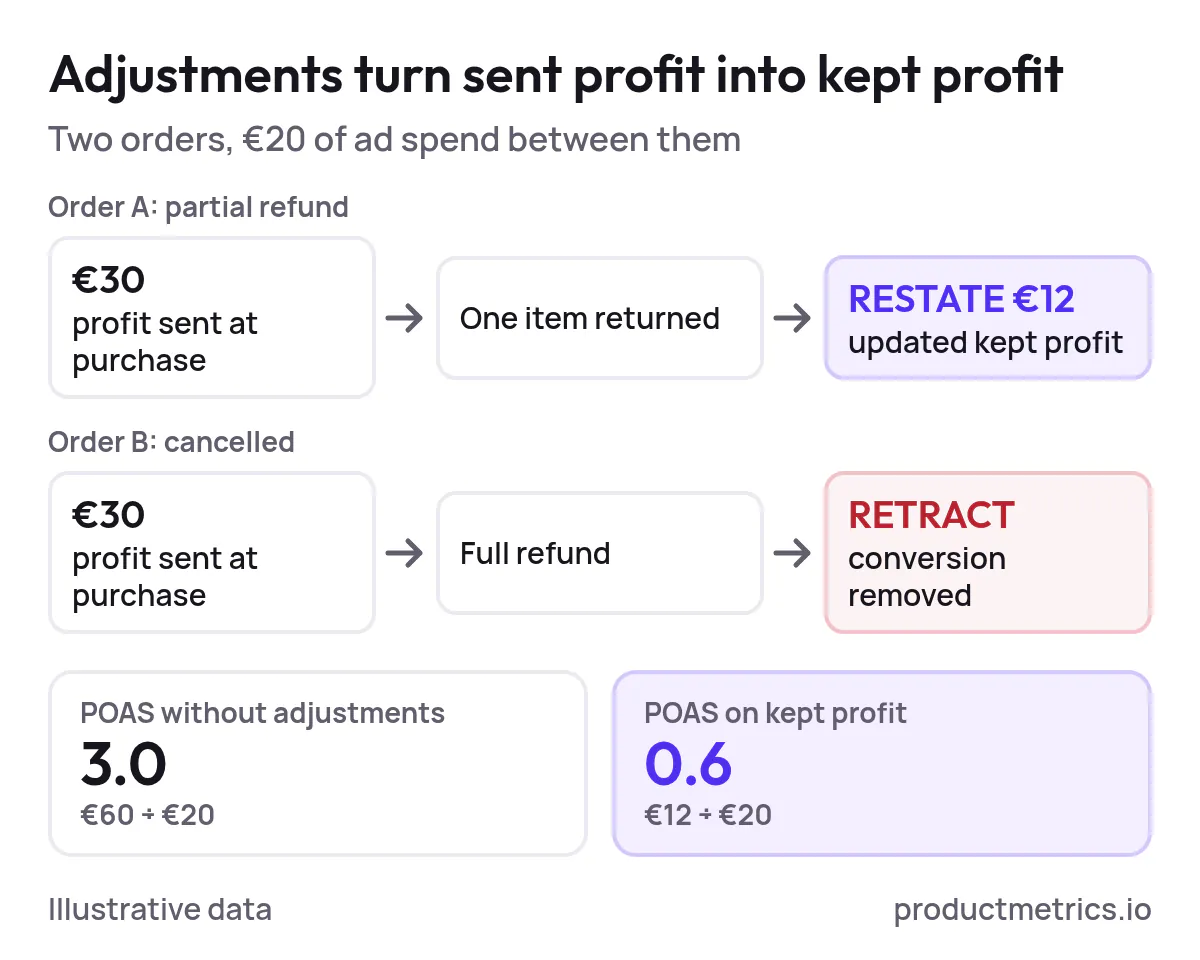
Google’s own value‑based bidding material explicitly recommends using conversion adjustments to reflect returns and profit in value-based setups. (Source: Think with Google – Maximise Growth with Data)
7. How To Keep Margins Confidential While Bidding On Profit
There are three complementary levers that let you run profit‑based bidding without exposing sensitive margins.
7.1 Keep All Cost Data Server-Side
When you compute profit from:
- Ecommerce platform data (prices, discounts, tax, COGS, shipping, fees).
- Order and refund status in your backend.
…and only send the final profit value to Google Ads via a server‑side endpoint or offline import, neither Google nor third parties see your margin table or item-level costs in the browser. (Source: Product Metrics – Full Signal Tracking, Google Ads Help – How Google Ads tracks website conversions)
This is the default approach in server‑side tracking products that “send profit to Google Ads and Meta,” including Product Metrics’ Full Signal Tracking. (Source: Product Metrics – Full Signal Tracking)
7.2 Use Indexed Or Scaled Values Instead Of Currency
Google’s guidance on changing biddable conversion actions mentions “indexed values” on a different scale: you can store conversion value as an index rather than real currency amounts, as long as Target ROAS is recalibrated. (Source: Google – Changing Biddable Conversion Actions)
In practice, that can mean:
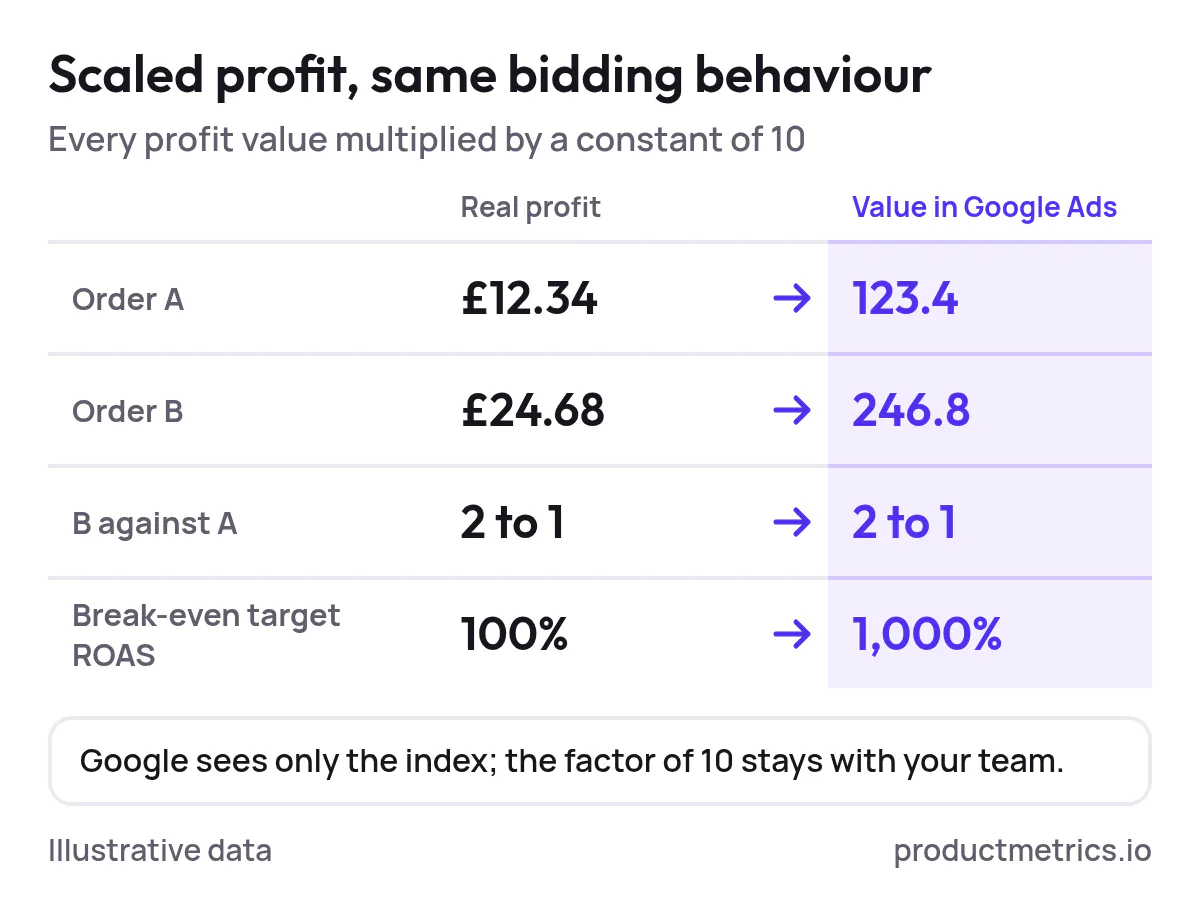
- Storing profit index = profit_before_ads ÷ X, where X is a constant known only to your team.
- Or multiplying profit by a constant so that £12.34 of profit might appear as a value like
123.4in Google Ads.
Because Target ROAS and Maximize conversion value care about relative differences and total value, not absolute currency, constant scaling preserves optimisation behaviour; you simply set a Target ROAS that matches the new scale. (Source: Google Ads Help – About conversion values, Think with Google – Maximise Growth with Data)
If you use Google’s conversion value rules, you can also apply multiplicative factors on top of recorded values for specific audiences or conditions, which underscores that the bidding system is comfortable with scaled values. (Source: Google Ads API – Conversion value rules, WordStream – How to Use Conversion Value Rules)
7.3 Limit Who Sees Profit In Your Reporting Stack
Even when profit values live in Google Ads, you can:
- Restrict account access to users who need to see value columns.
- Use custom columns that show POAS and profit after ads without revealing item‑level COGS. (Source: Google Ads Help – Custom columns)
Combined with server‑side computation and scaling, this lets you run full POAS optimisation while keeping underlying margins confidential.
8. How To Include COGS Shipping And Fees In Google Ads Conversion Value
A common edge question is whether shipping costs and payment fees should be included when you set up profit‑based conversion values.
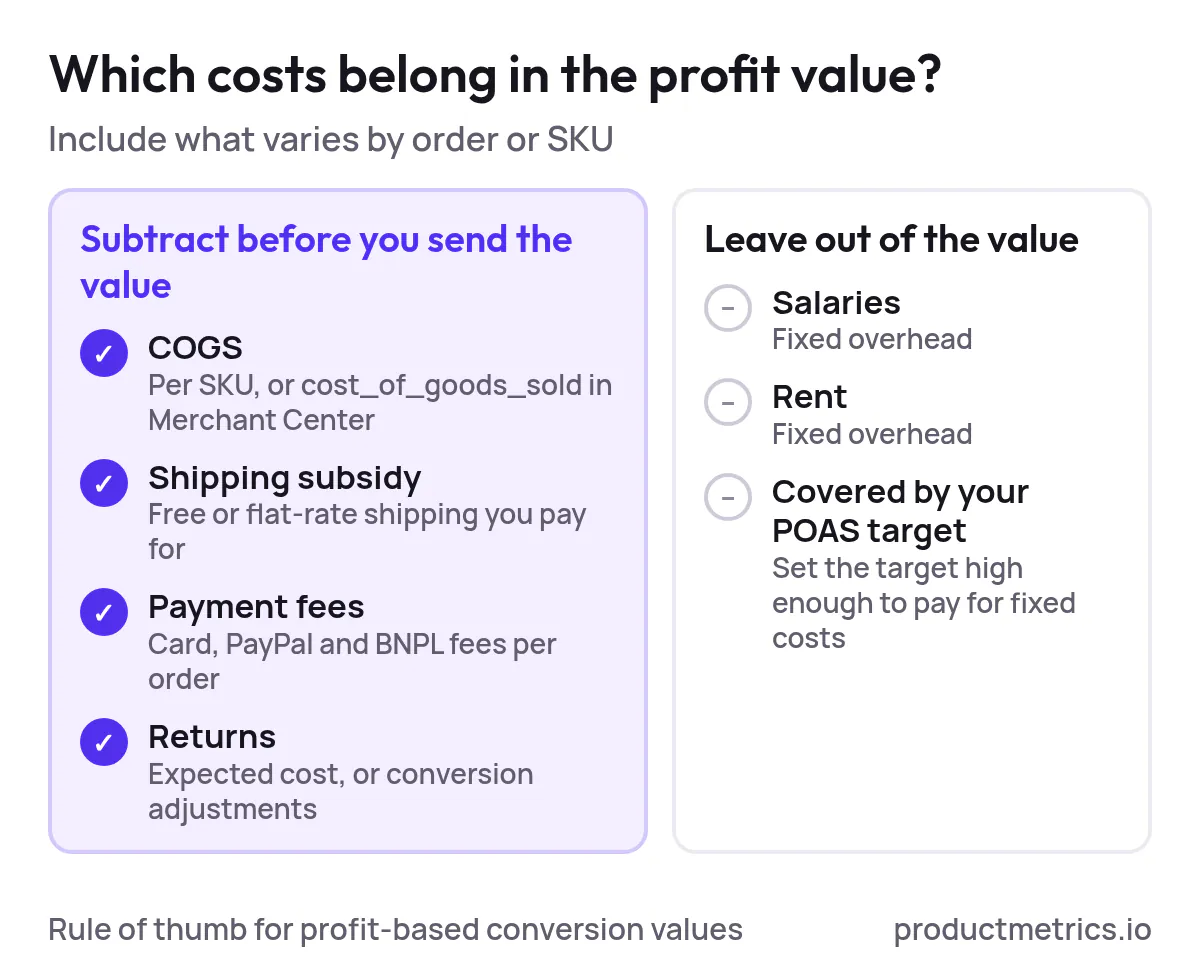
A practical rule of thumb:
- Include any cost that varies meaningfully by order or SKU and that you want Smart Bidding to internalise.
- Exclude fixed overheads (salaries, rent) and handle them outside Google Ads in your required POAS target.
For most retailers that means:
- COGS: always include. Either directly per SKU in your own database or via Merchant Center
cost_of_goods_sold. (Source: Merchant Center Help – cost_of_goods_sold) - Shipping: include any shipping subsidy you pay (for example, free shipping or flat‑rate shipping that doesn’t fully cover your carrier cost).
- Payment fees: include card/PayPal/BNPL fees per order.
- Returns: include an expected return cost per category or product, or adjust via conversion adjustments when actual returns happen. (Source: Google Ads Help – About conversion adjustments)
Technically, there are two main ways to get these costs into value:
- Directly in your profit formula, before you send
value. - By folding some items into COGS so that Google’s gross profit metrics consider them as part of product cost. (Source: Merchant Center Help – cost_of_goods_sold, Google Ads Help – Metrics with conversions with cart data)
Either way, the goal is the same: the value Google sees should reflect the profit you are actually willing to trade for ad spend.
9. Running A Safe POAS Experiment In Google Ads
You don’t have to flip an entire account to POAS in one step. Google strongly recommends phasing value-based bidding in, normally over several weeks, to let models learn from new value signals. (Source: Google – Value-based bidding best practice guide)
Here is a practical experiment pattern for ecommerce:
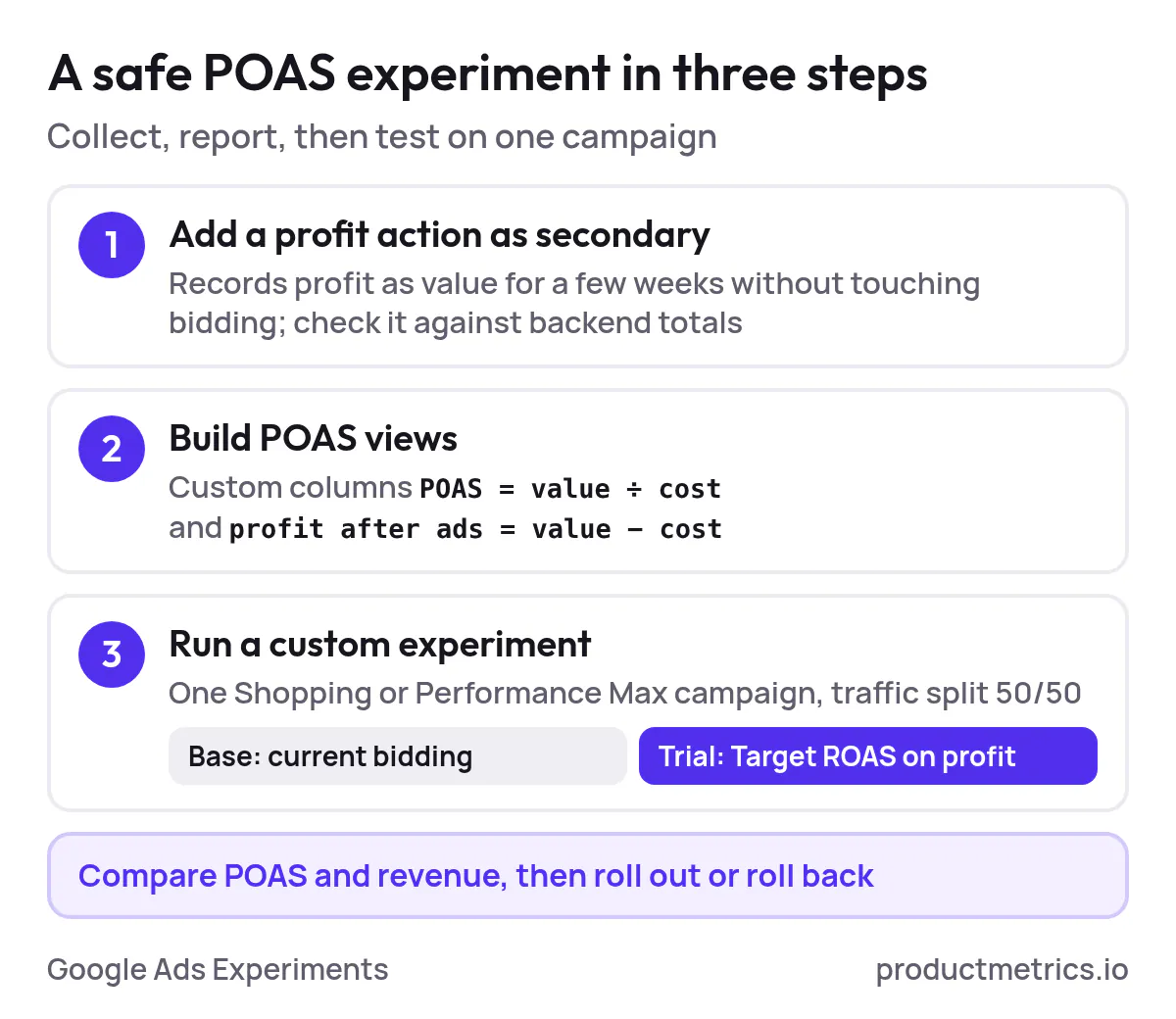
Step 1 - Add A Profit-Based Conversion Action No Bidding Yet
- Create a new Purchase – profit conversion action in Google Ads that records profit as
value. (Source: Google Ads Help – Set up conversion tracking for your website) - Implement tagging so this action fires on purchases with your chosen profit formula.
- Initially set it as secondary (not used for bidding) so you can collect data without disrupting existing strategies. (Source: Google – Changing Biddable Conversion Actions)
Run this for a few weeks until profit data is stable and matches your backend totals within a tolerable margin.
Step 2 - Build POAS Views In Reporting
Using Google Ads custom columns, create:
- POAS =
conversion value (profit) ÷ costfor the profit action. - Profit after ads =
conversion value (profit) − cost.
That gives you an account‑native view of “how to calculate profit inside of Google Ads” without exporting everything to spreadsheets. (Source: Google Ads Help – Custom columns)
Step 3 - Run A Campaign-Level Experiment On Target ROAS
Use Google Ads Experiments to A/B test profit‑based bidding: (Source: Google Ads Help – Set up a custom experiment, Google – Test Campaigns with Ads Experiments)
- Pick a Shopping or Performance Max campaign with enough volume.
- Create a Custom experiment that duplicates the base campaign.
- In the experiment campaign:
- Switch the bidding strategy to Target ROAS or Maximize conversion value with a Target ROAS on the profit conversion.
- Set an initial Target ROAS aligned with your break-even POAS and profit goals. (Source: Product Metrics – How to set a target ROAS from your margin, Google Ads Help – Bidding FAQ)
- Split traffic (for example, 50/50) and run long enough to get statistically useful POAS and revenue readings.
You’re now testing “how to bid on profit in Google Ads” in a controlled way, with a clear rollback path if needed.
10. Where Product Metrics Fits In
Doing all of the above manually is possible. It is also a lot of engineering and operations work:
- Joining order data, COGS and variable costs reliably for each SKU.
- Capturing click IDs first‑party so adblockers don’t break attribution.
- Maintaining conversion adjustments for refunds and returns.
- Keeping profit, revenue, new vs returning customers and LTV aligned across Google Ads and Meta.
Product Metrics was built specifically to solve this for Google Shopping and Performance Max. (Source: Product Metrics – About)
With Full Signal Tracking, Product Metrics: (Source: Product Metrics – Full Signal Tracking)
- Runs a first‑party, auto‑rotating endpoint on your domain that survives adblockers and browser privacy changes.
- Reads orders, margins and customer history from platforms like Shopify, WooCommerce, Magento, Lightspeed and Shopware.
- Keeps the Google Click ID server-side and deduplicates orders.
- Sends five conversion actions to Google Ads from each order: revenue, profit, new customer, returning customer and lifetime value.
That gives you:
- Clean POAS and ROAS per product, even under heavy adblocking.
- Profit as a first‑class conversion signal for Shopping and PMax bidding.
- The ability to run POAS experiments quickly without building and maintaining your own tracking stack.
If you want to go deeper from here, two good next reads are Product Metrics’ guides on POAS vs ROAS and setting Target ROAS from your margin, which show the maths behind the targets you’ll plug into your experiments. (Source: Product Metrics – POAS vs ROAS, Product Metrics – How to set a target ROAS from your margin)
And when you’re ready to see what profit-based bidding looks like on your own catalogue, Product Metrics can analyse your product-level ROAS and POAS and set up server-side profit tracking for you. (Source: Product Metrics – About, Product Metrics – Full Signal Tracking)
Written by
Berend Vrakking, Founder of Product Metrics
1M+ products analysed · Nominated at the Dutch Search Awards for Best Measurement Campaign (2023) and Best Use of Data (2024)
Keep reading.
Operationalizing POAS: Best Practices, Governance, and Analysis
Operationalizing POAS for Google Ads: one profit definition, profit sent to Google Ads and Meta server-side, products segmented on it and a weekly review.
Best POAS Tracking Tools for E‑commerce and Google Ads A Practical Buyer’s Guide
Compare POAS tracking tools for Google Ads and Shopping: native Google reports, profit apps, attribution platforms and product-level POAS, by business size.
Google Ads Match Types: Broad, Phrase and Exact Compared
Google Ads match types compared: what broad, phrase and exact let through, how close variants work and which one pays at your margin.
See which of your products to push, fix or pause. Start with your own products, or a 30-second estimate.
Check one product first: work out its break-even ROAS in the calculator. Then see where all your products stand.
Questions, or want to spar about your products? Book a demo: a video call with Berend, then a demo account.