
What Is an API Feed? How Product Data Feeds Work
What is an API feed? A connection that sends single product records between systems on request. How it differs from a file feed and where it fails.
An API feed is a connection through which one system requests current product records from another, or pushes changes to it, one record at a time instead of in a scheduled file.
The gap it closes is time. I worked out that a daily file fetch leaves a price change unseen by Google for 12 hours on average, using Google’s own fetch schedules and assuming changes land evenly through the day.
An API feed shortens that wait, but only if you check what Google did with the update.
What is an API feed?
An API feed is a product data feed delivered through an application programming interface (API): software asks for specific records, or sends them, through agreed endpoints.
If a file feed is a printed price list, an API feed is a phone line to the stockroom.
The National Institute of Standards and Technology’s API definition calls an API a system access point with well-defined syntax that application programs can use. In practice, both systems agree on four things:
| Part | What it defines | Jacket example |
|---|---|---|
| Endpoint | The address for a resource | /products/JKT-042-M |
| Method | The operation the caller wants | Read the record |
| Authentication | How the caller proves access | A token in the request header |
| Response format | How results and errors come back | JSON with a status code |
The record itself holds structured fields such as SKU, price, availability and stock.
Can an API feed change data, or only read it?
An API feed can do either, depending on the permissions it grants. An advertising platform might only read your products, while a connected app might also write an update back to the source.
Permission to read never implies permission to write, so check both before you connect anything.
Data feed vs API feed: what’s the difference?
A data feed (file feed) delivers a full snapshot on a schedule; an API feed moves individual records when they are requested or changed.
The choice decides how fresh your prices are and how much engineering you take on.
| Criterion | File feed | API feed |
|---|---|---|
| Delivery | Scheduled download over HTTP, HTTPS, FTP or SFTP | Requests or pushes through defined endpoints |
| Freshness | Daily, weekly or monthly | Can follow each change, subject to processing |
| Update size | The whole file every run | One record, field or batch |
| Format | CSV, TSV or XML file | JSON or XML with status codes |
| Errors | Checked per file or row after processing | Returned per request or field |
| Access | Protected file location | Tokens or keys with set permissions |
| Effort | Low: export, schedule, check | Higher: rate limits, retries, pagination |
| Best fit | Few products, infrequent changes | Fast-changing prices or stock, write-back |
How stale can a file feed get?
A file feed can be up to one full interval out of date, because a change made just after a fetch waits for the next one.
Google Merchant Center fetches a file feed daily, weekly or monthly at a set hour, as Google’s scheduled data-feed documentation lists.

Show the dataHide the data
| Hours, by update method | Average wait | Worst case |
|---|---|---|
| Weekly file fetch | 84 | 168 |
| Daily file fetch | 12 | 24 |
| API poll every hour | 1 | 1 |
A monthly fetch can be up to a month behind. An API poll or push removes most of that wait, but your store still has to detect the change, the connector has to send it and Google has to process it.
A neglected API job leaves prices as stale as a neglected export.
Format is a separate decision from delivery. CSV is easy to inspect in a spreadsheet, while JSON handles nested structures such as variants; Scrappey’s guide helps you compare CSV and JSON formats before you settle on one.
How does an API feed work?
An API feed works as a short exchange between a client, the software asking, and a server, the software answering. The client is usually a connector, not a person in a browser.
- Build the requestThe client, here your connector, calls the product endpoint with a stable product ID, so the server returns one record instead of the whole export.
- Prove it may askThe request carries a credential, usually a token in a header. The server checks identity and permission before it reads anything.
- Validate and answerThe server checks the request and returns a status code with a JSON or XML body. A 400 means a bad request, not a missing product.
- Read the fields that matterThe client takes price, currency, availability and an update timestamp. A price without its currency is unusable.
- Store, retry or escalateA valid result is stored. Temporary failures are retried with growing pauses; invalid payloads and permission errors go to a person.
Many product APIs, including Google’s Merchant API, follow REST, the architectural style that Roy Fielding introduced in his 2000 doctoral dissertation at the University of California, Irvine, as this IEEE Computer article on REST describes.
REST identifies each resource by a URL and keeps requests stateless: every request carries everything needed to process it.
REST doesn’t define what a record means. The API’s documentation has to settle identifiers, units, currency, timestamps and which kind of message each call sends:
| Message type | Contains | Risk if misread |
|---|---|---|
| Full snapshot | Every product and field | Absent products read as deleted |
| Delta | Only what changed | Read as a snapshot, it wipes unsent fields |
| Delete event | The ID of a withdrawn product | Missed, the product stays live |
What keeps an API feed reliable?
Four controls keep an API feed from failing quietly or creating duplicates:
| Control | What it does | What it prevents |
|---|---|---|
| Exponential backoff | Waits longer before each retry | Hammering a struggling server |
| Idempotent writes | Makes a repeated write safe | Duplicate products after a retry |
| Pagination | Reads large lists page by page | Timeouts on big product sets |
| Conditional requests | Uses ETag or Last-Modified |
Re-sending unchanged records |
Caching needs a deliberate setting per field, because a cached price is a stale price:
| Data | Cache lifetime |
|---|---|
| Descriptions and images | Hours |
| Price | Minutes, or none |
| Stock | Minutes, or none |
| Authenticated responses | Never in a shared cache |
Choose the simplest method that meets your freshness and recovery needs. A well-run file feed beats a neglected API.
Why doesn’t a successful API call mean a live product?
A successful API call means Google stored what you sent, not that the product can appear in ads.
Google’s Merchant API product overview separates ProductInput, the raw data you submit, from Product, the read-only result after feed rules, supplemental data and validation, including its final status and issues.
Say a retailer sends Google Shopping a lower jacket price through the Merchant API, which replaced Content API for Shopping in 2026.
The request returns 200, the merchandiser sees the new price in the store, and the marketer assumes the ad is updated.
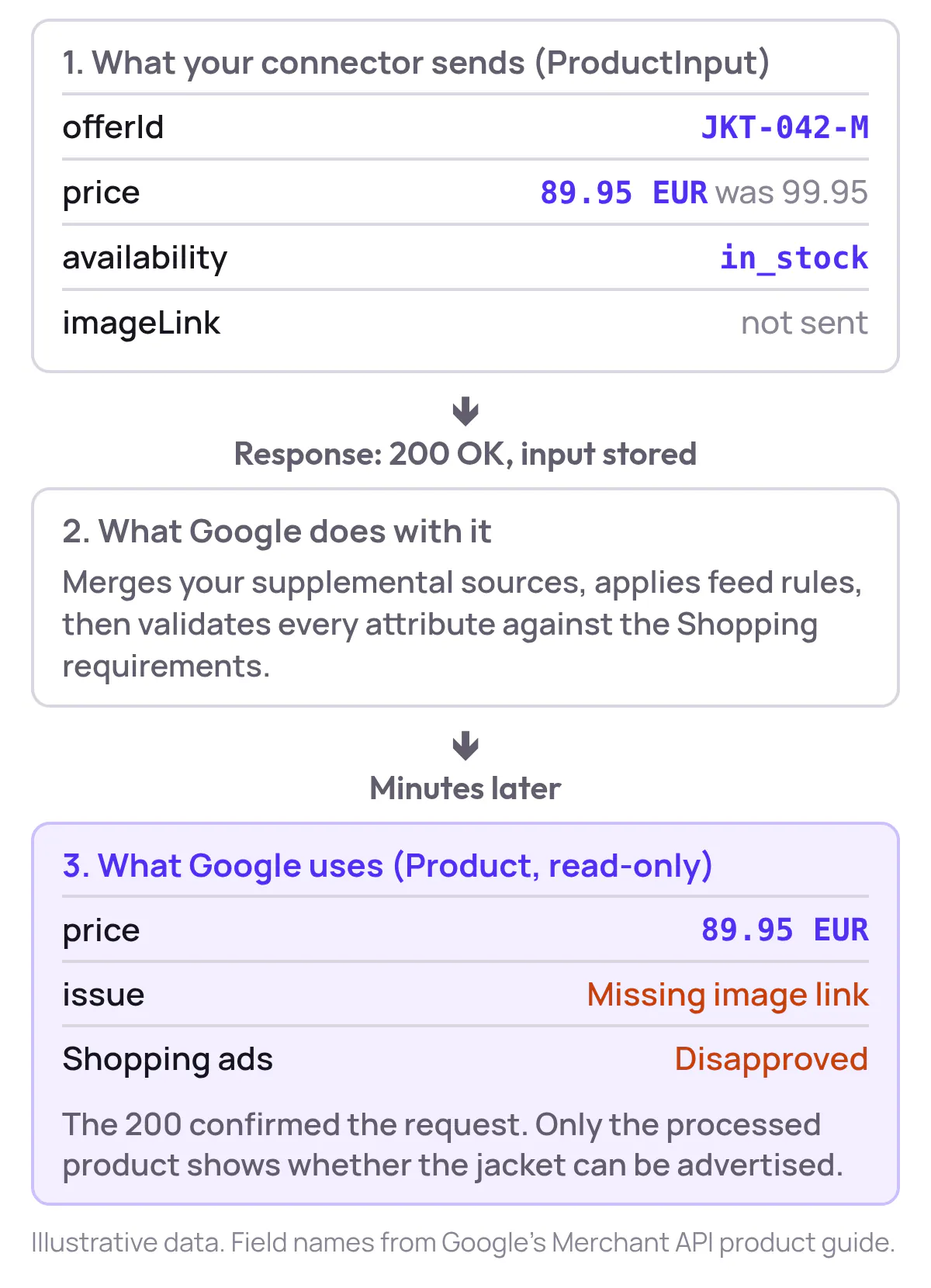
The Merchant API writes through insert, patch and delete on ProductInput, and reads through get and list on Product.
A connector can patch one attribute rather than resend the whole product set, but it should always read the processed product back. Our Merchant API guide covers authentication and the daily call quota that read-back uses.
Polling or webhooks: which keeps a feed fresher?
Webhooks keep a feed fresher because the source announces each change, while polling only finds changes at the next check. Polling is simpler to run and recover:
| Polling | Webhooks | |
|---|---|---|
| How updates arrive | Receiver asks at intervals | Source notifies on change |
| Freshness | Stale between checks | Close to real time |
| Wasted requests | Many, for unchanged records | Few |
| What you must build | Interval and retry logic | Callback authentication, duplicate and out-of-order handling, downtime recovery |
Neither removes reconciliation. A missed webhook leaves a gap only a scheduled comparison of source and destination will find.
Where do API feeds go wrong?
API feed failures usually show up as a mismatch between your store and Google Shopping. Diagnose the symptom before changing the architecture:
| Symptom | Likely cause | Fix |
|---|---|---|
| Shopping prices lag the website | Interval too long or a missed run | Shorten the interval or push on change |
| Rejected after a successful call | Missing required attribute | Validate before sending; read field errors |
| Duplicate products | Unstable IDs or non-idempotent retries | Stable product IDs, idempotent writes |
| Sold-out items still advertised | Stock cached too long | Shorter stock cache, scheduled reconciliation |
| Rate-limit errors | Too many requests at once | Back off, paginate, batch updates |
Track freshness lag where the record becomes usable, not when your connector sent it, along with rejected records, duplicates and recovery time.
Give every alert a named owner; for rejections, our list of Merchant Center errors gives the fix for each.
A correct feed lets Google show the right product. It doesn’t tell you which products deserve more priority.
At Product Metrics, we read your Google Ads and Merchant Center data and write only the labels you approve: Product Segmentation sends each product’s segment to Merchant Center as a custom label through a supplemental feed. We never change your prices.
Which product fields should an API feed share?
An API feed should share only the fields and operations the recipient needs, a principle called least privilege. A product record often sits next to cost price, margin, exact stock and unpublished prices that Google never needs.
Akamai’s 2026 API Security Study, a survey of 1,840 security professionals published in April 2026, found that 87% of organisations had an API-related security incident in the previous year, and fewer than one in four knew which of their APIs return sensitive data.
| Field | Send to Merchant Center? | Why |
|---|---|---|
| Title, price, availability, link | Yes | Required to show the product |
| Custom labels | Yes | Group products for campaigns |
| Cost price and margin | No | Internal; never needed by Google |
| Unpublished future prices | No | Could go live too early |
| Customer data | Never | Not product data |
Set field-level permissions where the API supports them, rotate tokens and keep test and production apart. Audit logs should record who read or changed which record, without storing the sensitive payloads themselves.
How do you protect the feed itself?
Protect the feed by authenticating every webhook, rejecting replayed messages and rate-limiting without blocking legitimate recovery traffic. Akamai’s 2026 application and API security report counted 258 daily API attacks per enterprise in 2025, up 113% from 121 in 2024.

Show the dataHide the data
| Year | Daily API attacks |
|---|---|
| 2024 | 121 |
| 2025 | 258 |
Then ask each feed provider five questions:
| Question | A good answer |
|---|---|
| Which fields leave the source? | A field list you can restrict |
| How long are records and logs kept? | A stated retention period |
| What triggers a refresh? | A change event or a fixed interval |
| Where do rejected records appear? | A report with field-level errors |
| How do you compare source and processed values? | An export you can reconcile |
A provider that can’t answer the last question can’t prove its feed is accurate. Our guide to Merchant Center feed rules shows where source values can change on the way in.
Should your store use an API feed?
Use an API feed when prices or stock change between scheduled fetches, or when a recipient needs single-record updates or write-back. If a daily snapshot is fresh enough, a file feed is easier to run.
| Signal | Favours a file feed | Favours an API feed |
|---|---|---|
| Price and stock changes | Weekly or less | Several times a day |
| What the recipient needs | A complete snapshot | Individual changes |
| Write-back | None | Updates flow back to the source |
| Engineering time | Little to spare | A team owns retries and monitoring |
Two signals in the right-hand column usually settle it. For the file route, our guide to Google product feeds covers ID mapping and fetch schedules.
How do you test an API feed before trusting it?
Test an API feed by tracing a handful of SKUs from source value to processed destination product.
Map each source field to its destination and document transformations such as availability values, currency and variant IDs, so developers and merchandisers check the same results.
Set a freshness target in minutes or hours that matches the cost of a stale price, then run four test records through it:
| Test record | What it proves |
|---|---|
| Price change | Updates arrive within your target |
| Withdrawn product | Deletes reach the destination |
| Invalid record | Errors surface and reach an owner |
| Resent unchanged product | Retries don’t create duplicates |
Setting up Product Metrics means connecting Google Ads and Merchant Center, choosing ROAS or POAS and adding the supplemental feed once; it doesn’t replace these checks on the records underneath.
Final thoughts
The green “connected” light is the least useful signal an API feed gives you. What counts is the processed product: the right price, an approved status, within a time you set.
Approve an integration when your team can show those three on real SKUs, including the broken ones.
When the feed spans a commerce platform, a warehouse system and a supplier network, Continuum Solutions’ system integration support for enterprise teams is one way to settle who owns each connection.
If you run a dropshipping store, supplier choice comes before feed design, because the supplier’s own stock data is what your feed passes on. A guide to find suppliers for Shopify jewelry dropshipping covers the sourcing side.
Written by
Berend Vrakking, Founder of Product Metrics
1M+ products analysed · Nominated at the Dutch Search Awards for Best Measurement Campaign (2023) and Best Use of Data (2024)
Keep reading.
Google Shopping feed setup: requirements, refresh and fixes
Google Shopping feed setup: the attributes Merchant Center needs, how often to refresh price and stock, a seven-step build and fixes for disapprovals.
Profit In Practice End-To-End COGS And Margin Integration For Google Shopping
How to collect COGS per product, model profit per order and send it to Google Ads as the conversion value, so Shopping and Performance Max bid on profit.
The Google Shopping Segmentation Playbook For 2026 Frameworks Labels And Structures
A feed-first Google Shopping segmentation playbook: custom labels, three campaign layers and new-customer bidding for Shopping and Performance Max.
Frequently asked questions.
Do I need a developer to set up an API feed?
Can a file feed and an API feed work together?
Is an API feed more secure than a file feed?
See which of your products to push, fix or pause. Start with your own products, or a 30-second estimate.
Check one product first: work out its break-even ROAS in the calculator. Then see where all your products stand.
Questions, or want to spar about your products? Book a demo: a video call with Berend, then a demo account.