
The Google Shopping Segmentation Playbook For 2026 Frameworks Labels And Structures
A feed-first Google Shopping segmentation playbook: custom labels, three campaign layers and new-customer bidding for Shopping and Performance Max.
Google Shopping has quietly become one of the most powerful levers for ecommerce growth. The problem is that most accounts still treat it like a black box: one Performance Max campaign, one big product group, and a single ROAS target — then hope Google magically finds new customers.
If you want new customer growth, that’s not enough.
This playbook walks through feed‑first, scalable segmentation frameworks that turn your product data into a structure Google can actually optimize — and that you can aim squarely at acquiring new buyers, not just milking repeat purchasers.
We’ll stay practical:
- How Shopping actually decides what to show
- A simple, repeatable segmentation framework for new‑customer growth
- How to design custom labels and product types that scale
- Example campaign structures (Standard Shopping + Performance Max)
- How to layer new‑customer acquisition goals and signals on top
- A copy‑paste blueprint and checklist you can adapt in an afternoon
1. Why Segmentation Is Now The Growth Lever For Google Shopping
Google Shopping (and Performance Max) are feed‑driven. Google doesn’t use keywords the way Search does — it looks at your product data (titles, product types, brand, price, etc.) and the user’s query, then decides what to show.
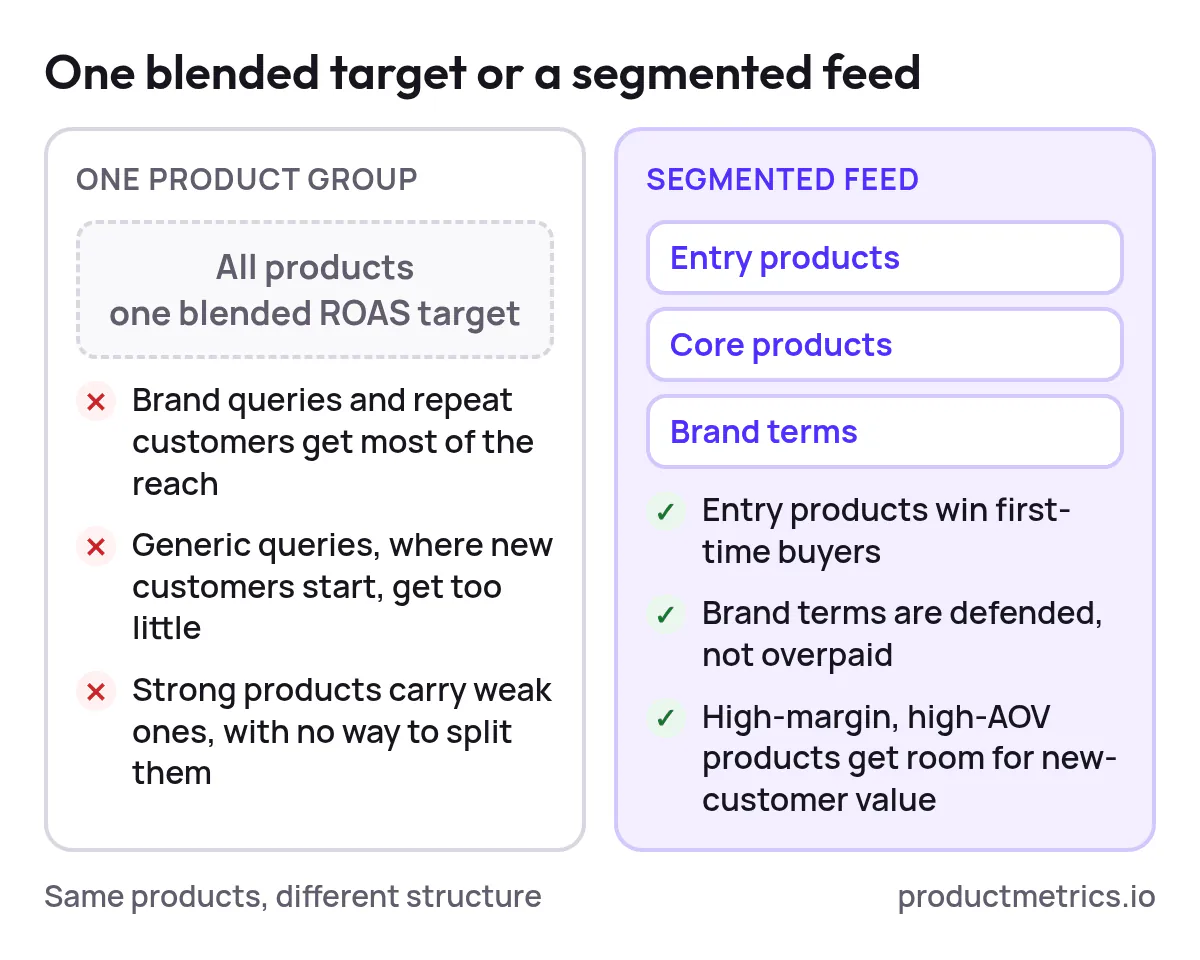
When your feed is one giant bucket, Google’s algorithms only learn one thing: “This whole catalog should hit a blended ROAS.” That usually leads to:
- Over‑serving brand queries and repeat customers
- Under‑serving generic, upper‑funnel queries where new customers actually start
- Star products subsidizing weak ones, with no way to separate budgets
Well‑structured feeds and campaigns let you:
- Push entry products that reliably bring in first‑time buyers
- Defend brand terms without burning budget on people who were going to buy anyway
- Reserve budget for high‑margin, high‑AOV products that can afford aggressive new‑customer bids
The rest of this guide shows how to do that without turning your account into an unmanageable spiderweb.
2. Feed‑First Thinking The Foundation Of Scalable Segmentation
Before we talk campaigns, priorities, or negatives, we have to talk feed. Shopping performance depends on how clean and structured your feed is — titles, product types, brands, and custom labels are the raw materials Google uses to match queries to products.
2.1 Think In Products Not Keywords
For Shopping, the unit of control is the product, not the keyword. Each SKU carries with it:
- A role in the funnel (discovery, entry, expansion)
- A margin profile
- A price point / AOV band
- A lifecycle stage (new arrival vs. clearance)
- An attractiveness for first‑time buyers (is this a good “first purchase”?)
Segmentation is just a way to turn those truths into structure — via product types, item IDs, and especially custom labels.
2.2 The Attributes You Should Care About
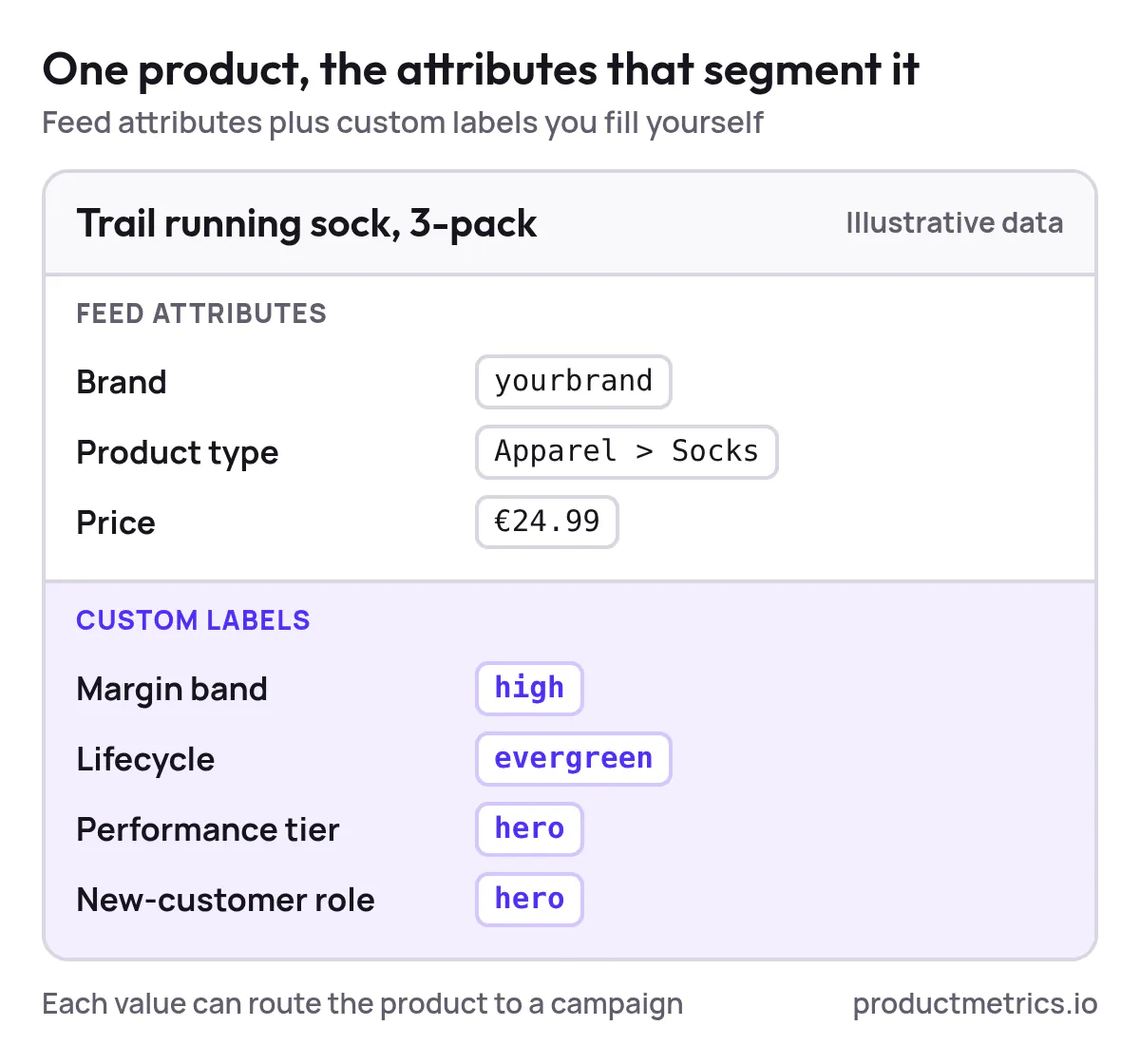
Most retailers under‑use the attributes that actually matter for segmentation. At minimum, you want these consistently populated:
- Brand – essential for splitting brand vs. non‑brand behaviors
- Product type / Google Product Category – the backbone for category‑level campaigns and reporting
- Price – enables price‑band campaigns and smart budget allocation
- Margin band (via custom label) – so you can bid harder where profit allows it
- Lifecycle (via custom label) – new arrivals, evergreen, clearance, etc.
- Performance tier (via custom label) – hero, stable, long‑tail, unproven
- New‑customer role (via custom label) – more on this in a moment
Once this is in place, you can route products into campaigns by business logic, not by whatever Google feels like serving.
3. The New‑Customer Segmentation Framework (3 Layers)
Let’s build a framework that’s explicitly about new customers, not just ROAS.
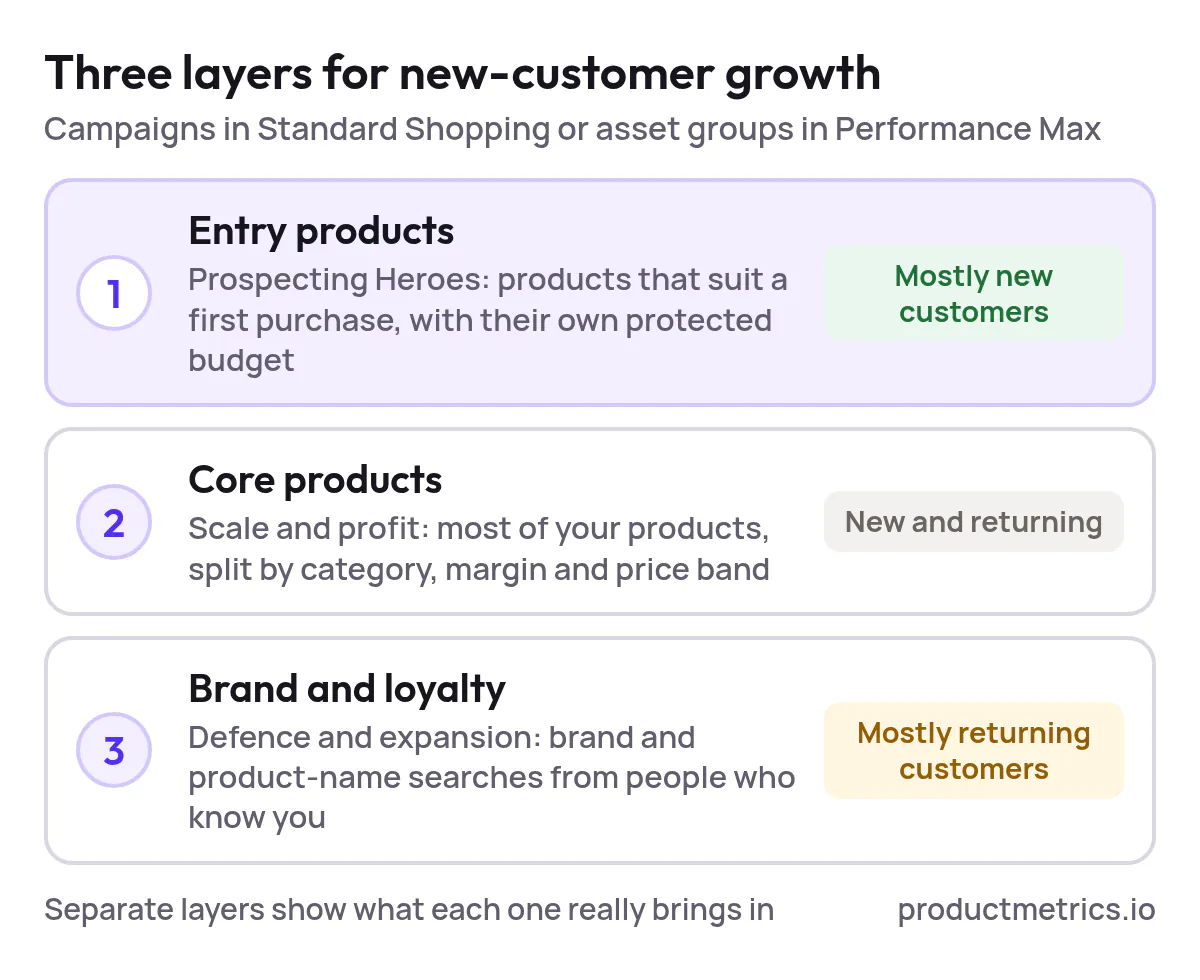
We’ll use three layers of campaigns or asset groups:
- Entry Products (Prospecting Heroes) – products that are perfect for first‑time buyers
- Core Catalog (Scale & Profit) – the bulk of your catalog, segmented sanely
- Brand & Loyalty (Defense & Expansion) – where existing customers mostly live
You can implement this in:
- Standard Shopping (more control, more work), or
- Performance Max with well‑designed listing groups and feed filters
3.1 Entry Products (Prospecting Heroes)
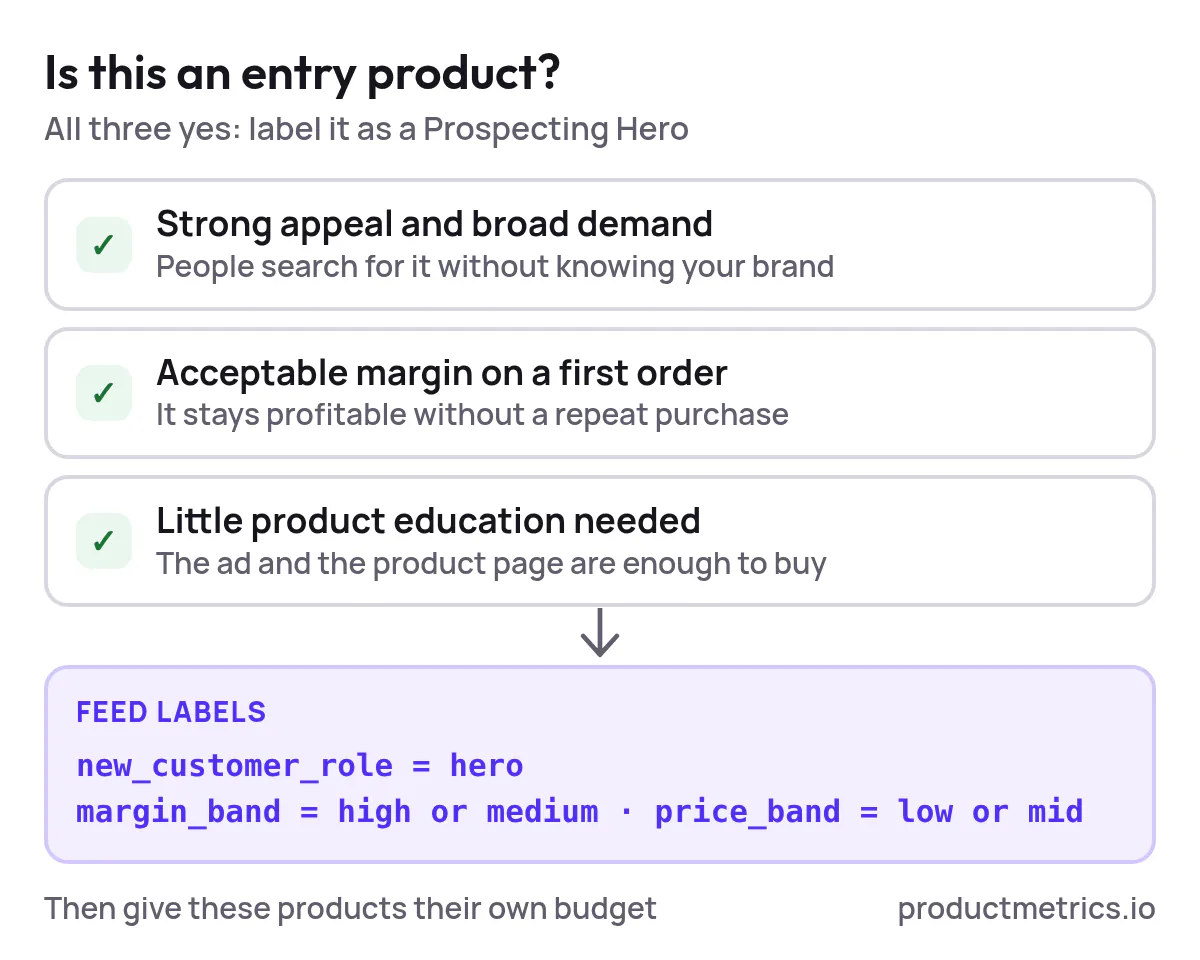
These are the SKUs that:
- Have strong appeal and broad demand
- Carry an acceptable margin even on a first order
- Don’t require high product education
Feed setup
custom_label_new_customer_role = hero- Often paired with:
margin_band = highormediumprice_band = lowormid(to reduce sticker shock)
Campaign setup
- One dedicated Prospecting Heroes campaign / asset group
- Target: maximize new customers or maximize conversion value with aggressive value for new customers
- Budgets protected from the rest of the catalog
This is your “engine”: if this layer isn’t clearly separated, your existing customers will soak up most impressions.
3.2 Core Catalog (Scale & Profit)
Here live most of your SKUs. The job of this layer is efficient revenue and profit, while still contributing to new customers.
Feed setup
Use a combination of:
- Product type (category)
- Margin band
- Price band
- Lifecycle (evergreen vs. clearance)
Campaign setup
- A small number of Core Catalog campaigns, each mapped to a slice of your catalog (e.g., by category cluster and price band)
- Standard Shopping: use product groups subdivided by brand and performance tier; PMax: listing groups filtered by these labels
3.3 Brand & Loyalty (Defense & Expansion)
Most repeat buyers search with brand terms and specific product names. This traffic is high‑intent but rarely incremental.
Feed setup
- Same attributes as above; no special label beyond performance tier
Campaign setup
- A Brand Defense campaign (Standard Shopping or Search) that primarily catches:
- Brand + product terms
- Product ID lookups
- ROAS / tCPA target can be looser because these customers are cheap to convert
The big unlock: once this layer is clearly identified in reporting, you see how much of your “great ROAS” is just harvesting existing demand versus actually creating new customers.
4. Designing A Label Taxonomy That Scales
Custom labels are where your strategy lives. They’re your chance to encode “how the business works” into the feed so Google can’t ignore it. Well‑designed custom labels are one of the main levers Google itself recommends for structuring Shopping campaigns at scale.
Here’s a simple, 5‑dimension taxonomy you can adapt:
| Dimension | Example key | Example values | Why it matters for new customers |
|---|---|---|---|
| Lifecycle | lifecycle |
new, evergreen, clearance |
Protect budget for new & evergreen heroes |
| Margin band | margin_band |
high, medium, low |
Lets you bid harder where profit allows |
| Price / AOV band | price_band |
$-50, $50-150, $150+ |
Matches bids and goals to AOV potential |
| Performance tier | performance_tier |
hero, stable, longtail, test |
Moves budget toward proven winners |
| New‑customer role | new_customer_role |
hero, okay, upsell_only |
Keeps true entry SKUs separate from add‑ons |
A few practical guidelines:
- Keep values human‑readable. You’ll be staring at them in reports every day.
- Use each dimension for one thing only. Don’t make
custom_label_0carry both price and lifecycle. - Plan for change. Use ranges and tiers, not exact prices or margins.
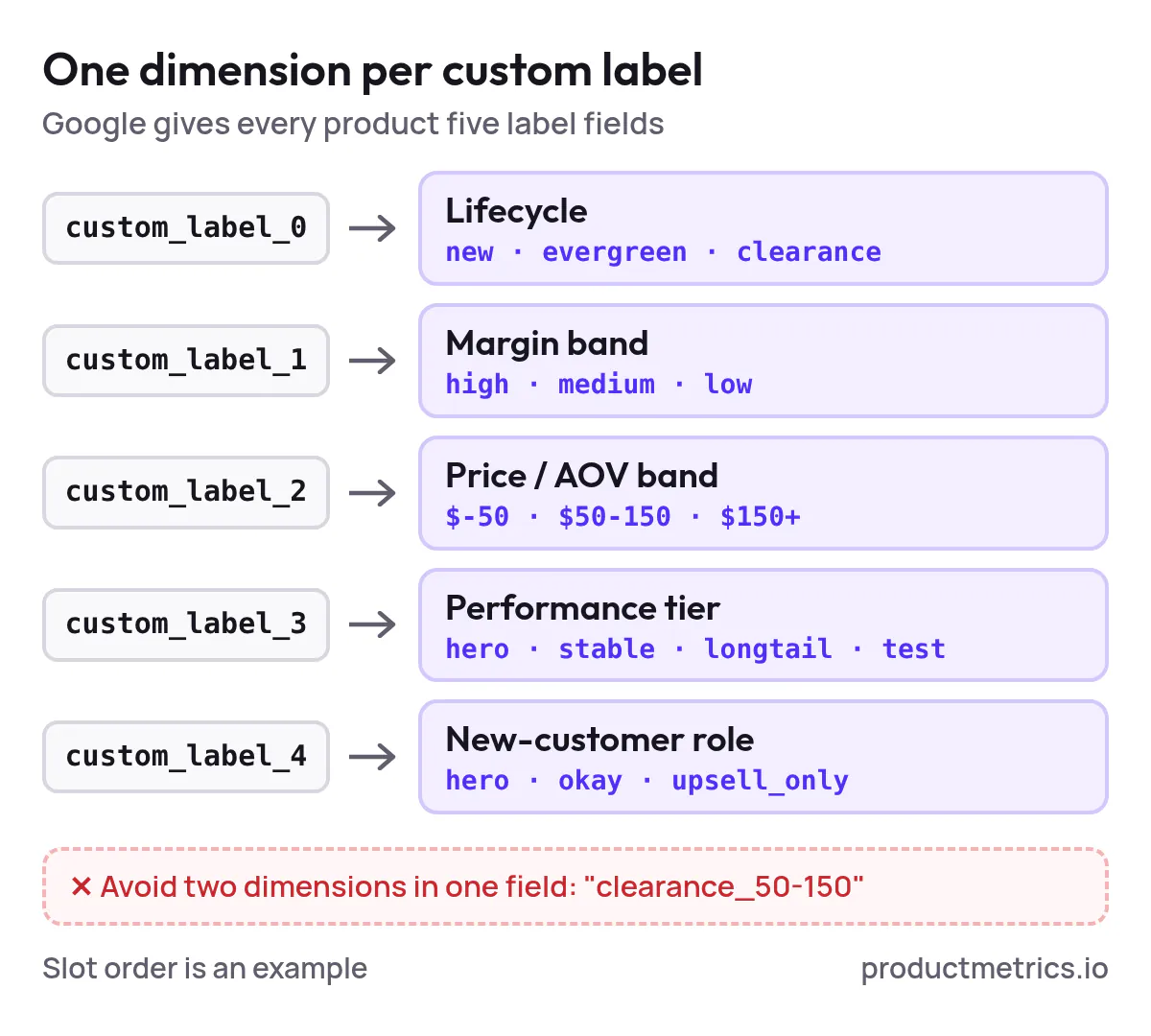
Once this taxonomy is in place, segmentation becomes a matter of filtering by labels, not reinventing structure for every new category or campaign.
5. Campaign Structures That Actually Scale
Now let’s translate the framework into the two environments you’re likely running:
- Standard Shopping (for control, query shaping, and detailed testing)
- Performance Max (for scale and cross‑network reach)
5.1 Standard Shopping Structure
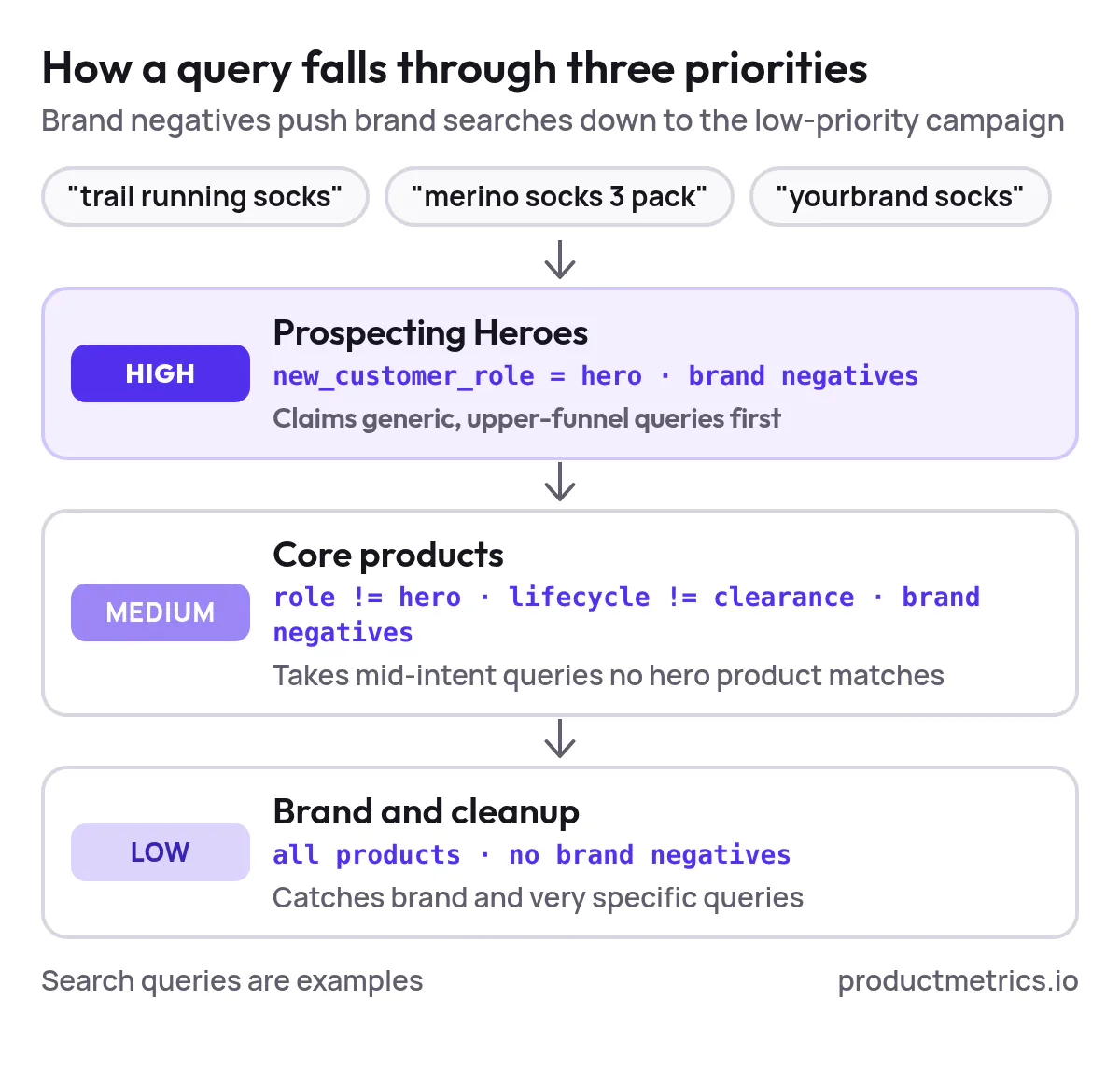
Standard Shopping still offers the most hands‑on control: you choose campaign priorities, search term negatives, and product group splits.
A simple new‑customer‑focused structure:
- Prospecting Heroes – High Priority
- Filter:
new_customer_role = hero - Priority: High
- Negatives: your own brand terms (to keep this as non‑brand as possible)
- Filter:
- Core Catalog – Medium Priority
- Filter:
new_customer_role != heroANDlifecycle != clearance - Priority: Medium
- Negatives: same brand negatives as above
- Filter:
- Brand & Cleanup – Low Priority
- Filter: all products
- Priority: Low
- No brand negatives — this is where brand queries land
This three‑tier structure uses campaign priorities and negatives so that:
- Generic, upper‑funnel queries are claimed by Prospecting Heroes first
- Mid‑intent queries fall to Core Catalog if heroes aren’t relevant
- Brand and ultra‑specific queries end up in Brand & Cleanup
Within each campaign, subdivide product groups by category and performance tier, so you can adjust bids on winners vs. long‑tail products.
5.2 Performance Max Structure
Performance Max reduces levers but gives huge reach. Your job is to feed it structure:
- Use asset groups and listing groups filtered by the same label taxonomy
- Avoid “All products” asset groups unless you truly mean it
A lean PMax structure for ecommerce:
- PMax – Prospecting Heroes
- Listing group filter:
new_customer_role = hero - Audience signals: broad interest + lookalike of high‑value customers
- Listing group filter:
- PMax – Core Catalog
- Listing groups by category and margin band
- Audience signals: in‑market categories, site visitors excluded or down‑weighted if you want higher net‑new mix
- PMax – Brand & Loyalty (optional)
- Listing group: all products
- Audience signals: customer lists, website purchasers, brand searchers
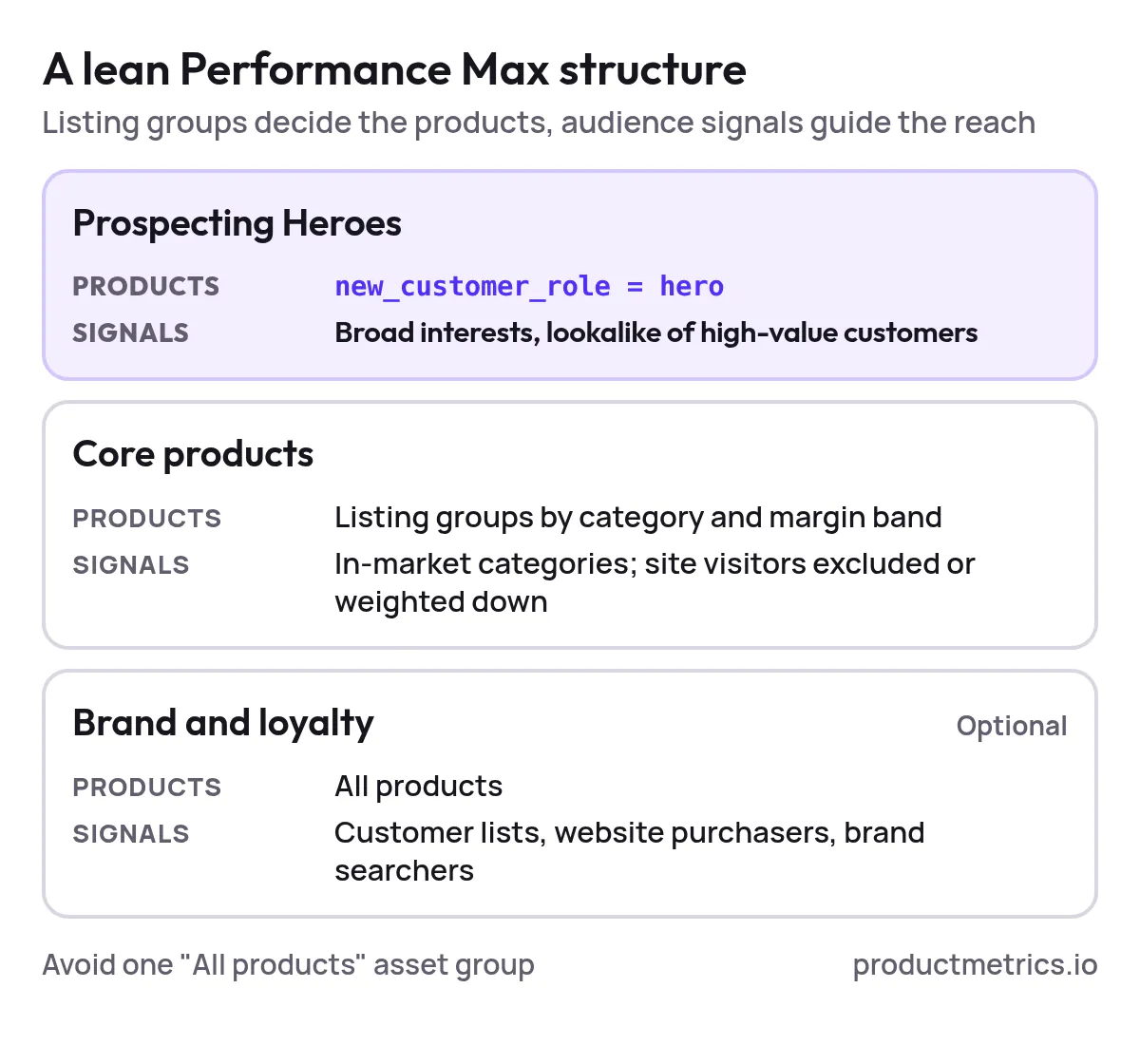
Even if you’re not using any explicit new‑customer features, this structure keeps your prospecting budget insulated from the gravitational pull of repeat buyers.
6. Layering New‑Customer Acquisition On Top Of Segmentation
Segmentation gets you control. To turn that control into new customers, you need to:
- Help Google understand who is new vs. existing
- Tell Google how much more you value a new customer
- Keep your own measurement clean
6.1 Keep Your Customer List Fresh
Upload regularly updated customer lists from your ecommerce platform or CRM so Google can better distinguish new from existing users. These lists are also useful for:
- Excluding existing buyers from prospecting‑only campaigns
- Building high‑quality audience signals for prospecting
6.2 Use New‑Customer Bidding Options Thoughtfully
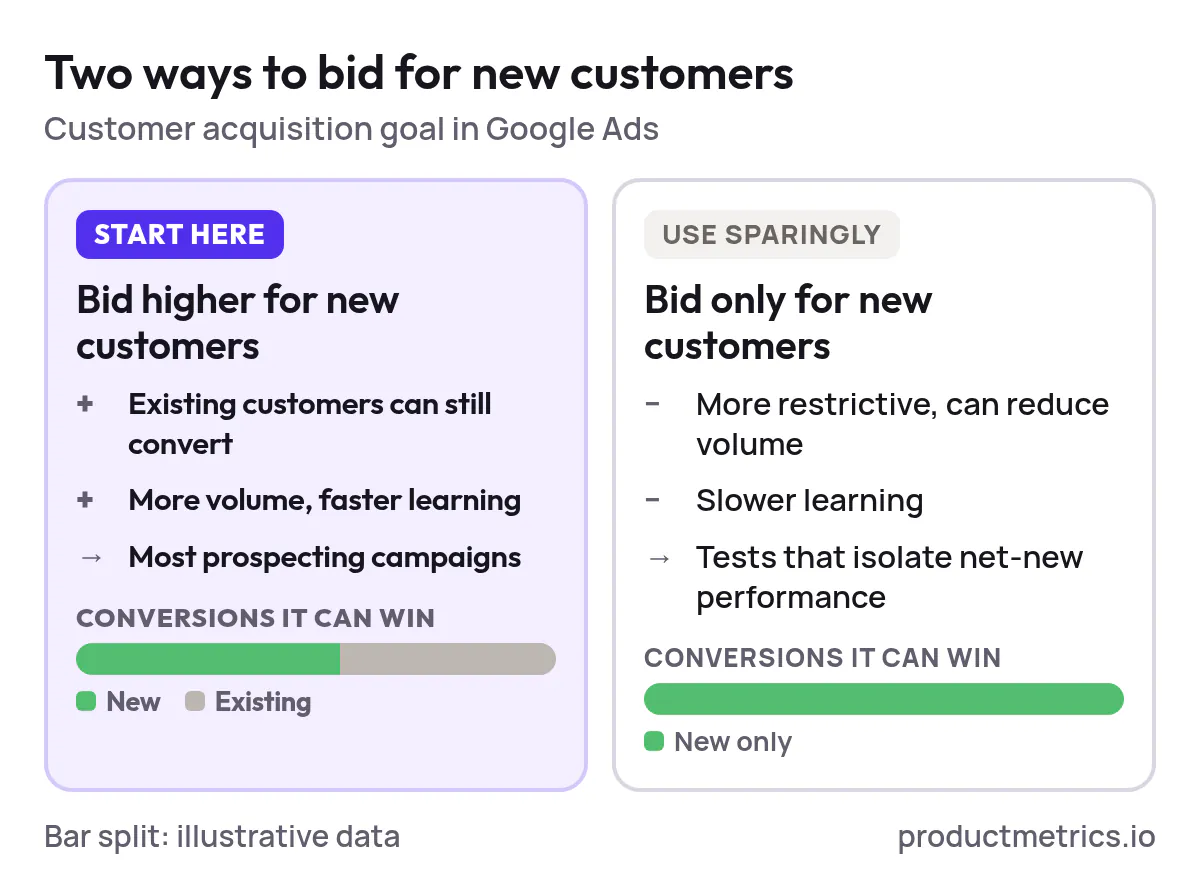
Google Ads now offers goal options that let you:
- Bid higher for new customers while still allowing conversions from existing ones
- Or bid only for new customers, which is more restrictive and can reduce volume
Practical guidance:
- Use “bid higher for new customers” for most prospecting campaigns so you don’t strangle volume.
- Reserve “new customers only” for tests where you truly need to isolate net‑new performance and can afford slower learning.
6.3 Tie Value To Customer Type
Where possible, use conversion value rules or lifecycle goals so that conversions from new customers carry extra value.
That way, when you optimize for “maximize conversion value” or “target ROAS,” Google is automatically nudged to prefer queries and placements that bring in people who haven’t bought before.
Combine this with the segmentation we laid out earlier:
- New‑customer value bump + Prospecting Heroes = high‑intent net‑new buyers
- Neutral value + Brand & Loyalty = cheap revenue from existing customers without overpaying
7. Measuring The Impact On New‑Customer Growth
If you can’t see new vs. existing performance, you can’t improve it. A minimal measurement stack looks like this:
- Track new vs. returning at conversion time
- Use your ecommerce platform or analytics to flag first‑time orders
- Pass this signal into Google Ads where possible
- Mirror it in your reporting
- Break down revenue, ROAS, and CPA by
newvs.returning - Compare across the three segmentation layers (Prospecting Heroes, Core, Brand)
- Break down revenue, ROAS, and CPA by
- Budget toward incremental growth
- If a campaign is crushing blended ROAS but 80% of its revenue is existing customers, don’t keep raising its budget blindly
- Instead, funnel incremental budget to campaigns and products with a higher share of new customers, even at lower ROAS
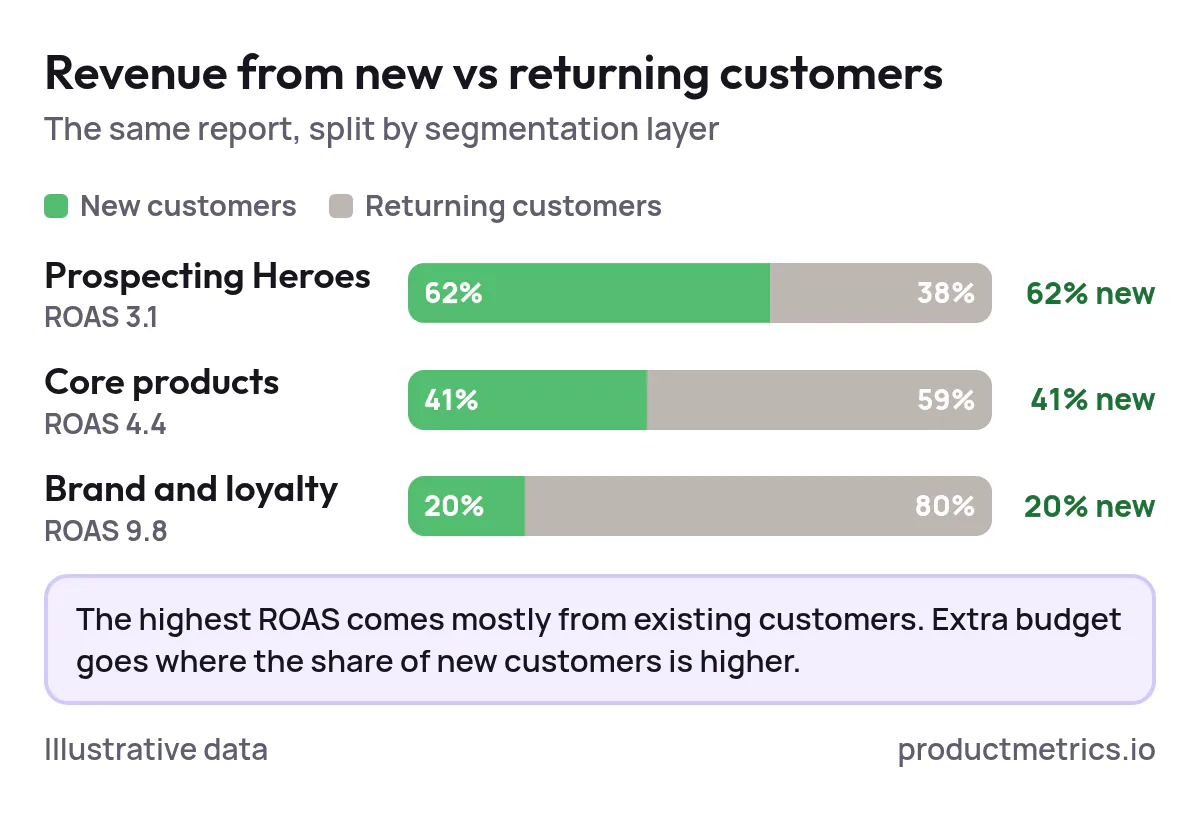
Over time, you want to see:
- A rising share of revenue from new customers
- Stable or improving payback window (how long until profit from those new customers catches up)
- Clear separation in how you treat entry products vs. loyalty drivers
8. A Copy‑Paste Segmentation Blueprint
Use this as a starting point and adapt to your catalog.
8.1 Label Plan
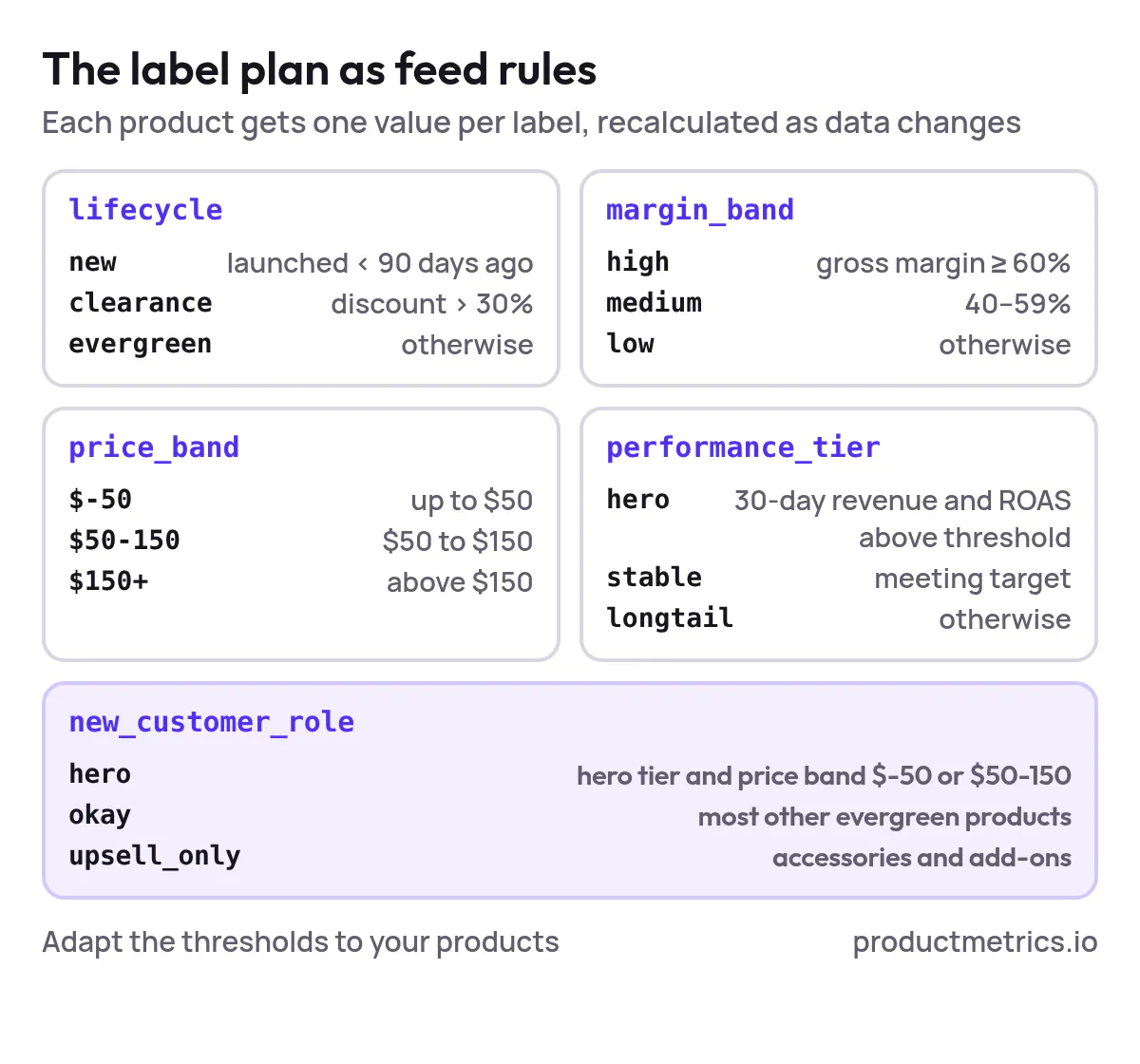
Implement these as product rules in your feed (or with a tool like Product Metrics):
lifecyclenewif launch date < 90 daysclearanceif discount > 30%evergreenotherwise
margin_bandhighif gross margin ≥ 60%mediumif 40–59%lowotherwise
price_band$-50,$50-150,$150+
performance_tierheroif last 30 days revenue & ROAS above thresholdstableif meeting targetlongtailotherwise
new_customer_roleheroif: hero tier and price_band in$-50or$50-150okayfor most other evergreen SKUsupsell_onlyfor accessories and add‑ons
8.2 Standard Shopping Campaign Map
- Shopping – Prospecting Heroes (High)
- Filter:
new_customer_role = hero - Priority: High
- Negatives: all brand terms
- Bid strategy: maximize conversion value with elevated new‑customer value
- Filter:
- Shopping – Core Catalog (Medium)
- Filter:
new_customer_role IN (okay, upsell_only)ANDlifecycle != clearance - Priority: Medium
- Negatives: all brand terms
- Bid strategy: tROAS
- Filter:
- Shopping – Brand & Cleanup (Low)
- Filter: all products
- Priority: Low
- Negatives: none
- Bid strategy: maximize conv. value or tROAS with neutral customer value
8.3 Performance Max Asset‑Group Map
Within a single account, you might run:
- PMax – Prospecting Heroes
Listing group filter:new_customer_role = hero
Audience signals: broad interests, top‑funnel site visitors excluded - PMax – Catalog
Listing groups by category x margin band
Audience signals: in‑market + contextual, minimal customer list weighting - PMax – Loyalty (optional)
Listing group: all products
Audience signals: purchasers and high‑value customer lists
Once these are stable, start testing different new‑customer value multipliers and budget splits to see where you get the best combination of new‑customer volume and acceptable payback.
9. FAQ Google Shopping Segmentation For New‑Customer Growth
“What’s the best way to segment Google Shopping campaigns to acquire new customers?”
Start with feed‑based segmentation:
- Label products by lifecycle, margin, performance, and new‑customer role
- Create a dedicated Prospecting Heroes campaign or asset group that only includes products labeled as strong first‑purchase candidates
- Use separate campaigns for core catalog and brand/loyalty traffic
This keeps your prospecting budget from being cannibalized by easy, repeat sales.
“How can I tell if my segmentation is actually driving new buyers?”
Two steps:
- Make sure your analytics or ecommerce platform flags first‑time orders.
- Compare new vs. returning revenue and orders for each campaign or segmentation layer.
If your Prospecting Heroes layer isn’t delivering a higher share of new customers than Brand & Loyalty, your structure or labels need work.
“Should I bid only for new customers or just bid higher for them?”
In most cases, start with bidding higher for new customers instead of new‑customers‑only. It’s more forgiving, lets campaigns learn faster, and still shifts spend toward incremental buyers. Use new‑customers‑only sparingly, when you can afford lower volume in exchange for very clean incrementality.
“Where does remarketing fit into all this?”
Treat remarketing and loyalty as their own layer, not something blended into prospecting:
- Run separate PMax or Shopping campaigns / asset groups focused on existing customers
- Use customer lists and website audiences as positive signals there
- Keep their performance out of your new‑customer KPIs
10. Next Steps And How Product Metrics Fits In
If this all sounds like a lot of labeling, splitting, and maintaining… you’re right. Done by hand, feed‑first segmentation can quickly become unmanageable.
That’s exactly where Product Metrics is built to help:
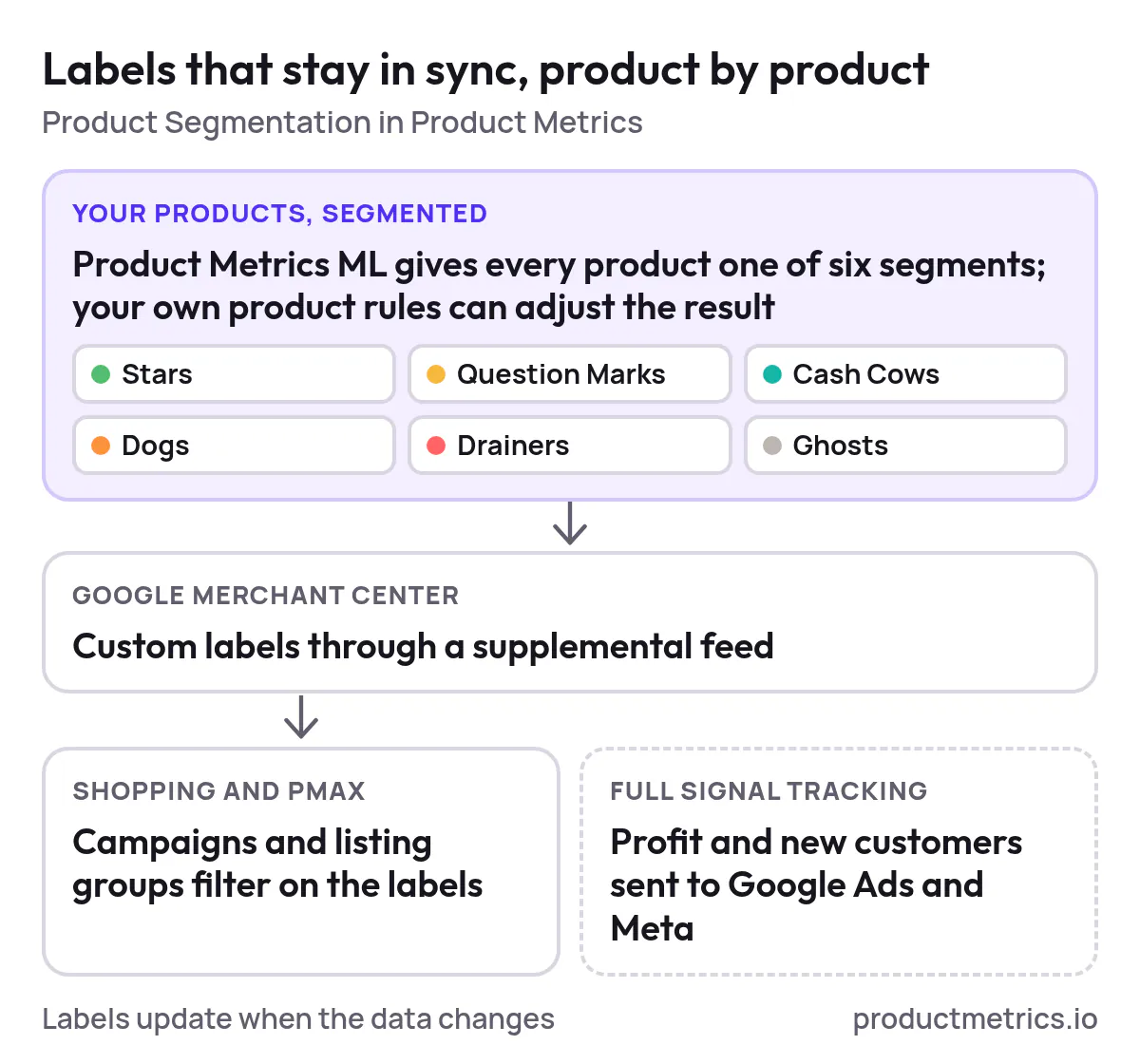
- Turn your raw product catalog into dynamic, rule‑based labels that stay in sync with price, inventory, and performance
- Push clean, structured data into Google Merchant Center so your Shopping and PMax campaigns reflect your real business logic
- Give you product‑level reporting so you see which SKUs are actually acquiring new customers vs. just re‑engaging existing ones
If you’re ready to turn Google Shopping from a blended ROAS channel into a predictable new‑customer engine, your next step is simple:
Map your label taxonomy, clean up your feed, and then talk to us about automating it so it stays clean as you scale.
That’s how you go from “one big PMax” to a segmented, feed‑first system that compounds new‑customer growth in 2026 and beyond.
Written by
Berend Vrakking, Founder of Product Metrics
1M+ products analysed · Nominated at the Dutch Search Awards for Best Measurement Campaign (2023) and Best Use of Data (2024)
Keep reading.
Measuring Profit Segmentation In Google Shopping: Metrics, Tests And The Tools That Make It Work
Measuring profit segmentation in Google Shopping: four metric layers, a baseline test and product-level POAS show which segments make money.
The Practical Buyer’s Guide To Google Shopping ROAS Platforms With Customizable Dashboards
The Practical Buyer’s Guide To Google Shopping ROAS Platforms With Customizable Dashboards: demo scripts, a scoring matrix and a security checklist.
Where to Buy and How to Choose Google Shopping Segmentation Software With Advanced Granularity: A Practical Buyer’s Guide
Where to Buy and How to Choose Google Shopping Segmentation Software With Advanced Granularity: pricing, a selection checklist and a six-step migration.
See which of your products to push, fix or pause. Start with your own products, or a 30-second estimate.
Check one product first: work out its break-even ROAS in the calculator. Then see where all your products stand.
Questions, or want to spar about your products? Book a demo: a video call with Berend, then a demo account.