
Google Shopping APIs: Merchant API Guide for 2026
Google Shopping APIs in 2026 mean the Merchant API: sub-APIs, setup, product fields, quotas, reporting joins and the Content API shutdown, from Google's docs.
Google Shopping APIs are the interfaces that let your systems manage product data in Google Merchant Center and read how those products perform.
The first call is easy. The hard part is keeping SKUs, processed products and performance joined on one offer ID, within a call budget that fills fast. Every endpoint, limit and date here comes from Google’s documentation, read on 6 November 2026.
What are the Google Shopping APIs?
The Google Shopping APIs are the Merchant API, which reads and writes your Merchant Center data, and the Google Ads API, which reports what Shopping and Performance Max campaigns did with it. The old Content API for Shopping is being shut down.
The Merchant API is a collection of sub-APIs, each versioned separately. Version 1 has been generally available since July 2025. A Shopping integration uses these:
| Sub-API | What it manages | Typical operations |
|---|---|---|
| Products | Product inputs and processed products | Insert, patch, delete, get, list |
| Inventories | Regional and local price and stock | Update availability and local stock |
| Accounts | Account settings, Google Ads link, developer registration | Get, link, register a project |
| Data sources | Where products are written | Create before any product call |
| Promotions | Promotion records | Create, update, list |
| Reviews | Product reviews (merchant reviews in alpha) | Read and manage |
| Reports | Performance, current products, price and market data | Search with Merchant Center Query Language |
| Quota | Usage and limits per method group | List current quotas |
Google’s Merchant API design overview lists the rest, such as Notifications and Order tracking. v1beta stopped working on 28 February 2026, so beta code needs moving too.
Why does an accepted product write not mean the product is live?
An accepted write means Google received your input, not that the product is live. The Merchant API splits a product in two: the ProductInput you submit and the Product Merchant Center builds from it after processing.
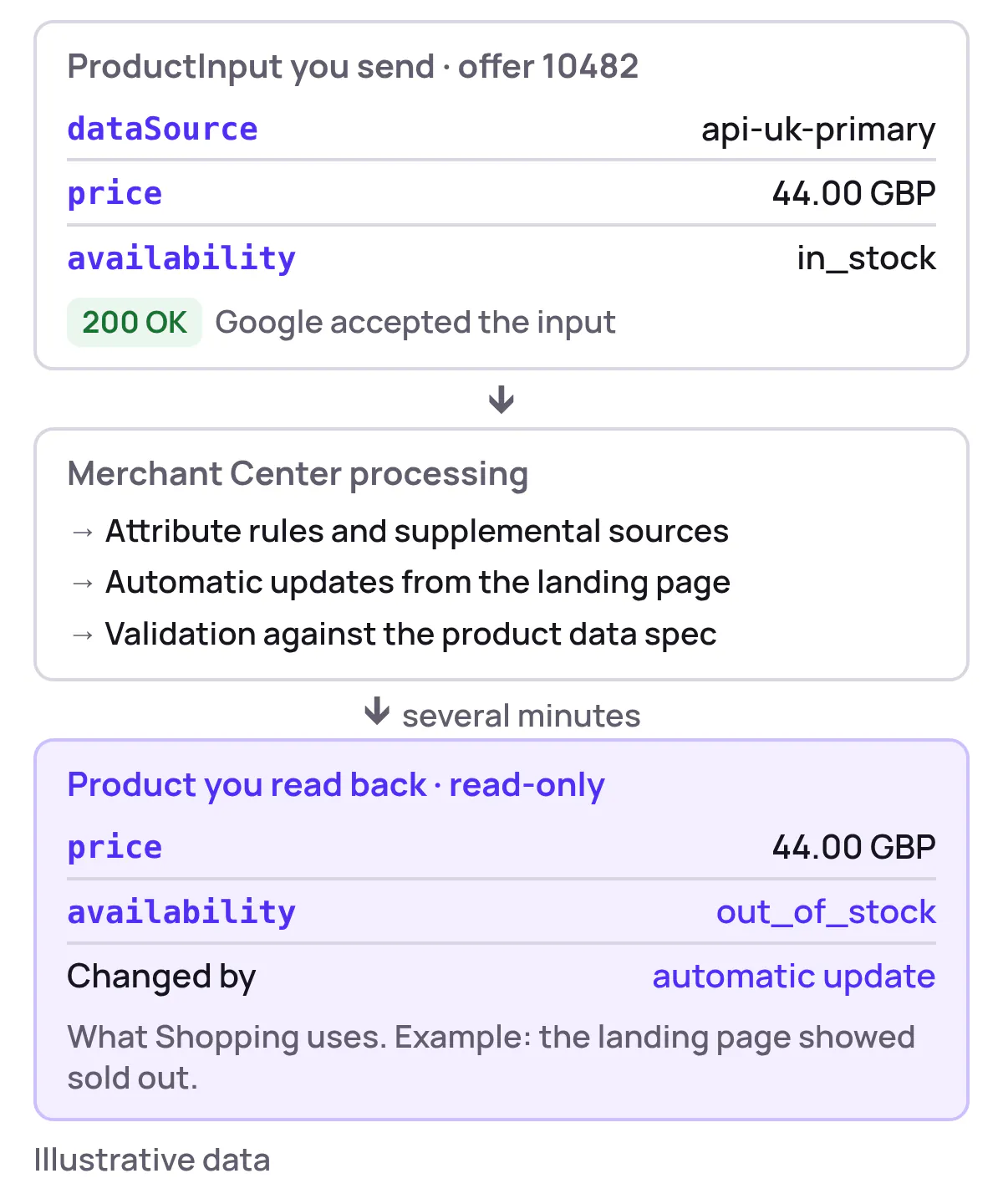
The read-only Product carries the effective values, status and item issues. Attribute rules, supplemental sources and automatic updates sit in between, so what you sent can differ from what Google uses.
Automatic updates for price, sale price, availability and condition come from your landing page and are on by default. Google’s product guide for the old Content API already said Google “can help maintain certain attributes of your products automatically”.
Is the Content API for Shopping still available?
No, not reliably. Content API for Shopping reached its sunset on 18 August 2026, according to Google’s Merchant Center migration guidance and its developer notice.
| Date | What happens | Source |
|---|---|---|
| 18 August 2026 | Sunset of Content API for Shopping | Deprecation and sunset |
| 1 September 2026 | Requests without an extension fail intermittently with HTTP 410 Gone | Same page |
| Early 2027 | Full shutdown; extensions end here too | Same page |
An integration still on v2.1 is a migration to finish. Porting requests is only the start, because four things work differently:
| Change | Content API v2.1 | Merchant API v1 |
|---|---|---|
| Product model | One product resource | ProductInput written, Product read |
| Where products go | Account | A named API data source, required |
| Bulk work | custombatch |
HTTP batch or concurrent calls; each call counts against quota |
| Partial updates | Update the product | patch with an updateMask of top-level fields |
How do you set up Merchant API access?
You set up Merchant API access in seven steps: a Google Cloud project, credentials, a one-time registration with Merchant Center, the account link, a data source, one test product and a read-back. In that order, the first product call is a test, not a debugging session.
- Enable Merchant API in a Google Cloud projectUse the project that will own the integration. If the API is off there, every call fails before Google reads your data.
- Pick OAuth or a service accountOAuth suits tools a person authorises; a service account suits server-to-server syncs. Check scopes first: a mismatch looks like an endpoint failure.
- Register the project with Merchant CenterA Merchant Center admin calls developerRegistration.registerGcp once per project. Unregistered projects get 401 UNAUTHENTICATED; calls work within 5 minutes of registering.
- Confirm the account ID and Google Ads linkA wrong account ID fails even with valid credentials. Check the Google Ads link in the Accounts sub-API.
- Create an API data sourceproductInputs.insert needs a dataSource, and only API data sources are accepted. Keep the account and data source IDs in configuration, not in code.
- Insert one minimal test productUse a low-risk account and only the fields your country needs, so any validation failure is unambiguous.
- Read it back and list your quotasGet the processed product by its ID, then call accounts.quotas.list. Setup is done when both come back.
Access problems look like product-data errors, so read the status code before you touch a feed attribute:
| Response | Usual cause | Fix |
|---|---|---|
401 UNAUTHENTICATED |
Project not registered with Merchant Center | A Merchant Center admin runs registerGcp |
403 PERMISSION_DENIED |
API not enabled, or no access to that account | Enable Merchant API; check the account’s users |
404 NOT_FOUND |
Wrong account or data source ID | Check the IDs in configuration |
429 RESOURCE_EXHAUSTED |
Quota reached | Back off and retry |
Which product fields do you have to send?
Every product needs an ID, title, description, landing page, image, price and availability. Country and category rules add more, such as condition for used goods or GTIN for branded products. Google’s product data specification sets the limits:
| Attribute | Purpose | Format or limit | Common mistake |
|---|---|---|---|
id |
Your unique product ID | Up to 50 characters | Reusing an ID for another product |
title |
Product name in ads | Up to 150 characters | Keyword stuffing, losing the product type |
description |
Detail for matching | Up to 5,000 characters | Copying the title |
link |
Landing page | Full URL on your domain | Not matching the live page |
image_link |
Main image | Public image URL | Blocked or temporary URLs |
price |
Selling price | Amount plus ISO 4217 currency | Differs from the landing page |
availability |
Stock status | in_stock, out_of_stock, preorder, backorder |
Stale after a sell-out |
condition |
Product condition | new, refurbished, used |
Missing on used or refurbished items |
gtin |
Global trade item number | 8, 12, 13 or 14 digits | Placeholder values |
brand |
Manufacturer | Up to 70 characters | Inconsistent spelling |
item_group_id |
Groups variants | Up to 50 characters | Different IDs in one family |
custom_label_0–4 |
Your own labels | 100 characters, 1,000 unique values per label | Labels left stale after a margin change |
Give each size or colour its own id and a shared item_group_id.
Check required fields per country and category before the write; the Merchant Center errors guide traces the common rejections to their source.
How do you update products without running out of quota?
You update products safely with one combined write per changed product, then a check of the processed result. Treat the Merchant API as state synchronisation, not a remote control for campaigns.
Google’s Merchant API quota guidance sets the budget:
| Limit | Rule | Window | Design response |
|---|---|---|---|
| Updates per product | Up to twice a day by default; more is possible within the account’s daily total | Daily | Combine price, stock and label changes |
| Daily call quota | Generally 2 × the offer quota, recalculated daily | Resets 12:00 UTC | Read usage from accounts.quotas.list |
| Per-minute calls | Rolling limit per method group | Rolling minute | Pace batches through the day |
| Over the limit | HTTP 429 RESOURCE_EXHAUSTED |
Immediate | Queue and retry with exponential backoff |
| Failed calls | Count against quota | Daily | Validate before sending |
What does the quota mean for a 20,000-product account?
For example, an account with an offer quota of 20,000 products gets about 40,000 calls a day. Three separate writes for price, stock and label would need 60,000.

Show the dataHide the data
| Write pattern | Calls per day |
|---|---|
| Separate price, stock and label writes | 60,000 |
| One combined write per product | 20,000 |
| Combined write plus read-back | 40,000 |
| Changed products only, plus read-back | 10,000 |
Send only the products that changed: at 25% a day, writes plus read-backs come to 10,000 calls. Checking processed state in bulk through the product_view report cuts the read-backs further.
A price patch rejected at 11:00 and retried at 15:00 means four hours of ads on a stale price. Log when each write was accepted, not just when it was sent.
How do you write a price change safely?
Say product 10482 drops from £49.00 to £44.00 and moves into a lower margin band. One patch sets both fields:
| Field | Before | After |
|---|---|---|
price |
49.00 GBP | 44.00 GBP |
custom_label_0 |
margin-band-mid |
margin-band-low |
availability |
in_stock |
unchanged, not sent |
Keep a fixed map from SKU to offer ID that survives renames and system changes; without it, updates land on the wrong offer. Store each response with both IDs, and compare processed products with what you expected on a schedule.
Don’t push product writes every few minutes to chase auction signals: that burns quota and still reacts too slowly. Labels suit slower-moving segments; this guide to when to automate feed labels separates the two.
How do you join product data to performance data?
You join product data to performance data on the offer ID. A product read says what exists now; a performance read says what happened to products that were shown, and neither fails when they disagree.
| Dataset | API | What it shows | Answers |
|---|---|---|---|
product_view |
Merchant API Reports | Products in your current inventory, with item issues | Is this product live, and what’s wrong with it? |
product_performance_view |
Merchant API Reports | Clicks, impressions and CTR by offer_id; conversions for free listings only |
Which products get attention? |
shopping_product |
Google Ads API | Current products from linked Merchant Center accounts | What can campaigns use? |
shopping_performance_view |
Google Ads API | Shopping and Performance Max stats by product dimensions | Which products earn revenue from ads? |
product_group_view |
Google Ads API | Listing group performance | How do product groups perform? |
Ad revenue and cost per product come from shopping_performance_view, segmented by segments.product_item_id.
A product that never served is in Merchant Center but missing from performance: a launch or eligibility problem. One that earned clicks last month can be gone from Merchant Center today: history, not zero spend.
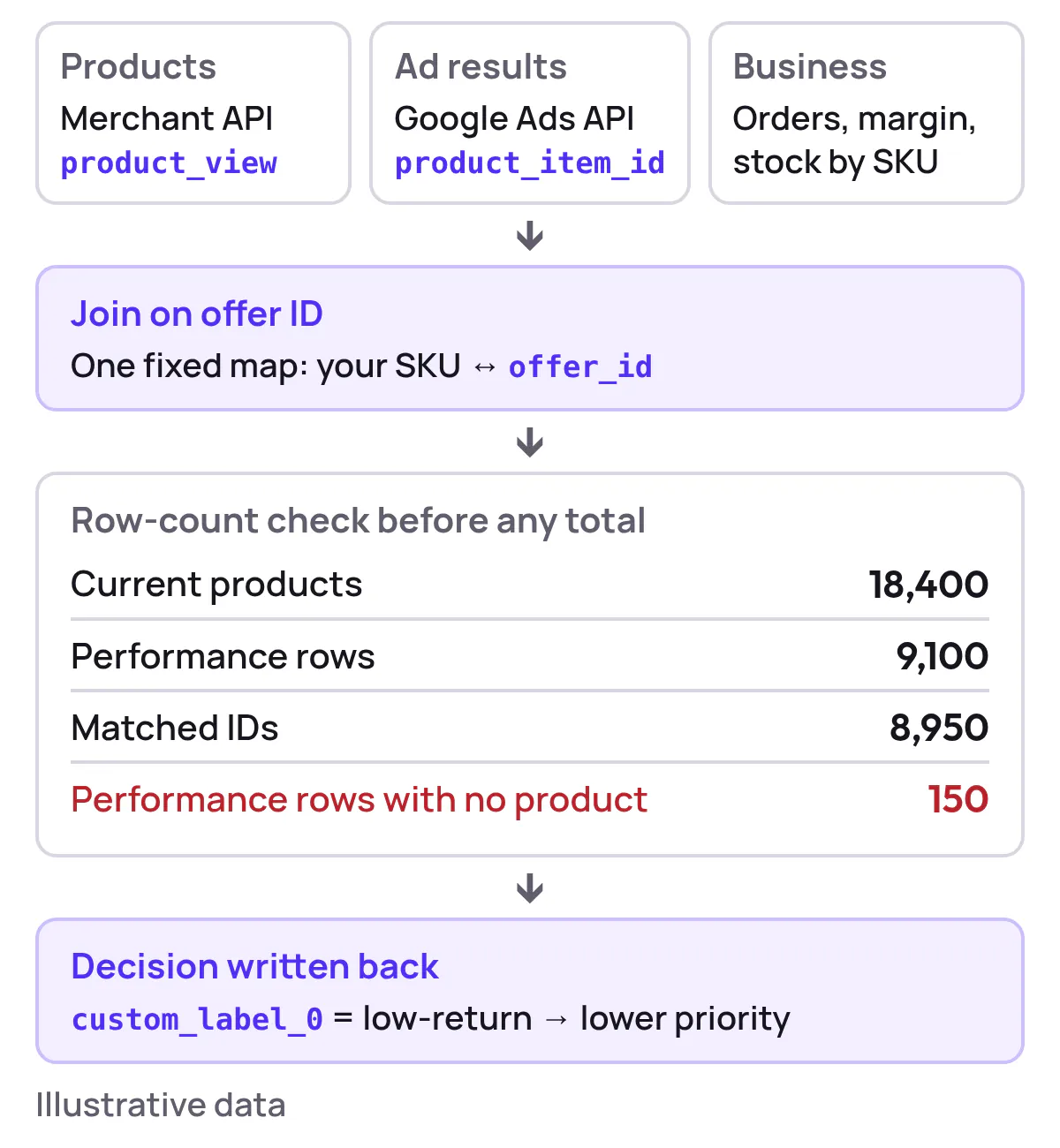
A mismatched ID never throws an error; it attaches revenue and cost to the wrong SKU, or to none.
How does API data become a product decision?
API data becomes a decision only after you add what neither API knows: margin, stock cover, returns and competitor prices. Split the work into three parts:
| Part | Job | Doesn’t do |
|---|---|---|
| Merchant API | Holds the product data and labels campaigns read | Decide what a product deserves |
| Google Ads reporting | Measures clicks, cost and conversions per product | Know your margin or returns |
| Your profitability model | Joins ads, orders, margin, stock and prices into a decision | Write campaigns by itself |
Say a product gets plenty of clicks but its POAS is below 1: after ads, it loses money. Your model gives it a low-return custom label, and the campaign reading that label gives it lower priority on the next sync.
POAS is ROAS times contribution margin, so break-even POAS is 1.0.
POAS vs ROAS explains the difference, and the break-even ROAS calculator gives each product’s floor.
Make the change reversible, so one label update undoes it, and plan for the usual failure modes:
| Failure | What happens |
|---|---|
| Stale stock | A sold-out product stays eligible |
| Variant ID mismatch | Clicks and orders for one product split across rows |
| Delayed conversions | A new product looks unprofitable before its sales mature |
| Broad labels | A label change moves more products than you meant |
By hand, this join works for a short product list. Across thousands of products, with margins and stock moving daily, it stops scaling.
At Product Metrics, we do that join for every product: ad performance, margin, stock, product journeys and competitor prices. Product Segmentation then writes each segment to a Merchant Center supplemental feed as a custom label, with no product write.
How do you migrate from Content API without silent drift?
You migrate by running both paths in parallel on a small scope and comparing the resulting products, not the response codes. Both APIs can return success while producing different product state.
Start with one country, keep IDs identical on both paths and widen the cutover only when the diff is clean:
| Check | Pass condition |
|---|---|
| Product counts | Exactly equal for the same scope, after excluding out-of-scope products |
| Attribute diff | ID, title, link, price and availability match, or every difference is explained |
| Inventory freshness | Time from a stock change to the processed product stays within a limit you set beforehand |
| Item status | No new issues after the switch |
| Operation coverage | Insert, patch, delete, batch, inventory, promotions and reviews tested with one valid and one invalid record each |
| Rollback | Rehearsed before production traffic moves, one country at a time |
Because the old path now fails intermittently, a rollback to v2.1 only holds while you have an extension. Make the rollback an API data source you can switch off instead.
Keep the comparison running after cutover, because drift after a clean migration is common:
| Monitor | How often | Catches |
|---|---|---|
| Product counts | Daily | Products the new path never created |
| Attribute diff | Every sync | Fields the new payload leaves out |
| Inventory lag | Continuously, with an alert | Updates queued behind other work |
| Per-item batch errors | Every batch | Failures inside a batch that returned 200 |
Our guide to product feed syncs covers ID mapping and fetch schedules, and PIM to Merchant Center the route from a PIM.
Should you build on the Merchant API or use a platform?
Build on the Merchant API yourself when you have a manageable number of products, infrequent updates and a team that can own the joins. Choose a platform when the scale outgrows that team.
| Criterion | Favours building | Favours a platform |
|---|---|---|
| Product count | Hundreds to a few thousand | Tens of thousands |
| Countries | One or two | Many, each with its own field rules |
| Update frequency | Weekly or less | Several times a day, close to quota |
| Profitability data | Order, margin and journey joins already exist | Those joins still need building |
| Maintenance | A team owns parity tests, API changes and monitoring | Little engineering time to spare |
Two or more signals in the right-hand column usually settle it. Either way, compare a vendor’s labels with your own profitability model on a connected account first.
Our ecommerce performance analytics guide covers the joins between ad results and product-level business measures.
Final thoughts
The Merchant API tells you what Google accepted and shows, never what a product is worth. The integration that pays off keeps SKU, offer ID and margin joined every day.
Start small: one data source, one country, one label you can reverse. Then let the row counts tell you when to widen it.
If you’re writing the sync yourself, this guide to API patterns for scalable apps covers retries, idempotency and configuration beyond the first connection.
Magnitude Marketing’s ecommerce API integration guide gives a broader view of connecting commerce systems, beyond Merchant Center.
For AI on top of these joins, Kagool’s piece on AI-driven retail analytics looks at where automated analysis is heading. Test it like a label: on a few products, over a full conversion cycle.
Written by
Berend Vrakking, Founder of Product Metrics
1M+ products analysed · Nominated at the Dutch Search Awards for Best Measurement Campaign (2023) and Best Use of Data (2024)
Keep reading.
Profit In Practice End-To-End COGS And Margin Integration For Google Shopping
How to collect COGS per product, model profit per order and send it to Google Ads as the conversion value, so Shopping and Performance Max bid on profit.
The Google Shopping Segmentation Playbook For 2026 Frameworks Labels And Structures
A feed-first Google Shopping segmentation playbook: custom labels, three campaign layers and new-customer bidding for Shopping and Performance Max.
Measuring Profit Segmentation In Google Shopping: Metrics, Tests And The Tools That Make It Work
Measuring profit segmentation in Google Shopping: four metric layers, a baseline test and product-level POAS show which segments make money.
Frequently asked questions.
Is there a Google Shopping API for competitor prices?
How long does a new product take to show up after an API insert?
Can the Merchant API change Google Ads bids or budgets?
See which of your products to push, fix or pause. Start with your own products, or a 30-second estimate.
Check one product first: work out its break-even ROAS in the calculator. Then see where all your products stand.
Questions, or want to spar about your products? Book a demo: a video call with Berend, then a demo account.