
Campaign Segmentation in Google Shopping - Principles, Pitfalls, and Governance
Campaign segmentation in Google Shopping - principles, pitfalls and governance for Shopping and Performance Max structures that keep enough data to learn.
Google Shopping decides product by product. Your segmentation decides which of those products actually get a chance to perform.
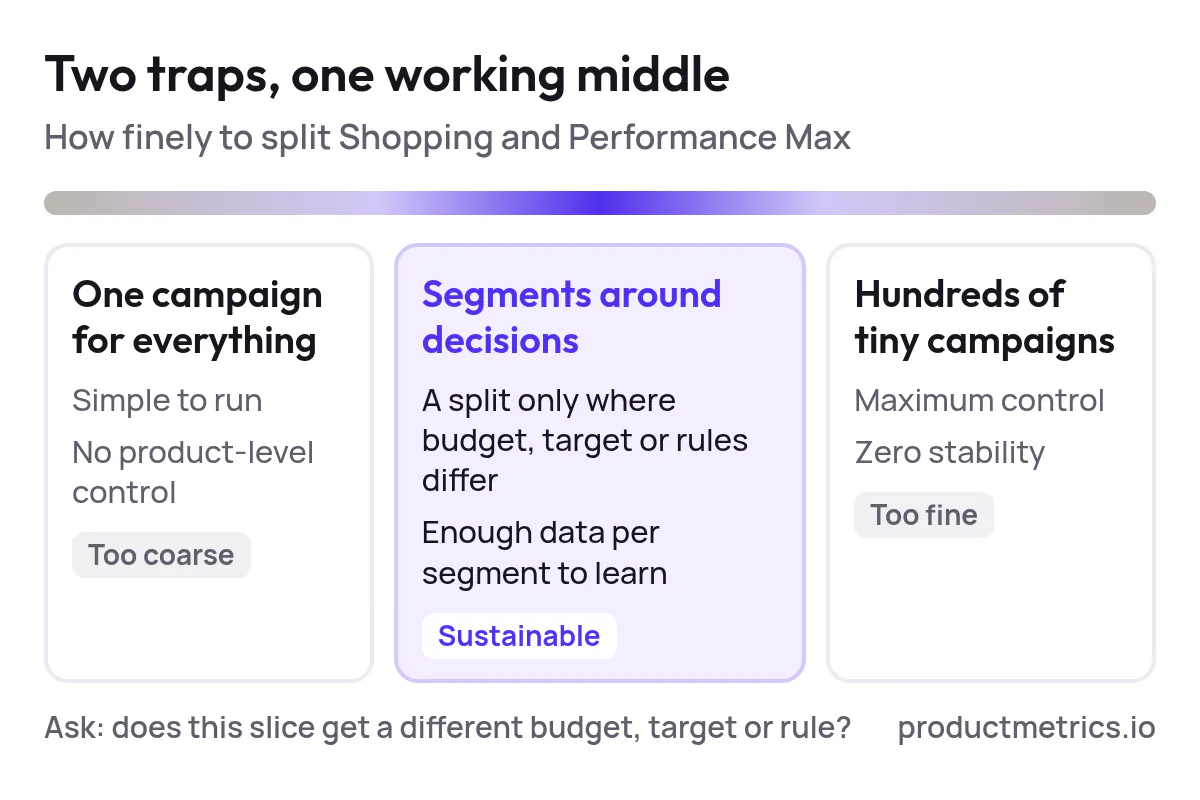
Most accounts swing between two extremes:
- Everything in one PMax or Shopping campaign – simple, but no product-level control.
- Hundreds of tiny campaigns and listing groups – maximum control, zero stability.
This guide is a PMax‑agnostic, category‑level reference to keep you out of both traps. It’s written for teams that want sustainable structures that still give Google’s automation enough data to learn.
TL;DR
If you only screenshot one section for your team, make it this one.
The job of campaign segmentation in Google Shopping (and PMax) is to answer one question:
“Which groups of products deserve different budgets, targets, or rules?”
From that follow a few non‑negotiables:
- Segment around decisions, not aesthetics. Only create a new campaign / asset group / listing group when you will actually bid, budget, or target differently for that slice.
- Let the feed do the heavy lifting. Use attributes like brand, product type, category, and custom labels to define product groups and listing groups, then plug those into Shopping campaigns and PMax asset groups. (Source: Google Ads Help)
- Keep enough volume per segment. Over‑segmentation kills Smart Bidding and PMax because bids are set at the product-group/listing-group level rather than keywords. (Source: Google for Developers)
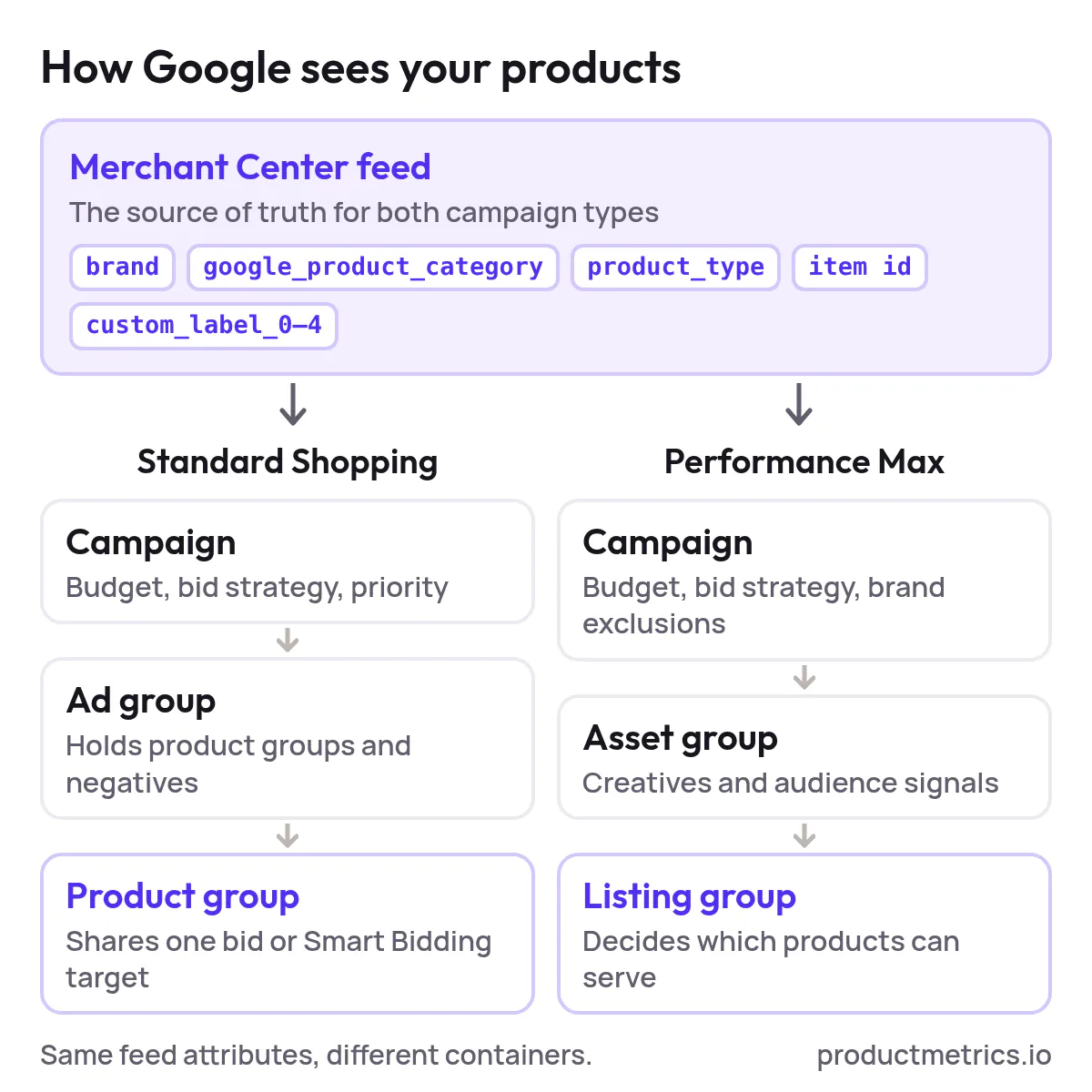
- Standard Shopping and PMax use the same product logic. Both rely on your Merchant Center feed and allow you to filter inventory by attributes like brand, category, product type, item ID and custom labels. (Source: Logical Gecko)
- Governance beats heroics. A simple segmentation charter, naming conventions, and rules for when you’re allowed to add or merge campaigns will do more for your long‑term performance than any clever one‑off build.
1. Why Segmentation Matters More in Shopping Than in Search
In Search, your structure is mostly about keywords and match types.
In Shopping and PMax, Google chooses when to show a product based on your feed and its own signals; you control which products are even eligible and how much you’re willing to pay via segmentation.
A few platform realities make segmentation critical:
- Bids are placed on product groups, not keywords. In Shopping campaigns, you group products into “product groups” and bid at that level instead of at the query level. (Source: Google for Developers)
- By default, you start with
All products. Every new Shopping campaign begins with a single product group that contains your entire feed; best practice is to split this into smaller, more meaningful groups. (Source: Google Ads Help) - PMax uses listing groups instead of product groups. Within each asset group, you define listing groups to decide which Merchant Center products that asset group is allowed to show, again using attributes like brand, product type, category, item ID, and custom labels. (Source: Logical Gecko)
- PMax is multi‑channel and heavily automated. A single campaign can spend across Search, Display, YouTube, Discover, Gmail, and Maps, which means the way you segment products is one of the cleanest levers left to keep budget aligned with product economics. (Source: Product listings guide – Performance Max)
If you don’t segment intentionally, Google will happily spend on:
- Low‑margin items that generate lots of cheap clicks
- Overstocked products you would rather slow down
- Products where you lose to competitors on price or shipping
Segmentation is the bridge between what the platform optimizes for (conversions/value) and what your business optimizes for (profit and product health).
2. How Google Actually Sees Your Products
Before you design any structure, it helps to understand the layers Google works with.
2.1 Feed & Merchant Center The Source of Truth
Everything starts with your product feed in Merchant Center. At minimum, Google expects core attributes such as id, title, description, link, image link, price, availability, brand, and category to be present and correctly formatted. (Source: Google Merchant Center Help)
For segmentation, the most important attributes are:
- Brand
- Google Product Category
- Product type (your own taxonomy)
- Item ID
- Custom labels (0–4) – your five free “buckets” to tag products by lifecycle, margin, seasonality, bestseller status, price band, etc. (Source: Shopping campaigns upgrade guide)
Custom labels in particular are your best friend: they don’t show to users, but they’re available everywhere you define product groups or listing groups.
2.2 Standard Shopping Campaigns Ad Groups Product Groups
At a simplified level:
- Campaigns set: budget, bid strategy (e.g., tROAS, Max conv. value), geo, and priority vs other Shopping campaigns.
- Ad groups are containers for product groups and control things like negatives.
- Product groups are where you actually segment products for bidding and visibility.
When you create a Shopping ad group, it starts with a single product group (All products). You then subdivide that group by attributes such as brand, item id, custom label, product type or Google Product Category to get to the granularity you want. (Source: Google for Developers)
Think of product groups as “switchboards”: whichever products are included in an active product group are eligible, and they all share the same bid or Smart Bidding target.
2.3 Performance Max Campaigns Asset Groups Listing Groups
In PMax, the scaffolding is slightly different but the inventory logic is the same:
- Campaigns set: budget, bid strategy (usually Maximize conversion value with or without target ROAS), geo, brand exclusions, and account‑level negative keywords. (Source: Google Ads Help)
- Asset groups bundle your creatives and audience signals and roughly replace ad groups.
- Listing groups inside each asset group decide which Merchant Center products that asset group can serve, using the same attributes as Shopping product groups (brand, category, product type, item ID, custom labels). (Source: Logical Gecko)
Many advertisers treat listing groups as an afterthought in PMax. In practice, they’re one of the only ways to enforce product‑level intent on an otherwise broadly automated campaign.
3. Core Principles of Effective Google Shopping Campaign Segmentation
Use these principles as your segmentation charter – the rules every new campaign or listing group has to pass.
Principle 1 Segment Around Different Decisions
A segment only makes sense if you’re going to treat it differently. Typical examples:
- Different economics – high vs low margin, premium vs entry‑level price points.
- Different goals – “scale” categories vs long‑tail categories where you only want profitable sales.
- Different lifecycle – new launches, evergreen, and clearance.
If your bids, ROAS targets, or budgets would end up identical, you probably don’t need a separate campaign or product group.
Principle 2 Let The Feed Define Structure Not The UI
Resist the urge to “hand‑build” segmentation only inside Google Ads. Instead:
- Design your segmentation schema first (e.g.,
Category x Lifecycle x Margin tier). - Implement it in the feed via product_type, category and custom labels.
- Reflect that schema in Shopping product groups and PMax listing groups.
This keeps your structure portable: the same labels can power Shopping, PMax, and even reporting in tools like Looker Studio or internal BI.
Principle 3 Respect Data Volume
Every time you split a product group or create a new campaign, you’re asking Google’s Smart Bidding to learn with less data per decision.
A few practical guardrails:
- Aim for at least dozens of conversions per month per Smart Bidding target (campaign or product group) before you split further.
- Merge or simplify segments that consistently run below your minimum volume threshold.
- For tiny but strategically important segments (e.g., one flagship SKU), be honest that performance will be noisier and manage expectations accordingly.
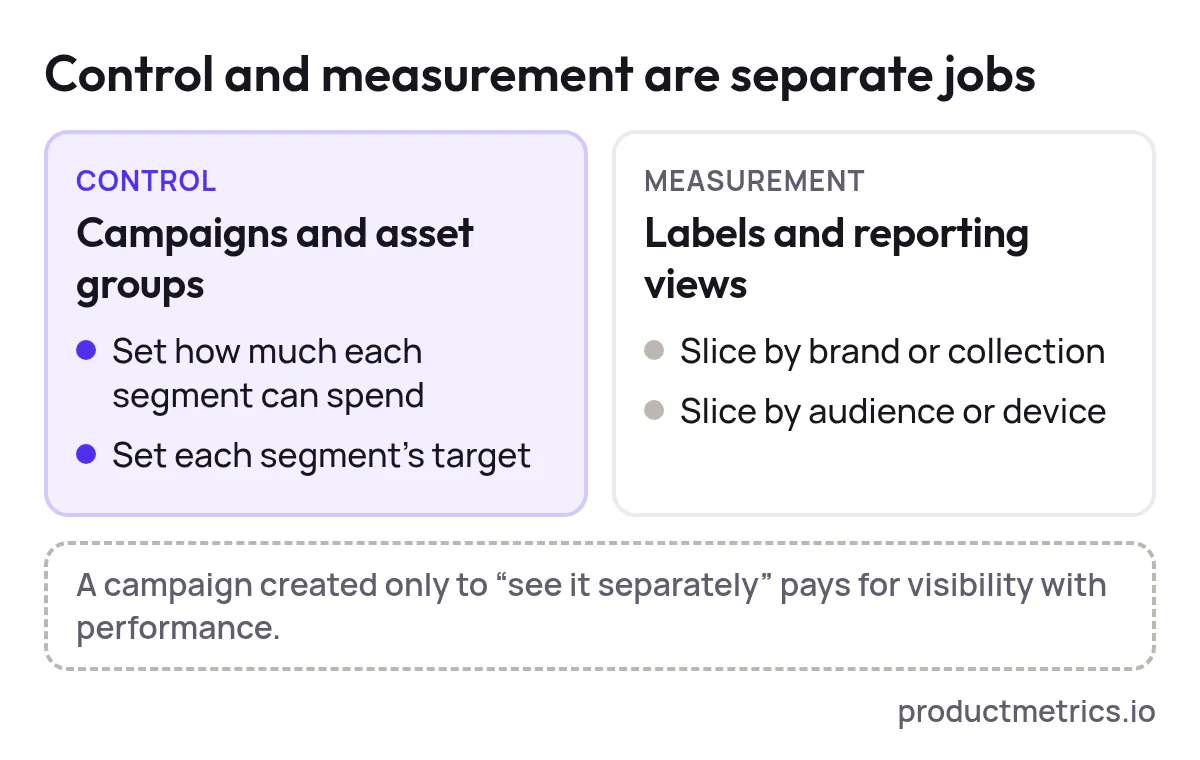
Principle 4 Separate Control From Measurement
You don’t need a separate campaign for every way you want to look at the data.
- Use campaigns and asset groups to control spend and targets.
- Use labels and reporting views to slice performance by brand, collection, audience, device, etc.
If you find yourself creating new campaigns purely “so we can see it separately,” you’re paying for visibility with performance.
Principle 5 Keep Structures Channel Agnostic
PMax, Standard Shopping, and even Search remarketing should all be able to sit on the same product segmentation logic.
When your product‑level labels and categories are consistent, you can:
- Share budgets or targets for the same segment across campaigns
- Compare performance apples‑to‑apples across channels
- Swap campaign types (e.g., Standard Shopping → PMax) without reinventing segmentation
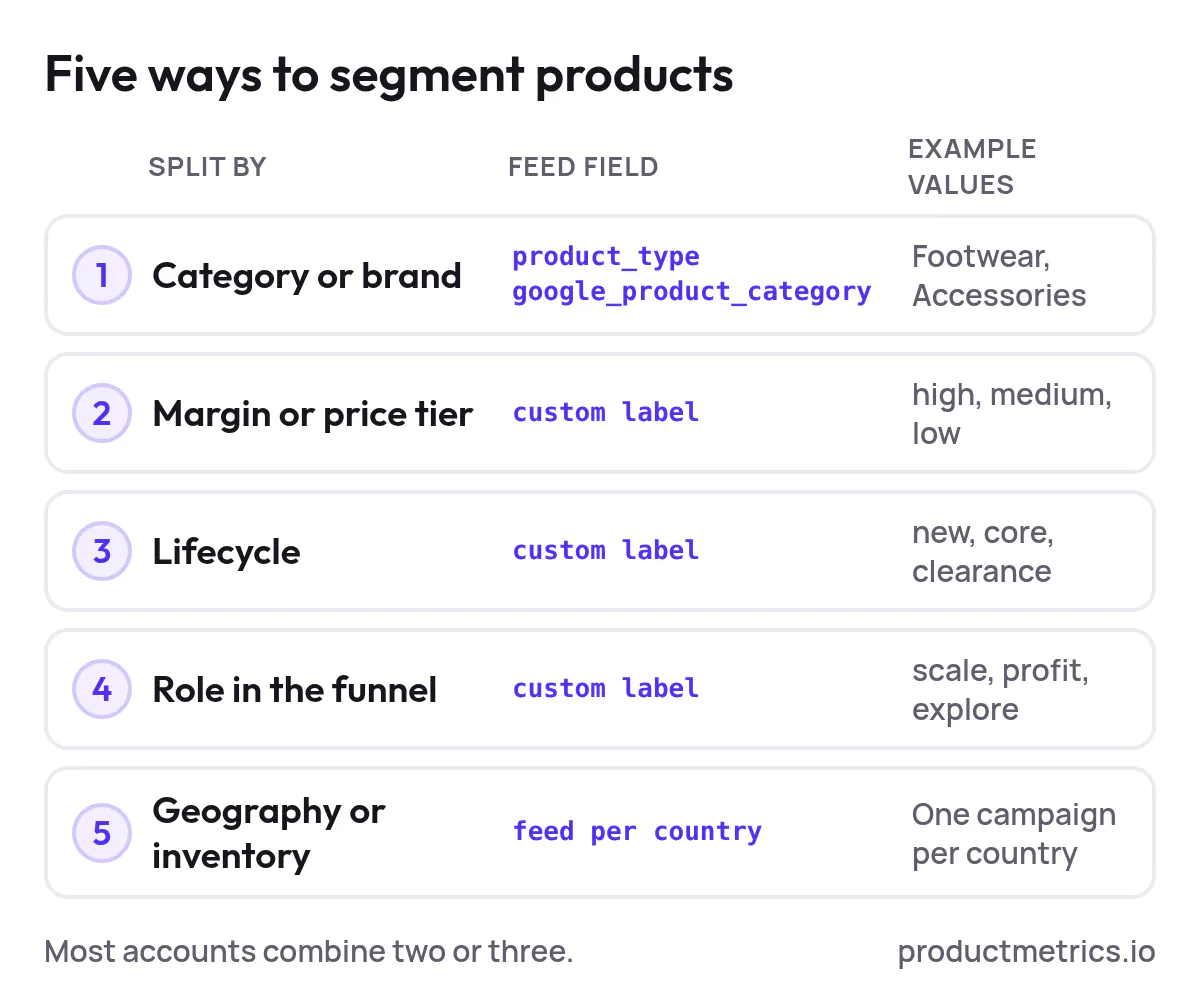
4. Five Practical Ways To Segment Products For Google Shopping & PMax
Below are five archetypes that cover most use cases. In practice, you’ll often combine two or three.
4.1 By Product Category Or Brand
When it helps:
- You have clear merchandising categories and owners
- Some categories are strategically more important than others
Feed setup:
- Ensure
product_typeorgoogle_product_categoryis clean and consistent - Optionally tag key brands or collections in a custom label
Standard Shopping structure:
- 1–3 campaigns per major category cluster (e.g., “Footwear”, “Accessories”)
- Within each campaign, ad groups by subcategory or brand
- Product groups: sub‑subcategory or brand x bestseller flag
PMax structure:
- One PMax campaign per big commercial grouping (e.g., “Core Catalog”, “Outlet”)
- Asset groups by category or brand, each with matching listing groups
This pattern makes Planning, Merchandising, and Performance all speak the same language.
4.2 By Margin Or Price Tier
When it helps:
- Margins differ significantly across products
- You routinely see Smart Bidding or PMax chase cheap items that don’t profit
Feed setup:
- Use a custom label for margin band (
high,medium,low) or price band (< $50,$50–$150,> $150). Custom labels are explicitly designed for this kind of retail‑specific bucketing. (Source: Shopping campaigns upgrade guide)
Standard Shopping structure:
- Separate campaigns for
High marginvsLow margin - Higher budgets and more aggressive targets in high‑margin campaign
PMax structure:
- Shared PMax campaign, separate asset groups + listing groups for each margin tier; or
- Separate campaigns if budgets truly need to be managed independently
This pattern aligns Google’s objective (max conversion value) with your objective (max profit) instead of letting high‑revenue, low‑margin products dominate.
4.3 By Lifecycle New Evergreen Clearance
When it helps:
- You run regular launches and sales
- You want different aggression for clearance vs new arrivals
Feed setup:
- Custom label for
lifecycle(new,core,clearance) - Optional
season(SS26,FW26, etc.)
Standard Shopping structure:
- Single campaign with product groups by lifecycle, or
- Dedicated clearance campaign (with higher priority and/or lower ROAS target) to flush stock
PMax structure:
- Shared PMax for core + new, with listing groups filtering by lifecycle
- Dedicated
PMax_Clearancecampaign with its own ROAS or CPA targets
Lifecycle segmentation is also where campaign priority settings in Standard Shopping can help you route queries towards sale products when needed. (Source: Google Ads Help)
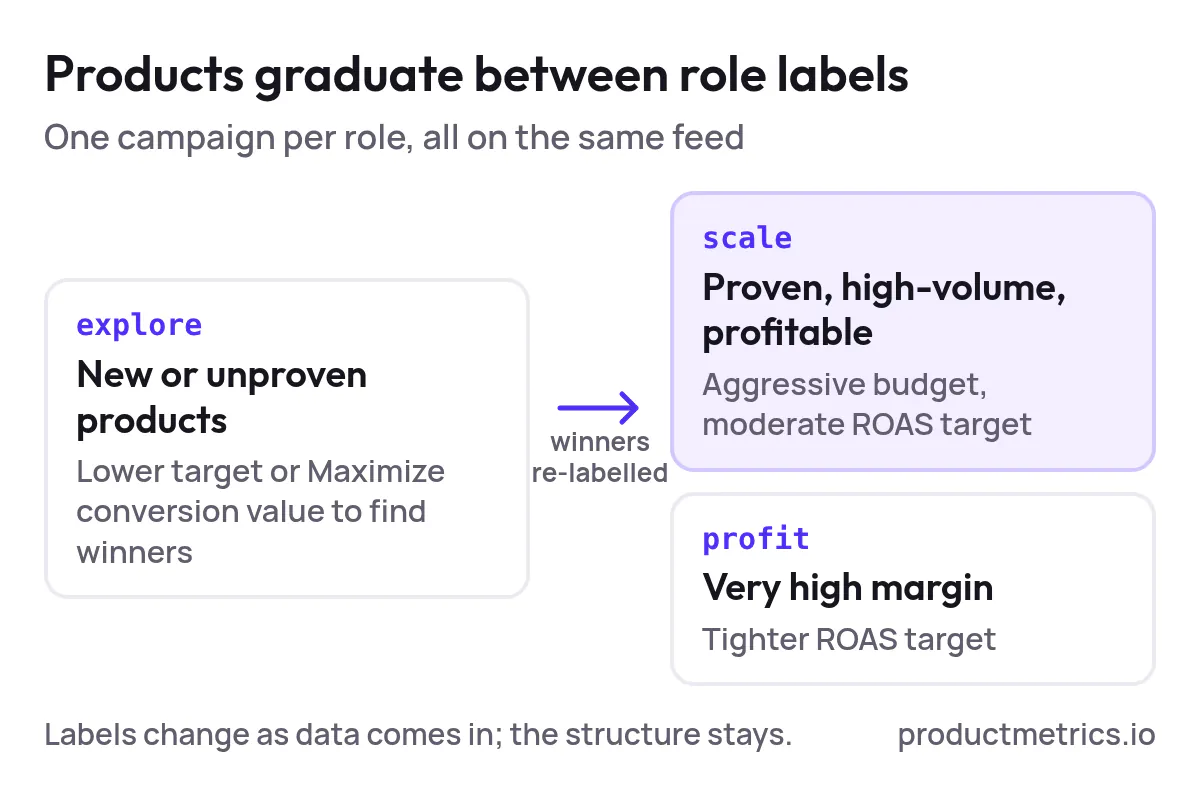
4.4 By Role In The Funnel Scale Vs Profit Vs Explore
When it helps:
- You want a simple, ROAS‑driven account but can’t ignore exploration
Feed setup:
- Custom label for
role:scale– proven, high‑volume, profitable productsprofit– niche but very high marginexplore– new or unproven products
Standard Shopping / PMax structure:
- One campaign for each role, all using the same feed
Scale: aggressive budgets, moderate ROAS targetProfit: tighter ROAS targetExplore: lower target or Maximize conversion value to find winners, then re‑label winners intoscale
This pattern builds a product lifecycle directly into your campaigns: products graduate as data comes in.
4.5 By Geography Or Inventory Constraints
When it helps:
- Stock or pricing differs by country/region
- Certain regions can’t sell certain products
Feed setup:
- Use separate feeds per target country where required
- Use availability/shipping settings and custom labels for region‑locked SKUs
Structure:
- Separate campaigns per country (mandatory when feeds differ)
- Within each country, reuse the previous archetypes (category, margin, lifecycle)
Avoid building structures where geography is the only dimension; you’ll still need product‑level segmentation within each market.
5. Common Mistakes in Google Shopping Campaign Segmentation
These are the patterns we see repeatedly across Shopping and PMax audits.
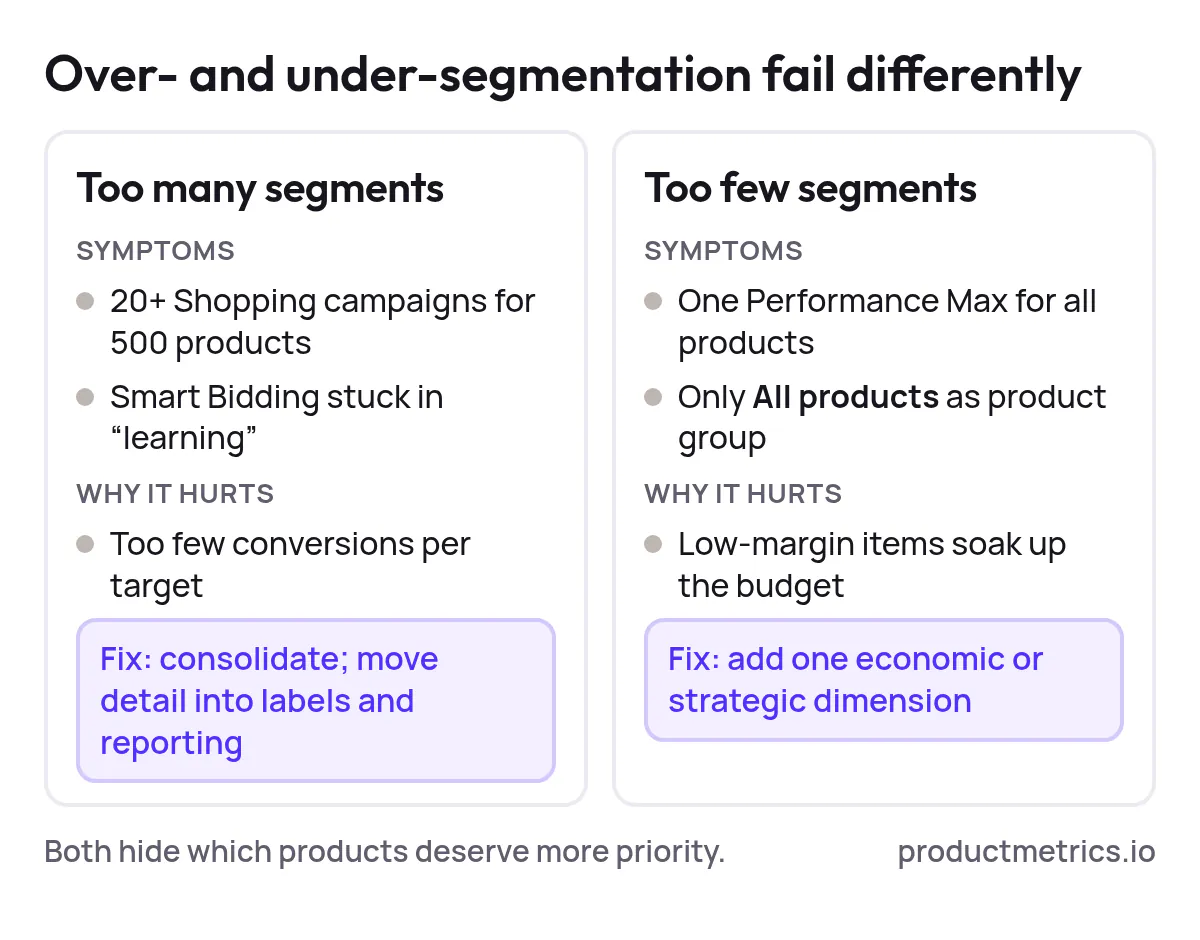
Mistake 1 Over‑segmentation And Data Starvation
Symptoms:
- 20+ Shopping campaigns for a catalog of 500 SKUs
- Dozens of PMax campaigns, each with tiny budgets
- Smart Bidding stuck in “learning” or swinging wildly
Why it hurts:
- Each campaign or target gets too few conversions for the algorithm to stabilize
- The team spends more time moving budgets around than making real product decisions
Fix:
- Consolidate low‑volume segments
- Push complexity down into labels and reporting, not more campaigns
- Set minimum volume thresholds for when a split is allowed
Mistake 2 Under‑segmentation And Blended Averages
Symptoms:
- One PMax for all products
- One Shopping campaign, one ad group, one product group (
All products) - You can’t answer basic questions like “Which margin tier is burning spend?”
Why it hurts:
- High‑volume, low‑margin items soak up most of the budget
- Product decisions become impossible because all metrics are averaged
Fix:
- Introduce at least one dimension of segmentation that reflects economics (margin/price) or strategy (scale/profit/explore)
- Use listing groups in PMax and product groups in Shopping to enforce which products are eligible where. (Source: Go Fish Digital)
Mistake 3 Segmenting By Attributes You Never Act On
Symptoms:
- Campaigns split by color, minor size variants, or highly granular sub‑categories
- No corresponding difference in bids or targets between those segments
Why it hurts:
- You increase operational overhead with zero strategic benefit
- Smart Bidding has less data per segment for no reason
Fix:
- Collapse segments that share identical strategies
- Keep niche breakdowns as reports or dashboards, not as separate campaigns
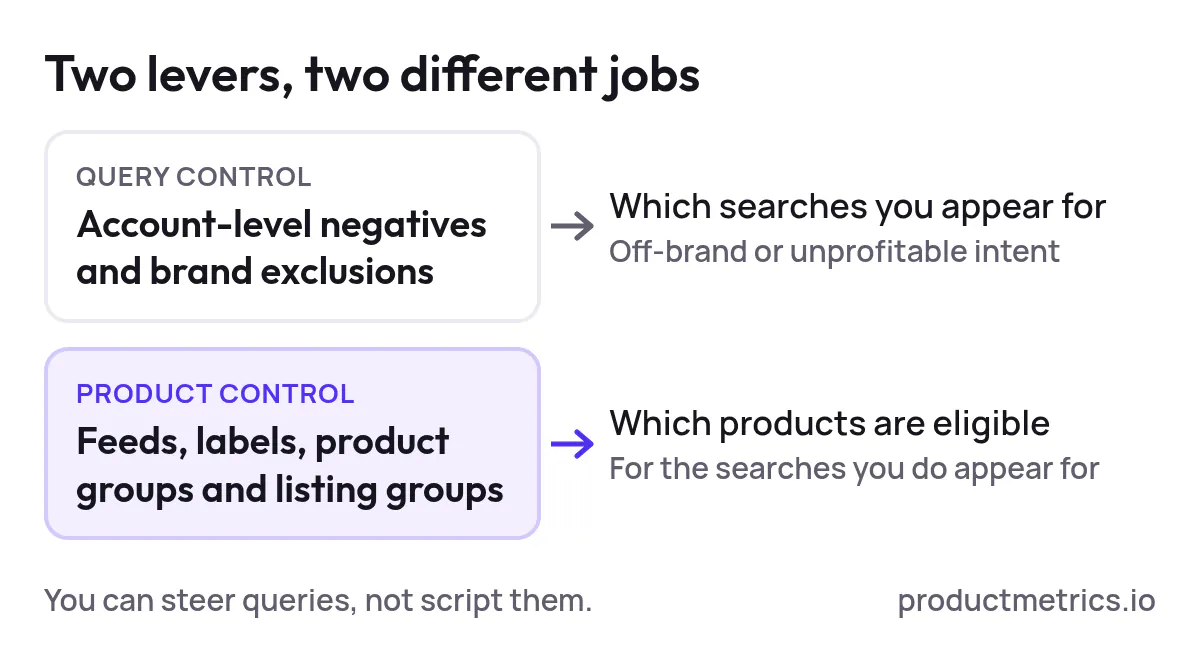
Mistake 4 Confusing Query Control With Product Control
Symptoms:
- Trying to use PMax campaign splits to control exact search terms
- Expecting Shopping campaign structure alone to replace negative keyword strategy
Reality:
- PMax uses signals like search themes, audiences, and URL expansion; you can steer but not script individual queries. (Source: Nupact)
- For query hygiene, you still need account‑level negatives and brand exclusions; for product control, your main levers are feeds, labels, product groups, and listing groups. (Source: Google Ads Help)
Fix:
- Use negatives and brand exclusions to handle off‑brand or unprofitable search intent
- Use segmentation to handle which products are even eligible for that intent
Mistake 5 No Governance Structures Drift Over Time
Symptoms:
- Old test campaigns never get shut down
- Naming conventions differ per manager
- Nobody can explain why a campaign exists or what would make you merge it
Fix:
- Write a one‑page segmentation governance doc (see next section)
- Assign ownership for approving new campaigns and for periodic clean‑ups
6. Governance Making Segmentation Sustainable
Segmentation is not a one‑time build. Treat it as an operating process.
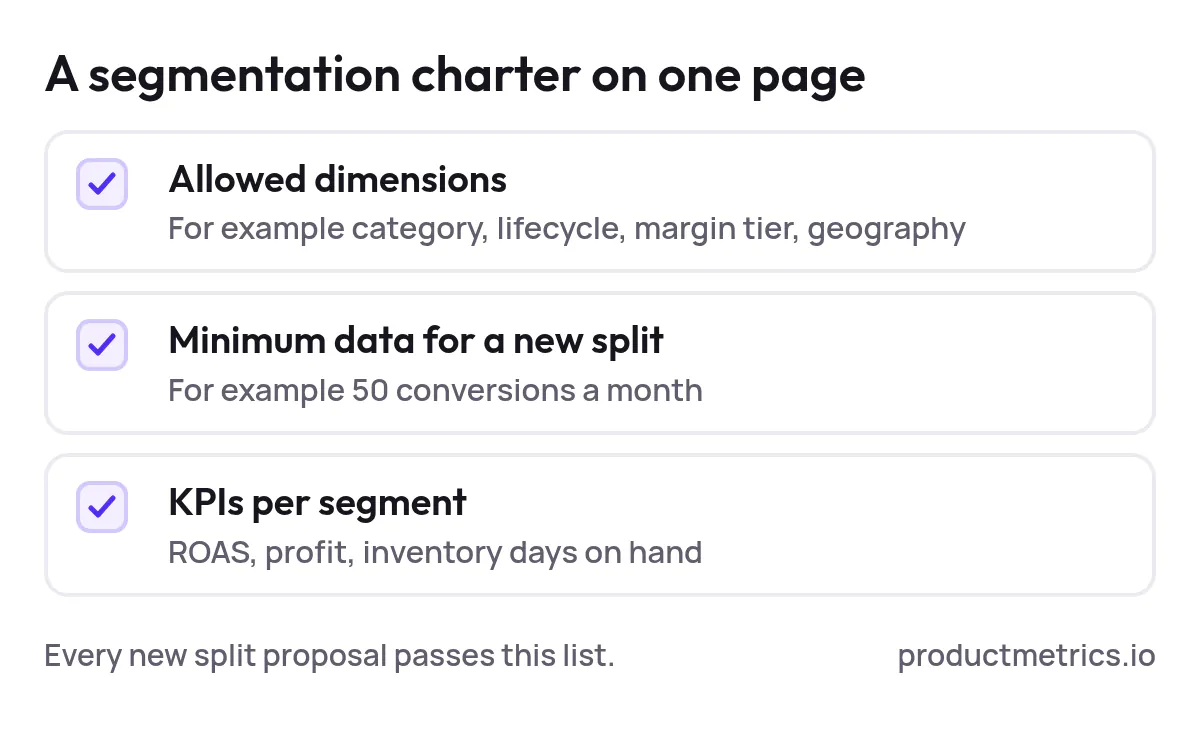
6.1 Define A Segmentation Charter
Document, in plain language:
- The dimensions you’re allowed to segment on (e.g., category, lifecycle, margin tier, geography)
- The minimum data thresholds for new splits (e.g., 50 conversions/month)
- The KPIs used per segment (ROAS, profit, inventory days‑on‑hand, etc.)
This becomes the checklist for any new campaign or product group proposal.
6.2 Standardize Naming Conventions
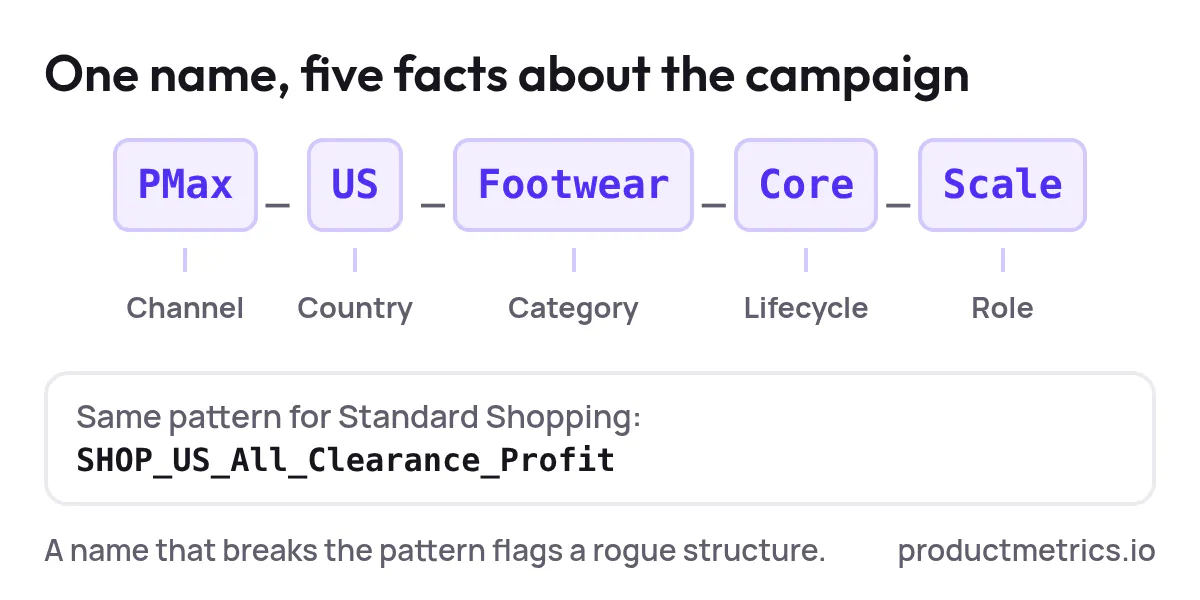
Good names are the cheapest form of governance. For example:
[Channel]_[Country]_[Category]_[Lifecycle]_[Role]
Example: PMax_US_Footwear_Core_Scale or SHOP_US_All_Clearance_Profit.
Once you have this, you can:
- Filter and compare like‑for‑like campaigns quickly
- Spot “rogue” structures that don’t fit the pattern
6.3 Create A Regular Segmentation Review
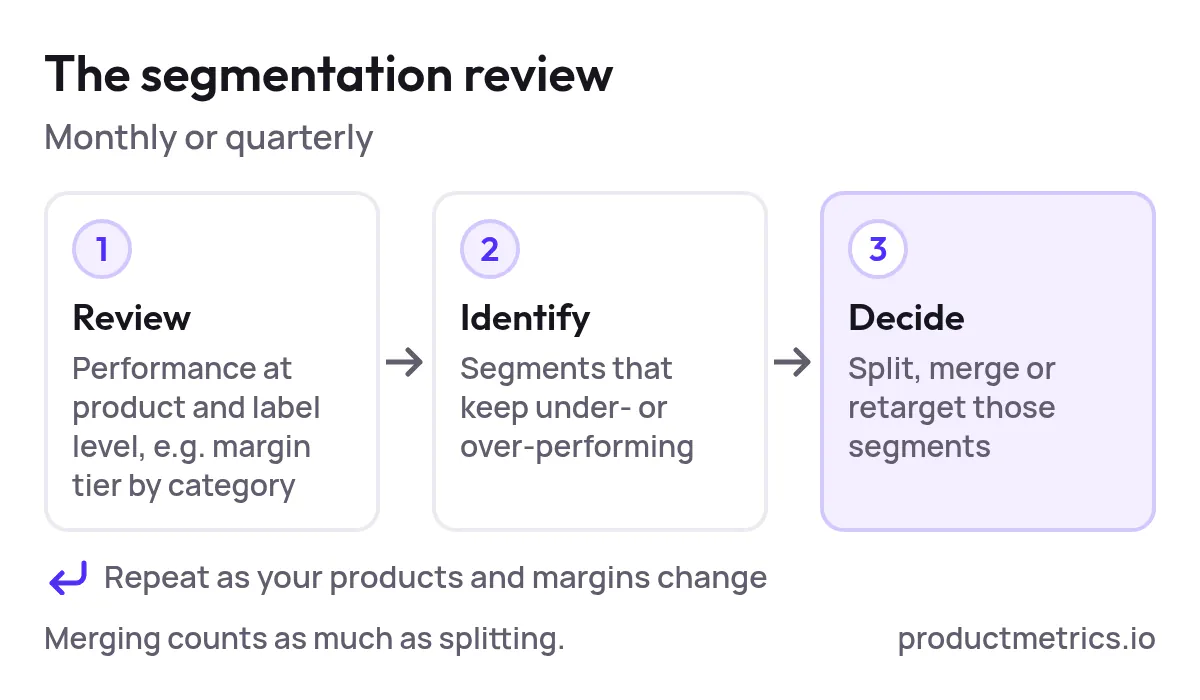
On a monthly or quarterly cadence:
- Review performance at the product and label level (e.g., margin tier x category).
- Identify segments that consistently under‑ or over‑perform.
- Decide whether you need to split, merge, or retarget those segments.
Smart Bidding and PMax improve when your segmentation evolves with your product mix and economics.
6.4 Control Who Can Create Structure
Not everyone needs the keys to new campaigns.
- Give write access for structural changes (new campaigns, asset groups, feed rules) to a small owner group.
- Encourage everyone else to propose changes via a simple template that includes:
- Why this segment deserves different treatment
- Expected data volume
- Clear success metrics and a review date
6.5 Use Tooling To Keep Product Level Truth
As your catalog and markets grow, it becomes harder to:
- See performance at the individual‑product level
- Combine ad performance with journeys, competitor prices, margin and stock
- Turn those insights into Merchant Center labels that drive segmentation
Product Metrics was built specifically to close that gap: it segments your products into performance clusters (e.g., Stars, Cash Cows, Drainers) and turns those into Merchant Center labels you can plug into Shopping and PMax structures. (Source: Product Metrics – About)
Whatever tools you use, the principle is the same:
Maintain a single, product‑level view of truth and let campaigns read from that, not the other way around.
7. An Example Segmentation Blueprint Mid Size Retailer
Let’s make this concrete. Say you’re a US retailer with:
- ~2,000 SKUs
- 4 main categories: Footwear, Apparel, Accessories, Outlet
- Mixed margins and regular seasonal drops
A sustainable, PMax‑agnostic segmentation could look like this.
7.1 Feed Design
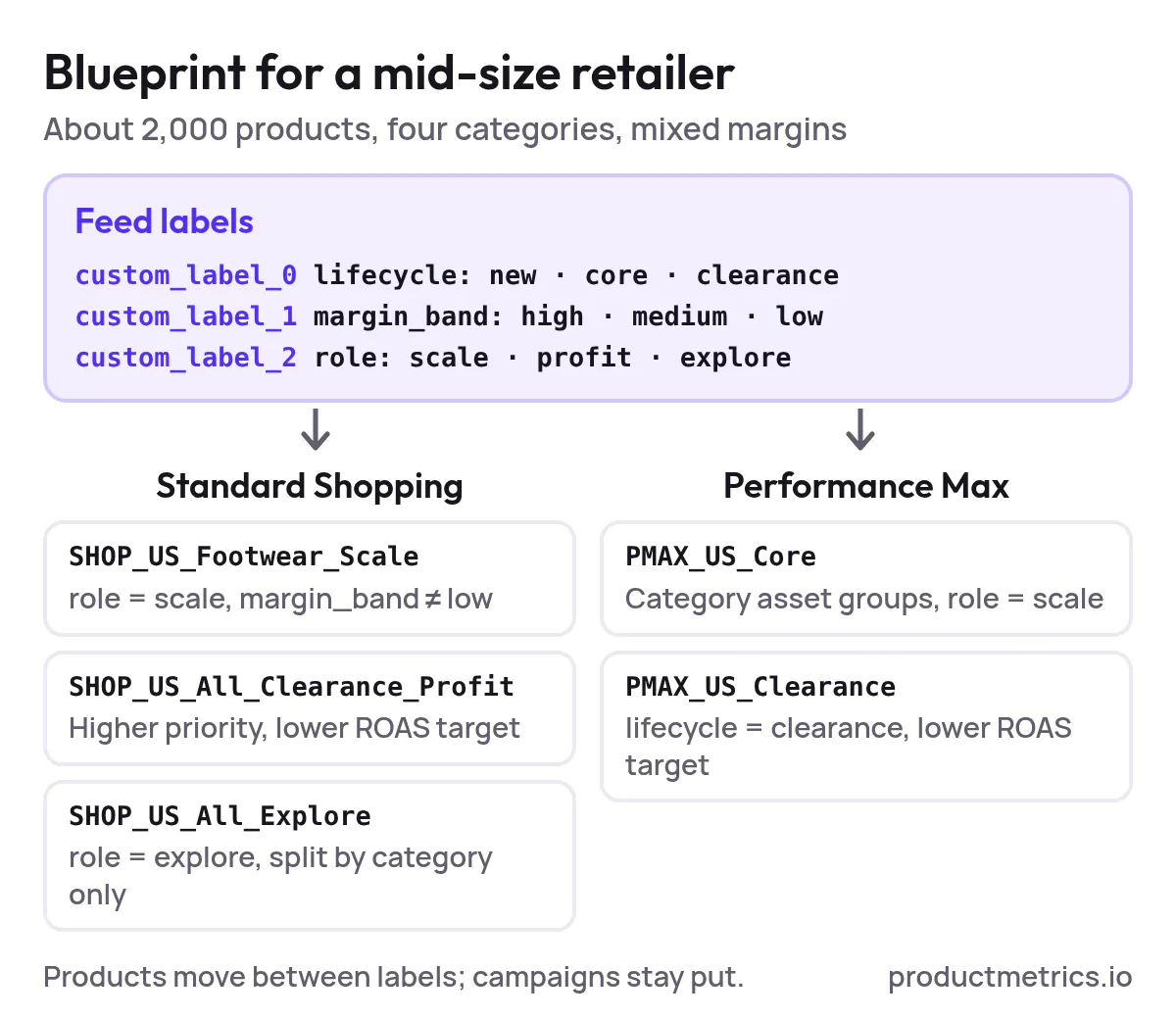
Custom labels:
custom_label_0 = lifecycle→new,core,clearancecustom_label_1 = margin_band→high,medium,lowcustom_label_2 = role→scale,profit,exploreproduct_type→Footwear > Sneakers,Apparel > Jackets, etc.
7.2 Campaign Structure Standard Shopping
-
Campaign 1: SHOP_US_Footwear_Scale
- Goal: Maximize revenue with guardrails
- Contents: Footwear products with
role = scaleandmargin_band ≠ low - Product groups: by
product_type(Sneakers, Boots, Sandals), then by lifecycle
-
Campaign 2: SHOP_US_All_Clearance_Profit
- Goal: Clear old stock at breakeven or better
- Higher campaign priority, lower ROAS target
- Product groups: clearance items across all categories
-
Campaign 3: SHOP_US_All_Explore
- Goal: Find new winners among
role = explore - Product groups: by category only to keep volume high
- Goal: Find new winners among
7.3 Campaign Structure PMax
-
Campaign: PMAX_US_Core
- Goal: Maximize conversion value with ROAS target
- Asset groups:
Footwear_Core_Scale– listing groups:category = Footwear,role = scaleApparel_Core_Scale– similar logicAccessories_Core_Scale
-
Campaign: PMAX_US_Clearance
- Goal: Flush stock, lower ROAS target
- One or two asset groups by high‑level category, listing groups =
lifecycle = clearance
Over time, you’d:
- Promote successful
exploreproducts intoscale - Demote underperforming or aging
coreproducts intoclearance - Adjust targets and budgets at the campaign level, not by constantly rebuilding structure
8. Best Practices Checklist For Google Shopping Campaign Segmentation
Use this as your quick pre‑launch or quarterly review checklist.
Strategy & Design
- We’ve defined which business dimensions (category, lifecycle, margin, geography) matter most.
- We only create separate campaigns when we need different budgets or targets.
- Our segmentation schema is expressed in the feed (product_type, category, custom labels) first.
Platform Implementation
- Every Shopping campaign has product groups more granular than
All products, but not so granular that groups starve. (Source: Google Ads Help) - Every PMax asset group has listing groups that intentionally include or exclude sets of SKUs. (Source: Logical Gecko)
- Account‑level negative keywords and brand exclusions are used to protect brand and profitability. (Source: Google Ads Help)
Governance
- We have a short segmentation charter and naming convention.
- There is a clear owner for approving new campaigns/asset groups.
- We review segmentation performance regularly and aren’t afraid to merge as well as split.
If you can tick these boxes, you’re already ahead of most advertisers running Shopping and PMax today.
Where Product Metrics Fits In
Segmentation is only as good as the product‑level insight beneath it.
Product Metrics turns raw performance and business data into product‑level decisions, then into labels your Shopping and PMax campaigns can actually use – so budget follows the products that truly deserve it. (Source: Product Metrics – About)
When you’re ready to move from one‑off restructures to a durable operating model:
- Analyze your products for free and see where budget is leaking or under‑invested.
- Use those insights to re‑design your segmentation around real performance, not assumptions.
(Analyze your products for free →) (Source: Product Metrics)
This article gives you the principles, pitfalls, and governance. The next step is seeing what they look like on your own product catalog.
Written by
Berend Vrakking, Founder of Product Metrics
1M+ products analysed · Nominated at the Dutch Search Awards for Best Measurement Campaign (2023) and Best Use of Data (2024)
Keep reading.
Implementing Profit Segmentation In Google Shopping And Performance Max
Implementing profit segmentation in Google Shopping and Performance Max, step by step: margin bands, custom labels, campaigns and target ROAS.
Evaluating Product Group Relevance In Google Shopping: Measurement Frameworks, Benchmarks And Tooling
Evaluating product group relevance in Google Shopping: score each group on structure, performance and intent, benchmark it and decide what to split.
The 2026 Buyer’s Guide to Google Shopping Campaign Segmentation Platforms (Product Group Relevance, Performance, and Automation)
The 2026 Buyer’s Guide to Google Shopping Campaign Segmentation Platforms: a test-forward, procurement-ready framework for PPC specialists.
See which of your products to push, fix or pause. Start with your own products, or a 30-second estimate.
Check one product first: work out its break-even ROAS in the calculator. Then see where all your products stand.
Questions, or want to spar about your products? Book a demo: a video call with Berend, then a demo account.