
Performance Max For New Customers - Setup, Value Rules, And Bidding Uplifts
Performance Max for new customers - setup, the three NCA modes, how much extra to value a new customer, value rules and campaign structure.
Performance Max has become the default engine behind Google Shopping inventory, but out of the box it is optimized to hit a revenue or ROAS goal, not to maximize new customer growth.
Google’s new customer acquisition (NCA) goal is designed to change that. It’s available across Performance Max, Search, Shopping, and Demand Gen, and lets you either bid only for new customers or bid more when a click is predicted to be from someone new. (Source: Accelerate with Google)
This article walks through, in operator detail:
- How the NCA goal in Performance Max actually works
- How to set it up correctly (so it can reliably distinguish new vs returning customers)
- How to choose between “Bid higher for new customers” and “Only bid for new customers”
- How to decide how much extra value to assign to a new customer
- How to layer conversion value rules and campaign structure for maximum new‑customer reach
The focus is ecommerce and Shopping inventory, but the same principles apply to any PMax setup running on a purchase conversion.
1. How The New Customer Acquisition Goal Works In Performance Max
1.1 The Three NCA Modes
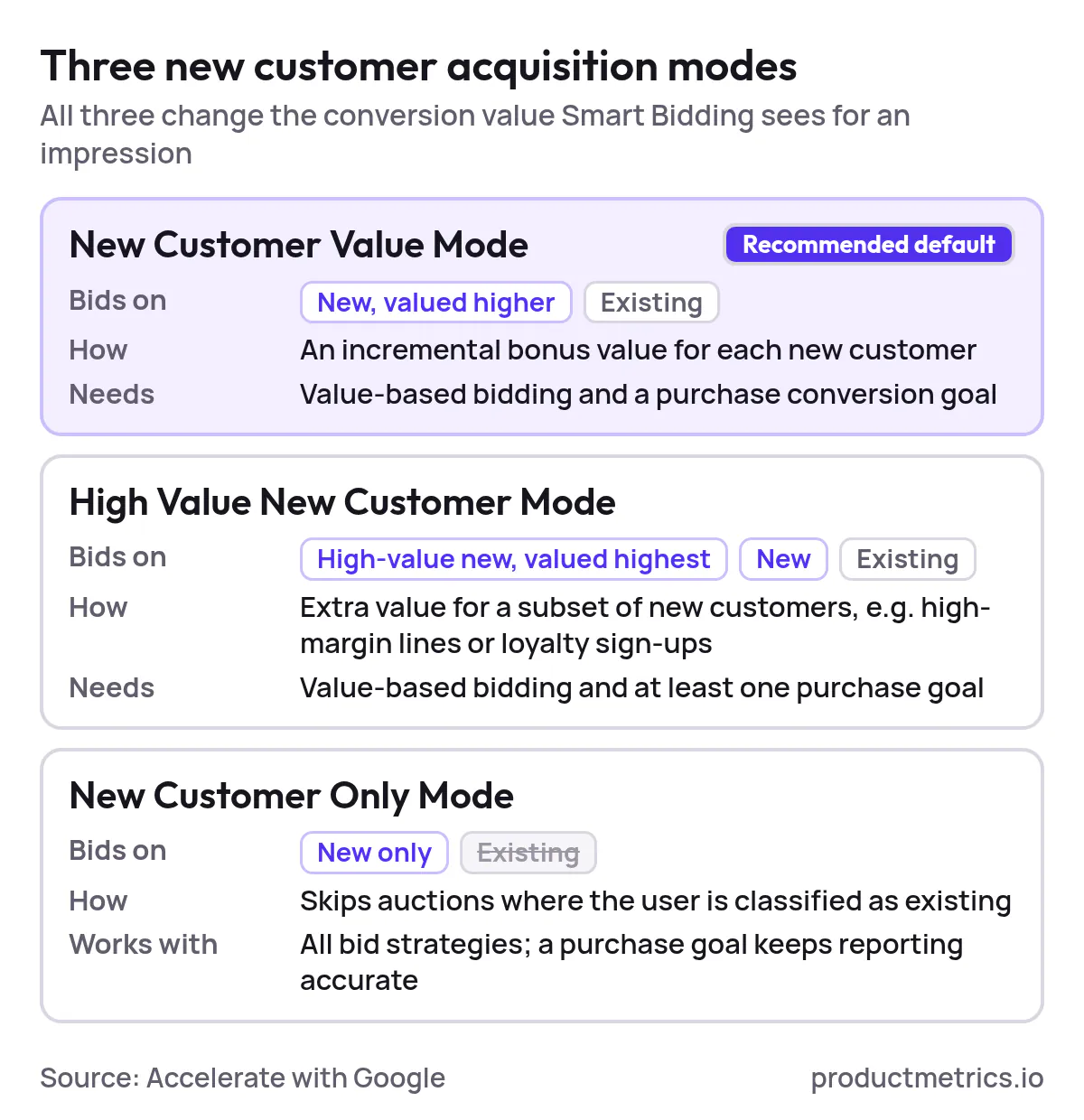
Google has expanded NCA from a single toggle into three distinct modes, available across Performance Max and other campaign types: New Customer Value Mode, High Value New Customer Mode, and New Customer Only Mode. (Source: Accelerate with Google)
At a high level for Performance Max:
- New Customer Value Mode (recommended default)
- You tell Google that a new customer is worth more than an existing one by assigning an incremental “bonus” value for new customers.
- PMax still serves to both new and existing customers, but Smart Bidding is skewed toward new customers because they are valued higher in the auction.
- This mode is recommended for most advertisers using value‑based bidding (Target ROAS or Maximize conversion value) and a purchase conversion goal. (Source: Accelerate with Google)
- High Value New Customer Mode
- An extension of New Customer Value Mode that lets you give extra value to a subset of “high‑value” new customers (for example, based on high‑margin product lines or loyalty sign‑ups), while still bidding for regular new and existing customers.
- Requires value‑based bidding and at least one purchase conversion goal. (Source: Accelerate with Google)
- New Customer Only Mode
- Tells PMax to only bid for new customers and ignore auctions where the user is classified as existing.
- Available on Performance Max, Search, Shopping, and Demand Gen with all bid strategies, though Google recommends still having a purchase conversion goal for accurate new vs returning reporting. (Source: Accelerate with Google)
Internally, all three modes are implemented by modifying the conversion value that Smart Bidding sees for a given impression. In Value Modes, new customers effectively get a higher predicted conversion value; in New Customer Only, bids are suppressed when the user looks like an existing customer. (Source: Google Ads API Docs)
1.2 How Google Decides Who Is A New Customer
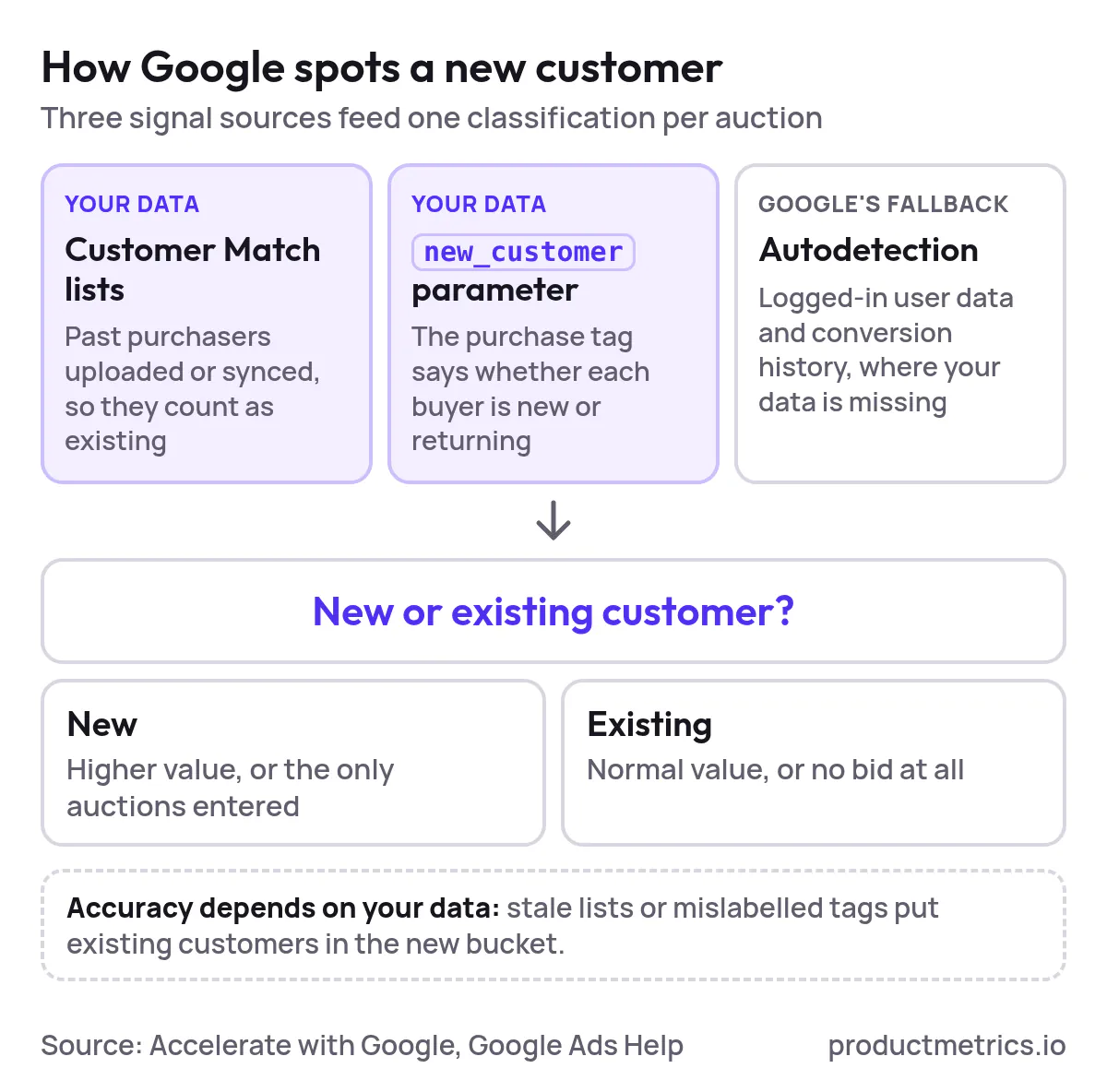
Google does not magically “know” if a user is new to your brand. The NCA goal combines three signal sources: Customer Match lists, a new_customer parameter in your purchase tag, and Google’s own autodetection. (Source: Accelerate with Google)
In practice:
- Customer Match / first‑party lists
- You upload or sync customer lists (e.g., all past purchasers) into Google Ads via Customer Match.
- PMax uses these lists to tag users as existing, improving its ability to avoid bidding new‑customer budgets on people you already have.
- Google explicitly recommends using Customer Match and other first‑party data to supplement autodetection for NCA accuracy. (Source: Google Ads Help)
new_customer(orcustomer_type) parameter in your conversion tag- On purchase conversions, you can pass a boolean or categorical parameter indicating whether the buyer is new or returning.
- This parameter is now supported across native integrations (such as the Google & YouTube app for Shopify) and custom tagging, and is called out as a best practice in Google’s NCA setup guidance. (Source: Accelerate with Google)
- Google’s autodetection
- When the above are missing or incomplete, Google uses its own logged‑in user data and historical conversion behavior to infer if a buyer is probably new or existing.
- Google has described these as “autodetection methods” that are improved when combined with your first‑party lists and tagging. (Source: Google Ads Blog)
From an operator’s perspective, the accuracy of NCA hinges on how clean your first‑party data and tagging are. Poorly maintained customer lists or mis‑labeled new_customer parameters will spill existing customers into your “new customer” bucket and vice versa.
2. How To Set Up The New Customer Acquisition Goal In Performance Max
This section assumes you already have a basic PMax Shopping campaign running with a purchase conversion.
2.1 Prerequisites Tracking Value And Data
Before enabling NCA in Performance Max, you should have:
- Purchase conversion tracking with values
- Your primary ecommerce conversion should be classified as “Purchase” and have a meaningful value (e.g., revenue or gross profit).
- Value‑based Smart Bidding strategies such as Maximize conversion value or Target ROAS are required for New Customer Value Mode and High Value New Customer Mode. (Source: Accelerate with Google)
- Clean first‑party customer lists
- Upload or sync a Customer Match list of historical buyers (all‑customers list at minimum; high‑value segments if available).
- Google explicitly recommends supplying multiple match keys (emails, phone, ZIP) to maximize match rates for NCA. (Source: Google Ads Help)
new_customer(orcustomer_type) parameter in your purchase tag- Implement this via Google Tag, Google Tag Manager, server‑side tagging, or your ecommerce platform integration.
- For Shopify, Google specifically recommends using the official Google & YouTube app, which automatically deploys the NCA parameter once configured. (Source: Accelerate with Google)
Only once these foundations are in place is it worth fine‑tuning bidding and value uplifts for new customers.
2.2 Enabling The Customer Acquisition Goal In A PMax Campaign
In the Google Ads interface, NCA is configured at the campaign level for Performance Max.
To turn it on for an existing PMax campaign:
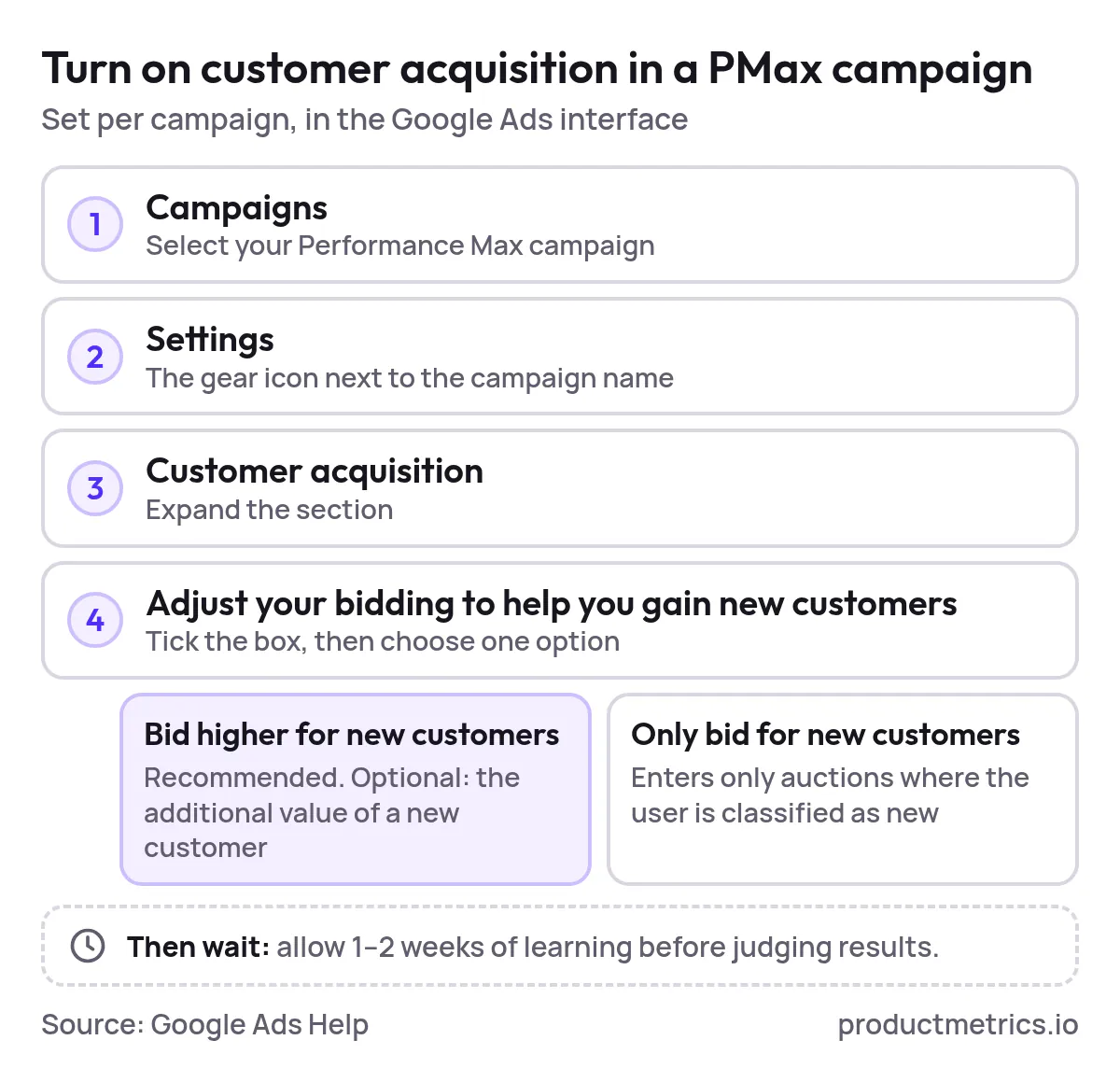
- Go to Campaigns and select your Performance Max campaign.
- Open Settings (gear icon next to the campaign name).
- Expand the Customer acquisition section.
- Check “Adjust your bidding to help you gain new customers”.
- Choose between:
- “Bid higher for new customers (recommended)” – PMax bids more aggressively when a click is likely to be a new customer, but still bids for existing customers.
- “Only bid for new customers” – PMax participates in auctions only when the user is classified as new.
- Optionally, specify the additional value for new customers if you’re using New Customer Value Mode.
These options and the recommendation to prefer “Bid higher for new customers” over “Only bid for new customers” (to avoid overly restricting reach) are documented in Google’s troubleshooting guide for NCA. (Source: Google Ads Help)
Operational note: Any major change to targeting or bidding (including enabling NCA) will typically trigger a new learning period for Performance Max; Google advises allowing 1–2 weeks for the system to adjust. (Source: Google Ads Help)
2.3 Verifying That NCA Is Working
After enabling NCA, you should validate that:
- New vs returning counts are populating
- Google has introduced reporting that shows new‑customer acquisition cost and new vs returning conversions for campaigns using the NCA goal, across both New Customer Only and New Customer Value modes. (Source: Accelerate with Google)
- Your Customer Match lists have healthy match rates
- In Audience Manager or Data Manager, review match‑rate columns for your customer lists; low match rates can degrade NCA accuracy, as Google itself notes when recommending multiple identifiers and clean lists. (Source: Google Ads Help)
If you see a suspiciously high proportion of “unknown” customers – or a high share of existing customers still showing up as “new” – you almost always have a data issue (list coverage, match rate, or tagging) rather than a bidding problem.
3. Bid Higher Vs Only Bid For New Customers - A Decision Framework
One of the most common strategic questions is:
“For Google Ads new customer acquisition, should I bid only for new customers, or just bid higher for them?”
3.1 What Each Option Actually Does
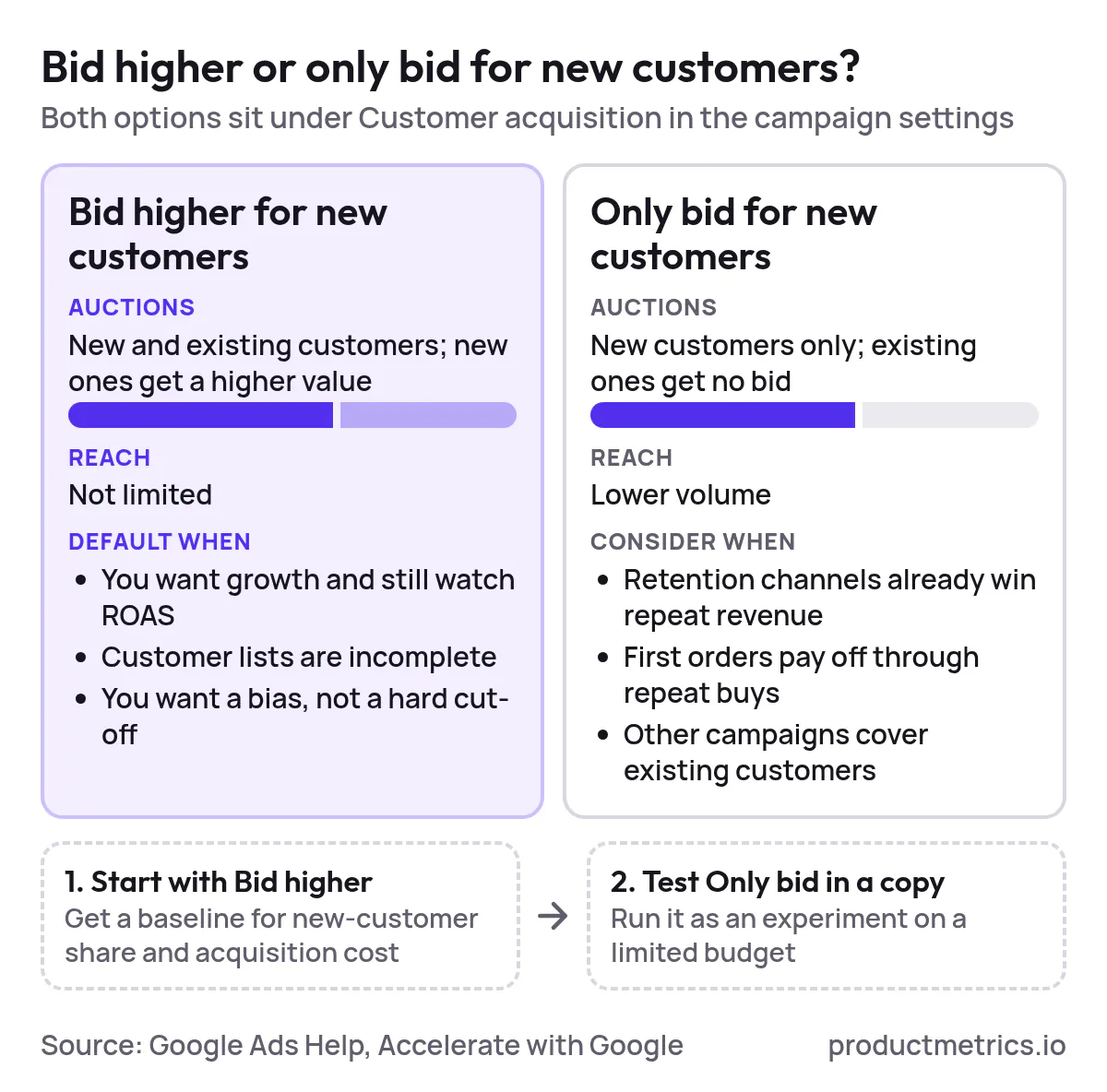
- Bid higher for new customers
- PMax still competes for both new and existing customers.
- Conversions predicted to be from new customers get a higher effective value, so Smart Bidding is more willing to pay for them while still respecting your ROAS or budget constraints.
- Google describes this as the recommended option for most advertisers because it doesn’t limit reach. (Source: Google Ads Help)
- Only bid for new customers
- PMax suppresses bids when the user is classified as existing, effectively turning the campaign into a pure acquisition engine.
- This can be powerful for free‑trial offers, aggressive expansion in new markets, or brands that have other channels handling retention.
- Google warns that this mode can reduce volume and suggests pairing it with a separate campaign for repeat customers. (Source: Accelerate with Google)
3.2 When Bid Higher For New Customers Is Usually Right
Choose Bid higher as your default when:
- You’re in growth mode but still care about overall ROAS.
- Your customer list coverage is incomplete (e.g., offline customers not yet uploaded), so NCA misclassification risk is non‑trivial.
- You want to bias the system toward new customers without creating brittle traffic patterns.
Google’s own case studies show that advertisers who “highly value new customer acquisitions and use New Customer Value Mode” saw an average 9% ROAS improvement, 5% higher new‑customer ratio, and 7% lower new‑customer acquisition cost, compared to similar setups without NCA. (Source: Accelerate with Google)

Show the dataHide the data
| Average change | Average change |
|---|---|
| ROAS improvement | 9% |
| Higher new-customer ratio | 5% |
| Lower new-customer acquisition cost | 7% |
These are incremental, not transformative, changes—which is exactly what you want from a system‑level optimization rather than a hard exclusion.
3.3 When Only Bid For New Customers Makes Sense
Consider Only bid for new customers when:
- You have a very strong retention engine (email, SMS, loyalty, organic search) already capturing most returning revenue.
- Your unit economics strongly favor winning first‑time buyers even at break‑even or slight loss (e.g., consumables with high repeat rates).
- You have other campaigns (PMax or Search) explicitly targeting existing customers, with their own budgets and bid strategies.
Even in these cases, it’s prudent to:
- Start with Bid higher, gather baseline data on new‑customer share and acquisition cost.
- Duplicate the campaign, switch the copy to Only bid for new customers, and run an experiment with limited budget until you see stable performance deltas.
- Keep an eye on blended CAC and LTV across all channels; NCA can shift where customers appear to come from because of attribution, not just the true underlying demand. (Source: Wikipedia)
4. How Much Extra Should You Value A New Customer In Performance Max
At the heart of NCA is a pricing question:
“How much extra should I value a new customer in Performance Max?”
Google offers a simple starting heuristic: if you’re unsure, set the new customer value to roughly twice your Average Order Value (AOV) when using New Customer Value Mode. (Source: Accelerate with Google)
That’s a reasonable default, but sophisticated teams should base this on lifetime value (LTV) and payback targets.
4.1 Start From Economics LTV Margin And Payback
A practical approach:
-
Estimate LTV for a newly acquired customer (on a gross profit basis, over a fixed time window, e.g., 12 or 24 months).
-
Estimate first‑order value (again on a profit basis) – your typical order margin from an anonymous new buyer.
-
Compute the Acquisition Multiple (AM):
AM = LTV / First‑order value
If LTV is $180 and first‑order value is $60, then AM = 3. Economically, a new customer is worth 3 times their first order.
In New Customer Value Mode, you don’t usually set the full LTV as incremental value, because your ROAS target and reporting need to remain interpretable. Instead you:
- Treat your normal conversion value as first‑order value (e.g., revenue or contribution margin for the order itself).
- Add an incremental uplift for new customers that reflects how far you’re willing to lean into LTV in your bidding.
4.2 Translating LTV Into A PMax Uplift
Continuing the example above (AM = 3):
- First‑order value (FoV): $60
- LTV: $180
- Incremental LTV beyond the first order: $120
Three practical uplift strategies:
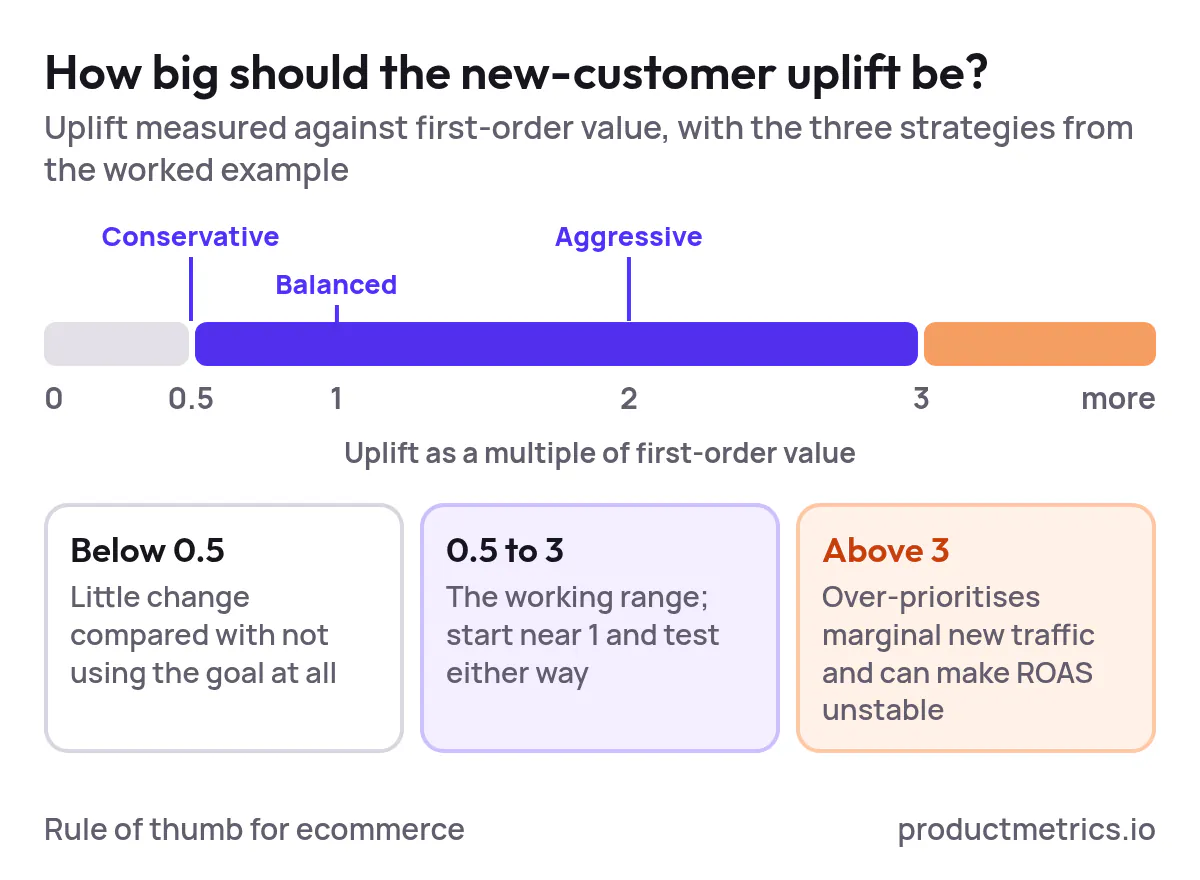
- Conservative (e.g., half of FoV)
- Incremental value = $30
- New‑customer value in PMax = $60 + $30 = $90
- Balanced (equal to FoV)
- Incremental value = $60
- New‑customer value = $120
- Aggressive (twice FoV)
- Incremental value = $120
- New‑customer value = $180 (i.e., full LTV)

Show the dataHide the data
| Uplift strategy | Incremental value | New-customer value in PMax |
|---|---|---|
| Conservative | $30 | $90 |
| Balanced | $60 | $120 |
| Aggressive | $120 | $180 |
In experiment design, you might:
- Start with a balanced uplift (≈ FoV, often close to Google’s twice-AOV heuristic when AOV and FoV are similar). (Source: Accelerate with Google)
- Watch new‑customer share, blended ROAS, and payback windows for a full purchase cycle.
- Then test more conservative or aggressive uplifts via Performance Max experiments or controlled campaign splits.
Crucially, any uplift artificially inflates reported conversion value for new customers in Google Ads. That’s by design—Smart Bidding needs the inflated value to justify higher bids. Your internal finance or BI reporting should still be based on actual revenue, not the boosted value numbers.
4.3 Guardrails For Uplift Size
As a working rule of thumb for ecommerce:
- Under‑valuing new customers (e.g., uplift < half of FoV) often results in minimal change versus not using NCA at all.
- Extreme uplifts (e.g., > 3 times FoV) can cause PMax to over‑prioritize marginal new traffic and destabilize ROAS, especially if your new vs returning classification isn’t very accurate.
The right answer depends on your LTV model, margin structure, and appetite for payback risk. The key is to treat the uplift as a capital allocation decision, not just a targeting checkbox.
5. Using Conversion Value Rules To Reflect LTV And New Customer Segments
Performance Max’s built‑in NCA goal isn’t the only way to tell Google that some conversions are more valuable than others.
5.1 What Conversion Value Rules Can Do
Conversion value rules let you automatically adjust the value of a conversion based on conditions such as location, device, audience, or customer attributes. (Source: Google Ads Help)
From Google’s perspective, they are additional multipliers layered on top of your base conversion value, and they can be applied at the account or campaign level via rule sets. (Source: Google Ads API Docs)
For new‑customer optimization in Shopping and Performance Max, typical use cases include:
- Boosting value for high‑LTV cohorts (e.g., loyalty‑program members, subscribers, or specific geo segments) via audience‑ or location‑based rules.
- De‑prioritizing low‑margin segments (e.g., certain regions or device types) while still running one unified PMax campaign.
5.2 Combining NCA And Value Rules
For most brands focused on new customers:
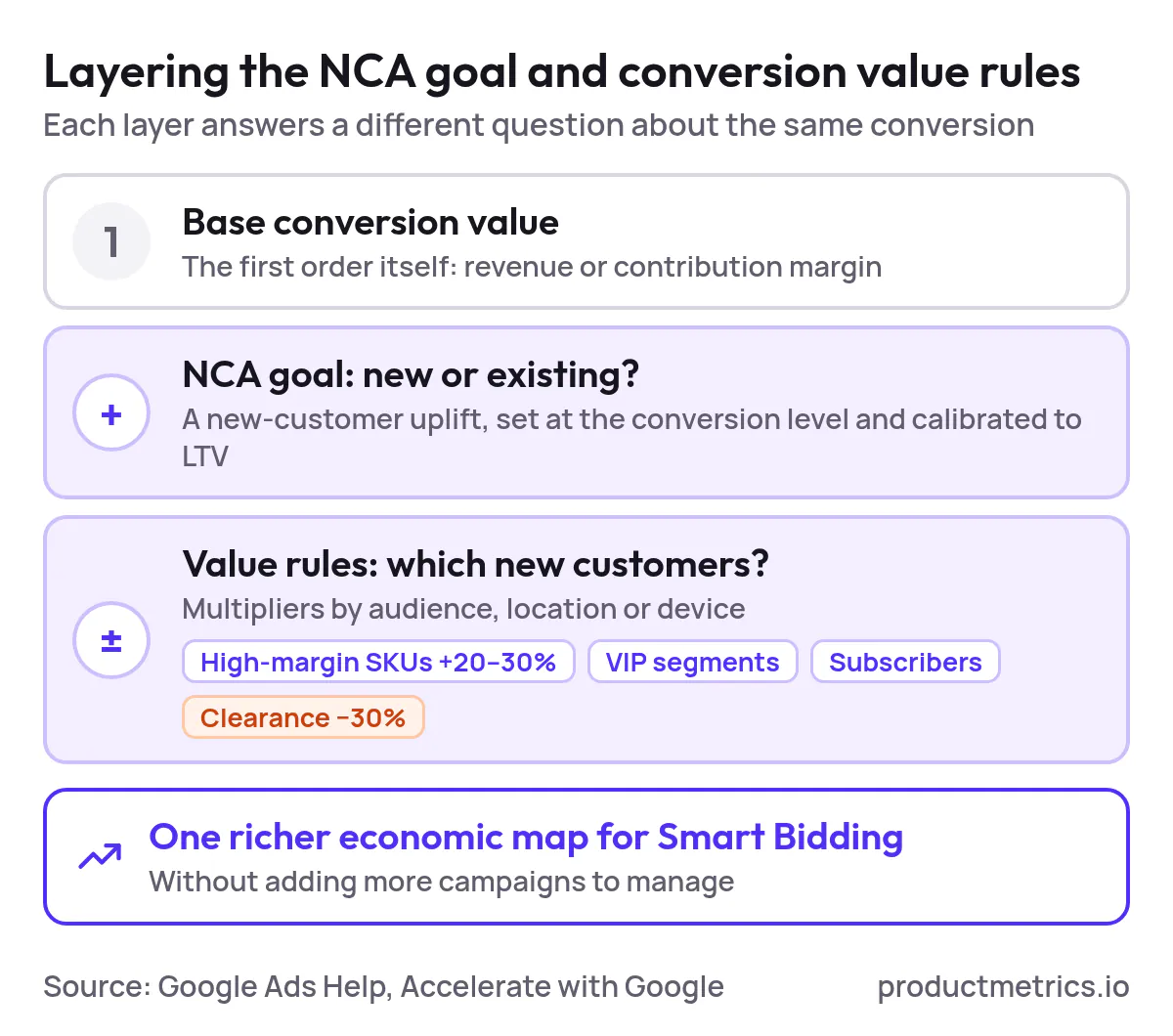
- Use the NCA goal to express “new vs existing” economics at the conversion level (via new‑customer value uplift).
- Use conversion value rules to express within‑new‑customer differences – such as high‑LTV geographies or product lines – or to dampen bids in low‑margin situations.
One practical pattern for Google Shopping inventory:
- Enable New Customer Value Mode in your acquisition‑focused PMax campaign, with an uplift calibrated to LTV as described above. (Source: Accelerate with Google)
- Add audience‑based conversion value rules that further boost value for high‑margin SKUs, VIP segments, or subscribers (e.g., by 20–30%) and/or reduce value for clearance categories (e.g., by −30%). (Source: Google Ads Help)
- Monitor whether these layered signals change product mix, average order value, and new‑customer share in the ways you expect.
The goal is to give Smart Bidding a richer economic map of your business without exploding the number of campaigns you need to manage.
6. Structuring Shopping And Performance Max Campaigns For Maximum New Customer Reach
Campaign structure is where Google Shopping optimization intersects with NCA.
6.1 A Simple Lifecycle Based Segmentation Model
For most mid‑to‑large ecommerce advertisers, a robust but manageable structure is:
- Acquisition PMax (Shopping‑led)
- Objective: New Customer Value Mode with calibrated uplift.
- Assets and listing groups biased toward broad, discovery‑oriented queries and non‑brand terms.
- NCA: Bid higher for new customers as the starting point.
- Retention / Cross‑sell PMax
- Objective: Maximize conversion value or Target ROAS without NCA, or with low uplift.
- Asset groups and audiences focused on Customer Match lists and brand‑heavy queries.
- Brand Search campaign(s)
- Standard Search with exact and phrase brand terms, often at very efficient CPA/ROAS targets, separate from PMax to avoid over‑counting “easy” conversions.
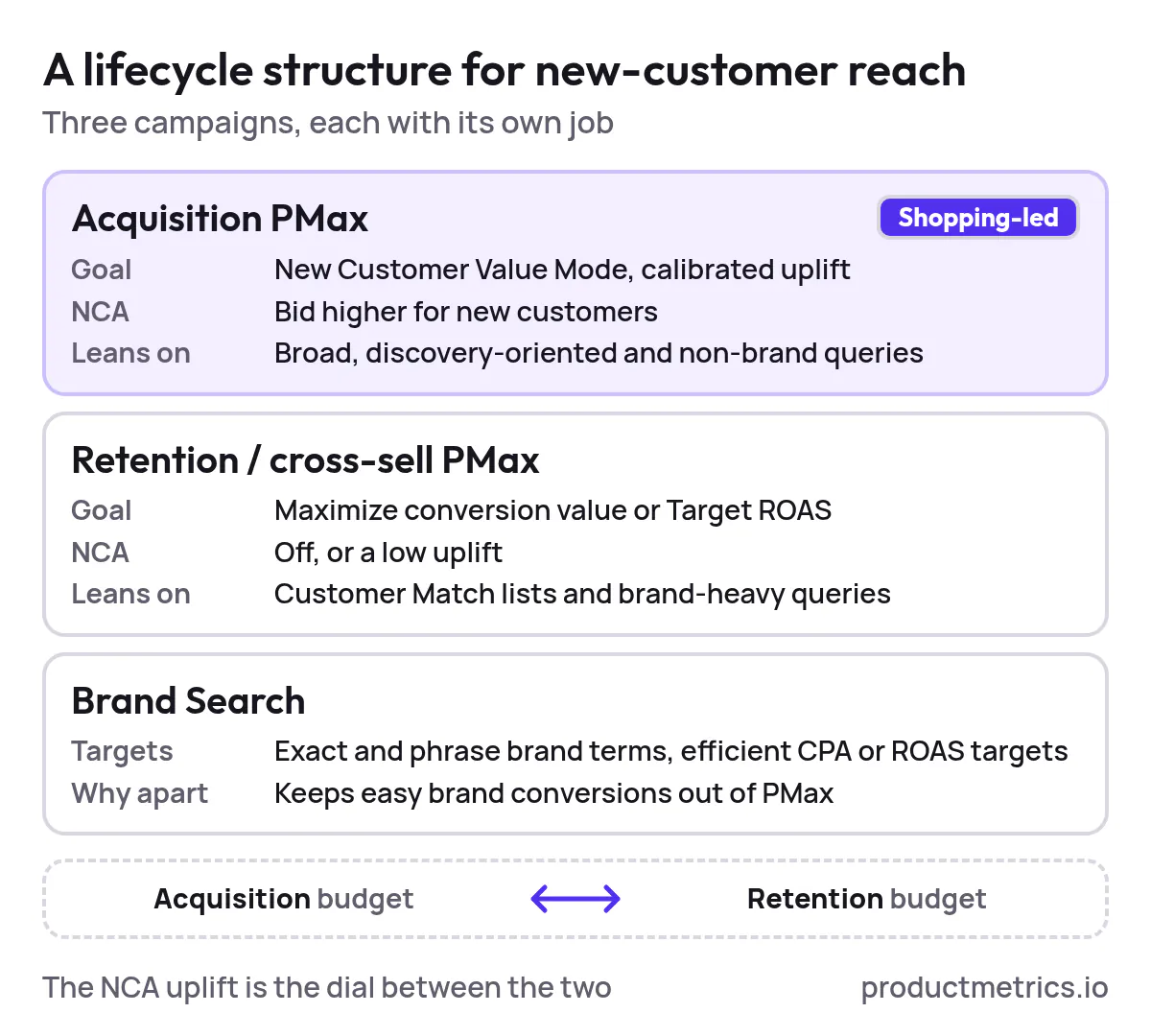
This structure ensures that when you “turn the dial” on NCA uplifts, you’re mainly re‑allocating spend between acquisition and retention budgets, not simply allowing PMax to cannibalize high‑intent brand traffic.
Google itself recommends aligning goals and bidding across performance campaigns (Search and PMax) to help Smart Bidding optimize toward the same outcomes, while using lifecycle goals like NCA to add nuance around new vs existing customers. (Source: Accelerate with Google)
6.2 Query And Product Segmentation For Shopping
Within your acquisition‑focused PMax campaign:
- Segment listing groups by margin and replenishment potential (e.g., high‑margin hero SKUs vs low‑margin accessories).
- Use audience signals that skew toward prospecting (similar audiences, in‑market segments, custom segments based on non‑brand queries) rather than pure remarketing lists. (Source: Accelerate with Google)
- Consider using brand exclusions and negative keywords (where available for PMax) to reduce over‑spend on navigational searches that your Brand Search campaigns already cover. (Source: Accelerate with Google)
The objective is not to perfectly separate new and existing customers by campaign—that’s impossible—but to make it more likely that your NCA‑enabled PMax campaigns are competing in auctions where new‑customer upside is highest.
7. Measuring New Vs Returning Customers In Google Ads
Answering “Is it worth paying more for new customers on Google Ads?” requires reliable measurement.
7.1 In Platform Reporting
For campaigns using the NCA goal, Google provides:
- Metrics for new‑customer conversions and new‑customer acquisition cost (NCAC) at the campaign level. (Source: Accelerate with Google)
- Segmentation of conversions by new vs returning customers, particularly when you use incremental new‑customer values and appropriate classification in your conversion setup. (Source: Accelerate with Google)
Make these a standard part of your Performance Max dashboards, alongside ROAS and overall conversion value.
7.2 Joining Google Ads With Your Own Data
Platform‑level reporting is only the first step. To understand true LTV and payback by channel, you should:
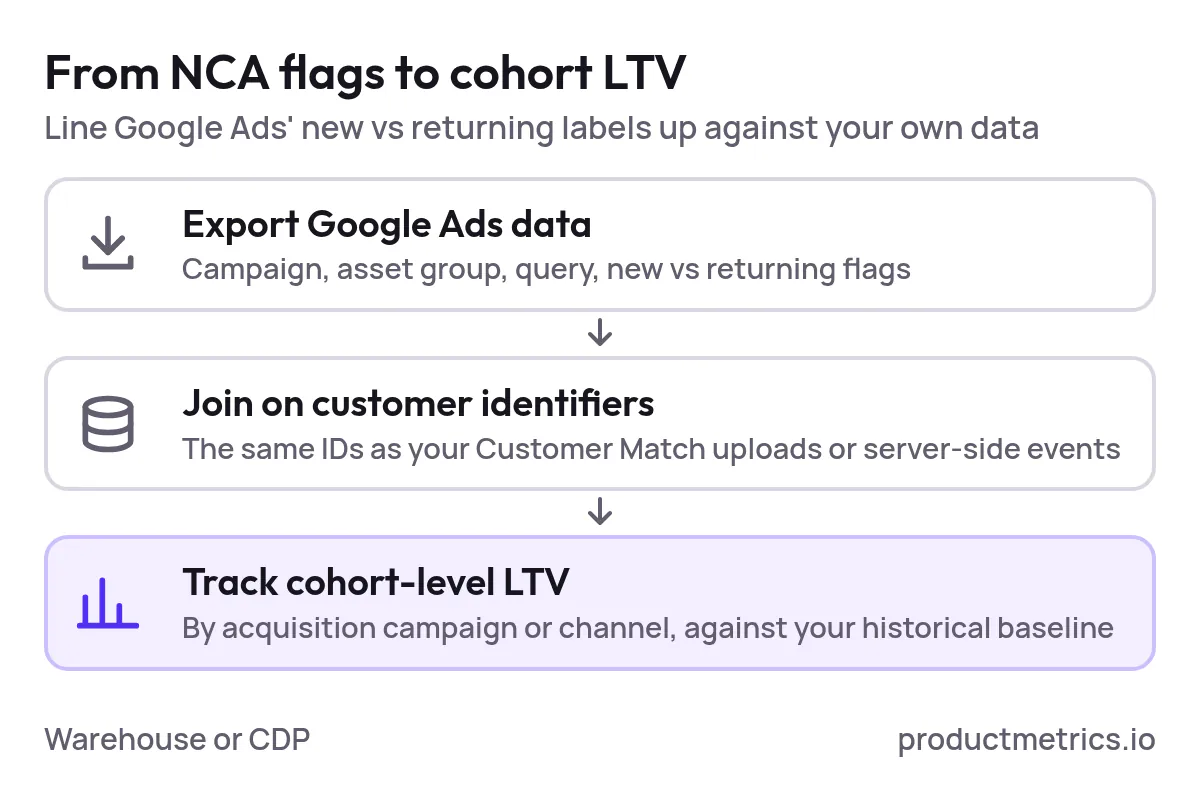
- Export Google Ads data (campaign, asset group, query, new vs returning flags) to your warehouse or CDP.
- Join on customer identifiers that are also present in your Customer Match uploads or server‑side events.
- Track cohort‑level LTV by acquisition campaign or channel, comparing cohorts sourced via NCA‑enabled campaigns vs your historical baseline.
This is where the Performance Max NCA goal becomes more than just a toggle: it gives you a consistent labeling system for new vs returning customers at the ad‑platform level, which you can line up against your own lifecycle metrics.
8. A Pragmatic Rollout Plan For NCA In Performance Max
To tie everything together, here’s a phased roadmap you can implement over a quarter.
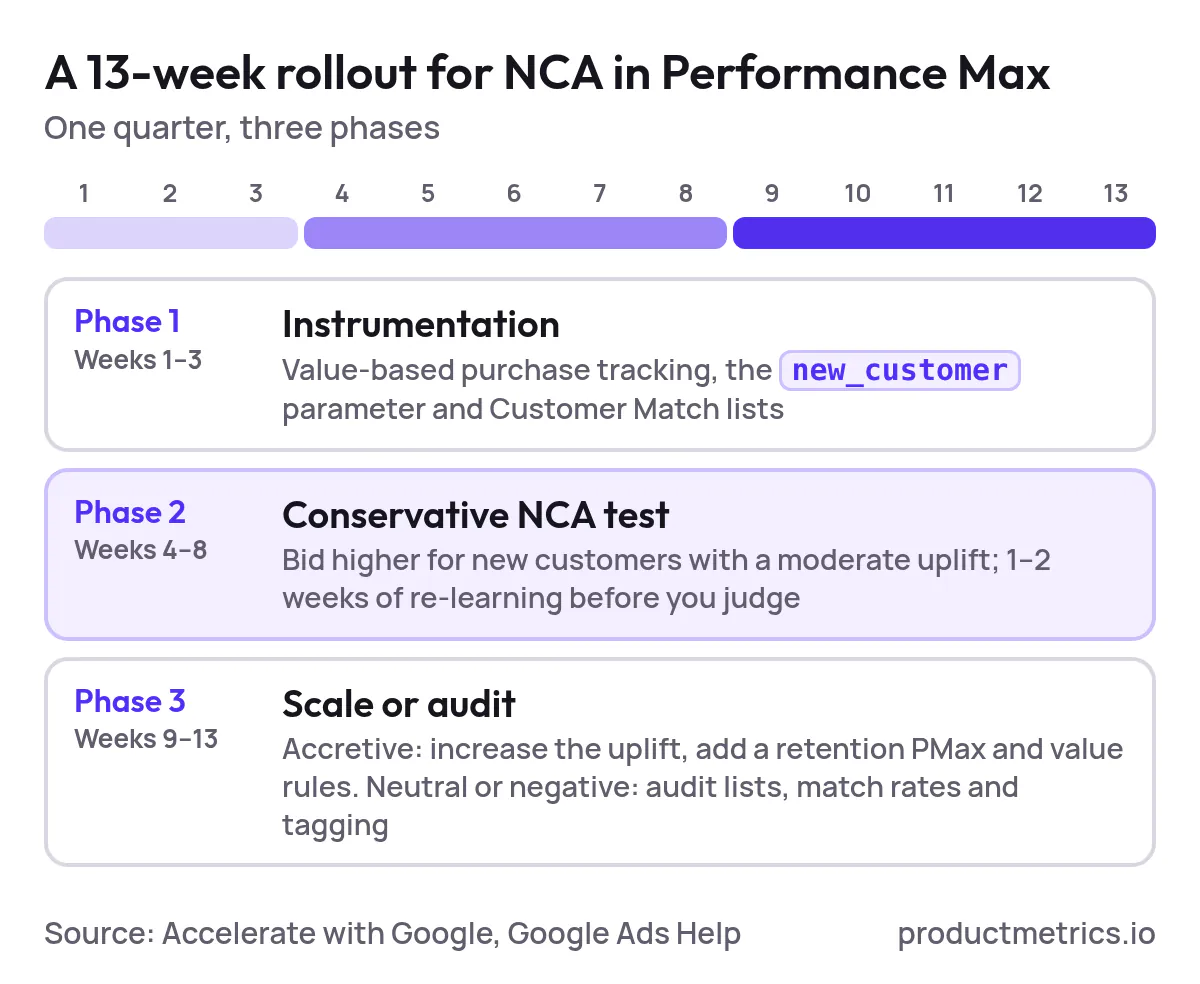
Phase 1 Instrumentation Weeks 1–3
- Ensure purchase conversion tracking is accurate and value‑based. (Source: Google Ads Help)
- Implement the
new_customerparameter for your primary purchase action. (Source: Accelerate with Google) - Upload or sync Customer Match lists for all customers and any known high‑value segments. (Source: Google Ads Help)
Phase 2 Conservative NCA Test Weeks 4–8
- On your main Shopping‑led Performance Max campaign:
- Enable Customer acquisition with Bid higher for new customers.
- Start with a moderate uplift (e.g., ≈ first‑order value or a number close to twice AOV) in New Customer Value Mode. (Source: Accelerate with Google)
- Let the campaign re‑learn for 1–2 weeks before judging performance deltas. (Source: Google Ads Help)
- Track changes in:
- Share of conversions from new customers
- New‑customer acquisition cost vs historical CAC
- Blended ROAS and payback vs your guardrails
Phase 3 Scaling And Segmentation Weeks 9–13
Depending on results:
- If NCA is accretive (more new customers at acceptable CAC and ROAS):
- Gradually increase the new‑customer uplift, re‑testing around key peak periods.
- Introduce a separate retention PMax or lifecycle‑based segmentation if you haven’t already.
- Layer conversion value rules to better reflect LTV tiers by audience or product line. (Source: Google Ads Help)
- If NCA is neutral or negative:
- Audit customer list coverage, match rates, and tagging for errors. (Source: Google Ads Help)
- Try a lower uplift or temporarily disable NCA to confirm that observed changes are caused by the goal and not external factors (seasonality, promotions, feed changes).
Over time, your objective is to treat PMax’s NCA goal and conversion value rules as levers in your capital allocation system: they express how much your business values a new customer relative to a returning one, and they guide Google’s AI to act accordingly—while you validate results with your own LTV models.
If you want to go deeper on how to connect your acquisition strategy with your product analytics and LTV modeling, this is exactly the kind of problem space Product Metrics was created to explore. Integrating robust LTV calculations with disciplined NCA setup in Performance Max is where Google Shopping optimization stops being a media‑only exercise and becomes a core growth lever for the business.
Written by
Berend Vrakking, Founder of Product Metrics
1M+ products analysed · Nominated at the Dutch Search Awards for Best Measurement Campaign (2023) and Best Use of Data (2024)
Keep reading.
PMAX Product Segmentation: A Setup‑to‑Scale Playbook for Google Shopping
PMAX Product Segmentation from first setup to scale: feed labels, listing groups, a three-stage model, a 90-day test plan and segment-level metrics.
Google Ads Campaign Types for Ecommerce: Search, Shopping and PMax
Google Ads campaign types for ecommerce: when Search, Standard Shopping or Performance Max fits a product, what benchmarks hide and when to scale.
Google Performance Max: What It Is and How It Works
Google Performance Max explained: how asset groups and signals steer one budget across Google, why campaign ROAS hides losing products, and how to fix it.
See which of your products to push, fix or pause. Start with your own products, or a 30-second estimate.
Check one product first: work out its break-even ROAS in the calculator. Then see where all your products stand.
Questions, or want to spar about your products? Book a demo: a video call with Berend, then a demo account.