
Where to Buy Google Shopping Segmentation Platforms - Pricing, Procurement, and Implementation
Where to buy Google Shopping segmentation platforms - pricing models, a procurement checklist, onboarding and the ROI case for campaign structure clarity.
If you’re running Google Shopping and Performance Max at meaningful scale, you don’t need another reporting dashboard—you need software that makes your campaign structure as clear as your numbers.
That’s why search terms like “where can I buy software that improves Google Shopping campaign structure clarity?” or “purchase platforms that help with Google Shopping campaign structure clarity” are starting to show up in RFPs and Slack threads.
This guide is written for teams that are ready to buy. You already believe in product-level segmentation; now you need to understand:
- Where to buy Google Shopping segmentation platforms
- How pricing models work (including spend-based models)
- What onboarding and implementation really look like
- How to model ROI and payback when structure clarity is the main goal
1. What You’re Actually Buying - Campaign Structure Clarity
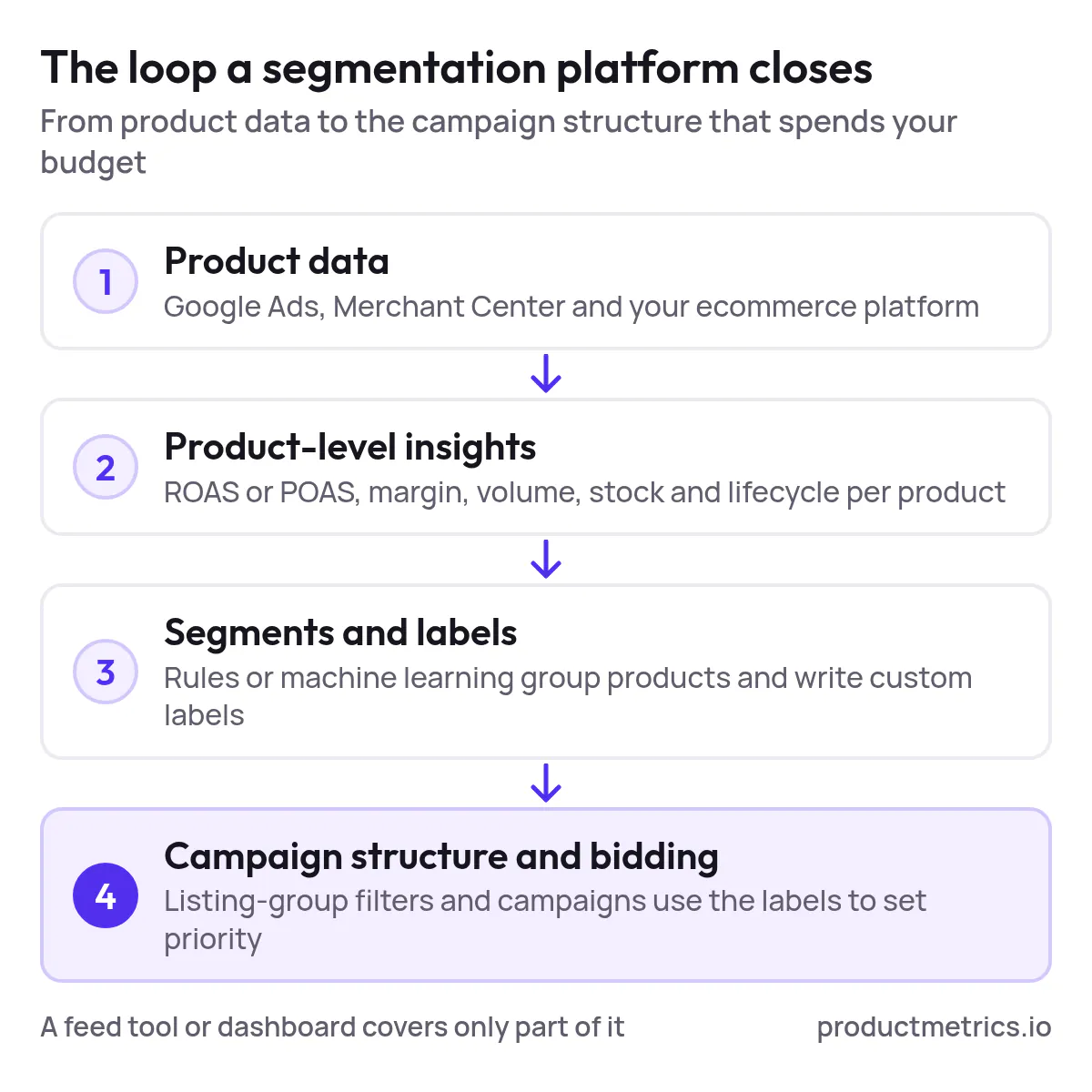
A true Google Shopping campaign segmentation platform isn’t just a feed tool or a BI layer. It closes a specific loop:
Product data → Product-level insights → Segments and labels → Campaign structure and bidding
In practice, that means the platform should:
- Ingest product and performance data from Google Ads, Merchant Center, and your ecommerce platform.
- Group or label products using rules or machine learning (e.g., by ROAS/POAS, margin, volume, stock, lifecycle stage).
- Push those labels back into Merchant Center and Google Ads as custom labels and listing-group filters that define your campaign structure, not just your reporting.
When you order solutions that clarify Google Shopping campaign structure, the outcome you’re paying for is the ability to answer, in minutes, questions like:
- Which SKUs are Stars, which are Drainers, and how much budget each segment is consuming?
- Which labels and campaigns control each segment?
- What should we push, fix, or pause this week—at a product level?
If a tool can’t give you clear answers here, you’re not buying structure clarity; you’re buying another layer of complexity.
2. Where Can You Buy Software That Improves Google Shopping Campaign Structure Clarity?
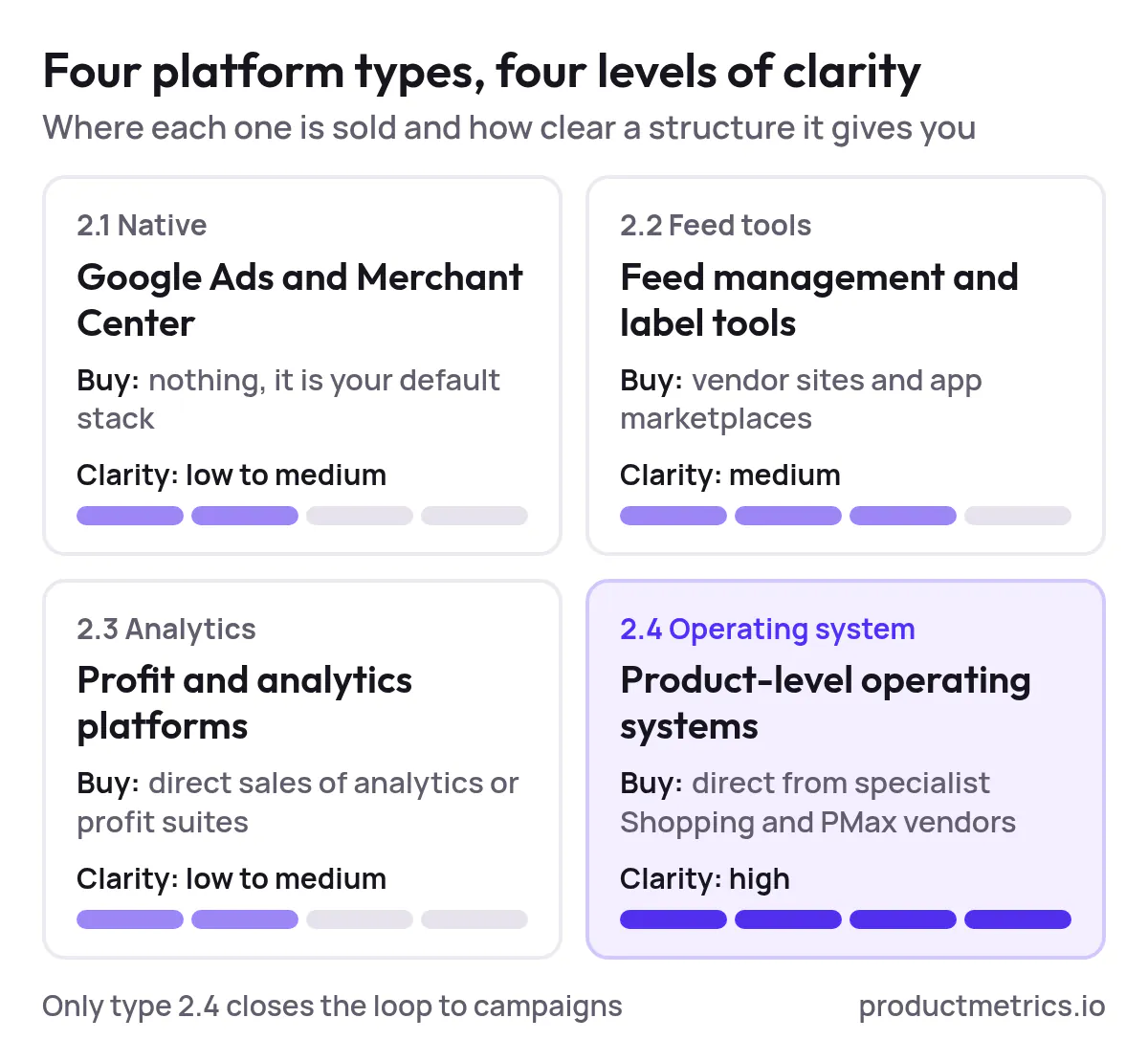
Most buyers evaluating Google Shopping optimization tools focused on campaign segmentation encounter four broad platform types. Understanding where and how each is sold helps you narrow the field fast.
2.1 Native Google Ads + Merchant Center (You Already “Own” This)
Where you get it: You already have it—this is the default stack.
What it offers: Manual product groups, campaign priorities, basic custom labels, and item-ID-level reporting.
Structure clarity: Low–medium. You can build sophisticated product group trees, but the logic typically lives in one person’s head or a one-off diagram, and translating business logic (margin tiers, inventory, lifecycle) into labels is manual.
This is not the answer if you’re explicitly searching to order tools for clear segmentation in Google Shopping campaigns—it’s the baseline you’re trying to improve on.
2.2 Feed Management and Label Tools
Where to buy: Direct from vendor sites and app marketplaces (e.g., platform app stores), often sold to merchandising and channel teams.
What they offer: Powerful rule engines for transforming feeds (titles, categories, attributes) and setting static or semi-static custom labels based on those attributes.
Structure clarity: Medium. You gain more control over labels, but rules usually depend on static attributes (category, brand, price) rather than live performance, profit, or stock. Diagnosis still happens elsewhere.
Feed tools are useful if you want to purchase tools for optimizing Google Shopping campaign structure on the data side. But they rarely qualify as full segmentation platforms because they don’t close the loop from performance → labels → campaigns.
2.3 Profit and Analytics Platforms
Where to buy: Sold as analytics/attribution or profit intelligence suites, usually via direct sales.
What they offer: Strong POAS/ROAS and LTV reporting at product level, sometimes with exports or basic label suggestions.
Structure clarity: Low–medium. Dashboards show you which SKUs are profitable, but turning that into an operational campaign structure still relies on spreadsheets, scripts, or separate feed tools.
If you buy campaign segmentation tools for Google Shopping with clear structure analytics as your main goal, analytics-only platforms are usually an incomplete answer.
2.4 Product-Level Operating Systems (Product Metrics and Peers)
Where to buy: Direct from specialist vendors that focus on Google Shopping and PMax. Platforms like Product Metrics sit squarely in this category.
What they offer:
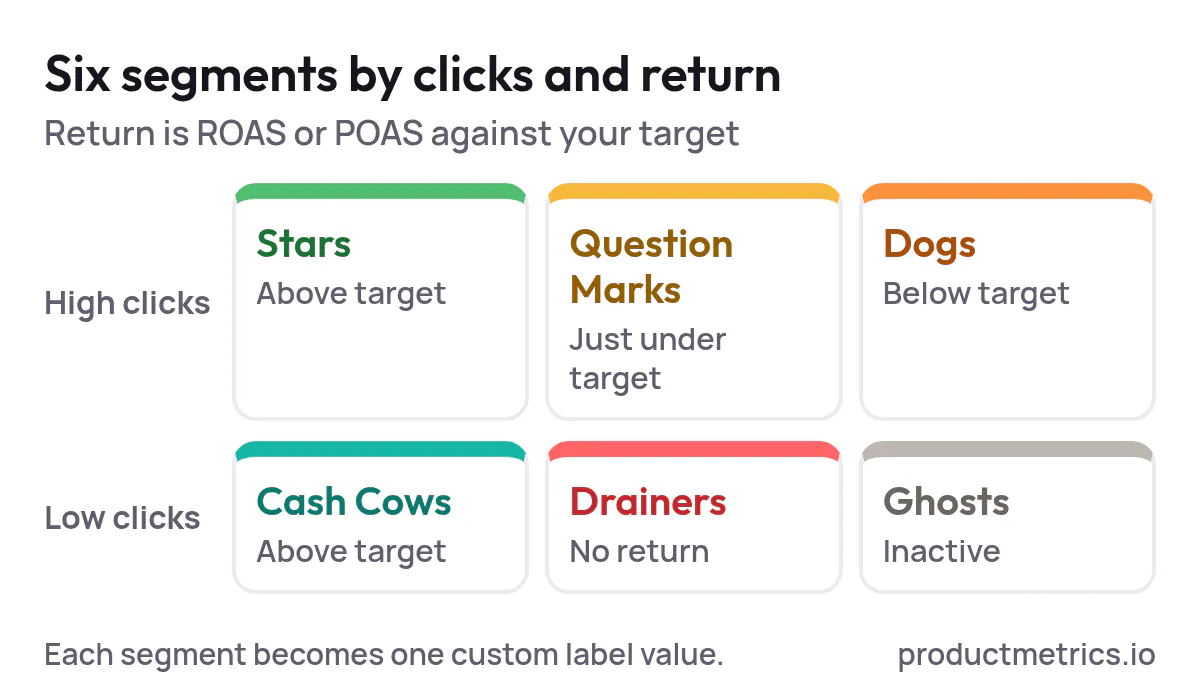
- ML-driven product segmentation (e.g., Stars, Question Marks, Cash Cows, Dogs, Drainers, Ghosts) based on profitability vs your ROAS/POAS targets, stock levels, return rate, potential and competitor prices, with ad clicks as one signal among many.
- A Product Context layer that connects ad performance with journeys, margin, stock, and competitor prices at SKU level.
- Product Rules that convert that context into custom labels in Merchant Center.
- A campaigns view that shows spend, revenue, and profit by segment and label, so you can see how campaign structure steers budget.
Structure clarity: High. These are the tools most aligned with queries like “purchase Google Shopping optimization platforms for campaign structure clarity” and “shop for Google Shopping campaign segmentation software with clear structure features.” On the Clarity Framework, this category is where you typically find the best tools for clear Google Shopping campaign segmentation.
Product Metrics, in particular, is built explicitly for campaign structure clarity at the product level, not just reporting.
3. Pricing Models for Google Shopping Segmentation Platforms
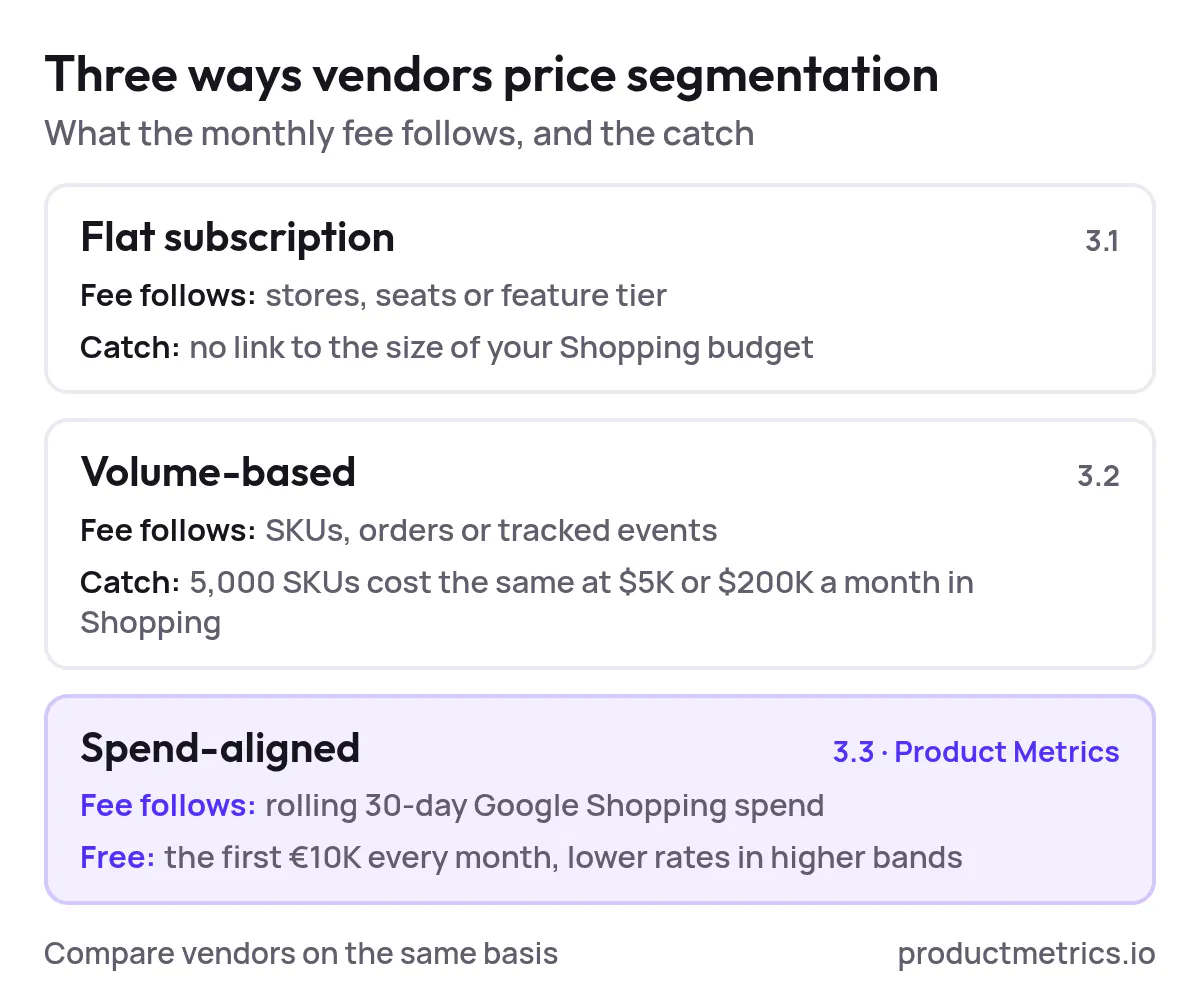
When you purchase platforms that help with Google Shopping campaign structure clarity, you’ll see three main pricing models. Understanding them is key to comparing vendors apples-to-apples.
3.1 Flat Subscription (Per Store or Per Seat)
Common with feed tools and some analytics suites. You pay a fixed monthly fee by store, seat, or feature tier. This is simple to budget but not inherently connected to the size of your media investment.
Flat pricing can be attractive for small stores, but for brands with large catalogs and high Shopping spend, it often underprices the value of structure clarity—or hides overages in implementation and support.
3.2 Volume-Based (By Products, Orders, or Events)
More advanced analytics and attribution tools often charge based on the number of SKUs, orders, or tracked events. This aligns better with data processing costs, but not necessarily with the incremental profit the platform unlocks in Shopping.
For campaign segmentation, volume-only pricing can be awkward: 5,000 SKUs at $5K/month in Shopping spend is a very different value case from 5,000 SKUs at $200K/month.
3.3 Spend-Aligned Pricing (Product Metrics’ Model)
Product Metrics uses a spend-aligned pricing model specifically for Google Shopping and PMax:
- The first €10K of Shopping ad spend per month is free.
- Above that, pricing is a small percentage of your rolling 30-day Shopping spend, with decreasing rates at higher tiers.
- Example monthly fees (excluding VAT):
- €25K spend → €97.50
- €50K spend → €247.50
- €100K spend → €547.50
- €200K spend → €1,047.50

Show the dataHide the data
| Rolling 30-day Google Shopping spend | Monthly fee (excl. VAT) |
|---|---|
| €10K | €0.00 |
| €25K | €97.50 |
| €50K | €247.50 |
| €100K | €547.50 |
| €200K | €1,047.50 |
For many brands, that makes a product-level operating system a small line item compared to wasted budget on Drainers, Ghosts, and low-intent queries in the existing structure.
This model maps cost directly to media scale, which is useful when you’re trying to purchase Google Shopping optimization tools focused on campaign segmentation and need to show that software costs flex with investment.
4. Procurement Checklist - How to Shortlist and Buy for Structure Clarity
If your RFPs include phrases like “order campaign segmentation solutions for Google Shopping with structure clarity”, use a clarity-first procurement process.
4.1 Define “Clarity” as a Hard Requirement
Start by agreeing internally on the questions your platform must answer in under 5–10 minutes:
- Which products are profitable enough to scale and which are draining spend?
- How is budget allocated by segment (e.g., by margin tier, lifecycle stage, or price position)?
- Which labels and campaigns control each segment?
- How do stock and price influence performance by group?
Turn these into line items in your RFP or scoring matrix. Any vendor that can’t meet them consistently should be disqualified early.
4.2 Shortlist by Platform Type, Not Hype
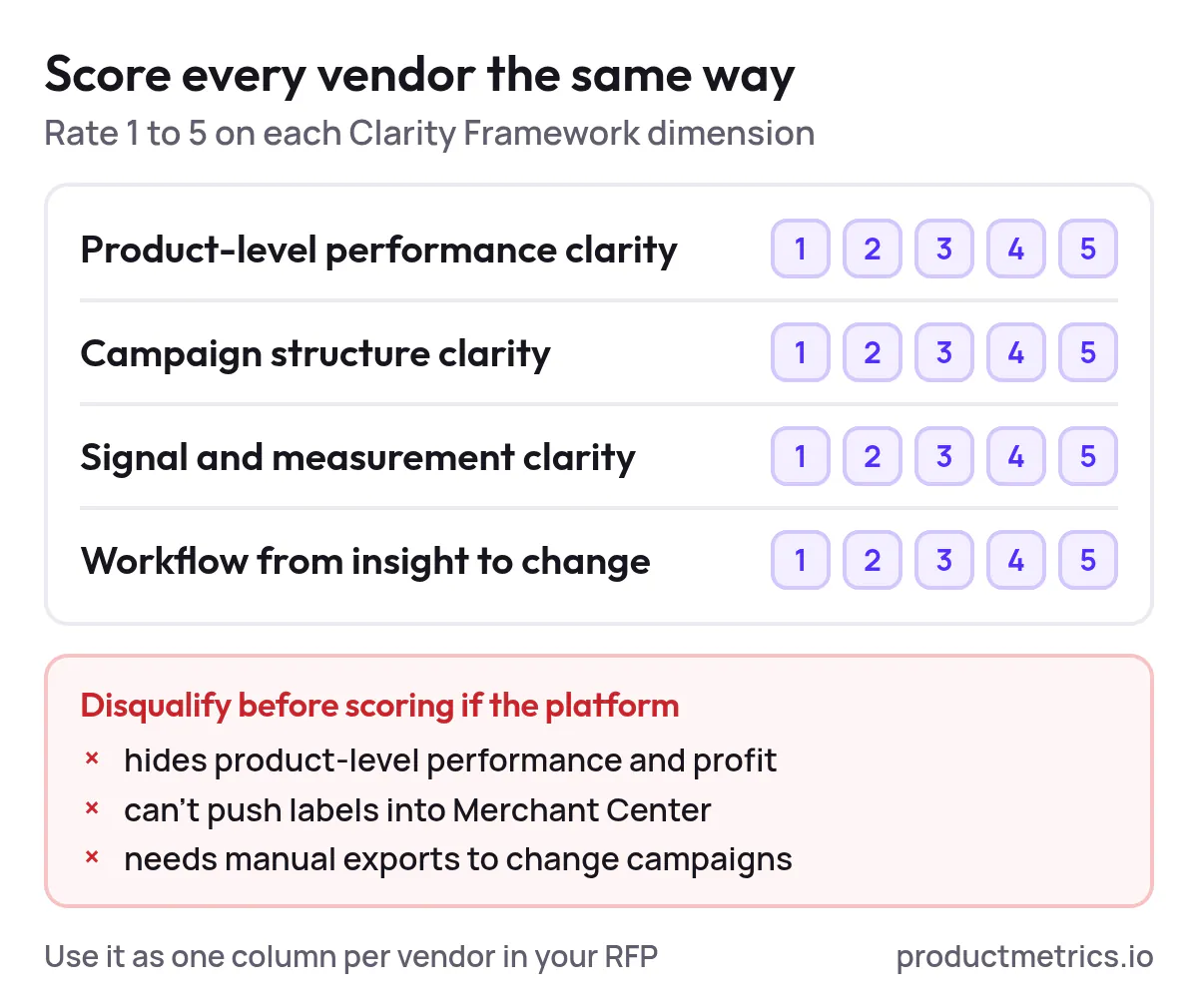
Map each vendor into one of the four categories above (native Google only, feed tools, profit analytics, product-level operating systems). Then score them 1–5 on the four Clarity Framework dimensions:
- Product-level performance clarity
- Campaign structure clarity
- Signal and measurement clarity
- Workflow clarity from insight to change
Disqualify any platform that:
- Can’t expose product-level performance and profit clearly.
- Doesn’t push labels or structure directly into Merchant Center.
- Relies purely on manual exports to get from insight to campaign changes.
This is usually where a product-level operating system like Product Metrics emerges as the most natural choice when your primary requirement is campaign structure clarity rather than generic reporting.
4.3 Run a Clarity-Focused Demo
In vendor demos, avoid generic “tour of the UI” sessions. Bring:
- 10–20 products you suspect are Stars or Drainers.
- One Shopping or PMax campaign where performance is volatile.
Ask each vendor to show, live:
- How they identify, segment, and label those products.
- How labels map into Shopping/PMax campaigns and product groups.
- How you’d know—next week—whether the change improved structure and profit.
For Product Metrics, this typically means seeing Segmentation, Product Context, Product Rules, and the resulting Merchant Center labels in one flow.
4.4 Pilot with a Constrained Scope
Run a 4–8 week pilot focused on a single country or high-value category. Measure:
- Uplift in POAS/ROAS for Stars and other high-priority segments.
- Reduction in spend on Drainers and Ghosts.
- Reduction in SKUs with zero impressions.
- Time saved from spotting a problem to deploying new labels.
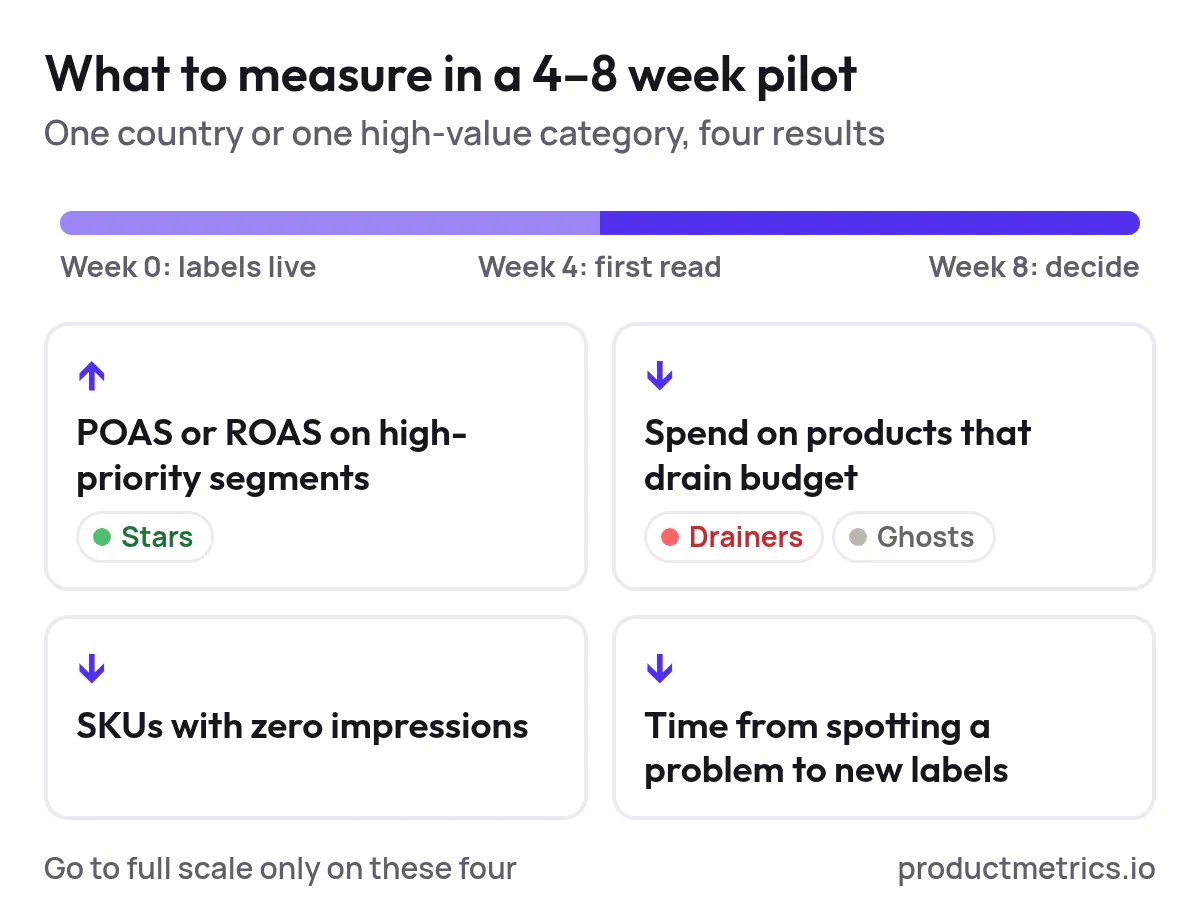
Use these results to decide whether to purchase solutions to improve Google Shopping campaign segmentation and structure at full scale.
5. Onboarding and Implementation - What Buyers Should Expect
When you order Google Shopping campaign segmentation platforms for better structure, the biggest risk isn’t the software—it’s a messy implementation that never closes the loop between segments and campaigns.
Here’s what a clean onboarding should look like with a product-level operating system such as Product Metrics.
5.1 Data and Integrations
A modern segmentation platform should:
- Connect to Google Ads and Merchant Center with read/write access.
- Integrate with your ecommerce platform (e.g., Shopify, WooCommerce, Magento, Lightspeed, Shopware 6) through native connectors.
- Ingest product costs and order-level costs so you can segment on profit, not just revenue.
- Optionally ingest stock and competitor price data for more nuanced rules.
Product Metrics provides native connectors for Shopify, WooCommerce, Magento, Lightspeed, and Shopware 6, which simplifies onboarding for catalogs between roughly 500 and 50,000 products.
5.2 Segmentation and Product Rules
Once data is flowing, the platform should:
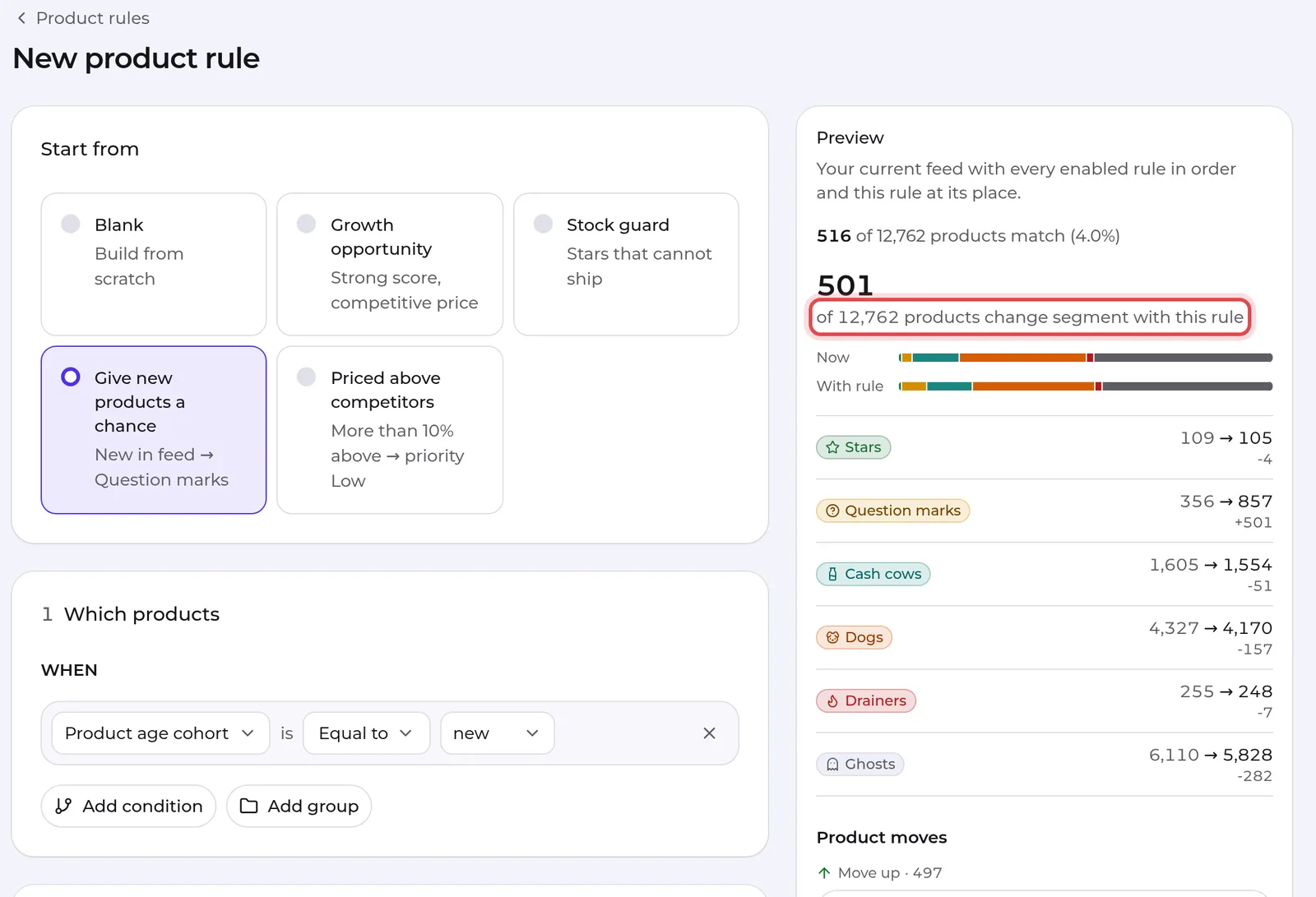
- Automatically segment every product into clear performance buckets (e.g., Stars, Drainers, Ghosts) using ML on profitability (ROAS/POAS vs target), stock levels, return rate, potential and competitor prices, with ad clicks as one signal among many.
- Allow you to add business logic—margin thresholds, stock levels, lifecycle stage—on top of those segments.
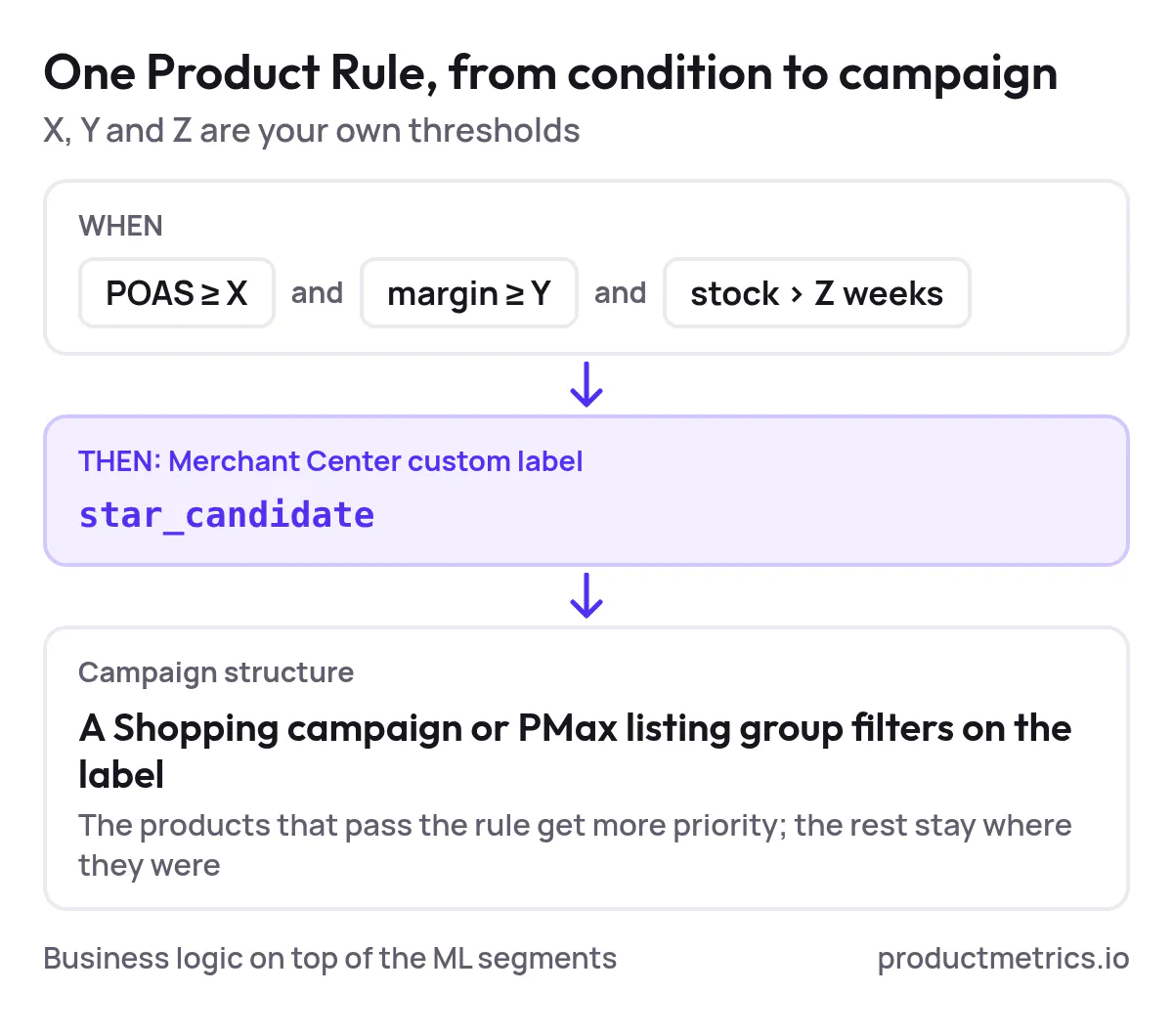
- Convert that logic into simple WHEN/THEN rules that output Merchant Center custom labels.
In Product Metrics, this is the Product Rules layer: for example, “When POAS ≥ X, margin ≥ Y, and stock > Z weeks → label as star_candidate.”
5.3 Pushing Labels into Campaign Structure
From there, onboarding should explicitly update your Shopping and PMax structures:
- Merchant Center labels from the platform become the basis for campaigns, asset groups, and listing groups (e.g., Stars vs Drainers vs Ghosts).
- A campaigns view shows spend, impressions, revenue, and profit by segment and label so you can see how structure changes impact results.
High-clarity platforms let you go from segment view → rule change → labels pushed to Merchant Center in one workflow, without CSV exports or manual feed rule edits.
5.4 Measurement and Signal Setup
Because Smart Bidding and PMax optimize on conversion signals, onboarding should also cover tracking:
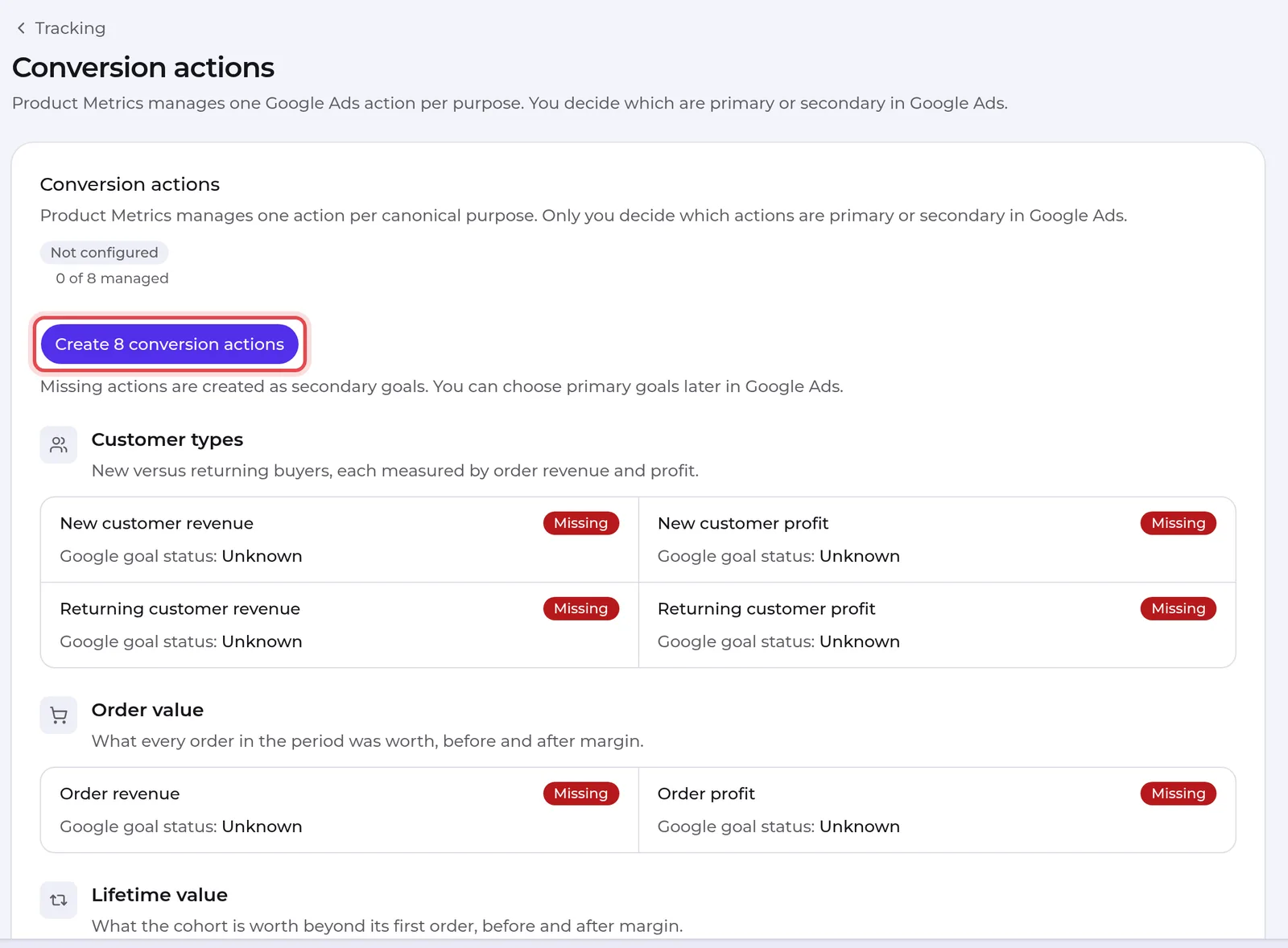
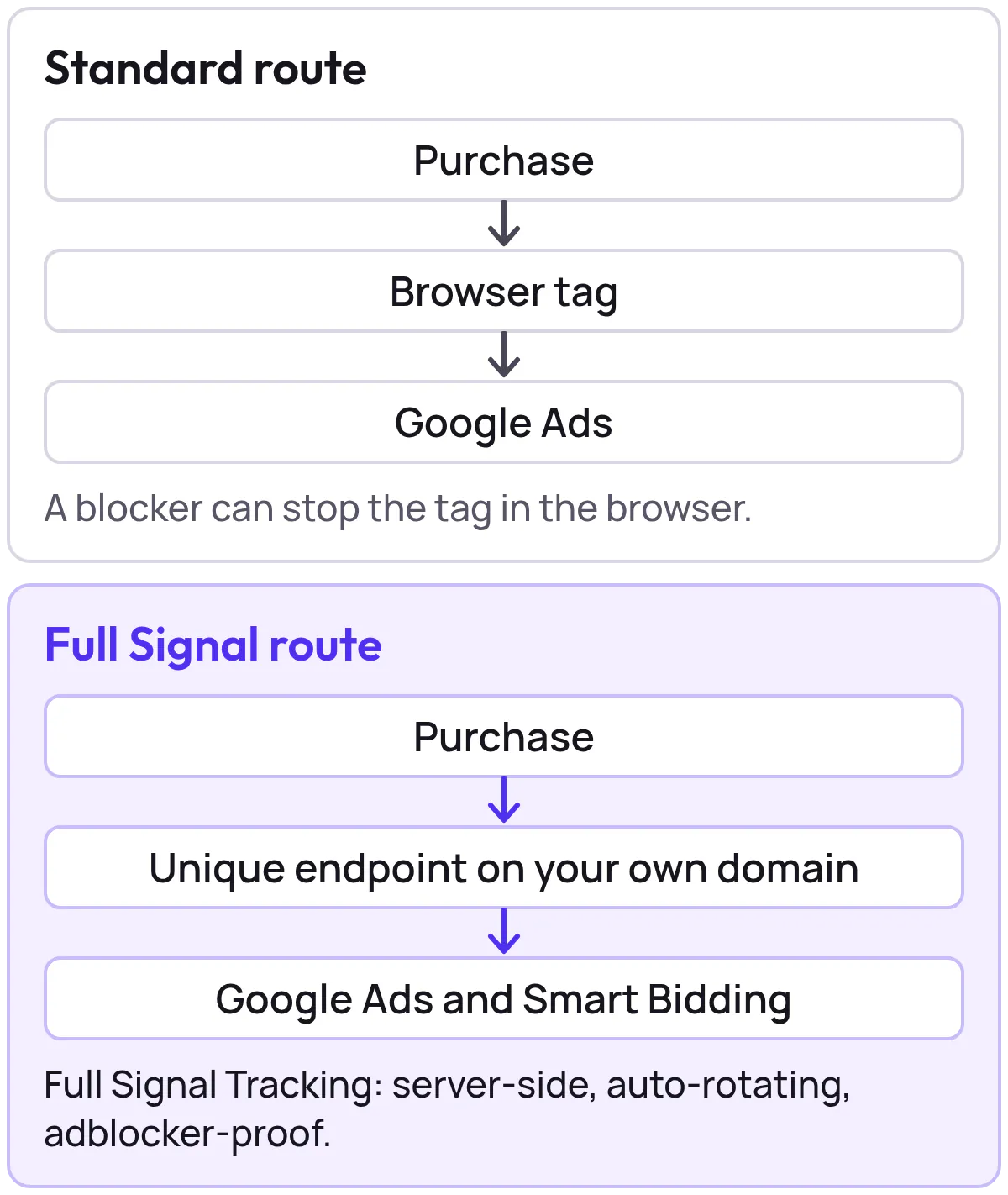
- Implement server-side or enhanced conversion tracking that works through ad blockers and browser restrictions.
- Send profit, revenue, and new vs returning customer flags back to Google Ads (and Meta where relevant).
Product Metrics’ Full Signal Tracking is designed for this: a server-side endpoint recovers conversions that client-side tags miss and passes profit-aware signals back to ad platforms, so campaign structure clarity is backed by signal clarity.
6. Modeling ROI for Campaign Structure Clarity
When you shop for tools that enhance Google Shopping campaign structure clarity, the core ROI story typically has three drivers.
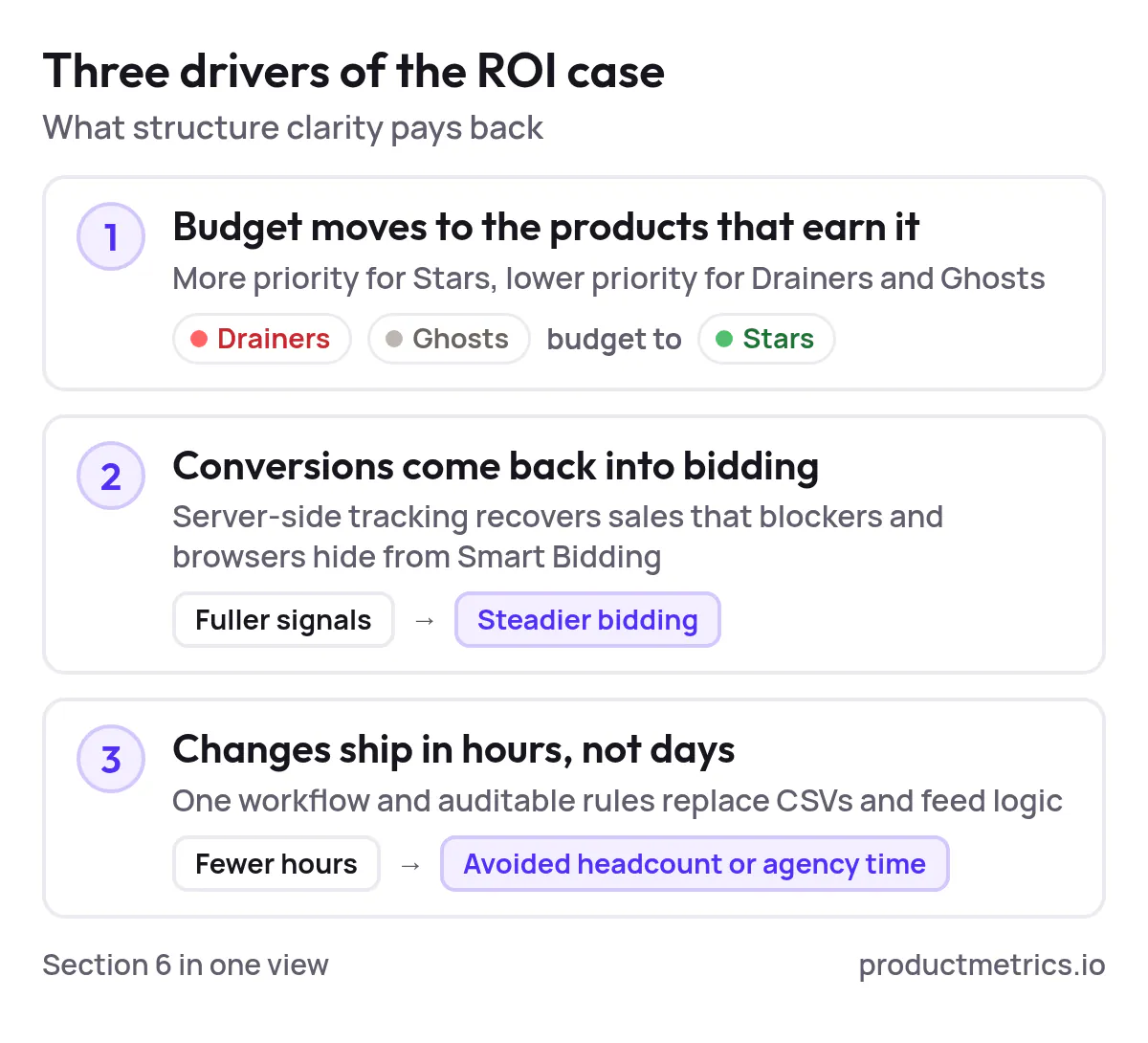
6.1 Budget Reallocation from Drainers to Stars
ML-based segmentation makes it obvious which products are over- or under-funded:
- Stars: high volume, high return.
- Drainers: high spend, low or negative return.
- Ghosts: zero-impression or low-data products.
A segmentation platform that pushes these labels into campaigns lets you increase bids and budget for Stars while cutting spend on Drainers and Ghosts in a controlled way.
6.2 Recovering Lost Conversions via Better Measurement
Server-side tracking can recover conversions lost to ad blockers and browser restrictions, increasing the volume and accuracy of the signals Google’s Smart Bidding sees.
More complete signals usually mean more stable bidding and better alignment between actual and reported ROAS/POAS, which strengthens the case for more budget through the segmented structure.
6.3 Workflow and Headcount Efficiency
High-clarity workflows cut down the time from “we spotted an issue” to “labels and campaigns are updated” from days to hours:
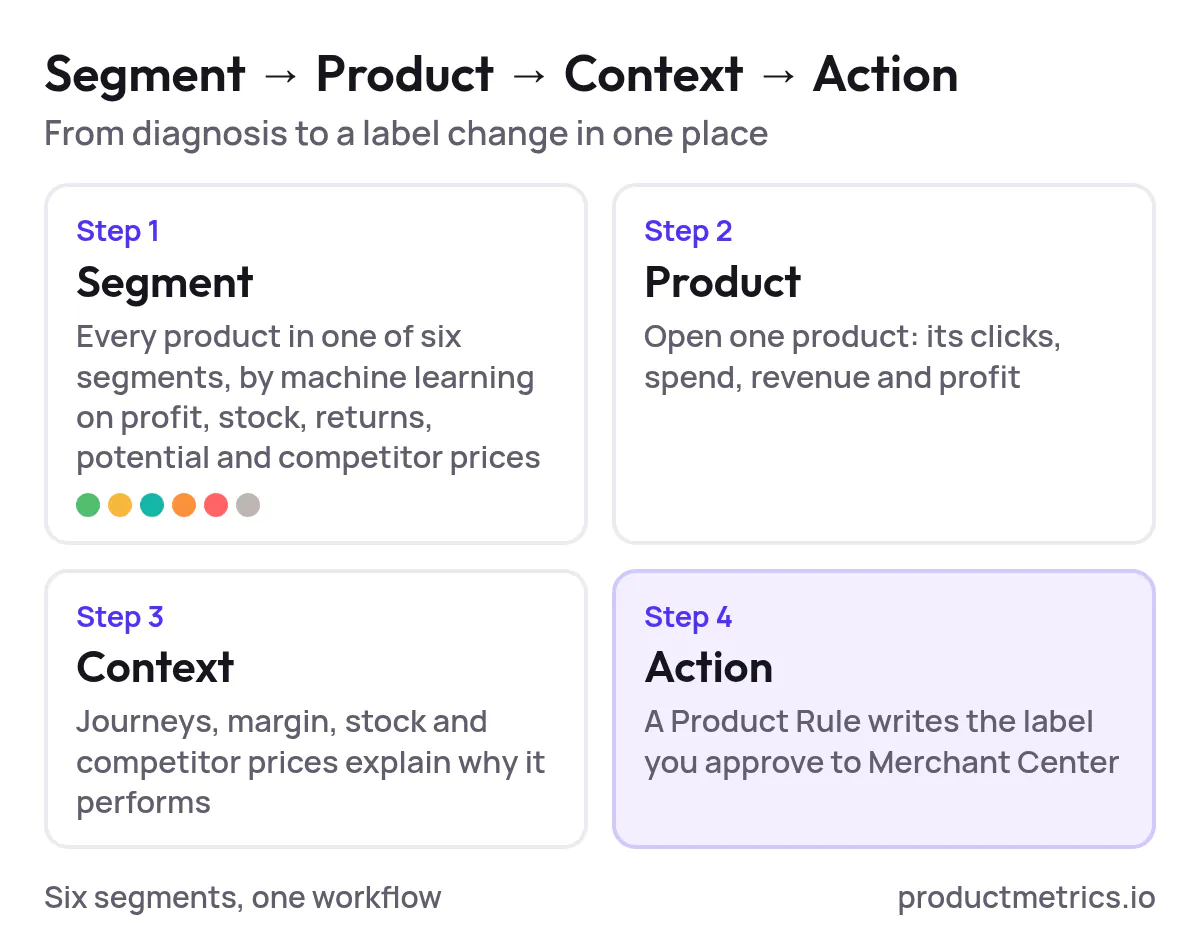
- One workflow from Segment → Product → Context → Action, instead of multiple tools and CSVs.
- Auditable rule changes instead of brittle, undocumented feed logic.
For procurement teams, treating this as avoided headcount or agency hours often tips the business case in favor of a product-level operating system.
7. Why Product Metrics Fits Buyers Focused on Structure Clarity
If your main intent is to buy platforms that simplify Google Shopping campaign segmentation and give you a structure you can explain on one slide, Product Metrics is designed for that use case.
On the Clarity Framework, it scores particularly strongly on:
- Product-level performance clarity – every SKU is segmented (Stars, Question Marks, Cash Cows, Dogs, Drainers, Ghosts) based on profitability (ROAS/POAS vs your targets), stock levels, return rate, potential and competitor prices (ad clicks are one signal among many), with spend and revenue by segment.
- Campaign structure clarity – Product Rules convert those segments and business constraints into Merchant Center labels, and a campaigns layer shows performance by label.
- Signal and measurement clarity – Full Signal Tracking and profit-aware signals give Smart Bidding cleaner inputs.
- Workflow clarity – a four-step Segment → Product → Context → Action flow takes you from diagnosis to label changes in one UI.
It’s best suited to ecommerce brands with 500–50,000 products and meaningful Shopping/PMax budgets that need to grow profit, not just revenue, and can’t afford structural opacity.
Next Steps for Ready-to-Buy Teams
If you’re at the point of wanting to purchase Google Shopping optimization platforms for campaign structure clarity, there are two pragmatic ways to move forward with Product Metrics:
- Analyse your products for free – run a free product-level analysis on your live data (no credit card), to see how your catalog would be segmented and where budget is leaking today.
- Book a demo – walk through segmentation, Product Context, Product Rules, and the resulting campaign structure on a call with the Product Metrics team.
However you proceed, make “campaign structure clarity” the lens for all your procurement decisions. In an AI-driven Shopping landscape, it’s the difference between feeding another black box and running a structure you can actually steer.
Written by
Berend Vrakking, Founder of Product Metrics
1M+ products analysed · Nominated at the Dutch Search Awards for Best Measurement Campaign (2023) and Best Use of Data (2024)
Keep reading.
Best Platforms For Advanced Google Shopping Segmentation: A Comparative Evaluation Framework
Best platforms for advanced Google Shopping segmentation, scored 1–5 on inputs, automation, PMax fit, scale and reporting, with a 7-step evaluation.
Buyer’s Guide: Choosing a Google Shopping Segmentation Platform That Prioritises Listing Group Relevance
Buyer’s guide to Google Shopping segmentation platforms: three tool types, 10 questions to ask vendors, a custom label blueprint and a 30-day rollout.
The Definitive Buyer’s Guide To Granular Google Shopping Campaign Segmentation Tools (2026 Edition)
The definitive buyer’s guide to granular Google Shopping campaign segmentation tools: three tool types, vendor criteria and a 60–90 day pilot.
See which of your products to push, fix or pause. Start with your own products, or a 30-second estimate.
Check one product first: work out its break-even ROAS in the calculator. Then see where all your products stand.
Or set it up with your AI assistant:
 Set up with Claude
 Set up with ChatGPT
Questions, or want to spar about your products? Book a demo: a video call with Berend, then a demo account.